All posts by Ashley Maule

Open Broadcaster Software (OBS)

CAM4 is an official streaming platform on OBS! This means OBS will auto configure your exact setting needs for optimal streaming on CAM4.

Here’s how it works:

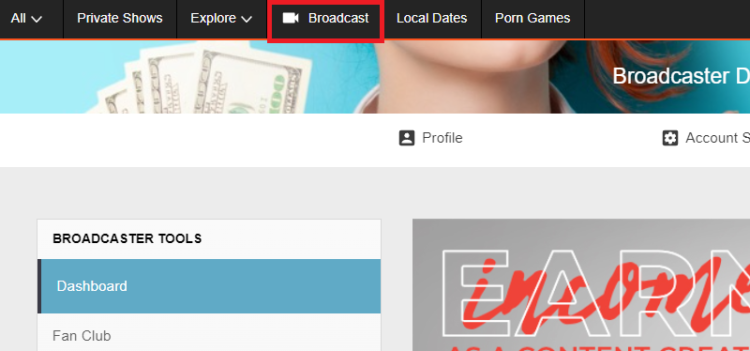
  1. Login to Cam4.com > Select Broadcast
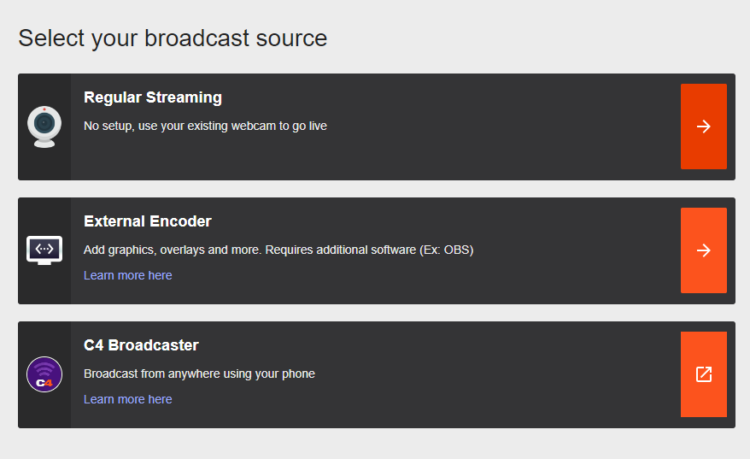
  2. Select > External Encoder
  3. Select > Get Stream Key
  4. Highlight Stream Key and Copy key as it will be pasted into OBS
  5. Open > OBS
  6. Select > Tools. Then select > Auto Configuration Wizard
  7. Select > Optimize for streaming, recording is secondary
  8. Click > Next
  9. Base (Canvas) Resolution select: Use Current

** Base canvas = your primary monitor’s resolution**

  1. FPS: Select 30
  2. Click > Next
  3. Stream Type: Streaming Services
  4. Service: Cam4 (show all if Cam4 is not listed)
  5. Stream Key: (clear if populated; paste key previously copied from your Cam4 broadcast window)
  6. Estimate bitrate with bandwidth test: CHECKED
  7. Prefer Hardware Encoding (if an option): UNCHECKED
  8. Click > Next
  9. Stream Warning pop up box: Select YES and wait while settings are configured
  10. OBS then shows Final Results for your settings.

              Select Apply to use the new settings.

              Settings will not be applied if you select Cancel

Other Article to check out:

What Is External Encoding?

How Do I Improve My Broadcast Quality?

How To Use Lightstream Studio


~That’s all for this lesson!

Happy Camming!

Love, Your CAM4 Coaching TEAM

Auto Pause after a Private or Group Show

Auto-Pause is designed to give you time to prepare to be in front of your regular viewers again after your Private or Group show ends.

Go grab some food or something to drink, clean up, use the washroom, or change your outfit. You have 5 minutes to do whatever you need to do before going live on cam for your viewers again.

HOW DOES IT WORK?

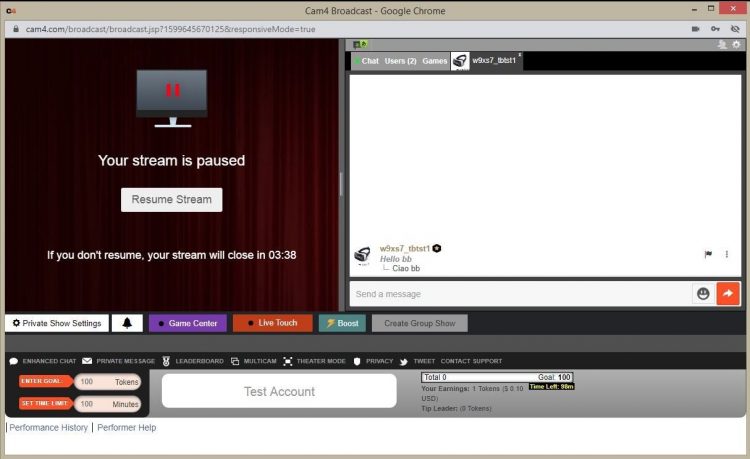
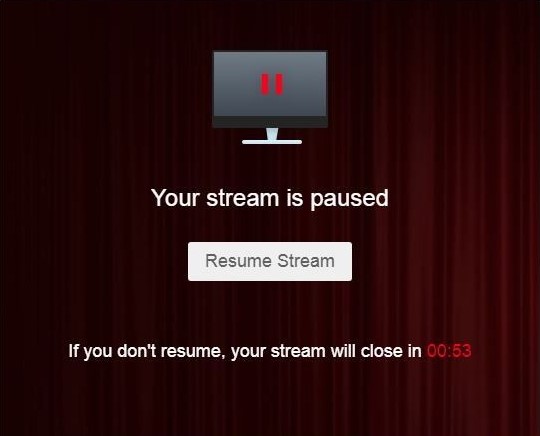
Start your Private or Group show as you normally would.  At the end of the show, your stream will pause for a maximum of 5 minutes .

What YOU will see:


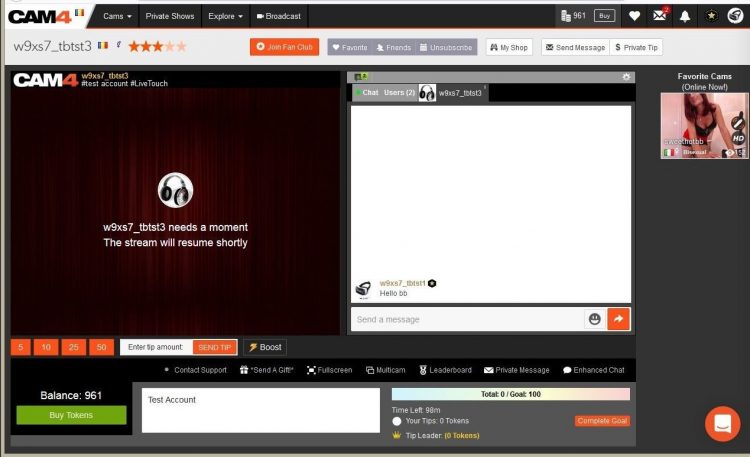
What your VIEWERS will see:

The stream is resumable at any time by clicking on the „Resume Stream” button. 

If you do not resume the stream during the first 5 minutes, the stream ends automatically. 

Private Show requests are not available while your show is paused. 

~That’s all for this lesson!

Happy Camming!
Love, Your Coaching Team!
BOOST: The Ultimate Way to Grow your Audience


Struggling to build an audience? Just logged on and want to kickstart your show?

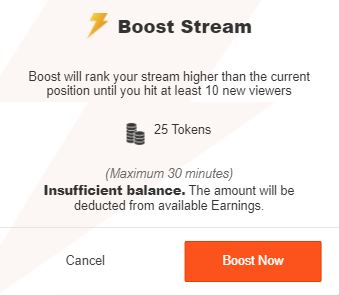
Now you can BOOST your room higher in the directory for just 25 tokens!

CAM4 has put YOU in the drives seat, giving YOU the ability to increasing your rank on the page so you  will get more viewers in your show!

How it Works:  

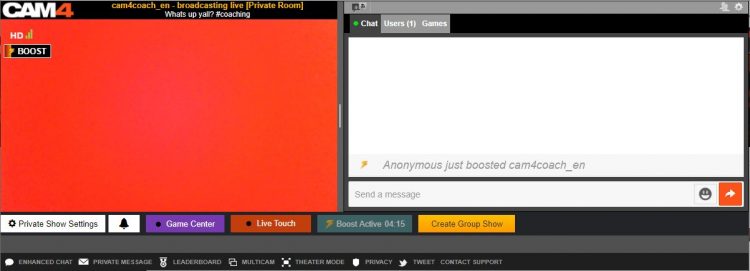
BOOST will display on your screen once you start a LIVE broadcast and is visible to you and your viewers.

This feature (once purchased) will  position you within the top percent of cams currently on the site for the duration of the BOOST.

Click on the „BOOST” button to start the feature.

It costs 25 tokens to BOOST your cam for 5 minutes, or until you have gained 10 new viewers in your room (to a max of 30 mins).

When you click on „Proceed” the cost of the BOOST will be deducted from your CAM4 account and your cam will be re-positioned on the directory page. 

What Happens when BOOST starts?

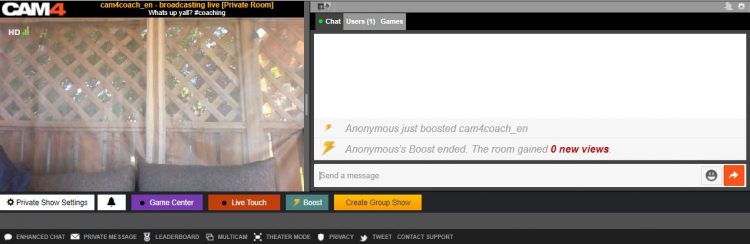
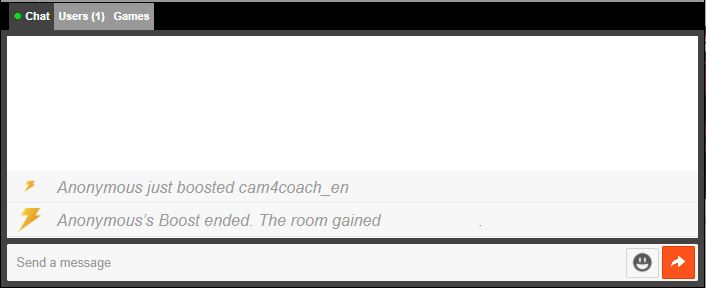
  1. You will see a message in your chat letting you know who purchased the boost.
  2. There is a bar on your broadcast window that will slowly fill up as the time runs out. 
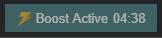
  3. The BOOST button is now inactive, this mean you cannot click on it. The text has also changed to read” Boost Active” and includes a count down. 

PRO TIP
When your boost is active, more people will be seeing your thumbnail. This is your moment to try to attract more viewers to your show! Switch it up with an alluring pose, a sexy strip tease, wet t-shirt show, or closeups. Anything you can do to attract the attention of the new audience you now have access to.

What Happens When the BOOST ends?

  1. The button will say „Boost” again become active enabling you to click on it again.
  2. You will see a message in the chat window that will tell you that the BOOST has ended and display how many viewers you gained during that BOOST.
  3. Your directory position will change, but not necessarily back to your original position – because your new position will reflect increases in your viewers due to the boost.

Viewers can BOOST you too!!

Viewers are always looking for ways to  support their favorite broadcasters. Why not encourage them to use the Boost feature on you?  With their help, boosting can really make a difference in your performance and exposure on CAM4. 

~That’s all for this lesson!

Happy Camming!
Love, Your Coaching Team!

Submit a Share-able Image

Do YOU want to be promoted on one of CAM4’s Official social-media accounts? Even be our monthly Cover Model on X.com?


Well, CAM4 needs YOUR help… Send us any of your best quality SFW (Safe For Work / Non Nude) images below, and your X.com or Instagram info so we can tag you.

USA/ Canada:
Click HERE to upload your SFW images now!!!!


United Kingdom/ Australia:
Upload for UK/AU 

Or contact: julia@cam4.com

And don’t forget, give us a follow


How To Buy A Gold Membership With Tokens

One of the benefits of being a verified performer on CAM4 is the ability to purchase your gold membership with tokens at a discounted price! Take a look at how you can convert your tokens into over 20 awesome Gold features.

Using Tokens For Your Gold Membership

First, tokens must come from your dashboard to be used for a Gold Membership.

Go into your Performer Dashboard  and request a CAM4 TOKENS payment for $12.50. 

You will see these tokens in your account on the CAM4 homepage.

new-account-gold-membership


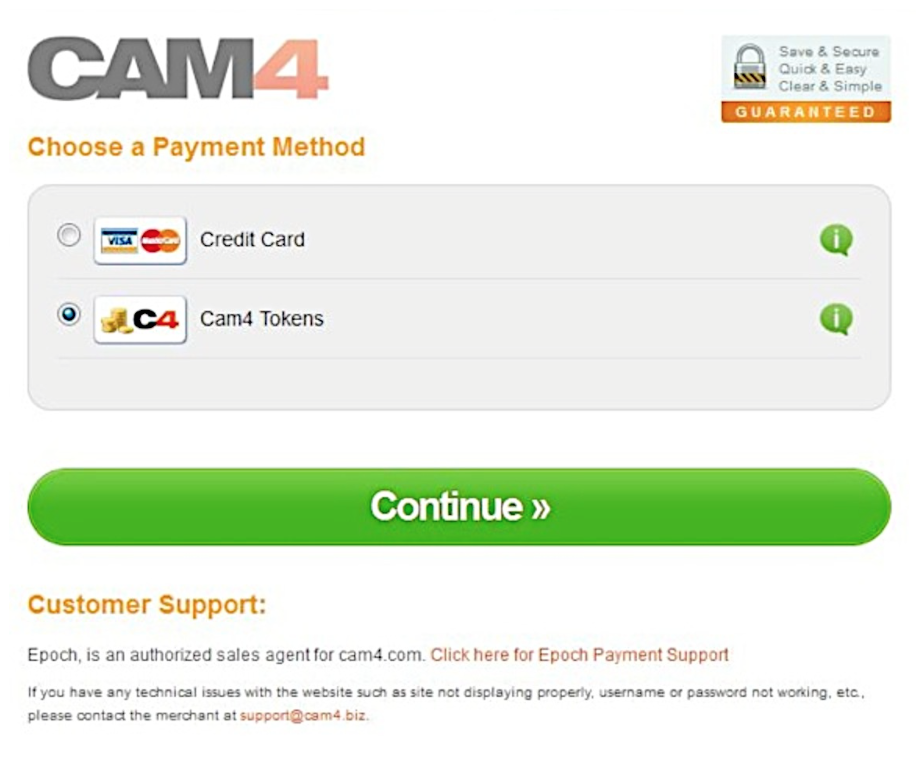
Once you press the “Upgrade to Gold” button you will be  taken to a  checkout window where CAM4 Tokens is a payment option.


Screen Shot 2015-06-25 at 2.48.50 PM

After clicking continue, you will receive a receipt and see your status go to Gold in a few minutes.  (You may have to refresh your page)


~That’s all for this lesson!

Happy Camming!
Love, Your Coaching Team!

How to Use Lightstream Studio

Here at CAM4, we’re proud to welcome a new feature that will forever benefit performers and their streaming quality – Lightstream Studio! 

Lightstream Studio is a web-based broadcast studio that will give our broadcasters the tools they need to create their most fun, or craziest, live shows! Lightstream Studio is similar to tools such as Split and OBS, but performers don’t need to download and install any software to use it! 

Features for Lightstream Studio include:

  • The ability to combine multiple cams into a single stream
  • Add graphic overlays into your videos
  • Pre-recorded video playback for review
  • 3rd party plugins are allowed

Broadcasters on CAM4 will have to create an account on Lightstream Studio before they can use the feature on CAM4. 

NOTE: The only way you can create an account on Lightstream Studios is to link it to an existing FACEBOOK, YOUTUBE, TWITCH OR MIXER account. Once you’re linked on Lightstream Studios, you can disable broadcasting on any of these platforms. Performers who want to stay anonymous are recommended to create a new YouTube or Twitch account to sign up.


~That’s all for this lesson!

Happy Camming!

Love, Your CAM4 Coaching TEAM


How to Improve Your CAM4 Rankings!

We all have one major goal on CAM4 – to rank high and get that hard-earned cash! But how do you climb your way to the top? And who can help you get there? WE CAN! We want all of our performers to rise to cam stardom,  which is why we’re offering all performers the chance to check out our performer articles, how-to videos and cam coaching, only on CAM4!

Improve Your Broadcasting!

Getting started on cam isn’t as easy-peasy as it looks. Before you can start filming yourself on CAM4, you have to find out how you can impress your new followers, and how to keep them in your room! Check out our articles on our Performer Training page to find tips on how you can improve your shows and get more viewers!

You can learn about getting started, our CAM4 coaching sessions, and how to schedule and promote your shows! Click HERE.

Want to know how lighting can help you in your cam shows? Watch this video, LIGHTING 101 to find out!

Want to see more How-To videos on performing on CAM4? Subscribe to our official YouTube channel by clicking HERE!

Get Technical!

Before you begin to show off your new skills on CAM4, make sure that all your computer, your internet connection, your webcam, lighting and microphone are all top notch!

Having terrible Internet connection or poor webcam quality can greatly affect your cam shows and viewership. Before filming your live show, make sure to test your Internet connection – is the connection glitchy? How is it affecting your webcam quality?

Find out how you can test your Internet and webcam connection HERE!

Click here to see more tips on filming great videos for fans on CAM4!

Engage with your viewers!

Our most important tip for all performers to rank higher CAM4 is this – ENGAGE WITH YOUR VIEWERS! You have to make your fans and viewers feel excited, comfortable and at-home when they enter your room. It’s your job to keep them entertained and glued to your page whenever you enter your live shows. Follow our advice and the tips will come rolling in!

Here are some tips on how you can engage with viewers:

  • Broadcast regularly, and make it known to viewers that you’re going on cam. You can do this through your CAM4 camming schedules, or on your own Twitter account! (Make sure to include the hashtag #CAM4)
  • Enable tipping games! Playing games like Roll-the-Dice (RTD) with your viewers is a fantastic way to get everyone in your room excited and engaged in your show (including you!). Check out our CAM4 games HERE!
  • Change up your routine! You can rank higher by trying out new toys or outfits during your shows. Check out our huge number of show ideas for all cam shows HERE!
  • Promote yourself on our CAM4 social media accounts (Instagram Takeover anyone?!). Message CAM4 on Twitter and Instagram to find out how you can do a takeover on our Snapchat or Instagram! 

If you ever need help in improving your rankings, our team at CAM4 is always here to help! 


Payment Options

We offer TEN payment options but not all options are available to every broadcaster due to your location.

Click here to find out which one works in your country!

Yoursafe 

  • Minimum payment: $50 USD
  • Processed: Daily (Mon – Fri)
  • Information required: Yoursafe Full Beneficiary Name

Link To FAQ for more details.

Paxum

  • Minimum payment: $50 USD
  • Delivery: Daily (Mon – Fri)
  • Information required: Paxum Account ID
  • Pre-paid Paxum Mastercard – CURRENTLY NOT AVAILABLE

Link To FAQ for more details.

Register for an Paxum account: https://www.paxum.com/

Sociale

  • Minimum payment: $50 USD
  • Delivery: Daily (Mon – Fri)
  • Information required: Setup on Sociale App
What payment methods does Sociale offer?
  • Local Bank Transfer (South America, Africa, Asia)
  • Crypto (USDT Tether)
 Need Help?
Click here to contact Sociale’s Customer Service team
Euro Wires (EUR Only – Including UK) –> click here for Australia
  • Minimum payment: $100 USD
  • Processed: Daily (Mon – Fri)
  • Delivery: 5-7 business days
  • Bank account has to be in the same name as the main account holder of the verified CAM4 account.

Link To FAQ for more details.

NOTE:  When filling out your banking/account information, please do not use special characters (comma, periods, dashes, etc.). Make sure to use your FULL NAME  (including all first names – no initials are allowed). Your name MUST match the name listed on your bank account.

Direct Deposits (US Only)

  • Minimum payment: $100 USD
  • Payments must be requested by TUESDAY 11:59pm EST to be included for payment on FRIDAY.
  • Once payment request is sent to the bank on Friday, please expect an additional 3 – 5 business days for the funds to settle in your account.
  • Payment will show on your bank statement as: TLE OPPORTUNITIES DIR DEP

CAN Direct Deposits (CAN Only)

  • Minimum payment: $100 USD
  • Processed: Daily (Mon – Fri)
  • Funds will be sent to your bank account in CAD
  • Expect an additional 3 – 5 business days for the funds to settle in your account.
  • Payment will show up on your bank statement as GRANITY MEDIA INC.

Link To FAQ for more details. 

Convert to Tokens: (100 tokens = $10 USD)

  • Cost: FREE
  • Minimum payment: None
  • Payment: Immediate

NOTE: Registration and approval are still required for this method of payment, as tokens have a cash value.

Daily Pay (UK Only)

 We offer a few other methods of payment that maybe local to your region as well. Simply add your Account ID to get setup!

Click here to find out which one works in your country!

If you have any issues setting up one of these payment options please email payments@cam4.com. Our friendly CS team are happy to help walk you through setup or work through any issues that may come up.


~That’s all for this lesson!

Happy Camming!
Love, Your Coaching Team!


Social Media 101

Talking all things social media. Lean some tricks and tips to making the best posts.

TWITTER 

1. Keep Your Profile and Cover Images Clean

Performers are able to show more sensitive and R-rated content, but this is not true for every area in Twitter. In your profile picture and your banner you can’t show any nudity, nothing sexy! Keep it SFW. This helps to keep your profile active and away from the dreaded bans. 

2. Keep Twitter Live Streams Clean

The same rules apply to your live broadcasts on Twitter, make sure there’s no nudity. Though this is an awesome way to tease viewers into your shows, it’s not the place to get explicit. 

3. Keep Nudity in Your Posts

Your tweets can include nudity, so you’re free to be as explicit as you want. 

4. Am I Shadowbanned?

Twitter will „shadowban” accounts that violate these rules. This means that your profile won’t appear in searches, making it hard for fans to find you. 

5. Tagging People in Photos

If you’re uploading a picture, click on the “Who’s in this photo?” button and you can tag up to 10 users in the photo. This is a cleaner option than tagging followers in the tweet itself.

6. Use Twitter Analytics!

 If you’re on your desktop on your Twitter profile page, look at “statistics” on the sidebar.  You can get a lot of information about when’s the best time to send your tweets, who’s following you, their interests etc. If you go through that data, you’ll have a better understanding of when you can make money and gain followers.

Why Should I Tweet?

1. Promote yourself! Social media is the cheapest, easiest, and fastest way you can promote your Cam4 shows!

2. More social media followers = more viewers = more money in your pocket. Loyal viewers spend more, and when people know what you’re offering, they can spend more. You can achieve both with Twitter.

3. Reach new fans! How else can you find new people who want what you’ve got? Using Twitter hashtags and the Cam4 social media community you can reach tons of viewers who are looking for you!

4. Interact with existing fans in a whole new way. Extend their Cam4 experience way beyond your shows. It’s a win-win for everyone 😉

Like all good things, you need a billboard to help people find you. Treat social media as your billboard! Tweet from anywhere with your mobile device, and tweet while you’re live from the web.

Ok… I got Twitter… now what?

When I signed up for Twitter, I sat there with an empty news feed and no clue where to start. There’s millions of users, so how do you find the ones who are into you? How do you get people to follow you? It’s not as hard as you think, take a breathe and get started with these easy steps:

1. Share your Cam4 link when you’re live


2. Use hashtags like #tittietuesday #asswednesday and #friskyfriday along with #CAM4 and pics to find new fans. 


3. Send @CAM4 a tweet and I will personally help you along the way
**Don’t be scared to show your personality, that’s what viewers love!**


INSTAGRAM

  1. Keep it all Clean!

Everything has to be SFW! Instagram can take down any pictures that are reported as, or are NSFW. Tease viewers, or show off your personality and style. 

2. We Recommend no More Than Bikini Photos

Take some bikini pics and keep them on hand for Instagram. It’s also good to take some seductive pics without any nudity or explicit content.

3. Where Can I Link?

Try not to post links to porn sites in your posts – instead, post your Twitter link so your followers can get links to your cam shows directly there. 


Getting Your Posts RT’d by your Cam Company

To get retweeted by a camming platform, there’s some key things you have to do: 

Include your URL – we want followers to click on your links!

Use hashtag (#) or ‘@’ your cam company – #cam4, for example. 

Post a HOT visual! (videos are a huge preference though) People love to see visuals. You can add up to 4 photos in a post.

If you want people on Twitter to watch your live shows, the Twitter picture should show them what that show’s going to be like. Example: if you’re doing a show from your bath tub, take pics/video of you in the tub!

Separate posts if you’re tagging separate cam companies! One post for one site, that way each site has the opportunity to retweet you

PRO TIP: Use videos from your Snapchat to post on Twitter!

CAM4 COACHING

CAM4 provides users with Training every Tuesday & Thursday with cam coach, Vannafaye


Reddit for Cam Performers (video)

Promoting yourself on Reddit gives you access to thousands of people who are searching for cam performer content. 

Reddit is basically a massive forum where people can discuss pretty much anything. It’s divided up by subreddit, and just for camshows alone there’s over 50 threads you could post on. 

Getting started

It’s so easy to sign up and make your first post that we promise it’ll take you less than 5 minutes. There’s no profile to design, no account info to edit, just make your username and password, and start posting!

  1. Chose a username that’s identical to or similar to your CAM4 name. Short and memorable names will help people remember you, Lala Capri, Lil Jezebel, Aqua Angel are a few examples of this.
  2. Follow threads that are related to your interests or content.

Reddit is hugely different from the other social media platforms we’ve covered, so watch this video from our resident cam girl and social media expert Sammy Strips or keep reading!


Posting on Reddit

Now you’re ready to start posting your best content! But, let’s review the guidelines before you begin posting:

  1. You have to wait 7 minutes in between postings
  2. Link to your images and videos via Imgur, ManyVids, PornHub, CAM4, YouTube, etc.
  3. Don’t post content into subreddits that aren’t related
  4. Read all of the rules of each subreddit 
  5. Don’t post the same content on multiple subreddits

Then it’s time to hit up the subreddits for Camgirls: 

r/CamGirl

r/CamGirls

r/CamModels

r/CumSluts

r/camshow

r/camshows

r/fuckmeat

r/girlskissing

r/FapFolders

r/GoneWildCurvy

r/JizzedToThis

r/NSFW_Ass

r/HungryButts

r/CumTributes

This isn’t even the tip of the iceberg. You could spend hours collecting all of the camgirl-related subreddits. Cha-ching!

A word of caution: Reddit is a community and they work hard to keep the content unbiased, helpful, and honest. Always read each thread’s rules and guidelines. For example, some threads require you to message the moderator before posting.


The best approach is to collect your content and make sure it’s varied – cumshots, lesbian, BDSM, spanking, wearing glasses, tattoos, or cum tributes will enable you to post on the more specific threads. 

Stop by r/CAM4Live and leave us a pic ❤️ And remember, follow our official accounts!

Follow CAM4

 @CAM4   @CAM4_Gay

 @CAM4_Official    @CAM4Gay

     CAM4snaps     CAM4gay