Todas las entradas de: Ashley Maule

Submit a Share-able Image

Do YOU want to be promoted on one of CAM4’s Official social-media accounts? Even be our monthly Cover Model on X.com?


Well, CAM4 needs YOUR help… Send us any of your best quality SFW (Safe For Work / Non Nude) images below, and your X.com or Instagram info so we can tag you.

USA/ Canada:
Click HERE to upload your SFW images now!!!!


United Kingdom/ Australia:
Upload for UK/AU 

Or contact: julia@cam4.com

And don’t forget, give us a follow


How to Use Lightstream Studio

Here at CAM4, we’re proud to welcome a new feature that will forever benefit performers and their streaming quality – Lightstream Studio! 

Lightstream Studio is a web-based broadcast studio that will give our broadcasters the tools they need to create their most fun, or craziest, live shows! Lightstream Studio is similar to tools such as Split and OBS, but performers don’t need to download and install any software to use it! 

Features for Lightstream Studio include:

  • The ability to combine multiple cams into a single stream
  • Add graphic overlays into your videos
  • Pre-recorded video playback for review
  • 3rd party plugins are allowed

Broadcasters on CAM4 will have to create an account on Lightstream Studio before they can use the feature on CAM4. 

NOTE: The only way you can create an account on Lightstream Studios is to link it to an existing FACEBOOK, YOUTUBE, TWITCH OR MIXER account. Once you’re linked on Lightstream Studios, you can disable broadcasting on any of these platforms. Performers who want to stay anonymous are recommended to create a new YouTube or Twitch account to sign up.


~That’s all for this lesson!

Happy Camming!

Love, Your CAM4 Coaching TEAM


How to Improve Your CAM4 Rankings!

We all have one major goal on CAM4 – to rank high and get that hard-earned cash! But how do you climb your way to the top? And who can help you get there? WE CAN! We want all of our performers to rise to cam stardom,  which is why we’re offering all performers the chance to check out our performer articles, how-to videos and cam coaching, only on CAM4!

Improve Your Broadcasting!

Getting started on cam isn’t as easy-peasy as it looks. Before you can start filming yourself on CAM4, you have to find out how you can impress your new followers, and how to keep them in your room! Check out our articles on our Performer Training page to find tips on how you can improve your shows and get more viewers!

You can learn about getting started, our CAM4 coaching sessions, and how to schedule and promote your shows! Click HERE.

Want to know how lighting can help you in your cam shows? Watch this video, LIGHTING 101 to find out!

Want to see more How-To videos on performing on CAM4? Subscribe to our official YouTube channel by clicking HERE!

Get Technical!

Before you begin to show off your new skills on CAM4, make sure that all your computer, your internet connection, your webcam, lighting and microphone are all top notch!

Having terrible Internet connection or poor webcam quality can greatly affect your cam shows and viewership. Before filming your live show, make sure to test your Internet connection – is the connection glitchy? How is it affecting your webcam quality?

Find out how you can test your Internet and webcam connection HERE!

Click here to see more tips on filming great videos for fans on CAM4!

Engage with your viewers!

Our most important tip for all performers to rank higher CAM4 is this – ENGAGE WITH YOUR VIEWERS! You have to make your fans and viewers feel excited, comfortable and at-home when they enter your room. It’s your job to keep them entertained and glued to your page whenever you enter your live shows. Follow our advice and the tips will come rolling in!

Here are some tips on how you can engage with viewers:

  • Broadcast regularly, and make it known to viewers that you’re going on cam. You can do this through your CAM4 camming schedules, or on your own Twitter account! (Make sure to include the hashtag #CAM4)
  • Enable tipping games! Playing games like Roll-the-Dice (RTD) with your viewers is a fantastic way to get everyone in your room excited and engaged in your show (including you!). Check out our CAM4 games HERE!
  • Change up your routine! You can rank higher by trying out new toys or outfits during your shows. Check out our huge number of show ideas for all cam shows HERE!
  • Promote yourself on our CAM4 social media accounts (Instagram Takeover anyone?!). Message CAM4 on Twitter and Instagram to find out how you can do a takeover on our Snapchat or Instagram! 

If you ever need help in improving your rankings, our team at CAM4 is always here to help! 


Opciones de pago – Cobrar tus ganancias en CAM4

CAM4 tiene la característica única de permitirte solicitar pagos cuando quieras – puedes elegir cuanto quieres, cuando las quieres, con un tiempo de aprobación de solo 3 días laborables. También es posible cambiar el método de pago en cualquier momento.
Cuando recibes tokens de tus espectadores, estas se convierten automáticamente a dólares (USD) en tu Panel de Modelo y van a las «ganancias reservadas». Después de 3 días (72h) una vez verificadas y completada la conversión se convierten en «ganancias disponibles» y puedes solicitar tu pago con el método que desees. (Para tu privacidad, el concepto del pago no menciona CAM4)

Te recordamos que antes de poder solicitar ningún pago en CAM4 deberás tener tu cuenta verificada. Aquí te explicamos Como Verificar tu Cuenta en CAM4.

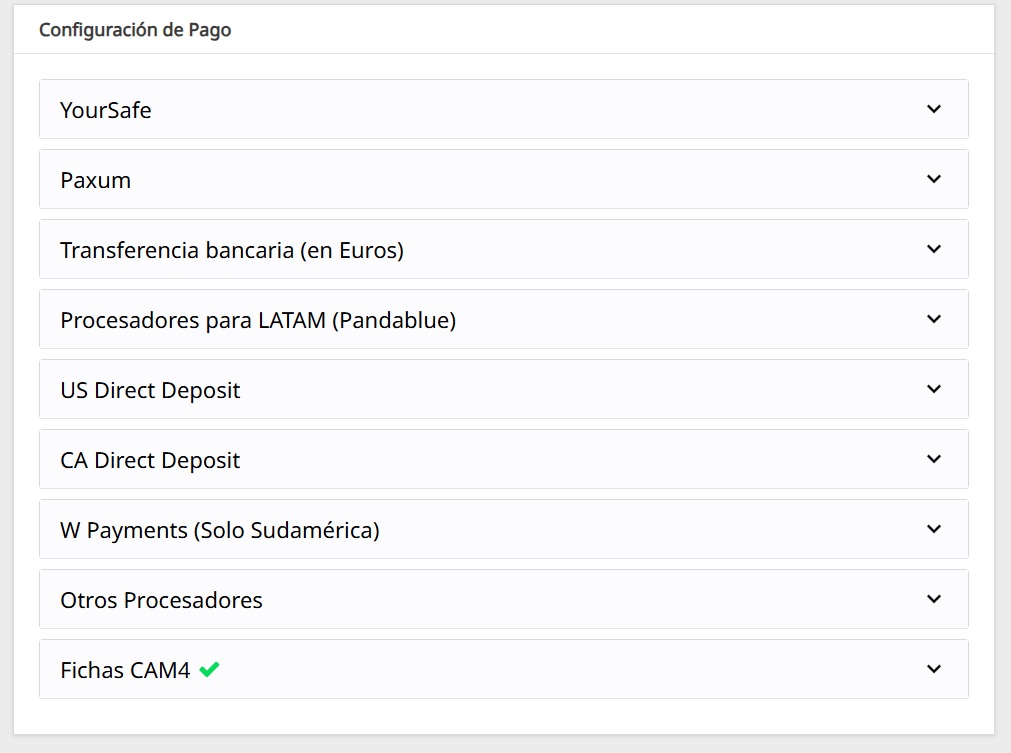
AL ENTRAR EN TU PANEL DE MODELO ENCONTRARÁS VARIOS MÉTODOS DE PAGO:


Las formas de pago son:

1 – FICHAS CAM4

Convierte la cantidad que desees en fichas para poder dar a otros modelos o utilizarlas como pago para solicitar la membresía Gold.
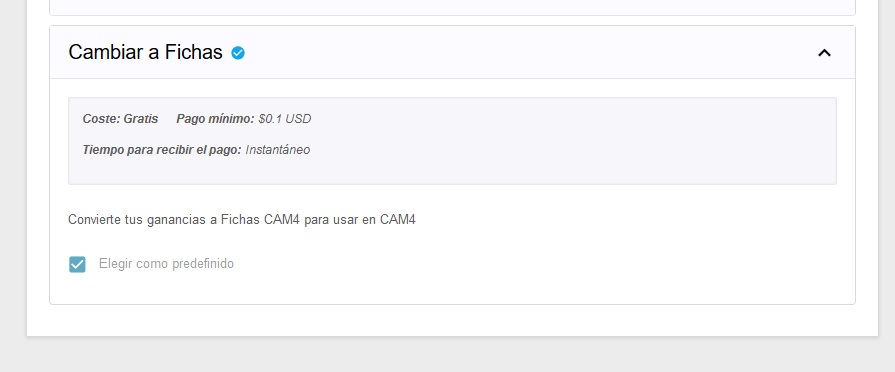
Convertir a fichas: (100 fichas = $10)

Coste: GRATIS
Pago mínimo: Ninguno
Tiempo de Pago: Inmediato

NOTA: Se requiere registro y verificación de documentos para este método de pago ya que las fichas tienen un valor monetario.


2 – TRANSFERENCIA BANCARIA EN EUROS  (Sólo paises de Europa) – Euro Wire

Transferencia bancaria en Euros directamente a tu banco.

  • Coste GRATUITO
  • Pago mínimo de 50$
  • Los pagos se aprueban A DIARIO (en días laborales). Los pagos solicitados antes de las 11.59 de cada día se aprobarán el siguiente día laboral.
  • Tiempo para recibir los pagos 1-2 días para la confirmación y 7-10 días para recibir el dinero en tu cuenta.
  • Necesitas un número de cuenta IBAN y SWIFT
  • El nombre del titular de la cuenta debe coincidir con el registrado en la cuenta Cam4
  • Ten en cuenta que se aplicará un cargo de 3% a la transferencia por la tasa de conversión que aplica el banco.

3 – YOURSAFE (antes Bitsafe)
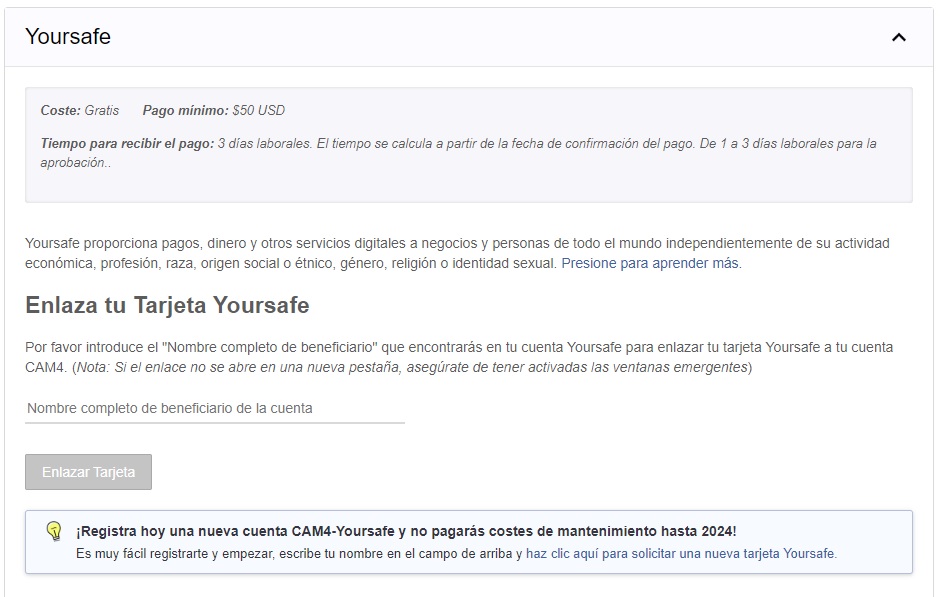
Yoursafe es un metodo de pago que ofrece una cuenta E-wallet así como una tarjeta de débito que puede ser utilizada para sacar dinero en ATM y en tiendas con datáfono.

Importe mínimo para solicitudes de pago: $50 USD

Los pagos se procesan: Diariamente

Costes de la tarjeta Yoursafe MasterCard: €29.50 anualmente.

PROMOCIÓN EXCLUSIVA CAM4: Solicita la tarjeta Yoursafe-Mastercard directamente desde el Panel de Modelo CAM4 y NO PAGARÁS NINGÚN COSTE DE MANTENIMIENTO hasta el 31 de Diciembre de 2023!

HAZ CLIC AQUÍ PARA CONOCER MÁS DETALLES

Costes para recibir pagos en la cuenta Yoursafe de CAM4: ninguno

Costes para transferir fondos desde tu cuenta Yoursafe a una cuenta bancaria Europea (EUR SEPA): €0.75

Costes para retirar dinero en cualquier cajero en EUROS: €2

Soporte: email support@yoursafe.com

ENCUENTRA AQUÍ UNA GUÍA PARA CREAR TU CUENTA Y SOLICITAR TU TARJETA YOURSAFE


4 – PAXUM

A través de Paxum puedes solicitar un pago a tu cuenta Paxum, una transferencia a tu cuenta o a tu tarjeta prepago Paxum. Para utilizar este método de pago solo tendrás que conectar tu cuenta Paxum, si aún no tienes una cuenta, puedes crear una en pocos minutos para conectar a tu cuenta CAM4.

VENTAJAS DE PAXUM:
– Los fondos pasan a tu cuenta Paxum en menos de 24h – muy rápido (y gratis)
– Puedes pasar dinero a cualquier tarjeta de débito o crédito del mundo
– Puedes solicitar una tarjeta mastercard paxum para retirar efectivo – esta tarjeta funciona en todo el mundo
– Pago mínimo de 50$

  • El nombre del titular de la cuenta debe coincidir con el registrado en la cuenta Cam4

Aquí puedes leer una guia para crear tu cuenta Paxum:
https://www.cam4support.com/wp-content/uploads/PAXUM-ES2.pdf

Una vez en la página de Paxum.com haz clic en «Open Personal Account»

  • Completa todos tus datos comenzando por tu email para asociar a tu nombre de usuario y selecciona account type «personal«. Elige una contraseña y una pregunta y respuesta de seguridad. Selecciona finalmente un apodo (nickname) y una vez terminado introduce el código de seguridad y haz clic en  submit.
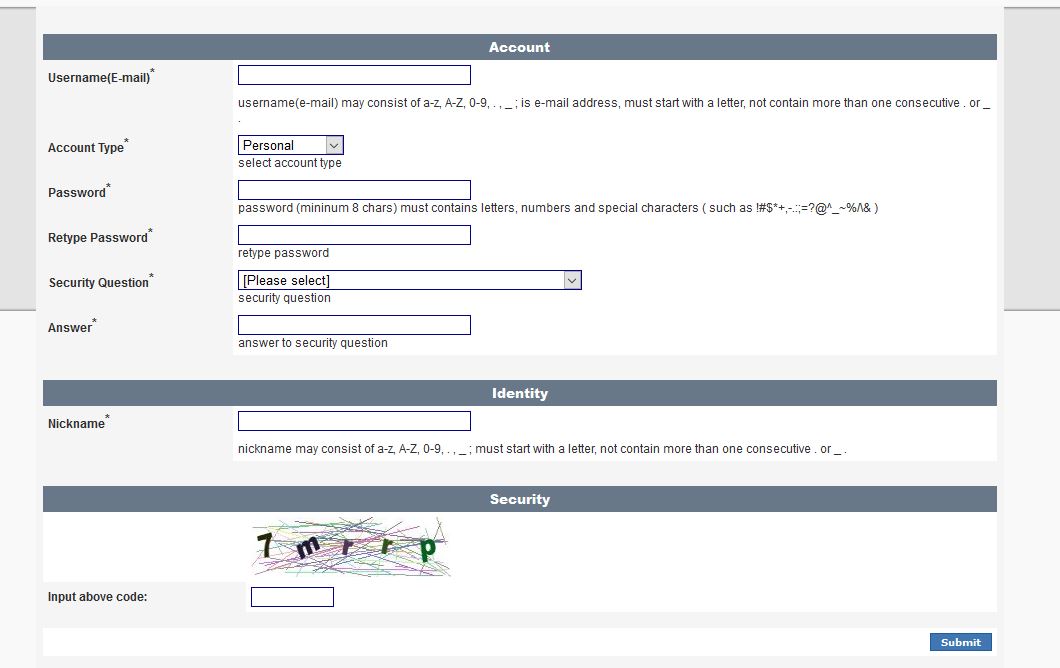
    Introduce toda la información requerida para el registro. Recuerda verificar tu email. Una vez que hayas recibido la confirmación de tu cuenta Paxum podrás conectarlo a cam4bucks.
  • Cómo seleccionar Paxum como método de pago
    En los métodos de pago de tu cam4bucks econtrarás la opción Paxum. Haz clic en la flecha de la derechaIntroduce tu dirección de email asociada a Paxum y haz clic en
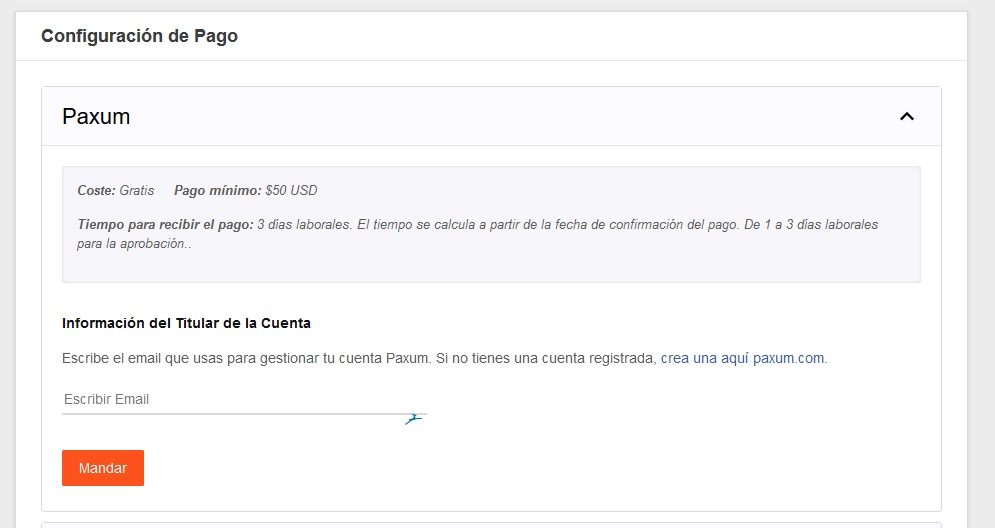
    Link to Paxum.
  • Una vez asociada tu cuenta vuelve a la pantalla del método de pago y en las opciones haz clic en SELECCIONAR junto a la opción de Paxum para seleccionarlo como tu método de pago.
  • Coste de solicitud del pago: Gratuito
  • Pago minimo: $ 50
  • Tiempo para recibir el pago: desde el envio de la solicitud al banco debes esperar al menos de 3 a 5 dias laborales para que los fondos lleguen a tu cuenta.

HAZ CLIC AQUI PARA VER UNA GUIA PARA SOLICITAR PAGOS A TARJETA DESDE PAXUM


5 – OTROS PROCESADORES
(SUDAMÉRICA)

Cam4 también trabaja con otros procesadores de pagos principalmente para Sudamérica.

La cantidad mínima para solicitar pago con ellos es de 50$ y necesitarás estar registrado previamente con el sistema de pago específico.

Así mismo la persona registrada en la cuenta de Cam4 debe coincidir con la persona registrada para el procesador de pago.

Los que usamos actualmente son:

AFO (Solo para Estudios)
PINGUINO
BANTOKENS
JUICY SERVICES
SOCIALE

Los pagos a través de Bantokens y Pinguino se procesan una vez por semana, todos los miércoles, con tiempo límite para realizar la solicitud de pago el martes a las 11.59 para que se procesen esa semana. Una vez procesado el pago aún puede tardar 3-5 días hábiles en llegar a su cuenta.


PAGOS AUTOMÁTICOS

Una vez tengas seleccionado y configurado tu método de pago, puedes solicitar los pagos cuando lo desees o activar los Pagos Automáticos.
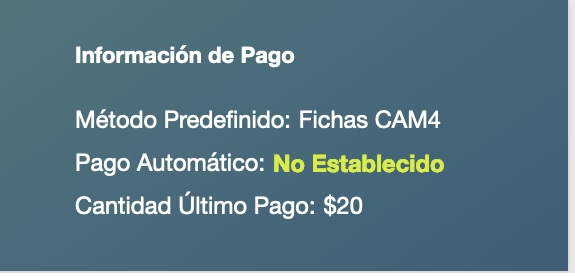
Encontrarás la opción al seleccionar el método de pago que desees.

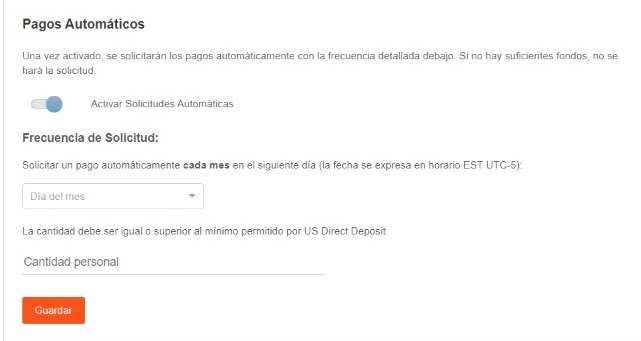
Activando los Pagos Automáticos puedes elegir cobrar una vez al mes, en el día del mes que elijas. Si al llegar ese día, tienes en tu cuenta la cantidad mínima necesaria para cobrar a través de tu método de pago preferido, se solicitará un pago automáticamente, si no, se hará el mes siguiente.
NOTA: Bajo las normas de la página, NO está permitido solicitar pagos en nombre de otras personas, y NO se permite recibir fichas de otros modelos para solicitar pagos por ellos. Esta actividad resultará en el cierre y bloqueo permanente de las cuentas y personas involucradas.


¡Eso es todo para esta clase!

Encuentra más tutoriales y explicaciones en nuestro canal de Youtube:
>>> CAM4 en Español

También puedes encontrar videos con explicaciones y realizar tus consultas uniéndote a nuestro grupo de Telegram en este enlace >>> TELEGRAM CLASES COACHING CAM4

Nos vemos en tu cam!

Social Media 101

Talking all things social media. Lean some tricks and tips to making the best posts.

TWITTER 

1. Keep Your Profile and Cover Images Clean

Performers are able to show more sensitive and R-rated content, but this is not true for every area in Twitter. In your profile picture and your banner you can’t show any nudity, nothing sexy! Keep it SFW. This helps to keep your profile active and away from the dreaded bans. 

2. Keep Twitter Live Streams Clean

The same rules apply to your live broadcasts on Twitter, make sure there’s no nudity. Though this is an awesome way to tease viewers into your shows, it’s not the place to get explicit. 

3. Keep Nudity in Your Posts

Your tweets can include nudity, so you’re free to be as explicit as you want. 

4. Am I Shadowbanned?

Twitter will «shadowban» accounts that violate these rules. This means that your profile won’t appear in searches, making it hard for fans to find you. 

5. Tagging People in Photos

If you’re uploading a picture, click on the “Who’s in this photo?” button and you can tag up to 10 users in the photo. This is a cleaner option than tagging followers in the tweet itself.

6. Use Twitter Analytics!

 If you’re on your desktop on your Twitter profile page, look at “statistics” on the sidebar.  You can get a lot of information about when’s the best time to send your tweets, who’s following you, their interests etc. If you go through that data, you’ll have a better understanding of when you can make money and gain followers.

Why Should I Tweet?

1. Promote yourself! Social media is the cheapest, easiest, and fastest way you can promote your Cam4 shows!

2. More social media followers = more viewers = more money in your pocket. Loyal viewers spend more, and when people know what you’re offering, they can spend more. You can achieve both with Twitter.

3. Reach new fans! How else can you find new people who want what you’ve got? Using Twitter hashtags and the Cam4 social media community you can reach tons of viewers who are looking for you!

4. Interact with existing fans in a whole new way. Extend their Cam4 experience way beyond your shows. It’s a win-win for everyone 😉

Like all good things, you need a billboard to help people find you. Treat social media as your billboard! Tweet from anywhere with your mobile device, and tweet while you’re live from the web.

Ok… I got Twitter… now what?

When I signed up for Twitter, I sat there with an empty news feed and no clue where to start. There’s millions of users, so how do you find the ones who are into you? How do you get people to follow you? It’s not as hard as you think, take a breathe and get started with these easy steps:

1. Share your Cam4 link when you’re live


2. Use hashtags like #tittietuesday #asswednesday and #friskyfriday along with #CAM4 and pics to find new fans. 


3. Send @CAM4 a tweet and I will personally help you along the way
**Don’t be scared to show your personality, that’s what viewers love!**


INSTAGRAM

  1. Keep it all Clean!

Everything has to be SFW! Instagram can take down any pictures that are reported as, or are NSFW. Tease viewers, or show off your personality and style. 

2. We Recommend no More Than Bikini Photos

Take some bikini pics and keep them on hand for Instagram. It’s also good to take some seductive pics without any nudity or explicit content.

3. Where Can I Link?

Try not to post links to porn sites in your posts – instead, post your Twitter link so your followers can get links to your cam shows directly there. 


Getting Your Posts RT’d by your Cam Company

To get retweeted by a camming platform, there’s some key things you have to do: 

Include your URL – we want followers to click on your links!

Use hashtag (#) or ‘@’ your cam company – #cam4, for example. 

Post a HOT visual! (videos are a huge preference though) People love to see visuals. You can add up to 4 photos in a post.

If you want people on Twitter to watch your live shows, the Twitter picture should show them what that show’s going to be like. Example: if you’re doing a show from your bath tub, take pics/video of you in the tub!

Separate posts if you’re tagging separate cam companies! One post for one site, that way each site has the opportunity to retweet you

PRO TIP: Use videos from your Snapchat to post on Twitter!

CAM4 COACHING

CAM4 provides users with Training every Tuesday & Thursday with cam coach, Vannafaye


Reddit for Cam Performers (video)

Promoting yourself on Reddit gives you access to thousands of people who are searching for cam performer content. 

Reddit is basically a massive forum where people can discuss pretty much anything. It’s divided up by subreddit, and just for camshows alone there’s over 50 threads you could post on. 

Getting started

It’s so easy to sign up and make your first post that we promise it’ll take you less than 5 minutes. There’s no profile to design, no account info to edit, just make your username and password, and start posting!

  1. Chose a username that’s identical to or similar to your CAM4 name. Short and memorable names will help people remember you, Lala Capri, Lil Jezebel, Aqua Angel are a few examples of this.
  2. Follow threads that are related to your interests or content.

Reddit is hugely different from the other social media platforms we’ve covered, so watch this video from our resident cam girl and social media expert Sammy Strips or keep reading!


Posting on Reddit

Now you’re ready to start posting your best content! But, let’s review the guidelines before you begin posting:

  1. You have to wait 7 minutes in between postings
  2. Link to your images and videos via Imgur, ManyVids, PornHub, CAM4, YouTube, etc.
  3. Don’t post content into subreddits that aren’t related
  4. Read all of the rules of each subreddit 
  5. Don’t post the same content on multiple subreddits

Then it’s time to hit up the subreddits for Camgirls: 

r/CamGirl

r/CamGirls

r/CamModels

r/CumSluts

r/camshow

r/camshows

r/fuckmeat

r/girlskissing

r/FapFolders

r/GoneWildCurvy

r/JizzedToThis

r/NSFW_Ass

r/HungryButts

r/CumTributes

This isn’t even the tip of the iceberg. You could spend hours collecting all of the camgirl-related subreddits. Cha-ching!

A word of caution: Reddit is a community and they work hard to keep the content unbiased, helpful, and honest. Always read each thread’s rules and guidelines. For example, some threads require you to message the moderator before posting.


The best approach is to collect your content and make sure it’s varied – cumshots, lesbian, BDSM, spanking, wearing glasses, tattoos, or cum tributes will enable you to post on the more specific threads. 

Stop by r/CAM4Live and leave us a pic ❤️ And remember, follow our official accounts!

Follow CAM4

 @CAM4   @CAM4_Gay

 @CAM4_Official    @CAM4Gay

     CAM4snaps     CAM4gay 


Increase your earnings and viewers with PornHub

How to create a profile on PornHub to get more viewers and earn more on CAM4!

PornHub is the largest adult portal in the world. Millions access it daily providing visibility that no other site can give you. You can create a free PornHub account and use it to upload your photos and videos to lure more users and turn them into potential fans and tippers on CAM4! But not only that … by entering your CAM4 Referral Program link in your profile bio you will earn $2 for each user who click’s on your affiliate link register’s on CAM4!

I guess you’re wondering how long it takes to create a free PornHub profile and connect it to CAM4 … well, it takes less than 5 minutes!
Here’s a quick guide on how to create your Brand Ambassador profile, how to upload your videos, how to use your affiliate link and start earning more!

– How to create a FREE profile on PornHub … in 5 minutes

Go to PornHub’s homepage and select Sign Up (on the top – right) … or just click on this link!

Click on Sign Up for Free. Then enter your e-mail address and choose a PornHub username (you can use the same on CAM4 if available) and finally choose a password.

Check your email address and activate your PornHub account by clicking Verify Your Email Address.
Done! Now you’ve created a PornHub profile and you just have to configure it according to your liking 🙂


– How to configure your PornHub account with images, video and your CAM4 affiliate link!

Once verified your mail PornHub will ask you for basic information to confine your profile. What do you like, What channels you want to see and Basic Information (the most important ones to promote you!)

In the Basic Information section you can select the country, city, and nickname that you prefer. Be sure to write a short description in the ABOUT entry. You can use this space as a showcase to promote you as a web cam model on CAM4.

The most effective tool is to enter your CAM4 referral link to bring them to your CAM4 page and earn even from each subscription! If you do not know how to get your affiliate link (always found in My Accunt > Profile Options, bottom left> Referral Program)!!

For example, enter your next scheduled show on CAM4 or find other videos on your CAM4 profile. Or click the link below to see more videos #fetish, #outdoor.

Then click on Complete and Have fun on Pornhub! Once the configuration is finished you will be able to edit your profile and enter profile, cover, galleries, gifs and VIDEOs!

On your profile click on the profile image and cover photo and select upload photos to get you noticed! Note. you may decide not to show your face or use masked photos 🙂

– How to UPLOAD VIDEOs on PORNHUB:

In your profile page, you can view a preview of your basic information to the left: Make sure your referral link is correct and have a captivating description to push users to click on the link! 🙂
At the top click the Video section and then click Add Now! Then drag the video you want to upload and wait for the upload to complete.

Remember to include details on your video (eg. orientation, privacy, amateur production) and carefully choose an alluring title (you can also add translations in other languages). Finally, select the tags to describe your video and bring users with ease.

 PRO TIP:  Post quite often to keep users up to date on your next CAM4 shows and  promote your new videos on your MyShop, but make sure each message always contains your referral link!


~That’s all for this lesson!

Happy Camming!
Love, Your Coaching Team!

Ice Cream Weekend July.29-30th


How many licks does it take till you finish? 

You’ll scream, and your viewers will cream for Ice Cream Weekend on CAM4. Tell your viewers to #LickIt by scheduling, tagging, and tweeting your ice creamy shows!

To earn a cool 100 Tokens all you have to do is:

~Tag your live show – #LickIt
~Tweet an ice cream themed picture with the link to your show and use the #LickIt.
~Schedule your tasty treat show with the #LickIt in the description.

~You can earn an additional 100 Tokens for tweeting the best Ice Cream themed picture using the #LickIt!


Rules

~Approved CAM4 performers only.
~Only one payment of 100 tokens per performer
~Show length must exceed 30 min. and reach a minimum of 20 viewers.
~Must include #LickIt in your live show status.
~Must tweet a picture, live show link, and the tweet must have the #LickIt. (Tweets containing photos unrelated to the theme will not be accepted)
~Schedule your show with the #LickIt in the description. 

How to Work with Promo Accounts

Beyond the CAM4 accounts, there’s endless opportunities to use social media to find new viewers. Here’s a list of just some of the Twitter accounts you could work with, and how to look for more. 

Always remember that cam promoters aren’t a source of instant tokens, they’re part of longterm success. Building up your exposure and personal brand will result in more tokens, more viewers, and more opportunities for events, trade shows, partnerships, and other magic that only the future knows. 

Most promo accounts make money as affiliates, so they will likely attach their referral code to your CAM4 URL. If it’s a good account, you’ll benefit from this. Check out the Camgirl Promo Accounts list on the CAM4 Twitter page: 

twitter.com/Cam4/lists/camgirl-promo-accounts

WeCamGirls (which by the way if you aren’t already mega active on this forum, do it now) has this epic article on how to use cam girl promo accounts on Twitter, including promo accounts for everything from facials to tattooed camgirls: 

wecamgirls.com/articles/for-camgirls-make-your-twitter-your-1-marketing-tool-updated-with-new-categories/

Doing fan signs for big accounts with thousands of followers is a great opportunity to get more people following you and joining your camshows. Even if they’re free, they will pay off in the end.

The most effective promo accounts are each others. Every cam girl’s following on social media is made up of: viewers, similar camgirls, and fans/promo accounts. Become friends and help each other out by trading tweets, doing giveaways together, camming together, or whatever works for you. 

Before you work with promo accounts, you have to make sure a couple of things: 

  • You’re tweeting regularly with good content like pictures, short videos, and always your CAM4 link
  • You’re able to cam often, or sell videos on CAM4
  • You are using your referral ID in your tweets, so when RT accounts repost your messages, you can earn money
  • You’re contacting accounts that represent you – i.e. if you don’t have tattoos don’t contact the tattoo accounts
  • Your Twitter account is public!!

Cómo usar las estadísticas de tu Tienda para crear contenido

Las estadísticas son un buen indicador de lo que estás haciendo bien o mal a la hora de crear contenido para vender a tus fans. Por eso tu Tienda en CAM4 ha sido creada para ser fácil de usar y ofrecerte estadísticas que te permitan conocer la satisfacción de tus compradores con los videos.

cam4-my-shop-profile-final-english

Tu «Mi Tienda» también incluye enlaces que podrás compartir en redes sociales y la habilidad de controlar si tus videos aparecen en tu perfil.

Tus estadísticas


statsESS


Comprendiendo tus estadísticas

Básicamente encontrarás dos factores a analizar, los Me gusta ❤️ y el número de reproducciones.


Todo el mundo sabe que tener estadísticas altas es bueno, pero lo que de verdad nos da información son las estadísticas bajas. En estos dos ejemplos vamos a mostrar razones por las que puedes tener estadísticas con números bajos.

Video #1 – Tu video tiene Me gustas bajos comparado con las ventas y las reproducciones

  • Esto puede significar:
  1. ¡Comprueba la calidad del video! ¿Tiene buena iluminación? ¿El audio es bueno? ¿Se te ve feliz en el video? Estas cosas afectan la satisfacción de los espectadores, asegúrate siempre de que sea un video que a ti te gustaría ver.
  2. Has hecho un buen trabajo vendiendo este video y atrayendo a los compradores… pero quizás no sean los compradores adecuados. Comprueba que has usado etiquetas relevantes/buen título/buena descripción para este video para asegurarte de atraer a la audiencia adecuada.
  3. Compara el precio con la duración del video. ¿Hiciste un video de 1 minuto y cobraste 50$? Si es así, ese video debe ser impresionante! Recuerda, tener muchas ventas te va a dar más beneficio que tener pocas…


Video #2. La gente lo compra, los Me gusta están bien, pero las reproducciones son casi las mismas que el total de ventas

  • Esto puede significar:
  1. Puede que hayas vendido pero el video no ha resultado satisfactorio. Es bueno aprender la lección para mejorar el próximo.
  2. Mira tu video de nuevo y fíjate en cuantas veces miras a la cámara (y por tanto al espectador), cambias de punto de vista, y das al espectador la sensación de que estás disfrutando. Estas cosas crean una conexión con la audiencia y les hace querer verlo una y otra vez.
  3. Puede ser un error de producción. ¿Está el audio demasiado alto? ¿Se te puede escuchar bien? ¿El video se para o se ve mal por momentos? ¿El color es bueno o no te favorece?


#ProTips para grabar videos


  • ~Siempre pregúntate: ¿Vería mi propio video? ¿Pagaría por el video?
  • ~Se que puede resultar incómodo al principio pero ¡MIRA TUS PROPIOS VIDEOS!
  • ~No es obligatorio hablar en los videos. Algunos de los videos más sexys y calientes son aquellos en los que solo se puede oir la respiración y jadeos…
  • ~Intenta no tener música de fondo o si lo haces de forma muy leve, tanto por asuntos legales como por gustos musicales.
  • ~Haz tus videos de unos 5-10 minutos de duración. Puede no sonar como un tiempo demasiado largo, pero si que lo es si tienes en cuenta intentar mantener la atención del espectador.
  • ~Un buen video puede ser uno grabado con un teléfono en un baño de estación. El buen contenido, es buen contenido, no importa el nivel de producción.
  • ~¡Asegúrate de pasártelo bien al grabar tus videos! Al igual que transmitiendo con la webcam, los espectadores podrán notar si te lo estás pasando bien y eso hará que ellos lo pasen mejor.
  • Si buscas consejos sobre programas de edición de video, lee el artículo «Como Editar y añadir marca de agua a tus videos y fotos»

¡Eso es todo para esta clase!

Sigue al día con consejos añadiéndo a Lila, la coach de CAM4 en Español a tu lista de amigos y suscribiéndote a sus clases semanales.

Puedes enviar un email con cualquier duda a lila@cam4.com

Nos vemos en tu cam!