Comunidades de CAM4: todo lo que los modelos necesitan saber

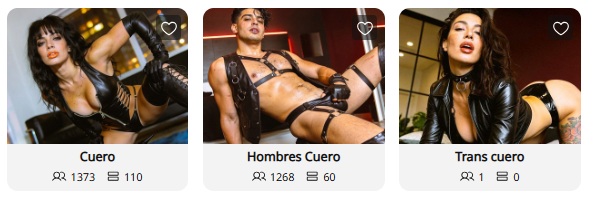
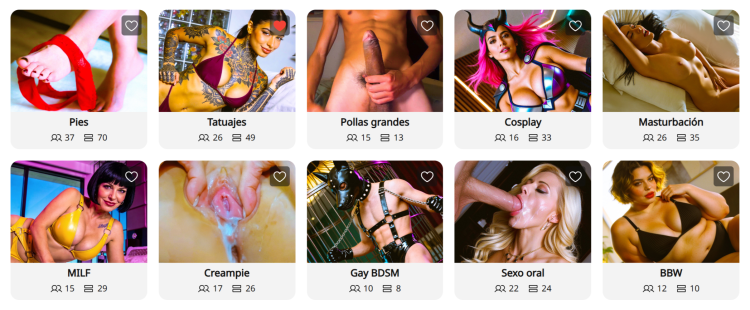
¿Qué son las Comunidades? Las nuevas páginas de Comunidades Cam4 son espacios especializados organizados por intereses específicos — como BDSM, Feet o BBW. Piensa en ellas como centros dedicados donde puedes conectar directamente con usuarios que están buscando específicamente el tipo de contenido único que ofreces.


Por qué las Comunidades son una oportunidad para ti:

  • Exposición dirigida: En lugar de competir en el directorio general, tus publicaciones y transmisiones en vivo aparecen en comunidades dedicadas a tu estilo o fetiche específico.
  • Vista previa en vivo en las publicaciones: Cuando estás transmitiendo en vivo, cualquier publicación que hayas hecho en una Comunidad mostrará automáticamente una vista previa de video en vivo. Esto permite que los usuarios que navegan por el feed de esa comunidad entren directamente en tu sala.
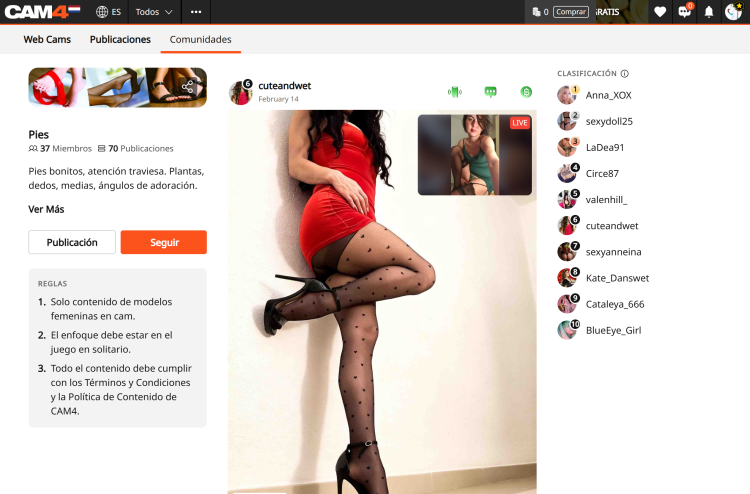
  • La Clasificación: Cada Comunidad cuenta con una Clasificación que muestra a los 10 principales contribuidores según el número total de “me gusta”. Aparecer aquí proporciona una gran visibilidad y te ayuda a convertirte en una autoridad reconocida dentro de esa comunidad.
  • Pestaña «Cams» dedicada: Las Comunidades tienen una pestaña específica «Cams» que muestra únicamente modelos en vivo que pertenecen a esa Comunidad. Esto facilita que los espectadores te encuentren cuando buscan contenido específico.

Cómo unirte y conectar:

  1. Encuentra tu Comunidad: Haz clic en la pestaña «Comunidades« en la barra de navegación superior para explorar el directorio.
  2. Seguir para unirte: Debes hacer clic en «Seguir» en una página de Comunidad para convertirte en miembro.
  3. Comparte contenido: Una vez que seas miembro, haz clic en «Crear publicación» para compartir fotos o videos desde tu Biblioteca o almacenamiento local.

    Nota: Todas las publicaciones en Comunidades son gratuitas para ver, lo que las convierte en el teaser perfecto para atraer usuarios a tu contenido de pago o a tu show en vivo.
  4. Interactúa: Interactuar con los comentarios en tus publicaciones ayuda a conseguir muchos seguidores dentro de esa Comunida.

El valor: desbloquear nuevas fuentes de ingresos Las Comunidades son más que una herramienta social; son una forma poderosa de aumentar tus ganancias:

  • Mayor conversión: Estás llegando a una audiencia “cálida” que ya está interesada en tu estilo específico, lo que conduce a más propinas y solicitudes de shows privados.
  • Marketing automatizado: Tu vista previa en vivo actúa como un anuncio constante para espectadores interesados mientras trabajas.
  • Ventas de Contenido: Utiliza teasers gratuitos en Comunidades para dirigir tráfico hacia tu contenido de pago y videos completos.
  • Estado en la Clasificación: Una mayor visibilidad en la Clasificación se correlaciona directamente con más inscripciones al Fan Club y crecimiento a largo plazo de suscriptores.

¿Listo para encontrar tu Comunidad?

¡Sumérgete y empieza a explorar Comunidades! Sigue algunos que despierten tu curiosidad, comparte algo de contenido teaser y mira quién aparece.

Podrías descubrir un nuevo lado de tu estilo que te encanta, y conectar con fans a quienes también les encanta.

Tu próximo contenido favorito (y tu próxima ola de fans) podría estar esperándote en un Comunidad que aún no has probado.

Empieza a explorar ahora: www.cam4.com/niches

¿Necesitas una mano? Para más detalles sobre otras funciones de CAM4, consulta nuestro FAQ o pregunta a nuestro chatbot «Spark», que encontrarás en tu bandeja de entrada.

¡Feliz camming!

Como Verificar tu Cuenta en CAM4


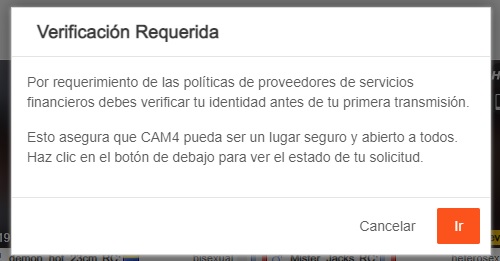
Antes de empezar a transmitir, es imprescindible enviar tus documentos a CAM4 para poder verificar la mayoría de edad de la persona que aparecerá en la webcam y para poder cobrar tus ganancias.

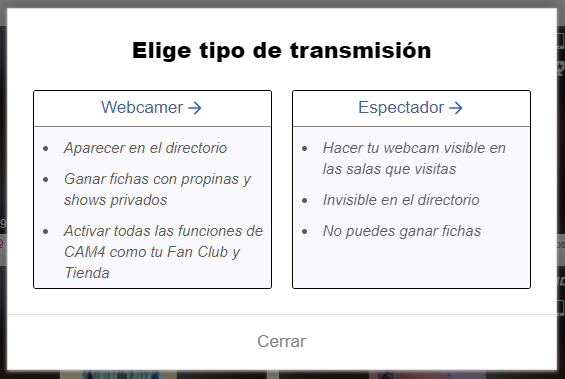
Si aún no has verificado tu cuenta, cuando entres a la página y hagas clic en «Transmitir» te aparecerá esta ventana en la que deberás seleccionar la opción de WEBCAMER e irás al panel de verificación de tu cuenta.

Para ser modelo en CAM4, al igual que en todas las páginas adultas, es necesario ser mayor de edad (18 años)

Si tu intención es solo la de exhibirte, permitir a l@s modelos ver tu webcam, pero sin recibir propinas, ganar dinero ni aparecer en el directorio, puedes seleccionar la opción de Espectador y no tendrás que subir tus documentos de identidad.


¿Qué necesito?
Una imagen escaneada o una foto de la parte de delante y de detrás de un documento de identidad válido y con foto y fecha de nacimiento: Pasaporte, Cédula o DNI

Se solicita un documento para cada persona que aparece en la webcam, independientemente de lo que haga en la webcam y del tiempo que aparezca.

Cómo aprobar tu cuenta CAM4

Haz clic en Transmitir, y después selecciona la opción «Ser una Estrella Webcam»

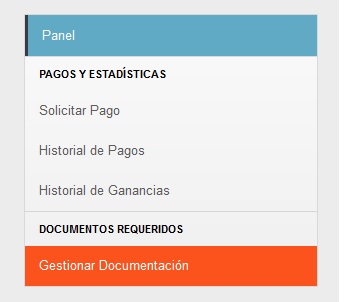
Una vez dentro, selecciona Gestionar Documentos, o si te aparece, haz clic en el mensaje de notificación de Verificar tu Identidad.

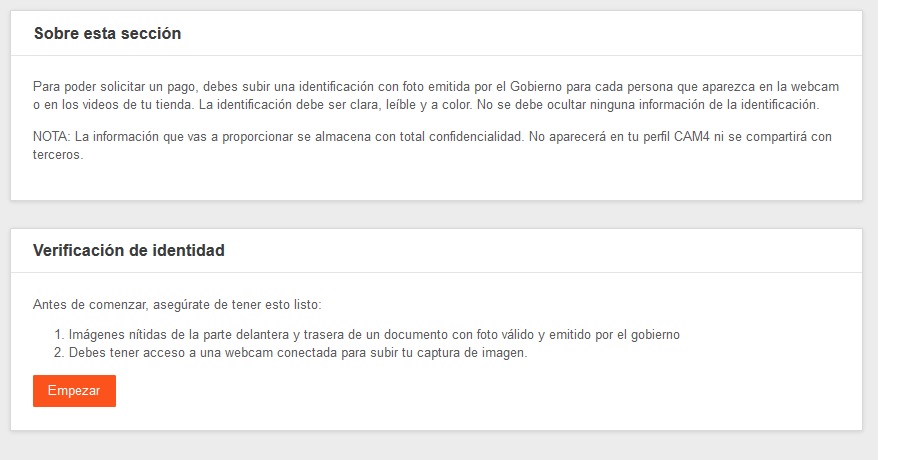
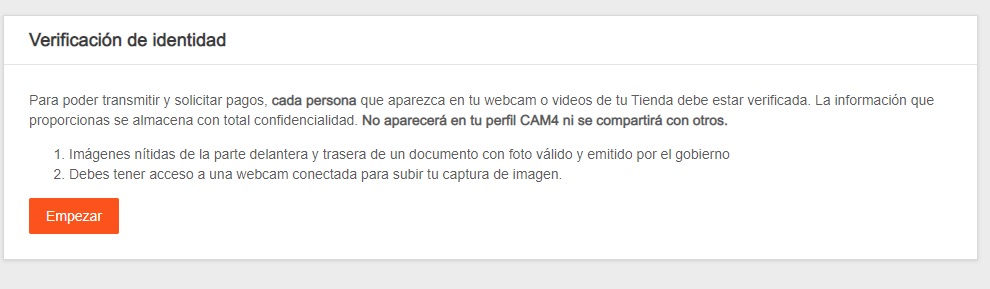
Antes de empezar, asegúrate que tienes: Foto de la parte delantera/trasera de un documento de identidad válido, legible y a color. Y poder activar la webcam para poder hacer una captura de tu imagen. Entonces haz clic en comenzar:


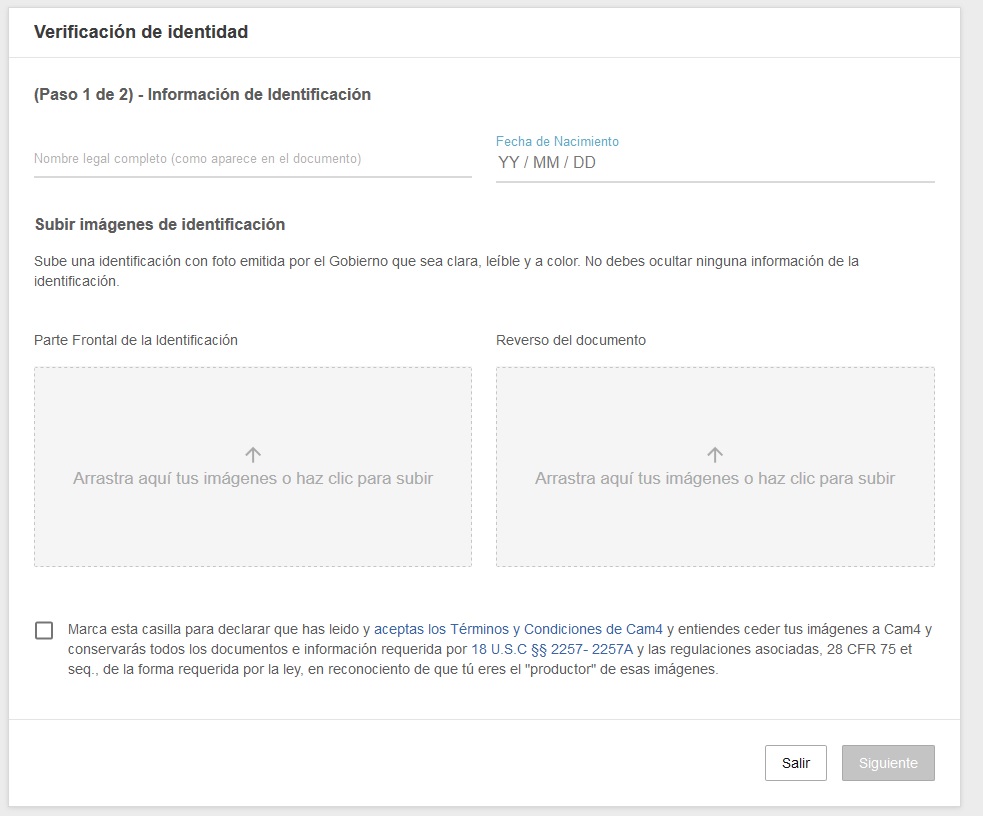
En la sección de Verificación de Identidad, introduce tus datos personales solicitados y carga en los respectivos recuadros las fotos del Documento válido (DNI, Pasaporte o cédula)

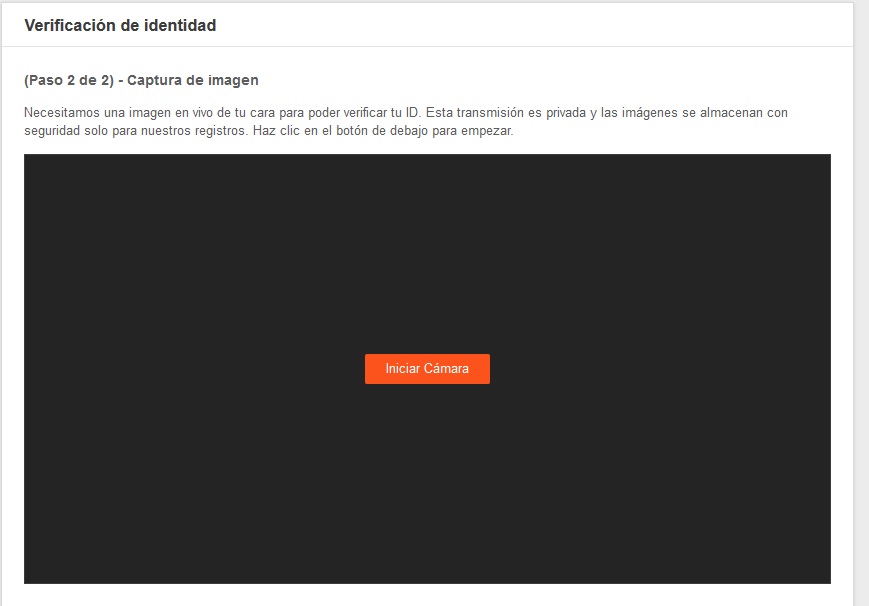
Marca la casilla de debajo para aceptar los términos y condiciones y seguir, entonces haz clic en Siguiente. Para completar el proceso deberás sacar una foto clara de tu rostro. Habilita la cámara y cuando estés listo/a para la foto haz clic en Iniciar Cámara. 

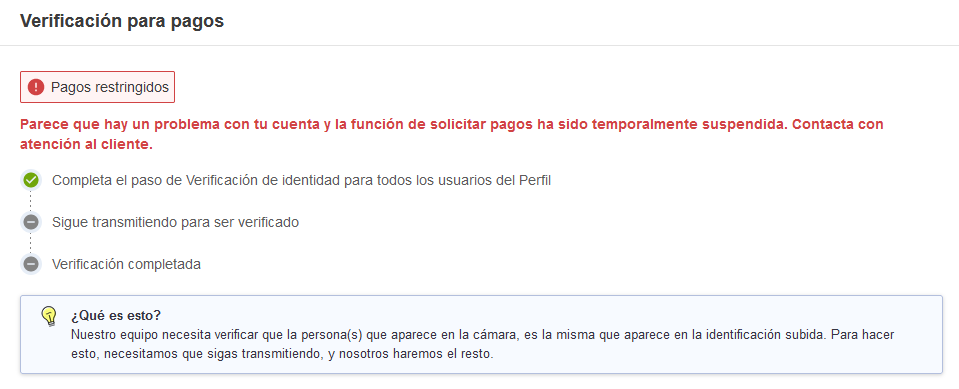
La verificación de tu perfil puede llevar hasta 48 horas. Podrás siempre consultar el proceso de aprobación en el apartado Gestionar Documentación.

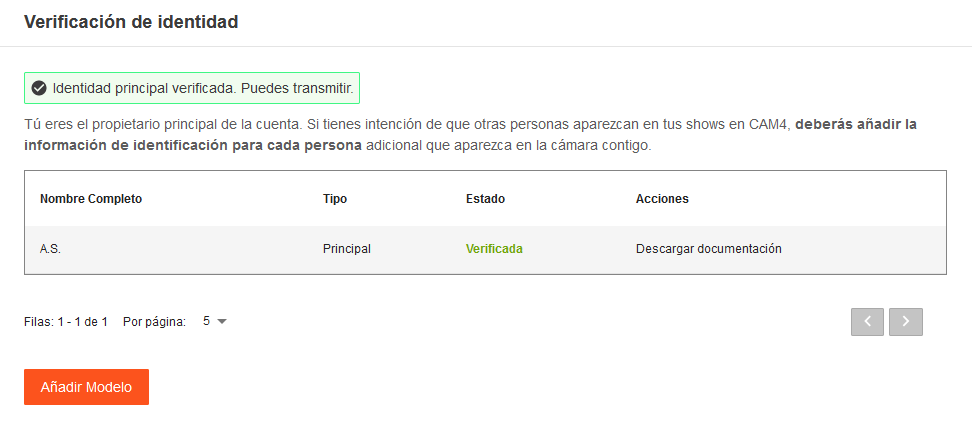
Una vez verificado podrás ver tus documentos como verificados y un mensaje de confirmación

Si más personas van a transmitir desde tu cuenta, deberán seguir el mismo procedimiento antes de aparecer en la webcam, y una vez verificados/as ya podrán aparecer en la webcam.

Si deseas cobrar tus ganancias, deberás continuar con la verificación para pagos, para lo que será necesario tener más transmisiones en tu cuenta.


¡Eso es todo para esta clase!

Sigue al día con consejos añadiéndo a Lila, la coach de CAM4 en Español a tu lista de amigos y suscribiéndote a sus clases semanales.

Puedes enviar un email con cualquier duda a lila@cam4.com

Nos vemos en tu cam!


Cam4 Sexy Bunny ✨ 35 Premios a l@s Conejit@s más sexys de CAM4 ✨ (2-5 Abril)


¿Quién no ama las conejitas sexys y el sexo desenfrenado de los conejitos en celo? Te invitamos a vestirte de conejita o conejito sexy y participar en nuestro concurso CAM4 Sexy Bunny 2026 donde premiaremos a l@s 35 conejit@s más sexys de todo CAM4!

¡Puedes ganar hasta 100$!


Para participar haz al menos un show temático #SexyBunny y twittea una foto o un video con disfraz entre el 2 y 5 de Abril de 2026 (incluídos).

✨  35 PREMIOS CAM4 a las mejores fotos/videos  ✨

Miss / Mr Conejit@ Cam4  1.000 tokens

Puesto 3 a 5 500 tokens

Puesto 6 a 10 250 tokens

Puesto 11 a 35100 tokens


________________________________

✨ Como participar:

Programa tu show en tu calendario de transmisiones para hacer entre los días 2 y 5 de Abril 2026, escribiendo en la descripción la etiqueta #Sexybunny (Los shows no programados previamente no participarán en el concurso ni recibirán ningún premio)

Usa el hashtag #SexyBunny como descripción de tu show cuando estés transmitiendo.

Durante tu show (o antes o después), publica en el Muro de Publicaciones de tu perfil Cam4 una foto o video soft (Sin mostrar genitales) de conejita o conejito sexy con el hashtag #Sexybunny

En la página principal de CAM4, haz click arriba a la derecha en + Publicación.
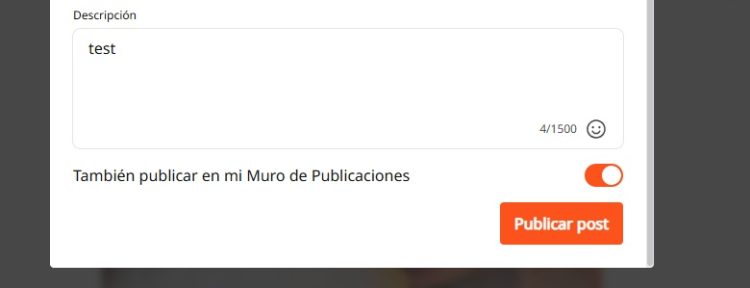
Haz click arriba para subir tu foto o video SOFT (sin sexo explícito ni genitales). Escribe tu mensaje personal (incluyendo #SexyBunny) y haz click en Publicar.

Recuerda no establecer ningún precio para que sea una publicación pública.

(OPCIONAL) > Publica también en X para mayor impacto! Al finalizar el concurso los community manager CAM4 de cada país participante adjudicarán los premios revisando todas las fotos y votando en base a la calidad y creatividad del contenido.

Consejos Pro: Twittea videos y fotos en buena resolución, creativas y con ángulos que resalten lo mejor de ti, y sin logos o texto… Puedes subir todas las fotos o videos que quieras!

Recuerda twittear fotos SOFT para este concurso:

– NO sexo explícito, NO genitales (no testículos, pene o vagina) – SI pezones, Si culo

Comparte también tu foto en X (Twitter) para tener mayor visibilidad y conseguir más espectadores para tu show!

¿Necesitas ideas? Mira las fotos ganadoras de la anterior edición Sexy Bunny CAM4 (haz clic aquí)

 ____________________________________

REGLAS

  • Solo pueden participar modelos con la cuenta verificada en su Panel de Modelo
  • El show debe ser programado previamente para participar, si no se ha programado no participará ni se recibirá ningún premio, al igual que si no se realiza el show no se podrá ganar ningún premio.
  • Durante el show en directo deberás escribir en el estado o descripción la etiqueta #SEXYBUNNY
  • Deberás usar el hashtag #SEXYBUNNY en la descripción del show en tu calendario, en la descripción del show en directo, y en la publicación en tu muro.
  • El show deberá realizarse entre el 2 y 5 de Abril (ambos incluidos) y durar al menos 30 minutos y reunir al menos a 20 espectadores
  • El show y las fotos twitteadas deben ajustarse al tema de CONEJITAS/OS (si la foto no se ajusta al tema no se considerará válida)
  • Las fotos / videos / gif deben ser soft (SFW) – Esto significa, sin genitales ni sexo explícito (pechos y pezones y culo son permitidos)
  • Las fotos o videos publicadas deben ser contenido nuevo, no se permite participar con fotos ya usadas anteriormente en concursos.
  • Máximo un premio por modelo (solo, o pareja) – aunque se haga más de un show
  • Los ganadores de las mejores fotos recibirán un mensaje de notificación y se publicarán en el blog y redes de Cam4
  • Los premios se añadirán a la cuenta antes del 15 de abril, y aparecerán en el Panel de Modelo en el apartado Estadísticas > Ajustes (abajo)
  • Al participar en el concurso das tu consentimiento para que tu contenido pueda ser publicado en el blog y redes de CAM4
  • Nota: solo modelos que hayan ganado al menos 50$ (500 fichas) en los últimos 30 días podrán clasificarse para ganar uno de los premios de 500 o 1000 fichas.
  • Aquell@s modelos que hayan ganado menos de 500 fichas podrán ganar uno de los premios de 20$ o 10$.

Recibe regalos de Primavera y Gana hasta 200$ (23 Mar – 5 Abr)

La primavera, la sangre altera…
¡Y es el mejor momento para recibir regalitos Cam4!


*Del lunes 23 de marzo al domingo 5 de Abril* consigue hacerte con todos los regalos que puedas de la categoría «Dulce Primavera» y «Letras Floreadas» para ganar uno de los 10 Premios en juego!

NOTA: Solo participan en este concurso los modelos que transmiten con bandera de España/Latam


CLASIFICACIÓN PROVISIONAL
(A 2 DE ABRIL)

cataleya_666

misstokio

andrew_wallker

body69lyd

nicol_hot30

yoli_morena

kylie_jen

daisy_fx

sexymiss24

sofi_sofia

angelito_boy19

louise_mikk

valenhill_

skinnybwc

natalyfitt

hanna_kl

andrew_ja

maite4ever

angela_bhair

gomitaboy__

*NOTA: La lista final con los ganadores será publicada el martes 6 de abril


Premios CAM4 España/América Latina

Primer Premio $200

Segundo Premio $100

Tercer Premio $70

Cuarto Premio $50

Quinto Premio $30

Sexto Premio $20

Séptimo Premio $20

Octavo Premio $20

Noveno Premio $20

Décimo Premio $20


INSCRIPCIONES ABIERTAS

completa el formulario

Nota: las inscripciones se cerrarán el 30 de marzo.

NOTA: Este concurso es solo para modelos de España / América Latina que transmiten con bandera de España o países de América Latina (Colombia, Argentina, Mexico, Chile, etc). Se debe transmitir con la misma bandera durante todo el concurso.

Si transmites con una bandera diferente no puedes participar ni ganar ningún premio en este concurso.

______________________________________________________________________

Algunos consejos para hacerte con uno de los premios…


– Recuerda a tus seguidores que participas en el concurso escribiéndolo en tu perfil, por mensaje y durante tus shows, solicitando especialmente los regalos «dulce primavera» y «letras floreadas»

Organiza sorteos especiales para tus fans, sortea videos y premia a quienes te envíen regalos «Dulce Primavera» y «Letras floreadas»

– Añade el banner «Ayúdame a ganar» a tu perfil y úsalo en tus redes!

Para añadirlo: Ve a Mi Cuenta, haz clic en Personalizar Perfil y añade el enlace de debajo para que aparezca en tu perfil

link url imagen:

http://performers.cam4.com/wp-content/uploads/ES_Spring-2024-banners-Help-me-win

_____________________________________________________________________

~ Reglas

1. Solo pueden participar modelos con cuenta verificada con sus documentos en su Panel de Modelo.


2. Los ganadores serán quienes consigan ganar más fichas a través de los regalos CAM4 de las categorías incluidas en el concurso (Dulce Primavera, Letras Floreadas) y NO el mayor número de regalos. – Solo contarán los regalos recibidos entre el 23 de marzo y 5 de abril (ambos incluídos)

3. Es necesario transmitir un mínimo de 10 horas durante estas fechas para poder estar entre los ganadores.

4. No es posible participar en este concurso si se transmite con una bandera que no sea de España o países de América Latina (de habla hispana) – Si usas una bandera diferente (Francia, Italia, USA…) debes inscribirte en el concurso de esa región, si la región lo permite. La bandera debe ser la misma durante todo el concurso.


5. Si recibes más de 6000 fichas en regalos del mismo usuario (independientemente de usar diferentes cuentas), solo se contará un máximo de 6000 fichas. (el recuento y corrección se hará al finalizar el concurso)

6. Los regalos recibidos deben provenir de al menos 3 usuarios diferentes para poder ganar uno de los premios.

7. No se permiten intercambios de regalos entre modelos o movimiento de fichas entre cuentas como intento de alterar los resultados del concurso. Cualquier intento de fraude resultará en la descalificación del concurso. – Las fichas recibidas deben provenir de compras de packs de fichas, no pueden provenir de otras cuentas de modelo que no hayan comprado las fichas.


8. Es posible registrarse en el concurso más tarde del 15 de marzo. Sin embargo el recuento de regalos comenzará en el momento de la inscripción (si es más tarde del 15) – Las inscripciones se cerrarán el 30 de marzo.

*Server Time: El recuento de regalos se hará en base al servidor situado en el horario EST (zona este de Estados Unidos)

_____________________________________________________________________

#CAM4CANDY Themed Weekend (MAR 14-15 2026)

WIN UP TO 550 TOKENS THIS WEEKEND!!!

STICKY AND SWEET !!!

This weekend from SAT,  MARCH 14th – SUN,  MARCH 15th, bust out the sweets as CAM4 celebrates #CAM4CANDY Weekend for a chance at winning 550 tokens !!!

HOW TO AUTOMATICALLY EARN 50 FREE TOKENS !!!

STEP 1:
Schedule your show in the broadcast calendar between MARCH 14th -15th and tag #CAM4CANDY in the show description and tag your broadcast #CAM4CANDY when you go live

STEP 2: GET 40 FREE TOKENS
Upload a FREE «CAM4 CANDY» themed photo or video to your CAM4 «Activity Feed» and tag it #CAM4CANDY

STEP 3 (OPTIONAL) : GET AN EXTRA 10 FREE TOKENS
During the broadcast, post on X a picture or video (new & SFW) with the link to the live show, along with the hashtag #CAM4CANDY

✨ Shows & Photos That Are The Most Creative And Incorporate The Theme  Will Win 1 of 30 Prizes! ✨  


PHOTO VOTING 

CAM4 staff will be voting on the BEST photos amongst participants. 

BEST PHOTO GLOBAL PRIZES​

1st Place: Best #CAM4CANDY Male Pic = 500 tokens
1st Place: Best #CAM4CANDY Female Pic = 500 tokens

PLUS 20 additional100 tokens​ prizes ​
AND 5 additional 50 tokens ​prizes 

​BEST PHOTO REGIONAL PRIZES

Each region will be giving away 3 additional prizes of 250 tokens to their individual favorites voted by the Regional Account Managers !!!

***Don’t forget to keep your image SFW! That means no uncovered genitals, or pubic hair please***

____________________________________________________________

*RULES*

  • MUST be 2257 approved
  • Maximum 1 prize per creator (even if multiple shows / posts) 
  • The show must last at least 30 minutes with at least 20 peak viewers.
  • MUST tag your show #CAM4CANDY
  • MUST upload a FREE themed photo or video of yourself to your Activity Feed and tag #CAM4CANDY
  • MUST schedule your show in your CAM4 Calendar and tag #CAM4CANDY
  • Prizes will be credited by 11:59PM EST Wed, MARCH 18th, 2026
  • Token prizes can be located in your BROADCASTER DASHBOARD > PAYMENT & INSIGHTS INSIGHTS > ADJUSTMENTS

What is SFW

SFW profile photos: why they’re essential for your visibility and earnings on CAM4.

SFW Profile Photos: Maximum Visibility, Maximum Earnings

A Safe For Work (SFW) profile photo is the key to worldwide visibility. Without an SFW photo, you remain invisible in important markets and search engines.

SFW means: sexy and attractive, but not explicit. Suitable for all platforms and search engines.

What Does SFW Mean?

SFW stands for Safe For Work. This means your profile photo is suitable to be shown anywhere online — including on platforms and search engines with strict content rules.

SFW photo = sexy and attractive, but not explicit.

Think of it as an advertising photo: enticing enough to attract attention, but safe enough not to be blocked anywhere.

Why Is an SFW Photo So Important?

Very simple: no SFW photo means less visibility — and therefore less income.

Invisible in Many Countries

Without an SFW profile photo, you won’t be shown in search results in countries like the US, Canada, Australia, and large parts of Europe.

Blocked by Search Engines

Search engines block profiles without an SFW photo. This means you miss out on traffic from people actively searching online.

Stricter Regulations

Platforms must comply with international regulations. An SFW photo protects your own visibility.

What Is a Good SFW Photo?

✅ This Is Allowed

  • Swimsuit, lingerie, or bikini
  • Provocative pose, but fully clothed
  • Close-up of your face (optional)
  • Full body photo in a nice outfit
  • Suggestive close-up without explicit details
  • Good lighting and clear quality

Tip: A photo that’s just too explicit can often be made SFW with smart cropping.

❌ This Is Not Allowed

  • Full nudity (visible breasts or genitals)
  • Sexual acts
  • Toys in use
  • Underwear where everything is visible
  • Extreme close-ups of intimate body parts

Do You Have to Show Your Face?

No. You don’t have to be recognizable. Many models choose, for example:

From Behind

Body photo without face

Accessories

Hat, sunglasses, or shadow

Partially

Face partly out of frame

Focus on Body

Full body photo without face

As long as your photo is SFW, you are visible worldwide.

Examples of Good SFW Photos

  • A stylish dress or lingerie set
  • Swimsuit photo by the pool or beach
  • Artistic photo with beautiful lighting
  • Sexy pose, but fully clothed
  • Close-up of lips, shoulders, or neck

Example of an SFW profile photo

Summary

✅ With SFW Photo:

  • Visible worldwide
  • More viewers
  • More income

❌ Without SFW Photo:

  • Invisible in many countries
  • No viewers
  • No income

It’s really that simple: upload a good SFW photo today and immediately expand your reach.

Lovense Stream Master & Browser Extension

Quickly learn how to use your Lovense toys in your CAM4 shows — via Stream Master or with the Browser Extension.

Lovense Integration on CAM4

Choose what suits your setup: Lovense Stream Master (all‑in‑one) or the Lovense Browser Extension (Chromium). Let your toy react to tips and enhance the experience.

Tip: communicate clear thresholds (e.g. 25/50/150 tokens) and test a small “tip‑demo” before you go live.

Two ways to connect

Lovense Stream Master

All‑in‑one software/browser from Lovense, designed for live streamers. Combines streaming, cam/browser‑integration and toy‑linking in one tool — fewer separate parts needed.

Lovense Browser Extension

Extension for Chromium‑browsers (Chrome/Edge/Brave) that passes tip‑events to your Lovense‑toy, so it reacts in realtime to tips during your stream.

Key benefits

Less hassle

With Stream Master you don’t have to work separately with OBS + separate browser + extension; many functions are built in.

Direct response

The (Cam) Extension forwards tips to Lovense, so your toy vibrates or responds to agreed thresholds/amounts.

Stability

Stream Master is the recommended route and replaces the older “Lovense Browser + extension” mode for a smoother experience.

Disadvantages & points to note

  • The older “Lovense Browser with extension” will no longer receive updates since September 1, 2023 — Stream Master is recommended.
  • Always use Lovense Connect to pair your toy (the Remote‑app does not work for this).
  • The Extension works well on Chromium‑browsers; support on Firefox/Safari is limited/not available.
  • Performance may vary: high resolution + multiple apps can cause lag/crash/delay on weaker PCs. Test your setup.

Setup (short steps)

  1. Install Lovense Connect on your phone and pair your toy via Bluetooth in that app.
  2. Download/install Stream Master (or choose the Browser Extension in a Chromium‑browser).
  3. In Stream Master: add your cam‑site and set up video/overlays/toy‑integration.
  4. If you use the Extension? Install the correct extension, open the extension page before you start streaming.
  5. Do a test‑tip (small amount) to check if your toy reacts exactly as you expect.

Best practices

Test in advance

Update firmware/apps, check battery/connection and show a short demo‑tip to your chat to “learn” the thresholds.

Communicate thresholds

Keep your mapping simple (e.g. 25/50/150 tokens = light/medium/intense response) and pin them visibly in your description or Tip Menu.

Disclaimer & current info

Please note: Lovense regularly releases updates (firmware/software/compatibility). Experiences vary per hardware and internet. Always consult the official Lovense‑manuals and release notes before you go live.

Games

Games energize your show, break the ice, and often lead to more tips — here’s how to use Token Keno, Spin the Wheel, and Roll the Dice smartly.

Play Games in Your CAM4 Shows

Games are perfect for starting your show, creating atmosphere, getting to know your audience, and earning tokens.

Tip: Keep rules and prizes visible (overlay/board/description) and link them to your goal bar.

Token Keno

There are 12 boxes; for each box, you choose an action/prize and the price in tokens. Viewers choose a box live, and you perform the corresponding action.

Battleship Variant

Hide “ships” behind the 12 boxes and mix small and larger rewards. Viewers “fire” at coordinates until the ship “sinks.”

  • Small reward: compliment, 30-sec dance, close-up.
  • Larger reward: outfit change, prop/toy intensity up, mini-game of choice.

Duo Fun (Sets/Group)

Fill boxes with fun duo assignments (within your boundaries/rules):

  • Blindfold assignment with surprise objects (safe and visible).
  • Yoga/pose challenge for the partner.
  • Playful prop/toy interaction (within platform rules).
  • Audience chooses a fun challenge or compliment round.

Spin the Wheel

Fill 12 options and choose a fixed price per spin. Clear, short descriptions work best.

Hangman

Let viewers buy letters to guess a word/phrase. The winner gets a reward (e.g., shout-out, chosen song, mini-challenge).

  • Keep the puzzle visible (board/overlay).
  • Setting max rounds prevents overrun.

Roll the Dice

Viewers tip to roll; the number of eyes determines the action. You determine the 6 actions and the price per roll.

  1. Choose 6 actions (short, fun, achievable).
  2. Set the price per roll.
  3. Activate your cooldown (standard ~60 sec) to be able to perform actions neatly. You can give «Allow Roll» earlier to speed up.

POV Switch

Choose 6 cam angles (e.g., full, close-up, detail, wide, low, shoulder). The roll determines the next POV.

Mini-Sale

Make 1 outcome a 10-minute “sale” (temporarily lower prices). Put this visibly in the picture with the username of the trigger.

Chase

Hide one “big” reward behind a roll and move it after each hit. Tension guaranteed.

Wheel of Fortune (board/balloons)

Make rows with numbered boxes or balloons. The die determines from which row may be chosen; behind each box is a prize or action.

Game Variation

  • “Forbidden word”: chat chooses a word that you are not allowed to say for 5 min. Violation = fun counter-performance (e.g., dance, pose, tongue-twister).
  • Do/Dare/Truth (PG-friendly and within your boundaries).
  • Record short clip/boomerang and post later in your Activity Feed.
  • Talk 2–5 minutes in a funny accent or with a theme.
  • Start a 60-second dance party with chat countdown.
  • Players choose a prop for a playful assignment (safe/rules).
  • Small workout: 10 squats, 10 jumping jacks, 30-sec plank.
  • Acting challenge: over-the-top soap scene or film quote imitation.

Keep everything within your boundaries and the CAM4 rules. Small, clear, and quickly executable works best — and ensures flow in your room.

Social Media

Smart social media = more visibility, more viewers, and a stronger community around your CAM4 shows.

Social Media — Use it to Reach a Larger Audience

Reach new viewers, build a loyal community, and drive traffic to your CAM4 room with a simple, consistent social strategy.

Tip: Schedule regular posts around your shows (teaser beforehand, live notification, thank you afterward) and make your CAM4 link visible everywhere.

How to Use Social Media

Post consistently! Variety and regularity keep you top-of-mind. More interaction = more reach = more chance that viewers will find your show.

Content Mix

  • Images, short videos, polls, and personal updates.
  • Behind-the-scenes and reminders for your next show.
  • Post teasers and direct followers to your full-content platform.

Planning

  • Make yourself a simple schedule: e.g., 1 post daily.
  • Announce shows well in advance + post a reminder.

Engagement

  • Respond to comments/DMs (short, friendly replies).
  • Ask questions and use polls to start conversations.

A Strong Bio

Your profile is your digital business card. Briefly tell who you are, your style, and where people can find you.

What to Include

  • 1 sentence about your vibe/style.
  • What viewers can expect.
  • Link to your CAM4 profile (Check the platforms rules)

Quick Writing Tip

Think like a fan: what would you want to read about your favorite creator? Use that as inspiration.

Ensure Clear Links

  • Put your CAM4 link in your bio and pin it where possible.
  • Repeat your link in show announcements and updates.
  • Use link stickers or “link in bio” where direct links are limited.
  • Every social platform is different as far as what they allow and don’t. Make sure that you are following their rules before adding your links and content.

Use Hashtags Wisely

Hashtags increase your discoverability. Use them consistently and appropriately for your content.

  • Examples: #cam4, #liveshow, #streaming + your own creative tags.
  • Mix broad and niche tags; don’t overdo it (quality > quantity).

Share Your Mentions

Are you being mentioned or promoted? Share it again (retweet/repost/share). Social proof increases your credibility and reach.

Key Platforms

X (x.com) / Twitter

  • Allows nudity/adult (within rules).
  • Ideal for show announcements and direct links.
  • Use hashtags, tags, and retweets for reach.

Instagram

  • Strict rules: no nudity; lifestyle/suggestive is possible.
  • Reels & Stories for engagement.
  • Link in bio to your CAM4 profile.

Facebook

  • Strict rules: no nudity.
  • Fan pages and community building.
  • Use a separate account for privacy.

TikTok

  • No nudity; large reach with short, creative videos.
  • Use trending sounds and hashtags.
  • Subtly refer to your other socials/CAM4.

Bluesky

  • Emerging platform (similar to X).
  • Relatively spacious, but rules may change.
  • Be active early and build an audience now.

Summary

Socials change, but the core remains: be visible, creative, and make it easy to follow you. Choose platforms that suit you, post consistently, and put your CAM4 link front and center — this maximizes your reach and income.

Quick recap: content mix + planning, strong bio, clear links, relevant hashtags, share social proof, and time your show moments smartly.

DMCA Safety

Submit a DMCA Claim: Protect Your Content

Do you see your video or photo somewhere without permission? Report it via the CAM4 DMCA form, we will contact the parties involved and work on removal.

Tip: Major platforms and hosts take DMCA requests seriously. Reporting quickly = faster removal.

What is a DMCA Claim?

With a DMCA notification, you ask the host or platform to remove unlawfully shared content. CAM4 helps you by forwarding your notification and following up with the correct party.


How to Submit a DMCA Notification

  1. Go to the DMCA form on CAM4 (via your help/support or privacy/security section).
  2. Fill in your details and paste the exact URL(s) of the pages with your content.
  3. Give a brief description (What would you like removed and why).
  4. Add proof where possible (e.g., screenshots, date/time of your original content).
  5. Submit, our team will take over and communicate with the host or site administrator.

You don’t have to chase after every site yourself. We support the process and follow up on your notification.

What Happens After Your Notification?

Confirmation

You will receive a notification and answers to any follow-up questions you may have..

Contact with Host

CAM4 contacts the host/website and requests removal based on DMCA.

Removal/Handling

Illegal content is typically taken offline quickly. You will be informed of important updates.

Tips to Protect Yourself

  • Do you have doubts about privacy? Consider a mask or don’t always show your face fully in the picture.
  • Save original files or screenshots (with date/time) as proof for your claim.
  • Note where and when you saw the infringement (URLs, date, any username on that site).
  • Add a watermark to your video and images.

A DMCA claim is a powerful way to maintain control over your work. You have the rights — we help you protect them.

Questions or Need Help?

Can’t figure it out or are you missing information? Contact Support via support@cam4.com. We will think along and help you complete your notification.

How many tokens should I ask?

We’ll tell you all about that here!

Setting Prices on CAM4

Knowing what to charge is just as important as what your show looks like. Clear prices help your viewers, and your wallet.

Tip: set your goals in advance and stick to them for more confidence and tips.

How do I know what to charge?

Start with your desired income and work backward. This keeps it realistic and achievable.

1) Determine your minimum

What is the minimum you want to earn per month to cover your fixed costs?

2) Determine your «comfortable» goal

What feels good to live comfortably? Not too high, but challenging.

3) Divide over your broadcast time

Divide your goal by the number of shows/hours. This gives you your goal per show.

Make your goals small — micro-goals keep the excitement going and give viewers quick «wins.»

  • Example: Do you want 1000 tokens (~100 USD) per show? Split into 4 goals of 250 tokens.
  • Goal 1: 250 tokens = nude
  • Goal 2: 250 tokens = oil show
  • Goal 3: 250 tokens = playing with yourself
  • Goal 4: 250 tokens = cumming (only if you feel good about it)

Pro tip: stick to your goals. If you keep changing them, it seems like you’re hesitating, viewers notice that immediately.

Quick triggers that always work

Make small, direct actions easily accessible. This encourages more frequent tipping.

  • Tongue = 1 token (someone tips 1 token → you stick your tongue out briefly, playful and fun)
  • «Flash breasts» for a set number of tokens

Use your Tip Menu

Avoid «what does this cost?» questions. Your Tip Menu makes it clear what you offer and at what price. You can find it in the bar under your broadcast screen (also adjustable from a private broadcast).

Butt 25 tokens popular
Breasts 25 tokens
Vagina 50 tokens
Tongue 1 token
Oil Show 150 tokens
Private DM 20 tokens
Whisper name 10 tokens
Song request 15 tokens
Dance (1 min) 40 tokens
Change clothes 60 tokens
Grab toy 80 tokens

Do’s

  • Be crystal clear about your prices and what you offer.
  • Split your show into small goals for constant progress.
  • Thank tippers and mention achieved goals out loud.
  • Test, evaluate, and adjust your menu based on what works.

Pay attention

  • Don’t change your room goal until it is hit
  • Stay within your boundaries and within the platform rules.
  • Be consistent: Always complete the actions that are tipped for.

Important: Adhere to local laws and platform rules. Only 18+ broadcasters and consent is always required.