Category Archives: Do not use

Pay per Text

Earn from DMs: with Pay-Per-Text (PPT), you get tokens for messages and media — set it up, test it, and let your inbox work for you.

Pay‑Per‑Text on CAM4: Get Paid for Messages and Media

Set a fixed price on DMs and uploads, prioritize Fanclub members, and earn through — even when you’re not live.

Tip: communicate your PPT‑rates in your bio or Feed and pin a post with “how it works”.

Short Demo

Why Pay‑Per‑Text Works

  1. Get paid for your time — every message or media file can earn tokens, even that quick “hello”.
  2. Build your inner circle — give Fanclub members free or discounted DMs/media and charge a higher rate for the public — this builds loyalty.
  3. Full control — you determine prices and what counts (messages, media) and who you prioritize.
  4. Premium feel — paying fans get guaranteed attention and exclusive connection.
  5. Insight — see exactly what PPT yields and adjust your strategy.

Setup: Super Simple

Step 1: Basics

Make sure you are Broadcast Approved and enable Pay‑Per‑Text in your settings.

Step 2: While Streaming

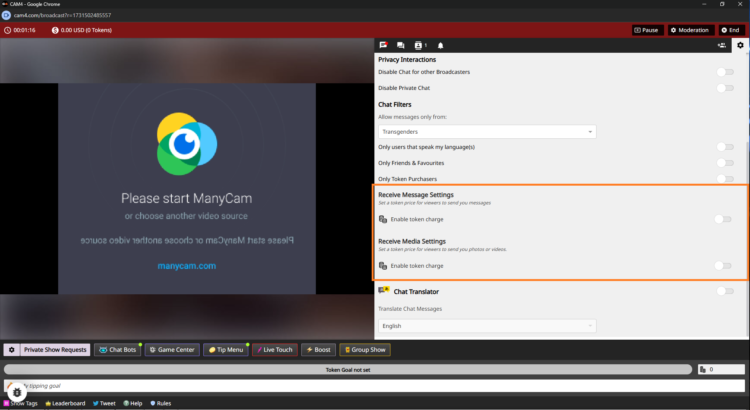
PPT instellingen tijdens stream

  1. Go live — log in and start your broadcast.
  2. Open chat‑settings — click on the gear (top right in your broadcast window) and scroll to the PPT‑section.
  3. Turn on pay per message — activate “Receive Message” and set amounts.
    Example: 5 tokens for public, 1 token for Fanclub (or free to stimulate sign-ups).
  4. Turn on pay for media — activate “Receive Media” with separate amounts.
    Example: 10 tokens for public uploads, 2 tokens for Fanclub‑uploads.
  5. No ‘Save’ needed — changes are applied immediately.

Step 3: Set Up in Messenger in Advance

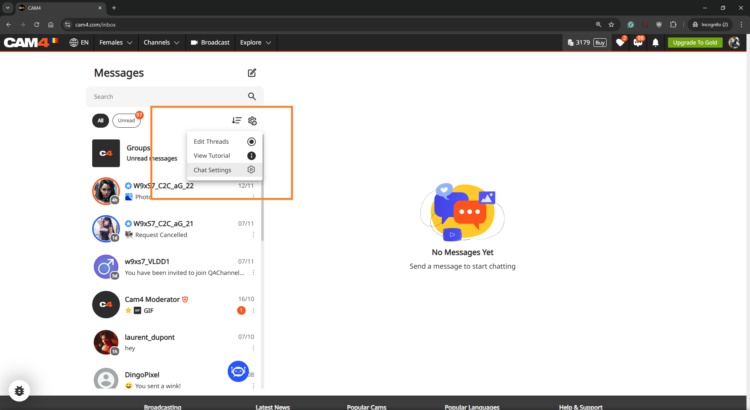
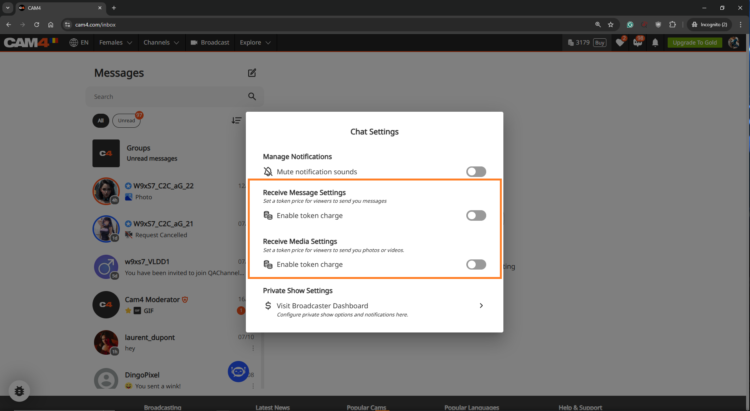
Want to get everything ready before you go live? Open the Messenger via the chat‑icon on your profile and set your PPT‑settings there. Everything is synchronized platform‑wide.

PPT in Messenger instellen
Messenger instellingen overzicht

Get the Most Out of Pay‑Per‑Text

Treat Fanclub as VIP

Give Fanclub free or discounted DMs/media and charge a higher rate for the public — this builds loyalty.

Experiment with Prices

Test different token amounts; find the sweet spot where income rises and fans remain engaged.

Test & Communicate

Check with a test account or ask a regular fan to test. Communicate your rates clearly to avoid surprises.

View Your Results

In your Broadcaster Dashboard, you can see per day what DMs and media yield. Check the Tip History tab and compare strategies: does media work better, or Fanclub‑messages?

Frequently Asked Questions

  • Can I only charge for media? — Yes. You choose whether to charge for messages, media or both.
  • What if a viewer has too few tokens? — They will receive a notification to buy tokens before the message or media is sent.
  • Are Fanclub‑messages free by default? — Yes, but you can adjust that. Set a few tokens or leave it free for conversion.

Summary: turn on PPT, distinguish between public and Fanclub, test prices, communicate clearly, and monitor your results. Consequence wins — every interaction becomes a chance to earn.

Goals & Tip Menu

Your guide to tipping options on CAM4

Tip menu and room goals — earn more by guiding your viewers

Earn more tokens by giving your viewers exactly what they want!
Your fans need to know what you’re willing to do and how to get you to do it. Keep your tip menu and your room goal separate by offering different things.

Pro tip: quick, fun actions keep energy high while tips also contribute to your larger goal.

Tip Menu — what is it?

The Tip Menu is a simple way to boost engagement. Create a list of actions with their token values so viewers know exactly how much it costs to see that action.

Broadcasters using a clear tip menu often see more interaction and higher show revenue.

Tip menu ideas

What you include is up to you — adjust based on what your audience likes.

  • Kiss-hands
  • Mention the viewer’s name or write it on your body
  • Flash breasts
  • Oil massage
  • Spanking
  • Twerk
  • Use toy for 15 seconds
  • Be creative — the sky is the limit!

Set up your Tip Menu

How to set it up

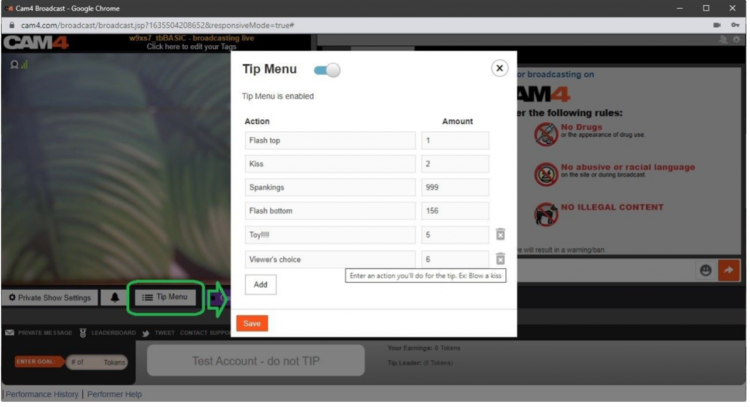
Find the Tip Menu near the Game Center and add your actions with the required tip amount.

Note: you must enter at least four (4) actions to activate your tip menu for viewers.

Setting up the tip menu

Manage & notifications

You can add up to 12 options. Use the trash icon to delete/update. Ready? Click SAVE to activate.

Once a tip menu is activated, you can’t remove it from your live show.

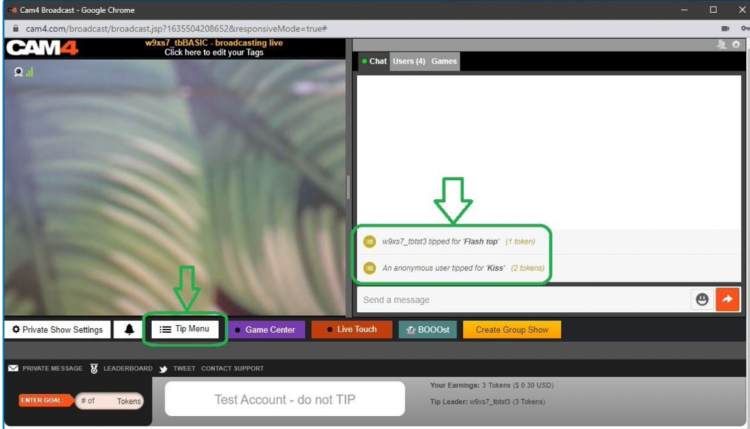
Your tip menu is automatically promoted in your chat so viewers know it’s active. When someone purchases an item, a special notification appears in chat.

Tip menu notifications in chat

Room Goal

Besides individual actions, you can also add goals. Goals are a joint challenge: viewers tip together to reach your target — once it’s hit, you perform the action.

Use goals for bigger actions, but start with micro-goals to maintain tension and give quick wins.

How to set it up

Once live, set your Goal! Click the white bar (right of the fire emoji) at the bottom of the broadcast window. Type the name of the action you will perform when the room goal is hit.

Then set the price: find the “Goal” box to the right of the grey bar that says “Token Goal not set” and add the amount in tokens.

Set your goal

Know your value

Think about what you want to do and how much you want to make before you go live. You don’t want goals that are too easy or too hard.

Example: want 1000 tokens (~$100 USD) per show? Split into four goals of 250 tokens.

  • Goal 1: 250 tokens = Naked
  • Goal 2: 250 tokens = Oil show
  • Goal 3: 250 tokens = Playing with yourself
  • Goal 4: 250 tokens = Cumming (only if you feel comfortable with that)

Pro tip: stick to your goals. If you keep changing them, it looks like you’re hesitating — viewers notice immediately.

SWAG Store – UK Only

New SWAG store: redeem your points for free goodies or convert them to CAM4 tokens — simple, fast and nicely organized.

The renewed SWAG store: points → goodies or tokens

Use your points for free products or convert them to CAM4 tokens. Everything in one simple flow — you choose.

Tip: you automatically save (up to 5% on top of your income) — check your points and redeem them.

CAM4 Pride SWAG

What is the SWAG store?

The SWAG store is the exclusive shop where you exchange points for goodies: sex toys, lubricant, CAM4 merch and more.

Save up to 5% on top of your income! With every earning, you automatically build up points for extras.

Discover the categories

Check out Cheetah Collection, SEX TOYS, Accessories, Classic Collection and European Products (scroll down a bit).

How does it work?

  1. Create account — click on the figure icon in the top right of the store to log in/register.
  2. Shopping — choose your favorites and add them to your shopping cart.
  3. Redeem points (rewards) — click on the gift icon in the bottom left to see your points balance.
    1 point = 1 USD. Click ‘redeem’ to create a voucher for the desired number of points; you will receive a unique discount code.
  4. Use discount code — add the code to your shopping cart; the amount will be deducted immediately.

Don’t forget to fill in your name in this form (so that we can easily find you):

Prefer tokens over products?

Also possible: exchange your points for CAM4 tokens. You can then simply have them paid out.

Why you don’t want to miss this

  • Choose free products with your points.
  • You decide when you order.
  • Everything clearly in one system.
  • Really feels like a reward for your work.

Go to the SWAG store

Note: availability may vary per region. Check your delivery options during checkout.

Extra promotion? UK only

Want to be in the spotlight? Upload your photos with your permission and let CAM4 promote you through our official channels.

Let CAM4 Promote You: Upload Your Photos (With Consent)

With your photos, we can promote you through our official channels — so you can reach more viewers faster and build a loyal fanbase.

Tip: upload multiple photos with different angles and poses for the best match with our channels.

How Does It Work?

Simply upload your latest photos via the form. We review them and prepare them for promotion. Do you have new content? Feel free to upload again. Want to switch faster? Send us a message.

Short Checklist

  • Recent, sharp images (good lighting, quiet background).
  • Mix of close-ups and full-body.
  • Indicate in the form where you want to be visible (opt-in/opt-out).

Where Will You Be Promoted?

Twitter / X

Optional — you choose whether you want to be visible here (adjustable in the form).

Telegram

For direct fans and followers who want to quickly see when you are online.

Push Notifications

Directly to CAM4 users for maximum visibility.

This way we ensure that your name and content reach as many people as possible.

Consent is Key

Nothing is shared without your permission. In the upload form, you indicate yourself what may and may not be used. You keep control — including a separate choice for Twitter/X.

You Decide

  • Choose per channel whether you want to be visible.
  • Adjust your preferences whenever you want by uploading again.

Respect for Boundaries

We only work with material that you have explicitly allowed and that falls within the platform rules.

Ready to Shine?

Click below to upload your photos and indicate how we may promote you:

➡ Upload Your Photos Here

We look forward to sharing your content and giving you even more visibility!

Please note: by submitting you agree to review and use according to your specified preferences. You can always change your preferences by uploading again.

First time live – Password Practice Show

A safe start to check everything in advance!

Offline Practice Before Your First LIVE Broadcast

Before you go live for the first time, you can practice with a Password Show first. This way you can discover how broadcasting works in peace and quiet — without direct viewers in your room.

Tip: Use this as your “dress rehearsal” to reduce stress and go live with confidence.

What is a Password Show?

A Password Show is a private broadcast that is only accessible to people with the password you set. You can just keep this password to yourself so you can practice completely privately.

Practice: What Are You Going to Test?

1) Explore the Buttons

See how your camera appears, where you set your goals, and how to make the Tip Menu visible.

2) Test Your Setup

Check your light, sound, background, and camera position without pressure from viewers.

3) Practice Your Flow

Go through how you want to build a show: from greeting to working with goals and menus.

Make it a practice show — use micro-goals as if you were live. This way you learn what goals look like on screen.

  • Goal 1: 10 tokens = check what the goal looks like
  • Goal 2: 20 tokens = test sound and music
  • Goal 3: 30 tokens = change camera position

Pro tip: write down notes during your Password Show — what works well, what do you want to adjust?

Why This is Smart

A Password Show gives you:

  • Peace to learn the platform technically
  • Confidence before going live for a large audience
  • Less chance of stress or technical glitches during your first real show

Setting Up a Password Show

Go to your broadcast screen, choose “Show Type” and select Password Show. Set a password and keep it only for yourself if you just want to practice.

Steps:

Open Broadcast Screen
Choose ‘Password Show’
cam4 password show

Set Password
cam4 password settings

Go Live & Test
cam4 private

You can use the same process later to do a private show with a select group of fans.

Do’s

  • Use the Password Show as your practice space
  • Test both camera and sound extensively
  • See how goals and tips appear on screen
  • Feel free to practice multiple times before you go “really” live

Pay Attention

  • Don’t forget to set your settings back to a regular broadcast after your Password Show
  • Don’t just pass on your password if you really want to practice privately
  • Always stay within your own boundaries and platform rules — even in a Password Show

Important: adhere to local laws and platform rules. Only 18+ performers and consent is always required.

Tips for Kicking Things Off Right

We’ll tell you everything here — short, clear, and applicable.

The secrets to becoming a TOP webcam model on CAM4

This article helps you get off to a flying start for more viewers, more interaction and more tokens — without unnecessary complexity. Focus on your Activity Feed and Fanclub for reach and stable income.

Tip: work with clear goals, a clear Tipmenu and a consistent posting cadence on your Feed.

1) Start here: account, verification & payout

Before you can go live: verify your age/identity and set up your payout in 10 minutes. Block countries/regions if necessary.

Account & ID‑check (2257)

All performers (18+) must be ID‑verified. This also applies to duos/groups — everyone on cam must be verified.

Get started with ID‑verification

Set up payout

Choose your payment method and check your details. Read how and when you will be paid.

Payout optionsSet it up now!

Practice online for the first time

Start without being immediately visible. This way you can safely look around and set everything up in peace

Read here how to do that.

2) Create an irresistible profile

Your profile is your landing page. Show in 5 seconds who you are, what you do and when you are live.

Bio

Short and powerful, with your vibe and boundaries. Add your broadcast schedule and a clear call‑to‑action.

Images

A clear profile picture + 2–4 recent photos that show your style.
Avoid busy backgrounds and very important add a

SFW profile pic
.

Clarity

Put your Tipmenu and (micro)goals in your description so viewers know immediately how they can participate.

More help? How to create a strong profile page

3) Set goals and achieve them

Without a goal, your show feels “non‑committal”. Break your daily goal down into visible micro‑goals and communicate them clearly.

Example — do you want 1000 tokens (~100 USD) per show? Divide into 4 milestones of 250 tokens.

  • Goal 1: 250 tokens = naked
  • Goal 2: 250 tokens = oil‑moment
  • Goal 3: 250 tokens = solo
  • Goal 4: 250 tokens = closing moment (only if you feel good about it)

Stick to your goals. Changing constantly damages trust — and your tips.

Hint: the text in your goal bar is limited. Keep the mapping‑scheme simple (e.g. @250 → naked, @500 → oil, @750 → solo, @1000 → end).

More help? Goal & Tipmenu

4) Increase Your Visibility with Niche Pages

Being discovered by the right viewers is no coincidence. By adding yourself to relevant Niche Pages, you connect with fans who are specifically searching for your style, look, or type of content.

Choose strategically

Select niches that truly match who you are. Does it align with your profile, hashtags, and type of show? If so, you’ll attract more targeted and higher‑quality traffic.

Stay consistent

Make sure your bio, photos, and thumbnail reflect your chosen niches. Recognition builds trust — and tips.

Think ahead

Want to grow within a specific category? Stream regularly within that theme so your audience knows what to expect.

Tip: combine 2–4 strong niches instead of selecting everything. Focus works better than volume.

Want to learn more? Everything about Niche Pages

4) Earn more with group shows and private shows

Group show = exclusive show with ticket for multiple viewers. Start after a maximum of ~15 minutes intro and thank each ticket holder audibly.

Private show = 1‑on‑1 per minute (spies can watch for a fee, without chat). Choose a rate that suits your offer and experience.

Starter rate

Many models start around 12–18 tokens/min.

C2C

Cam2Cam is more common around 18–32 tokens/min.

Transparency

Viewers see your price + local taxes, keep this in mind.

Pro‑tip: name in advance what makes private different/better than your public show.

Read more: Group shows •  Private Show options

Offline private shows (notifications)

Also let fans book when you are not live. Turn on OPS‑notifications and accept when it suits you.

Explanation: Enable Offline Private‑notifications

5) Activity Feed & Fanclub 

Activity Feed: post short updates, teasers and show‑announcements outside your live‑hours. Mix public (reach) with Fanclub‑only (value).

Fanclub: offer benefits that you can sustain (exclusive posts, early access, monthly shout‑out). Choose a monthly price that suits your rhythm.

Want to know more? Activity Feed & FanClub

6) Tipmenu (keep it simple and visible)

Put 6–10 fixed items in your profile description and repeat them verbally during your show. Link to your goals where possible.

Small tease 25 tokens quick boost
Pose / close‑up 50 tokens
Dance / hype‑moment 100 tokens
Wheel spin / mini‑game 150 tokens
Oil‑moment 250 tokens
Solo‑highlight 500 tokens
Group show ticket variable
Private show per minute

Need more help? How many tokens can I ask?

7) Pay-Per Text

Pay per Text: earn from DMs without negotiating

How to use it

Set a fixed price per private message and mention this in your bio or Feed. Use it for short questions, personal responses and quick requests — within your boundaries and platform rules.

Price indication

Start simple and test: many models start between 1-2 tokens/message. Increase when busy, decrease for more volume.

Useful example sentences

  • “Want a personal shoutout? Pay per Text is on.”
  • “Ask your question in DM — 1-2 tokens per message.”
  • “Fanclub gets priority with Pay per Text.”

More info: Earn more with Pay per Text •  All about messenger

8) More viewers to your shows

  • Thumbnail: fresh setting, good light, expression. Avoid the “just a bedroom”‑look.
  • Description: short, unique and with a clear invitation (what do you want to happen NOW?).
  • Hashtags: 3–5 strong tags is often enough.
  • Rhythm: stream at fixed times and announce via your Feed.

Read more: Maybe outside? •  Schedule Shows

9) Interactive toys

Increase engagement and tip‑frequency with interactive toys (e.g. Lovense). Announce thresholds (e.g. “at 200 tokens: intensity up”).

More info: Which toys can you use? •  How do you connect it?

10) Games

Use Token Keno, Spin the Wheel and Roll The Dice for extra excitement and income. Let viewers bet tokens and link creative rewards to outcomes (assignment, piece of clothing off, special interaction).

Need more help with games? All CAM4 games

11) X/Twitter Connect & Social Media

Use X/Twitter for announcements, clips/teasers and community‑building. Share your affiliate‑link smartly.

Tip: plan posts around your shows (morning‑announcement, reminder 1 hour in advance, thank you afterwards).

12) Chat‑indicators: badges, colors and token activity

Who do you see at a glance?

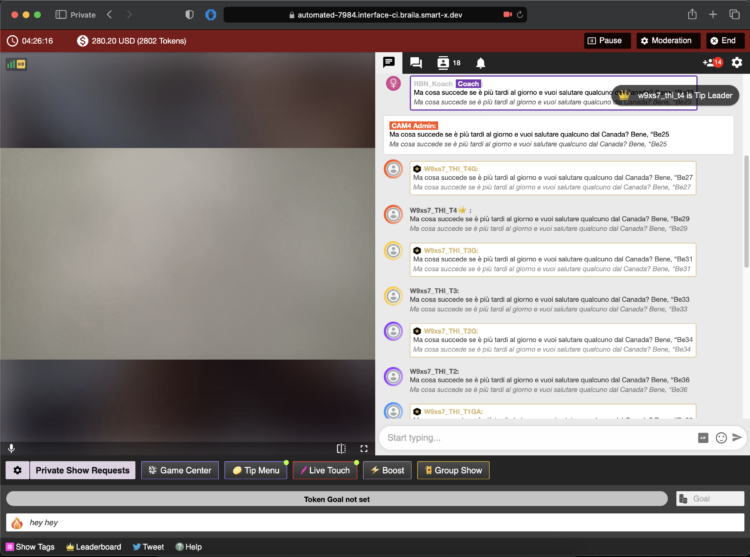
  • Gold/fans: special color/badge — greet quickly, involve them in goals.
  • Moderators: marked — are there to help, but be careful those rights are not for everyone.
  • Top tippers: stand out — mention them audibly with every tip.
  • CAM4 Crew: account managers/coaches etc have clear visibility.

How to read and use indicators

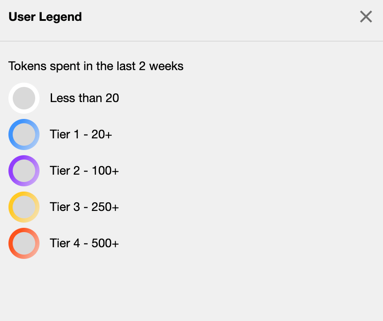
  • Colors/badges show role and membership; the ring around someone’s icon = recent spending (14 days).
  • Does the ring stand out? Invite specifically: achieve micro‑goal or choose 1–2 menu‑suggestions (e.g. 25/50/150 tokens).
  • Use a fixed sentence: “120 more to go until Goal 2 — thanks to [name] for the boost!”
  • Make rewards audible: thank you at every threshold (name + what unlocks).

Want to know more? Explanation about chat‑indicators

13) Protect yourself & moderate

Privacy

Be careful with personal data. Protect your privacy

DMCA – recordings

Know what to do if your show has been recorded. Broadcast recorded — what now?

Help!

If you really can’t figure it out, our support is available 24/7!

Also interesting: Banning & ModeratorsBlock countries & provinces

Erotic Stories Submissions


CAM4 is now publishing Erotic Stories and we want yours!

If your story is chosen, it will be published, narrated, shared with our audience, and you’ll get paid. You can even choose to stay anonymous if you prefer.

Word limit: 500–1500 words. That’s all it takes to turn your imagination into income.
Payment details: Will be provided by email if your story is selected.
Publishing: Selected stories will be filmed, creating narrated videos that are published weekly on our Erotic_stories profile on CAM4.
Editing: Light editing may be applied for a smoother read for video narration and to comply with CAM4’s terms and conditions.


Why Submit?

  • Get seen. Your story reaches thousands of readers & listeners.

  • Get paid. Selected stories earn real money.

  • Get creative. Share your fantasies in your own unique voice.

  • Get Content. Use your story yourself by selling it to your fans.

Quick Writing Tips

  • Find your voice — be authentic and let your style shine.

  • Build tension — anticipation is everything.

  • Make it sensory — show, don’t just tell.

  • Keep it polished — clean writing stands out.

  • Don’t get too wordy – Stay within 500–1500 words.

For a full beginner’s guide with more tips, click here.

Ready to Submit?

It’s simple:

  1. Write your story (500–1500 words).

  2. 👉 Submit Your Story Here

  3. If your story has been selected, a CAM4 staff member will email you with more details


Your fantasies deserve more than to stay in your head. Put them on the page, share them with the world, and let them earn for you.

Start writing today — your audience is waiting.


Need a Hand?

For more information on topics relating to CAM4, check out our FAQ , or join our live Coaching Sessions every Tuesday & Thursday at 11 AM & 8 PM EST.

Our chatbot “Spark” is also always ready to help and can be found in your Inbox!


Now get writing, have fun, and let the love (and tokens) roll in!

Happy Camming!

Fan Club Pricing: What Successful Creators Charge

What is a CAM4 Fan Club?

A Fan Club is a monthly subscription where your biggest supporters pay a set fee to get exclusive access to you and your content. Unlike one-time token tips or purchases, Fan Clubs bring guaranteed monthly income directly into your account.

By joining, fans get:

  • Exclusive content (photos, videos, behind-the-scenes material). This is where your NSFW content should be hiding!
  • Special perks like chat badges, free spy access to shows, and private messaging.
  • Discounted rates on your premium videos and content.

Fan Clubs are not only about exclusive perks, they’re a way to strengthen your connection with fans while earning 80% from every subscription, more than you receive from token purchases!

Suggested Fan Club Pricing

Here are five options inspired by top creators and platforms:

50–75 tokens/month ($4.99–$7.99) – Perfect for beginners and building your base.

75–125 tokens/month ($7.99–$9.99) – The sweet spot for casual fans and one of the most popular ranges across platforms.

125–150+ tokens/month ($14.99+) – Best for creators with consistent content, loyal fans, and premium material.

Tip: Start in the mid-range (~$5.99) and adjust based on demand, the volume of your content, and fan engagement.

Quick Pricing Guide (Cheat Sheet)

Content Type

Entry / Promo

Standard Range

Premium / High Effort

Fan Club

50–75 tks ($4.99–$7.99)

75–125 tks ($7.99–$9.99)

125–150+ tks ($14.99+)

Photos (single)

Free – 5 tks

10–25 tks

30–50 tks

Photosets

10–25 tks (5–10 pics)

25–150 tks (10–15 pics)

50-300+ tks (15-20 pics)

Videos (short <3m)

Free – 25 tks (teasers)

50–120 tks

150 tks+

Videos (medium 3–10m)

1-25  tks

25–100 tks

120-300+ tks

Videos (long 15m+)

25-100 tks

250–400 tks

500–600 tks (high effort)

Tip: Use freebies (1–2 pics or <1 min clips) as teasers. Offer seasonal discounts (10–20%) to boost sales without devaluing your work.

Photosets & Unlockables

  • SFW content: Free or unlocked automatically to tease your style.
  • Single photos: 5–25 tokens depending on explicitness.
  • Bundles (5–10 pics): 15–25 tokens.
  • Larger sets (10–20 pics): 150–300 tokens.

Mix in occasional freebies on your Activity Feed. This gives fans a taste of what’s inside and helps hook new subscribers.

Videos

  • Short (1–3 mins): 50–120 tokens. Teasers and quick clips sell best here.
  • Medium (3–10 mins): 75–250 tokens depending on effort and explicitness.
  • Long (10–15+ mins): 250–600 tokens, especially for high-effort or special releases.

Pro tip: Cut longer videos into shorter clips for easier sales and more views. Keep a few <1 min teasers free for promotion.


Do’s and Don’ts for a Successful Fan Club

Do’s

  • Post consistently to give fans ongoing value.
  • Make members feel special with perks and exclusive drops.
  • Offer discounts or seasonal promos (10–20%).
  • Reply to messages — engagement keeps fans loyal.
  • Refresh your content often (new covers, contests, seasonal sets).

Don’ts

  • Don’t set it and forget it — inactivity = unsubscribes.
  • Don’t overprice if you’re not offering strong exclusive value.
  • Don’t forget to promote — mention your Fan Club in every post/show.
  • Don’t give everything away outside the Club — keep your best material inside.

Need a Hand?

For more details check out our FAQ on this topic and others, or join our live Coaching Sessions every Tuesday & Thursday at 11 AM & 8 PM EST.

Our chatbot “Spark” is also always ready to help and can be found in your Inbox!


Now go live, have fun, and let the love (and tokens) roll in!

Happy Camming!

EROTIC STORIES : A Beginners Guide To Writing

If you are a new or an experienced writer who is looking to have you stories published we are here for you. You can submit your story or idea to us for review and if we publish it we’ll pay you $$$!

SUBMIT YOUR STORY HERE

We are here for you!  So lets cut to the chase. Below, I will break down some actionable items to help you get started.

(Noun) literature or art intended to arouse sexual desire.

Erotica, unlike pornography, is designed to arouse and provide stimulation to the reader based around plot and character development. It is not just one long sex scene with all action. Not to say that your sex scenes can’t be explicit; the more detailed the better. However, it must be grounded in plot and character growth.

If your story contains more plot and characters, with minimal sex or less explicit scenes. You may be venturing into erotic romance.

If you are serious about getting started in erotica, we need to address privacy. One of the most important questions you’ll have to ask yourself is if you’ll write under your Industry name or a new pen name.

For those who don’t know. A pen name is essentially a pseudonym that you can use professionally in your writing, books, blogs, public profiles, and social media.

There are many pros to using a pen name. For example:

Using a pen name will allow you some creative freedom to write that is separate from your career in the adult industry.  You can keep that part of your life separate from your professional one and take on a whole new persona.

A con would be…

If you use a pen name instead of your industry one, you now need to grow that name instead of getting visibility right away due to your current success and following. 

Whichever route you take, it’s an important first step.

The erotica community is alive in all corners of the internet. At a minimum, I would recommend you join Twitter. If you are unsure on how Twitter works or the most effective ways to get noticed on that platform there are some great guides out there with a quick google search or even here on Medium.

After you complete your profile information and upload your picture (or icon, stock image if you are using a pen name) seek out some authors of interest. Do a quick #erotica search and you will be inundated with accounts to follow. Check out some profiles to see if they are writing the things you are into.

An important step that a lot of people miss, and the key to getting more involved in the community is simple: When you grab a copy of someone’s book, tell them. If you like it, let them know. Extra points if you leave a review. Not only will a review make you stand out from the crowd, they are rare and greatly appreciated in the world of erotica.

Let your growing audience know that you are new to the genre. You will find a very supportive group of people who can help you on your way.

Some great tags to keep tabs on are #erotica #writingcommunity #eroticacommunity

Time to loosen up. Open up a new document or start a new notebook and pour yourself a drink of your choice. We are going to get dirty. I want you to practice writing scenes made to titillate your audience. Your goal, after all, is to help someone reach their goal.

For example, don’t do this:

She reached for his love muscle and put it in her warm cavern.

Do this:

She grabbed his dick, smiling at the weight in her hand. Guiding the head to her slick entrance. She teased herself as she sat. Moaning as the thickness filled her cunt.

The second uses a lot more graphic language and some people will struggle with getting into the ‘dirty’ words. Practice them until you are comfortable. Take your last sexual encounter, write about it. Describe it as if you were writing it into a book. Watch some pornography, a quick 20–30 seconds sample and try to write it into words. Use all five senses.

Another exercise is to write short acts like the one above. Mix it up. Try it in the first person perspective, then switch and try it from the male POV. How did he see and feel things compared to her? Write that down, then keep going. Just keep filling your page or your document.

When you are starting out you may find it easier to write a story containing things you yourself are interested in or have a fetish about. If you have fantasies about lesbian or gay sex. Write a story about it. Hotwife, shared wife or cuckolding? Write it. Vampire alien breeding with a hucow who is into bondage. Yup write it. You will not be the only one into it.

A word of warning on this point. These kinds of stories will likely get your book removed as well as running the risk getting your account banned on Amazon: Underage, Non-Consent, Incest, Bestiality (unless its a werewolf or other mythical creatures) If you have any doubts refer to Amazon or the forums.

This rule is no different from that of other genres. If you want to be a good erotica writer you need to read a lot of erotic fiction. 

Download some books from the authors you are interacting with on Twitter. Pick up some from varying POV. Try some written by female and male authors. Maybe try different sub-genres that you have an interest in, but never experimented with.

Most of all, take notes. Write what you liked and what didn’t work for you. Review once you have a few stories under your belt. If you find yourself constantly liking to read third person stories, you will likely have more success concentrating on that POV. First person more your style? Write that way.

If you pick up some badly written erotica, just return it and move on to the next one. 

Make sure you enjoy what you write, burn out and lost motivation is as real in erotica as it is in other genres.

I cannot emphasize joining the community enough. I’ve met some great people since I started and would be at a loss without the other authors/readers on Twitter.

~That’s all for this lesson!

Happy Writting!
Love, Your Coaching Team!

Unlocking the Power of the new Activity Feed

The Activity Feed is CAM4’s latest and most exciting tool yet! Designed to help you, the creator, to effortlessly showcase and monetize your offline content into one simple feed, serving as an all-in-one platform to share updates, post photos, monetize your videos, and grow your audience—similar to the layout of most social media platforms. 

With complete control over your feed, you can curate the content you want fans to see, reflecting your unique style and giving your content the visibility it deserves.

Let’s dive into how to use it effectively!


What is the Activity Feed?

The Activity Feed lets you transfer content from your Galleries and My Shop areas into a dynamic, interactive feed displayed prominently on your profile.  By leveraging this feature, you can:

  • Keep fans engaged with daily updates, curate content, and add exclusive posts.
  • Promote and monetize your recorded video content
  • Promote Fanclub signups and special promotions

How It Works

1. Customize Your Profile

Your profile is a visitor’s first impression—make it count! Add a captivating SFW profile picture and cover image to reflect your personal brand. A visually polished profile helps turn casual visitors into loyal fans.

2. Transition Your Content to the Feed

  • Your existing Galleries and My Shop content will automatically be converted into posts, updated every 24 hours.
  • Initially, these posts will be visible only to you, giving you the opportunity to curate and refine your feed before launching it to your audience.

Once the feed is live, Galleries and My Shop will be retired and no longer displayed in seperate locations.   *Rest assured: purchased videos will remain accessible to buyers.

3. Launch Exclusive Content with Your Fan Club

Boost your income by offering exclusive perks through your Fan Club subscription:

  • Create a Fanclub or simply update your existing  Fan Club via the Broadcaster Dashboard.
  • Provide premium content that club members will continuously engage with, building a dedicated audience within your Fan Club. 

4. Monetize Your Video and Image Content

Create and share video and image posts that your audience can purchase, offering exclusive content to paying fans or subscribers while boosting your revenue. Provide VIP content to encourage memberships and maximize your earnings.

5. Your Media Library

The new Media Vault consolidates your photos and videos into one convenient location. Previously uploaded media is already there, ready to be posted directly to your feed.

6. Keep Your Content Fresh

  • Consistently share creative, diverse, and enticing posts to attract and retain fans.
  • Use the feed to highlight different aspects of your talent and build a robust collection of content that keeps fans coming back for more.

Why Did CAM4 Launch The Activity Feed To  Creators First?

Before the Activity Feed is rolled out to all users, creators are getting exclusive early access, giving you the opportunity to:

  • Explore and familiarize yourself with the platform’s new design.
  • Curate your feed to match your personal style and organize your content seamlessly.
  • Fine-tune and add exclusive content to effectively monetize your feed.

By preparing in advance, you’ll maximize the impact of your Activity Feed when it’s unveiled to your fans.


Tips for Success

  • Set Preferences Early: Take a few minutes to customize your notifications and get comfortable with the new settings.
  • Check Regularly: Make it a habit to monitor your feed daily to stay updated and respond to fan activity.
  • Engage Promptly: Interact with comments and messages quickly to build stronger connections with your fans.
  • Post Consistently: Frequent updates keep your audience engaged and help attract new fans. 

Why You’ll Love the Activity Feed

  • Increased Visibility: Fans can easily discover your latest and historical posts.
  • Enhanced Productivity: Manage all your updates in one place.
  • User-Friendly Design: The platform is intuitive and familiar, making it easy to navigate.

Ready to take your content to the next level? Start curating your Activity Feed today and prepare for a seamless launch to your fans. Let your creativity shine and watch your audience grow!