All posts by Julia

Outdoor Streaming Guide

Streaming outdoors or indoors? Keep it safe, legal, and creative — here’s how to make exciting shows from your own property (without unnecessary risk).

Streaming Safely (Outdoors) on CAM4

You often make the best shows right at home — kitchen, balcony, garage, or garden. Keep it legal, private, and safe, and you can be fully creative.

Tip: Only stream on your own property or a private location with the owner’s permission.

Streaming Outdoors: Basic Rules

  1. Make sure only you are in the picture/audible. Casual passers-by have not chosen to come online.
  2. Stream on your own property or a private location with permission. Avoid public places, stores, or someone else’s property.
  3. Car shows? Only stationary and with the engine off.
  4. Pay attention to copyright/brands in the picture and music in the background.
  5. Hide recognizable location information (street names, license plates, recognizable buildings).
  6. Children (under 18) must never be visible or audible. Violation leads to immediate removal of your account.

Always check local/national laws regarding public morals and privacy. You are responsible for a legal set-up.

Sexy Ideas per Location (Home & Private)

Kitchen

  • Host your own “cooking show” with playful challenges.
  • Creative ways to use props/kitchen utensils (within platform rules).
  • “Vegetarian” theme show with playful, safe food props (hygiene first).

Terrace or Balcony

  • Use doors/windows as decor and suction cup props on glass.
  • Present a “weather report” as an intro to your show.
  • Involve your patio furniture as playful set pieces.

Garage

  • “Tune-up” theme: working on your car as a setting (safe, engine off).
  • DIY show: nod to handyman programs.
  • Use (clean) tools as decor/prop — no sharp edges.

Pool or Jacuzzi

  • Show with swimwear, pool party vibes.
  • BBQ + pool theme for a summer set.
  • Mermaid/merman or lifeguard fantasy.

Laundry Room

  • “Laundry day” with dryer props (pay attention to stability/safety).
  • Cheeky undergarment moment (within your boundaries/rules).
  • Minimal outfit reveal when sorting laundry.

Do’s & Don’ts (Important!)

Do’s

  • Keep your frame under control: only you in the picture, background clean.
  • Work with decor/props that are stable and clean (hygiene).
  • Use a private location and check neighbor/environment view.
  • Communicate your boundaries and keep your Tip Menu/rules visible.

Don’ts

  • Do not stream in public spaces, stores, or someone else’s property.
  • No moving cars or running engines.
  • No recognizable third parties (face, voice) or children in picture/sound.
  • Avoid logos/music with rights — or turn off audio.

In Conclusion

Stream from your own property or an approved private place: this protects yourself and respects the privacy of others. Indoors or outdoors — with smart framing, clear rules, and creativity, you have endless possibilities for exciting, original shows.

Remember: safety and compliance with legal and platform rules come before everything. In doubt? Choose an indoor set-up with a controlled background.

Private Show Possibilities

All you need to know about private shows on CAM4 — per minute, time blocks, or solo private with spies.

Private Shows on CAM4: How to Earn Smart with 1-on-1

Choose per minute, work with pre-paid time blocks, or start a solo private show with spies. Clear prices = more trust (and therefore more tips).

Tip: also mention your private options and rates in your bio or Activity Feed.

What is a private show?

A private show is an exclusive show between you and one viewer. Depending on your settings, others can (paid) watch as “spy”. With private shows, you are guaranteed to earn tokens per minute or sell a time block in advance.

Three ways to earn with private

1) Pay per minute

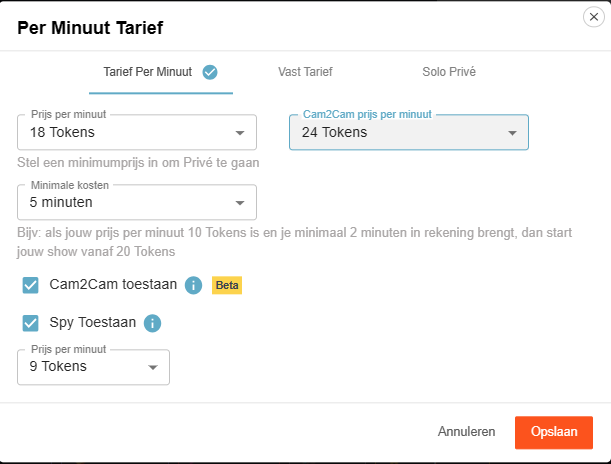
Pay per minute (settings)

Viewers see the cost per minute before requesting a private show; in the Netherlands, 21% VAT is applied upon purchase.

Guideline example: 12 tokens/min is $1.20 per minute for you. Your viewer in the Netherlands sees an amount of 15 tokens/min including VAT. This VAT percentage varies per country where your fan lives.

Pro tip: allow spying (Spy). These viewers only see the image, no chat, and hear no sound.

2) Time blocks (pre-paid)

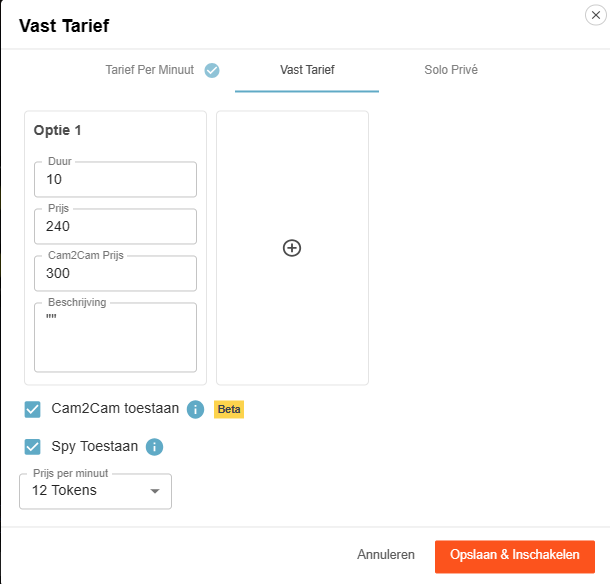
Fixed rate for time blocks

Offer pre-paid blocks. You choose the duration and the price; the viewer chooses and pays.

Advantage: you are assured of the entire block. If the viewer clicks away themselves, you will still be paid the full block. If you end it yourself or your connection drops, the tokens go back to the viewer.

3) Solo private show

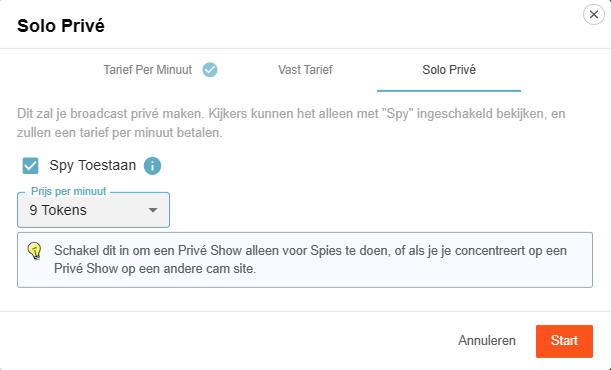
Solo private show display

You appear to be in private, but you are alone. Spies can — if you allow it — watch for a fee and pay per minute.

Useful for calmly setting up your games or settings (turn off Spy then), or if you are running a private show elsewhere and want to generate income on CAM4 at the same time via spies.

Cam2Cam: make your private show even more intimate

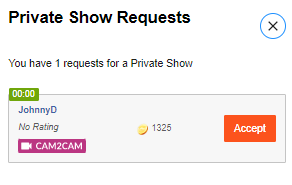
C2C offers more intimacy and often higher per-minute prices — communicate your terms and boundaries in advance. Some models find it much nicer to be able to see the viewer themselves, but some do not. Adjust your price accordingly.

Activate Cam2Cam

Activate Cam2Cam

Go to the settings of your Private Show via the gear next to ‘Requests for private shows’. Set your C2C price and check ‘Allow Cam2Cam’. Save — done.

What does it cost?

Cam2Cam is usually ±1.25× the price of your normal private show. If you normally ask for 12–18 tokens/min, then 18–24 tokens/min for C2C is a logical range.

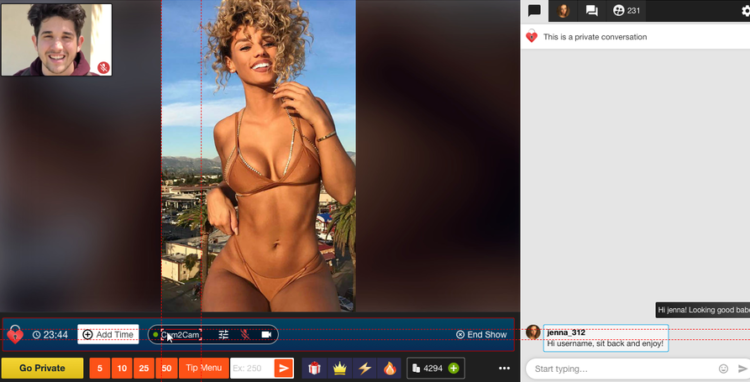
Enlarge/move C2C window

During the show


  1. The video of your viewer appears in a corner of your screen (movable and scalable).
  2.     

  3. Use the Cam2Cam buttons: mute and volume control.

Auto-Pause: your time after a private show

Auto-Pause

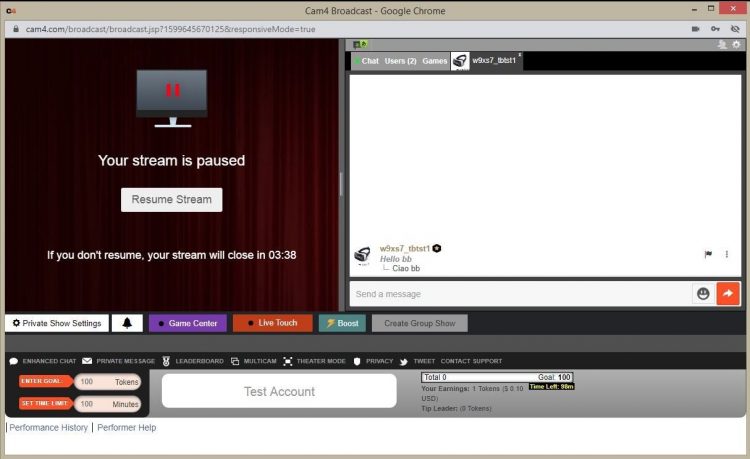
Auto-Pause gives you time to catch your breath after a Private or Group Show, before your public stream goes live again.

How does it work?

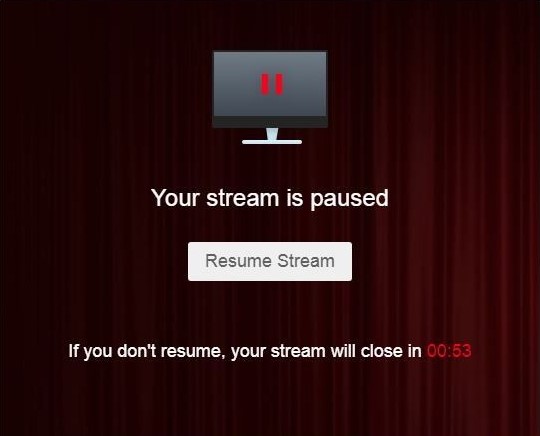
Afterwards, your stream automatically pauses for up to 5 minutes. Get something to drink, change clothes, or reset your setting — you decide.

You can resume earlier at any time via “Resume Broadcast”. If you wait longer than 5 minutes, the stream ends automatically.

You will not receive private requests during the pause.

What you see

Auto-Pause performer view

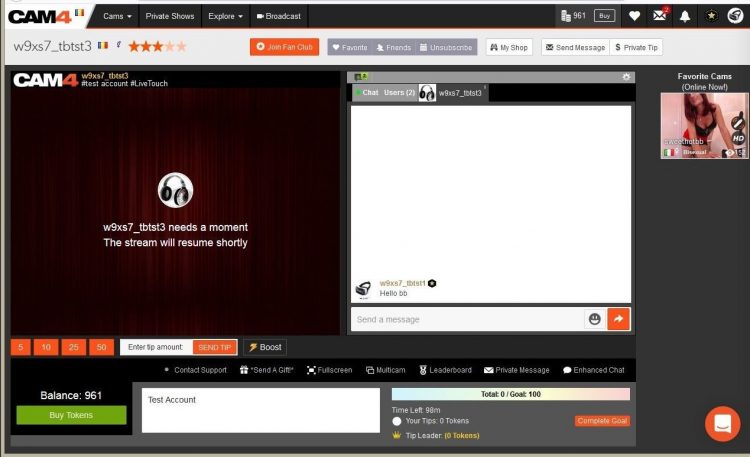
What viewers see

Auto-Pause viewer view

Resume Broadcast button

Price & transparency

Communicate in advance what makes private different from your public show (tempo, requests, Cam2Cam, no negotiations) and stick to your rates. Clarity increases conversion and prevents hassle.

Never miss a private show request again: with Offline Private Show (OPS) notifications fans can book at any time and you choose how you are alerted.

All Verifications upto 2257

Everything you need to know about verifications on CAM4: how you can broadcast, get paid, and comply with the law.

Verification Types on CAM4

To work safely and professionally on CAM4, there are several types of verification. These checks ensure that you are allowed to broadcast, can be paid, and that you comply with the legislation.

Please note: processing usually takes 1–3 business days.

The three types of verification

1) Broadcast Approved

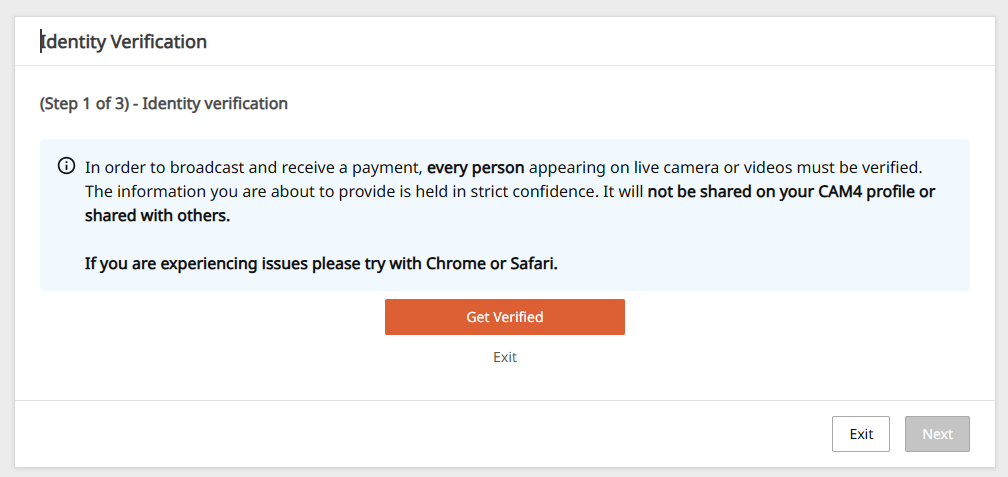
Required to be allowed to broadcast. Your ID is checked to confirm that you are 18+. After approval, you can go live.

Identification example
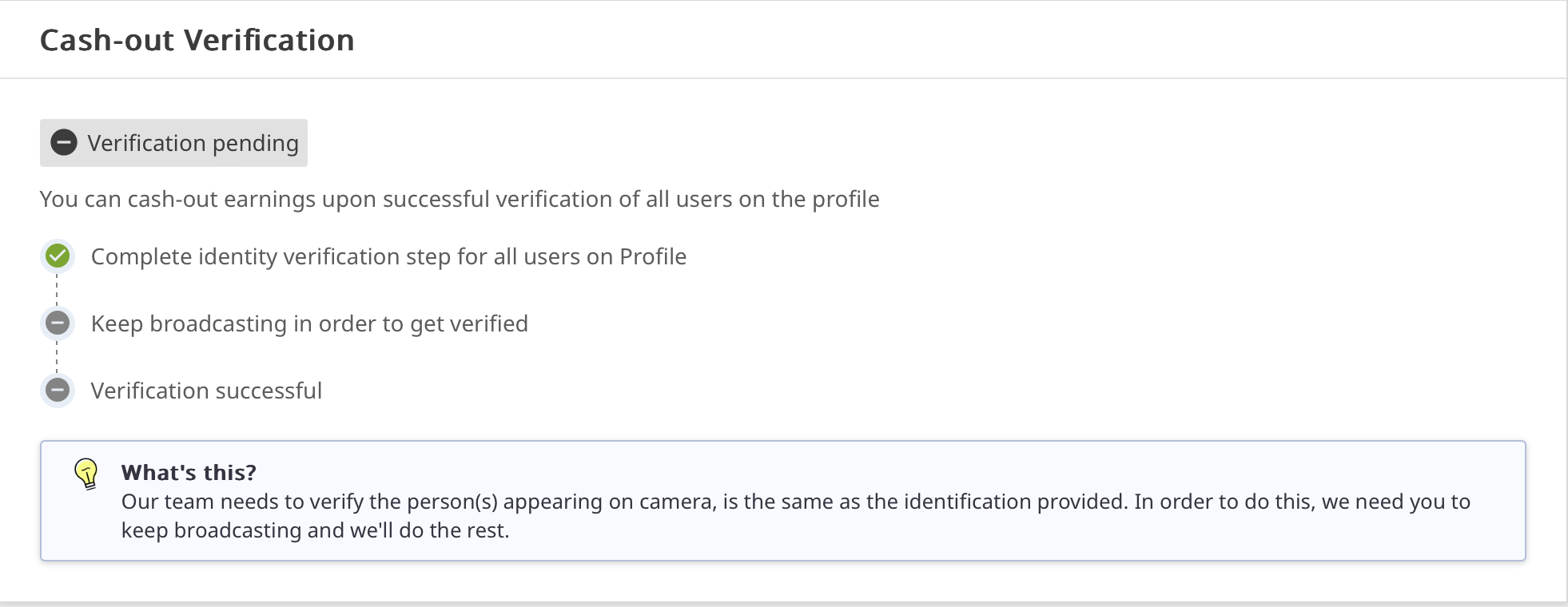
Broadcast Approved example

2) Verification for Payment

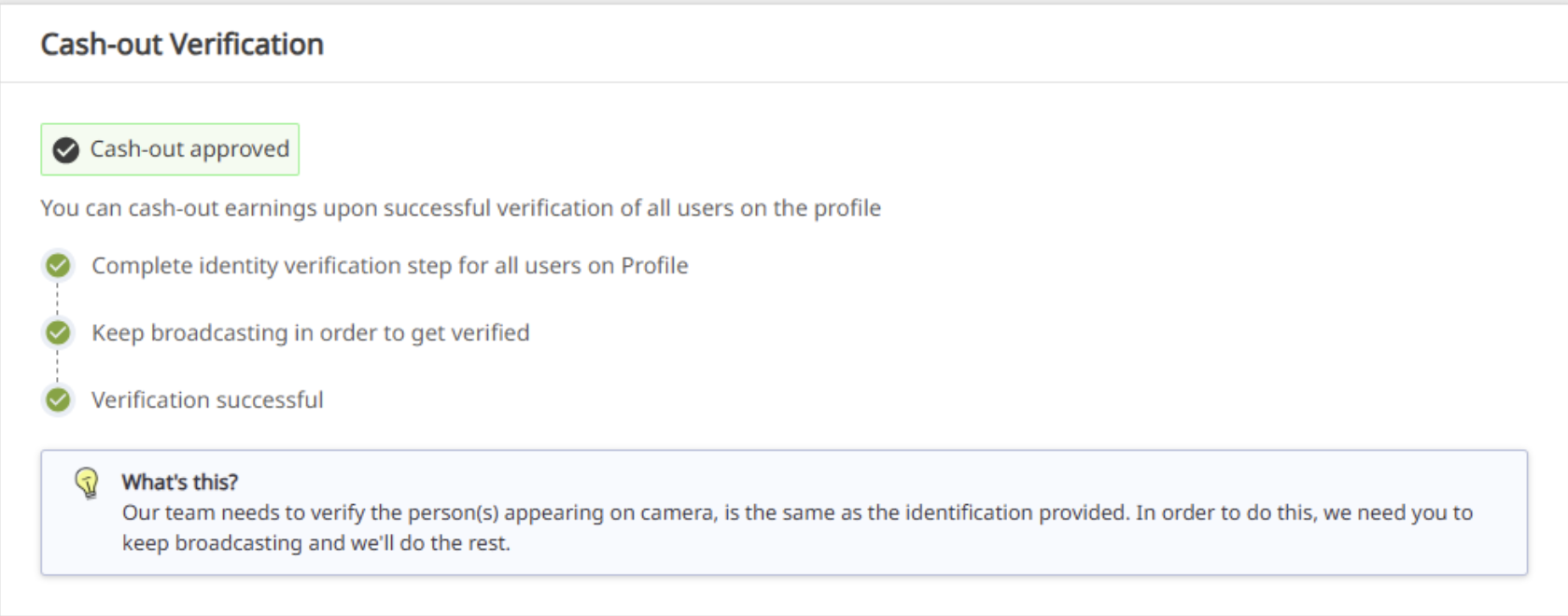
Required to have tokens paid out. You upload your ID and your profile is officially approved for payouts.

Cashout Approved example

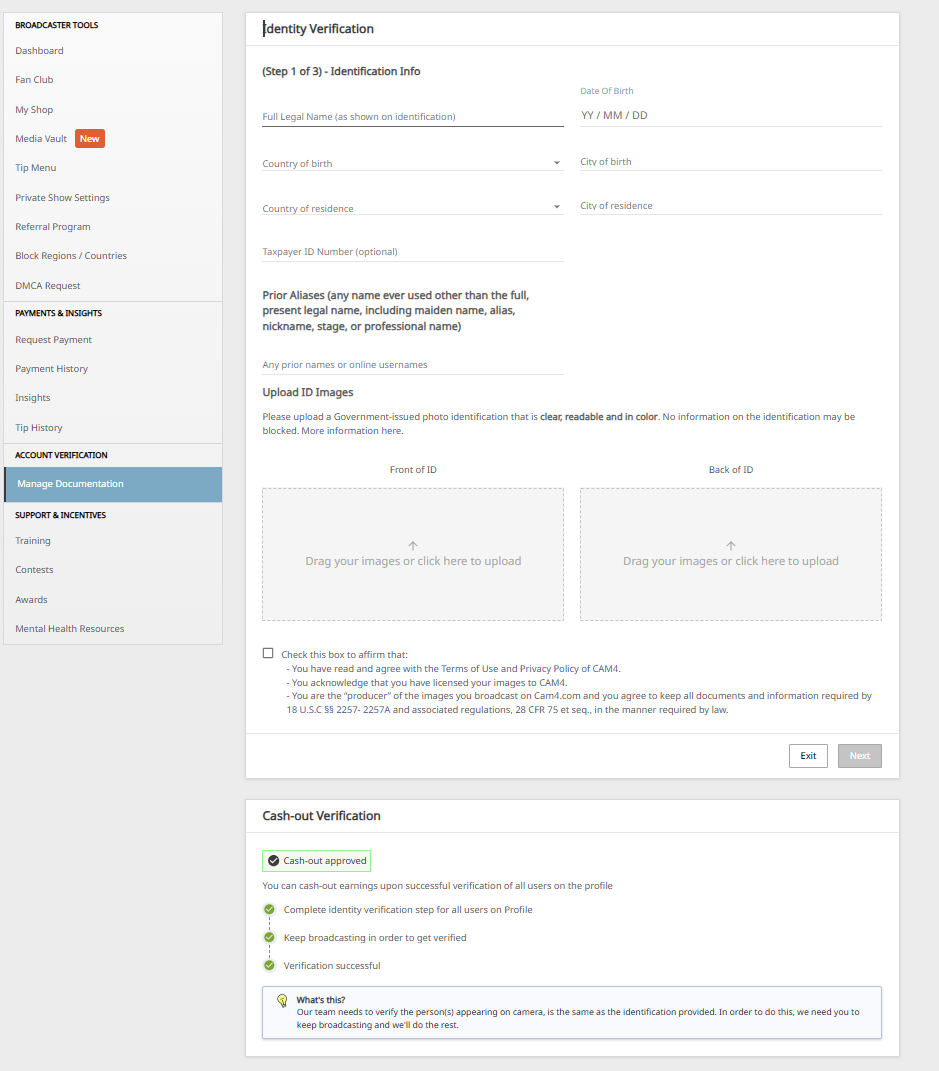
3) 2257 Form

Legal document: you confirm that you (and everyone in your content) are 18+, that you own the material and give CAM4 permission to broadcast.

2257 Form example

How long does it take?

Checking your documents takes an average of 1–3 business days. Once you are broadcast approved, you can just keep broadcasting. After the second check, your payment will also be released and everything is completely in order.

Tip

Check your data

Upload clear, valid documents and fill in your forms carefully. This prevents delays in approval.

In summary: without Broadcast Approval you are not allowed to broadcast; without payment verification no payouts; and with the 2257 form you comply with the legal requirements.

PRIVATE SHOW CONTEST (APRIL 20 – MAY 3, 2026)


WHAT HAPPENS IN A PRIVATE SHOW, STAYS IN A PRIVATE SHOW

From APRIL 20th – MAY 3rd CAM4 is giving you a chance to WIN !!! Give your viewers what they have been waiting for… a personalized and intimate experience with a 1-On-1 Private Show. Performers who earn the most through Private Shows (including Spy Shows for the voyeurs at heart) will win 1 of 10 $$$ prizes !!!

10 TOP PRIZES (NA, RO, RU, UA)
1st: $250
2nd: $180
3rd: $100
4th: $80
5th: $50
6th: $30
7th to 10th: $20

+ 3 EXTRA PRIZES OF $50 for the creators who earn the most from  CAM2CAM shows!

CLICK HERE TO SIGN-UP FOR UK / AU


WHAT WILL BE COUNTED FOR THIS COMPETITION:
– Private shows with payment per minute
– Cam2Cam private shows
– Private shows at a fixed price
– Earnings from “SPY”

TIP: By selling private shows at a fixed cost, you’ll always know how much you’ll earn. It really is an easy way to get tokens, and a fantastic and safe alternative to Skype shows.

Haven’t tried CAM4’s Private Shows yet? Visit the FAQ and find out how easy it is to set your options!

Private Show: Fixed Rate or Price per Minute

CONTEST RULES:
– Creators MUST be 2257 Approved
– Creators MUST signup using the form below
– Bonus’s determined by viewer Private Shows ONLY (Pay-per-min, Fixed rate, Cam2cam, Spy)
– Tokens exchanges between creators or other users are not allowed
– A max of 6000 tokens will be counted per unique tipper.
– Contest ends May 3rd at 11:59pm ET

Prizes will be added to creators accounts no later then WED, MAY 6th, 2026 at 11:59pm ET


CAM4 Cares: ModelConnection

Broadcasting alone doesn’t have to mean feeling alone. Discover how CAM4 Cares is bringing models together through ModelConnection.

CAM4 Cares – ModelConnection

Broadcasting can be powerful — but it can also feel isolating.

At CAM4, we believe that great models deserve more than just a platform. They deserve a real sense of connection. That’s why we launched ModelConnection under CAM4 Cares — a safe, confidential space created exclusively for our female models.

What is ModelConnection?

ModelConnection is a guided group session where models come together to talk, share, and support one another. Not as therapy, but as a powerful combination of peer connection and professional coaching.

Sessions take place via Zoom, with participants encouraged to join on camera to create a more open and connected space. Through small breakout groups and focused coaching questions, models explore their work, routines, and mindset — without judgment or pressure.

Emma - Life Coach & Cam Model

Emma — Life Coach & Cam Model

Emma is a skilled life coach and successful cam model with extensive experience guiding international groups through transformation, confidence-building, and personal growth. Specialising in mindset, communication, and empowerment, she brings a rare combination of professional coaching expertise and real-world industry experience. As an active cam model herself, Emma deeply understands the pressures, challenges, and opportunities of online broadcasting. She creates a safe, judgment-free space where models feel seen, heard, supported, and empowered to grow both personally and professionally.

Why This Matters

Working as a broadcaster often means working alone. There are no colleagues to turn to, and in your personal life, it’s not always easy to talk about what you do.

ModelConnection fills that gap — offering a space where you can connect with others who truly understand your world.

  • A stronger, more connected model community
  • A healthier work mindset and greater accountability
  • Sustainable long-term growth and wellbeing

Who Can Join?

ModelConnection is designed for a curated group of dedicated models. You may receive a personal invitation based on your activity and engagement on the platform.

You don’t need a specific issue or goal. You’re welcome to come as you are — whether you want to share, listen, or simply connect.

What We Have Learned

When models are given the right space, meaningful connection happens naturally. Even participants who join with some hesitation often leave feeling more energised and supported.

“The session made me realize that I’m not alone. That there is a great community of wonderful NSFW broadcasters who face similar issues and help build each other up.”

— Salacious_sage

“For me as a very shy person, it was a great place to share and see different points of view.”

— Roxannepiggy

Get Involved

The next session will be announced soon. Interested but haven’t received an invitation yet? Sign up below.

Submitting the form does not guarantee a spot, as sessions are curated to ensure the best group experience.

Apply now and take the next step.

Apply here to be considered for the next session:

Submitting the form does not guarantee a spot, as sessions are curated to ensure the best group experience.

100% confidential. We respect your privacy.
Come as you are. Leave stronger.

Banning and Moderating

Banning and moderating on CAM4 — here’s how to keep your room safe, cozy, and under control.

Safety on CAM4: Banning and Moderating

Keep CAM4 fun and safe with the right measure at the right time. Difference between banning (denying access) and moderating (steering chat behavior).

You decide what happens in your room — choose the mildest effective option and scale up if necessary.

Banning on CAM4

Sometimes it is necessary to deny someone access completely or partially. There are two types of bans:

1) Administrator Site Ban

With a site ban, a user loses access to the entire website — usually after violating the Terms & Conditions or illegal activities.

  • Illegal/prohibited activities (including minors)
  • Spamming or scamming
  • Unlawfully recording/distributing broadcasts
  • Persistent ignoring of warnings (e.g., playing video instead of live)

Payment problems can also lead to a site ban. Do they think they were banned unfairly? Refer to support@cam4.com.

Full terms: cam4.com/legal/termsofuse

2) Broadcaster Room Ban

  • Only applies to your room.
  • The viewer can still use the rest of CAM4.
  • Only use if milder options didn’t work.

You have full control over who has access to your room.

Moderating on CAM4

In addition to banning, there are lighter measures to keep your chat pleasant. Both you and your moderators can use these functions.

Moderate Yourself or Deploy a Moderator

  • You can steer visitors yourself with available tools.
  • You can also appoint a moderator who takes over (part of) it.
  • A good moderator promotes atmosphere and income — reward active mods.
Note: Be careful with mod rights, especially with other models. Someone else can remove visitors from your room; confidentiality and clear agreements are essential.

Available Options (from Mild to Strict)

Silencing

Messages from the visitor are not visible to anyone. Useful for negative behavior, spam, or begging.

Advantage: the user often doesn’t notice and is less likely to create new accounts.

Kicking

The visitor is temporarily removed but can come back immediately. Only use after a clear warning.

Room Ban

The heaviest tool within your room. The visitor can only come back once you have released (unban) him/her.

Keep CAM4 Fun!

Banning and moderating protect our community against abuse, illegal activities, and disruptive behavior. Use them wisely and to your advantage.

Do you see someone who is not following the rules? Report this to your performer manager (Alexandra) or email performers@cam4.com.

Summary: start mild (silence/ignore), scale up (kick), and ban only when necessary. You determine the climate in your room — clear rules, consistent enforcement, nice vibe.

X/Twitter Basics

Become a self-promotion master: get more viewers via X (Twitter) with smart, simple steps.

X (Twitter) Basics — Become a Self-Promotion Master

Increase your audience and attract more viewers to your CAM4 shows with a smartly designed X profile and consistent posts.

Tip: Add your CAM4 link to your bio and pin your show announcement to the top of your profile.

Start: Creating Your X (x.com) Account

A well-designed profile is the first step to success:

  1. Go to x.com or download the X app.
  2. Click Sign Up and fill in your name, email, and password.
  3. Complete your profile: photo, bio, and a link to your CAM4 profile.
  4. Activate your account via the verification email.

Quick Profile Check

  • Profile photo that shows your style.
  • Short bio with your vibe + boundaries.
  • Link to your CAM4 profile (easy to find!).

Link X to Your CAM4 Profile

By linking, CAM4 automatically posts a live notification when you broadcast — free reach outside CAM4.

Here’s how: Model Dashboard → Profile → Social Media → connect your X account.

Works great in combination with your Activity Feed: teaser beforehand, auto-post at start, thank you afterward.

Posting (Tweeting): The Basics

  • Click the Post/Tweet icon, write your message (max. 280 characters), and post.
  • Add images, GIFs, or links for more impact.
  • Use hashtags like #cam4, #liveshow, #cammodel for findability.
  • Tag relevant accounts to stimulate interaction.
  • Repost/retweet and respond to fans/creators to grow your network.

Timing

Post just before your show, at start (auto-post), and a short thank you afterward.

Content Mix

Announcements, behind-the-scenes, polls, short clips/teasers.

Consistency

Small but frequent works better than an occasional long thread.

Why Use X?

Reach & Promotion

  • Broader guidelines than many platforms.
  • Quickly promote your live shows.
  • Free extra visibility.

Direct Interaction

  • Talk to fans and followers in real-time.
  • Build relationships that bring back tips and viewers.

Need Extra Help?

Want to learn more about promotion and socials? Check out our other training articles or contact the CAM4 team. We are happy to help you use social media smartly and get more success from your shows.

Quick recap: complete profile + link to CAM4, fixed post routine around your shows, use hashtags and tags smartly, and respond actively. Consistency wins.

Refer a Friend & Referral Promotion Program

Want to get more out of your broadcasts? Earn extra in two ways: Refer a Friend (Friends Bonus) and the Referral Program for viewers.

Earn More: Refer a Friend & Referral Program

Two simple ways to boost your income: invite a friend to become a broadcaster or earn from verified sign-ups via your link.

Tip: combine both — promote your referral link on socials and within your shows.

Overview — Two Ways to Earn Extra

1) Refer a Friend (Friends Bonus)

Invite a friend to become a broadcaster themselves. You get USD 50 as soon as your referral meets the conditions. Your friend can earn up to USD 600 bonus in 6 weeks.

2) Referral Program (Viewers)

Share your unique link. Get paid for each verified free sign-up (email confirmed) — up to USD 2.00 per registration (country dependent).

1) Refer a Friend — Friends Bonus

Invite your friends to become broadcasters and earn bonuses together — simple, transparent, and quickly arranged.

What Does It Yield?

  • USD 50 bonus for you.
  • Your friend can earn up to USD 600 bonus in 6 weeks.

    Vrienden Bonus

How It Works

  1. Create Account — help your friend with a CAM4 account.
  2. Pass on Your Username — via the chat box or mail to julia@cam4.com.
  3. Bonus Program — your friend can earn up to 600 USD in 6 weeks.
  4. Your Bonus — you get 50 USD as soon as your referral streamed ≥ 20 hours and earned ≥ 100 USD.

⚠️ That first USD 100 does not have to be earned within the first 20 hours.

Rules

  • Only for new performers who have not been active on CAM4 before.
  • The new performer broadcasts under the United Kingdom and speaks English.
  • Your username must be correctly passed on to us upon registration.
  • Bonuses do not count towards the required minimum of 100 USD.
  • Tokens that you give to your friend do not count towards that 100 USD.

In short: you get 50 USD as soon as your referral has broadcasted for 20 hours and has earned 100 USD. They can grab up to 600 USD bonus in 6 weeks.

2) Referral Program — Earn from Viewers

Referral links voorbeeld

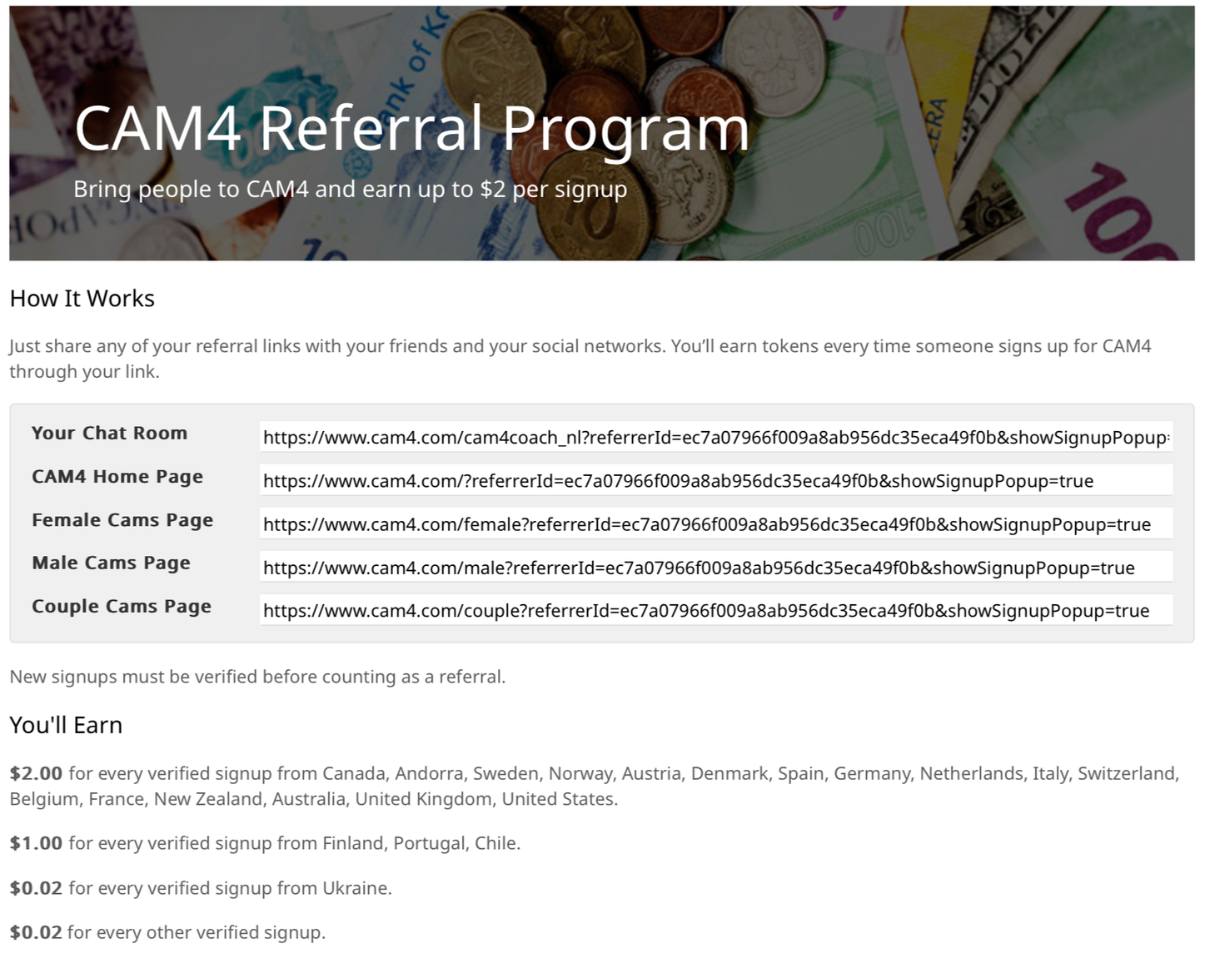
Earn by bringing viewers and followers to CAM4. Share your personal link; you get paid for each verified free sign-up (email confirmed).

Payout — Top Countries

USD 2.00 per verified sign-up from: Canada, Andorra, Sweden, Norway, Austria, Denmark, Spain, Germany, the Netherlands, Italy, Switzerland, Belgium, France, New Zealand, Australia, England, United States.

Payout — Level 2

USD 1.00 per sign-up from: Finland, Portugal, Chile.

Payout — Other

USD 0.02 per sign-up from all other countries.

How It Works

  1. Go to your Model DashboardPromotion Program.
  2. Copy your personal referral links.
  3. Share them via social media, blog, email, or in your live chat.
  4. Earn even when you are not live (place links/banners on your site).

What is a verified sign-up?
A new user who creates a free CAM4 account and confirms their email address.

Rules

  • You have earned a minimum of 100 tokens to participate.
  • Your account is verified in the Dashboard.
  • Fraud will result in exclusion and possible termination of your account.

You can see your earnings directly in your Model Dashboard under Promotion Program.

Cam Setup, Lightning and Internet

Small tweaks, big difference: with a smart cam setup, good lighting, and stable internet, your show immediately looks more professional.

Cam Setup, Lighting & Internet — How to Improve Your Show

Authenticity sells: you don’t need a studio. With a few smart adjustments, your stream immediately looks and feels better for fans.

Tip: test shortly before you go live (cam, light, sound, upload speed) and adjust if necessary.

Cam Setup

Keep it Real

Viewers don’t want an ultra-polished TV show, but a pleasant, stable experience. Simple = effective.

Background

Remove personal items (family photos, papers, addresses). Quiet decor = nicer viewing + better privacy.

Cam Placement

Camera at eye level, neat framing. Do a quick test to see if you are well in the picture and lit.

Lighting & Sound

Lighting

  • Use multiple light sources for even light.
  • Soft, warm ambiance — not too dark.
  • Light behind the camera, not behind you (avoid silhouette).
  • Same color temperature (e.g., all warm white).
  • Reflect light off wall/ceiling for soft look.

Sound

  • Test your microphone before you go live.
  • Simple USB microphone > built-in laptop mic.
  • Minimize background noise (TV, traffic, housemates).

Internet & Connection

Speed & Stability

Check upload via speedtest.net (upload is more important than download).

  • 600–800 kbps = low quality possible
  • 1.5 Mbps = average quality
  • 4 Mbps+ = high quality (HD)

Practical

  • Wired if wifi is not stable.
  • Close unnecessary apps, give your stream the bandwidth.
  • Troubleshoot: refresh stream; limit other devices (phone/tablet/smart TV) on wifi.

Practicing & Testing Before You Go Live

Practice Safely

First try in a safe setting how camera, light, and sound work together.

Tip: Offline Practice Before Your First LIVE Broadcast

Pre-Live Checklist

  • Short test run with cam, light, and audio.
  • Also view your show on mobile (many fans watch via phone).
  • Adjust position or lighting where necessary.

Privacy & Safety • Comfort

Privacy & Safety

  • Remove documents/mail/photos from view.
  • Check mirrors/windows for reflections.
  • Use room divider or move the cam if in doubt.

Comfort for Yourself

  • Have a drink ready.
  • Make sure you are sitting/lying comfortably (less shifting).
  • Keep the room temperature pleasant (especially for longer shows).

In short: keep your setup simple but thoughtful, choose warm, soft lighting, check your upload, pay attention to sound and privacy, and make sure you are comfortable. Practice offline if necessary — this makes your show feel real, look good, and run smoothly for your fans.

Lovense Toys

Connect Lovense toys to CAM4

Make your show more engaging and increase your tips: with every tip, your toy reacts directly — you determine the intensity per threshold.

Tip: Put your thresholds (e.g. 25 / 50 / 150 tokens) clearly in your description or Tip Menu.


Interactive toys make your shows more dynamic and give viewers direct feedback. You control the experience — they remember it.

Please note: Live Touch / FeelConnect is not suitable for Lovense. Always use the official Lovense software.

Lovense integration

Lovense works great with CAM4. Use the Lovense Browser Extension or Lovense Stream Master to sync tips with your toy.

Step-by-step

  • Update Lovense app and firmware.
  • Install the extension or Stream Master.
  • Connect your toy.
  • Make a test tip (small amount).

Tips for the show

  • Link thresholds to intensity or duration (e.g. 25 / 50 / 150 tokens).
  • Pin your thresholds visibly and repeat them aloud.
  • Use goals and your Tip Menu for rhythm and transparency.

Multiple toys

You can use multiple Lovense toys at the same time. Test combinations in advance and keep an eye on battery status.

Supported models (selection, 2025)

Vibrators & wearables

  • Lush 4, Lush Mini, Lush 3
  • Ferri (panty vibrator)
  • Ambi, Exomoon (bullet / lipstick)
  • Mission 2, Osci 3, Dolce, Flexer
  • Tenera 2 (clitoral suction)

Rabbit & G-spot

  • Nora (all generations)
  • Lapis (strapless strap-on)

Masturbators

  • Max 2 (and older Max)
  • Calor
  • Solace / Solace Pro

Prostate & penis

  • Edge 2 (and older Edge)
  • Gush 2 (and older Gush)
  • Diamo (cockring)

Anal / Wands / Specials

  • Hush 2 (all sizes), Hush (older gen.)
  • Domi 2 (and older Domi), Gravity, Hyphy
  • Gemini (nipple)
  • Lovense Sex Machine (mini & full)

Disclaimer: This list is a selection. Compatibility may change due to new firmware or models. Always consult the official
Lovense website for the most up-to-date information.


Best practices

Test in advance

Test connection, intensities and thresholds before you go live. Have a short demo tip ready to let your audience experience the effect.

Communicate clearly

Keep thresholds short and visible. Repeat them to newcomers and thank them for each trigger (name + what happens).

Boundaries & rules

Stay within your comfort zone and CAM4 rules. Set time-outs or cooldowns if you want to control the pace.


Quick recap: Always use Lovense software (extension or Stream Master), test in advance, set clear thresholds and communicate them. Update apps and firmware, and keep batteries ready. Consistency creates better experience and more tips.