All posts by Julia

Selling Personal Items

Earn extra with personal items — safely, discreetly, and within your own boundaries.

Sell Personal Items via CAM4 — Safely & Discreetly

In addition to tips and shows, you can also sell personal items to your fans. This can be a nice extra source of income, but safety and privacy should always come first.

Remember: protect your data, get paid via CAM4 first, and package personally and discreetly.

What can you sell?

Popular items

  • Handwritten letters or cards with a personal message
  • Photos or printed polaroids (with or without signature)
  • Worn panties, lingerie, or socks
  • Accessories or jewelry you wore during a show
  • Fun extras: lipstick prints or a fragrance on a cloth

Tip: creative, personal, and unique = more value for your fan.

Your boundaries

Determine in advance what you do/don’t want to offer, and communicate this clearly in your profile or feed.

  • Work with limited stock (FOMO works).
  • Add delivery time (e.g., shipped within 5–7 business days).
  • Use a standard text for confirmation and shipping update.

Privacy first

Protecting data

  • Never put your home address on the package (sender).
  • Use a shipping point/parcel shop or P.O. box.
  • Online postage? Use systems where your address is not visible to the recipient.

Discretion first

  • Neutral outer packaging without logos or hints to the contents.
  • Do not place socials or personal info in/on the package.
  • Recognizable labels/invoices? Hide them invisibly (or digitally).

Get paid safely

Only via CAM4

Always get paid via CAM4 first. Do not agree to bank transfers or external methods — you share private data and run the risk of fraud/chargebacks.

Is the amount in your CAM4 account? Then you know that the payment is safe and final. Only send it after that.

Make it special

Personal touch

  • Handwritten note with the buyer’s name
  • Tissue paper or lightly scented paper (within your boundaries)
  • Small extra: polaroid or mini-sticker

Professional & discreet

  • Sturdy outer packaging, neutral from the outside
  • No references to content or platform
  • Standard thank you text + shipping update via your CAM4 messages

In summary: offer creative, personal items — but always put safety and privacy first. Payment via CAM4 first, never share your address, and package everything carefully and discreetly.

First time live – Password Practice Show

A safe start to check everything in advance!

Offline Practice Before Your First LIVE Broadcast

Before you go live for the first time, you can practice with a Password Show first. This way you can discover how broadcasting works in peace and quiet — without direct viewers in your room.

Tip: Use this as your “dress rehearsal” to reduce stress and go live with confidence.

What is a Password Show?

A Password Show is a private broadcast that is only accessible to people with the password you set. You can just keep this password to yourself so you can practice completely privately.

Practice: What Are You Going to Test?

1) Explore the Buttons

See how your camera appears, where you set your goals, and how to make the Tip Menu visible.

2) Test Your Setup

Check your light, sound, background, and camera position without pressure from viewers.

3) Practice Your Flow

Go through how you want to build a show: from greeting to working with goals and menus.

Make it a practice show — use micro-goals as if you were live. This way you learn what goals look like on screen.

  • Goal 1: 10 tokens = check what the goal looks like
  • Goal 2: 20 tokens = test sound and music
  • Goal 3: 30 tokens = change camera position

Pro tip: write down notes during your Password Show — what works well, what do you want to adjust?

Why This is Smart

A Password Show gives you:

  • Peace to learn the platform technically
  • Confidence before going live for a large audience
  • Less chance of stress or technical glitches during your first real show

Setting Up a Password Show

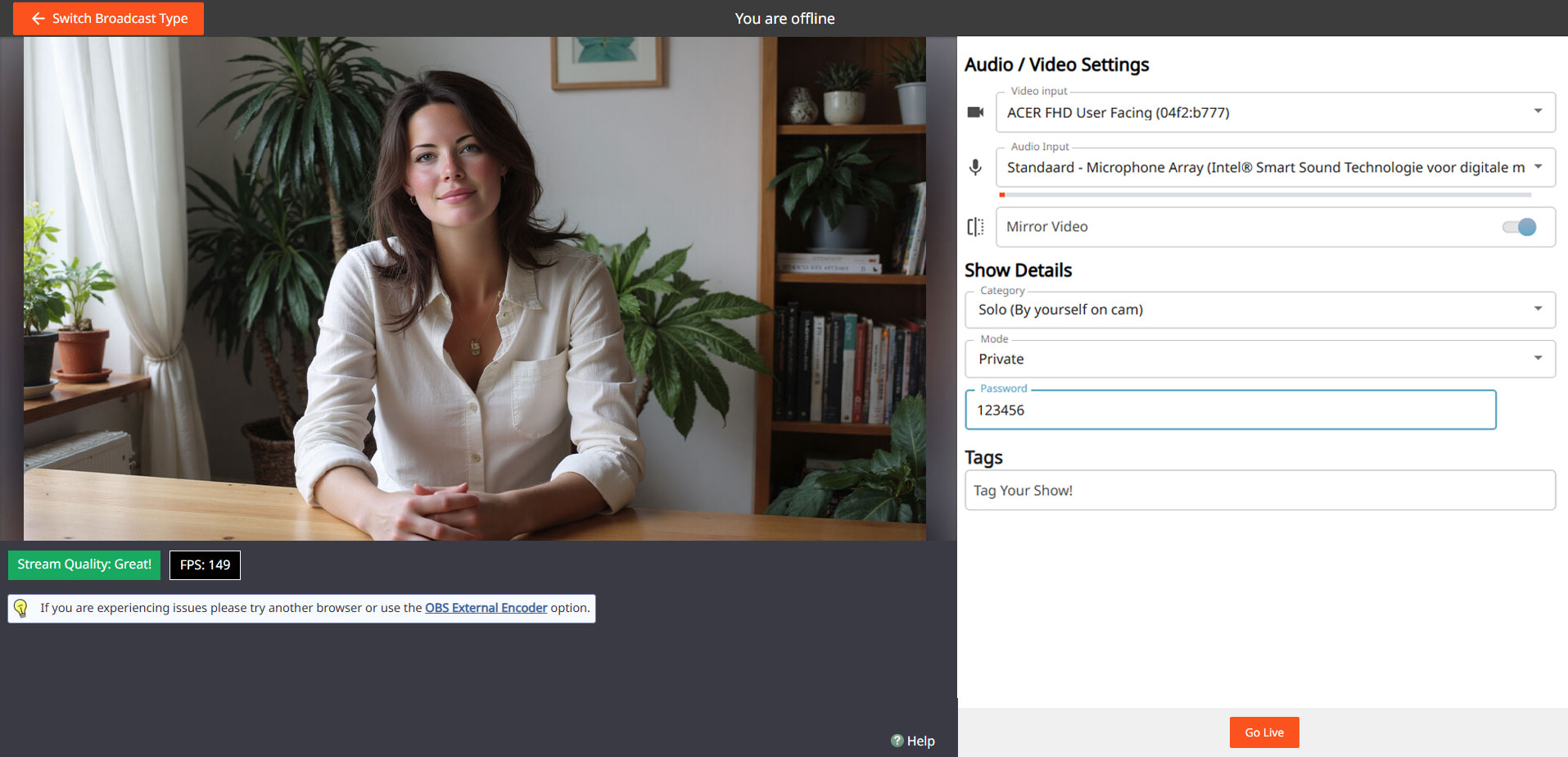
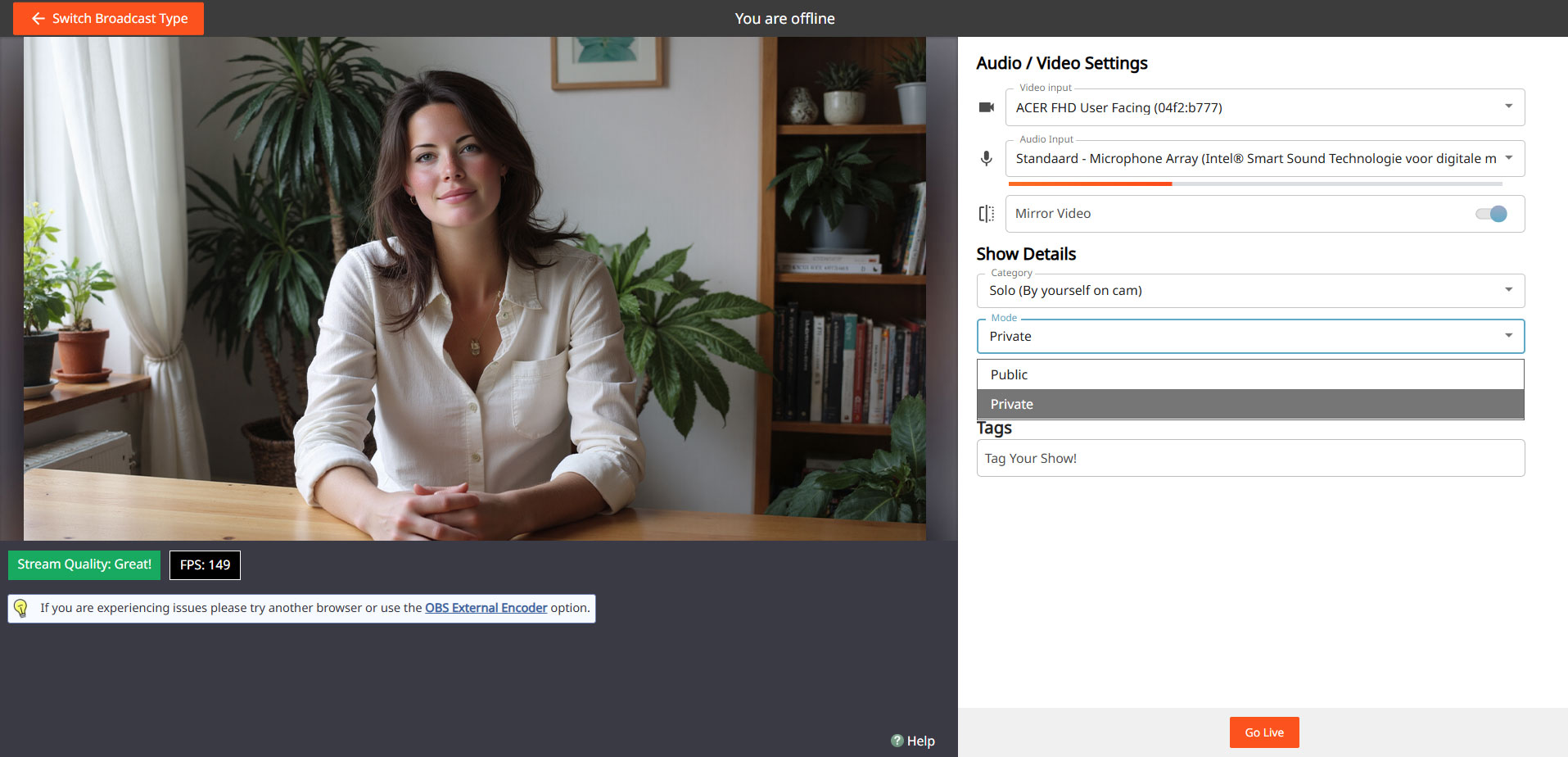
Go to your broadcast screen, choose “Show Type” and select Password Show. Set a password and keep it only for yourself if you just want to practice.

Steps:

Open Broadcast Screen
Choose ‘Password Show’
cam4 password show

Set Password
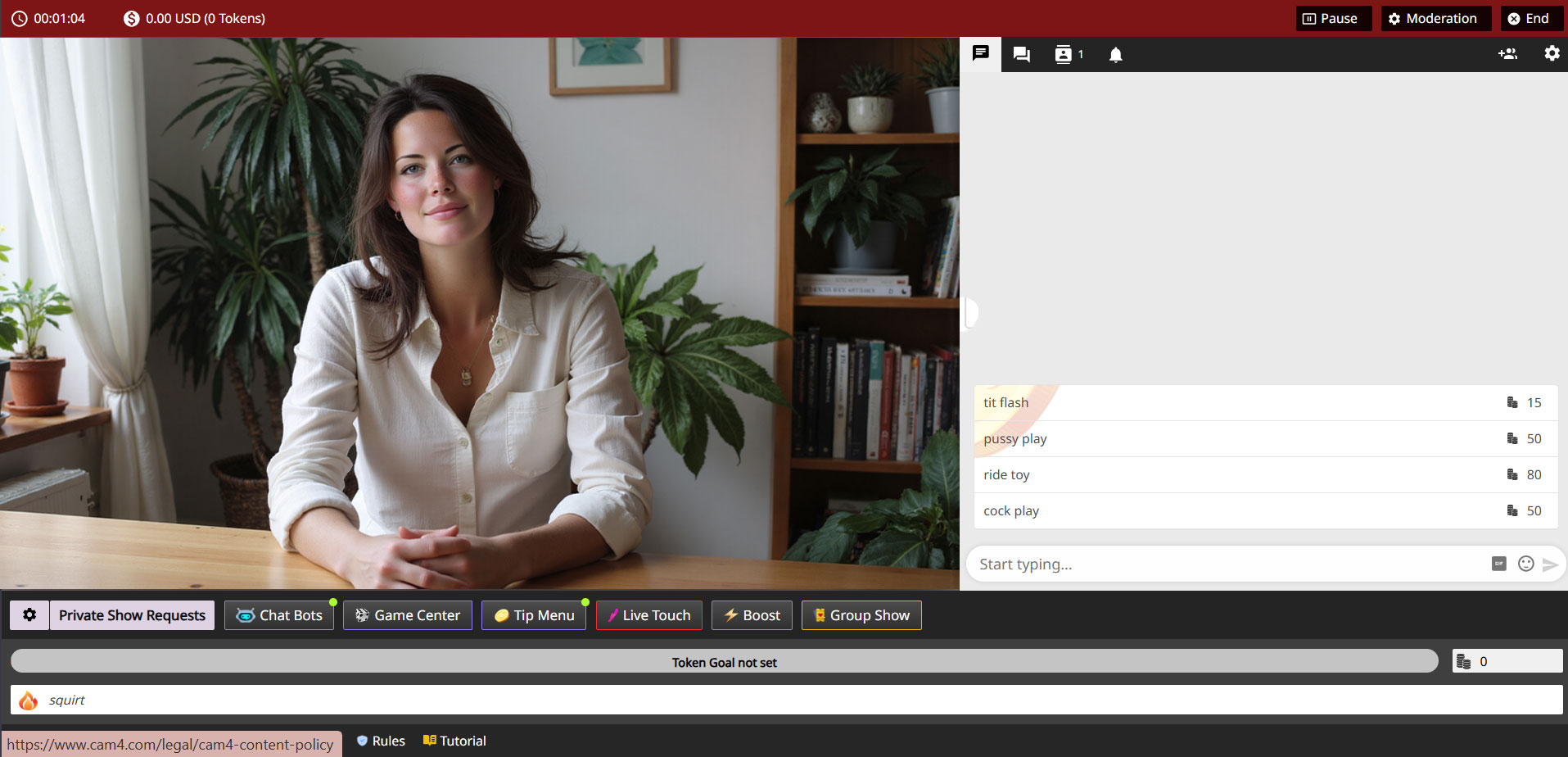
cam4 password settings

Go Live & Test
cam4 private

You can use the same process later to do a private show with a select group of fans.

Do’s

  • Use the Password Show as your practice space
  • Test both camera and sound extensively
  • See how goals and tips appear on screen
  • Feel free to practice multiple times before you go “really” live

Pay Attention

  • Don’t forget to set your settings back to a regular broadcast after your Password Show
  • Don’t just pass on your password if you really want to practice privately
  • Always stay within your own boundaries and platform rules — even in a Password Show

Important: adhere to local laws and platform rules. Only 18+ performers and consent is always required.

Tips for Kicking Things Off Right

We’ll tell you everything here — short, clear, and applicable.

The secrets to becoming a TOP webcam model on CAM4

This article helps you get off to a flying start for more viewers, more interaction and more tokens — without unnecessary complexity. Focus on your Activity Feed and Fanclub for reach and stable income.

Tip: work with clear goals, a clear Tipmenu and a consistent posting cadence on your Feed.

1) Start here: account, verification & payout

Before you can go live: verify your age/identity and set up your payout in 10 minutes. Block countries/regions if necessary.

Account & ID‑check (2257)

All performers (18+) must be ID‑verified. This also applies to duos/groups — everyone on cam must be verified.

Get started with ID‑verification

Set up payout

Choose your payment method and check your details. Read how and when you will be paid.

Payout optionsSet it up now!

Practice online for the first time

Start without being immediately visible. This way you can safely look around and set everything up in peace

Read here how to do that.

2) Create an irresistible profile

Your profile is your landing page. Show in 5 seconds who you are, what you do and when you are live.

Bio

Short and powerful, with your vibe and boundaries. Add your broadcast schedule and a clear call‑to‑action.

Images

A clear profile picture + 2–4 recent photos that show your style.
Avoid busy backgrounds and very important add a

SFW profile pic
.

Clarity

Put your Tipmenu and (micro)goals in your description so viewers know immediately how they can participate.

More help? How to create a strong profile page

3) Set goals and achieve them

Without a goal, your show feels “non‑committal”. Break your daily goal down into visible micro‑goals and communicate them clearly.

Example — do you want 1000 tokens (~100 USD) per show? Divide into 4 milestones of 250 tokens.

  • Goal 1: 250 tokens = naked
  • Goal 2: 250 tokens = oil‑moment
  • Goal 3: 250 tokens = solo
  • Goal 4: 250 tokens = closing moment (only if you feel good about it)

Stick to your goals. Changing constantly damages trust — and your tips.

Hint: the text in your goal bar is limited. Keep the mapping‑scheme simple (e.g. @250 → naked, @500 → oil, @750 → solo, @1000 → end).

More help? Goal & Tipmenu

4) Increase Your Visibility with Niche Pages

Being discovered by the right viewers is no coincidence. By adding yourself to relevant Niche Pages, you connect with fans who are specifically searching for your style, look, or type of content.

Choose strategically

Select niches that truly match who you are. Does it align with your profile, hashtags, and type of show? If so, you’ll attract more targeted and higher‑quality traffic.

Stay consistent

Make sure your bio, photos, and thumbnail reflect your chosen niches. Recognition builds trust — and tips.

Think ahead

Want to grow within a specific category? Stream regularly within that theme so your audience knows what to expect.

Tip: combine 2–4 strong niches instead of selecting everything. Focus works better than volume.

Want to learn more? Everything about Niche Pages

4) Earn more with group shows and private shows

Group show = exclusive show with ticket for multiple viewers. Start after a maximum of ~15 minutes intro and thank each ticket holder audibly.

Private show = 1‑on‑1 per minute (spies can watch for a fee, without chat). Choose a rate that suits your offer and experience.

Starter rate

Many models start around 12–18 tokens/min.

C2C

Cam2Cam is more common around 18–32 tokens/min.

Transparency

Viewers see your price + local taxes, keep this in mind.

Pro‑tip: name in advance what makes private different/better than your public show.

Read more: Group shows •  Private Show options

Offline private shows (notifications)

Also let fans book when you are not live. Turn on OPS‑notifications and accept when it suits you.

Explanation: Enable Offline Private‑notifications

5) Activity Feed & Fanclub 

Activity Feed: post short updates, teasers and show‑announcements outside your live‑hours. Mix public (reach) with Fanclub‑only (value).

Fanclub: offer benefits that you can sustain (exclusive posts, early access, monthly shout‑out). Choose a monthly price that suits your rhythm.

Want to know more? Activity Feed & FanClub

6) Tipmenu (keep it simple and visible)

Put 6–10 fixed items in your profile description and repeat them verbally during your show. Link to your goals where possible.

Small tease 25 tokens quick boost
Pose / close‑up 50 tokens
Dance / hype‑moment 100 tokens
Wheel spin / mini‑game 150 tokens
Oil‑moment 250 tokens
Solo‑highlight 500 tokens
Group show ticket variable
Private show per minute

Need more help? How many tokens can I ask?

7) Pay-Per Text

Pay per Text: earn from DMs without negotiating

How to use it

Set a fixed price per private message and mention this in your bio or Feed. Use it for short questions, personal responses and quick requests — within your boundaries and platform rules.

Price indication

Start simple and test: many models start between 1-2 tokens/message. Increase when busy, decrease for more volume.

Useful example sentences

  • “Want a personal shoutout? Pay per Text is on.”
  • “Ask your question in DM — 1-2 tokens per message.”
  • “Fanclub gets priority with Pay per Text.”

More info: Earn more with Pay per Text •  All about messenger

8) More viewers to your shows

  • Thumbnail: fresh setting, good light, expression. Avoid the “just a bedroom”‑look.
  • Description: short, unique and with a clear invitation (what do you want to happen NOW?).
  • Hashtags: 3–5 strong tags is often enough.
  • Rhythm: stream at fixed times and announce via your Feed.

Read more: Maybe outside? •  Schedule Shows

9) Interactive toys

Increase engagement and tip‑frequency with interactive toys (e.g. Lovense). Announce thresholds (e.g. “at 200 tokens: intensity up”).

More info: Which toys can you use? •  How do you connect it?

10) Games

Use Token Keno, Spin the Wheel and Roll The Dice for extra excitement and income. Let viewers bet tokens and link creative rewards to outcomes (assignment, piece of clothing off, special interaction).

Need more help with games? All CAM4 games

11) X/Twitter Connect & Social Media

Use X/Twitter for announcements, clips/teasers and community‑building. Share your affiliate‑link smartly.

Tip: plan posts around your shows (morning‑announcement, reminder 1 hour in advance, thank you afterwards).

12) Chat‑indicators: badges, colors and token activity

Who do you see at a glance?

  • Gold/fans: special color/badge — greet quickly, involve them in goals.
  • Moderators: marked — are there to help, but be careful those rights are not for everyone.
  • Top tippers: stand out — mention them audibly with every tip.
  • CAM4 Crew: account managers/coaches etc have clear visibility.

How to read and use indicators

  • Colors/badges show role and membership; the ring around someone’s icon = recent spending (14 days).
  • Does the ring stand out? Invite specifically: achieve micro‑goal or choose 1–2 menu‑suggestions (e.g. 25/50/150 tokens).
  • Use a fixed sentence: “120 more to go until Goal 2 — thanks to [name] for the boost!”
  • Make rewards audible: thank you at every threshold (name + what unlocks).

Want to know more? Explanation about chat‑indicators
13) Protect yourself & moderate

Privacy

Be careful with personal data. Protect your privacy

DMCA – recordings

Know what to do if your show has been recorded. Broadcast recorded — what now?

Help!

If you really can’t figure it out, our support is available 24/7!

Also interesting: Banning & ModeratorsBlock countries & provinces

Refer a Friend UK & AU

UK & AU ONLY


Invite your male and female friends to become broadcasters and both earn a bonus! Here’s how it works:

1. Assist your friend in creating a CAM4 account.
2. The new performer signs up with us and provides us with your username.
3. The new performer can also participate in our bonus program and can earn up to $600 USD in bonuses over 12 weeks!
4. Once the new performer has broadcasted for a minimum of 20 hours and earned at least $100 USD, you will receive a $50 USD bonus! (This does not mean they have to earn $100 within the first 20 hours)

Rules:

– The bonus is only awarded for new performers who have not been active on CAM4 before.
– The new performer must broadcast under a British flag and speak English.
– The new performer must provide your username to us to participate in the Friend Bonus. This can be done with Julia through the chatbox on the website or via julia@cam4.com.
– Any bonuses received do not count towards the new performer’s minimum earnings of $100 USD.
– You are welcome to give tokens to your friend, but these also do not count towards the minimum earnings of $100 USD.