Toate articolele scrise de Ashley Maule

Auto Pause after a Private or Group Show

Auto-Pause is designed to give you time to prepare to be in front of your regular viewers again after your Private or Group show ends.

Go grab some food or something to drink, clean up, use the washroom, or change your outfit. You have 5 minutes to do whatever you need to do before going live on cam for your viewers again.

HOW DOES IT WORK?

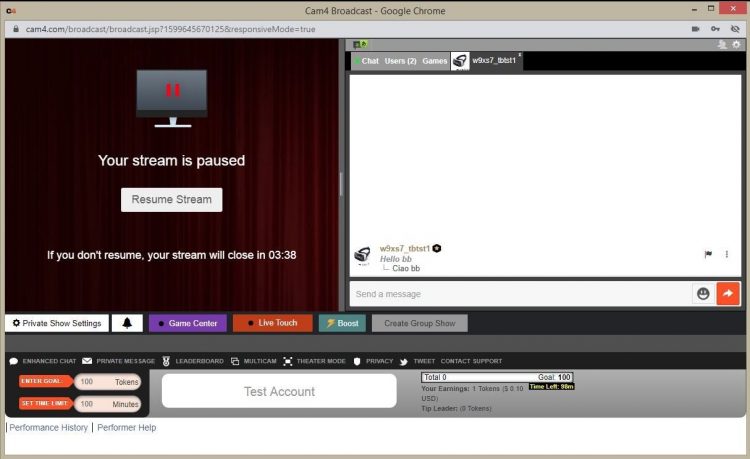
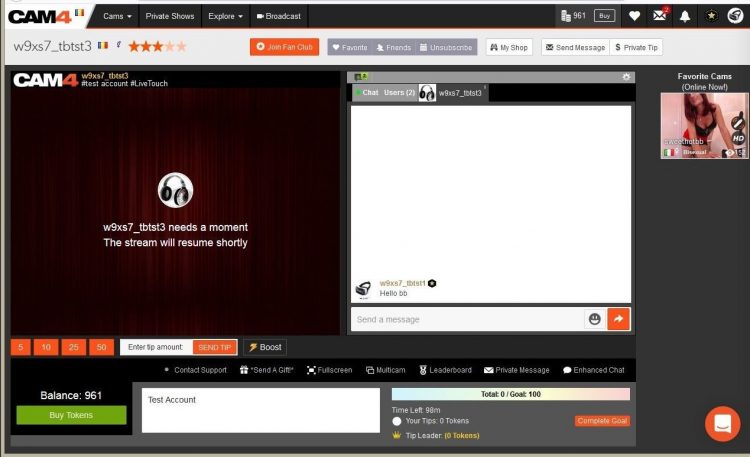
Start your Private or Group show as you normally would.  At the end of the show, your stream will pause for a maximum of 5 minutes .

What YOU will see:


What your VIEWERS will see:

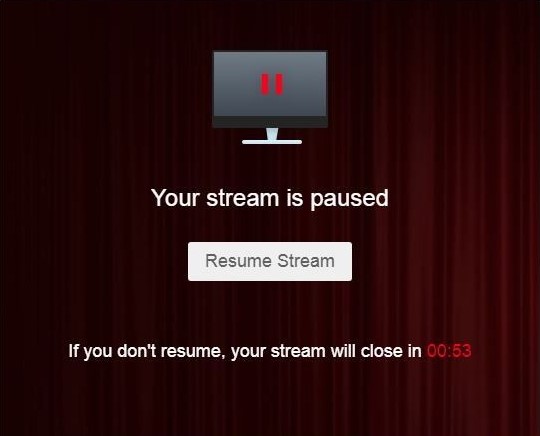
The stream is resumable at any time by clicking on the „Resume Stream” button. 

If you do not resume the stream during the first 5 minutes, the stream ends automatically. 

Private Show requests are not available while your show is paused. 

~That’s all for this lesson!

Happy Camming!
Love, Your Coaching Team!

BOOST: The Ultimate Way to Grow your Audience

CAM4 BOOST — Grow your audience

BOOST: The Ultimate Way to Grow Your Audience

Struggling to build an audience? Just logged on and want to kickstart your show?

You can BOOST your room higher in the directory for just 25 tokens!

CAM4 puts YOU in the driver’s seat, giving you the ability to move higher in the directory so more people can discover your show!

How It Works

The BOOST button appears on your screen once you start a live stream and is visible to you and your fans.

Once purchased, this feature positions your room among the top cams currently on the site for the duration of the boost.

  1. Click the BOOST button to get started.
  2. It costs 25 tokens to boost your cam for 5 minutes, or until you have gained 10 new people in your room, up to a maximum of 30 minutes.
  3. Click Proceed to confirm. The cost will be deducted from your CAM4 account, and your cam will be repositioned in the directory.

What Happens When BOOST Starts?

  • A message appears in your chat letting you know who purchased the boost.
  • A bar on your broadcast window slowly fills as the time runs out.
  • The button changes to Boost Active and includes a countdown. It becomes inactive, so you cannot click it while your boost is running.

Pro Tip

When your boost is active, more people will see your thumbnail. This is your moment to attract more fans to your show! Switch things up with an alluring pose, a sexy striptease, a wet T-shirt show, or close-ups. Make the most of the opportunity to catch your new audience’s attention.

What Happens When BOOST Ends?

  • The button changes back to BOOST and becomes active again, allowing you to click it to start another boost.
  • A message in your chat confirms that the boost has ended and shows how many viewers you gained during it.
  • Your directory position changes, but you may not return to your original spot. Your new position will reflect increases in your viewers gained during the boost.

Viewers Can BOOST You Too!

Fans are always looking for ways to support their favorite models. Why not encourage them to use the BOOST feature on your room?

With their help, boosting can make a difference in your show and exposure on CAM4.

Cam Of The Month Contest

Our CAM-Of-The-Month contest is open to ALL broadcasters on CAM4, awarding 20 prizes totalling $15,000 USD each month.


HOW DOES IT WORK?

 CAM OF THE DAY – Each day CAM4 recognizes 20 broadcasters who have the most logged-in viewers in their room during a single broadcast.

In addition to the award, each of the 20 broadcasters is awarded points according to their position.


POINTS BREAKDOWN

1st                    7 points

2nd                   6 points

3rd                   5 points

4th                   4 points

5th – 9th          3 points

10th – 14th     2 points

15th – 20th     1 point

CAM OF THE MONTH
At the end of the month, the top 20 broadcasters with the most points from CAM Of The Day, who meet the minimum earnings requirement,  and are within the guidelines stated in the rules are eligible to win a cash prize!

PRIZE BREAKDOWN

1st                    $2,500

2nd                   $2,000

3rd                   $1,500

4th                   $1,000

5th – 9th           $750

10th – 14th      $500

15th – 20th      $250


OFFICIAL RULES

To participate in the Cam of the Month Contest, broadcasters must meet all of the following requirements during the contest month:

  1. Must earn a minimum of $500 during each month’s contest period. Bonuses and contest prizes are excluded.
  2. You must earn at least the same amount as your prize to receive it in full. If you earn less, you will only be paid what you earn. Example: If you earn $1,000 but win a $1,500 prize, you will receive $1,000.
  3. You must have an approved profile photo that clearly shows you.
  4. Tips from other broadcasters/studios do not count toward the minimum required earnings.
  5. Only logged-in viewers count towards peak viewer* total.
  6. A broadcaster can only win once per day/month.
  7. A valid email address must be on file so we can contact you if you win.
  8. Employees, contractors, and coaches of CAM4 are ineligible to participate.
  9. Shows violating our terms of service will be automatically disqualified.
  10. CAM4 reserves the right to remove or disqualify any broadcaster for violations, fraud, or misuse of the platform. CAM4 Admin decision is final.
  11. Harassment of any kind toward CAM4 staff or members will not be tolerated and will result in removal from the contest.
  12. All content and participation must comply with the CAM4 Terms of Service and Community Guidelines.
  13. CAM4 reserves the right to modify or update these rules at any time.

*PEAK VIEWERS – are members who are logged in and viewing your broadcast. You can view the number of peak viewers for any broadcast by going into the Broadcaster Dashboard > Insights > Live Broadcasts.

The competition rules can be found at http://www.cam4.com/contest/rules/

Submit a Share-able Image

Do YOU want to be promoted on one of CAM4’s Official social-media accounts? Even be our monthly Cover Model on X.com?


Well, CAM4 needs YOUR help… Send us any of your best quality SFW (Safe For Work / Non Nude) images below, and your X.com or Instagram info so we can tag you.

USA/ Canada:
Click HERE to upload your SFW images now!!!!


United Kingdom/ Australia:
Upload for UK/AU 

Or contact: julia@cam4.com

And don’t forget, give us a follow


Broadcaster Release Form (2257)

Your broadcaster release form (or 2257) is a legal document that you electronically sign in when you are going through the approval process – take a closer look at what it means here.

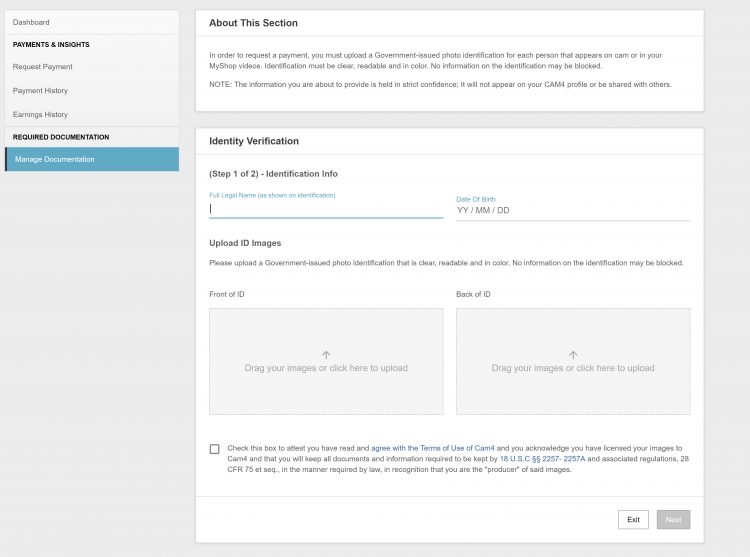
Anyone aged 18+ can broadcast and accept tips on CAM4, but you have to upload your I.D. and sign your Performer Release Form in order to cash out your tokens.


What are you agreeing to when you sign your Broadcaster Release Form?

  1. You are the sole owner and ‘producer’ of all content and you agree to not create any illegal content.
  2. You and any others on your cam are all 18 years of age or older.
  3. You are granting CAM4 the right to show or display your likeness on the site during your show.
  4. You have agreed to keep a copy of this form for your own records and you can produce that copy if needed.

~That’s all for this lesson!

Happy Camming!

Love, Your CAM4 Coaching TEAM

How To Buy A Gold Membership With Tokens

One of the benefits of being a verified performer on CAM4 is the ability to purchase your gold membership with tokens at a discounted price! Take a look at how you can convert your tokens into over 20 awesome Gold features.

Using Tokens For Your Gold Membership

First, tokens must come from your dashboard to be used for a Gold Membership.

Go into your Performer Dashboard  and request a CAM4 TOKENS payment for $12.50. 

You will see these tokens in your account on the CAM4 homepage.

new-account-gold-membership


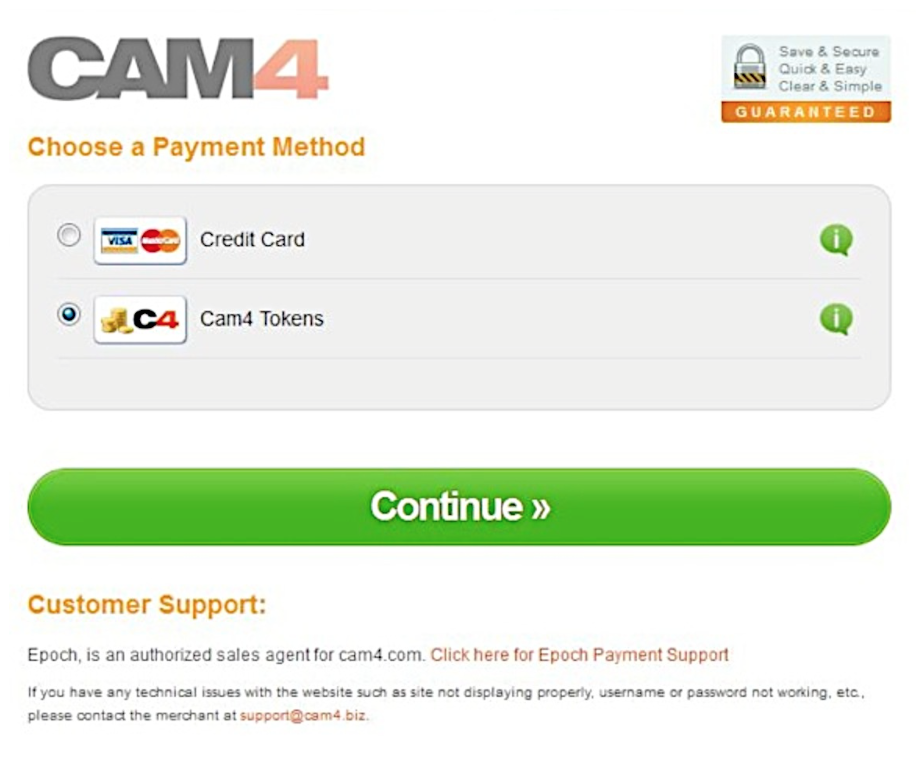
Once you press the “Upgrade to Gold” button you will be  taken to a  checkout window where CAM4 Tokens is a payment option.


Screen Shot 2015-06-25 at 2.48.50 PM

After clicking continue, you will receive a receipt and see your status go to Gold in a few minutes.  (You may have to refresh your page)


~That’s all for this lesson!

Happy Camming!
Love, Your Coaching Team!

Your Broadcaster Dashboard

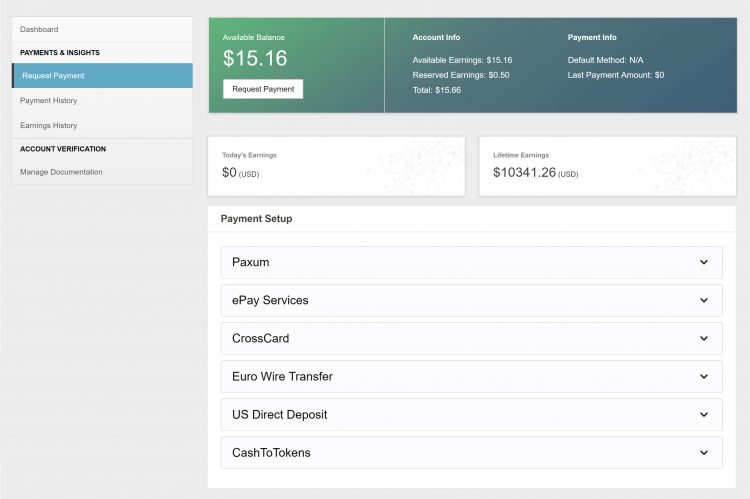
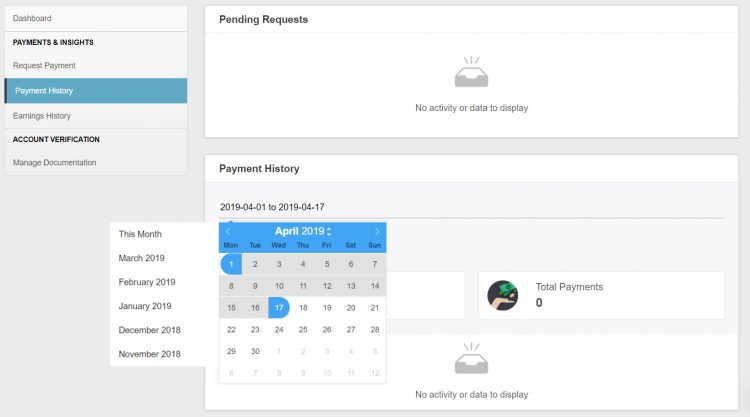
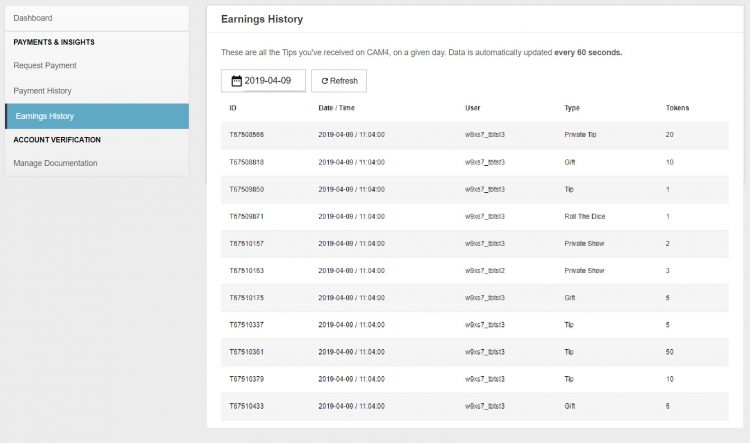
From your Broadcaster Dashboard you can cash out, view your payment & earnings history, upload ID or add additional performers to your account.

 
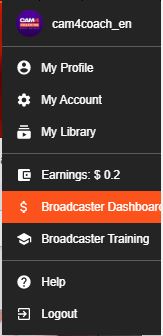
*You can also access your dashboard in ‘My Account’. It’s listed under ‘Performer tools’ on the lower left side of your screen.

Request Payment

Here you can select and setup your method of payment and cash out your earnings right from the same page!

Look here for more info on your Payment Options

Payment History

♥Up to date status of your most recent payment request
♥Custom payment history look-ups & stats. 
♥Have access to all your performer payout information in a simple easy to read data.
♥Super helpful when tax season cums bb 😉

Earnings History

♥Detailed view of where every single token you earned came from. 
♥Up to the minute view of your earnings. 
♥Custom earnings history look-ups & stats. 

Manage Documentation

For new  broadcasters this is where you will upload your ID and go through the approval process!

More info on adding additional broadcaster to your account.


~That’s all for this lesson!

Happy Camming!
Love, Your Coaching Team!


How To Handle Tips & PM’s In Chat

Being successful in Public Chat is more than just getting naked, its about knowing how to react to your chatroom and what to do when you get tipped. Staying calm and making these small changes to your show will make a BIG difference!


1. Don’t Let TIPS Stop You…

Don’t send a PM to every viewer who sends you a tip! If you are in the middle of your show and someone tips you its because they like what you are doing! If you stop what you are doing to send them a PM, you will train your room to not tip you because you stop the action they are tipping you for.


2. Stay Cool And Tease.

When someone sends you a tip its nice to say thank you, but don’t rip all your clothes off and get too excited, make them work for it a bit and TEASE! Its also important to NOT jump all over your tippers when they com into your room. Jumping on your whales when they come in the room (or someone who contributed a lot to your last show) can alert others to the fact that that a generous viewer came in the room and could make them rely on this viewer to tip you. This can make generous viewers feel awkward and can open them up to messages from others asking for tips. Just stay cool and the tips will come.


3. Less Typing Means More Touching.

Keep your chatroom alive by making everyone chat with you in your public chat. It is VERY boring to watch you type during your show and having a bunch of private conversations kills the show an the chat. When they all ask to PM you simply say „Talk to me in here! If my hands are busy I can’t do a show!”


~That’s all for this lesson!

Happy Camming!

Love, Your CAM4 Coaching TEAM


How to Use Lightstream Studio

Here at CAM4, we’re proud to welcome a new feature that will forever benefit performers and their streaming quality – Lightstream Studio! 

Lightstream Studio is a web-based broadcast studio that will give our broadcasters the tools they need to create their most fun, or craziest, live shows! Lightstream Studio is similar to tools such as Split and OBS, but performers don’t need to download and install any software to use it! 

Features for Lightstream Studio include:

  • The ability to combine multiple cams into a single stream
  • Add graphic overlays into your videos
  • Pre-recorded video playback for review
  • 3rd party plugins are allowed

Broadcasters on CAM4 will have to create an account on Lightstream Studio before they can use the feature on CAM4. 

NOTE: The only way you can create an account on Lightstream Studios is to link it to an existing FACEBOOK, YOUTUBE, TWITCH OR MIXER account. Once you’re linked on Lightstream Studios, you can disable broadcasting on any of these platforms. Performers who want to stay anonymous are recommended to create a new YouTube or Twitch account to sign up.


~That’s all for this lesson!

Happy Camming!

Love, Your CAM4 Coaching TEAM


How to Improve Your CAM4 Rankings!

We all have one major goal on CAM4 – to rank high and get that hard-earned cash! But how do you climb your way to the top? And who can help you get there? WE CAN! We want all of our performers to rise to cam stardom,  which is why we’re offering all performers the chance to check out our performer articles, how-to videos and cam coaching, only on CAM4!

Improve Your Broadcasting!

Getting started on cam isn’t as easy-peasy as it looks. Before you can start filming yourself on CAM4, you have to find out how you can impress your new followers, and how to keep them in your room! Check out our articles on our Performer Training page to find tips on how you can improve your shows and get more viewers!

You can learn about getting started, our CAM4 coaching sessions, and how to schedule and promote your shows! Click HERE.

Want to know how lighting can help you in your cam shows? Watch this video, LIGHTING 101 to find out!

Want to see more How-To videos on performing on CAM4? Subscribe to our official YouTube channel by clicking HERE!

Get Technical!

Before you begin to show off your new skills on CAM4, make sure that all your computer, your internet connection, your webcam, lighting and microphone are all top notch!

Having terrible Internet connection or poor webcam quality can greatly affect your cam shows and viewership. Before filming your live show, make sure to test your Internet connection – is the connection glitchy? How is it affecting your webcam quality?

Find out how you can test your Internet and webcam connection HERE!

Click here to see more tips on filming great videos for fans on CAM4!

Engage with your viewers!

Our most important tip for all performers to rank higher CAM4 is this – ENGAGE WITH YOUR VIEWERS! You have to make your fans and viewers feel excited, comfortable and at-home when they enter your room. It’s your job to keep them entertained and glued to your page whenever you enter your live shows. Follow our advice and the tips will come rolling in!

Here are some tips on how you can engage with viewers:

  • Broadcast regularly, and make it known to viewers that you’re going on cam. You can do this through your CAM4 camming schedules, or on your own Twitter account! (Make sure to include the hashtag #CAM4)
  • Enable tipping games! Playing games like Roll-the-Dice (RTD) with your viewers is a fantastic way to get everyone in your room excited and engaged in your show (including you!). Check out our CAM4 games HERE!
  • Change up your routine! You can rank higher by trying out new toys or outfits during your shows. Check out our huge number of show ideas for all cam shows HERE!
  • Promote yourself on our CAM4 social media accounts (Instagram Takeover anyone?!). Message CAM4 on Twitter and Instagram to find out how you can do a takeover on our Snapchat or Instagram! 

If you ever need help in improving your rankings, our team at CAM4 is always here to help!