Toate articolele scrise de Ashley Maule

Private Show Contest – November 2026

CAM4 Private Show Contest - Win up to $500

Turn up the exclusivity and earn more this November! Sign up, host Private Shows and compete for 1 of 8 cash prizes worth up to $500!

November 16th – November 29th, 2026

8 Cash Prizes Up for Grabs

Compete for a share of the $1,525 total prize pool.

Top 5 Global Prizes

  • 1st: $500
  • 2nd: $300
  • 3rd: $250
  • 4th: $150
  • 5th: $100

Top 3 Newbie Prizes

  • 1st: $100
  • 2nd: $75
  • 3rd: $50

What Earnings Count?

Climb the rankings by earning tokens through:

  • Private Shows – per-minute and fixed-price shows
  • Spy earnings
  • CAM2CAM earnings

Group Show earnings do not count toward this contest.

How to Participate

Joining is easy. Complete these three steps:

1. Sign Up

Sign up using the form below to participate. Registration closes Friday, November 20th, 2026.

2. Go Live

Stream for at least 5 total hours during the contest period.

3. Go Private

Host Private Shows and earn through Private Shows, Spy and CAM2CAM. The eligible models who earn the most will climb to the top of the rankings.

Sign Up for the Private Show Contest

Enter your CAM4 username below to participate.

Form not showing? Open it directly here →

What Rate Should You Set?

Your Private Show rate is up to you. Think about what you’re offering compared with your public show and whether you’re offering a per-minute rate or fixed-price show.

New or unsure where to start?

A commonly chosen rate among CAM4 models is around 15–20 tokens per minute.

More experienced models may charge around 30–60 tokens per minute.

Choose a rate that reflects the experience you’re offering and gives your Private Show the right value.

Example: A show priced at 18 tokens per minute costs the viewer approximately $2 per minute.

Tips for Getting More Private Shows

  • Leave them wanting more. Don’t show everything during your public broadcast. Tease what viewers can experience in private.
  • Make it feel exclusive. Let viewers know what makes your Private Shows different from your public room.
  • Reward your best fans. Consider special experiences or offers for generous tippers and viewers who request a Private Show.
  • Drop hints in chat. Flirt, chat with your tippers and use key or lock emojis to hint at requests or content you save for private.

Don’t Forget: Offline Private Show Notifications

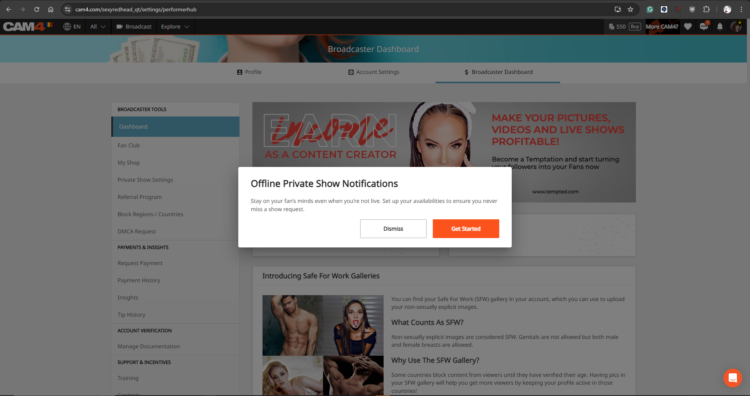
Enable Offline Notifications so viewers can send you Private Show requests when you’re not live and see your daily availability.

Don’t miss a Private Show request just because you’re offline or away from your device.

Learn how to set up Offline Private Shows

Rules & Eligibility Requirements

  • Broadcasters must be 2257 approved to participate.
  • Broadcasters must sign up using the official registration form. Sign-ups close Friday, November 20th, 2026.
  • To qualify for a Newbie Prize, your CAM4 account must have been created between September 16th and November 15th, 2026.
  • Everyone is eligible for a Global Prize, regardless of when they joined CAM4.
  • Broadcasters must stream for a minimum of 5 total hours during the contest period.
  • Winners are determined by eligible earnings from Private Shows (fixed-price and per-minute), Spy and CAM2CAM.
  • Group Show earnings do not count toward this contest.
  • To be eligible for a prize, models must complete Private Shows with at least 2 different viewers.
  • Token transfers between multiple accounts are strictly prohibited.
  • Earnings from Private Shows involving linked accounts, other models or the broadcaster’s own moderators will not be counted.
  • Each broadcaster may receive a maximum of one prize.
  • Broadcasters who qualify for a Global Prize are not also eligible to receive a Newbie Prize.
  • Previous winners may register but will be excluded from the final results and cannot win again.
  • Contest bans will be issued following 3 fair-play warnings.
  • All registrations, results and earnings will be validated during the final review. CAM4 reserves the right to remove participants who do not meet the contest requirements.
  • Winners will be announced and prizes paid no later than Wednesday, December 2nd, 2026.
  • Contest period: Earnings begin counting at 00:00 UTC on November 16th, 2026 and stop at 23:59 UTC on November 29th, 2026.

Pagini Niche CAM4: tot ce trebuie să știe modelele

Ce sunt Niches? Paginile Niche sunt spații comunitare specializate pe CAM4 organizate în jurul unor interese specifice — cum ar fi BDSM, Feet sau BBW. Gândește-te la ele ca la hub-uri dedicate unde te poți conecta direct cu utilizatori care caută exact tipul de conținut unic pe care îl oferi.


De ce Niches schimbă modul în care ești descoperit:

  • Expunere direcționată: În loc să concurezi în directorul general, postările și transmisiunile tale live apar în comunități dedicate stilului sau fetisului tău specific.
  • Previzualizare live în postări: Când transmiți live, orice postare pe care ai făcut-o într-o Niche va afișa automat o previzualizare video live. Acest lucru permite utilizatorilor care navighează prin feedul Niche-ului să intre direct în camera ta.
  • Leaderboard-ul: Fiecare Niche include un Leaderboard care prezintă primii 10 contributori pe baza numărului total de aprecieri. Clasarea aici oferă o vizibilitate foarte mare și te ajută să devii o autoritate recunoscută în acea comunitate.
  • Tab dedicat „Cams”: Niches au un tab special „Cams” care afișează doar modelele live care sunt membri ai acelei Niche. Acest lucru face mai ușor pentru spectatori să te găsească atunci când caută un tip specific de conținut.

Cum să te alături și să te conectezi:

  1. Găsește-ți Niche-ul: Fă click pe tabul „Niche„ din bara de navigare de sus pentru a explora directorul.
  2. Urmărește pentru a te alătura: Trebuie să faci click pe „Urmărește” pe pagina unei Niche pentru a deveni membru.
  3. Distribuie conținut: După ce devii membru, fă click pe „Creează postare” pentru a distribui fotografii sau videoclipuri din Media Vault sau din stocarea locală.

    Notă: Toate postările din Niches sunt gratuite pentru vizualizare, ceea ce le face teaserul perfect pentru a atrage utilizatorii către conținutul tău plătit sau către show-ul tău live.
  4. Interacționează: Interacționarea cu comentariile de la postările tale ajută la construirea unei comunități loiale în cadrul Niche-ului.

Valoarea: deblocarea unor noi fluxuri de venit Niches sunt mai mult decât un simplu instrument social; ele reprezintă o modalitate puternică de a-ți crește câștigurile:

  • Conversie mai mare: Ajungi la un public „cald” deja interesat de stilul tău specific, ceea ce duce la mai multe tips și solicitări de show-uri private.
  • Marketing automatizat: Previzualizarea ta live funcționează ca o reclamă constantă pentru spectatorii interesați în timp ce lucrezi.
  • Vânzări Media Vault: Folosește teasere gratuite în Niches pentru a direcționa trafic către media ta plătită și videoclipurile complete.
  • Status în Leaderboard: Vizibilitatea mai mare în Leaderboard este direct corelată cu mai multe înscrieri în Fan Club și creșterea pe termen lung a abonaților.

Gata să îți găsești Niche-ul?

Intră și începe să explorezi Niches! Urmărește câteva care îți stârnesc curiozitatea, împărtășește conținut teaser și vezi cine apare.

Ai putea descoperi o nouă latură a stilului tău pe care o iubești și să te conectezi cu fani care o iubesc și ei.

Următorul tău conținut preferat (și următorul tău val de fani) ar putea să te aștepte într-un Niche pe care nu l-ai încercat încă.

Începe să explorezi acum: www.cam4.com/niches


Ai nevoie de o mână de ajutor? Pentru mai multe detalii despre alte funcții CAM4, verifică FAQ-ul nostru sau întreabă chatbotul nostru „Spark”, pe care îl găsești în inboxul tău.

Camming plăcut!

Erotic Stories Submissions


CAM4 is now publishing Erotic Stories and we want yours!

If your story is chosen, it will be published, narrated, shared with our audience, and you’ll get paid. You can even choose to stay anonymous if you prefer.

Word limit: 500–1500 words. That’s all it takes to turn your imagination into income.
Payment details: Will be provided by email if your story is selected.
Publishing: Selected stories will be filmed, creating narrated videos that are published weekly on our Erotic_stories profile on CAM4.
Editing: Light editing may be applied for a smoother read for video narration and to comply with CAM4’s terms and conditions.


Why Submit?

  • Get seen. Your story reaches thousands of readers & listeners.

  • Get paid. Selected stories earn real money.

  • Get creative. Share your fantasies in your own unique voice.

  • Get Content. Use your story yourself by selling it to your fans.

Quick Writing Tips

  • Find your voice — be authentic and let your style shine.

  • Build tension — anticipation is everything.

  • Make it sensory — show, don’t just tell.

  • Keep it polished — clean writing stands out.

  • Don’t get too wordy – Stay within 500–1500 words.

For a full beginner’s guide with more tips, click here.

Ready to Submit?

It’s simple:

  1. Write your story (500–1500 words).

  2. 👉 Submit Your Story Here

  3. If your story has been selected, a CAM4 staff member will email you with more details


Your fantasies deserve more than to stay in your head. Put them on the page, share them with the world, and let them earn for you.

Start writing today — your audience is waiting.


Need a Hand?

For more information on topics relating to CAM4, check out our FAQ , or join our live Coaching Sessions every Tuesday & Thursday at 11 AM & 8 PM EST.

Our chatbot „Spark” is also always ready to help and can be found in your Inbox!


Now get writing, have fun, and let the love (and tokens) roll in!

Happy Camming!

Fan Club Pricing: What Successful Creators Charge

What is a CAM4 Fan Club?

A Fan Club is a monthly subscription where your biggest supporters pay a set fee to get exclusive access to you and your content. Unlike one-time token tips or purchases, Fan Clubs bring guaranteed monthly income directly into your account.

By joining, fans get:

  • Exclusive content (photos, videos, behind-the-scenes material). This is where your NSFW content should be hiding!
  • Special perks like chat badges, free spy access to shows, and private messaging.
  • Discounted rates on your premium videos and content.

Fan Clubs are not only about exclusive perks, they’re a way to strengthen your connection with fans while earning 80% from every subscription, more than you receive from token purchases!

Suggested Fan Club Pricing

Here are five options inspired by top creators and platforms:

50–75 tokens/month ($4.99–$7.99) – Perfect for beginners and building your base.

75–125 tokens/month ($7.99–$9.99) – The sweet spot for casual fans and one of the most popular ranges across platforms.

125–150+ tokens/month ($14.99+) – Best for creators with consistent content, loyal fans, and premium material.

Tip: Start in the mid-range (~$5.99) and adjust based on demand, the volume of your content, and fan engagement.

Quick Pricing Guide (Cheat Sheet)

Content Type

Entry / Promo

Standard Range

Premium / High Effort

Fan Club

50–75 tks ($4.99–$7.99)

75–125 tks ($7.99–$9.99)

125–150+ tks ($14.99+)

Photos (single)

Free – 5 tks

10–25 tks

30–50 tks

Photosets

10–25 tks (5–10 pics)

25–150 tks (10–15 pics)

50-300+ tks (15-20 pics)

Videos (short <3m)

Free – 25 tks (teasers)

50–120 tks

150 tks+

Videos (medium 3–10m)

1-25  tks

25–100 tks

120-300+ tks

Videos (long 15m+)

25-100 tks

250–400 tks

500–600 tks (high effort)

Tip: Use freebies (1–2 pics or <1 min clips) as teasers. Offer seasonal discounts (10–20%) to boost sales without devaluing your work.

Photosets & Unlockables

  • SFW content: Free or unlocked automatically to tease your style.
  • Single photos: 5–25 tokens depending on explicitness.
  • Bundles (5–10 pics): 15–25 tokens.
  • Larger sets (10–20 pics): 150–300 tokens.

Mix in occasional freebies on your Activity Feed. This gives fans a taste of what’s inside and helps hook new subscribers.

Videos

  • Short (1–3 mins): 50–120 tokens. Teasers and quick clips sell best here.
  • Medium (3–10 mins): 75–250 tokens depending on effort and explicitness.
  • Long (10–15+ mins): 250–600 tokens, especially for high-effort or special releases.

Pro tip: Cut longer videos into shorter clips for easier sales and more views. Keep a few <1 min teasers free for promotion.


Do’s and Don’ts for a Successful Fan Club

Do’s

  • Post consistently to give fans ongoing value.
  • Make members feel special with perks and exclusive drops.
  • Offer discounts or seasonal promos (10–20%).
  • Reply to messages — engagement keeps fans loyal.
  • Refresh your content often (new covers, contests, seasonal sets).

Don’ts

  • Don’t set it and forget it — inactivity = unsubscribes.
  • Don’t overprice if you’re not offering strong exclusive value.
  • Don’t forget to promote — mention your Fan Club in every post/show.
  • Don’t give everything away outside the Club — keep your best material inside.

Need a Hand?

For more details check out our FAQ on this topic and others, or join our live Coaching Sessions every Tuesday & Thursday at 11 AM & 8 PM EST.

Our chatbot „Spark” is also always ready to help and can be found in your Inbox!


Now go live, have fun, and let the love (and tokens) roll in!

Happy Camming!

Earn more with Pay-Per-Text

Your Guide to Earning Big with Pay-Per-Text on CAM4!


Hey Creator, Ready to Boost Your Earnings?

Imagine this: every message you receive or media file you get from your fans directly puts tokens in your pocket. Sounds amazing, right? That’s exactly what Pay-Per-Text (PPT) on CAM4 does for you. It’s time to take control of your chat, maximize your earnings, and create deeper, more meaningful connections with your fans. Let’s dive in and get you set up for success!


Why Pay-Per-Text Is a Game-Changer for You

  1. Get Paid for Your Time
    Every message or media file your fans send is now a chance to earn. Yes, even that quick “hello” can add up to tokens in your account.

  2. Build Your Inner Circle
    Want to make your Fan Club the hottest spot? Reward members with free or discounted interactions while charging others a premium. It’s a win-win!

  3. Total Control, Your Way
    You decide how much to charge and for what. Want to charge only for photos or prioritize Fan Club messages? The choice is all yours.

  4. A Premium Experience for Fans
    Fans love feeling special! By charging for messages and media, you’re offering them guaranteed attention and an exclusive connection with you.

  5. Track Your Success
    CAM4 makes it easy to see exactly how much you’re earning from PPT, so you can fine-tune your strategy and watch those tokens roll in.


How to Set Up Pay-Per-Text (It’s Super Simple!)

Step 1: Let’s Get Ready!

First things first, make sure you’re Broadcast Approved and that the Pay-Per-Text feature is enabled in your settings. Easy!

Step 2: Set Up While Streaming

  1. Start Your Broadcast
    Log in and go live!

  2. Access Your Chat Settings
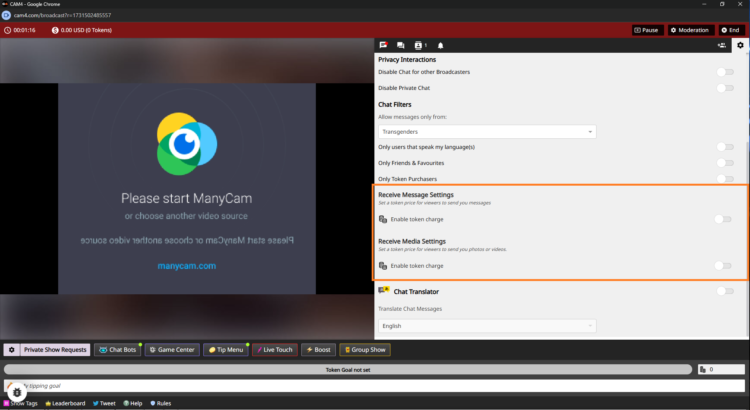
    Click the cogwheel icon (top-right corner) in the Broadcast Window. Scroll down to find the PPT options.

  3. Turn On Token Charges
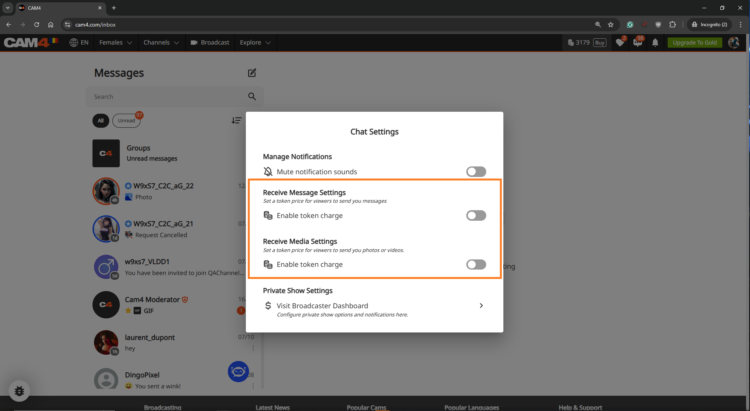
    Flip the toggle for Receive Message Settings to start earning tokens for public and Fan Club messages.
    Example: Set 5 tokens for public messages and 1 token for Fan Club members (or keep it free to encourage signups).

    Do the same for Receive Media Settings to earn from photos and videos.
    Example: Charge 10 tokens for public uploads and 2 tokens for Fan Club uploads.

  4. Let CAM4 Do the Rest
    No need to hit save—your settings are updated instantly.

Step 3: Pre-Configure in the Messenger Interface

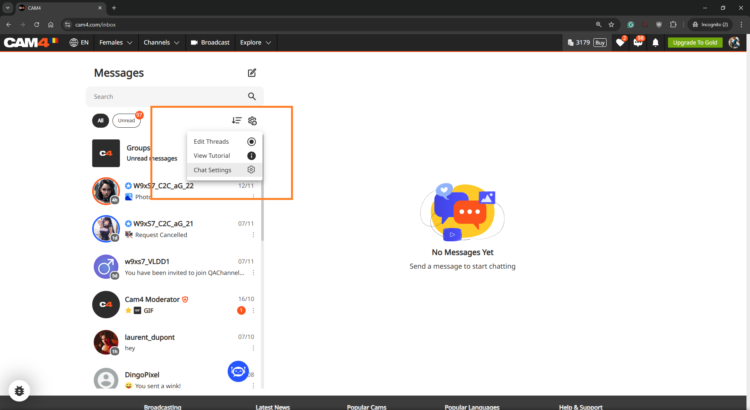
Want to set things up before you go live? No problem! Head to the Messenger Interface via the Chat Icon on your profile. Adjust your PPT settings, and they’ll sync across the platform.

Make the Most of Pay-Per-Text

  • Treat Your Fan Club Like VIPs
    Let’s be real: your Fan Club is your squad. Offer them free or reduced-rate messages to build loyalty while charging higher rates for everyone else.

  • Experiment with Token Rates
    Try different pricing to see what works best for your fans. The sweet spot is where your earnings soar, and your fans stay engaged.

  • Test It Out First
    Use a test account or ask a trusted viewer to make sure your settings work perfectly before going live.

  • Be Clear and Upfront
    Fans appreciate transparency. Display token charges clearly so there are no surprises—just good vibes.


Watch Your Earnings Grow!

Head to your Broadcaster Dashboard to track every token you earn from messages and media. It’s all broken down for you under the Tip History tab, so you know exactly where your success is coming from.

Feeling curious? Check out the Tipping Reports to see which strategies are working best. Is it media uploads? Fan Club messages? You’ve got all the insights at your fingertips.


FAQs (Because We Know You’ll Crush It!)

  • Can I charge for just one thing, like media?
    Absolutely! You’re in control, so choose what works for you.

  • What if a viewer doesn’t have enough tokens?
    No worries—they’ll get a prompt to buy more before their message or media goes through.

  • Are Fan Club messages free by default?
    Yep, but you can change that. Charge a little or keep them free—it’s totally your call.


Pay-Per-Text isn’t just a feature—it’s your gateway to more earnings, more connections, and more control over your time and energy. Ready to turn every interaction into an opportunity? Let’s do this! Your fans are waiting, and those tokens are yours to claim. 💎


~That’s all for this lesson!

Happy Camming!

Love, Your Coaching Team!

Are your Offline Private Show (OPS) Notifications on?

Never miss a private show request, even when you’re offline or away from your computer. With Offline Private Show (OPS) notifications, your viewers can make private show requests and view your schedule at any time!

This guide will help you get started with ‘Offline Private Shows’ (OPS) and setting up your notifications. By leveraging these powerful CAM4 features, you can keep your audience continuously engaged and build lasting relationships- even outside of your regular online shows.

What are the Benefits of using OPS Notifications?

✓ Notification Preferences – Personalize your alerts and select the channels where they’ll be delivered in real-time. 

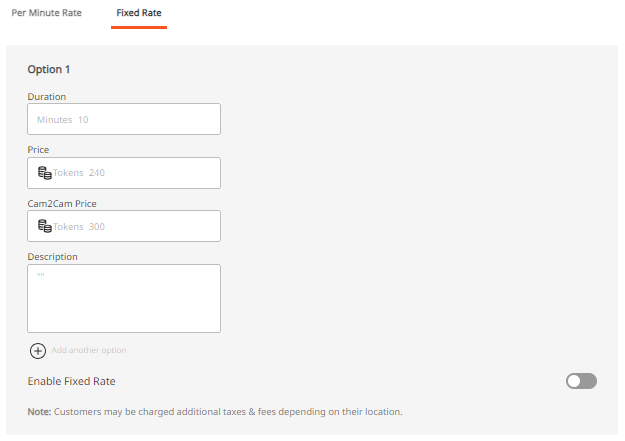
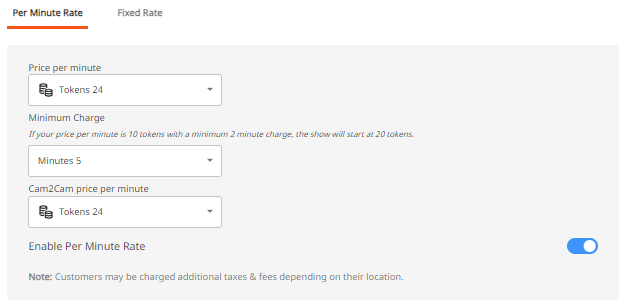
✓ Customized Pricing – Set your desired Private Show pricing with the ability to allow Cam2Cam and Spying. 

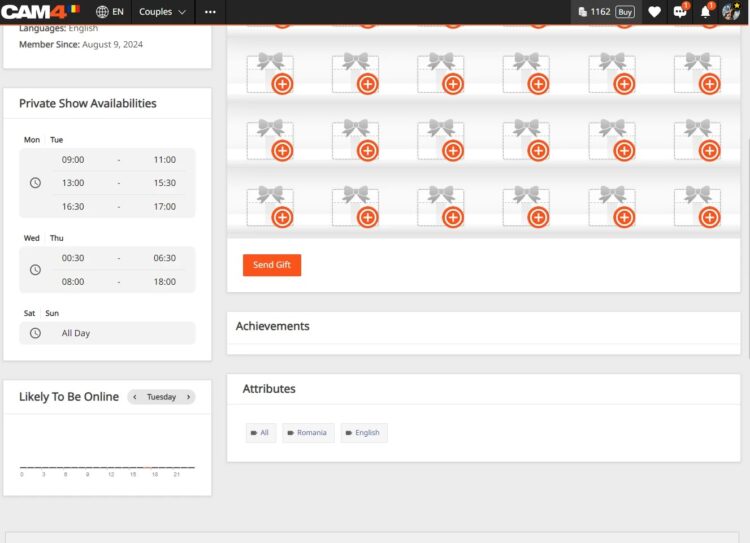
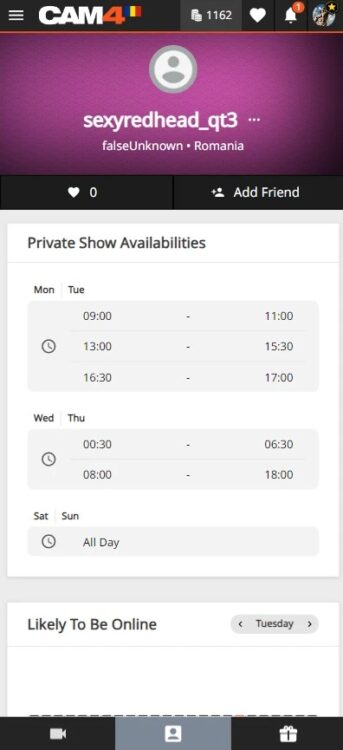
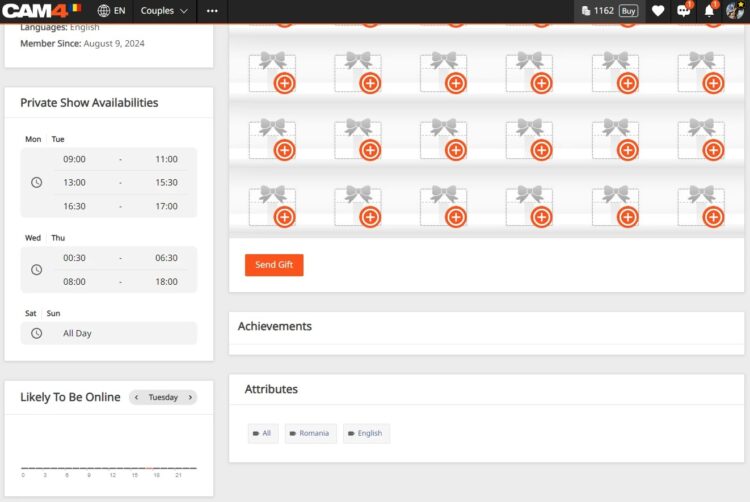
✓ Improved Schedule Visibility – Make your Private Show schedule and availability visible to your fans… it’s super easy to configure and is shown right on your profile- Set up to 3 different time slots.

How do I find the OPS settings?
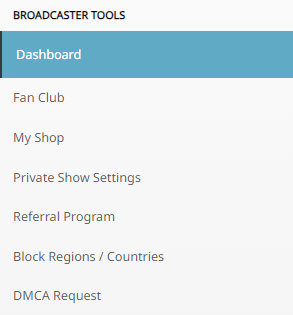
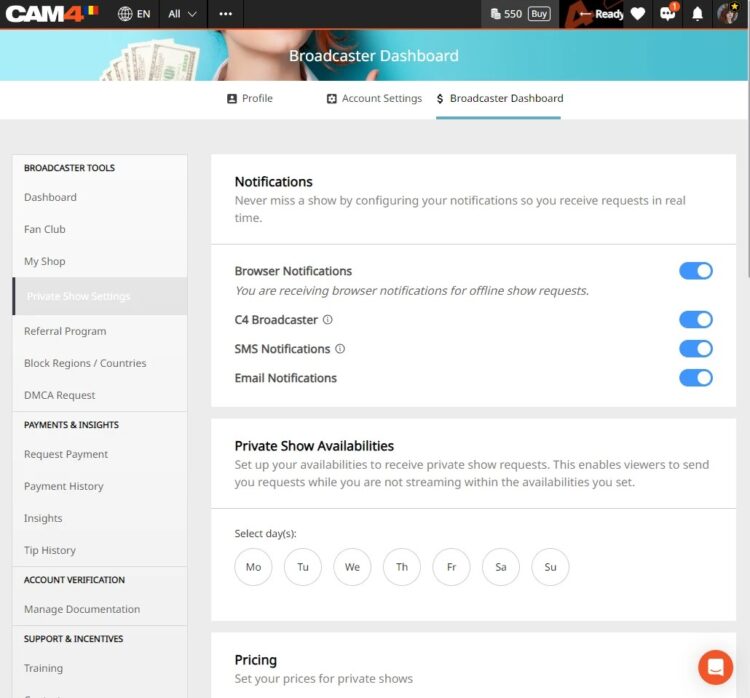
Once logged into your CAM4 account navigate to your Broadcaster Dashboard , then click on „Private Show Settings” from the „Broadcaster Tools” menu on the right.

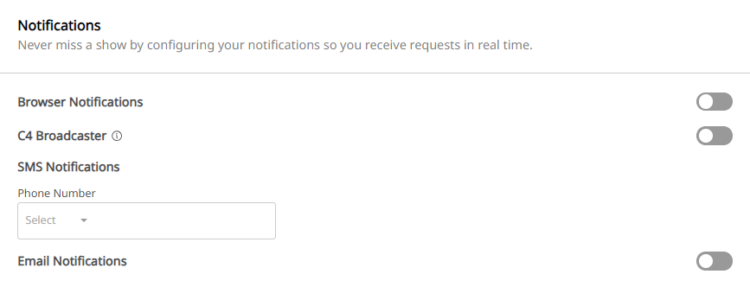
IMPORTANT: The first thing to note is that the OPS Notifications function is defaulted to OFF, therefore as a creator you will need to activate this in your settings by sliding to ON.

Want to understanding your Offline Private Show (OPS) Notifications? 

BROWSER NOTIFICATIONS

These notifications are pop-ups that appear on your screen, regardless of which website you are on.  If your browser (ie. Safari, Firefox, Chrome) is open, a notification will be shown.   

To enable, simply toggle the “Browser Notifications” option to ON.

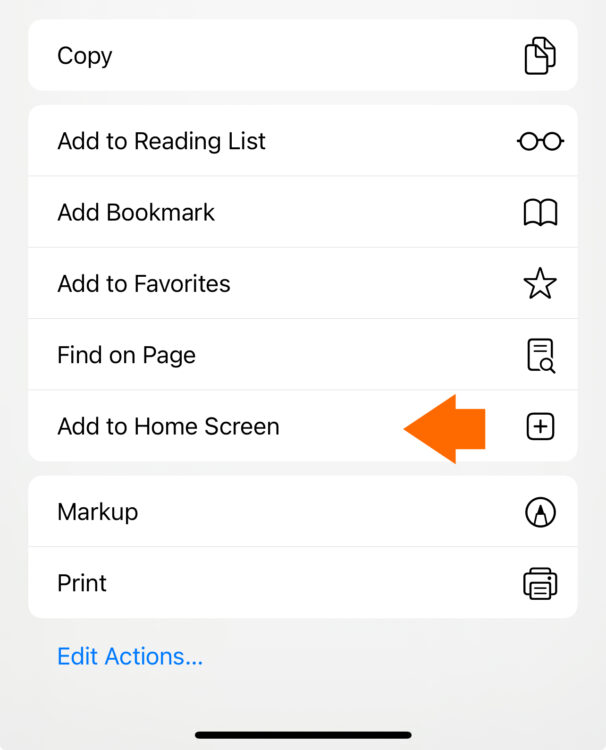
iOS users this feature requires additional steps to be enabled. You must add the web app to your home screen and access it from there to enable notifications.

Installing Web App

  1. Open your Web browser and go to CAM4.com
  2. Click the download icon at the bottom of your browser. 
  3. Select “Add to Home Screen from the menu

  1. Rename the icon or just press “add”
  2. The C4 icon will appear on your home screen 

C4 BROADCASTER APP NOTIFICATIONS

These notifications are sent through the C4 Broadcaster App keeping you informed about your private show requests directly to your mobile device.

To enable, simply toggle the “C4 Broadcaster” option to ON.

EMAIL NOTIFICATIONS

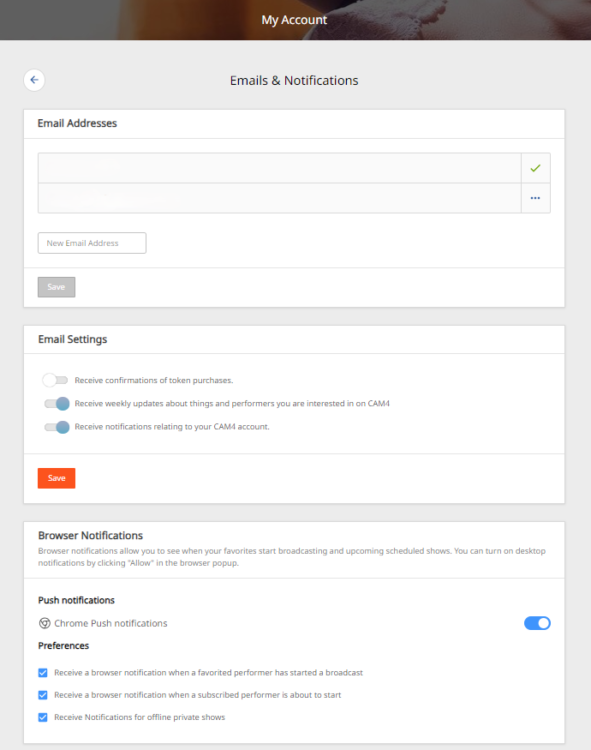
These notifications are sent directly to an external email address, ensuring you have a record of the request in your inbox.

Once enabled, check your email preferences to ensure the “Receive Notifications Relating To Your CAM4 Account” option is ON.


SMS NOTIFICATIONS

These notifications are sent as a text message to your mobile phone whenever a private show request has been made. 

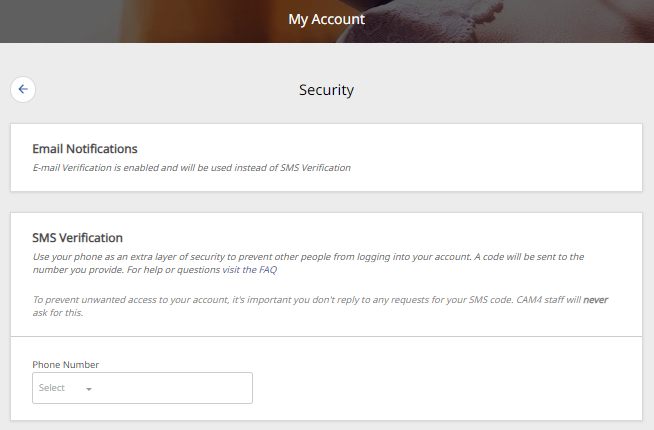
To enable, simply “Add Your Mobile Number” in the settings.

Note: if Two-Factor Authentication (2FA) is on, the mobile number MUST MATCH  the one used for 2FA.

SET PRICING
This feature allows you to set your Private Show pricing either per minute or as a fixed rate. You can configure your “Price Per Minute”, “Minimum Timeframe”, “Spy Per Minute Rate”, and “Cam2Cam” settings here.

3 USEFUL TIPS TO REMEMBER

TIP 1: GET NOTIFIED MULTIPLE WAYS- You can activate one or more notification channels at once, enabling you to receive alerts through various methods and stay informed no matter what you’re doing or where you are.

TIP 2: CUSTOMIZE YOUR AVAILABILITY- Set the times when you are open to accepting Private Show requests.  This will help boost engagement and more private shows coming your way..  

TIP 3: SHOW YOUR SCHEDULE ON THE PROFILE & MESSENGER-  Setting your schedule will show on your profile page and also on  your messenger, ensuring viewers can easily see your availability., 

With the right settings in place, you can look forward to a more organized, responsive, and profitable PRIVATE SHOW experience.

👉 If you have any questions, feel free to ask the Coaching Bot 👈

NEED MORE HELP?

Read our FAQ’s or join one of our regular Coaching Sessions every Tuesday & Thursday at 10am EST for useful insights and to meet other creators.

Alternatively, please reach out to CAM4’s Support Team via the chat bubble in the bottom right hand corner of CAM4, or by email at support@cam4.com

One final thing… The content of Private Shows are subject to CAM4’s creator rules, and all persons on your cam must be approved by CAM4.

~That’s all for this lesson!

Happy Camming!

Love, Your Coaching Team!

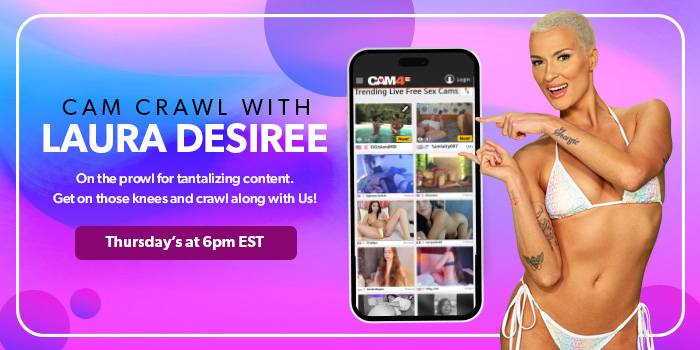
Cam Crawl

Looking for new ways to be discovered on CAM4?

Every Thursday from 6pm to 7pm EST, Laura will broadcast live with split-screen magic, allowing her viewers to sit next to her in real-time.

Navigating from room to room, Laura will guide her viewers showing them exactly how to interact with the most delicious creators from North America and around the world!

You could be one of them!

Gain new fans each week and be discovered for new possibilities with CAM4.

The task is to catch Laura’s eye during the crawl… Simply login to CAM4 on Thursdays and be streaming  live between 6pm – 7pm EST. Make sure  you stream the greatest show you have to offer.

That means:
Good lighting – Get out of the dark!
Engaging with your viewers – She wants to see you on cam.
HD Quality Cam – No grainy streams
Nice cam room – Take pride in the space around you, it makes a big difference.

CAM4’s exclusive Cam Crawl provides opportunity for our creators to be discovered and improves the tipping habbits of our users.

By shining a spotlight on new talent and encouraging viewers to engage with them, the crawl is working to help cultivate a community of appreciation and support.  Showcasing creators and the wonderful content the create is our goal.

Hope to see you on the next Cam Crawl!


~That’s all for this lesson!

Happy Camming!

Love, Your Coaching Team!

Start-Up Program (USA & CAN Only)

Start-Up Program

🚀 New Broadcaster Exclusive

JOIN THE START-UP PROGRAM

We offer new broadcasters an 8-week bonus program where your weekly earnings are doubled — up to a maximum bonus per week — on top of what you already earn on CAM4!

Earn up to $400 Extra! 💰

💰

Earnings Matched

Up to $50 bonus per week — your tips are matched!

⏱️

Stream Hours

Minimum 4 hours of streaming per week required

📅

8 Weeks

Bonus weeks run Monday through Sunday

📆 8 Weeks of Earning

WEEK 1

Earn tips → get matched

up to +$50

WEEK 2

Earn tips → get matched

up to +$50

WEEK 3

Earn tips → get matched

up to +$50

WEEK 4

Earn tips → get matched

up to +$50

WEEK 5

Earn tips → get matched

up to +$50

WEEK 6

Earn tips → get matched

up to +$50

WEEK 7

Earn tips → get matched

up to +$50

WEEK 8 ⭐

Final week! Push hard!

up to +$50

TOTAL POTENTIAL BONUS: $400 💰

✅ Requirements

🌎

North American ID on file with CAM4 (USA or Canada)

🆕

New to CAM4 — registered within the last 60 days. No multiple accounts allowed.

🚫

Canada and USA not fully blocked — you may still block your own province or state

⏱️

Stream the required hours each week (minimum 4 hours)

👥

Real viewer tips only — only tips earned from genuine viewers count toward your weekly total

1️⃣

You can only be part of one incentive program at a time

💳 Bonuses are credited to your account no later than end-of-day Tuesday of the following week.

🟠 Ready to Start?

Signing up is easy! Here’s how it works:

💬

Step 1

You receive a message from Julia in your CAM4 support bubble

↩️

Step 2

Reply to let Julia know you want to join!

✅

Step 3

Julia verifies and adds you to the program — you’re in!

⚠️ You are only added once Julia receives your reply!

Getting Approved

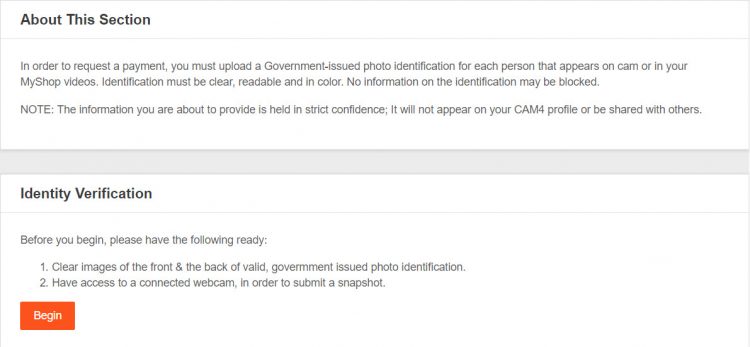
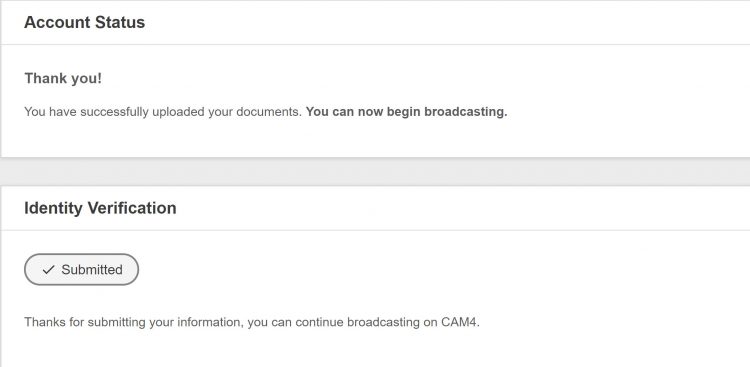
Before you can start broadcasting and earn money, you’ll need to submit your ID and go through the approval process in your Broadcaster Dashboard.


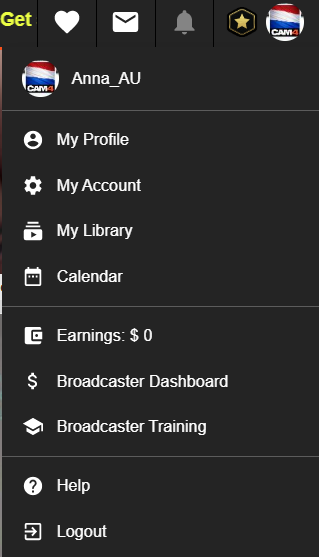
*You can also access your dashboard in ‘My Account’. It’s listed under ‘Broadcater tools’ on the lower left side of your screen.


Finding where to upload your ID is easy with this helpful notification you’ll see on your dashboards main page.


ID requirements:

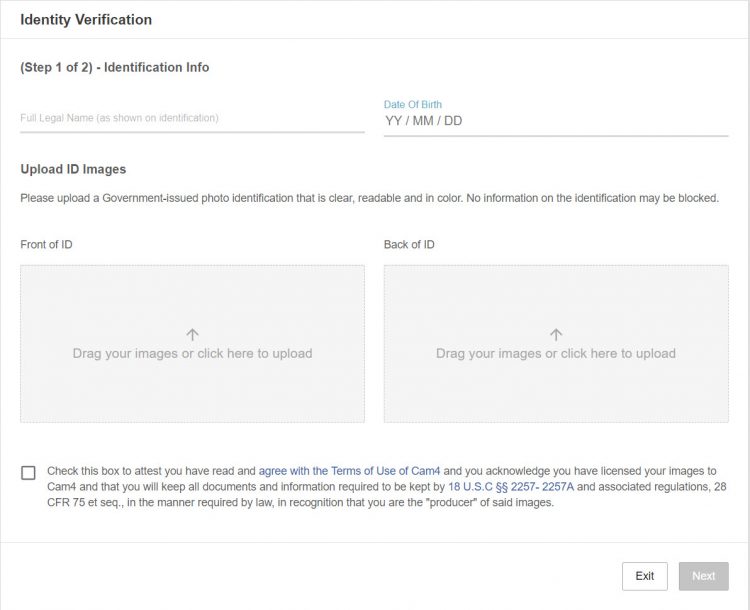
• Valid Government-issue PHOTO ID (expired ID will not be accepted)
• ID must be in decent, readable condition with no tampering or visible damage that could block information.

Upload requirements:

• Clear, high quality, colour image. *recommended resolution 240dpi 
• No part of the ID can be blocked, covered, or cut out of the photo. 

Next, we require that you check the box at the bottom of the page that means you agree to the following: 

• You’ve read, and understand the CAM4 site rules.
• You’re allowing CAM4 to show your image live on the site.
• You’re the sole owner/creator of all content you share on CAM4. 
• You will collect and maintain records of ALL performers’ identification information that are seen on your live broadcast or content you sell on CAM4. You also swear to have them readily accessible if you’re ever asked to produce them. 

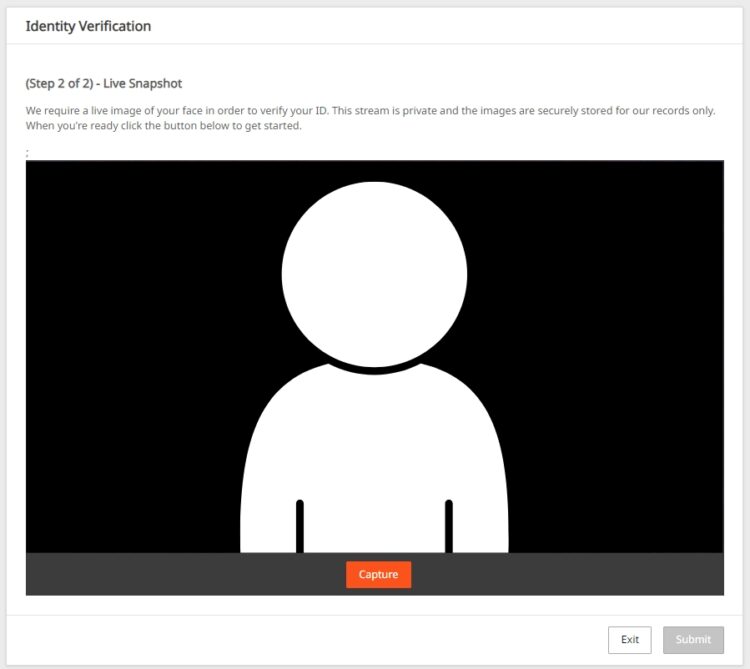
For added protection, we ask for a live snapshot of your face to verify your ID. Please make sure you are in a well lit room with all scarves, hats, toques, and hairstyles removed that block your full face from being seen. 


~That’s all for this lesson!

Happy Camming!
Love, Your Coaching Team!


Token Indicators

More insight in what your viewer might spend 
As a Broadcaster on CAM4, it’s always good to keep track of your tippers spending behavior to prioritize your attention during a live show. Get ready to see just how big of a spender your viewers may be with the brand new Token Indicator. Conveniently integrated within your CAM4 chat, this tool now allows you to identify viewers tipping habits !


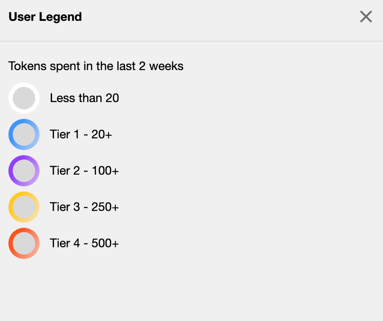
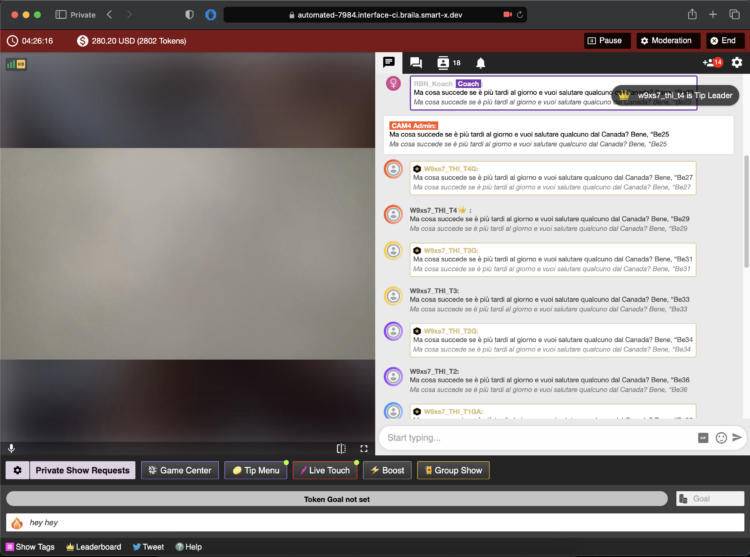
Viewers in your chat will be indicated by color coded usernames representing 5 different token tiers alongside their corresponding viewer type (Gold Member, Fanclub Subscriber, Moderator) showing you what they have spent in tokens over the last 2 weeks


TIER 1: WHITE = Has not spent any tokens in the past 2 weeks

TIER 2: BLUE = Has spent at least 1 token but not more than 19 in the past 2 weeks

TIER 3: PURPLE = Has spent at least 20 tokens but not more than 99 in the past 2 weeks

TIER 4: YELLOW = Has spent at least 100 tokens but not more than 500 in the past 2 weeks

TIER 5: ORANGE = Has spent at least 500 tokens in the past 2 weeks

THIS IS WHAT YOU WILL SEE…


Whether they are blue, purple, yellow, or orange, be sure to show them some extra love and attention while visiting your room. You never know when a regular viewer may become your next big tipper !!! 

~That’s all for this lesson!

Happy Camming!
Love, Your Coaching Team!