Category Archives: Do not use

Private Show Possibilities

All you need to know about private shows on CAM4 — per minute, time blocks, or solo private with spies.

Private Shows on CAM4: How to Earn Smart with 1-on-1

Choose per minute, work with pre-paid time blocks, or start a solo private show with spies. Clear prices = more trust (and therefore more tips).

Tip: also mention your private options and rates in your bio or Activity Feed.

What is a private show?

A private show is an exclusive show between you and one viewer. Depending on your settings, others can (paid) watch as “spy”. With private shows, you are guaranteed to earn tokens per minute or sell a time block in advance.

Three ways to earn with private

1) Pay per minute

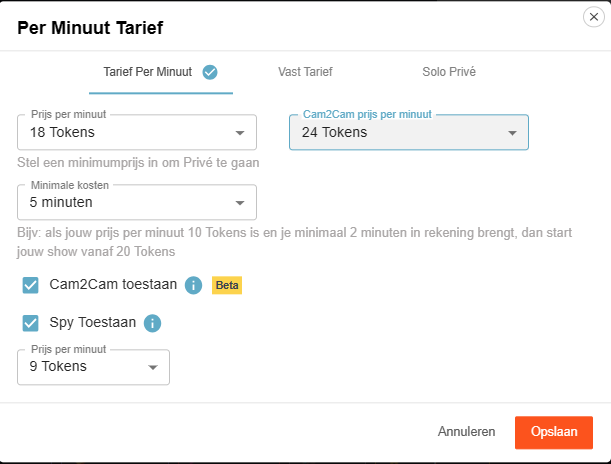
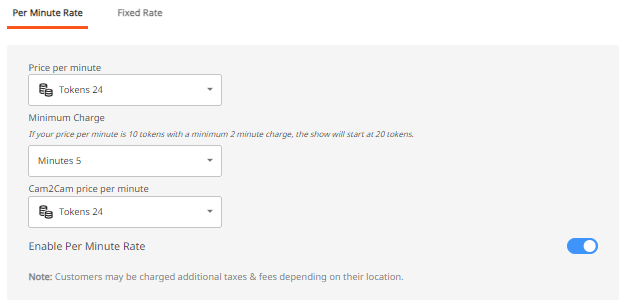
Pay per minute (settings)

Viewers see the cost per minute before requesting a private show; in the Netherlands, 21% VAT is applied upon purchase.

Guideline example: 12 tokens/min is $1.20 per minute for you. Your viewer in the Netherlands sees an amount of 15 tokens/min including VAT. This VAT percentage varies per country where your fan lives.

Pro tip: allow spying (Spy). These viewers only see the image, no chat, and hear no sound.

2) Time blocks (pre-paid)

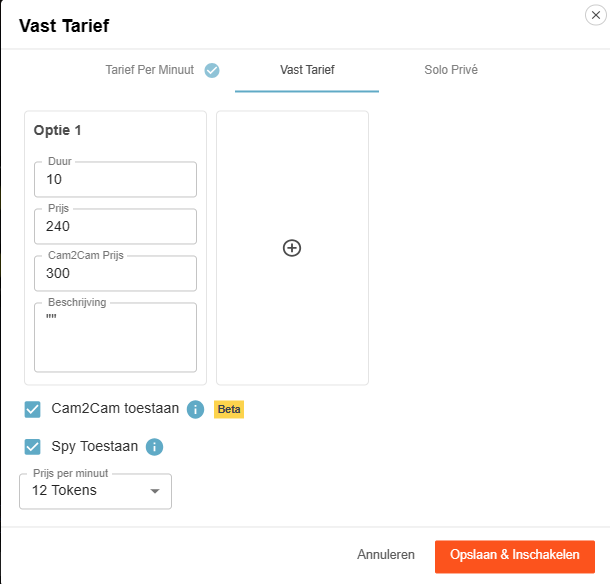
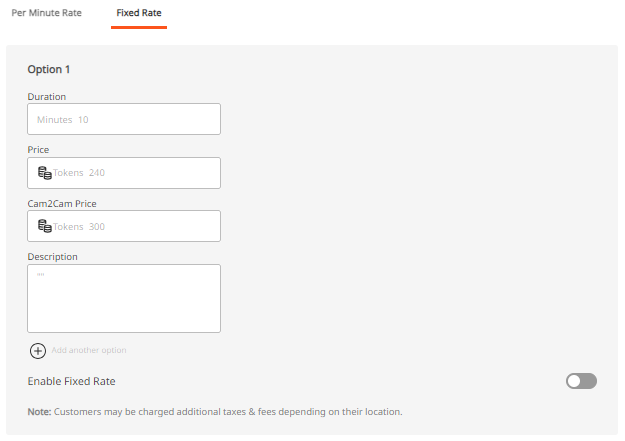
Fixed rate for time blocks

Offer pre-paid blocks. You choose the duration and the price; the viewer chooses and pays.

Advantage: you are assured of the entire block. If the viewer clicks away themselves, you will still be paid the full block. If you end it yourself or your connection drops, the tokens go back to the viewer.

3) Solo private show

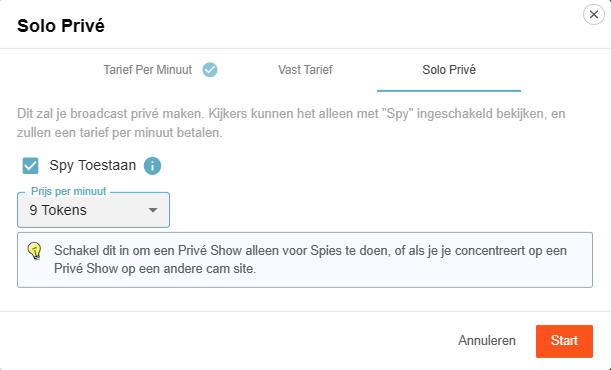
Solo private show display

You appear to be in private, but you are alone. Spies can — if you allow it — watch for a fee and pay per minute.

Useful for calmly setting up your games or settings (turn off Spy then), or if you are running a private show elsewhere and want to generate income on CAM4 at the same time via spies.

Cam2Cam: make your private show even more intimate

C2C offers more intimacy and often higher per-minute prices — communicate your terms and boundaries in advance. Some models find it much nicer to be able to see the viewer themselves, but some do not. Adjust your price accordingly.

Activate Cam2Cam

Activate Cam2Cam

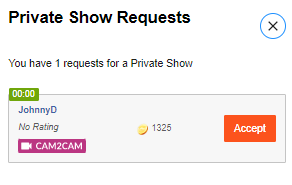
Go to the settings of your Private Show via the gear next to ‘Requests for private shows’. Set your C2C price and check ‘Allow Cam2Cam’. Save — done.

What does it cost?

Cam2Cam is usually ±1.25× the price of your normal private show. If you normally ask for 12–18 tokens/min, then 18–24 tokens/min for C2C is a logical range.

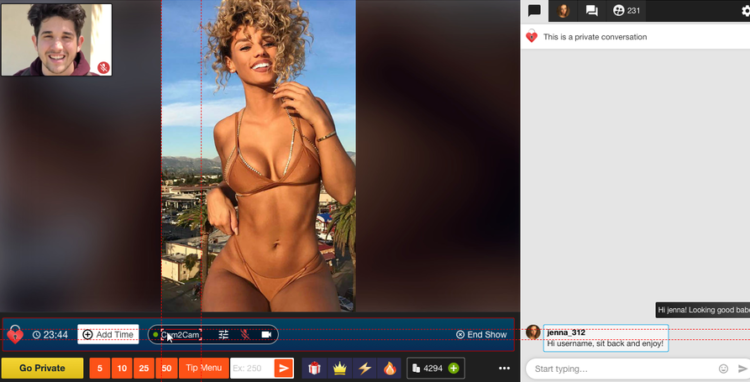
Enlarge/move C2C window

During the show


  1. The video of your viewer appears in a corner of your screen (movable and scalable).
  2.     

  3. Use the Cam2Cam buttons: mute and volume control.

Auto-Pause: your time after a private show

Auto-Pause

Auto-Pause gives you time to catch your breath after a Private or Group Show, before your public stream goes live again.

How does it work?

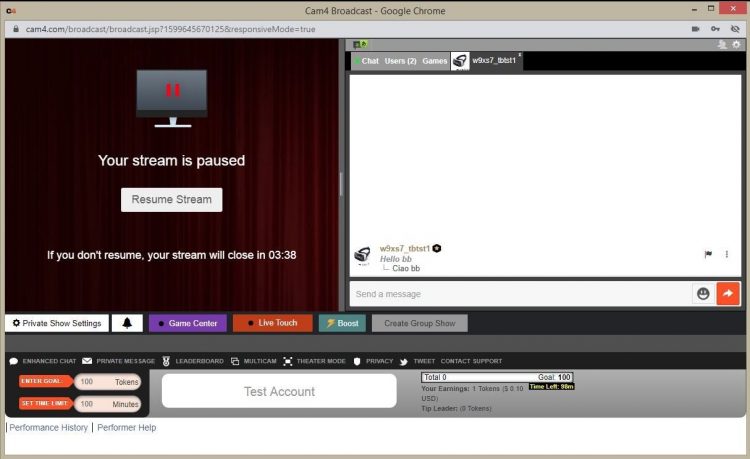
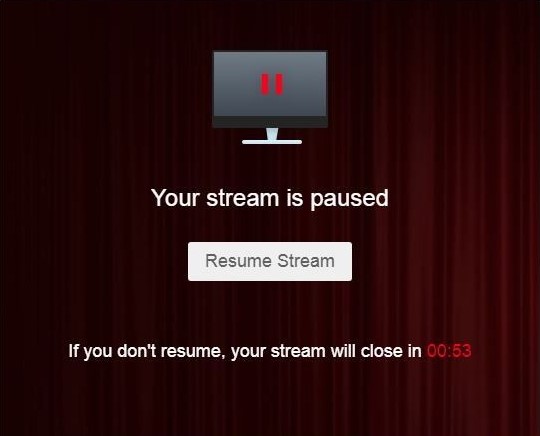
Afterwards, your stream automatically pauses for up to 5 minutes. Get something to drink, change clothes, or reset your setting — you decide.

You can resume earlier at any time via “Resume Broadcast”. If you wait longer than 5 minutes, the stream ends automatically.

You will not receive private requests during the pause.

What you see

Auto-Pause performer view

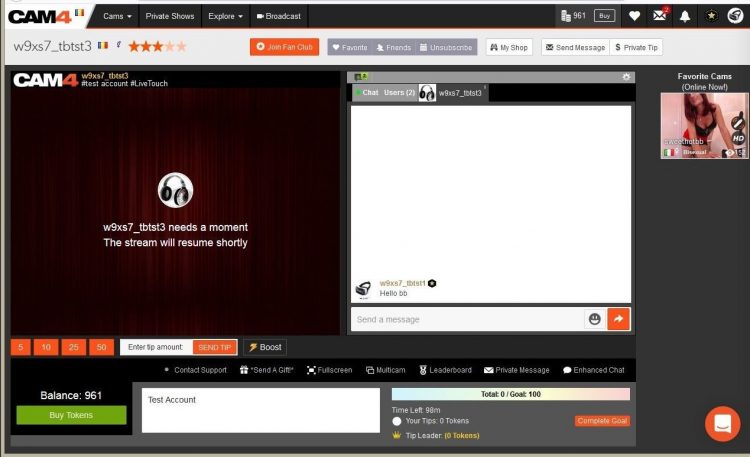
What viewers see

Auto-Pause viewer view

Resume Broadcast button

Price & transparency

Communicate in advance what makes private different from your public show (tempo, requests, Cam2Cam, no negotiations) and stick to your rates. Clarity increases conversion and prevents hassle.

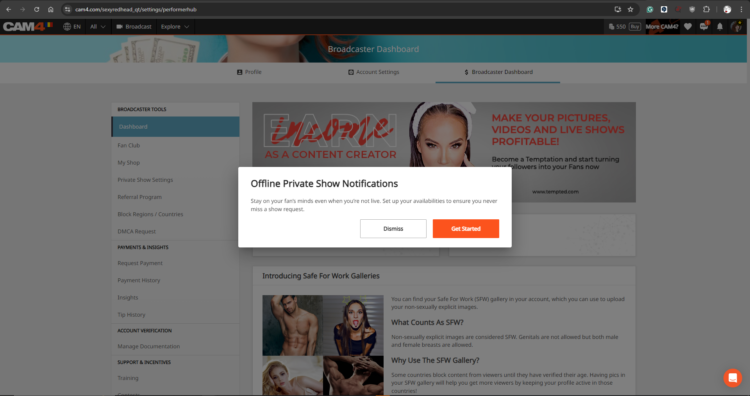
Never miss a private show request again: with Offline Private Show (OPS) notifications fans can book at any time and you choose how you are alerted.

PRIVATE SHOW CONTEST (APRIL 20 – MAY 3, 2026)


WHAT HAPPENS IN A PRIVATE SHOW, STAYS IN A PRIVATE SHOW

From APRIL 20th – MAY 3rd CAM4 is giving you a chance to WIN !!! Give your viewers what they have been waiting for… a personalized and intimate experience with a 1-On-1 Private Show. Performers who earn the most through Private Shows (including Spy Shows for the voyeurs at heart) will win 1 of 10 $$$ prizes !!!

10 TOP PRIZES (NA, RO, RU, UA)
1st: $250
2nd: $180
3rd: $100
4th: $80
5th: $50
6th: $30
7th to 10th: $20

+ 3 EXTRA PRIZES OF $50 for the creators who earn the most from  CAM2CAM shows!

CLICK HERE TO SIGN-UP FOR UK / AU


WHAT WILL BE COUNTED FOR THIS COMPETITION:
– Private shows with payment per minute
– Cam2Cam private shows
– Private shows at a fixed price
– Earnings from “SPY”

TIP: By selling private shows at a fixed cost, you’ll always know how much you’ll earn. It really is an easy way to get tokens, and a fantastic and safe alternative to Skype shows.

Haven’t tried CAM4’s Private Shows yet? Visit the FAQ and find out how easy it is to set your options!

Private Show: Fixed Rate or Price per Minute

CONTEST RULES:
– Creators MUST be 2257 Approved
– Creators MUST signup using the form below
– Bonus’s determined by viewer Private Shows ONLY (Pay-per-min, Fixed rate, Cam2cam, Spy)
– Tokens exchanges between creators or other users are not allowed
– A max of 6000 tokens will be counted per unique tipper.
– Contest ends May 3rd at 11:59pm ET

Prizes will be added to creators accounts no later then WED, MAY 6th, 2026 at 11:59pm ET


Banning and Moderating

Banning and moderating on CAM4 — here’s how to keep your room safe, cozy, and under control.

Safety on CAM4: Banning and Moderating

Keep CAM4 fun and safe with the right measure at the right time. Difference between banning (denying access) and moderating (steering chat behavior).

You decide what happens in your room — choose the mildest effective option and scale up if necessary.

Banning on CAM4

Sometimes it is necessary to deny someone access completely or partially. There are two types of bans:

1) Administrator Site Ban

With a site ban, a user loses access to the entire website — usually after violating the Terms & Conditions or illegal activities.

  • Illegal/prohibited activities (including minors)
  • Spamming or scamming
  • Unlawfully recording/distributing broadcasts
  • Persistent ignoring of warnings (e.g., playing video instead of live)

Payment problems can also lead to a site ban. Do they think they were banned unfairly? Refer to support@cam4.com.

Full terms: cam4.com/legal/termsofuse

2) Broadcaster Room Ban

  • Only applies to your room.
  • The viewer can still use the rest of CAM4.
  • Only use if milder options didn’t work.

You have full control over who has access to your room.

Moderating on CAM4

In addition to banning, there are lighter measures to keep your chat pleasant. Both you and your moderators can use these functions.

Moderate Yourself or Deploy a Moderator

  • You can steer visitors yourself with available tools.
  • You can also appoint a moderator who takes over (part of) it.
  • A good moderator promotes atmosphere and income — reward active mods.
Note: Be careful with mod rights, especially with other models. Someone else can remove visitors from your room; confidentiality and clear agreements are essential.

Available Options (from Mild to Strict)

Silencing

Messages from the visitor are not visible to anyone. Useful for negative behavior, spam, or begging.

Advantage: the user often doesn’t notice and is less likely to create new accounts.

Kicking

The visitor is temporarily removed but can come back immediately. Only use after a clear warning.

Room Ban

The heaviest tool within your room. The visitor can only come back once you have released (unban) him/her.

Keep CAM4 Fun!

Banning and moderating protect our community against abuse, illegal activities, and disruptive behavior. Use them wisely and to your advantage.

Do you see someone who is not following the rules? Report this to your performer manager (Alexandra) or email performers@cam4.com.

Summary: start mild (silence/ignore), scale up (kick), and ban only when necessary. You determine the climate in your room — clear rules, consistent enforcement, nice vibe.

Activity Feed & Fanclub

The Do’s & Don’ts: share content, earn continuously, and build a loyal community — all within CAM4.

The CAM4 Activity Feed & Fanclub: Your All-in-One Platform

Share updates, photos, and videos, sell premium content, and build steady income through your Fanclub — all within CAM4.

Tip: mix public posts (reach) with Fanclub-only content (value) and post at fixed times.

Intro Video

What is the Activity Feed?

Think of it as your own social platform within CAM4: you share updates, post photos, sell videos, and grow your audience — even when you’re not live.

How does it work?

  1. Personalize your profile: choose an SFW profile picture and header that reflect your brand.
  2. Fanclub-exclusive: offer premium posts through your Fanclub for loyal members.
  3. Earn from your content: sell individual photos and videos to your fans.
  4. Media library: all your media in one place, ready to post.
  5. Fresh and active: post short, attractive updates regularly.

Why the Activity Feed?

More Visibility

Fans quickly find your latest content — even when you’re offline.

Efficient

Manage all your updates in one place, without separate tools or detours.

Easy

Intuitive and quick posting with everything within easy reach.

Fanclub: Build a Loyal Community

Fanclub hero

A Fanclub is a monthly subscription with exclusive access to you and your content — an ideal basis for predictable, recurring income.

Benefits for Fans

  • Exclusive content (photos, videos, behind-the-scenes).
  • Special benefits such as chat badges and free spy access.
  • Discount on premium content.

Recommended Fanclub Prices

  • 50–75 tokens/month (USD 4.99–7.99): ideal to start.
  • 75–125 tokens/month (USD 7.99–9.99): for casual fans.
  • 125–150+ tokens/month (USD 14.99+): for creators with consistent premium content.

Quick Price Guide

Content Type Entry / Promo Standard Range Premium / High Effort
Fanclub 50–75 tks (USD 4.99–7.99) 75–125 tks (USD 7.99–9.99) 125–150+ tks (USD 14.99+)
Photos (Single) Free – 5 tks 10–25 tks 30–50 tks
Photo Sets 10–25 tks (5–10 photos) 25–150 tks (10–15 photos) 50–300+ tks (15–20 photos)
Videos (Short < 3m) Free – 25 tks (teasers) 50–120 tks 150 tks+
Videos (Medium 3–10m) 1–25 tks 25–100 tks 120–300+ tks
Videos (Long 15m+) 25–100 tks 250–400 tks 500–600 tks

Do’s and Don’ts for a Successful Fanclub

Do’s

  • Post new content regularly.
  • Give members a special feeling with extras.
  • Offer discounts or seasonal promotions.
  • Respond to messages and DMs.
  • Renew your content often.

Don’ts

  • Not posting = cancellations.
  • No too high price without extra value.
  • Don’t forget to promote (Feed + socials).
  • Don’t give everything away for free outside the Club.

Pro tip: plan a monthly content cadence (e.g., 2 photo sets + 1 video + 3 short updates) and pin your “welcome/benefits” post at the top.

Refer a Friend & Referral Promotion Program

Want to get more out of your broadcasts? Earn extra in two ways: Refer a Friend (Friends Bonus) and the Referral Program for viewers.

Earn More: Refer a Friend & Referral Program

Two simple ways to boost your income: invite a friend to become a broadcaster or earn from verified sign-ups via your link.

Tip: combine both — promote your referral link on socials and within your shows.

Overview — Two Ways to Earn Extra

1) Refer a Friend (Friends Bonus)

Invite a friend to become a broadcaster themselves. You get USD 50 as soon as your referral meets the conditions. Your friend can earn up to USD 600 bonus in 6 weeks.

2) Referral Program (Viewers)

Share your unique link. Get paid for each verified free sign-up (email confirmed) — up to USD 2.00 per registration (country dependent).

1) Refer a Friend — Friends Bonus

Invite your friends to become broadcasters and earn bonuses together — simple, transparent, and quickly arranged.

What Does It Yield?

  • USD 50 bonus for you.
  • Your friend can earn up to USD 600 bonus in 6 weeks.

    Vrienden Bonus

How It Works

  1. Create Account — help your friend with a CAM4 account.
  2. Pass on Your Username — via the chat box or mail to julia@cam4.com.
  3. Bonus Program — your friend can earn up to 600 USD in 6 weeks.
  4. Your Bonus — you get 50 USD as soon as your referral streamed ≥ 20 hours and earned ≥ 100 USD.

⚠️ That first USD 100 does not have to be earned within the first 20 hours.

Rules

  • Only for new performers who have not been active on CAM4 before.
  • The new performer broadcasts under the United Kingdom and speaks English.
  • Your username must be correctly passed on to us upon registration.
  • Bonuses do not count towards the required minimum of 100 USD.
  • Tokens that you give to your friend do not count towards that 100 USD.

In short: you get 50 USD as soon as your referral has broadcasted for 20 hours and has earned 100 USD. They can grab up to 600 USD bonus in 6 weeks.

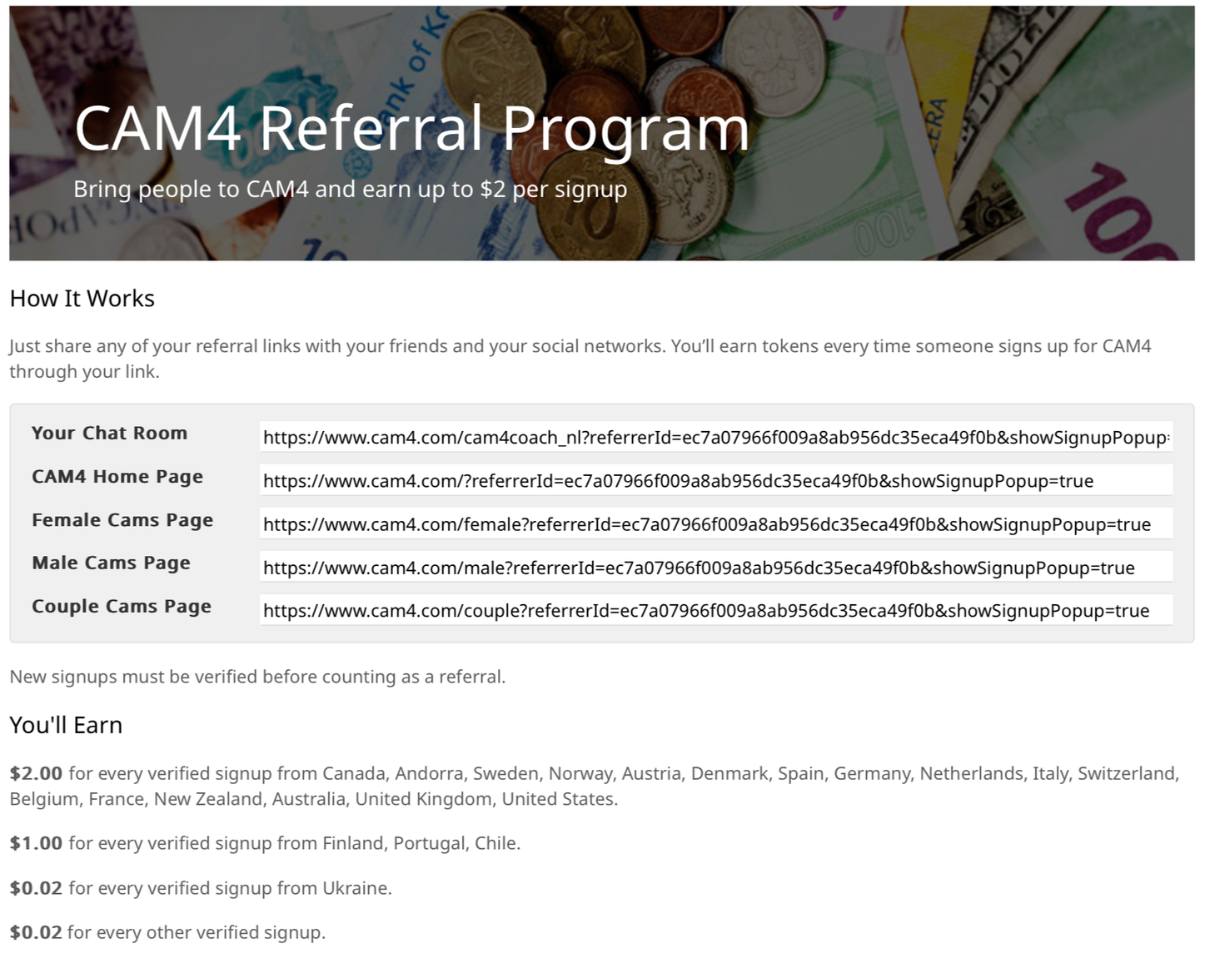
2) Referral Program — Earn from Viewers

Referral links voorbeeld

Earn by bringing viewers and followers to CAM4. Share your personal link; you get paid for each verified free sign-up (email confirmed).

Payout — Top Countries

USD 2.00 per verified sign-up from: Canada, Andorra, Sweden, Norway, Austria, Denmark, Spain, Germany, the Netherlands, Italy, Switzerland, Belgium, France, New Zealand, Australia, England, United States.

Payout — Level 2

USD 1.00 per sign-up from: Finland, Portugal, Chile.

Payout — Other

USD 0.02 per sign-up from all other countries.

How It Works

  1. Go to your Model DashboardPromotion Program.
  2. Copy your personal referral links.
  3. Share them via social media, blog, email, or in your live chat.
  4. Earn even when you are not live (place links/banners on your site).

What is a verified sign-up?
A new user who creates a free CAM4 account and confirms their email address.

Rules

  • You have earned a minimum of 100 tokens to participate.
  • Your account is verified in the Dashboard.
  • Fraud will result in exclusion and possible termination of your account.

You can see your earnings directly in your Model Dashboard under Promotion Program.

ChatBot

Multitasking without stress….

Chat Bot on CAM4: automatic help in your chat (so you can shine)

Automate welcome messages, thank yous, and updates. More peace of mind for you, more clarity for your viewers — and a more active room.

Tip: put your core message and your Tip Menu in a recurring message every few minutes.

Watch the short demo

What is a Chat Bot?

CAM4 Chat Bot example

The Chat Bot supports your LIVE chat as a personal moderator. You set messages and triggers, the bot places them automatically — so you keep focus on your performance and real-time attention.

The three most popular bot types

Welcome Bot

Welcome Bot example

Automatically send a warm welcome message to new viewers (with ~5 seconds delay after entry).

Tip Bot

Tip Bot icon

Have the bot say ‘thank you’ for a tip or when a goal is reached. Set different reactions per token amount.

Planning / Automatic Notification Bot

Notification Bot icon

Schedule a series of pre-set messages that appear at fixed intervals in your public chat. Note: there must be at least three viewer messages in the chat before notifications appear.

Examples: what can you have posted automatically?

  • Updates of your goals
  • Changes in your Tip Menu
  • Fan club / Shop offers and discounts
  • Room rules and boundaries
  • Promotions for social media
  • Wish lists (CAM4 Swag Store, Amazon, etc.)
  • Upcoming shows and cam planning

Why this works

With endlessly customizable options and three powerful bot commands, the Chat Bot keeps your show running smoothly, informs your audience, and encourages tips — while keeping your hands free.

Pro tip: repeat your core action every 3–5 minutes (e.g. “120 more to Goal 2 — thanks to [name]!”) and let the bot help to keep your rhythm.

Paymentoptions

Payouts on CAM4: choose how and when you get paid — YourSafe, Paxum, EuroWire, or CAM4 Tokens.

Payouts on CAM4: Your earnings, your choice

Once you earn tokens, you choose when and how you get paid. Most methods are processed daily; bank transfer runs on fixed days.

Choose the option that fits your speed, costs, and convenience. Minimum amounts vary per method.

Available methods

YourSafe

Digital wallet with IBAN and optional prepaid card. Daily payouts.

Paxum

Digital wallet; transfer to bank/card or P2P. Processed daily.

EuroWire

Bank transfer in EUR, offered to the bank 2× per week.

CAM4 Tokens

Convert balance to tokens to tip other models.

YourSafe

YourSafe is a digital wallet. Create a free YourSafe account and link it via your Broadcaster Dashboard. You can also request a prepaid debit card.

Benefits

  • Transfer money directly from/to your YourSafe (IBAN) account.
  • Daily free payouts from CAM4.
  • Free transfers between YourSafe customers.
  • Pay and pin with the YourSafe Prepaid Card.

Details

  • Minimum payout: 50 USD.
  • Processing: daily.
  • Required: linked YourSafe account in your payment settings.
  • Costs: see the YourSafe FAQ.

Special promotion: 6 months no card fee for new CAM4 applications. If you use the card within 6 months, then +18 months extra free.

Paxum

Paxum is a digital wallet where you can have your earnings deposited. Then you can use your money in several ways.

Possibilities

  • Wire transfer to your bank account.
  • EFT transfer.
  • P2P transfer with other Paxum users.
  • Transfer to your own credit card (Visa/Mastercard).

Details

Bank transfer in Euros (EuroWire)

Direct transfer from CAM4 to your bank. Payouts requested on Tuesday or Thursday before 11:59 EST are offered to the bank the next day.

Details

  • Minimum payout: 100 USD.
  • Processing: 2× per week.
  • Receipt: typically 5–7 business days after offer at the bank.
  • Your bank may charge fees — check with your bank.

Required for payout

  • SWIFT/BIC and IBAN.
  • Name on account, address and country of your bank.

Important: fill in your first names in full (no initials) and do not use special characters. Payout can only be made to an account in exactly the same verified name.

CAM4 Tokens

You can convert your earned balance into tokens to tip other models.

In summary: YourSafe and Paxum — daily payouts from 50 USD. EuroWire — bank transfer (min. 100 USD), offered 2× per week and 5–7 business days processing. Or convert balance to CAM4 Tokens for tips within the platform.

Privacy

Protect yourself and your income: simple, practical tips for online safety that you can apply today.

Online safety: simple tips for everyone

Working online is great: you choose your own hours and you’re your own boss. Protect yourself and your income at the same time with these practical basics.

Tip: make safety part of your routine — small habits, big effect.

Passwords and 2FA

Strong passwords

  • Make them long (at least 12 characters).
  • Mix letters, numbers and symbols.
  • No personal info (social security number, date of birth, PIN).
  • A different password for each site.

Two-step verification (2FA)

  • Turn on 2FA for your most important accounts.
  • Preferably use an authenticator app.
  • Store backup codes safely (not in your email).

Phishing and suspicious links

Don’t fall for fake emails

  • Real companies never ask for your password via email/DM.
  • Don’t click on “log in here” links from messages.
  • Are you in doubt? Go to the website yourself and log in there.

Watch out where you click

  • Don’t open unknown links, files or photos.
  • Also pay attention in Skype/WhatsApp and other chat apps.
  • Stay within the platform where possible.

Recognizing scams

Too good to be true

  • “Free money”, “super fast opportunities”, “exclusive deals” = usually scams.
  • Ignore and delete. Do not respond.

Privacy: what you never share

Keep it private

  • Don’t put your real name on screen.
  • Don’t share photos/videos of family or children.
  • Remove location data from photos (turn off location on your phone/camera).

Separate work and private

  • Use a stage name.
  • Use a separate email address and (where possible) separate phone number.
  • Never share your real name or address — not even with other models; keep it professional.

Physical safety

What you show

  • Use a neutral background; no documents or outside view in the picture.
  • Avoid recognizable places, license plates or unique furniture.

Location & mail

  • Don’t share your location or schedule live.
  • Preferably use a PO box for mail.

Mental well-being and boundaries

Boundaries

  • Set clear rules (what you do/don’t do).
  • Block or mute anyone who crosses your boundary — without feeling guilty.

Self-care

  • Take breaks. Sleep and eat well.
  • Talk to someone if something is bothering you.

Collaboration and consent

Clear agreements

  • Only work with adults (18+).
  • Discuss in advance what is/is not okay. “Yes is yes, no is no.”
  • Record agreements briefly (chat/message). Do not share data from others.

Quick checklist: strong passwords + 2FA on, never click on login links from messages, don’t share private info/location, separate work and private, keep boundaries — and update your security settings regularly.

Offline Private shows Setup

Never miss a private show request again: with Offline Private Show (OPS) notifications, fans can book at any time and you choose how you are alerted.

Offline Private Show (OPS) Notifications on CAM4

Receive private requests when you are offline, show your availability, set your rates, and choose notification channels: browser, app, email, or SMS.

Tip: activate multiple channels at the same time and put your calendar visibly on your profile for more bookings.

What is OPS and Why Use It?

With OPS, viewers can always make private show requests and view your schedule — you get notifications on the channels you choose. Perfect for keeping your audience engaged, even outside your regular show times.

OPS overzicht

Notification Preferences

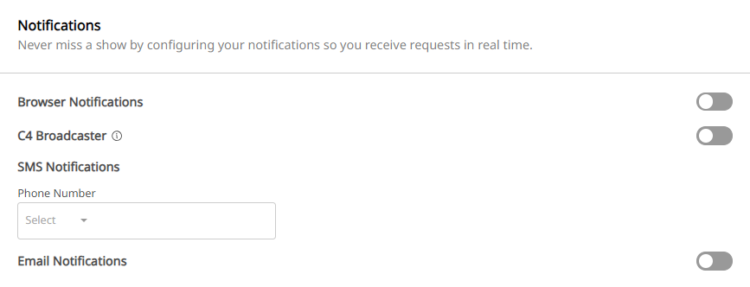
Personalize real-time notifications per channel: Browser, C4 Broadcaster App, Email, and SMS.

Personal Rates

Determine your Private Rates, set up Cam2Cam and Spying as you want.

Visible Calendar

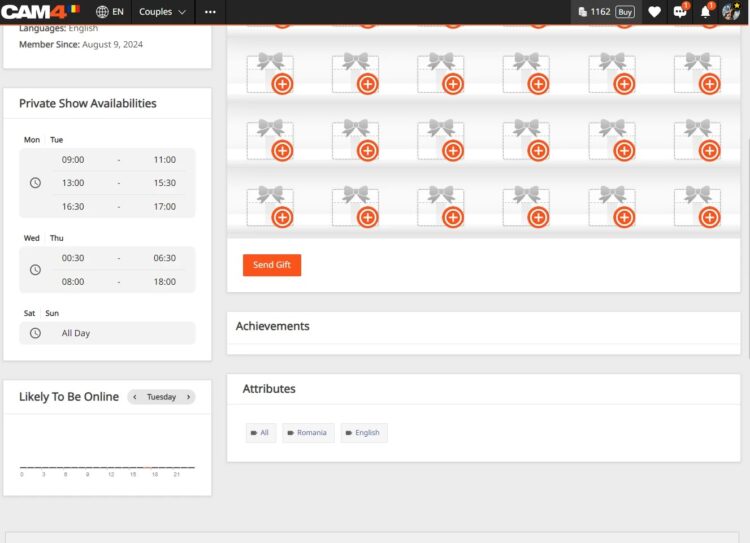
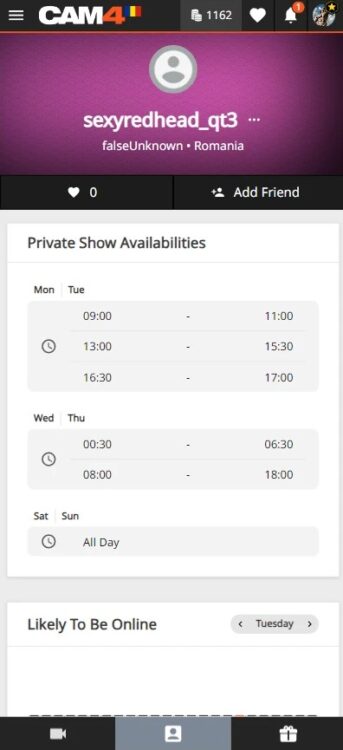
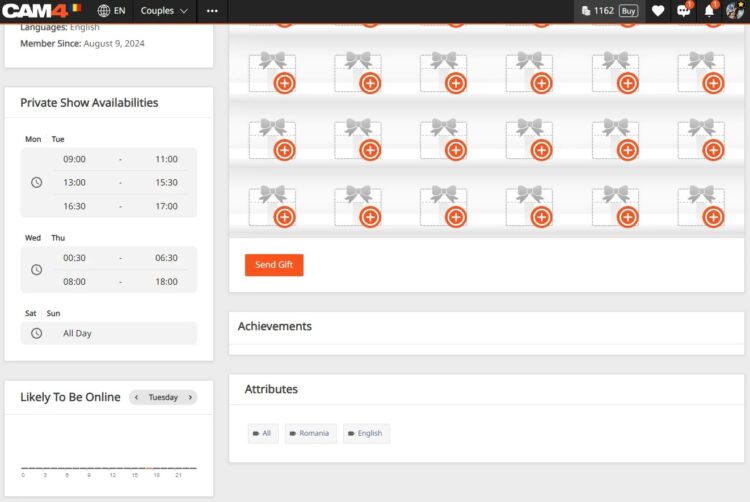
Publish up to 3 time slots; your schedule appears directly on your profile and in Messenger.

Kalender/zichtbaarheid

Setting Up OPS: How to Find the Options

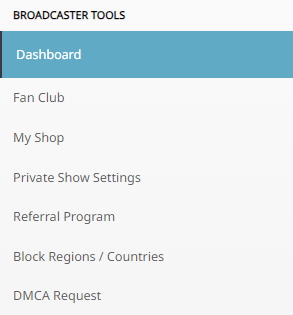
Log in, click on MENU (top right) → Performer DashboardPrivate Show Settings.

Navigatie naar instellingen

Important: OPS notifications are set to OFF by default. Set the switch to ON to activate.

OPS aanzetten

Notification Channels

Browser Notifications

Pop-ups on your screen as long as your browser (Safari, Firefox, Chrome) is open. Set “Browser Notifications” to ON.

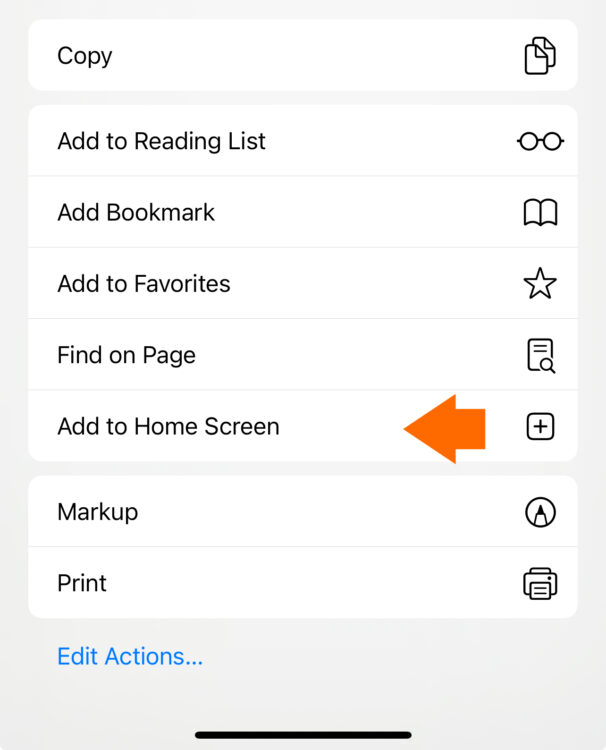
iOS Users: add the web app to your home screen and open it from there to receive notifications.

  1. Go to CAM4.com in your browser.
  2. Click on the download icon and choose “Add to Home Screen”. iOS icon
  3. Rename (optional) and confirm “Add”.
iOS add to homescreen C4 icoon

C4 Broadcaster App

Receive push notifications on your phone via the C4 Broadcaster App. Set “C4 Broadcaster” to ON in your OPS settings.

Email Notifications

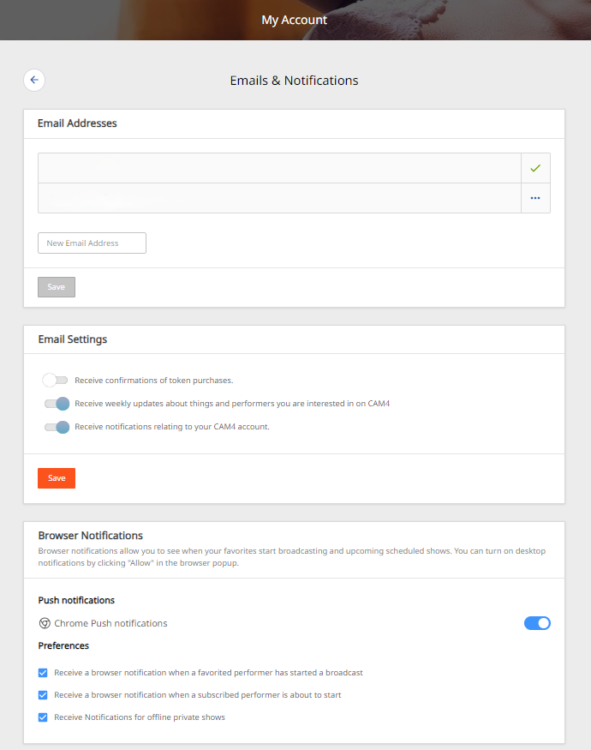
Keep a record in your inbox. In your email preferences, set “Receive notifications about your CAM4 account” to ON.

E-mailvoorkeuren

SMS Notifications

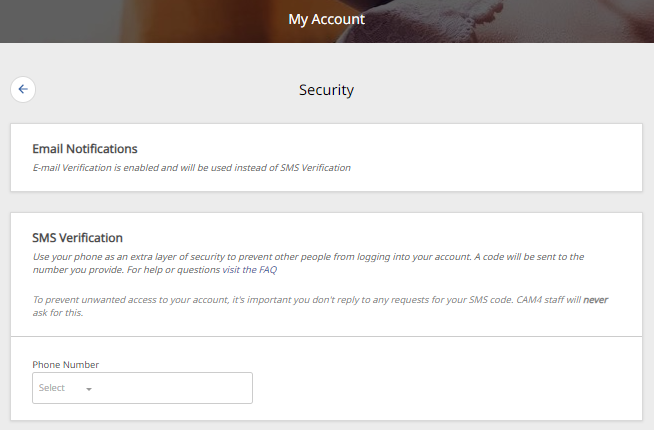
Receive an SMS with each private request. Add your mobile number in the settings.

Note: if 2FA is enabled, your SMS number must match the 2FA number.

SMS instelling

Price Settings for Private Shows

Set your prices as you want: per minute or as a fixed rate. Configure “Price Per Minute”, “Minimum Time Limit”, “Spy Per Minute Rate”, and “Cam2Cam”.

Prijsinstellingen 1
Prijsinstellingen 2

3 Useful Tips

  • Receive multiple notifications: activate more than one channel so you are always reached.
  • Adjust your availability: set time slots open when you accept private requests.
  • Show your schedule on profile & Messenger: increase the chance that fans will book when you are free.
Schema in Messenger Schema op profiel

With the right settings, your private show flow becomes more organized, responsive, and profitable.