Earn extra with personal items — safely, discreetly, and within your own boundaries.
Sell Personal Items via CAM4 — Safely & Discreetly
In addition to tips and shows, you can also sell personal items to your fans. This can be a nice extra source of income, but safety and privacy should always come first.
Remember: protect your data, get paid via CAM4 first, and package personally and discreetly.
What can you sell?
Popular items
Handwritten letters or cards with a personal message
Photos or printed polaroids (with or without signature)
Worn panties, lingerie, or socks
Accessories or jewelry you wore during a show
Fun extras: lipstick prints or a fragrance on a cloth
Tip: creative, personal, and unique = more value for your fan.
Your boundaries
Determine in advance what you do/don’t want to offer, and communicate this clearly in your profile or feed.
Work with limited stock (FOMO works).
Add delivery time (e.g., shipped within 5–7 business days).
Use a standard text for confirmation and shipping update.
Privacy first
Protecting data
Never put your home address on the package (sender).
Use a shipping point/parcel shop or P.O. box.
Online postage? Use systems where your address is not visible to the recipient.
Discretion first
Neutral outer packaging without logos or hints to the contents.
Do not place socials or personal info in/on the package.
Recognizable labels/invoices? Hide them invisibly (or digitally).
Get paid safely
Only via CAM4
Always get paid via CAM4 first. Do not agree to bank transfers or external methods — you share private data and run the risk of fraud/chargebacks.
Is the amount in your CAM4 account? Then you know that the payment is safe and final. Only send it after that.
Make it special
Personal touch
Handwritten note with the buyer’s name
Tissue paper or lightly scented paper (within your boundaries)
Small extra: polaroid or mini-sticker
Professional & discreet
Sturdy outer packaging, neutral from the outside
No references to content or platform
Standard thank you text + shipping update via your CAM4 messages
In summary: offer creative, personal items — but always put safety and privacy first. Payment via CAM4 first, never share your address, and package everything carefully and discreetly.
Want to be in the spotlight? Upload your photos with your permission and let CAM4 promote you through our official channels.
Let CAM4 Promote You: Upload Your Photos (With Consent)
With your photos, we can promote you through our official channels — so you can reach more viewers faster and build a loyal fanbase.
Tip: upload multiple photos with different angles and poses for the best match with our channels.
How Does It Work?
Simply upload your latest photos via the form. We review them and prepare them for promotion. Do you have new content? Feel free to upload again. Want to switch faster? Send us a message.
Indicate in the form where you want to be visible (opt-in/opt-out).
Where Will You Be Promoted?
Twitter / X
Optional — you choose whether you want to be visible here (adjustable in the form).
Telegram
For direct fans and followers who want to quickly see when you are online.
Push Notifications
Directly to CAM4 users for maximum visibility.
This way we ensure that your name and content reach as many people as possible.
Consent is Key
Nothing is shared without your permission. In the upload form, you indicate yourself what may and may not be used. You keep control — including a separate choice for Twitter/X.
You Decide
Choose per channel whether you want to be visible.
Adjust your preferences whenever you want by uploading again.
Respect for Boundaries
We only work with material that you have explicitly allowed and that falls within the platform rules.
Ready to Shine?
Click below to upload your photos and indicate how we may promote you:
We look forward to sharing your content and giving you even more visibility!
Please note: by submitting you agree to review and use according to your specified preferences. You can always change your preferences by uploading again.
Block regions or countries: hide your profile from specific locations — here’s how to set it up (and when it is or isn’t smart).
Block Regions/Countries on CAM4
Hide your profile from visitors from selected provinces or countries. Please note: not watertight (mobile IP/VPN can bypass blockades).
Tip: It’s better to block your province than an entire country — most of your income often comes from your own region.
What Does Region Blocking Do?
If you block a province or country, visitors with an IP address from that region cannot find your profile. If they search for your username, it will appear as if your profile does not exist.
Good to Know
Blockades do not work on all mobile IP addresses.
Proxy/VPN users can bypass blockades.
Blocking too broadly can reduce your reach and income.
Advice
Use blocking sparingly.
If possible, choose to block at the province level.
Regularly evaluate whether the blockade is still necessary.
How to Set Up a Block
Go to your Broadcaster Dashboard by selecting your profile picture in the top right corner (drop-down opens).
Choose ‘Block Regions / Countries’ under Performer Tools in the sidebar.
Select the country or region you want to block and click ‘Save’.
After saving, your profile is not visible in the chosen province or countries.
Undo Blockade
Want to remove the blockade? Click the trash can icon behind the country or region.
Make a Conscious Choice
Reach vs. Privacy
Most performers earn the most from viewers from their own country. Blocking too much can slow your growth. Weigh your privacy wish against visibility and income.
Summary: block specifically (preferably province), remember that mobile/VPN can bypass blockades, and check periodically whether your settings are still correct.
Before you go live for the first time, you can practice with a Password Show first. This way you can discover how broadcasting works in peace and quiet — without direct viewers in your room.
Tip: Use this as your “dress rehearsal” to reduce stress and go live with confidence.
What is a Password Show?
A Password Show is a private broadcast that is only accessible to people with the password you set. You can just keep this password to yourself so you can practice completely privately.
Practice: What Are You Going to Test?
1) Explore the Buttons
See how your camera appears, where you set your goals, and how to make the Tip Menu visible.
2) Test Your Setup
Check your light, sound, background, and camera position without pressure from viewers.
3) Practice Your Flow
Go through how you want to build a show: from greeting to working with goals and menus.
Make it a practice show — use micro-goals as if you were live. This way you learn what goals look like on screen.
Goal 1: 10 tokens = check what the goal looks like
Goal 2: 20 tokens = test sound and music
Goal 3: 30 tokens = change camera position
Pro tip: write down notes during your Password Show — what works well, what do you want to adjust?
Why This is Smart
A Password Show gives you:
Peace to learn the platform technically
Confidence before going live for a large audience
Less chance of stress or technical glitches during your first real show
Setting Up a Password Show
Go to your broadcast screen, choose “Show Type” and select Password Show. Set a password and keep it only for yourself if you just want to practice.
Steps:
Open Broadcast Screen Choose ‘Password Show’
Set Password
Go Live & Test
You can use the same process later to do a private show with a select group of fans.
Do’s
Use the Password Show as your practice space
Test both camera and sound extensively
See how goals and tips appear on screen
Feel free to practice multiple times before you go “really” live
Pay Attention
Don’t forget to set your settings back to a regular broadcast after your Password Show
Don’t just pass on your password if you really want to practice privately
Always stay within your own boundaries and platform rules — even in a Password Show
Important: adhere to local laws and platform rules. Only 18+ performers and consent is always required.
We’ll tell you everything here — short, clear, and applicable.
The secrets to becoming a TOP webcam model on CAM4
This article helps you get off to a flying start for more viewers, more interaction and more tokens — without unnecessary complexity. Focus on your Activity Feed and Fanclub for reach and stable income.
Tip: work with clear goals, a clear Tipmenu and a consistent posting cadence on your Feed.
1) Start here: account, verification & payout
Before you can go live: verify your age/identity and set up your payout in 10 minutes. Block countries/regions if necessary.
Account & ID‑check (2257)
All performers (18+) must be ID‑verified. This also applies to duos/groups — everyone on cam must be verified.
Being discovered by the right viewers is no coincidence. By adding yourself to relevant Niche Pages, you connect with fans who are specifically searching for your style, look, or type of content.
Choose strategically
Select niches that truly match who you are. Does it align with your profile, hashtags, and type of show? If so, you’ll attract more targeted and higher‑quality traffic.
Stay consistent
Make sure your bio, photos, and thumbnail reflect your chosen niches. Recognition builds trust — and tips.
Think ahead
Want to grow within a specific category? Stream regularly within that theme so your audience knows what to expect.
Tip: combine 2–4 strong niches instead of selecting everything. Focus works better than volume.
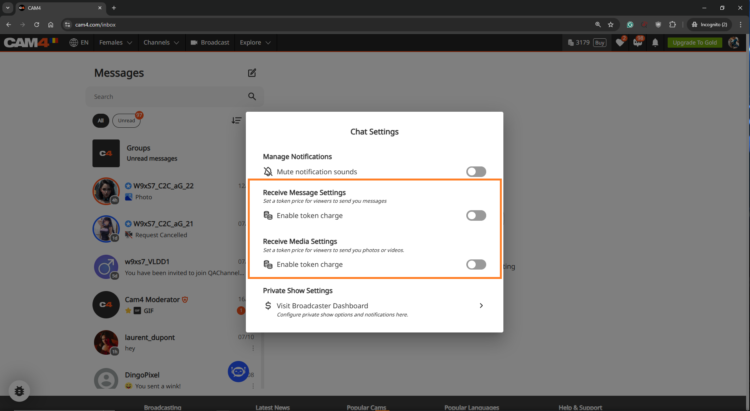
Set a fixed price per private message and mention this in your bio or Feed. Use it for short questions, personal responses and quick requests — within your boundaries and platform rules.
Price indication
Start simple and test: many models start between 1-2 tokens/message. Increase when busy, decrease for more volume.
Useful example sentences
“Want a personal shoutout? Pay per Text is on.”
“Ask your question in DM — 1-2 tokens per message.”
Use Token Keno, Spin the Wheel and Roll The Dice for extra excitement and income. Let viewers bet tokens and link creative rewards to outcomes (assignment, piece of clothing off, special interaction).
CAM4 publie désormais des histoires érotiques — et nous voulons la vôtre ! Si votre histoire est sélectionnée, elle sera publiée, narrée et partagée avec notre public . Vous pouvez même choisir de rester anonyme si vous le souhaitez.
Limite de mots : 500 à 1 500 mots. C’est tout ce qu’il faut pour transformer votre imagination en revenus.
Pourquoi soumettre ?
Soyez visible. Votre histoire touche des milliers de lecteurs et d’auditeurs.
Soyez rémunéré. Les histoires sélectionnées rapportent de l’argent réel.
Soyez créatif. Partagez vos fantasmes avec votre propre voix.
Un Fan Club est un abonnement mensuel qui permet aux membres de CAM4 d’accéder en exclusivité à votre contenu en vous versant un montant fixe chaque mois. Contrairement aux pourboires ou aux achats uniques, les Fan Clubs génèrent un revenu mensuel garanti.
En vous abonnant, vos fans recevront :
Du contenu exclusif (photos, vidéos, coulisses). C’est là que votre contenu le plus explicite devrait être caché !
Des avantages spéciaux comme un badge exclusif dans votre chat, un accès espion gratuit aux shows privés et la messagerie privée.
Des tarifs réduits sur vos vidéos et votre contenu premium.
Les Fan-clubs offrent non seulement des avantages exclusifs, mais ils permettent également de renforcer votre lien avec vos fans, en vous permettant de gagner 80 % de vos gains, soit davantage que ce que vous gagnez avec l’achat de jetons !
Tarifs recommandés pour le Fan Club
Voici cinq options populaires utilisées par les créateurs à succès :
4,99 $ à 7,99 $ – Idéal pour les débutants qui souhaitent développer leur base de fans.
7,99 $ à 9,99 $ – L’une des fourchettes les plus populaires sur toutes les plateformes.
14,99 $ ou plus – Idéal pour les créateurs ayant beaucoup de contenu fréquemment mis en ligne, des fans fidèles et un contenu de haute qualité.
Conseil: commencez par un prix moyen (environ 5,99 $) et ajustez le prix en fonction de la demande, du volume de votre contenu et de l’engagement des fans.
Guide rapide des tarifs
Type de Contenu
Débutant/ Promo
Tarifs standard
Premium
Fan Club
4.99–7.99$
7.99–9.99$
14.99$ +
Photo (individuelle)
Gratuit – 5 tokens
10–25 tokens
30–50 tokens
Set de photos
10–25 tokens
(5–10 photos)
25–150 tokens
(10–15 photos)
50-300+ tokens
(15-20 photos)
Videos
(moins de 3 min)
gratuit – 25 tokens (anteprima/ teaser)
50–120 tokens
150 tokens ou plus
Video
(de 3 a 10 min)
10-25 tokens
25–100 tokens
120-300+ tokens
Video
(plus de 15 min)
25-100 tokens
250–400 tokens
500–600 tokens
(HD)
Conseil: Utilisez du contenu gratuit (1 à 2 photos ou vidéos de moins d’une minute) comme aperçus. Proposez des réductions saisonnières (10 à 20 %) pour augmenter vos ventes sans nuire à votre travail.
Séries de photos et contenu de fans
Contenu Soft (SFW) : gratuit ou débloqué automatiquement pour permettre aux membres de votre fan club de découvrir votre style.
Photos individuelles : 5 à 25 jetons (dépendant de comment la photo est explicite).
Set de photos (5 à 10 photos) : 15 à 25 jetons.
Séries de photos (10 à 20 photos) : 150 à 300 jetons.
Ajoutez occasionnellement du contenu public gratuit à votre tableau de bord. Cela vous permettra d’attirer de nouveaux abonnés.
Vidéos
Courtes (1 à 3 min) : 50 à 120 jetons. Recommandées pour les teasers et les vidéos courtes.
Moyennes (3 à 10 min) : 75 à 250 jetons, selon l’effort fourni et le contenu explicite.
Longues (10 min et plus) : 250 à 600 jetons, notamment pour les exclusivités premium
Conseil : Décomposez les longues vidéos en clips plus courts pour les vendre plus facilement et augmenter les vues. Publiez des teasers gratuits de moins d’une minute pour promouvoir votre contenu.
Conseils pour un fan club réussi.
À faire :
Publiez régulièrement du contenu pour offrir une valeur ajoutée continue à vos fans.
Offrez à vos abonnés un sentiment d’appartenance grâce à des avantages et promotions exclusifs.
Proposez des réductions ou des promotions saisonnières (10 à 20 %).
Répondez aux messages : l’interaction fidélise les fans.
Mettez à jour votre contenu quotidiennement (nouvelles couvertures, concours, etc).
À éviter :
Publiez peu ou pas de nouveau contenu : inactivité = désabonnements.
Ne surévaluez pas vos offres si vous n’offrez pas d’exclusivité.
N’oubliez pas de promouvoir votre Fan Club : mentionnez-le dans chaque publication/show.
Ne révélez pas tout en dehors du Fan Club : conservez vos meilleurs contenus à l’intérieur.
CAM4 is now publishing Erotic Stories and we want yours!
If your story is chosen, it will be published, narrated, shared with our audience, and you’ll get paid. You can even choose to stay anonymous if you prefer.
Word limit: 500–1500 words. That’s all it takes to turn your imagination into income. Payment details: Will be provided by email if your story is selected. Publishing: Selected stories will be filmed, creating narrated videos that are published weekly on our Erotic_stories profile on CAM4. Editing: Light editing may be applied for a smoother read for video narration and to comply with CAM4’s terms and conditions.
Why Submit?
Get seen. Your story reaches thousands of readers & listeners.
Get paid. Selected stories earn real money.
Get creative. Share your fantasies in your own unique voice.
Get Content. Use your story yourself by selling it to your fans.
Quick Writing Tips
Find your voice — be authentic and let your style shine.
Build tension — anticipation is everything.
Make it sensory — show, don’t just tell.
Keep it polished — clean writing stands out.
Don’t get too wordy – Stay within 500–1500 words.
For a full beginner’s guide with more tips, click here.