CAM4 Pages de Niche : Tout ce que vous devez savoir


Prêt(e) à trouver votre Niche ?

Plongez et commencez à explorer les Niches ! Suivez-en quelques-unes qui éveillent votre curiosité, partagez du contenu, et voyez qui se présente.

Vous pourriez découvrir une nouvelle facette de votre style que vous adorez — et vous connecter avec des fans qui l’adorent aussi.

Votre prochain contenu préféré (et votre prochaine vague de fans) pourrait vous attendre dans une Niche que vous n’avez pas encore essayée.

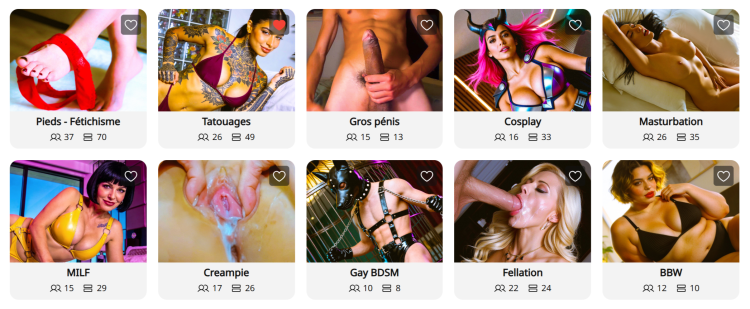
Que sont les Niches ? Les pages de Niche sont des espaces communautaires spécialisés sur CAM4, organisés autour d’intérêts spécifiques comme BDSM, Feet, BBW, Creampie, et bien plus encore. Considérez-les comme des pages où vous pouvez vous connecter directement avec des utilisateurs qui recherchent précisément le type de contenu que vous proposez.


Pourquoi les Niches changent la donne pour votre découverte :

  • Exposition ciblée : Au lieu de concurrencer dans la page d’accueil, vos publications et vos diffusions en direct apparaissent dans des communautés dédiées à votre style/kink .
  • Aperçu en direct sur les publications : Lorsque vous diffusez en direct, toute publication que vous avez faite dans une Niche affichera automatiquement un aperçu vidéo de votre show en direct. Cela permet aux utilisateurs parcourant le fil de la Niche de rejoindre directement votre room.
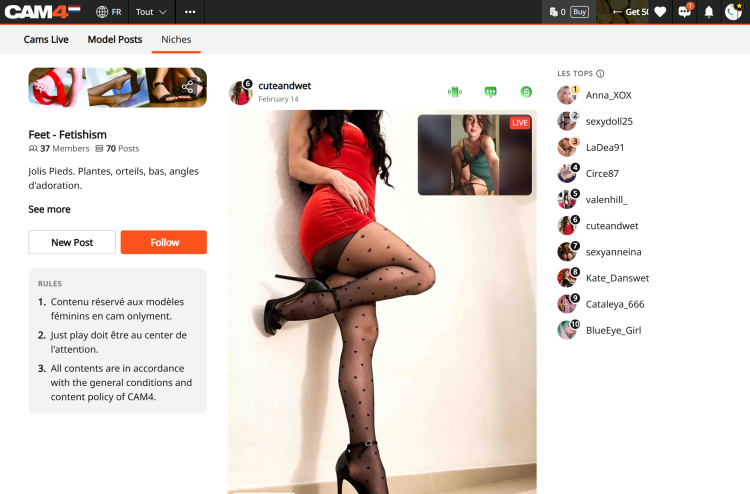
  • Le Classement : Chaque Niche propose un Classement présentant les 10 meilleurs modèles en fonction du nombre total de likes. Être classé ici offre une visibilité massive et vous aide à devenir une référence reconnue dans la communauté.
  • Onglet « Cams » dédié : Les Niches disposent d’un onglet « Cams » spécifique qui affiche uniquement les modèles en direct membres de cette Niche. Cela permet aux spectateurs de vous trouver plus facilement lorsqu’ils recherchent un contenu spécifique.

Comment rejoindre une Niche :

  1. Trouvez votre Niche : Cliquez sur l’onglet « Niche » dans la barre de navigation supérieure.
  2. Suivre pour rejoindre : Cliquez sur « Follow » sur une page de Niche pour devenir membre.
  3. Partager du contenu : Une fois membre, cliquez sur « Créer un post » pour partager des photos ou des vidéos depuis votre Coffre Médias.
    Vous pouvez également cliquer sur “Publier aussi sur mon Fil d’Actualité” pour que la photo que vous postez sur la niche apparaisse aussi sur votre Fil D’Actualité. 

    Note :
    Toutes les publications de Niche sont gratuites à consulter, ce qui en fait le « trailer» parfait pour attirer les utilisateurs vers votre contenu payant ou votre show en direct
  4. Interagir : Interagir avec les commentaires sur vos publications aide à construire une communauté fidèle au sein de la Niche.

La valeur : Débloquer de nouvelles sources de revenus
Les Niches sont plus qu’un simple outil social ; elles constituent un moyen puissant d’augmenter vos gains :

  • Conversion plus élevée : Vous atteignez une audience ayant un intérêt spécifique pour ce type de contenu, ce qui mène à davantage de tips et de demandes de shows privés.
  • Marketing automatisé : Votre aperçu en direct agit comme une publicité permanente auprès des spectateurs intéressés pendant que vous êtes en direct.
  • Vente de contenu : Utilisez des teasers GRATUITS dans les Niches pour générer du trafic vers vos médias payants et les vidéos sur votre Activity Feed.
  • Statut dans le Classement : Une meilleure visibilité dans le Classement est directement corrélée à une augmentation des inscriptions au Fan Club et à la croissance des abonnés à long terme.

Commencez à explorer maintenant : www.cam4.com/niches


Besoin d’un coup de main ? Pour plus de détails sur les autres fonctionnalités de CAM4, consultez notre FAQ ou demandez à notre chatbot « Spark » que vous trouverez dans votre boîte de réception.

Bon camming !
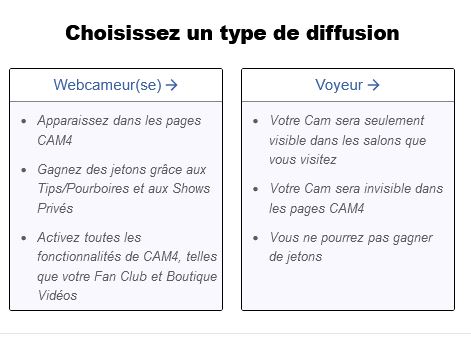
Comment me faire approuver sur Cam4

-Webcameur(se)
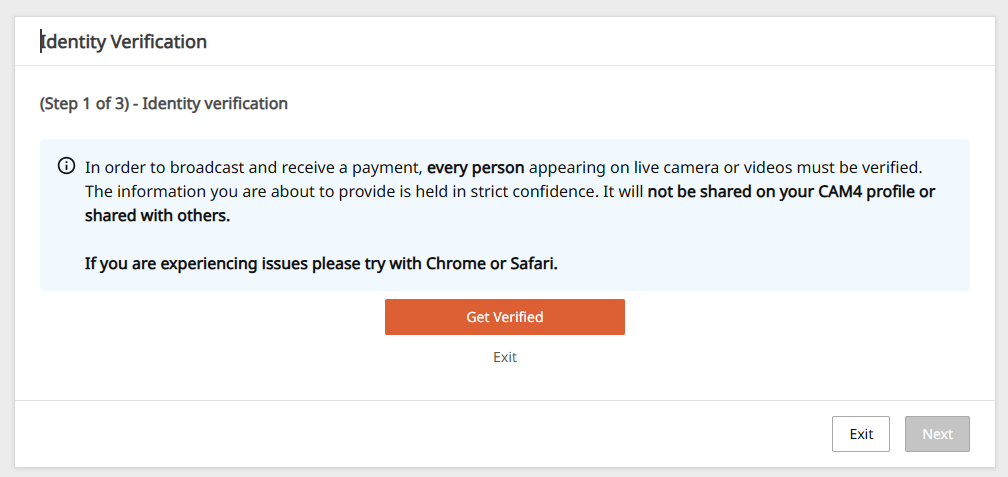
Pour travailler comme webcameur(se)s sur CAM4 et demander un paiement, vous devez vérifier l’identité de votre compte avant de diffuser en direct.

– Voyeur
Si vous ne voulez PAS recevoir d’argent et ne pas apparaître dans le mur de cam, cliquez sur Voyeur et continuez.


Pour devenir camgirl sur CAM4 et sur n’importe quel autre site de webcam il est en fait nécessaire d’être majeur.

L’envoi de documents est une étape nécessaire pour vérifier votre âge et pour pouvoir retirer l’argent sur CAM4.


De quoi ai-je besoin?
Une numérisation ou une photo recto / verso d’une pièce d’identité valide avec photo: passeport, permis de conduire ou carte d’identité

Un document est requis pour chaque personne apparaissant sur la webcam.

Comment approuver votre compte CAM4

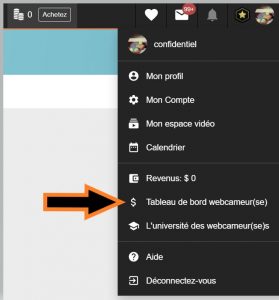
Cliquez sur “Tableau de bord webcameur(se)” en haut à droite de la page d’accueil de CAM4.

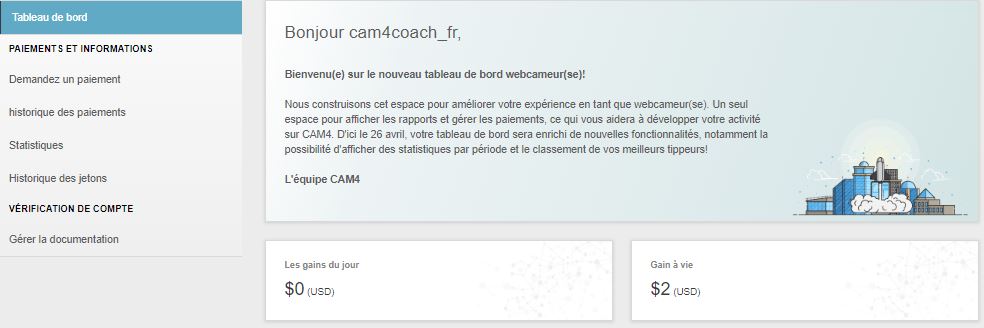
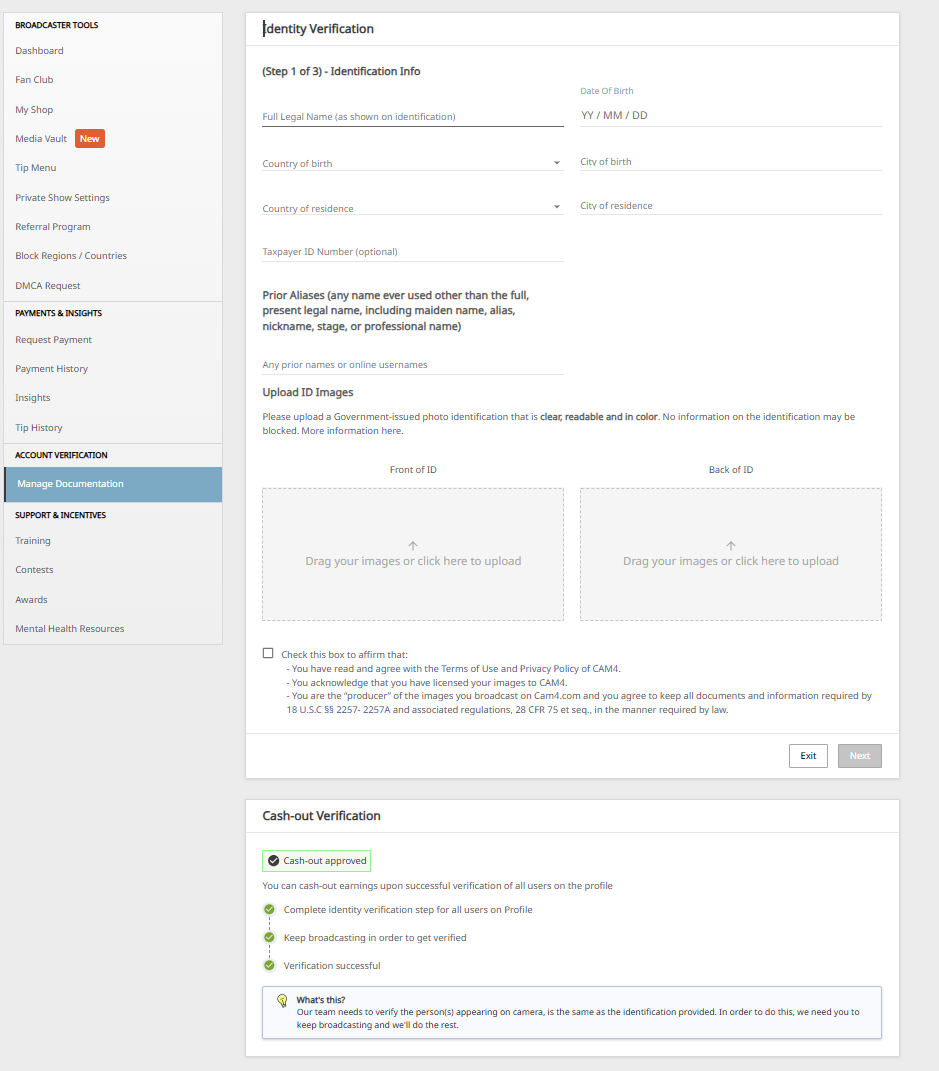
Dans le menu situé à gauche du panneau de commande, cliquez en bas sur Gérer la documentation ou, si vous le voyez, dans le message Vérification de l’identité.
 

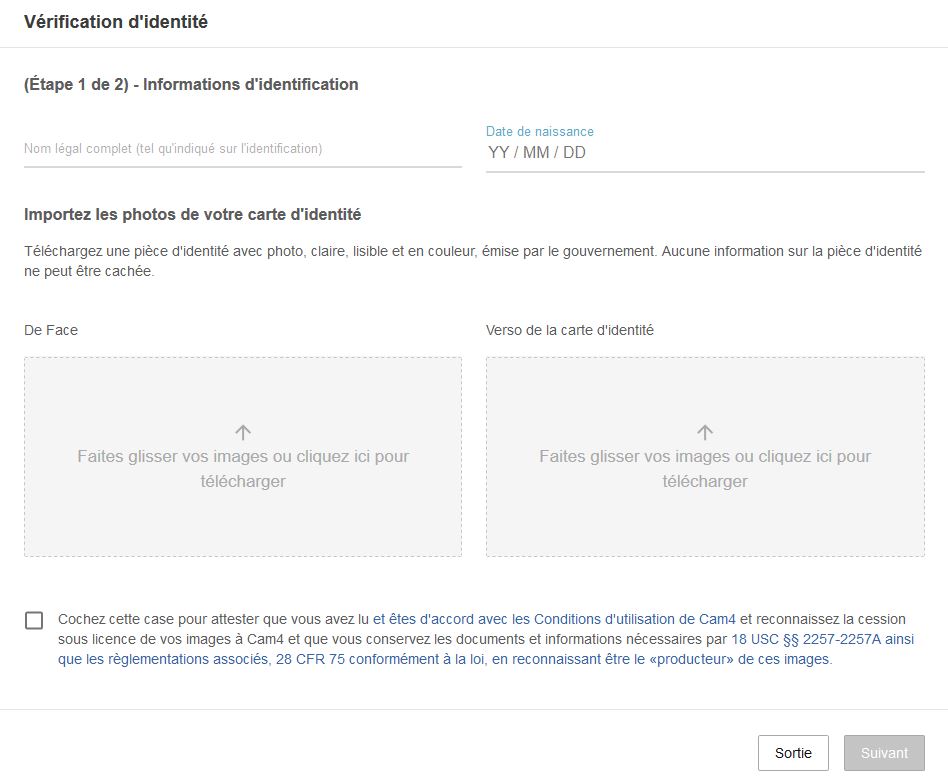
Pour la 1ère étape, cliquez sur noter vos noms et prenoms ainsi que votre date de naissance, puis téléchargez une photo claire d’un document valide (carte d’identité, passeport ou permis de conduire).
 

Faites glisser ou chargez dans la partie gauche une photo recto du document, et à droite une photo au verso du document. Cochez la case ci-dessous pour continuer et cliquez sur Suivant.

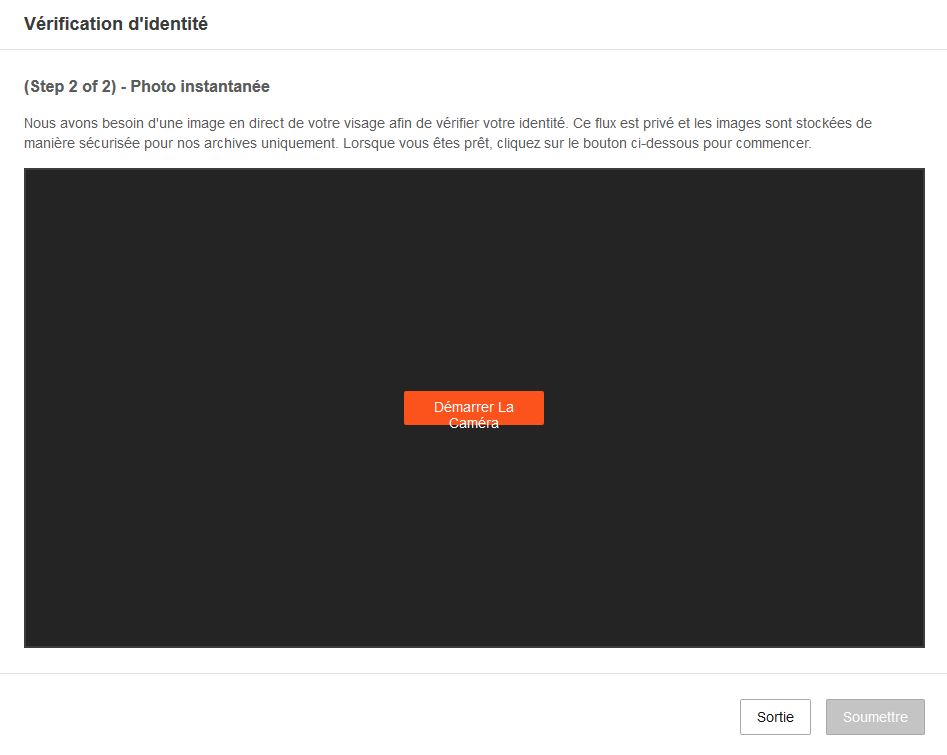
Pour terminer le processus, prenez une photo en direct pour vérifier les documents envoyés. Activez l’appareil photo et lorsque la photo est faite, cliquez sur Soumettre pour ensuite envoyer la photo.

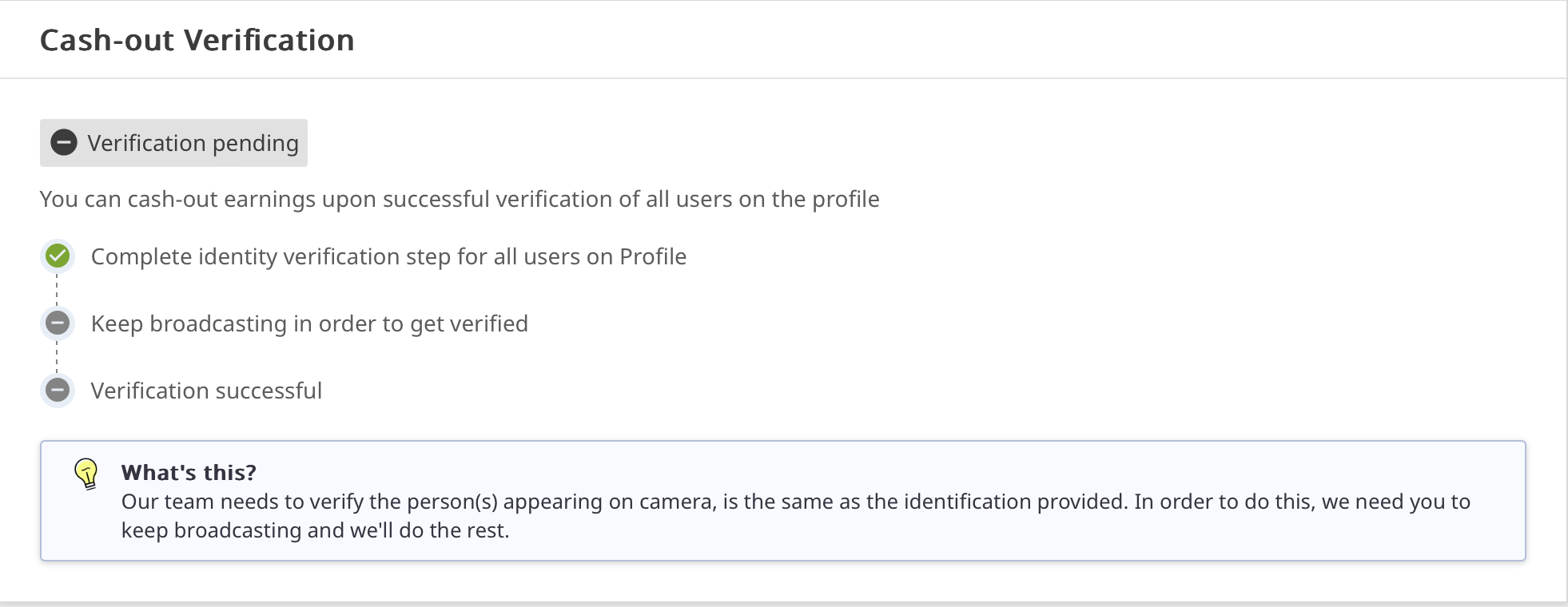
La vérification peut prendre jusqu’à 72 heures. Vous pouvez toujours vérifier l’état d’approbation et de vérification des documents envoyés dans Gérer la documentation.

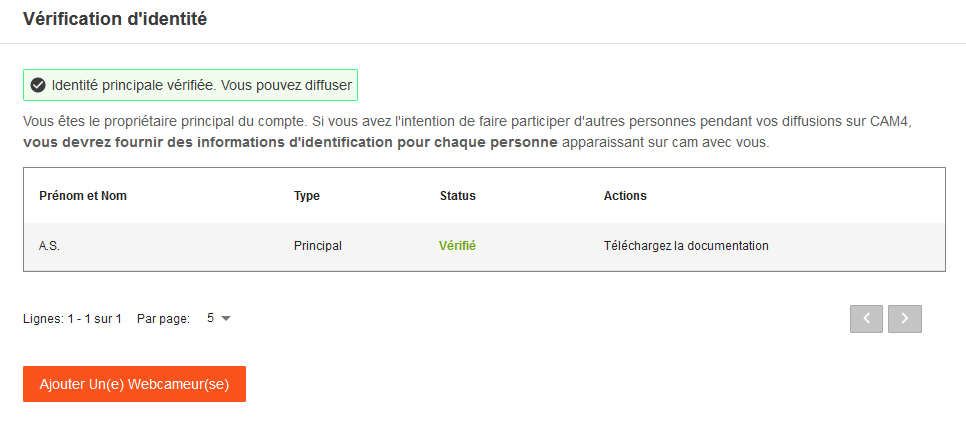
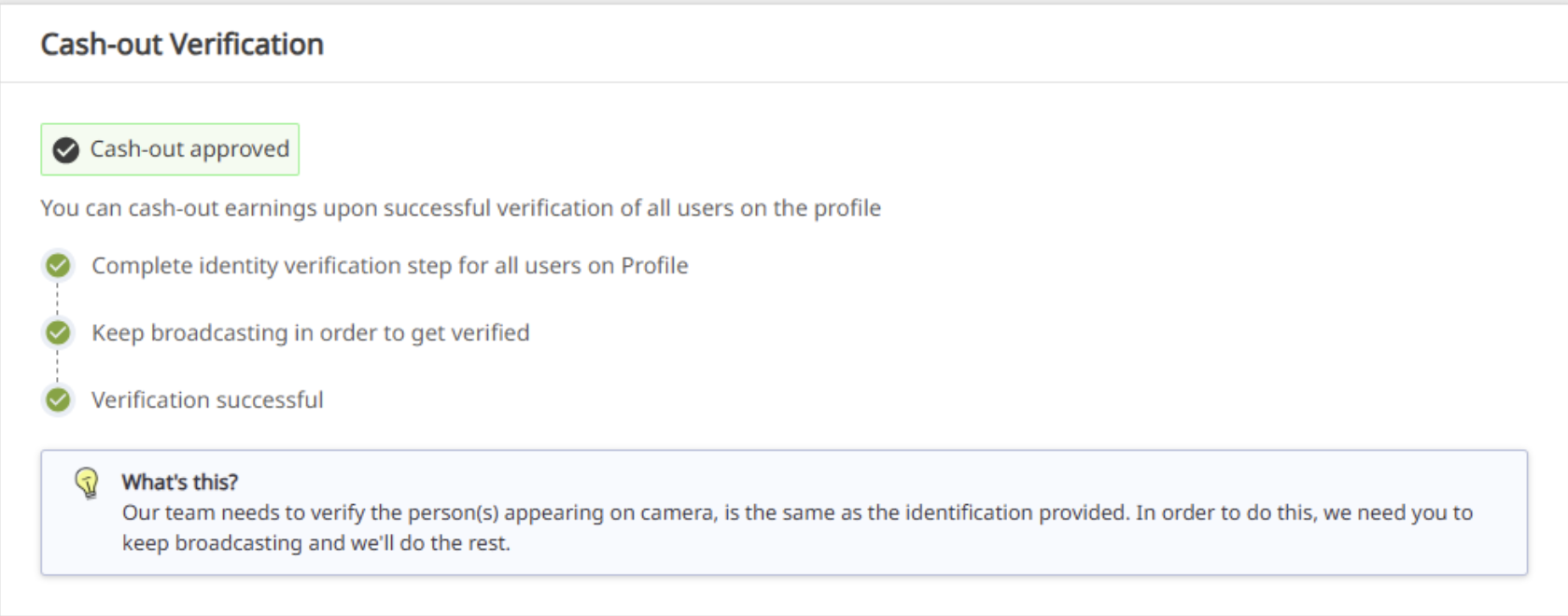
Lorsque votre identité sera approuvée cela apparaitra  :

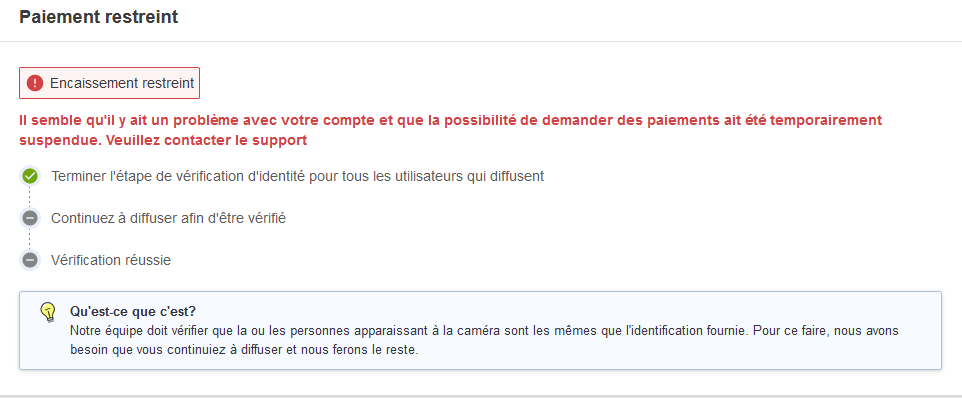
En revanche si vous n’avez pas soumis tous les documents ou pas assez diffuser en direct, les paiements seront restreints jusqu’à ce que les papiers d’identité soient fourni.


Outdoor Streaming Guide

Streaming outdoors or indoors? Keep it safe, legal, and creative — here’s how to make exciting shows from your own property (without unnecessary risk).

Streaming Safely (Outdoors) on CAM4

You often make the best shows right at home — kitchen, balcony, garage, or garden. Keep it legal, private, and safe, and you can be fully creative.

Tip: Only stream on your own property or a private location with the owner’s permission.

Streaming Outdoors: Basic Rules

  1. Make sure only you are in the picture/audible. Casual passers-by have not chosen to come online.
  2. Stream on your own property or a private location with permission. Avoid public places, stores, or someone else’s property.
  3. Car shows? Only stationary and with the engine off.
  4. Pay attention to copyright/brands in the picture and music in the background.
  5. Hide recognizable location information (street names, license plates, recognizable buildings).
  6. Children (under 18) must never be visible or audible. Violation leads to immediate removal of your account.

Always check local/national laws regarding public morals and privacy. You are responsible for a legal set-up.

Sexy Ideas per Location (Home & Private)

Kitchen

  • Host your own “cooking show” with playful challenges.
  • Creative ways to use props/kitchen utensils (within platform rules).
  • “Vegetarian” theme show with playful, safe food props (hygiene first).

Terrace or Balcony

  • Use doors/windows as decor and suction cup props on glass.
  • Present a “weather report” as an intro to your show.
  • Involve your patio furniture as playful set pieces.

Garage

  • “Tune-up” theme: working on your car as a setting (safe, engine off).
  • DIY show: nod to handyman programs.
  • Use (clean) tools as decor/prop — no sharp edges.

Pool or Jacuzzi

  • Show with swimwear, pool party vibes.
  • BBQ + pool theme for a summer set.
  • Mermaid/merman or lifeguard fantasy.

Laundry Room

  • “Laundry day” with dryer props (pay attention to stability/safety).
  • Cheeky undergarment moment (within your boundaries/rules).
  • Minimal outfit reveal when sorting laundry.

Do’s & Don’ts (Important!)

Do’s

  • Keep your frame under control: only you in the picture, background clean.
  • Work with decor/props that are stable and clean (hygiene).
  • Use a private location and check neighbor/environment view.
  • Communicate your boundaries and keep your Tip Menu/rules visible.

Don’ts

  • Do not stream in public spaces, stores, or someone else’s property.
  • No moving cars or running engines.
  • No recognizable third parties (face, voice) or children in picture/sound.
  • Avoid logos/music with rights — or turn off audio.

In Conclusion

Stream from your own property or an approved private place: this protects yourself and respects the privacy of others. Indoors or outdoors — with smart framing, clear rules, and creativity, you have endless possibilities for exciting, original shows.

Remember: safety and compliance with legal and platform rules come before everything. In doubt? Choose an indoor set-up with a controlled background.

Private Show Possibilities

All you need to know about private shows on CAM4 — per minute, time blocks, or solo private with spies.

Private Shows on CAM4: How to Earn Smart with 1-on-1

Choose per minute, work with pre-paid time blocks, or start a solo private show with spies. Clear prices = more trust (and therefore more tips).

Tip: also mention your private options and rates in your bio or Activity Feed.

What is a private show?

A private show is an exclusive show between you and one viewer. Depending on your settings, others can (paid) watch as “spy”. With private shows, you are guaranteed to earn tokens per minute or sell a time block in advance.

Three ways to earn with private

1) Pay per minute

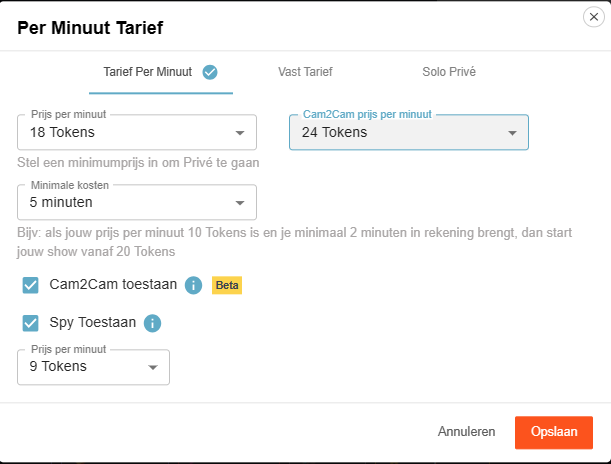
Pay per minute (settings)

Viewers see the cost per minute before requesting a private show; in the Netherlands, 21% VAT is applied upon purchase.

Guideline example: 12 tokens/min is $1.20 per minute for you. Your viewer in the Netherlands sees an amount of 15 tokens/min including VAT. This VAT percentage varies per country where your fan lives.

Pro tip: allow spying (Spy). These viewers only see the image, no chat, and hear no sound.

2) Time blocks (pre-paid)

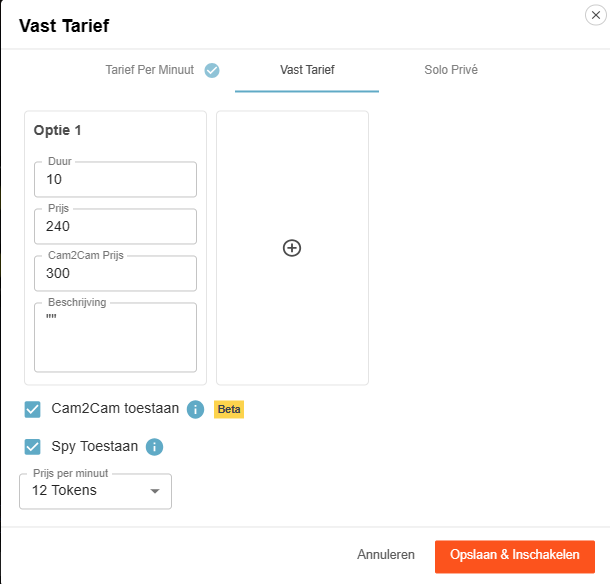
Fixed rate for time blocks

Offer pre-paid blocks. You choose the duration and the price; the viewer chooses and pays.

Advantage: you are assured of the entire block. If the viewer clicks away themselves, you will still be paid the full block. If you end it yourself or your connection drops, the tokens go back to the viewer.

3) Solo private show

Solo private show display

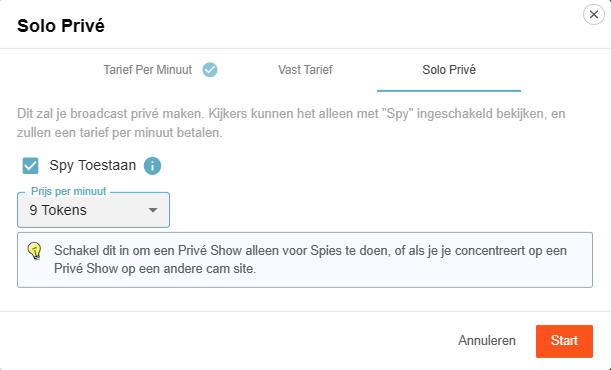
You appear to be in private, but you are alone. Spies can — if you allow it — watch for a fee and pay per minute.

Useful for calmly setting up your games or settings (turn off Spy then), or if you are running a private show elsewhere and want to generate income on CAM4 at the same time via spies.

Cam2Cam: make your private show even more intimate

C2C offers more intimacy and often higher per-minute prices — communicate your terms and boundaries in advance. Some models find it much nicer to be able to see the viewer themselves, but some do not. Adjust your price accordingly.

Activate Cam2Cam

Activate Cam2Cam

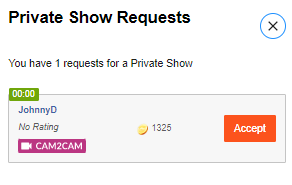
Go to the settings of your Private Show via the gear next to ‘Requests for private shows’. Set your C2C price and check ‘Allow Cam2Cam’. Save — done.

What does it cost?

Cam2Cam is usually ±1.25× the price of your normal private show. If you normally ask for 12–18 tokens/min, then 18–24 tokens/min for C2C is a logical range.

Enlarge/move C2C window

During the show


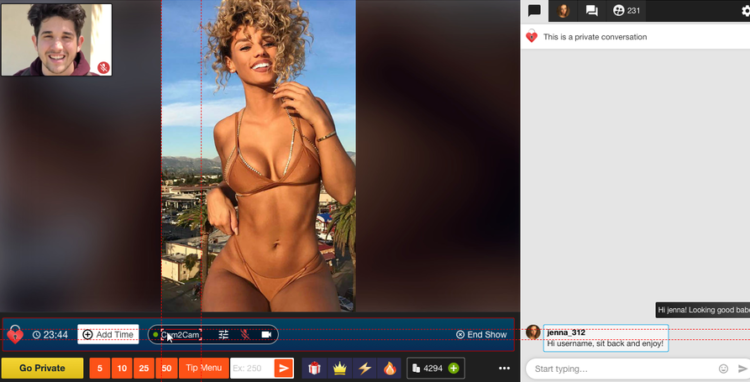
  1. The video of your viewer appears in a corner of your screen (movable and scalable).
  2.     

  3. Use the Cam2Cam buttons: mute and volume control.

Auto-Pause: your time after a private show

Auto-Pause

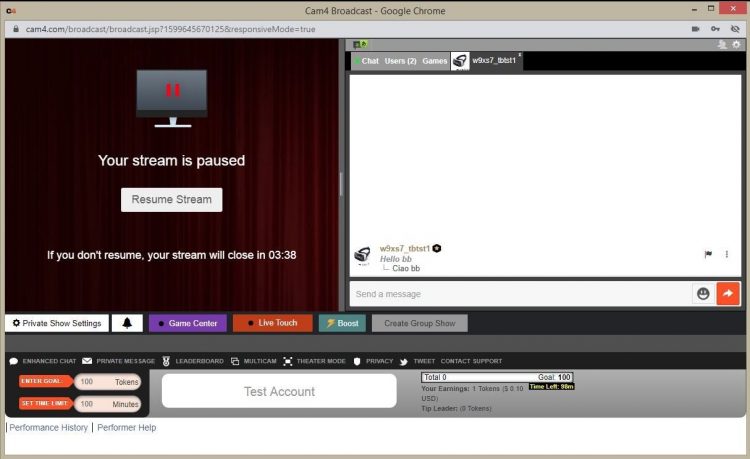
Auto-Pause gives you time to catch your breath after a Private or Group Show, before your public stream goes live again.

How does it work?

Afterwards, your stream automatically pauses for up to 5 minutes. Get something to drink, change clothes, or reset your setting — you decide.

You can resume earlier at any time via “Resume Broadcast”. If you wait longer than 5 minutes, the stream ends automatically.

You will not receive private requests during the pause.

What you see

Auto-Pause performer view

What viewers see

Auto-Pause viewer view

Resume Broadcast button

Price & transparency

Communicate in advance what makes private different from your public show (tempo, requests, Cam2Cam, no negotiations) and stick to your rates. Clarity increases conversion and prevents hassle.

Never miss a private show request again: with Offline Private Show (OPS) notifications fans can book at any time and you choose how you are alerted.

All Verifications upto 2257

Everything you need to know about verifications on CAM4: how you can broadcast, get paid, and comply with the law.

Verification Types on CAM4

To work safely and professionally on CAM4, there are several types of verification. These checks ensure that you are allowed to broadcast, can be paid, and that you comply with the legislation.

Please note: processing usually takes 1–3 business days.

The three types of verification

1) Broadcast Approved

Required to be allowed to broadcast. Your ID is checked to confirm that you are 18+. After approval, you can go live.

Identification example
Broadcast Approved example

2) Verification for Payment

Required to have tokens paid out. You upload your ID and your profile is officially approved for payouts.

Cashout Approved example

3) 2257 Form

Legal document: you confirm that you (and everyone in your content) are 18+, that you own the material and give CAM4 permission to broadcast.

2257 Form example

How long does it take?

Checking your documents takes an average of 1–3 business days. Once you are broadcast approved, you can just keep broadcasting. After the second check, your payment will also be released and everything is completely in order.

Tip

Check your data

Upload clear, valid documents and fill in your forms carefully. This prevents delays in approval.

In summary: without Broadcast Approval you are not allowed to broadcast; without payment verification no payouts; and with the 2257 form you comply with the legal requirements.

Concours De Shows Privés – Gagnez jusqu’à 250$ du 20 avril au 3 mai (15 Prix à gagner)

 *INSCRIPTIONS OUVERTES*
Voulez-vous gagner plus de $$$ ? Alors, inscrivez-vous au concours et faites des Shows Privés pour gagner jusqu’à 250$ !

CAM4 propose 15 prix à gagner pour les webcameur(se)s inscrit(e)s qui gagneront le plus de jetons grâce à leurs shows privés du 20 avril au 3 mai

15 Prix CAM4 France, Suisse, Belgique

1° prix : $250

2° prix : $150

3° prix : $100

4° prix : $70

5° prix : $50

6° prix : $40

7° prix : $30

8° prix : $25

9° au 11° prix : $20

12° au 15° prix : $10

Seront comptés pour ce concours :
– Les shows privés avec paiement par minute
– Les shows privés Cam2Cam
– Les shows privés à prix fixe
– Les revenus des espions.
– Max. 5000 jetons par tippeurs

*INSCRIPTIONS OUVERTES*


________________________________________________________________

Conseil : En vendant des shows privés à un coût fixe, vous saurez toujours combien vous gagnerez. C’est vraiment un moyen facile d’obtenir des jetons.

Vous n’avez pas encore essayé les shows privés de CAM4 ? Visitez la FAQ et découvrez à quel point il est simple de définir vos options ! Show Privé  : Taux Fixe ou prix à la minute 

________________________________________________________________

~ Règlement :

1. Seuls les webcameur(se)s ayant des comptes approuvés dans le tableau de bord webcameur(se) diffusant avec le drapeau français, suisse ou belge avec un profil en français + IP et ID française peuvent participer.
2. Pour vous inscrire, entrez votre pseudo CAM4 dans le formulaire. Concours Régional avec 15 prix réservés
à CAM4 France, Suisse, Belgique.
3. Les inscriptions se termineront le 27 avril
4. Les gagnants seront ceux qui,du 20 avril au 3 mai
, récolteront le plus de jetons grâce aux shows privés (à coût fixe et paiement à la minute, et Cam2Cam) et grâce aux revenus générés par les espions.
5. Les échanges de jetons entre différents comptes ne sont pas autorisés afin de modifier les résultats du concours.
6. Un maximum de 5000 jetons par voyeur sera compté (par exemple, si vous gagnez 6000 jetons dans des shows privés avec le même voyeur, un maximum de 5000 jetons sera compté pour ce voyeur).

Heure du serveur : le décompte des gains commencera en France, Suisse, Belgique à 00 h 00 le 20 avril et se terminera à 23 h 59 le 3 mai 


 Participant(e)s :

AliceDuboisFrX
AliceNguyen
amoi7
Anah
angelcoquinou
Angiecoquinou
annasexdial
Axoxo80
BDSMdomina_aix
Bellemasquer
BelleRose69
BiancaetKayn
Bidoouu
Bmversa32
bulle_revee
Candyy18
Carribean34
CasseluileQ
chatoncokinxx
Claraa1
Cocominette
Coralatexdoll
Coupleopen64
Cuni40
DaddyBearLive
Deesse_luna
dehu59420
Diablesse4
didier_lopez
doucelouve9
Dreamloveme
DydyXnyny
Elaxtan
Fac2613
FISTINGCHMDIDO
FISTINGCMDIDO
Frabre69
frenchi666
Friendsgirl
garotadafavela
Glamchic10
Hello1822
hollycheriexxx
hotbandia
hugo4K
Icy__Diamond
ines190
JolieAmanda5
JoyceDavis
kelicia
Lablonde8
Lamisse35
Lanoisettehot
Leaelucas
Leanympho
Lenaaahot
Lexa_del_mar
Libellule29
Lilinaughty
Lissaboob
Littlefrenchie
Littlesecret1
Lola_psyco
Loveopenhole
Lubrik46
Luciololi5
Lunetentatrice
lysetexxx
Mariesalope66
Marina8606_
matt3_fun
Milenaose91
Nadia_L
Nomena22
Nudegambit
Oksana_PtiQ
oseriezvous
Peitho_france
Pichou69
Pivoine27
PurpleRainn69
QuiBggrosmorceauxplanà3
RadBtm
Remy27122
ritonledjnalia
RubyLaSexyy
Saraah34
sexyfeetany
Sexylovexx44
sexypussycatass
Sexywomannnn
shashakokine
Shely5934
Solo351
Spartixxx
spicyfanny
Stellahot_sexy
Sweatcandyblu6
Tania02
Thefrenchkiss
Titie_sexyy
Tontoncams
turlut75
Typostree
vaninyah
Vinie31
viril0001
viry70
Wedgeetlili
WndMxmff
xmyriamx
Yourb0i

CAM4 Cares: ModelConnection

Broadcasting alone doesn’t have to mean feeling alone. Discover how CAM4 Cares is bringing models together through ModelConnection.

CAM4 Cares – ModelConnection

Broadcasting can be powerful — but it can also feel isolating.

At CAM4, we believe that great models deserve more than just a platform. They deserve a real sense of connection. That’s why we launched ModelConnection under CAM4 Cares — a safe, confidential space created exclusively for our female models.

What is ModelConnection?

ModelConnection is a guided group session where models come together to talk, share, and support one another. Not as therapy, but as a powerful combination of peer connection and professional coaching.

Sessions take place via Zoom, with participants encouraged to join on camera to create a more open and connected space. Through small breakout groups and focused coaching questions, models explore their work, routines, and mindset — without judgment or pressure.

Emma - Life Coach & Cam Model

Emma — Life Coach & Cam Model

Emma is a skilled life coach and successful cam model with extensive experience guiding international groups through transformation, confidence-building, and personal growth. Specialising in mindset, communication, and empowerment, she brings a rare combination of professional coaching expertise and real-world industry experience. As an active cam model herself, Emma deeply understands the pressures, challenges, and opportunities of online broadcasting. She creates a safe, judgment-free space where models feel seen, heard, supported, and empowered to grow both personally and professionally.

Why This Matters

Working as a broadcaster often means working alone. There are no colleagues to turn to, and in your personal life, it’s not always easy to talk about what you do.

ModelConnection fills that gap — offering a space where you can connect with others who truly understand your world.

  • A stronger, more connected model community
  • A healthier work mindset and greater accountability
  • Sustainable long-term growth and wellbeing

Who Can Join?

ModelConnection is designed for a curated group of dedicated models. You may receive a personal invitation based on your activity and engagement on the platform.

You don’t need a specific issue or goal. You’re welcome to come as you are — whether you want to share, listen, or simply connect.

What We Have Learned

When models are given the right space, meaningful connection happens naturally. Even participants who join with some hesitation often leave feeling more energised and supported.

“The session made me realize that I’m not alone. That there is a great community of wonderful NSFW broadcasters who face similar issues and help build each other up.”

— Salacious_sage

“For me as a very shy person, it was a great place to share and see different points of view.”

— Roxannepiggy

Get Involved

The next session will be announced soon. Interested but haven’t received an invitation yet? Sign up below.

Submitting the form does not guarantee a spot, as sessions are curated to ensure the best group experience.

Apply now and take the next step.

Apply here to be considered for the next session:

Submitting the form does not guarantee a spot, as sessions are curated to ensure the best group experience.

100% confidential. We respect your privacy.
Come as you are. Leave stronger.

Banning and Moderating

Banning and moderating on CAM4 — here’s how to keep your room safe, cozy, and under control.

Safety on CAM4: Banning and Moderating

Keep CAM4 fun and safe with the right measure at the right time. Difference between banning (denying access) and moderating (steering chat behavior).

You decide what happens in your room — choose the mildest effective option and scale up if necessary.

Banning on CAM4

Sometimes it is necessary to deny someone access completely or partially. There are two types of bans:

1) Administrator Site Ban

With a site ban, a user loses access to the entire website — usually after violating the Terms & Conditions or illegal activities.

  • Illegal/prohibited activities (including minors)
  • Spamming or scamming
  • Unlawfully recording/distributing broadcasts
  • Persistent ignoring of warnings (e.g., playing video instead of live)

Payment problems can also lead to a site ban. Do they think they were banned unfairly? Refer to support@cam4.com.

Full terms: cam4.com/legal/termsofuse

2) Broadcaster Room Ban

  • Only applies to your room.
  • The viewer can still use the rest of CAM4.
  • Only use if milder options didn’t work.

You have full control over who has access to your room.

Moderating on CAM4

In addition to banning, there are lighter measures to keep your chat pleasant. Both you and your moderators can use these functions.

Moderate Yourself or Deploy a Moderator

  • You can steer visitors yourself with available tools.
  • You can also appoint a moderator who takes over (part of) it.
  • A good moderator promotes atmosphere and income — reward active mods.
Note: Be careful with mod rights, especially with other models. Someone else can remove visitors from your room; confidentiality and clear agreements are essential.

Available Options (from Mild to Strict)

Silencing

Messages from the visitor are not visible to anyone. Useful for negative behavior, spam, or begging.

Advantage: the user often doesn’t notice and is less likely to create new accounts.

Kicking

The visitor is temporarily removed but can come back immediately. Only use after a clear warning.

Room Ban

The heaviest tool within your room. The visitor can only come back once you have released (unban) him/her.

Keep CAM4 Fun!

Banning and moderating protect our community against abuse, illegal activities, and disruptive behavior. Use them wisely and to your advantage.

Do you see someone who is not following the rules? Report this to your performer manager (Alexandra) or email performers@cam4.com.

Summary: start mild (silence/ignore), scale up (kick), and ban only when necessary. You determine the climate in your room — clear rules, consistent enforcement, nice vibe.

X/Twitter Basics

Become a self-promotion master: get more viewers via X (Twitter) with smart, simple steps.

X (Twitter) Basics — Become a Self-Promotion Master

Increase your audience and attract more viewers to your CAM4 shows with a smartly designed X profile and consistent posts.

Tip: Add your CAM4 link to your bio and pin your show announcement to the top of your profile.

Start: Creating Your X (x.com) Account

A well-designed profile is the first step to success:

  1. Go to x.com or download the X app.
  2. Click Sign Up and fill in your name, email, and password.
  3. Complete your profile: photo, bio, and a link to your CAM4 profile.
  4. Activate your account via the verification email.

Quick Profile Check

  • Profile photo that shows your style.
  • Short bio with your vibe + boundaries.
  • Link to your CAM4 profile (easy to find!).

Link X to Your CAM4 Profile

By linking, CAM4 automatically posts a live notification when you broadcast — free reach outside CAM4.

Here’s how: Model Dashboard → Profile → Social Media → connect your X account.

Works great in combination with your Activity Feed: teaser beforehand, auto-post at start, thank you afterward.

Posting (Tweeting): The Basics

  • Click the Post/Tweet icon, write your message (max. 280 characters), and post.
  • Add images, GIFs, or links for more impact.
  • Use hashtags like #cam4, #liveshow, #cammodel for findability.
  • Tag relevant accounts to stimulate interaction.
  • Repost/retweet and respond to fans/creators to grow your network.

Timing

Post just before your show, at start (auto-post), and a short thank you afterward.

Content Mix

Announcements, behind-the-scenes, polls, short clips/teasers.

Consistency

Small but frequent works better than an occasional long thread.

Why Use X?

Reach & Promotion

  • Broader guidelines than many platforms.
  • Quickly promote your live shows.
  • Free extra visibility.

Direct Interaction

  • Talk to fans and followers in real-time.
  • Build relationships that bring back tips and viewers.

Need Extra Help?

Want to learn more about promotion and socials? Check out our other training articles or contact the CAM4 team. We are happy to help you use social media smartly and get more success from your shows.

Quick recap: complete profile + link to CAM4, fixed post routine around your shows, use hashtags and tags smartly, and respond actively. Consistency wins.

DAC7 & Taxes

Although the UK is not subject to DAC7, we are updating our processes to align with global standards, including similar European regulations like DAC7. These changes mean we need to collect additional information from broadcasters/creators to process payments. Providing accurate information is essential to avoid issues with payouts.

DAC7 in short: European rules require platforms to report income from creators to the Tax Authorities. Here’s how to comply easily — without hassle.

DAC7 & the Tax Authorities

DAC7 requires platforms like CAM4 to report user income to EU tax authorities. Our process is streamlined so you can pay out quickly and compliantly.

Tip: Keep your details up-to-date (social security number, address, name). Is everything correct? Payouts run smoother.

What is DAC7?

DAC7 is European legislation that requires platforms to share certain information about user income with tax authorities. Goal: to combat tax evasion and promote fair taxation.

Why is this important to you?

Transparency

With correct data, you contribute to a fairer system and avoid administrative issues.

No Surprises

Because your information is complete upon registration, you will not face additional obligations later.

Fast Payouts

Correct data = fast processing of your payouts.

What Happens to Your Data?

Privacy & Security

  • Data is only used to comply with DAC7.
  • We store your data securely and only share what is legally required.

What We Do/Don’t Report

  • We report necessary information (such as the amount you have earned).
  • We do not report the nature of your activities on the platform.

What Do You Need to Do?

  • When registering, fill in your details completely and correctly (social security number, official name, address, country).
  • Keep your profile information up-to-date (moved or changed name? adjust immediately).
  • Check your payment and profile settings occasionally to avoid delays.

Important: this article is informative and not tax advice. Consult the Tax Authorities website for official information.

Questions or Need Help?

Do you have questions about DAC7 or payments? Email us via payments@cam4.com. More information can also be found on the Tax Authorities website.

Make sure your details are always up to date. Does something change? Adjust it directly in your profile to prevent interruptions.

Activity Feed & Fanclub

The Do’s & Don’ts: share content, earn continuously, and build a loyal community — all within CAM4.

The CAM4 Activity Feed & Fanclub: Your All-in-One Platform

Share updates, photos, and videos, sell premium content, and build steady income through your Fanclub — all within CAM4.

Tip: mix public posts (reach) with Fanclub-only content (value) and post at fixed times.

Intro Video

What is the Activity Feed?

Think of it as your own social platform within CAM4: you share updates, post photos, sell videos, and grow your audience — even when you’re not live.

How does it work?

  1. Personalize your profile: choose an SFW profile picture and header that reflect your brand.
  2. Fanclub-exclusive: offer premium posts through your Fanclub for loyal members.
  3. Earn from your content: sell individual photos and videos to your fans.
  4. Media library: all your media in one place, ready to post.
  5. Fresh and active: post short, attractive updates regularly.

Why the Activity Feed?

More Visibility

Fans quickly find your latest content — even when you’re offline.

Efficient

Manage all your updates in one place, without separate tools or detours.

Easy

Intuitive and quick posting with everything within easy reach.

Fanclub: Build a Loyal Community

Fanclub hero

A Fanclub is a monthly subscription with exclusive access to you and your content — an ideal basis for predictable, recurring income.

Benefits for Fans

  • Exclusive content (photos, videos, behind-the-scenes).
  • Special benefits such as chat badges and free spy access.
  • Discount on premium content.

Recommended Fanclub Prices

  • 50–75 tokens/month (USD 4.99–7.99): ideal to start.
  • 75–125 tokens/month (USD 7.99–9.99): for casual fans.
  • 125–150+ tokens/month (USD 14.99+): for creators with consistent premium content.

Quick Price Guide

Content Type Entry / Promo Standard Range Premium / High Effort
Fanclub 50–75 tks (USD 4.99–7.99) 75–125 tks (USD 7.99–9.99) 125–150+ tks (USD 14.99+)
Photos (Single) Free – 5 tks 10–25 tks 30–50 tks
Photo Sets 10–25 tks (5–10 photos) 25–150 tks (10–15 photos) 50–300+ tks (15–20 photos)
Videos (Short < 3m) Free – 25 tks (teasers) 50–120 tks 150 tks+
Videos (Medium 3–10m) 1–25 tks 25–100 tks 120–300+ tks
Videos (Long 15m+) 25–100 tks 250–400 tks 500–600 tks

Do’s and Don’ts for a Successful Fanclub

Do’s

  • Post new content regularly.
  • Give members a special feeling with extras.
  • Offer discounts or seasonal promotions.
  • Respond to messages and DMs.
  • Renew your content often.

Don’ts

  • Not posting = cancellations.
  • No too high price without extra value.
  • Don’t forget to promote (Feed + socials).
  • Don’t give everything away for free outside the Club.

Pro tip: plan a monthly content cadence (e.g., 2 photo sets + 1 video + 3 short updates) and pin your “welcome/benefits” post at the top.

Refer a Friend & Referral Promotion Program

Want to get more out of your broadcasts? Earn extra in two ways: Refer a Friend (Friends Bonus) and the Referral Program for viewers.

Earn More: Refer a Friend & Referral Program

Two simple ways to boost your income: invite a friend to become a broadcaster or earn from verified sign-ups via your link.

Tip: combine both — promote your referral link on socials and within your shows.

Overview — Two Ways to Earn Extra

1) Refer a Friend (Friends Bonus)

Invite a friend to become a broadcaster themselves. You get USD 50 as soon as your referral meets the conditions. Your friend can earn up to USD 600 bonus in 6 weeks.

2) Referral Program (Viewers)

Share your unique link. Get paid for each verified free sign-up (email confirmed) — up to USD 2.00 per registration (country dependent).

1) Refer a Friend — Friends Bonus

Invite your friends to become broadcasters and earn bonuses together — simple, transparent, and quickly arranged.

What Does It Yield?

  • USD 50 bonus for you.
  • Your friend can earn up to USD 600 bonus in 6 weeks.

    Vrienden Bonus

How It Works

  1. Create Account — help your friend with a CAM4 account.
  2. Pass on Your Username — via the chat box or mail to julia@cam4.com.
  3. Bonus Program — your friend can earn up to 600 USD in 6 weeks.
  4. Your Bonus — you get 50 USD as soon as your referral streamed ≥ 20 hours and earned ≥ 100 USD.

⚠️ That first USD 100 does not have to be earned within the first 20 hours.

Rules

  • Only for new performers who have not been active on CAM4 before.
  • The new performer broadcasts under the United Kingdom and speaks English.
  • Your username must be correctly passed on to us upon registration.
  • Bonuses do not count towards the required minimum of 100 USD.
  • Tokens that you give to your friend do not count towards that 100 USD.

In short: you get 50 USD as soon as your referral has broadcasted for 20 hours and has earned 100 USD. They can grab up to 600 USD bonus in 6 weeks.

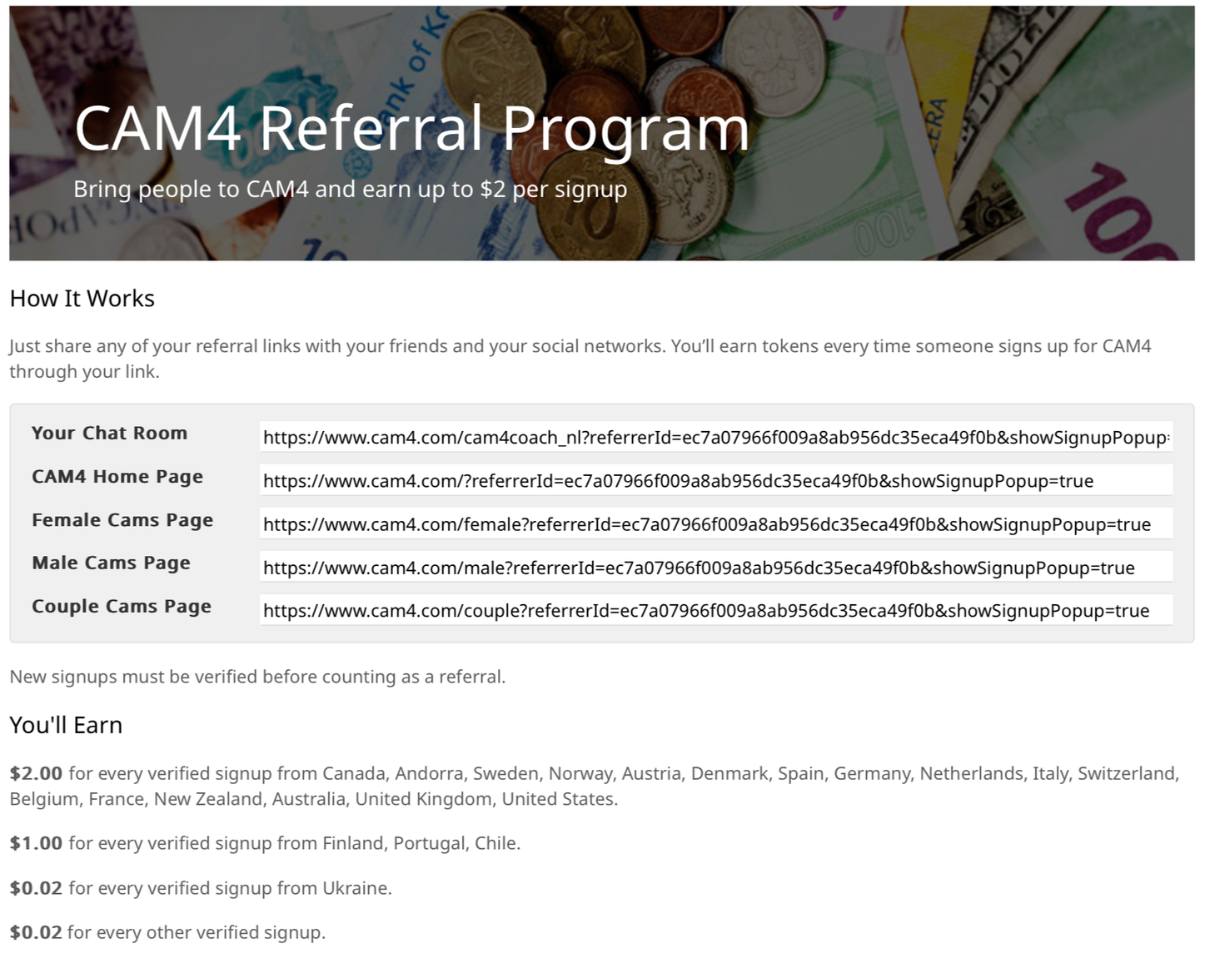
2) Referral Program — Earn from Viewers

Referral links voorbeeld

Earn by bringing viewers and followers to CAM4. Share your personal link; you get paid for each verified free sign-up (email confirmed).

Payout — Top Countries

USD 2.00 per verified sign-up from: Canada, Andorra, Sweden, Norway, Austria, Denmark, Spain, Germany, the Netherlands, Italy, Switzerland, Belgium, France, New Zealand, Australia, England, United States.

Payout — Level 2

USD 1.00 per sign-up from: Finland, Portugal, Chile.

Payout — Other

USD 0.02 per sign-up from all other countries.

How It Works

  1. Go to your Model DashboardPromotion Program.
  2. Copy your personal referral links.
  3. Share them via social media, blog, email, or in your live chat.
  4. Earn even when you are not live (place links/banners on your site).

What is a verified sign-up?
A new user who creates a free CAM4 account and confirms their email address.

Rules

  • You have earned a minimum of 100 tokens to participate.
  • Your account is verified in the Dashboard.
  • Fraud will result in exclusion and possible termination of your account.

You can see your earnings directly in your Model Dashboard under Promotion Program.