Category Archives: Do not use

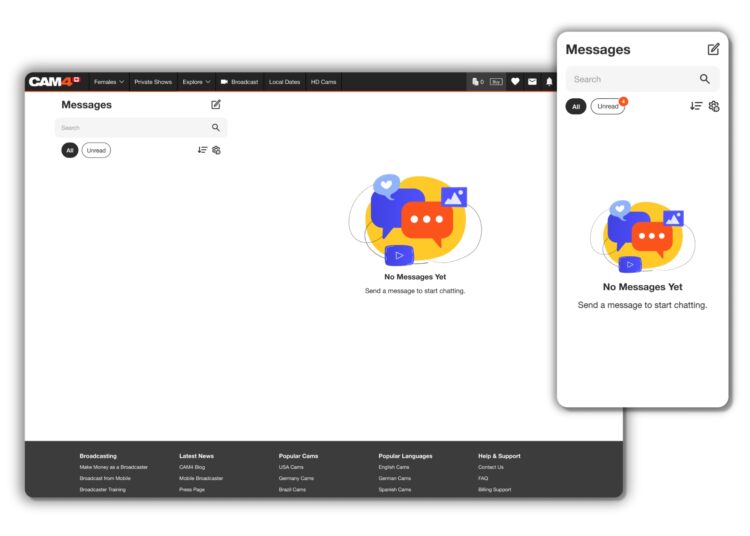
Navigating Direct Messaging

We have heard your feedback and elevated your DM experience.

To support you as you become familiar with messenger’s great features, we have provided you with an easy to follow guide to all of the Chat and Media functionality, and so much more!

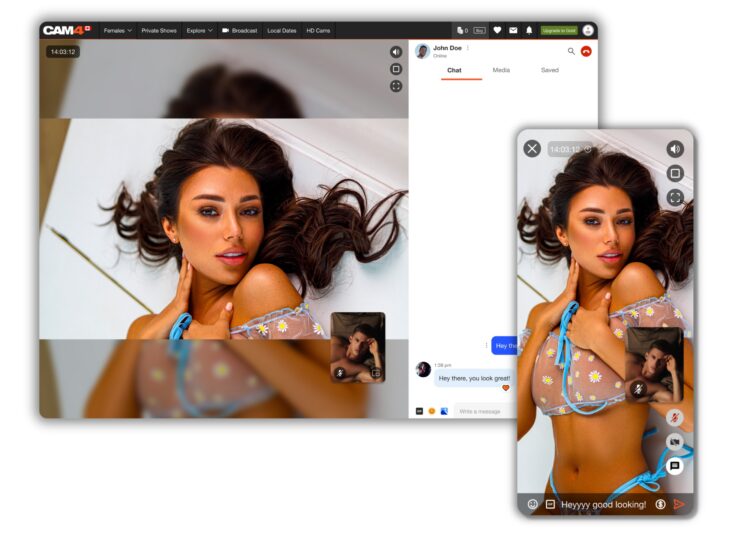
The first thing you’ll notice about this new communication tool is how much easier it is to use, as well as it providing far more than just the ability to chat!

BENEFITS OF USING CAM4 MESSENGER

  • Increased Privacy – Create connections with only the users that you choose though chat and Private shows.
  • Filtering Options – Easy access to important information and content.
  • MonetizationEarn tokens while chatting through tipping, selling content, gifting, and Private shows.
  • Mobile Friendly – Now it’s easy to use our new Messenger tool on the go!

CHAT UPGRADES

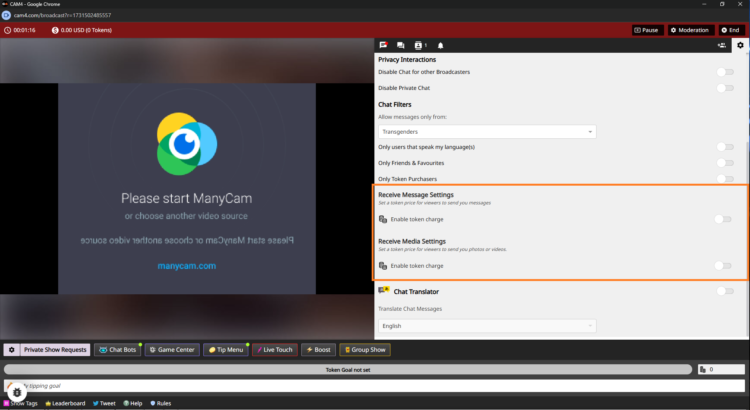
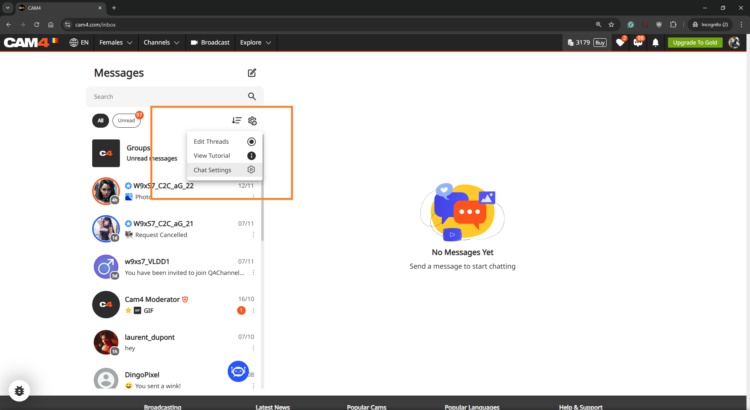
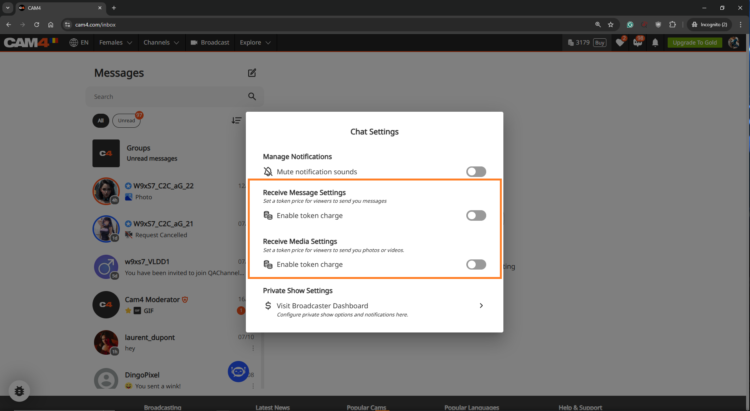
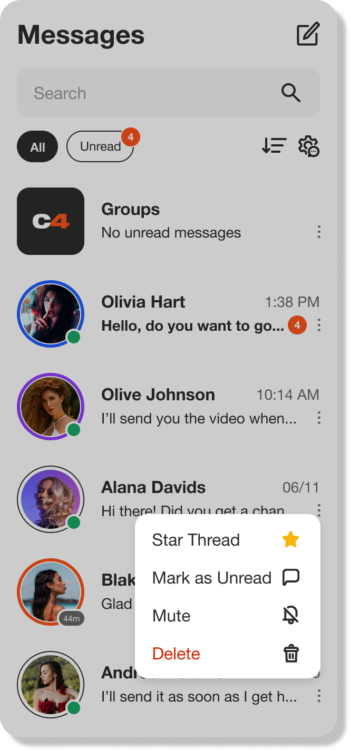
As well as the common features, such as saving, replying, deleting, adding Gifs, and Emojis,  you now have additional tools to make messages stand out and have control over who messages you. Let’s break down a few of them for you.

WINKS
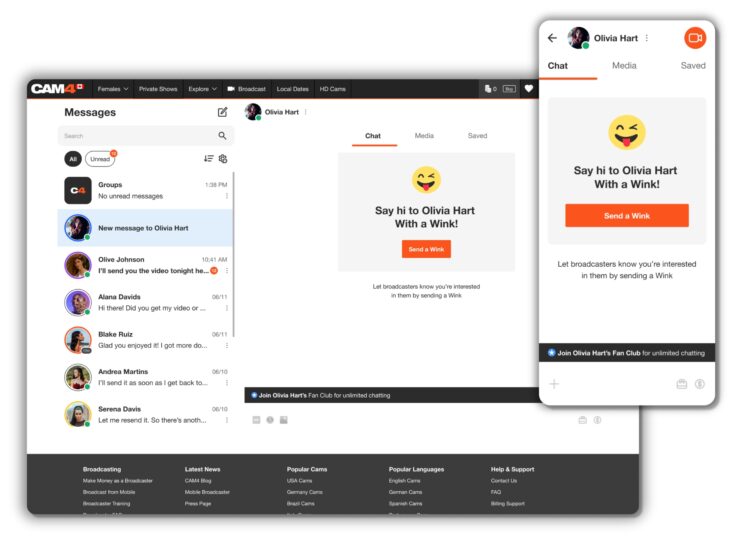
Wink’s are sent from Non-gold users who would like to chat with you. The ability to type in the chat will only be enabled once you reply to their wink.

Gold users can message anyone they want – No winks needed!

SELL CONTENT

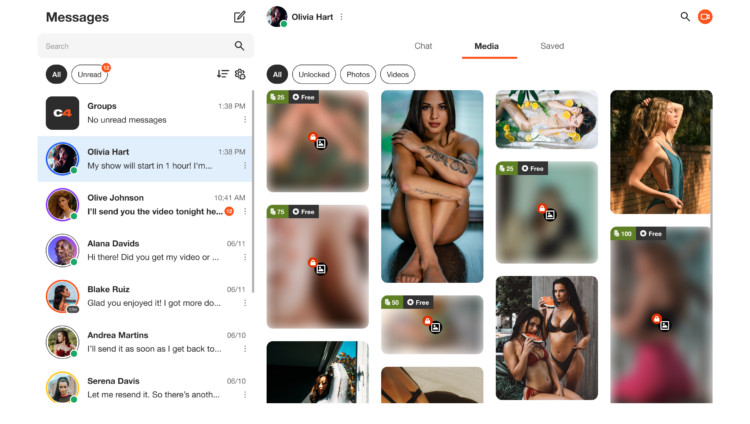
With this feature within the Media functionality of Messenger, you can add content from your ‘Media’ directly into the chat, allowing the user to purchase and enjoy.

FAN CLUBS
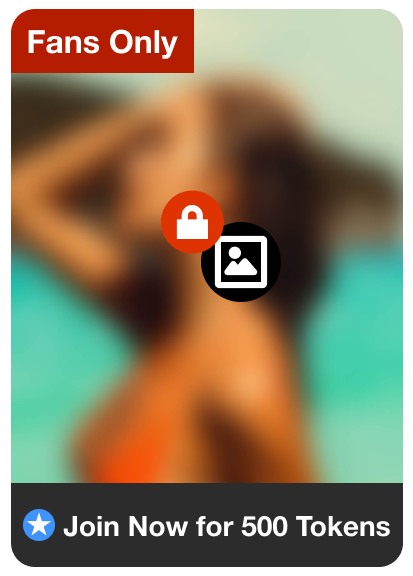
You can share your Fan Club Content via the chat. This will allow you to promote your ‘Fan Club’, and the user can simply click on the link to view it. They will then be prompted to join, and once they have, the content will be visible to them in the chat.

HOST A PRIVATE SHOW

Offer Private Shows at any time through Messenger!

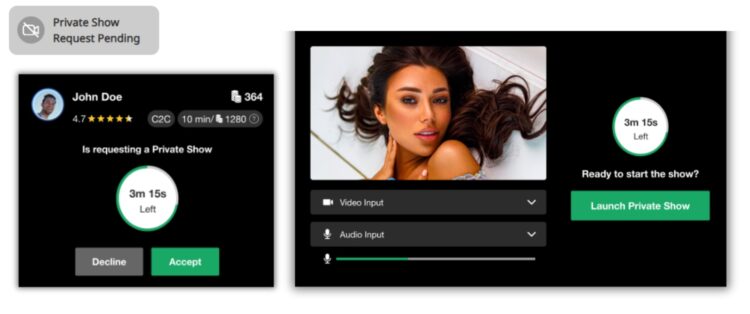
Don’t worry about going live on your profile, your users can now request a Private Show directly with you from Messenger! 

This super function allows both creators and users to enjoy some alone time, without the possibility of others spying. Turn on Cam2Cam or keep it a 1-way private show – whichever you both want to explore.

You can start the Private Show yourself by simply clicking on the camera icon at the top right of the chat window – another great feature to make the process quick and easy.

Remember – once the show has ended, the user can rate the show, a great way to gain feedback. Also, the earnings gained from the show will appear in the chat, giving you instant insight without having to review your account.

SAFETY AND INFORMATION

REPORTING USERS
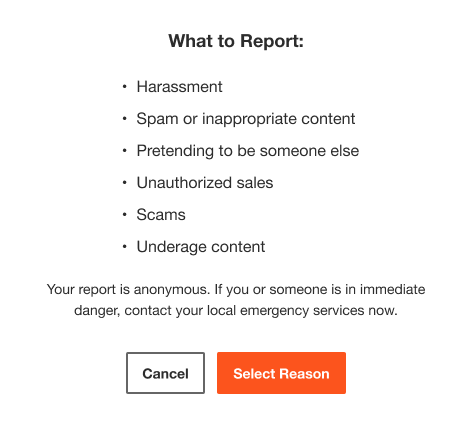
Fill out and submit a report form to our support team to investigate. Note: this will not remove the user’s ability to contact you.

BAN USERS
This facility will mean that the user will be removed from your chat and also banned from your shows. The user will still be able to see the chat, as well as any media they have purchased from you, but they won’t be able to contact you. Additionally, your username will no longer appear in any searches by the user.

CHAT BOT “SPARK”
Receive answers right away to questions you have about messenger, your shows, the site, and rules right from your chat window!


ORGANIZING WITH FILTERS

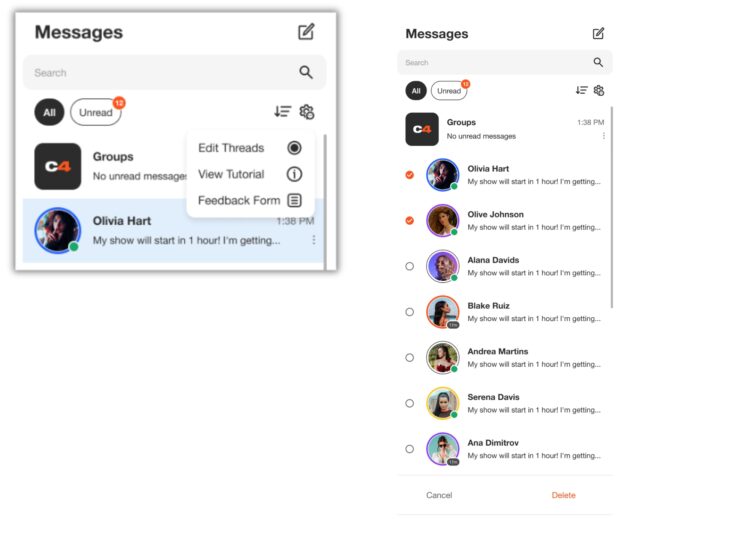
Use filtering to keep your messenger nice and organized. Grouping and saving important messages is a breeze and you can also select and delete multiple messages to manage your inbox!

EDIT THREADS
Remove unwanted chat session in bulk so your inbox isn’t cluttered with old DMs. 

MEDIA
All of the media you send or receive in the chat will appear in the Media Tab. The content can be sorted by ‘Unlocked’, ‘Photos’ and ‘Videos’, making it super easy to find! 

SAVING
You fans send you important information that you may want to easily find later. While in your chat with them, click on the “Saved” tab to see all messages you saved from that user. Messages and content that you save, will appear chronologically.


We think the new CAM4 Messenger is the perfect way to enhance the interface between creators and users, making it easier for everyone to stay in touch.

👉 If you have any questions, feel free to ask the Coaching Bot 👈

NEED MORE HELP?

Read our FAQ’s or join one of our regular Coaching Sessions every Tuesday & Thursday at 10am EST for useful insights and to meet other creators.


~That’s all for this lesson!

Happy Camming!

Love, Your Coaching Team!
Refer a Friend UK & AU

UK & AU ONLY


Invite your male and female friends to become broadcasters and both earn a bonus! Here’s how it works:

1. Assist your friend in creating a CAM4 account.
2. The new performer signs up with us and provides us with your username.
3. The new performer can also participate in our bonus program and can earn up to $600 USD in bonuses over 12 weeks!
4. Once the new performer has broadcasted for a minimum of 20 hours and earned at least $100 USD, you will receive a $50 USD bonus! (This does not mean they have to earn $100 within the first 20 hours)

Rules:

– The bonus is only awarded for new performers who have not been active on CAM4 before.
– The new performer must broadcast under a British flag and speak English.
– The new performer must provide your username to us to participate in the Friend Bonus. This can be done with Julia through the chatbox on the website or via julia@cam4.com.
– Any bonuses received do not count towards the new performer’s minimum earnings of $100 USD.
– You are welcome to give tokens to your friend, but these also do not count towards the minimum earnings of $100 USD.

Start-Up Program (USA & CAN Only)

Earn an additional $400 in the first 8 weeks on Cam4 – Signing up NOW for our Start-up Program.

We are making it easier for you to get started on CAM4.  This bonus is only available to NEW CREATORS in their first 8 weeks to help your earn more, while you build up your fan base. 

HOW DOES IT WORK? It’s super easy!
We will match your tips up to a max of $50 each week, that’s it!

Here’s how you can take part:
Step 1: Send an email to join@cam4.com, include “START-UP PROGRAM in the subject your CAM4 Username.

Step 2: CAM4 staff will confirm your start date and add you to the program will be supporting you through your 8 weeks.

Important! Requirements for participation:

  1. Your ID on file with is is North American
  2. New to CAM4 in the last 60 days. Having multiple accounts will disqualify you.
  3. You have not blocked Canada or the USA (you can block your own province/state)
  4. You acknowledge that attempted fraud can lead to immediate exclusion from the this program and possibly even from CAM4 as a whole.
  5. Moving tokens back and forth between accounts to achieve your bonus is not allowed and you will be removed from the program if you are caught doing it.
  6. Only tips earned from viewers will be counted towards the weekly total that we will match.
  7. You can only be a part of one incentive program at a time.

Bonuses will be credited to accounts no later then end-of-day Tuesday the following week. 

PRO TIP
CAM4  offers FREE live coaching in North Americia every Tuesday & Thursday at 12pm EST. Join one of our classes with Coach Vanna Faye so she can teach you how to make the most of our platform and answer any questions you may have.

Token Indicators

More insight in what your viewer might spend 
As a Broadcaster on CAM4, it’s always good to keep track of your tippers spending behavior to prioritize your attention during a live show. Get ready to see just how big of a spender your viewers may be with the brand new Token Indicator. Conveniently integrated within your CAM4 chat, this tool now allows you to identify viewers tipping habits !


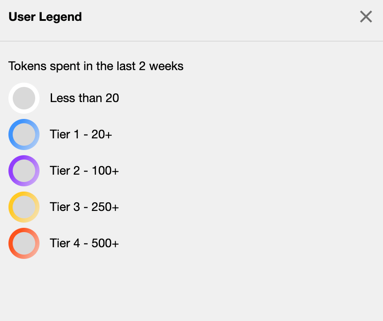
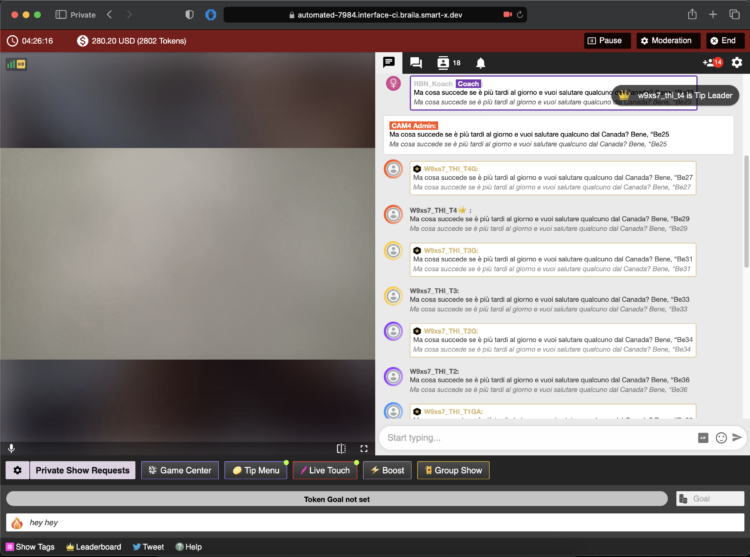
Viewers in your chat will be indicated by color coded usernames representing 5 different token tiers alongside their corresponding viewer type (Gold Member, Fanclub Subscriber, Moderator) showing you what they have spent in tokens over the last 2 weeks


TIER 1: WHITE = Has not spent any tokens in the past 2 weeks

TIER 2: BLUE = Has spent at least 1 token but not more than 19 in the past 2 weeks

TIER 3: PURPLE = Has spent at least 20 tokens but not more than 99 in the past 2 weeks

TIER 4: YELLOW = Has spent at least 100 tokens but not more than 500 in the past 2 weeks

TIER 5: ORANGE = Has spent at least 500 tokens in the past 2 weeks

THIS IS WHAT YOU WILL SEE…


Whether they are blue, purple, yellow, or orange, be sure to show them some extra love and attention while visiting your room. You never know when a regular viewer may become your next big tipper !!! 

~That’s all for this lesson!

Happy Camming!
Love, Your Coaching Team!
What is Chat Bot?

NEED A HAND ?
CAM4 is excited to introduce a brand-new function within your CAM4 broadcasts. With our NEW ChatBot tool you will be able to multitask while giving your viewers that special chat room experience unique from other broadcasters.


WHAT IS A CHAT BOT ?
A ChatBot is a conversational tool that can assist your LIVE chat with ease and free up those busy hands of yours… think of it as your very own personalized moderator. By utilizing the ChatBot function during your CAM4 broadcast it will help automate messaging so you can remain focused and give your audience your undivided attention.

A few examples and benefits of what a ChatBot can be helpful with include :

WELCOME BOT
Generate a specific “Welcome Message” visible to NEW viewers who join your room. Note, this message has a 5 second delay when someone comes in.


TIPPING BOT
Send out aThank You” message when a certain tip amount has been received or a token goal achieved. Including different chat responses for different token thresholds

TIMED / AUTO NOTIFICATION BOT  
Create a set of predefined messages that will be displayed in your Public Chat at predetermined time increments. Note, atleast 3 messages from viewers must be sent in the chat for these messages to begain.

Examples
Updates on Room Goals
Tip Menu changes
Fan Club / My Shop offerings and discounts
Notifying your audience of Room Rules
Promoting Social Media handles
Promoting Wishlists (CAM4 Swag Store, Amazon, Stock Room, etc)
Upcoming shows and cam Schedule

With an endless list of customizable options and 3 unique bot commands, CAM4’s NEW ChatBot feature is a sure way to keep your show flowing, all while doing the work for you and keeping your viewers in the loop and their tokens tipped.

~That’s all for this lesson!

Happy Camming!
Love, Your Coaching Team!
Level UP Program

GAME ON !!!

Grab onto your joysticks and get ready to Level Up each month!

This program will have you feeling like a boss… From the 1st of each month we are challenging YOU with the opportunity to make an extra $2K+.

ACHIEVEMENT LEVELS

LEVEL 1 – $100 = $10
LEVEL 2 – $200 = $20
LEVEL 3 – $300 = $30 + Bonus CAM4 Shirt
LEVEL 4 – $400 = $40
LEVEL 5 – $500 = $50 + Bonus Creator Pack
LEVEL 6- $750 = $50
LEVEL 7 – $1000 = $100
LEVEL 8 – $1500 = $100 + Lovense Toy
LEVEL 9 – $2000 = $100
LEVEL 10 – $3000 = $200
LEVEL 11 – $4000 = $300
LEVEL 12 – $5000 = $1000

UNLOCK EACH  BONUS AS YOU GO!

The more you earn >> the more levels you unlock >> the more bonuses you collect along the way!  

Creator Pack from the Swag Store
Female Swag ($100 Value)


Male Swag ($100 Value)

Please note: The creator pack changes monthly. The swag shown in the images above does not reflect the exact products available to you. 

BUT WAIT… THERE’S MORE

As you unlock each $$$ level there are additional prizes and stretch goals that can be achieved along the way, from CAM4 Swag to LIVE TOUCH connected toys by Lovense .

BONUS ROUND
“Top Up’s”

Creators who earn $300+ can win 1 of 5 additional randomly selected  “top ups” that range between $20 – $100  each month.

Choose your destiny on your quest to beat your best score with the NEW CAM4 Level-Up Program !!!

RULES

  • Creators MUST be 2257 approved
  • Creators MUST live in North America
  • Creators MUST broadcast a min of4 hours
  • Transferring tokens between accounts is not allowed
  • Earnings are counted from 12:00am ET the first day of the month till 11:59pm ET on the last day of the month
  • Creators MUST sign up each month to take part in the program
  • Top Up’s are rewarded through random draw
  • Each Swag Store Prize can only be redeemed ONCE.
  • You can only be a part of one incentive program at a time.

Any bonuses will be credited to the creators account within the first 7 days of the following month.

What is Cam2Cam?

Cam2Cam

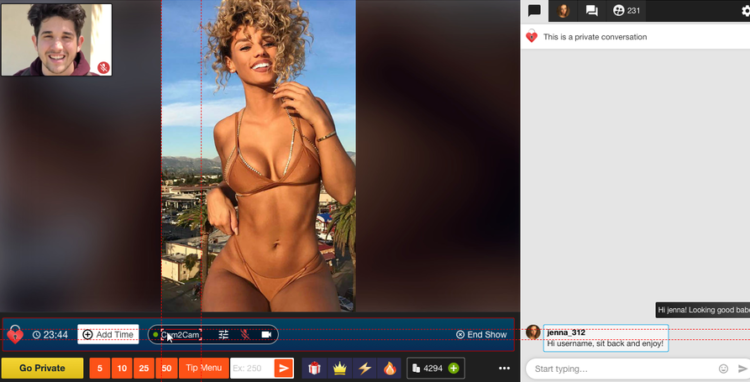
Cam2Cam is a Private Show option that allows Viewers to display their camera feed to Broadcasters

As opposed to the traditional Private Show on CAM4 where only the viewer can watch the broadcaster

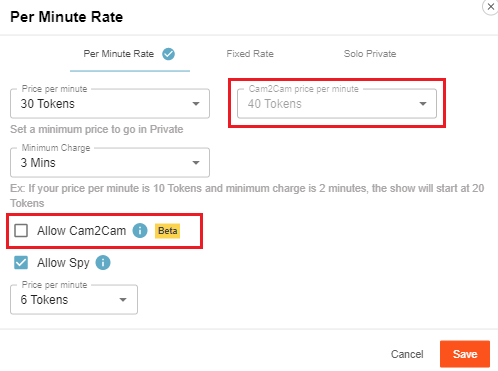
Cam2Cam offers low latency for both audio and video, with a custom price that can be different from the regular Private Show price.

Good to know:

– Cam2Cam only works if both streamer and viewer are logged in on the desktop and use the Chrome browser

– The price for Cam2Cam  per minute is typically around 1.25 times the private show price per minute

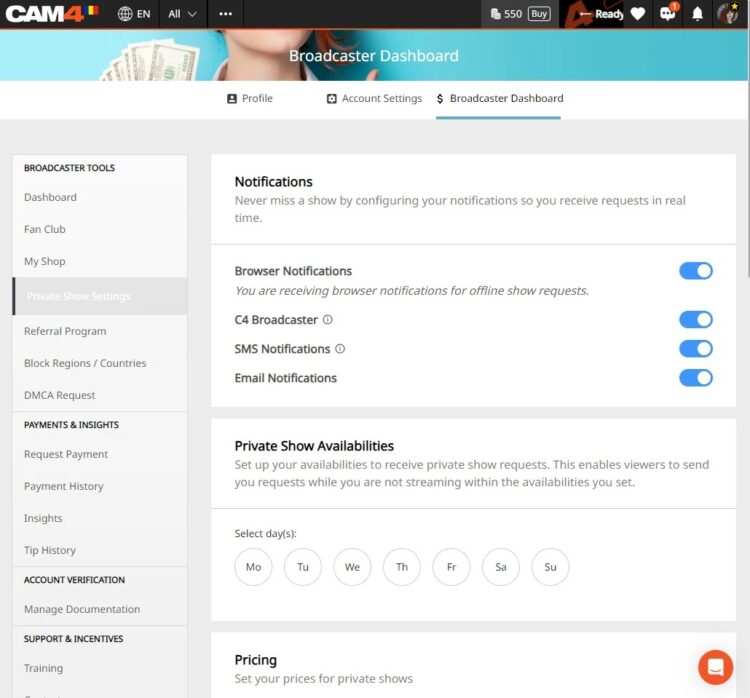
Access the private show settings by clicking on the gear icon beside the “Private Show Requests button”. You can set the price for Cam2cam shows and then add a checkmark beside “Allow Cam2Cam”  to activate the feature once you press save.

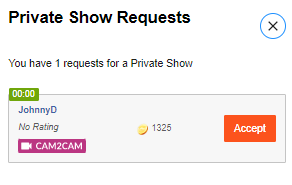
Once your viewer allows CAM4 to share their cam you will see a Private show Request. Open your requests and as you can see below they have enabled their Cam2cam for this show.

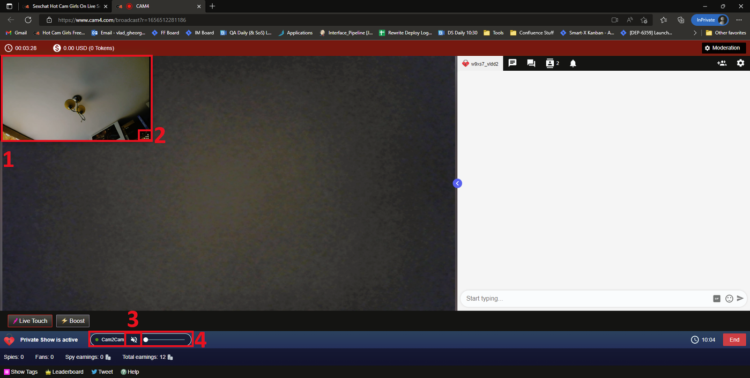
What you will see after accepting the Private Show:

  1. The Viewer’s Stream. It is displayed by default in a small rectangular shape in the top left corner of the screen

  2. The Resize Indicator which lets users know that the window is resizeable. The window also be moved anywhere on the screen

  3. Cam2Cam Controls, split in 2 elements (3 and 4). Element 3 is the “Mute Audio” button, which will mute (or unmute) the Viewer’s stream. When pressed, the icon will update to reflect this change.

  4. Cam2Cam Controls, split in 2 elements (3 and 4). Element 4 is the “Volume” slider, which allows the Broadcaster to adjust the Viewer’s volume. Its behaviour is identical to the Volume slider present on the Viewer-side video player.

Adding the Cam2cam to your Private Shows is a great way to earn more and give your viewers a more intimate experience. By keeping you on the CAM4 platform, you can trust that your experience will be not only easy, but safe and secure.


~That’s all for this lesson!

Happy Camming!
Love, Your Coaching Team!
 

How to Host a Group Show on Cam4

What is a group show?
Group shows give broadcasters a chance to have a private show with multiple viewers.

When the Group show begins, everyone who has purchased an entry ticket has access to the show and can watch, listen and chat with the broadcaster.

How much does a Group Show cost?
You can set the cost of each ticket: 10, 25, 50, 100, 150, 200, 250 or 300 tokens.

How to start a group show?

Create a group show, describe your show, define the price and duration.


Launch your “Ticket Sale” by setting a “Ticket Goal” or set a “Time Limit” if you have an large audience of viewers and hitting a ticket goal might be too easy.

Time Limit –  Once the grouped show has been created and launched, the countdown starts, you have a set amount of time to complete the sale of tickets to hit your goal.

What happens if I sold tickets and the goal is not reached?
If the predetermined goal is not reached, you can restart the countdown, so you give extra time (5 or 10 min more).

How do I modify and extend my countdown?

Click on the red “Cancel” button. You will then get a confirming the canel.


If  you have almost reached the goal, do not cancel the group show, confirm your group show in order to validate the sale of your tickets.

To confirm your group show, let the countdown end, the group show will start automatically.

However, In the event that the show is canceled for x reason, the tickets purchased by the voyeurs are refunded immediately.

How to optimize the sale of your group shows?
As soon as you broadcast:
• Add value and exclusivity to your show group. To do this, show up dressed in lingerie (no direct nude).
• Greet everyone by announcing the sale of group show tickets at 50 tokens for 15 minutes (recommended). You can always set the cost of your ticket to 10, 25, 50 or 100 tokens, and the duration to 10, 15, 20 or 30 minutes.
• ANSWER and be chatty to set the mood with your viewers by always having control of the conversations on your chat.
• STAY FOCUSED ON YOUR OBJECTIVE: ticket sales!
Important: do not let any viewers devalue your session, for that silence (or ban) the bad comments as well as the viewers who question the price of the ticket.

Why do I have to silence or ban a bad viewer immediately?
When you let viewers bash your show, you can have potential ticket buyers who hesitate and not buy tickets.

BRAVO you sold grouped show tickets!!
Tips :
• Thank the ticket buyers live, followed by the question “Who’s next, to complete the goal, so we can all go on a group show together?!”
• You can also offer private shows for those who wish.
• Make it easier and increase your chips by using your Lush Lovense (sex toy) during your group shows!!!


~That’s all for this lesson!

Happy Camming!
Love, Your Coaching Team!
Connecting a Wishlist to your Profile

Let your fans SPOIL you!

Fans are always looking for ways that they can help and spoil their favorite broadcasters. Create a Wishlist on one of these great sites and let your fans know exactly what you need!

What do I need to Do?

  1. Visit the website of one of the CAM4 supported stores listed above.
  2. Create an account on their site and use their registry or Wishlist function to start building your list.

    If you are having issues, please contact the store you are building your Wishlist on. CAM4 does not provide support these platforms.

  1. Once your list is complete copy the Registry or Wishlist URL that they provide you and go to CAM4.com.
  1. Login into your CAM4 and hover your mouse over your profile icon on the top right-hand side of the homepage. From the menu click on “My Account”.


5. Click on “Wishlist” and add the URL below the logo for the store you used and click “Save”

When you visit your profile on CAM4 you will see your wish list appear on the bottom left under you “Detailed Bio”.


To add a list for another CAM4 supported store, just repeat the process and you will see the logo linking you viewer to your list appear under “Wishlist” as well.

PRO TIP: When creating your Wishlist, DO NOT use your real name. All Wishlist will hide your mailing info but some will show the owners name when viewing the list. If you want to hide your legal identity, always use your fake name.


~That’s all for this lesson!

Happy Camming!
Love, Your Coaching Team!


Your Tip Menu

Launch Your Very Own Custom Tip Menu to Improve Engagement and Increase Earnings!

Tell your fans what to tip for and earn more tokens, set up yours now!

What Is It?
The CAM4 Tip Menu is a fun tool that allows you to create a customized list of actions with the corresponding token amount a viewer needs to tip for you to perform the action during your performance. We’ve recently upgraded our tipping menu functionality to allow for simple set up and easy viewer access. Performers who’ve launched their own tip menus have reported heightened activity and ultimately an increase in show earnings! 

Benefits of Creating a Tip Menu:

  • The tip menu is an easily customizable list that you control and can change / update at any time
  • Your viewers know exactly what they can tip for each performance action without having to ask
  • You won’t need to set up an HTML bio
  • The tip menu is easily accessible via your profile during every show
  • Less chatty viewers are more likely to engage

Quick & Easy Tip Menu Set Up
Locate the Tip Menu feature near the Game Center and enter each action and the required tipping amount. *Please note you must enter at least four (4) actions to activate your tipping menu for viewers

You can add up to 12 tip menu options; click the trash can icon to the right of each option to delete and update. Once you’ve completed your list, click SAVE to activate.

You will receive a special notification in your chat window every time a viewer selects an item in your tip menu


Tip Menu Ideas
What you include on your tip menu is completely up to you, and the great thing is you can add and update the menu as you learn what your viewers want and need in your shows!  Here are some sample tip menu options to get you started:

  • Blow kisses
  • Custom shout out message
  • Flash boobs
  • Oil rubdown
  • Spanking
  • Twerk
  • Insert toy for 15 seconds

Get creative here – the sky really is the limit!

The Key to Tip Menu Success
Our best advice for making the tip menu work for you is to keep your list of options fresh and creative while continuously directing viewers to it during your show.

We’re Here to Help You Win!
If you need help setting up your tip menu or are looking for ways to maximize this fun tool, please reach out to support@CAM4.com at any time and one of our experts will guide you.


~That’s all for this lesson!

Happy Camming!
Love, Your Coaching Team!