Make your show more engaging and increase your tips: with every tip, your toy reacts directly — you determine the intensity per threshold.
Tip: Put your thresholds (e.g. 25 / 50 / 150 tokens) clearly in your description or Tip Menu.
Interactive toys make your shows more dynamic and give viewers direct feedback. You control the experience — they remember it.
Please note: Live Touch / FeelConnect is not suitable for Lovense. Always use the official Lovense software.
Lovense integration
Lovense works great with CAM4. Use the Lovense Browser Extension or Lovense Stream Master to sync tips with your toy.
Step-by-step
Update Lovense app and firmware.
Install the extension or Stream Master.
Connect your toy.
Make a test tip (small amount).
Tips for the show
Link thresholds to intensity or duration (e.g. 25 / 50 / 150 tokens).
Pin your thresholds visibly and repeat them aloud.
Use goals and your Tip Menu for rhythm and transparency.
Multiple toys
You can use multiple Lovense toys at the same time. Test combinations in advance and keep an eye on battery status.
Supported models (selection, 2025)
Vibrators & wearables
Lush 4, Lush Mini, Lush 3
Ferri (panty vibrator)
Ambi, Exomoon (bullet / lipstick)
Mission 2, Osci 3, Dolce, Flexer
Tenera 2 (clitoral suction)
Rabbit & G-spot
Nora (all generations)
Lapis (strapless strap-on)
Masturbators
Max 2 (and older Max)
Calor
Solace / Solace Pro
Prostate & penis
Edge 2 (and older Edge)
Gush 2 (and older Gush)
Diamo (cockring)
Anal / Wands / Specials
Hush 2 (all sizes), Hush (older gen.)
Domi 2 (and older Domi), Gravity, Hyphy
Gemini (nipple)
Lovense Sex Machine (mini & full)
Disclaimer: This list is a selection. Compatibility may change due to new firmware or models. Always consult the official Lovense website for the most up-to-date information.
Best practices
Test in advance
Test connection, intensities and thresholds before you go live. Have a short demo tip ready to let your audience experience the effect.
Communicate clearly
Keep thresholds short and visible. Repeat them to newcomers and thank them for each trigger (name + what happens).
Boundaries & rules
Stay within your comfort zone and CAM4 rules. Set time-outs or cooldowns if you want to control the pace.
Quick recap: Always use Lovense software (extension or Stream Master), test in advance, set clear thresholds and communicate them. Update apps and firmware, and keep batteries ready. Consistency creates better experience and more tips.
Get direct insight into who’s in your room: with the CAM4 Token Indicator you recognize big tippers, read the chat smarter and steer your show more effectively.
More insight with the CAM4 Token Indicator
See at a glance who recently tipped, recognize big spenders and focus your energy where it pays off — directly in your chat.
Tip: link your goals and Tip Menu to what your “colored” viewers show for maximum conversion.
What is the Token Indicator?
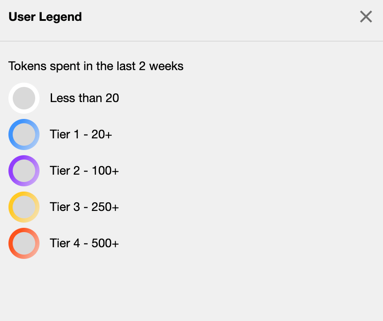
The Token Indicator shows in your CAM4-chat how much a viewer has spent in the last 14 days.
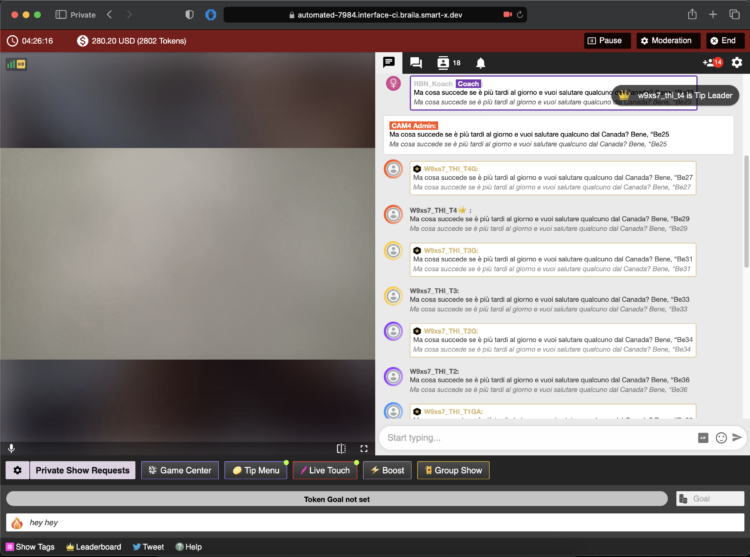
Color-coded names and badges (such as GOLD, Fanclub or Moderator) help you quickly assess how involved someone is.
Colors based on spending
Everyone in your chat gets (if applicable) a color based on tokens spent in the last 14 days.
Whatever color you see — greet these viewers warmly and involve them in your goals. Often regular visitors are your next top tippers.
Badges and roles in the chat
In addition to colors, you see different icons and labels. This way you know directly who is speaking:
Token icon
Indicates that a viewer currently has tokens available.
Your messages
This is what your chat messages look like as a creator during the broadcast.
GOLD member
Viewers with a Gold subscription and extra features. Their status is independent of their token balance.
Moderator
Helpers you designate with tools like mute, kick and ban (only in your room).
Regular member
A registered CAM4 user without a Gold subscription.
Admin (CAM4 Crew)
Official CAM4 staff who provide support and oversee the rules. They never ask for your password.
Coach (CAM4 Crew)
Selected CAM4 coaches who support creators and provide training.
Smart use of newcomers
You immediately see when someone enters your room (like this example of a Gold member). Use that info wisely: greet new “colored” viewers, link your goals (“120 more to Goal 2”) and highlight 1–2 popular Tip Menu items. This increases your chance of tips — without pushing.
Pro tip: have a few short sentences ready to name thresholds (“80 more to Goal 1”), thank them for each unlock and name 1–2 menu-suggestions (e.g. 25/50/150 tokens).
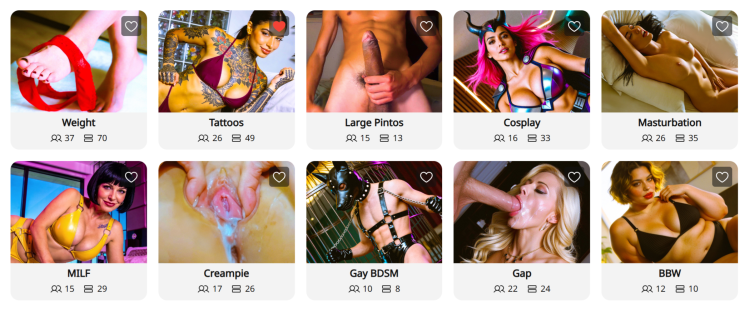
O que são Nichos? As páginas de Nichos são espaços comunitários especializados no CAM4 organizados por interesses específicos — como BDSM, Pés ou BBW. Pense nelas como hubs dedicados onde você pode se conectar diretamente com usuários que estão procurando especificamente o tipo de conteúdo único que você oferece.
Por que os Nichos mudam o jogo para a sua descoberta:
Exposição direcionada: Em vez de competir no diretório geral, seus posts e transmissões ao vivo aparecem em comunidades dedicadas ao seu estilo ou fetiche específico.
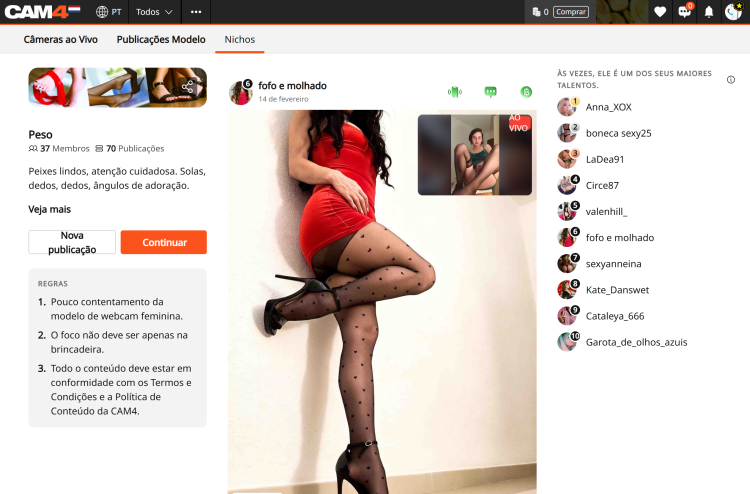
Prévia ao vivo nas publicações: Quando você está transmitindo ao vivo, qualquer post que você tenha feito em um Nicho mostrará automaticamente uma prévia do vídeo ao vivo. Isso permite que usuários navegando pelo feed do Nicho entrem diretamente na sua sala.
O Leaderboard: Cada Nicho possui um Leaderboard que mostra os 10 principais contribuidores com base no total de curtidas. Aparecer nele oferece grande visibilidade e ajuda você a se tornar uma autoridade reconhecida dentro dessa comunidade.
Aba “Cams” dedicada: Os Nichos possuem uma aba específica “Cams” que mostra apenas modelos ao vivo que são membros daquele Nicho. Isso facilita para que os espectadores encontrem você quando estão procurando conteúdo específico.
Como participar e se conectar:
Encontre seu Nicho: Clique na aba “Nicho“ na barra de navegação superior para navegar pelo diretório.
Seguir para participar: Você deve clicar em “Seguir” em uma página de Nicho para se tornar membro.
Compartilhe conteúdo: Depois de se tornar membro, clique em “Criar Post” para compartilhar fotos ou vídeos da sua Biblioteca de Conteúdo ou do armazenamento local.
OBS: Todos os posts em Nichos são gratuitos para visualizar, tornando-os o teaser perfeito para atrair usuários para seu conteúdo pago ou sua transmissão ao vivo.
Interaja: Interagir com comentários em seus posts ajuda a construir uma comunidade fiel dentro do Nicho.
Selecione a opção “Também Postar no meu Feed de Atividades” antes de publicar sua postagem.
O valor: desbloqueando novas fontes de receitaNichos são mais do que apenas uma ferramenta social; eles são uma forma poderosa de aumentar seus ganhos:
Maior conversão: Você está alcançando um público “quente” já interessado no seu estilo específico, o que leva a mais gorjetas e pedidos de shows privados.
Marketing automatizado: Sua prévia ao vivo funciona como um anúncio constante para espectadores interessados enquanto você trabalha.
Vendas na Biblioteca de conteudo: Use teasers gratuitos nos Nichos para direcionar tráfego para suas mídias pagas e vídeos completos.
Status no Leaderboard: Maior visibilidade no Leaderboard está diretamente relacionada ao aumento de inscrições no Fã Clube e crescimento de assinantes a longo prazo.
Entre e comece a explorar Niches! Siga alguns que despertem sua curiosidade, compartilhe alguns conteúdos teaser e veja quem aparece. Você pode descobrir um novo lado do seu estilo que você ama, e se conectar com fãs que também amam isso.
Seu próximo conteúdo favorito (e sua próxima onda de fãs) pode estar esperando em um Niche que você ainda não experimentou.
Precisa de uma mão? Para mais detalhes sobre outros recursos do CAM4, confira nosso FAQ ou pergunte ao nosso chatbot “Spark” encontrado na sua caixa de entrada.
SFW profile photos: why they’re essential for your visibility and earnings on CAM4.
SFW Profile Photos: Maximum Visibility, Maximum Earnings
A Safe For Work (SFW) profile photo is the key to worldwide visibility. Without an SFW photo, you remain invisible in important markets and search engines.
SFW means: sexy and attractive, but not explicit. Suitable for all platforms and search engines.
What Does SFW Mean?
SFW stands for Safe For Work. This means your profile photo is suitable to be shown anywhere online — including on platforms and search engines with strict content rules.
SFW photo = sexy and attractive, but not explicit.
Think of it as an advertising photo: enticing enough to attract attention, but safe enough not to be blocked anywhere.
Why Is an SFW Photo So Important?
Very simple: no SFW photo means less visibility — and therefore less income.
Invisible in Many Countries
Without an SFW profile photo, you won’t be shown in search results in countries like the US, Canada, Australia, and large parts of Europe.
Blocked by Search Engines
Search engines block profiles without an SFW photo. This means you miss out on traffic from people actively searching online.
Stricter Regulations
Platforms must comply with international regulations. An SFW photo protects your own visibility.
What Is a Good SFW Photo?
✅ This Is Allowed
Swimsuit, lingerie, or bikini
Provocative pose, but fully clothed
Close-up of your face (optional)
Full body photo in a nice outfit
Suggestive close-up without explicit details
Good lighting and clear quality
Tip: A photo that’s just too explicit can often be made SFW with smart cropping.
❌ This Is Not Allowed
Full nudity (visible breasts or genitals)
Sexual acts
Toys in use
Underwear where everything is visible
Extreme close-ups of intimate body parts
Do You Have to Show Your Face?
No. You don’t have to be recognizable. Many models choose, for example:
From Behind
Body photo without face
Accessories
Hat, sunglasses, or shadow
Partially
Face partly out of frame
Focus on Body
Full body photo without face
As long as your photo is SFW, you are visible worldwide.
Examples of Good SFW Photos
A stylish dress or lingerie set
Swimsuit photo by the pool or beach
Artistic photo with beautiful lighting
Sexy pose, but fully clothed
Close-up of lips, shoulders, or neck
Summary
✅ With SFW Photo:
Visible worldwide
More viewers
More income
❌ Without SFW Photo:
Invisible in many countries
No viewers
No income
It’s really that simple: upload a good SFW photo today and immediately expand your reach.
Quickly learn how to use your Lovense toys in your CAM4 shows — via Stream Master or with the Browser Extension.
Lovense Integration on CAM4
Choose what suits your setup: Lovense Stream Master (all‑in‑one) or the Lovense Browser Extension (Chromium). Let your toy react to tips and enhance the experience.
Tip: communicate clear thresholds (e.g. 25/50/150 tokens) and test a small “tip‑demo” before you go live.
Two ways to connect
Lovense Stream Master
All‑in‑one software/browser from Lovense, designed for live streamers. Combines streaming, cam/browser‑integration and toy‑linking in one tool — fewer separate parts needed.
Lovense Browser Extension
Extension for Chromium‑browsers (Chrome/Edge/Brave) that passes tip‑events to your Lovense‑toy, so it reacts in realtime to tips during your stream.
Key benefits
Less hassle
With Stream Master you don’t have to work separately with OBS + separate browser + extension; many functions are built in.
Direct response
The (Cam) Extension forwards tips to Lovense, so your toy vibrates or responds to agreed thresholds/amounts.
Stability
Stream Master is the recommended route and replaces the older “Lovense Browser + extension” mode for a smoother experience.
Disadvantages & points to note
The older “Lovense Browser with extension” will no longer receive updates since September 1, 2023 — Stream Master is recommended.
Always use Lovense Connect to pair your toy (the Remote‑app does not work for this).
The Extension works well on Chromium‑browsers; support on Firefox/Safari is limited/not available.
Performance may vary: high resolution + multiple apps can cause lag/crash/delay on weaker PCs. Test your setup.
Setup (short steps)
Install Lovense Connect on your phone and pair your toy via Bluetooth in that app.
Download/install Stream Master (or choose the Browser Extension in a Chromium‑browser).
In Stream Master: add your cam‑site and set up video/overlays/toy‑integration.
If you use the Extension? Install the correct extension, open the extension page before you start streaming.
Do a test‑tip (small amount) to check if your toy reacts exactly as you expect.
Best practices
Test in advance
Update firmware/apps, check battery/connection and show a short demo‑tip to your chat to “learn” the thresholds.
Communicate thresholds
Keep your mapping simple (e.g. 25/50/150 tokens = light/medium/intense response) and pin them visibly in your description or Tip Menu.
Disclaimer & current info
Please note: Lovense regularly releases updates (firmware/software/compatibility). Experiences vary per hardware and internet. Always consult the official Lovense‑manuals and release notes before you go live.
Games energize your show, break the ice, and often lead to more tips — here’s how to use Token Keno, Spin the Wheel, and Roll the Dice smartly.
Play Games in Your CAM4 Shows
Games are perfect for starting your show, creating atmosphere, getting to know your audience, and earning tokens.
Tip: Keep rules and prizes visible (overlay/board/description) and link them to your goal bar.
Token Keno
There are 12 boxes; for each box, you choose an action/prize and the price in tokens. Viewers choose a box live, and you perform the corresponding action.
Battleship Variant
Hide “ships” behind the 12 boxes and mix small and larger rewards. Viewers “fire” at coordinates until the ship “sinks.”
Small reward: compliment, 30-sec dance, close-up.
Larger reward: outfit change, prop/toy intensity up, mini-game of choice.
Duo Fun (Sets/Group)
Fill boxes with fun duo assignments (within your boundaries/rules):
Blindfold assignment with surprise objects (safe and visible).
Audience chooses a fun challenge or compliment round.
Spin the Wheel
Fill 12 options and choose a fixed price per spin. Clear, short descriptions work best.
Hangman
Let viewers buy letters to guess a word/phrase. The winner gets a reward (e.g., shout-out, chosen song, mini-challenge).
Keep the puzzle visible (board/overlay).
Setting max rounds prevents overrun.
Roll the Dice
Viewers tip to roll; the number of eyes determines the action. You determine the 6 actions and the price per roll.
Choose 6 actions (short, fun, achievable).
Set the price per roll.
Activate your cooldown (standard ~60 sec) to be able to perform actions neatly. You can give “Allow Roll” earlier to speed up.
POV Switch
Choose 6 cam angles (e.g., full, close-up, detail, wide, low, shoulder). The roll determines the next POV.
Mini-Sale
Make 1 outcome a 10-minute “sale” (temporarily lower prices). Put this visibly in the picture with the username of the trigger.
Chase
Hide one “big” reward behind a roll and move it after each hit. Tension guaranteed.
Wheel of Fortune (board/balloons)
Make rows with numbered boxes or balloons. The die determines from which row may be chosen; behind each box is a prize or action.
Game Variation
“Forbidden word”: chat chooses a word that you are not allowed to say for 5 min. Violation = fun counter-performance (e.g., dance, pose, tongue-twister).
Do/Dare/Truth (PG-friendly and within your boundaries).
Record short clip/boomerang and post later in your Activity Feed.
Talk 2–5 minutes in a funny accent or with a theme.
Start a 60-second dance party with chat countdown.
Players choose a prop for a playful assignment (safe/rules).
Small workout: 10 squats, 10 jumping jacks, 30-sec plank.
Acting challenge: over-the-top soap scene or film quote imitation.
Keep everything within your boundaries and the CAM4 rules. Small, clear, and quickly executable works best — and ensures flow in your room.
Estamos preparando tudo para a grande final ao vivo!
Não perca o show ao vivo no sábado, 29 de novembro, a partir das 21h: Nossos 10 finalistas competirão pelo cobiçado primeiro prêmio, e o público decidirá o vencedor.Fiquem ligados!
Mostre-nos seu talento XXX
para ganhar até 1.000$!
Um novo concurso global está chegando ao CAM4: o show de talentos XXX FACTOR.Estamos recompensando o talento XXX e a criatividade desenfreada dos nossos criadores de conteúdo com até US$ 1.000 em prêmios!
Participe com um vídeo mostrando sua performance mais sedutora.De todos os vídeos enviados, finalistas talentosos serão selecionados para se apresentar e competir ao vivo!
O palco do CAM4 está pronto e estamos prestes a acender os holofotes: quem será a estrela desta primeira edição de 2025?
10 Prêmios que brilham:
Primeiro Prêmio: 1.000$
Segundo Prêmio: 750$
Terceiro Prêmio: 500$
Quarto Prêmio: 250$
do 5º ao 10º Premio: 100$
_______________
Como o concurso funcionará (em resumo):
✨1 Candidatura: Envie um vídeo curto mostrando seu talento mais sexy para participar (entre 1 e 16 de novembro). Os candidatos aprovados nessa fase de seleção serão contatados com mais informações sobre as fases subsequentes.
2 Votação do publico:
◊ Receba votos dos usuários do CAM4 para estar entre os 10 finalistas (entre 8 e 23 de novembro).
3. Performance ao vivo – Grande final:
◊ Apresente-se ao vivo com os finalistas na noite de 29 de novembro para ganhar o cobiçado primeiro prêmio!
✨Acha que tem o XXX Factor?
Você acha que tem um talento único e atraente?Já pensou que sua performance poderia conquistar o público?Então SIM!!
Você pode nos mostrar seu canto e dança sensuais, fazer twerk de cabeça para baixo ou nos impressionar com suas habilidades únicas e sensuais — esta é a sua hora de brilhar!
As inscrições serão abertas em 1º de novembro de 2025. Inscrições anteriores não serão aceitas.
Como participar:
Grave um vídeo curto (menos de 2 minutos) mostrando seus talentos sensuais.
Salve seu talento com um título original ecarreque-o AQUI.
Publique seu vídeo no seu feed de atividades do CAM4(Lembre-se de não definir nenhum preço, para que seu vídeo fique visível para seus fãs)
Transmita pelo menos 8 horas durante o mês de novembro.
Envolva seus fãs, ganhe seus votos e prepare-se para a grande final ao vivo!
Os modelos de webcam que passarem na fase de seleção serão contatadas com mais informações sobre as fases subsequentes.
O conteúdo será avaliado pelo Gerente de cada país participante do CAM4 com base na sensualidade da performance, originalidade ou exclusividade e qualidade do conteúdo.
OBS: Se você estiver entre os finalistas, ao participar do concurso, você concorda em se apresentar ao vivo na noite final, em 29 de novembro.
Datas para lembrar:
Fase
Datas
Detalhes
Período de Submissão
1–16, Nov 2025
Envie seu vídeo de talento (máximo de 2 minutos)
Fase de votação
18–23, Nov 2025
Reúna seus fãs e chegue ao top 10
Finalistas anunciados
24–28 Nov , 2025
Conheça as estrelas do grande final
Grande Final (LIVE)
29 Nov , 2025 @ 9PM CET
Alto, ao vivo e lendário
Acha que não tem o XXX Factor , mas conhece alguém que tem?Indique-o para ganhar US$ 100!
Você conhece alguém com talento incrível que ainda não transmitiu no CAM4? Indique-o para o Show de Talentos XXX FACTOR — E se o seu candidato se inscrever e ganhar a coroa, você também ganhará US$ 100!
Porque quando uma nova estrela nasce, todos nós brilhamos!
Trocas de tokens entre usuários ou modelos de webcam são estritamente proibidas.
Se você for finalista, ao participar do concurso, você concorda em se apresentar ao vivo no dia 29 de novembro, às 21h. A data e o horário da final ao vivo não podem ser alterados.
Smart social media = more visibility, more viewers, and a stronger community around your CAM4 shows.
Social Media — Use it to Reach a Larger Audience
Reach new viewers, build a loyal community, and drive traffic to your CAM4 room with a simple, consistent social strategy.
Tip: Schedule regular posts around your shows (teaser beforehand, live notification, thank you afterward) and make your CAM4 link visible everywhere.
How to Use Social Media
Post consistently! Variety and regularity keep you top-of-mind. More interaction = more reach = more chance that viewers will find your show.
Content Mix
Images, short videos, polls, and personal updates.
Behind-the-scenes and reminders for your next show.
Post teasers and direct followers to your full-content platform.
Planning
Make yourself a simple schedule: e.g., 1 post daily.
Announce shows well in advance + post a reminder.
Engagement
Respond to comments/DMs (short, friendly replies).
Ask questions and use polls to start conversations.
A Strong Bio
Your profile is your digital business card. Briefly tell who you are, your style, and where people can find you.
What to Include
1 sentence about your vibe/style.
What viewers can expect.
Link to your CAM4 profile (Check the platforms rules)
Quick Writing Tip
Think like a fan: what would you want to read about your favorite creator? Use that as inspiration.
Ensure Clear Links
Put your CAM4 link in your bio and pin it where possible.
Repeat your link in show announcements and updates.
Use link stickers or “link in bio” where direct links are limited.
Every social platform is different as far as what they allow and don’t. Make sure that you are following their rules before adding your links and content.
Use Hashtags Wisely
Hashtags increase your discoverability. Use them consistently and appropriately for your content.
Examples: #cam4, #liveshow, #streaming + your own creative tags.
Mix broad and niche tags; don’t overdo it (quality > quantity).
Share Your Mentions
Are you being mentioned or promoted? Share it again (retweet/repost/share). Social proof increases your credibility and reach.
Key Platforms
X (x.com) / Twitter
Allows nudity/adult (within rules).
Ideal for show announcements and direct links.
Use hashtags, tags, and retweets for reach.
Instagram
Strict rules: no nudity; lifestyle/suggestive is possible.
Reels & Stories for engagement.
Link in bio to your CAM4 profile.
Facebook
Strict rules: no nudity.
Fan pages and community building.
Use a separate account for privacy.
TikTok
No nudity; large reach with short, creative videos.
Use trending sounds and hashtags.
Subtly refer to your other socials/CAM4.
Bluesky
Emerging platform (similar to X).
Relatively spacious, but rules may change.
Be active early and build an audience now.
Summary
Socials change, but the core remains: be visible, creative, and make it easy to follow you. Choose platforms that suit you, post consistently, and put your CAM4 link front and center — this maximizes your reach and income.
Quick recap: content mix + planning, strong bio, clear links, relevant hashtags, share social proof, and time your show moments smartly.
Do you see your video or photo somewhere without permission? Report it via the CAM4 DMCA form, we will contact the parties involved and work on removal.
Tip: Major platforms and hosts take DMCA requests seriously. Reporting quickly = faster removal.
What is a DMCA Claim?
With a DMCA notification, you ask the host or platform to remove unlawfully shared content. CAM4 helps you by forwarding your notification and following up with the correct party.
How to Submit a DMCA Notification
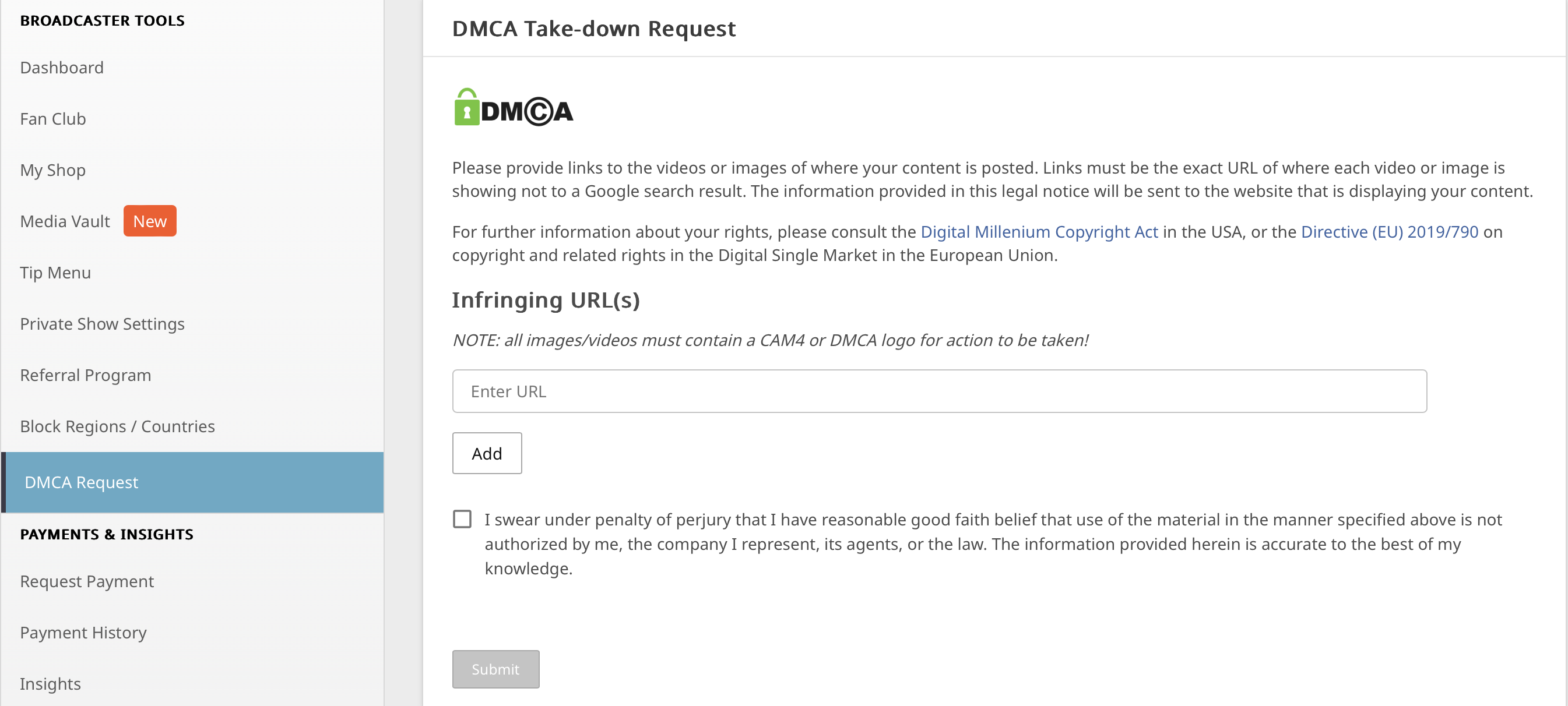
Go to the DMCA form on CAM4 (via your help/support or privacy/security section).
Fill in your details and paste the exact URL(s) of the pages with your content.
Give a brief description (What would you like removed and why).
Add proof where possible (e.g., screenshots, date/time of your original content).
Submit, our team will take over and communicate with the host or site administrator.
You don’t have to chase after every site yourself. We support the process and follow up on your notification.
What Happens After Your Notification?
Confirmation
You will receive a notification and answers to any follow-up questions you may have..
Contact with Host
CAM4 contacts the host/website and requests removal based on DMCA.
Removal/Handling
Illegal content is typically taken offline quickly. You will be informed of important updates.
Tips to Protect Yourself
Do you have doubts about privacy? Consider a mask or don’t always show your face fully in the picture.
Save original files or screenshots (with date/time) as proof for your claim.
Note where and when you saw the infringement (URLs, date, any username on that site).
Add a watermark to your video and images.
A DMCA claim is a powerful way to maintain control over your work. You have the rights — we help you protect them.
Questions or Need Help?
Can’t figure it out or are you missing information? Contact Support via support@cam4.com. We will think along and help you complete your notification.