Give an exclusive group show on CAM4: sell tickets, start on time, and stream only for paying viewers.
Group Shows on CAM4
A group show is an exclusive show for which viewers buy a ticket. Only ticket buyers see your stream — ideal for guaranteed, paying viewers.
Tip: announce your group show in advance and start no later than ~15 minutes after your intro.
What is a Group Show?
You sell tickets to viewers who want access. So it’s one performer for a group of paying viewers (not: multiple performers at the same time). Announce in time what happens in the show; the countdown shows when you start.
How to Set Up Your Group Show
Settings in the Menu
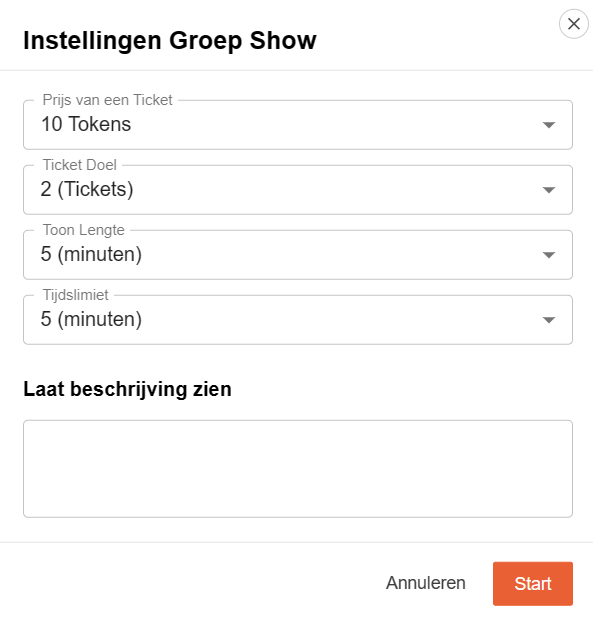
- Description: what can viewers expect?
- Ticket price: your fixed price per access.
- Minimum number of tickets for passage.
- Duration of the show.
- Countdown: how long people can still buy tickets.
Interface
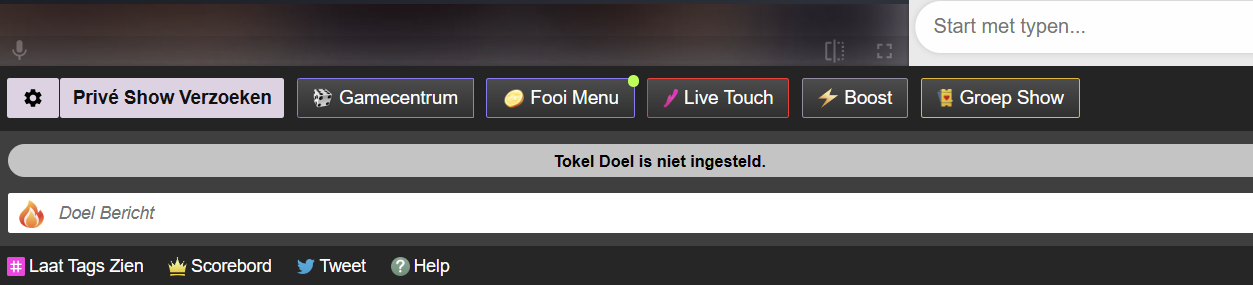
Find the Group Show options in your broadcast screen and set them as desired.
Don’t you sell the minimum? You can still start. If you don’t start, buyers will automatically get their tokens back.
Price & Expectations
Transparency to Viewers
The price viewers pay is higher than your token earnings; in many regions, VAT is added on top of that. Take this into account when setting your ticket price.
Regional differences (VAT/fees) are possible; viewers see a cost indication before purchase.
Quick Tips for Success
Tease & Announce
Use your Activity Feed to tease the show and mention time, duration, and highlights.
Clear Promise
Clearly describe what you are going to do. Clarity increases conversion.
Thank Buyers
Mention ticket buyers audibly/visibly and start on time to maintain trust.