Category Archives: Do not use

❄ Raccogli i Regali XXXMas per Vincere fino a 300$ ✨

Sappiamo tutti quant’è bello ricevere regali in questo periodo, ma riceverli su CAM4 può donare ancora più $oddisfazioni!

Partecipa al concorso dei regali a tema e fai il pieno di regali XXXMass per vincere fino a 300$.  Iscriviti in basso per partecipare ⇓

10 Premi CAM4 Italia ❄

1º premio: 300$
2º premio: 200$
3º premio: 150$
4º premio:100$
5º premio: 70$

6º premio:60$
7º premio: 50$
8º premio: 40$
9º premio: 30$
10º premio: 25$

I 10 premi CAM4 Italia saranno assegnati ai partecipanti che otterranno più token raccogliendo i regali CAM4 della categoria
 XXXMas ❄ tra il 15 e il 30 Dicembre 2025 ❄.

❄  Iscrizioni Aperte fino al 23 Dicembre
Scrivi il tuo username CAM4 nel form google ⇓

>> CLICCA QUI ISCRIVERTI! <<

La mail inserita non sarà visibile e resterà confidenziale.
Assicurati solo che il tuo username CAM4 si scritto in maniera corretta!

In fondo all’articolo potrai trovare la lista dei performer iscritti (ordine alfabetico).
La lista dei performer iscritti sarà aggiornata manualmente ogni 2 giorni. 

Ricorda ai tuoi fan che inviando dei regali a tema XXXmas anche loro potranno vincere dei premi.
>> Clicca qui per info sul concorso per gli utenti <<

Fai sapere ai tuoi follower che sei in gara scrivendolo sul tuo profilo.

 Inserisci il banner sulla tua biografia CAM4 e condividilo su i tuoi social.


Copia l’url immagine nella tua biografia (vai su Modifica Profilo > Personalizza Profilo >

quindi clicca sulla prima icona a sinistra e copia il link in basso):

https://64.media.tumblr.com/96b9397fc42be41f2a85485ae41a26c8/4c0f976eb541f3c0-b7/s1280x1920/5df289850709cf5d3a66d560551d5eb5fc6e7ed9.gifv

Organizza una vendita promozionale dei tuoi video, inviandoli in cambio di regali.
E ricordati di regalare ai tuoi fan uno show memorabile a tema festivo!

____________________________________

~ Regolamento

1. Solo i cam model con account verificato che trasmettono dall’Italia o dall Svizzera potranno partecipare al concorso CAM4 Italia.

2. Per iscriversi è necessario inserire il proprio nome utente su CAM4 nel form. Le iscrizioni chiuderanno il 23 Dicembre 2025.

3. I vincitori saranno coloro che avranno raccolto più token tramite i regali Cam4 della categoria “XXXMas” (non il maggior numero di regali) tra il 15 e il 30 Dicembre 2025*.

3. Non saranno conteggiati regali fra performer o passaggi di token fra account al fine di alterare i risultati del contest. I risultati saranno verificati nel corso degli aggiornamenti provvisori.


4. Saranno conteggiati massimo 6000 token per tipper (se ad es. guadagni 7.000 token in regali XXXMas dallo stesso tipper, ne saranno conteggiati un massimo di 6000 token per quel tipper).


* Il conteggio dei regali partirà in Italia dall’una di mattina del giorno 15 Dicembre e terminerà all’una di mattina del 31 Dicembre 2025.


❄ Performer Iscritti ❄ 

aggiornata al 17 Dicembre ore 17.00

La lista dei performer iscritti sarà aggiornata manualmente ogni 2 giorni. 

_cocca79
_Daddysgirl_00
1_1_F_A_G_3
Adelaide986
Afrodite_1974
Akemy_room
Alain1989
Ale20forher
AleBiP
AleMarco5
Alessio967
Alexsandraxxxxx
Alexsasexsy94
Alexsasexy94
ALotHot23
Anastasia87
Andreate2k
Andrexxlive
Annalisa_love
Annarellapika
Annettexxxxx
antonino282
antosilvy86
Aquaman6
Aries1882
arta33
asiahotx
Auri5hot
axell58
BabyElisa
babyx2x
BambolaGenuina
bambolinabarra3
baudelaire5
Belcazzo22hot
BIGK20
Bionda_M
Biricchino1976
Blacksofy121
Blacktatto94
Blumoon_21
Bomba186
Boys4boys2
bulldotatosexy
Bunnyesweet1995
caemozione
cassandra1989
Cassandra4
Cazzonepadova
Celinelion
Chanel_blur
Cherryhair1988
Chubbymoobs98
Cicciolino23
Circe87
Claudietta20
Claufia
Cleo2510
Cleopatraof26
Cliccastella
COBRAHARD
Cocca80
Cody2123
Coppia8092
Coppiaspinta
Cornaeamore
CoupleMystery
crazylayla
Cristiana7
Crystal9898
CuccioloTroia90
Culogrande91
Cuoremeryhj
CyberShakti
Dandiroma93
Danielsex962
Dark_Angel_22
Diavoletta77
DINOTTECT
dirtyitacouple
DolceJessica
du_rissimo87
duracel70
dwight_fun
easypeasygirl
Elabahi69
ElliPark
Emma8936
Enzo733
Erfreddo84
erikaxxxhot
ErotiKat
Exxxbizionismo
Facelessbaby
Farfallina_girl
fatcock_91
FireStrykeraIta
florence1990
Fortuna91
fra22ita
FraFedeCouple
Fragola_821
francesc80
Frenk024
Furrywolf
gattarossah
gerilom8787
giadarossi
giglioblonde
Gilberto144
ginnygi
giorgia_2000
GmGit
Grace96_xxx
gravitylove1
helicopterdick
Honey2991
honey2bad
HOT_soho
HotTeo06
Iavorovschi_31
ILCAZZOMIGLIORE
ilmioo21
inter
italiano773
Jebote
Jenfri
Jenfry69
Jessikaaa90
Jessy__j_
jolly2020
jonnie696969
JSYMON
karendolly8
Keira_1_1
khiba
Kink_y
kinkyrose
Ktchkaos
kyliebri
Lacoppia9679
Ladyboy94
Ladydark92
Ladymoonshine
Ladytits18
lafiga
Laillalylac
lalufinder
latuapesca
lauratonynapoli
lavedovanera86
lexiepapi
lia_velvetx
LindaL69
Littledreamer97
lolloEBibbi
Lorella345
LorenaSexyHot
Lu_isa3
Lucky_Red6
LukaShyGuy
lukignolo81
lulu_italy
lunamilly
lunashade1
Lunghibiondi
LupoBarbuto
Luposolitario44
luxxe25
Macabrette
madame_niki
MadameSandra
Maia183
Malika025
manu2434
manue2434
Manuel9568
Marcone99
Maria20252025
Mariamariw
mariaperla
MasterKap
Matteoc4_hot
Matty2773_sexy
MEandX
mich460
Mikesfyres
Milfdasogno
Milferotika
Milfona77
Millefoglie00
miss_laura_
MolossoHot
Monellaebella
moniba
Monicadavinci
moniga
Morrigan_7
Myalina2
naturist_XL
Nicy71
NiMa2025
nina22xxxx
Noemy_italy
NoirMirage
Norahawtin
onehandguy
Passero79
passion_70
Pedrigno792
Perla
Perla_nera1
Piccolamatta
Pipita87
Pop_art
porcellinarm
Porcotuscany88
Ptbull711
Pufi_masokista
Pufy_masokista
Pulamea02
Queennyhot00
Raysa90
Redblood_75
Ricciola_xXX
Riobe
Roky1997
Rossiccia
Sahmin
Samanthablonde
Schiavocuckold
sciascia90
SeleLive
SelvaggiaCaribe
Sendyhais
Sensee85
Serena_hard
serena181
sessoinmaschera
Sexy_Evelyn
SGeronimo
Shilaebob
Siciliantop1
SirinBejaoui
Slipfun_sexy
SnezhannaXXL
Sofialove90
Sognatore39
sole252
Sonoest
Sonounpopersa
Spikjack2
Stecc3
StellaAltamarea
steve69_hot1
Stonerz10
Succosamora
Supermacho7
Susetta77
susylux20
sweeetgirl_hot
sweet_mia_love
Sweet_Shahrazad
tentatrice74
Theeightcouple
TheSlaveKaps
Tinyjasmine
titty88
titty88,
Tosca_Diamante
totem45
TwinkOasis
twinkyitalian
Uomo86
Valerioo9
vampirexslayerx
Vanessapikkola1
velocissimo87
Venere_
Veritas7
Vers332
Versxxxx
ViolaSensation
Weasley_xxx
Xxgioia
yumilux

Lovense Stream Master & Browser Extension

Quickly learn how to use your Lovense toys in your CAM4 shows — via Stream Master or with the Browser Extension.

Lovense Integration on CAM4

Choose what suits your setup: Lovense Stream Master (all‑in‑one) or the Lovense Browser Extension (Chromium). Let your toy react to tips and enhance the experience.

Tip: communicate clear thresholds (e.g. 25/50/150 tokens) and test a small “tip‑demo” before you go live.

Two ways to connect

Lovense Stream Master

All‑in‑one software/browser from Lovense, designed for live streamers. Combines streaming, cam/browser‑integration and toy‑linking in one tool — fewer separate parts needed.

Lovense Browser Extension

Extension for Chromium‑browsers (Chrome/Edge/Brave) that passes tip‑events to your Lovense‑toy, so it reacts in realtime to tips during your stream.

Key benefits

Less hassle

With Stream Master you don’t have to work separately with OBS + separate browser + extension; many functions are built in.

Direct response

The (Cam) Extension forwards tips to Lovense, so your toy vibrates or responds to agreed thresholds/amounts.

Stability

Stream Master is the recommended route and replaces the older “Lovense Browser + extension” mode for a smoother experience.

Disadvantages & points to note

  • The older “Lovense Browser with extension” will no longer receive updates since September 1, 2023 — Stream Master is recommended.
  • Always use Lovense Connect to pair your toy (the Remote‑app does not work for this).
  • The Extension works well on Chromium‑browsers; support on Firefox/Safari is limited/not available.
  • Performance may vary: high resolution + multiple apps can cause lag/crash/delay on weaker PCs. Test your setup.

Setup (short steps)

  1. Install Lovense Connect on your phone and pair your toy via Bluetooth in that app.
  2. Download/install Stream Master (or choose the Browser Extension in a Chromium‑browser).
  3. In Stream Master: add your cam‑site and set up video/overlays/toy‑integration.
  4. If you use the Extension? Install the correct extension, open the extension page before you start streaming.
  5. Do a test‑tip (small amount) to check if your toy reacts exactly as you expect.

Best practices

Test in advance

Update firmware/apps, check battery/connection and show a short demo‑tip to your chat to “learn” the thresholds.

Communicate thresholds

Keep your mapping simple (e.g. 25/50/150 tokens = light/medium/intense response) and pin them visibly in your description or Tip Menu.

Disclaimer & current info

Please note: Lovense regularly releases updates (firmware/software/compatibility). Experiences vary per hardware and internet. Always consult the official Lovense‑manuals and release notes before you go live.
Lovense ✨ Come collegare il tuo toy su CAM4 ⊕

I sextoy della Lovense ti consentono di interagire ancora di più con i tuoi spettatori, consentendo loro di prendere il controllo del tuo toy.
Come? Inviandoti delle tip per farlo vibrare: più grande il tip = maggiore la vibrazione e il piacere $.

Se hai un toy della Lovense (come il Lush oppure l’Hush), abbiamo realizzato un tutorial e una guida per aiutarti a collegarlo a CAM4.

Trasmissione Mobile tramite app C4 Broadcaster

Se trasmetti dal telefono tramite un dispositvo Android puoi collegarlo rapidamente tramite la nostra app C4 Brodacaster (disponibile al momento solo per Android). >> clicca qui per scaricare l’app C4 Broadcaster <<

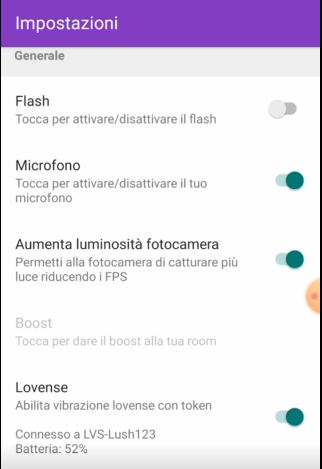
L’app C4 Broadcaster consente di collegare tramite bluetooth il tuo sex toy se trasmetti dal uno smartphone Android.

Ti basta abilitare la funzione nelle impostazioni (raggiungibili scorrendo con il dito verso destra), quindi accendere il tuo Toy Lovense e associarlo tramite bluetooth. Una volta associato il tuo toy sarà pronto per i tuoi show mobile!

Trasmissione da PC: Stream Master o Estensione Lovense

Se invece trasmetti da un computer, hai 2 opzioni per collegarlo. In entrambi i casi dovreai creare un account su Lovense.com, se non ne hai già uno, e scaricare l’app Lovense Connect sul tuo smartphone (trovi i passaggi in basso)

–  Stream Master: encoder trasmissione della lovense: >>  clicca qui per la video guida completa <<
     Questa opzione è quella che ti consigliamo in quanto più rapida.

– estensione Lovense: da aggiungere al tuo browser (disponibile per Chrome/ Edge,  versione meno aggiornata anche per Firefox) 
   
Guida per configurazione Estensione Lovense. 
Scarica l’estensione in base al browser che utilizzi:

⊕  Chrome/ Edge  << clicca qui per scaricarla dal sito Lovense >>

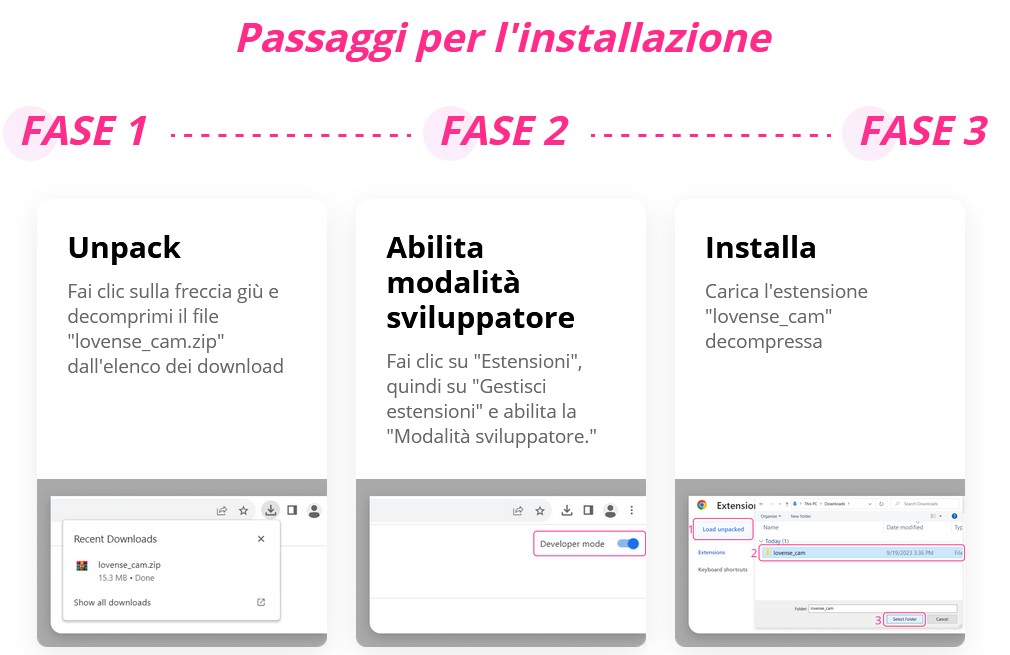
– Dopo aver scaricato il pacchetto, decomprimi il file dall’elenco degli ultimi download.
– Dal menu in alto a destra ( i 3 punti verticali) clicca Estensioni, quindi Gestisci Estensioni.
– Abilita in alto a destra la modalità sviluppatore.
– Carica tra le estensioni la cartella (dalla sezione dowbload puoi trascire la cartella) e abilitala.
– Ricorda di selezionare l’impostazione abilita script per utenti. 
– 
Fissala tra le tue preferite e fai click sull’icona. In questo modo ti si aprirà una finestra per il login.


  ⊕  Firefox << clicca qui per scaricarlo dal sito Lovense  >>

– Dopo aver scaricato il pacchetto, aprilo con il browser Firefox. 
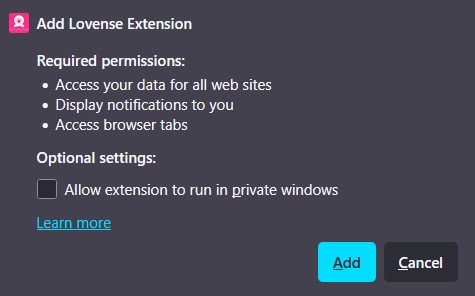
– Abilita l’estensione (Add)
– Ti sarà chiesto se vuoi  fissala in alto tra le preferite, per maggiore comodità.
–  Fai click sull’icona dell’estensione. In questo modo ti si aprirà una finestra per il login.


Collega il tuo account Lovense

Dopo aver scaricato l’estensione o stream master, dovrai fare l’accesso al tuo account Lovense. 
Se non ne hai uno clicca su Sign Up per creare uno rapidamente su Lovense.com o dalla finestra di login (Sign up).

– Una volta loggato, nel menu in alto “Cam Site” clicca sul “+”

– Dall’elenco seleziona CAM4, per aggiungere CAM4 ai tuoi siti di streaming e quindi seleziona le impostazioni consigliate da Lovense.


Scarica l’app Lovense Connect

Scarica l’app Lovense Connect sul tuo smartphone ed esegui l’accesso al tuo account Lovense.
In questo modo potrai collegare al tuo account Lovense il tuo toy, tramite il tuo smartphone.

 >> clicca qui per il download per dispositivi Android

>> clicca qui per il download per dispositivi iOs (iPhone/ iPad)

– Dopo averla scaricata, attiva il Bluetooth e accendi il toy.
– Clicca su Add Toy + (aggiungi Toy).  Una volta associato potrai controllare lo stato del tuo toy dall’app.
– Seleziona dal menu in alto “Scan QR”
– 
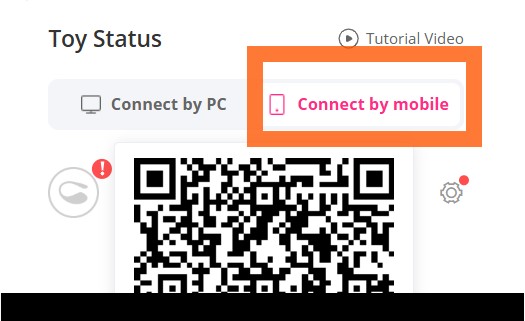
Scansiona il codice QR che visualizzi nell’estensione, a sinistra sotto l’opzione connect by mobile.


Ora trasmetti su CAM4 con Lovense 

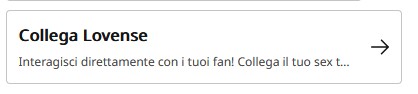
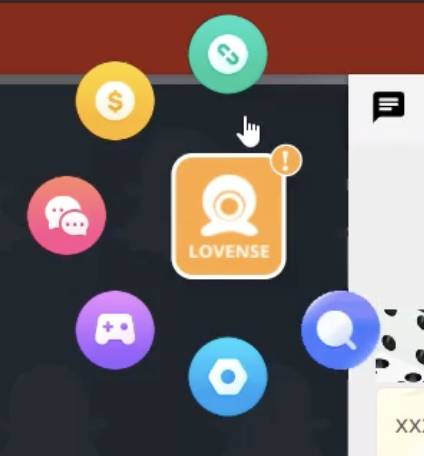
Ci siamo! Ora apri la finestra di streaming CAM4 e vedrai l’opzione per collega a Lovense.

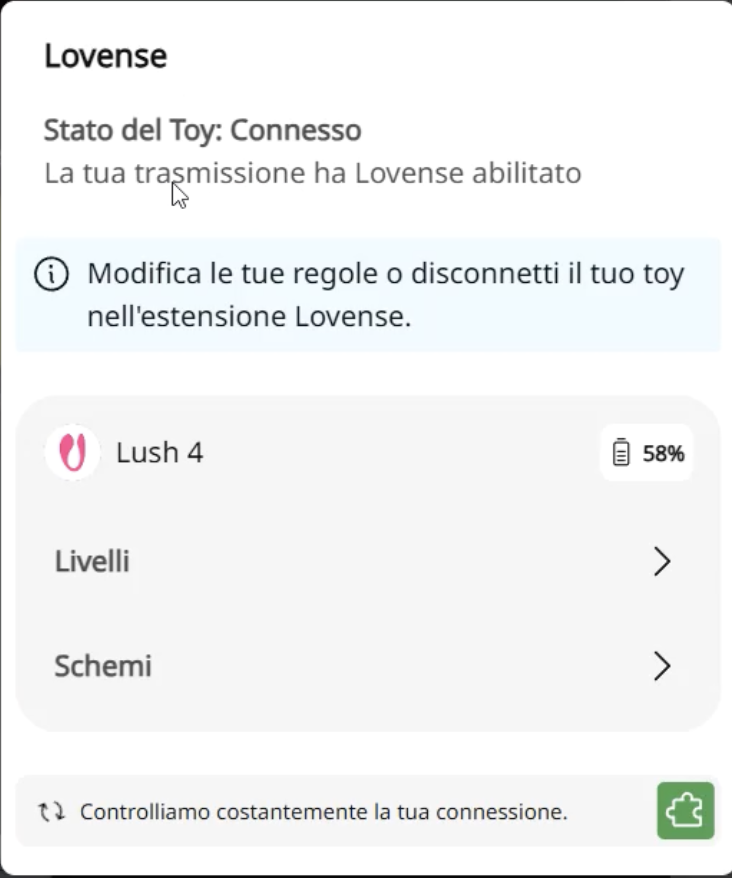
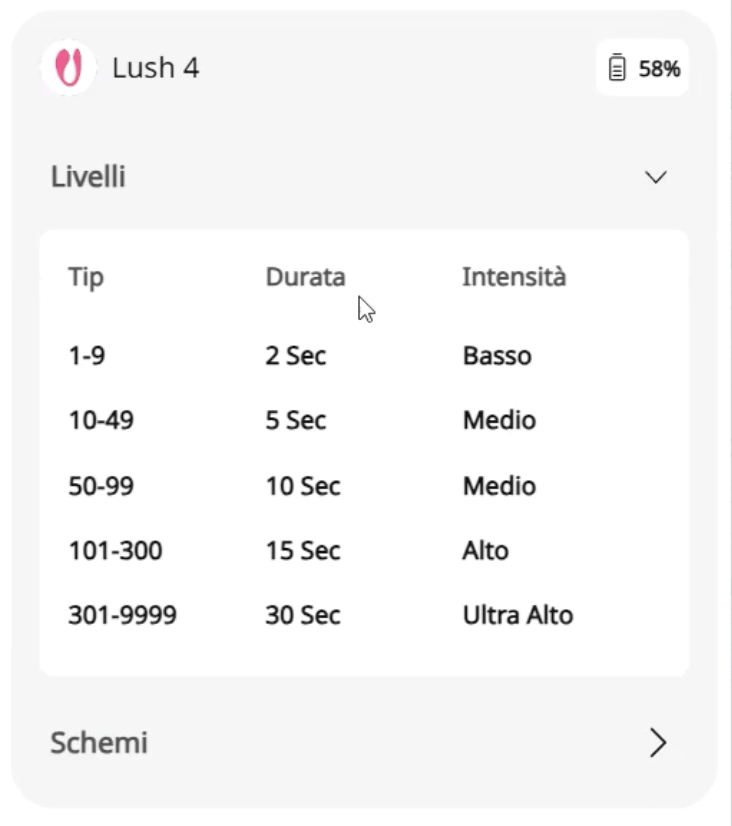
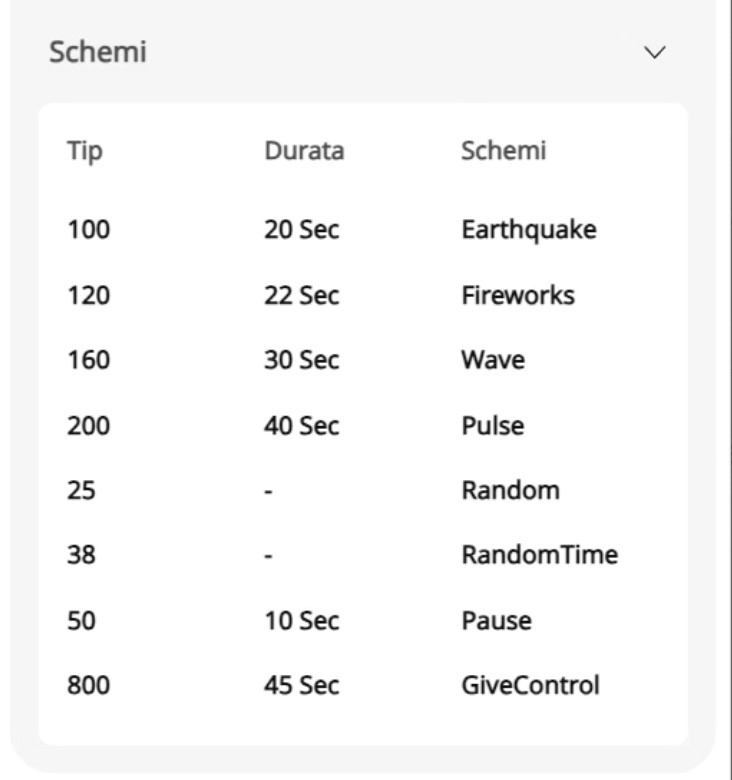
Cliccando vedrai il tuo toy già connesso (se avrai seguito l’installazione dell’estensione o scaricato stream mastert) e potrai vedere come hai configurato i Livelli e gli Schemi.

Cliccando su Livelli: potrai visualizzare la durata e l’intensità di vibrazione, in base alla grandezza del tip che hai settato (ad es. tip compreso tra 50 e 99 Token = vibrazione media per 10 secondi).

Cliccando su Schemi: potrai visualizzare l’intensità e la modalità di vibrazione per un determinato valore del tip (ad es. 100 Token = modalità terremoto).


A destra della finestra d trasmissioni vederai il Lovense Widget dal quale potrai modificare livelli e modelli, durante la tua live.
Puoi anche inviarti una tip di prova come test per verificare che il toy sia correttamente configurato.


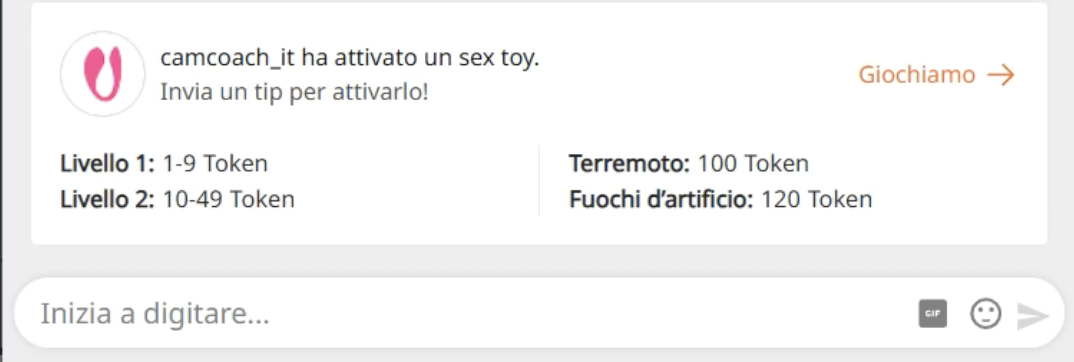
I tuoi spettatori vederanno in alto nella chat il menu interrativo Lovense che offri.
Cliccando su Giochiamo → apriranno il tuo menu con i tuoi Livelli e Modelli impostati.

<< Clicca qui per vedere il video con tutte le funzioni Lovense che vedrai durante la tua trasmissione >>


Social Media

Smart social media = more visibility, more viewers, and a stronger community around your CAM4 shows.

Social Media — Use it to Reach a Larger Audience

Reach new viewers, build a loyal community, and drive traffic to your CAM4 room with a simple, consistent social strategy.

Tip: Schedule regular posts around your shows (teaser beforehand, live notification, thank you afterward) and make your CAM4 link visible everywhere.

How to Use Social Media

Post consistently! Variety and regularity keep you top-of-mind. More interaction = more reach = more chance that viewers will find your show.

Content Mix

  • Images, short videos, polls, and personal updates.
  • Behind-the-scenes and reminders for your next show.
  • Post teasers and direct followers to your full-content platform.

Planning

  • Make yourself a simple schedule: e.g., 1 post daily.
  • Announce shows well in advance + post a reminder.

Engagement

  • Respond to comments/DMs (short, friendly replies).
  • Ask questions and use polls to start conversations.

A Strong Bio

Your profile is your digital business card. Briefly tell who you are, your style, and where people can find you.

What to Include

  • 1 sentence about your vibe/style.
  • What viewers can expect.
  • Link to your CAM4 profile (Check the platforms rules)

Quick Writing Tip

Think like a fan: what would you want to read about your favorite creator? Use that as inspiration.

Ensure Clear Links

  • Put your CAM4 link in your bio and pin it where possible.
  • Repeat your link in show announcements and updates.
  • Use link stickers or “link in bio” where direct links are limited.
  • Every social platform is different as far as what they allow and don’t. Make sure that you are following their rules before adding your links and content.

Use Hashtags Wisely

Hashtags increase your discoverability. Use them consistently and appropriately for your content.

  • Examples: #cam4, #liveshow, #streaming + your own creative tags.
  • Mix broad and niche tags; don’t overdo it (quality > quantity).

Share Your Mentions

Are you being mentioned or promoted? Share it again (retweet/repost/share). Social proof increases your credibility and reach.

Key Platforms

X (x.com) / Twitter

  • Allows nudity/adult (within rules).
  • Ideal for show announcements and direct links.
  • Use hashtags, tags, and retweets for reach.

Instagram

  • Strict rules: no nudity; lifestyle/suggestive is possible.
  • Reels & Stories for engagement.
  • Link in bio to your CAM4 profile.

Facebook

  • Strict rules: no nudity.
  • Fan pages and community building.
  • Use a separate account for privacy.

TikTok

  • No nudity; large reach with short, creative videos.
  • Use trending sounds and hashtags.
  • Subtly refer to your other socials/CAM4.

Bluesky

  • Emerging platform (similar to X).
  • Relatively spacious, but rules may change.
  • Be active early and build an audience now.

Summary

Socials change, but the core remains: be visible, creative, and make it easy to follow you. Choose platforms that suit you, post consistently, and put your CAM4 link front and center — this maximizes your reach and income.

Quick recap: content mix + planning, strong bio, clear links, relevant hashtags, share social proof, and time your show moments smartly.

How many tokens should I ask?

We’ll tell you all about that here!

Setting Prices on CAM4

Knowing what to charge is just as important as what your show looks like. Clear prices help your viewers, and your wallet.

Tip: set your goals in advance and stick to them for more confidence and tips.

How do I know what to charge?

Start with your desired income and work backward. This keeps it realistic and achievable.

1) Determine your minimum

What is the minimum you want to earn per month to cover your fixed costs?

2) Determine your “comfortable” goal

What feels good to live comfortably? Not too high, but challenging.

3) Divide over your broadcast time

Divide your goal by the number of shows/hours. This gives you your goal per show.

Make your goals small — micro-goals keep the excitement going and give viewers quick “wins.”

  • Example: Do you want 1000 tokens (~100 USD) per show? Split into 4 goals of 250 tokens.
  • Goal 1: 250 tokens = nude
  • Goal 2: 250 tokens = oil show
  • Goal 3: 250 tokens = playing with yourself
  • Goal 4: 250 tokens = cumming (only if you feel good about it)

Pro tip: stick to your goals. If you keep changing them, it seems like you’re hesitating, viewers notice that immediately.

Quick triggers that always work

Make small, direct actions easily accessible. This encourages more frequent tipping.

  • Tongue = 1 token (someone tips 1 token → you stick your tongue out briefly, playful and fun)
  • “Flash breasts” for a set number of tokens

Use your Tip Menu

Avoid “what does this cost?” questions. Your Tip Menu makes it clear what you offer and at what price. You can find it in the bar under your broadcast screen (also adjustable from a private broadcast).

Butt 25 tokens popular
Breasts 25 tokens
Vagina 50 tokens
Tongue 1 token
Oil Show 150 tokens
Private DM 20 tokens
Whisper name 10 tokens
Song request 15 tokens
Dance (1 min) 40 tokens
Change clothes 60 tokens
Grab toy 80 tokens

Do’s

  • Be crystal clear about your prices and what you offer.
  • Split your show into small goals for constant progress.
  • Thank tippers and mention achieved goals out loud.
  • Test, evaluate, and adjust your menu based on what works.

Pay attention

  • Don’t change your room goal until it is hit
  • Stay within your boundaries and within the platform rules.
  • Be consistent: Always complete the actions that are tipped for.

Important: Adhere to local laws and platform rules. Only 18+ broadcasters and consent is always required.

Goals & Tip Menu

Your guide to tipping options on CAM4

Tip menu and room goals — earn more by guiding your viewers

Earn more tokens by giving your viewers exactly what they want!
Your fans need to know what you’re willing to do and how to get you to do it. Keep your tip menu and your room goal separate by offering different things.

Pro tip: quick, fun actions keep energy high while tips also contribute to your larger goal.

Tip Menu — what is it?

The Tip Menu is a simple way to boost engagement. Create a list of actions with their token values so viewers know exactly how much it costs to see that action.

Broadcasters using a clear tip menu often see more interaction and higher show revenue.

Tip menu ideas

What you include is up to you — adjust based on what your audience likes.

  • Kiss-hands
  • Mention the viewer’s name or write it on your body
  • Flash breasts
  • Oil massage
  • Spanking
  • Twerk
  • Use toy for 15 seconds
  • Be creative — the sky is the limit!

Set up your Tip Menu

How to set it up

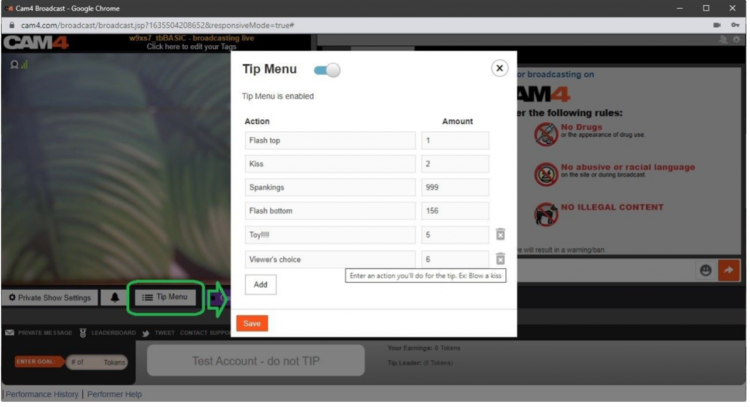
Find the Tip Menu near the Game Center and add your actions with the required tip amount.

Note: you must enter at least four (4) actions to activate your tip menu for viewers.

Setting up the tip menu

Manage & notifications

You can add up to 12 options. Use the trash icon to delete/update. Ready? Click SAVE to activate.

Once a tip menu is activated, you can’t remove it from your live show.

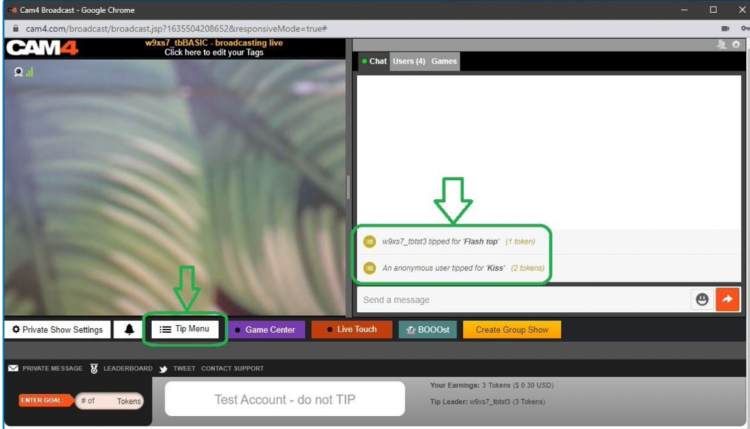
Your tip menu is automatically promoted in your chat so viewers know it’s active. When someone purchases an item, a special notification appears in chat.

Tip menu notifications in chat

Room Goal

Besides individual actions, you can also add goals. Goals are a joint challenge: viewers tip together to reach your target — once it’s hit, you perform the action.

Use goals for bigger actions, but start with micro-goals to maintain tension and give quick wins.

How to set it up

Once live, set your Goal! Click the white bar (right of the fire emoji) at the bottom of the broadcast window. Type the name of the action you will perform when the room goal is hit.

Then set the price: find the “Goal” box to the right of the grey bar that says “Token Goal not set” and add the amount in tokens.

Set your goal

Know your value

Think about what you want to do and how much you want to make before you go live. You don’t want goals that are too easy or too hard.

Example: want 1000 tokens (~$100 USD) per show? Split into four goals of 250 tokens.

  • Goal 1: 250 tokens = Naked
  • Goal 2: 250 tokens = Oil show
  • Goal 3: 250 tokens = Playing with yourself
  • Goal 4: 250 tokens = Cumming (only if you feel comfortable with that)

Pro tip: stick to your goals. If you keep changing them, it looks like you’re hesitating — viewers notice immediately.

SWAG Store – UK Only

New SWAG store: redeem your points for free goodies or convert them to CAM4 tokens — simple, fast and nicely organized.

The renewed SWAG store: points → goodies or tokens

Use your points for free products or convert them to CAM4 tokens. Everything in one simple flow — you choose.

Tip: you automatically save (up to 5% on top of your income) — check your points and redeem them.

CAM4 Pride SWAG

What is the SWAG store?

The SWAG store is the exclusive shop where you exchange points for goodies: sex toys, lubricant, CAM4 merch and more.

Save up to 5% on top of your income! With every earning, you automatically build up points for extras.

Discover the categories

Check out Cheetah Collection, SEX TOYS, Accessories, Classic Collection and European Products (scroll down a bit).

How does it work?

  1. Create account — click on the figure icon in the top right of the store to log in/register.
  2. Shopping — choose your favorites and add them to your shopping cart.
  3. Redeem points (rewards) — click on the gift icon in the bottom left to see your points balance.
    1 point = 1 USD. Click ‘redeem’ to create a voucher for the desired number of points; you will receive a unique discount code.
  4. Use discount code — add the code to your shopping cart; the amount will be deducted immediately.

Don’t forget to fill in your name in this form (so that we can easily find you):

Prefer tokens over products?

Also possible: exchange your points for CAM4 tokens. You can then simply have them paid out.

Why you don’t want to miss this

  • Choose free products with your points.
  • You decide when you order.
  • Everything clearly in one system.
  • Really feels like a reward for your work.

Go to the SWAG store

Note: availability may vary per region. Check your delivery options during checkout.

Extra promotion? UK only

Want to be in the spotlight? Upload your photos with your permission and let CAM4 promote you through our official channels.

Let CAM4 Promote You: Upload Your Photos (With Consent)

With your photos, we can promote you through our official channels — so you can reach more viewers faster and build a loyal fanbase.

Tip: upload multiple photos with different angles and poses for the best match with our channels.

How Does It Work?

Simply upload your latest photos via the form. We review them and prepare them for promotion. Do you have new content? Feel free to upload again. Want to switch faster? Send us a message.

Short Checklist

  • Recent, sharp images (good lighting, quiet background).
  • Mix of close-ups and full-body.
  • Indicate in the form where you want to be visible (opt-in/opt-out).

Where Will You Be Promoted?

Twitter / X

Optional — you choose whether you want to be visible here (adjustable in the form).

Telegram

For direct fans and followers who want to quickly see when you are online.

Push Notifications

Directly to CAM4 users for maximum visibility.

This way we ensure that your name and content reach as many people as possible.

Consent is Key

Nothing is shared without your permission. In the upload form, you indicate yourself what may and may not be used. You keep control — including a separate choice for Twitter/X.

You Decide

  • Choose per channel whether you want to be visible.
  • Adjust your preferences whenever you want by uploading again.

Respect for Boundaries

We only work with material that you have explicitly allowed and that falls within the platform rules.

Ready to Shine?

Click below to upload your photos and indicate how we may promote you:

➡ Upload Your Photos Here

We look forward to sharing your content and giving you even more visibility!

Please note: by submitting you agree to review and use according to your specified preferences. You can always change your preferences by uploading again.

Tips for Kicking Things Off Right

We’ll tell you everything here — short, clear, and applicable.

The secrets to becoming a TOP webcam model on CAM4

This article helps you get off to a flying start for more viewers, more interaction and more tokens — without unnecessary complexity. Focus on your Activity Feed and Fanclub for reach and stable income.

Tip: work with clear goals, a clear Tipmenu and a consistent posting cadence on your Feed.

1) Start here: account, verification & payout

Before you can go live: verify your age/identity and set up your payout in 10 minutes. Block countries/regions if necessary.

Account & ID‑check (2257)

All performers (18+) must be ID‑verified. This also applies to duos/groups — everyone on cam must be verified.

Get started with ID‑verification

Set up payout

Choose your payment method and check your details. Read how and when you will be paid.

Payout optionsSet it up now!

Practice online for the first time

Start without being immediately visible. This way you can safely look around and set everything up in peace

Read here how to do that.

2) Create an irresistible profile

Your profile is your landing page. Show in 5 seconds who you are, what you do and when you are live.

Bio

Short and powerful, with your vibe and boundaries. Add your broadcast schedule and a clear call‑to‑action.

Images

A clear profile picture + 2–4 recent photos that show your style. Avoid busy backgrounds.

Clarity

Put your Tipmenu and (micro)goals in your description so viewers know immediately how they can participate.

More help? How to create a strong profile page

3) Set goals and achieve them

Without a goal, your show feels “non‑committal”. Break your daily goal down into visible micro‑goals and communicate them clearly.

Example — do you want 1000 tokens (~100 USD) per show? Divide into 4 milestones of 250 tokens.

  • Goal 1: 250 tokens = naked
  • Goal 2: 250 tokens = oil‑moment
  • Goal 3: 250 tokens = solo
  • Goal 4: 250 tokens = closing moment (only if you feel good about it)

Stick to your goals. Changing constantly damages trust — and your tips.

Hint: the text in your goal bar is limited. Keep the mapping‑scheme simple (e.g. @250 → naked, @500 → oil, @750 → solo, @1000 → end).

More help? Goal & Tipmenu

4) Earn more with group shows and private shows

Group show = exclusive show with ticket for multiple viewers. Start after a maximum of ~15 minutes intro and thank each ticket holder audibly.

Private show = 1‑on‑1 per minute (spies can watch for a fee, without chat). Choose a rate that suits your offer and experience.

Starter rate

Many models start around 12–18 tokens/min.

C2C

Cam2Cam is more common around 18–32 tokens/min.

Transparency

Viewers see your price + local taxes, keep this in mind.

Pro‑tip: name in advance what makes private different/better than your public show.

Read more: Group shows •  Private Show options

Offline private shows (notifications)

Also let fans book when you are not live. Turn on OPS‑notifications and accept when it suits you.

Explanation: Enable Offline Private‑notifications

5) Activity Feed & Fanclub 

Activity Feed: post short updates, teasers and show‑announcements outside your live‑hours. Mix public (reach) with Fanclub‑only (value).

Fanclub: offer benefits that you can sustain (exclusive posts, early access, monthly shout‑out). Choose a monthly price that suits your rhythm.

Want to know more? Activity Feed & FanClub

6) Tipmenu (keep it simple and visible)

Put 6–10 fixed items in your profile description and repeat them verbally during your show. Link to your goals where possible.

Small tease 25 tokens quick boost
Pose / close‑up 50 tokens
Dance / hype‑moment 100 tokens
Wheel spin / mini‑game 150 tokens
Oil‑moment 250 tokens
Solo‑highlight 500 tokens
Group show ticket variable
Private show per minute

Need more help? How many tokens can I ask?

7) Pay-Per Text

Pay per Text: earn from DMs without negotiating

How to use it

Set a fixed price per private message and mention this in your bio or Feed. Use it for short questions, personal responses and quick requests — within your boundaries and platform rules.

Price indication

Start simple and test: many models start between 1-2 tokens/message. Increase when busy, decrease for more volume.

Useful example sentences

  • “Want a personal shoutout? Pay per Text is on.”
  • “Ask your question in DM — 1-2 tokens per message.”
  • “Fanclub gets priority with Pay per Text.”

More info: Earn more with Pay per Text •  All about messenger

8) More viewers to your shows

  • Thumbnail: fresh setting, good light, expression. Avoid the “just a bedroom”‑look.
  • Description: short, unique and with a clear invitation (what do you want to happen NOW?).
  • Hashtags: 3–5 strong tags is often enough.
  • Rhythm: stream at fixed times and announce via your Feed.

Read more: Maybe outside? •  Schedule Shows

9) Interactive toys

Increase engagement and tip‑frequency with interactive toys (e.g. Lovense). Announce thresholds (e.g. “at 200 tokens: intensity up”).

More info: Which toys can you use? •  How do you connect it?

10) Games

Use Token Keno, Spin the Wheel and Roll The Dice for extra excitement and income. Let viewers bet tokens and link creative rewards to outcomes (assignment, piece of clothing off, special interaction).

Need more help with games? All CAM4 games

11) X/Twitter Connect & Social Media

Use X/Twitter for announcements, clips/teasers and community‑building. Share your affiliate‑link smartly.

Tip: plan posts around your shows (morning‑announcement, reminder 1 hour in advance, thank you afterwards).

12) Chat‑indicators: badges, colors and token activity

Who do you see at a glance?

  • Gold/fans: special color/badge — greet quickly, involve them in goals.
  • Moderators: marked — are there to help, but be careful those rights are not for everyone.
  • Top tippers: stand out — mention them audibly with every tip.
  • CAM4 Crew: account managers/coaches etc have clear visibility.

How to read and use indicators

  • Colors/badges show role and membership; the ring around someone’s icon = recent spending (14 days).
  • Does the ring stand out? Invite specifically: achieve micro‑goal or choose 1–2 menu‑suggestions (e.g. 25/50/150 tokens).
  • Use a fixed sentence: “120 more to go until Goal 2 — thanks to [name] for the boost!”
  • Make rewards audible: thank you at every threshold (name + what unlocks).

Want to know more? Explanation about chat‑indicators

13) Protect yourself & moderate

Privacy

Be careful with personal data. Protect your privacy

DMCA – recordings

Know what to do if your show has been recorded. Broadcast recorded — what now?

Help!

If you really can’t figure it out, our support is available 24/7!

Also interesting: Banning & ModeratorsBlock countries & provinces