All posts by Ashley Maule

How to Improve Your CAM4 Rankings!

We all have one major goal on CAM4 – to rank high and get that hard-earned cash! But how do you climb your way to the top? And who can help you get there? WE CAN! We want all of our performers to rise to cam stardom,  which is why we’re offering all performers the chance to check out our performer articles, how-to videos and cam coaching, only on CAM4!

Improve Your Broadcasting!

Getting started on cam isn’t as easy-peasy as it looks. Before you can start filming yourself on CAM4, you have to find out how you can impress your new followers, and how to keep them in your room! Check out our articles on our Performer Training page to find tips on how you can improve your shows and get more viewers!

You can learn about getting started, our CAM4 coaching sessions, and how to schedule and promote your shows! Click HERE.

Want to know how lighting can help you in your cam shows? Watch this video, LIGHTING 101 to find out!

Want to see more How-To videos on performing on CAM4? Subscribe to our official YouTube channel by clicking HERE!

Get Technical!

Before you begin to show off your new skills on CAM4, make sure that all your computer, your internet connection, your webcam, lighting and microphone are all top notch!

Having terrible Internet connection or poor webcam quality can greatly affect your cam shows and viewership. Before filming your live show, make sure to test your Internet connection – is the connection glitchy? How is it affecting your webcam quality?

Find out how you can test your Internet and webcam connection HERE!

Click here to see more tips on filming great videos for fans on CAM4!

Engage with your viewers!

Our most important tip for all performers to rank higher CAM4 is this – ENGAGE WITH YOUR VIEWERS! You have to make your fans and viewers feel excited, comfortable and at-home when they enter your room. It’s your job to keep them entertained and glued to your page whenever you enter your live shows. Follow our advice and the tips will come rolling in!

Here are some tips on how you can engage with viewers:

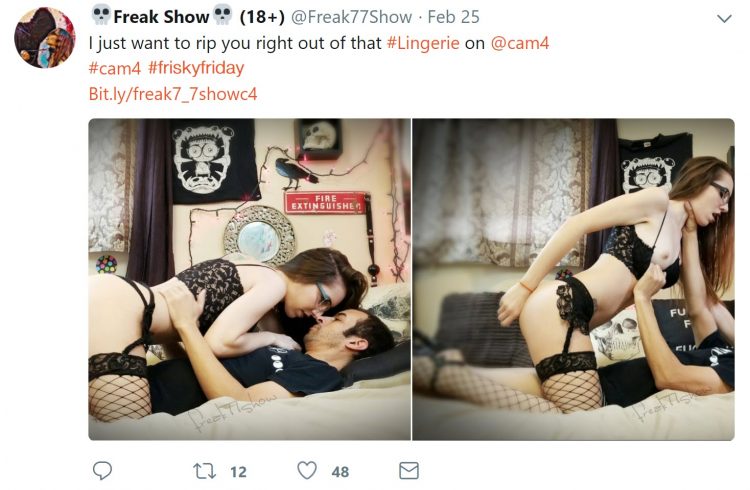
  • Broadcast regularly, and make it known to viewers that you’re going on cam. You can do this through your CAM4 camming schedules, or on your own Twitter account! (Make sure to include the hashtag #CAM4)
  • Enable tipping games! Playing games like Roll-the-Dice (RTD) with your viewers is a fantastic way to get everyone in your room excited and engaged in your show (including you!). Check out our CAM4 games HERE!
  • Change up your routine! You can rank higher by trying out new toys or outfits during your shows. Check out our huge number of show ideas for all cam shows HERE!
  • Promote yourself on our CAM4 social media accounts (Instagram Takeover anyone?!). Message CAM4 on Twitter and Instagram to find out how you can do a takeover on our Snapchat or Instagram! 

If you ever need help in improving your rankings, our team at CAM4 is always here to help! 


Options de paiement

CAM4 a la particularité unique de proposer le paiement sur demande — vous pouvez encaisser autant de jetons que vous le souhaitez, quand vous le souhaitez, avec une période de traitement de trois jours ouvrables. Vous pouvez également modifier votre méthode de paiement à tout moment.

Lorsque vous gagnez des jetons, nous convertissons automatiquement ces jetons en Dollars dans votre “gain réserve”. Sous 72h, une fois la conversion terminée, vos dollars situés en “Gain réserve” passeront en “gain disponible”. Les dollars en “gain disponible” sont accessibles, vous pouvez faire votre demande de paiement!

Il est possible de mettre en place un paiement automatique afin de ne plus avoir a faire l’action vous-même. Il vous suffit d’activer l’option une fois le mode de paiement correctement configuré. (Fonctionne pour tous les paiements sauf pour la conversion en jetons CAM4)


Afin d’avoir accès au mode de paiement, assurez-vous d’avoir un compte CAM4 approuvé. Pour plus d’informations regardez le tuto ci-dessous:

Voici vos 5 options de paiements :


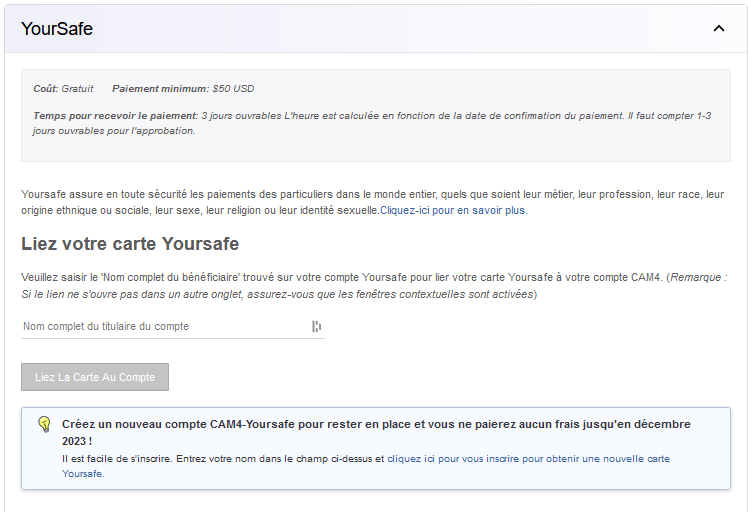
1. Yoursafe  (promotion exclusive CAM4)


Yoursafe propose à la fois un portefeuille électronique et une carte de débit MASTERCARD à utiliser aux guichets automatiques et dans les points de vente.

Demande de paiement minimum : $50 USD

Traité : Chaque jour

CAM4 PROMO*

Demandez la carte Yoursafe / Mastercard via le tableau de bord sur CAM4 et VOUS NE PAYEREZ AUCUN FRAIS de maintenance jusqu’au 31 décembre 2023 !

Par la suite, le coût de la carte Yoursafe est de 29,5 € par an

Frais de retrait de n’importe quel distributeur en EURO : 2 €

Frais de paiement sur des comptes bancaires européens (EUR SEPA): 0,75 €


Pour commander votre carte Yoursafe avec les conditions spéciales CAM4 ci-dessus, il faudra d’abord entrer votre nom complet comme il est montré ci-dessous, puis cliquez sur le lien en bas de l’ecran. Ensuite, il vous suffira de suivre les indications donnees par Yoursafe.

* CLIQUEZ ICI POUR LE GUIDE  SUR COMMENT DEMANDER VOTRE Yoursafe DEPUIS LE TABLEAU DE BORD WEBCAMEUR(SE) CAM4

Frais pour recevoir de l’argent sur votre compte Yoursafe de CAM4: gratuit

Remarque : depuis le 7 septembre 2023, Yoursafe connaît des retards dans l’émission et l’expédition de nouvelles cartes. Les délais d’attente peuvent être plus longs que ceux indiqués. Si vous êtes pressé de recevoir un paiement, nous vous conseillons par mesure de précaution d’opter pour un autre mode de paiement.

Support : support@Yoursafe.com

Cliquez ici pour les voir les modes de paiement disponibles par pays


2. PAXUM

Grâce à un compte Paxum, vous pouvez demander un paiement sur votre compte Paxum, un virement sur votre compte ou votre carte prépayée Paxum. Pour utiliser ce mode de paiement, connectez simplement votre compte Paxum, si vous en avez déjà un, ou créez un compte en ligne en quelques minutes pour vous connecter ultérieurement à votre Tableau de bord Webcameur(se).

Suivez les consignes ci-dessous pour créer et connecter votre Paxum à votre Tableau de bord Webcameur(se).

Cliquez ci-dessous pour voir le tutoriel vidéo de comment créer un compte PAXUM:

  • Comment créer un compte en ligne Paxum:
    rendez-vous sur www.paxum.com ou cliquez ici!

    Une fois sur le site de Paxum.com, cliquez sur “Ouvrir un compte personnel”

    Cliquez sur “open a personal account”:


    Après avoir cliqué sur Enregistrer, vous serez redirigé vers une série de pages pour compléter vos informations d’inscription, telles que le nom, l’adresse, etc. Veuillez consulter les captures d’écran suivantes du processus d’inscription pour voir ce qui est requis :

    Entrez les informations supplémentaires requises pour l’enregistrement:
    Saisissez l’adresse e-mail que vous utiliserez pour votre compte.
    Entrez votre mot de passe – Le mot de passe doit être composé d’au moins une lettre majuscule, d’un symbole, d’un chiffre et comporter au moins 8 caractères. Chacune de ces exigences est affichée dans une bulle sous les zones de mot de passe.
    Ils seront mis en évidence en vert lorsque chaque exigence est satisfaite, comme indiqué dans l’image ci-dessous:

    Pour plus de détail de COMMENT enregistrer et vérifier votre compte personnel Paxum?

    Cliquez sur le lien ci-dessous:

    https://fr.scribd.com/document/376205947/Paxum-French-Translation

    N’oubliez pas de vérifier votre adresse e-mail. Une fois que vous avez reçu la confirmation de l’activation de votre compte Paxum, vous pouvez le connecter au tableau de bord.

    • Comment sélectionner Paxum comme mode de paiement
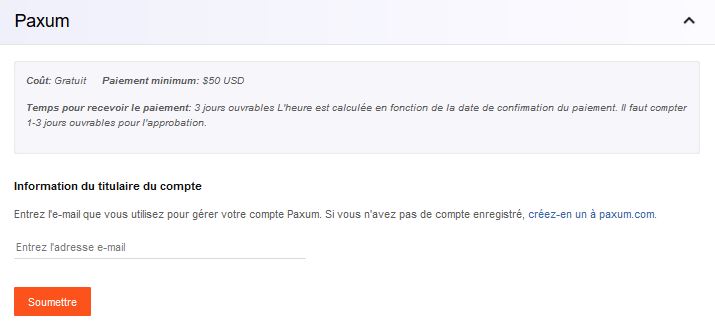
      Dans la méthode de paiement de votre Tableau de bord Webcameur(se), vous trouverez l’option Paxum. Puis cliquez sur modifier les informations.


      Entrez votre adresse email associée à paxum et cliquez sur Lien vers Paxum.
    • Une fois votre compte associé, revenez à l’écran de mode de paiement et dans l’option de paiement Paxum, cliquez sur l’élément Configurer pour le sélectionner comme mode de paiement par défaut.
    • Frais de demande de paiement: Gratuit
    • Paiement minimum: 50 $
    • Heure de réception du paiement: de l’envoi de la demande à la banque, il faudra 3 à 5 jours ouvrables pour que l’argent parvienne à votre compte si la demande est faite avant mardi.
  • Comment créditer votre carte prépayé PAXUM ou vos comptes, cliquez sur le lien ci-dessous:

    Ci-dessous le tuto pour convertir votre argent avec Paxum :


    3. Virement en Euro /transfert en Euro sur un compte bancaire européen est la méthode la plus utilisée :

    Veuillez entrer vos informations bancaires avec nom, pays et adresse. Cliquez sur “envoyer”!

    • Frais : 3%*
    • Transfert de 50$ minimum.
    • Les virements sont maintenant exécutés TOUS les jours (du Lundi au Vendredi). Les demandes faites avant 23h59 (EST) – 5h59 (Paris) seront traitées le jour ouvrable suivant.
    • Délai de paiement: Une fois la demande de paiement envoyée à la banque, veuillez prévoir 5 à 7 jours ouvrables supplémentaires pour que cela paraisse sur votre compte.
    • Un numéro IBAN et SWIFT est requis.

    Après avoir choisi votre mode de paiement, cliquez sur “demandez un paiement” en choisissant le montant souhaité.

    Notez qu’il n’est PAS autorisé par les règles du site de demander un paiement au nom d’autres webcameur(se)s et n’est PAS autorisé à recevoir des jetons d’un webcameur(se)s afin d’encaisser en son nom. La pénalité entraînera la fermeture du compte et l’interdiction permanente de revenir sur CAM4.


    *Dû aux frais bancaires de change, 3% de frais sont chargés sur les virements en Euros par rapport au cours de change $/Euros. Merci de noter que votre banque (ou banque intermédiaire) peut vous facturer des frais qui s’ajoutent aux frais indiqués ici. 

    4. Jetons CAM4:

    Convertissez le montant désiré de vos gains en jetons afin de pouvoir donner des jetons aux autres webcameurs ou pour payer votre abonnement Gold en jetons.


Comment connecter CAM4 à l’application Social :

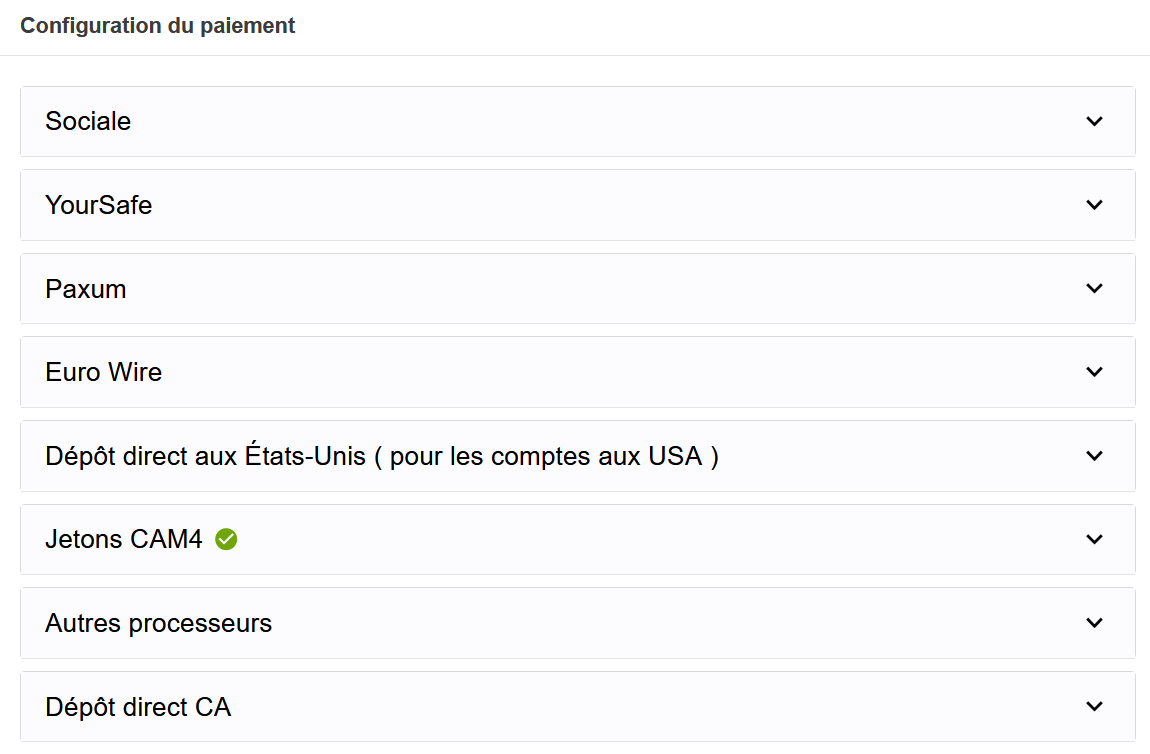
Accédez au Tableau de bord Webcameur(se), puis demandez un paiement, dans Configuration du paiement, cliquez sur Social.

Ouvrez votre application sociale et cliquez sur l’icône + pour ajouter un nouveau site. Cliquez ensuite sur le bouton Se connecter aux réseaux sociaux, puis suivez les étapes.

Quels modes de paiement Sociale propose-t-il ?

Virement bancaire (disponible uniquement en Amérique du Sud, Afrique et Asie)
Crypto (service limité)

Coût : 1,00 $

Paiement minimum : 50 $


Social Media 101

Talking all things social media. Lean some tricks and tips to making the best posts.

TWITTER 

1. Keep Your Profile and Cover Images Clean

Performers are able to show more sensitive and R-rated content, but this is not true for every area in Twitter. In your profile picture and your banner you can’t show any nudity, nothing sexy! Keep it SFW. This helps to keep your profile active and away from the dreaded bans. 

2. Keep Twitter Live Streams Clean

The same rules apply to your live broadcasts on Twitter, make sure there’s no nudity. Though this is an awesome way to tease viewers into your shows, it’s not the place to get explicit. 

3. Keep Nudity in Your Posts

Your tweets can include nudity, so you’re free to be as explicit as you want. 

4. Am I Shadowbanned?

Twitter will “shadowban” accounts that violate these rules. This means that your profile won’t appear in searches, making it hard for fans to find you. 

5. Tagging People in Photos

If you’re uploading a picture, click on the “Who’s in this photo?” button and you can tag up to 10 users in the photo. This is a cleaner option than tagging followers in the tweet itself.

6. Use Twitter Analytics!

 If you’re on your desktop on your Twitter profile page, look at “statistics” on the sidebar.  You can get a lot of information about when’s the best time to send your tweets, who’s following you, their interests etc. If you go through that data, you’ll have a better understanding of when you can make money and gain followers.

Why Should I Tweet?

1. Promote yourself! Social media is the cheapest, easiest, and fastest way you can promote your Cam4 shows!

2. More social media followers = more viewers = more money in your pocket. Loyal viewers spend more, and when people know what you’re offering, they can spend more. You can achieve both with Twitter.

3. Reach new fans! How else can you find new people who want what you’ve got? Using Twitter hashtags and the Cam4 social media community you can reach tons of viewers who are looking for you!

4. Interact with existing fans in a whole new way. Extend their Cam4 experience way beyond your shows. It’s a win-win for everyone 😉

Like all good things, you need a billboard to help people find you. Treat social media as your billboard! Tweet from anywhere with your mobile device, and tweet while you’re live from the web.

Ok… I got Twitter… now what?

When I signed up for Twitter, I sat there with an empty news feed and no clue where to start. There’s millions of users, so how do you find the ones who are into you? How do you get people to follow you? It’s not as hard as you think, take a breathe and get started with these easy steps:

1. Share your Cam4 link when you’re live


2. Use hashtags like #tittietuesday #asswednesday and #friskyfriday along with #CAM4 and pics to find new fans. 


3. Send @CAM4 a tweet and I will personally help you along the way
**Don’t be scared to show your personality, that’s what viewers love!**


INSTAGRAM

  1. Keep it all Clean!

Everything has to be SFW! Instagram can take down any pictures that are reported as, or are NSFW. Tease viewers, or show off your personality and style. 

2. We Recommend no More Than Bikini Photos

Take some bikini pics and keep them on hand for Instagram. It’s also good to take some seductive pics without any nudity or explicit content.

3. Where Can I Link?

Try not to post links to porn sites in your posts – instead, post your Twitter link so your followers can get links to your cam shows directly there. 


Getting Your Posts RT’d by your Cam Company

To get retweeted by a camming platform, there’s some key things you have to do: 

Include your URL – we want followers to click on your links!

Use hashtag (#) or ‘@’ your cam company – #cam4, for example. 

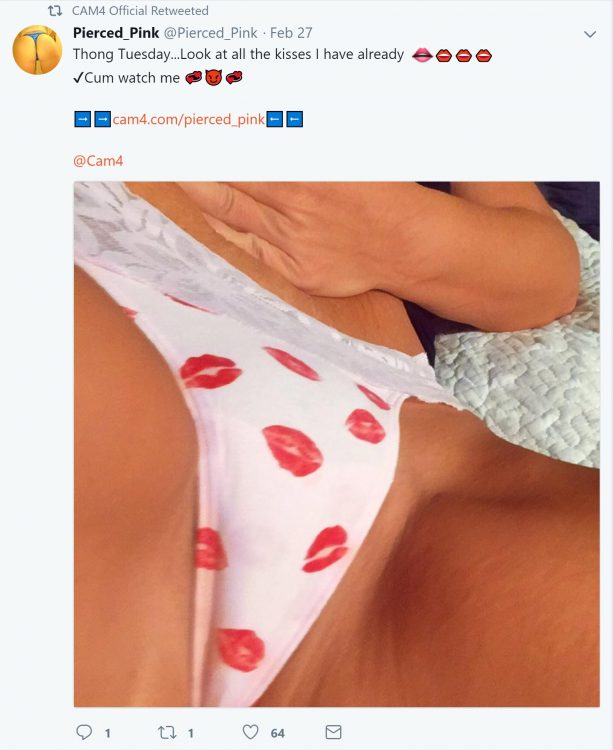
Post a HOT visual! (videos are a huge preference though) People love to see visuals. You can add up to 4 photos in a post.

If you want people on Twitter to watch your live shows, the Twitter picture should show them what that show’s going to be like. Example: if you’re doing a show from your bath tub, take pics/video of you in the tub!

Separate posts if you’re tagging separate cam companies! One post for one site, that way each site has the opportunity to retweet you

PRO TIP: Use videos from your Snapchat to post on Twitter!

CAM4 COACHING

CAM4 provides users with Training every Tuesday & Thursday with cam coach, Vannafaye


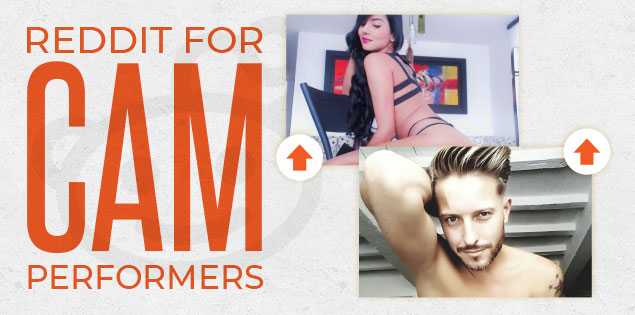
Reddit for Cam Performers (video)

Promoting yourself on Reddit gives you access to thousands of people who are searching for cam performer content. 

Reddit is basically a massive forum where people can discuss pretty much anything. It’s divided up by subreddit, and just for camshows alone there’s over 50 threads you could post on. 

Getting started

It’s so easy to sign up and make your first post that we promise it’ll take you less than 5 minutes. There’s no profile to design, no account info to edit, just make your username and password, and start posting!

  1. Chose a username that’s identical to or similar to your CAM4 name. Short and memorable names will help people remember you, Lala Capri, Lil Jezebel, Aqua Angel are a few examples of this.
  2. Follow threads that are related to your interests or content.

Reddit is hugely different from the other social media platforms we’ve covered, so watch this video from our resident cam girl and social media expert Sammy Strips or keep reading!


Posting on Reddit

Now you’re ready to start posting your best content! But, let’s review the guidelines before you begin posting:

  1. You have to wait 7 minutes in between postings
  2. Link to your images and videos via Imgur, ManyVids, PornHub, CAM4, YouTube, etc.
  3. Don’t post content into subreddits that aren’t related
  4. Read all of the rules of each subreddit 
  5. Don’t post the same content on multiple subreddits

Then it’s time to hit up the subreddits for Camgirls: 

r/CamGirl

r/CamGirls

r/CamModels

r/CumSluts

r/camshow

r/camshows

r/fuckmeat

r/girlskissing

r/FapFolders

r/GoneWildCurvy

r/JizzedToThis

r/NSFW_Ass

r/HungryButts

r/CumTributes

This isn’t even the tip of the iceberg. You could spend hours collecting all of the camgirl-related subreddits. Cha-ching!

A word of caution: Reddit is a community and they work hard to keep the content unbiased, helpful, and honest. Always read each thread’s rules and guidelines. For example, some threads require you to message the moderator before posting.


The best approach is to collect your content and make sure it’s varied – cumshots, lesbian, BDSM, spanking, wearing glasses, tattoos, or cum tributes will enable you to post on the more specific threads. 

Stop by r/CAM4Live and leave us a pic ❤️ And remember, follow our official accounts!

Follow CAM4

 @CAM4   @CAM4_Gay

 @CAM4_Official    @CAM4Gay

     CAM4snaps     CAM4gay 


Increase your earnings and viewers with PornHub

How to create a profile on PornHub to get more viewers and earn more on CAM4!

PornHub is the largest adult portal in the world. Millions access it daily providing visibility that no other site can give you. You can create a free PornHub account and use it to upload your photos and videos to lure more users and turn them into potential fans and tippers on CAM4! But not only that … by entering your CAM4 Referral Program link in your profile bio you will earn $2 for each user who click’s on your affiliate link register’s on CAM4!

I guess you’re wondering how long it takes to create a free PornHub profile and connect it to CAM4 … well, it takes less than 5 minutes!
Here’s a quick guide on how to create your Brand Ambassador profile, how to upload your videos, how to use your affiliate link and start earning more!

– How to create a FREE profile on PornHub … in 5 minutes

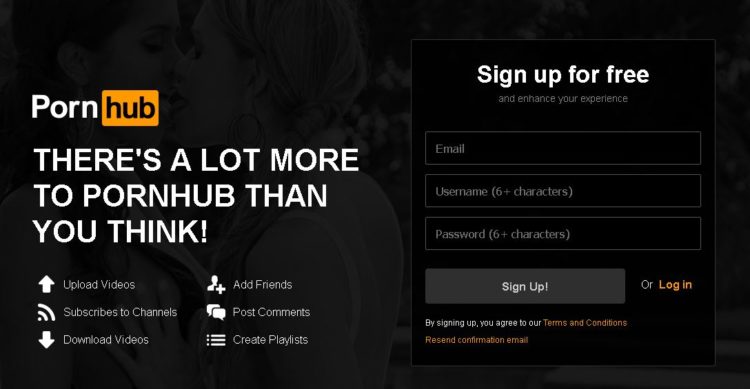
Go to PornHub’s homepage and select Sign Up (on the top – right) … or just click on this link!

Click on Sign Up for Free. Then enter your e-mail address and choose a PornHub username (you can use the same on CAM4 if available) and finally choose a password.

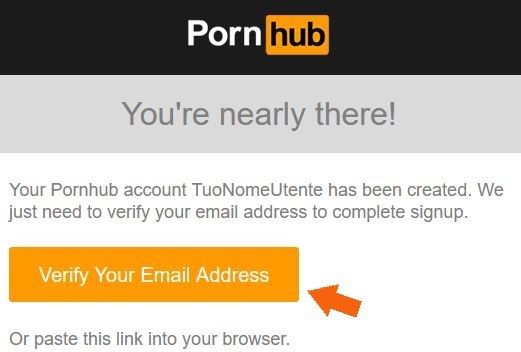
Check your email address and activate your PornHub account by clicking Verify Your Email Address.
Done! Now you’ve created a PornHub profile and you just have to configure it according to your liking 🙂


– How to configure your PornHub account with images, video and your CAM4 affiliate link!

Once verified your mail PornHub will ask you for basic information to confine your profile. What do you like, What channels you want to see and Basic Information (the most important ones to promote you!)

In the Basic Information section you can select the country, city, and nickname that you prefer. Be sure to write a short description in the ABOUT entry. You can use this space as a showcase to promote you as a web cam model on CAM4.

The most effective tool is to enter your CAM4 referral link to bring them to your CAM4 page and earn even from each subscription! If you do not know how to get your affiliate link (always found in My Accunt > Profile Options, bottom left> Referral Program)!!

For example, enter your next scheduled show on CAM4 or find other videos on your CAM4 profile. Or click the link below to see more videos #fetish, #outdoor.

Then click on Complete and Have fun on Pornhub! Once the configuration is finished you will be able to edit your profile and enter profile, cover, galleries, gifs and VIDEOs!

On your profile click on the profile image and cover photo and select upload photos to get you noticed! Note. you may decide not to show your face or use masked photos 🙂

– How to UPLOAD VIDEOs on PORNHUB:

In your profile page, you can view a preview of your basic information to the left: Make sure your referral link is correct and have a captivating description to push users to click on the link! 🙂
At the top click the Video section and then click Add Now! Then drag the video you want to upload and wait for the upload to complete.

Remember to include details on your video (eg. orientation, privacy, amateur production) and carefully choose an alluring title (you can also add translations in other languages). Finally, select the tags to describe your video and bring users with ease.

 PRO TIP:  Post quite often to keep users up to date on your next CAM4 shows and  promote your new videos on your MyShop, but make sure each message always contains your referral link!


~That’s all for this lesson!

Happy Camming!
Love, Your Coaching Team!

How to Work with Promo Accounts

Beyond the CAM4 accounts, there’s endless opportunities to use social media to find new viewers. Here’s a list of just some of the Twitter accounts you could work with, and how to look for more. 

Always remember that cam promoters aren’t a source of instant tokens, they’re part of longterm success. Building up your exposure and personal brand will result in more tokens, more viewers, and more opportunities for events, trade shows, partnerships, and other magic that only the future knows. 

Most promo accounts make money as affiliates, so they will likely attach their referral code to your CAM4 URL. If it’s a good account, you’ll benefit from this. Check out the Camgirl Promo Accounts list on the CAM4 Twitter page: 

twitter.com/Cam4/lists/camgirl-promo-accounts

WeCamGirls (which by the way if you aren’t already mega active on this forum, do it now) has this epic article on how to use cam girl promo accounts on Twitter, including promo accounts for everything from facials to tattooed camgirls: 

wecamgirls.com/articles/for-camgirls-make-your-twitter-your-1-marketing-tool-updated-with-new-categories/

Doing fan signs for big accounts with thousands of followers is a great opportunity to get more people following you and joining your camshows. Even if they’re free, they will pay off in the end.

The most effective promo accounts are each others. Every cam girl’s following on social media is made up of: viewers, similar camgirls, and fans/promo accounts. Become friends and help each other out by trading tweets, doing giveaways together, camming together, or whatever works for you. 

Before you work with promo accounts, you have to make sure a couple of things: 

  • You’re tweeting regularly with good content like pictures, short videos, and always your CAM4 link
  • You’re able to cam often, or sell videos on CAM4
  • You are using your referral ID in your tweets, so when RT accounts repost your messages, you can earn money
  • You’re contacting accounts that represent you – i.e. if you don’t have tattoos don’t contact the tattoo accounts
  • Your Twitter account is public!!

Tips for promoting and selling your MyShop content

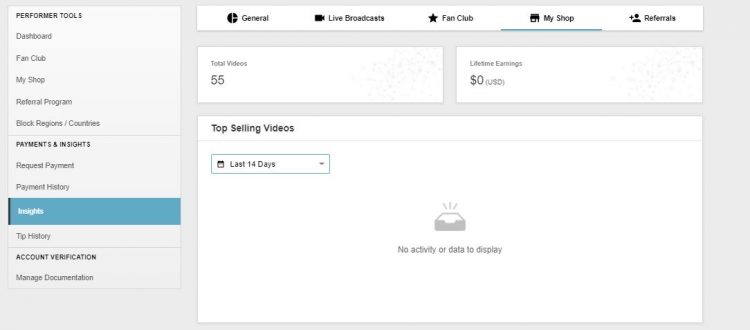
Selling your videos in MyShop is not only a fantastic way to please your fans, it’s an easy way to increase your monthly earnings. So, what is the best way to ensure success of your videos?  Follow this guide on effective ways to promote and increase your MyShop sales and watch your earnings grow!
Use free content to entice viewers

CAM4 MyShop gives you the ability to make a video free to watch, so why not use this feature to upload a teaser or promo video! Free content attracts viewers to your shop, so use this opportunity to show viewers why they should buy all your videos. You should add new free content as your paid video collection grows.

  • Promo video ideas:

~A sexy video where you list off all the reasons they should buy your videos and become a fan, except you use articles of clothing to represent reasons and take them off as you go down the list.

~Online dating style video. Think “long walks on the beach”, with your own personal twist.

~Infomercial style video. “Have you lost the will to wank? Perverted comments not as funny as they used to be? That’s all about to change with the purchase of my videos!”

~Personal video where you tell fans what they can expect in your videos, and what it’s like watching your online shows.

~A highlight reel of your other videos.

~A behind the scenes video that lets viewers get to know you, and you talk about the filming of your videos.

~A guide where you recommend videos based on a viewer’s taste. “If you like cum shots, then _______ video is definitely for you.”


Get discovered with a great title

Choosing the right title is an important part of what makes a video successful. A catchy title not only peeks a viewer’s interest, it can be the deciding factor on whether they purchase it or not.

  • Title tips:

If it applies, include phrases like ‘behind the scenes’, ‘inside look’, ‘exclusive’, ‘intimate encounter’, ‘full access’, ‘rarely seen’. This will make the content of your video feel even more special, and make viewers watching it feel like they are included in your sexy raw video.

Refrain from using words like sexy, hot, fun, naked, etc… Buying a video from your MyShop already implies all these things, so those words may not catch a viewer’s attention like you hoped.

Catchy titles raise more questions then they answer. Eg. ‘I had no idea my cam was still on after my show!’ Or ‘Feeling optimistic about anal?’ The reason these work is because our brains are hard wired to want to complete a thought, or get the answer to a question. They don’t like to be left hanging 😉

Using enticing descriptions like – porn lovers only, warning: this video may cause spontaneous arousal, video is known to increase risk of ejaculation, or do not watch if you are prone to obsession, is a fun way to intrigue prospective buyers.

#ProTip – Titles that use your CAM4 username in third person seem to sell very well so give it a try! Eg. ‘Cam4coach_en meets 2 strangers in the park and cums in an unexpected place…’


#Tagging brings your audience to you
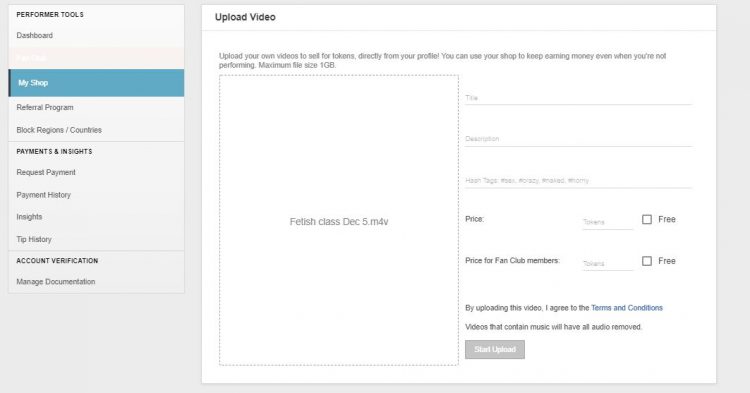
Just like your shows on CAM4, adding relevant tags will help viewers find your video faster and easier.

  • Tagging tips:

~Use tags that describe what your video is about. Eg. #footworship, #fetish, #anal, #doublepenetration, #gay, #shower, #oilshow, #toy, #pee, #squirt

~Tell viewers about the cast of your video. Eg. #solo, #girl/girl, #guy/guy, #guy/girl, #group, #orgy, #gangbang

~Just like your title, stay away from generic tags like #sexy, #hot, etc…


Sort your videos

Did you know the order of your MyShop videos can directly influence a viewer’s purchase choice? Its true, many viewers will only focus on the first three videos that appear on your profile, potentially making them miss a masterpiece that’s at the bottom of your shop! This is why it’s important to keep your MyShop library looking new and fresh by rotating your videos so they all get some top shelf love. Just click on Manage My Shop and drag the thumbnail where you like, viewers will see your content exactly as you arranged it.

  • Sorting tips:

~ Rotate from the bottom of your list, and ones you think may be a potential best seller.

~ Put your free video first, followed by a higher priced video, then one with a slightly lower price. This will result in higher sales of your third video because by comparison it is the best deal.

~Match your top row videos to CAM4 themed weekends or holidays to boost sales. Eg. Put all your fetish/BDSM videos at the top of the list during CAM4’s Fetish themed weekend. 


Promotion equals success

Now that your MyShop is stocked with catchy titled and tagged videos, it’s time to tell the world that you are open for business. Getting into good promoting habits right from the start is a smart move, self-promotion is ongoing if you want continued success. Add these effective marketing practices to your routine, and promoting your videos will never become a chore.

MyShop talk in your shows

~Now that viewers have a collection of videos to choose from, help them find the perfect one by making recommendations based on their taste.

~Tell viewers about your videos that match their requests when they ask during your show.

~After getting to know a viewer in a PVT show, send them an inbox message suggesting a video you think they would like.

Raffles and contests

~When adding a new video to your shop, give it a promo boost by raffling it off to a viewer that has purchased one of your previous videos. You can get a full list of who purchased your videos in your MyShop ‘insights’ dashboard under ‘details’.

~Have a contest where viewers can submit ideas for your next video. You choose the top 5 ideas and let viewers vote for their favorite, the user who came up with the winning idea gets a copy of the video once it’s made.

~Have a video raffle that can only be entered if you win a ticket on a Roll-the-Dice outcome. This will create a lot of interest in your video because not everyone can enter to win, and create buzz around your other MyShop videos.


Social Media
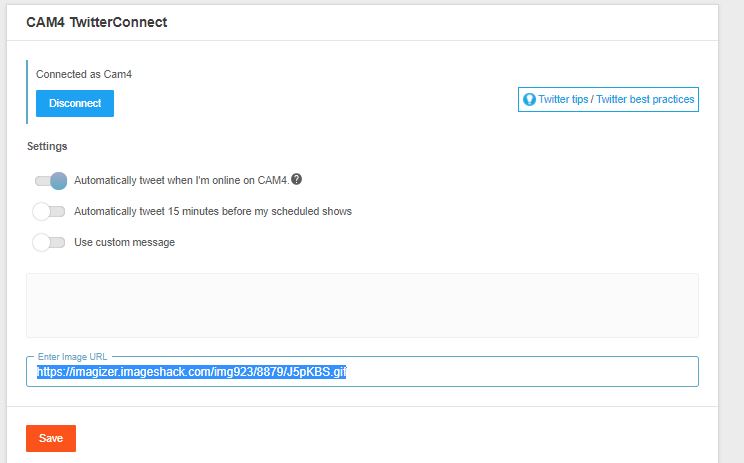
It’s no secret that social media is a powerful promotional tool for performers. Make sure you’re getting the most from your social accounts by including your MyShop in your social account bio, and tweeting, posting, blogging about your shop whenever possible.

  • How to use social media effectively:

~Let CAM4 do some of the work by adding your MyShop link to your custom tweets. You can do this under ‘Social networks’ that is in your CAM4 account options.

~Use social media tools like Hoot Suite to schedule tweets regularly that include your MyShop link with a promo image for your videos.

~Where possible, use the header banner on a social media account to advertise your shop, or a new video you just released.

~Use your pinned tweet to advertise your MyShop videos.

~Include the #’s you used on CAM4 to tag your video in all social media promo about the video. This will help your video get discovered faster.

~When promoting a new video on Twitter, do a re-tweet challenge where you will release a clip of the video if your promo tweet gets re-tweeted a certain number of times.

~Tweet blooper clips from your video as a fun way to promote it to your followers.


~That’s all for this lesson!

Happy Camming!
Love, Your Coaching Team!
Comment analyser vos statistiques de Ma boutique pour améliorer votre contenu

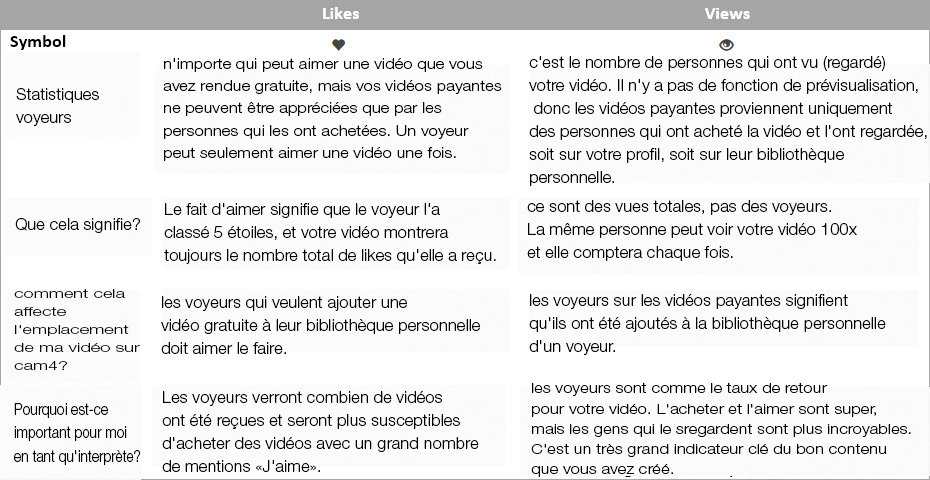
Les statistiques sont un indicateur essentiel qui vous permette de savoir ce que vous faites bien quand il s’agit de fabriquer et de vendre du contenu pour vos fans. Ainsi votre Cam4 “Ma Boutique Vidéo” a été soigneusement conçu pour être facile à utiliser et vous propose des statistiques ciblées qui reflètent la satisfaction de votre public avec les vidéos qu’ils ont achetés.

Votre “Ma Boutique” comprend également des liens partagés pour vos vidéos à utiliser sur les réseaux sociaux et la possibilité de contrôler l’ordre dans lequel vos vidéos sont affichées sur votre profil.

Vos Stats


Comprendre vos statistiques


Tout le monde sait que des statistiques élevées sont excellentes, mais ce sont les statistiques bassent qui dévoilent ce qui ne va pas. Dans ces deux prochains exemples, je vais vous montrer les raisons pour lesquelles vous pouvez obtenir des chiffres bas  sur les statistiques.

Video #1 – Vos vidéos ont très peu de likes par rapport à vos ventes et vues.

  • Cela veut dire:
  1. Vérifiez votre qualité vidéo! Y a t-il un bon éclairage? Pouvons-nous vous entendre correctement? Avez-vous l’air d’être heureux dans la vidéo? Ces choses affectent la satisfaction de votre public, alors assurez-vous de prendre tous ces facteurs en compte pour améliorer jour après jour vos vidéos.
  2. Vous avez fait un excellent travail en commercialisant cette vidéo et en attirant les télespectateurs… mais peut-être pas les bons. Vérifiez que vous avez utilisé des tags / titres / descriptions pour cette vidéo afin que attiriez le bon public.
  3. Regardez vos prix par rapport à la longueur de vos vidéos.  Rappelez-vous, la quantité de vente vous fera gagner plus d’argent à la fin que sur un prix de vente élevé.


Video #2. Les gens achètent, même vos likes sont bons.. mais vos vues sont presque identiques à celles de votre nombre total de ventes.

  • Cela veut dire:
  1. Regardez votre vidéo à nouveau et voyez combien de fois vous essayer d’interpeler votre public  avec un contact visuel. Changer votre angle de cam et donner à votre public le sentiment que vous aimez ce que vous faites. Ces choses forment une connection entre vous et votre public et si ce n’est pas le cas, ils ne regarderont plus!
  2. Cela peut-être un problème de production. Votre audio est-il de bonne qualité? Pouvons nous vous entendre tout dire? Est ce que la connection coupe? Est-ce que les couleurs de l’image sont bonnes?


Production de vidéo #ProTips


  • ~Demandez-vous “Est-ce que je regarderais ma vidéo? “Est-ce que je paierais pour ma vidéo?”
  • ~Je sais que cela peut être étrange d’abord, mais regardez vos propres vidéos!
  • ~Dois-je parler dans mes vidéos? Certaines des vidéos les plus sexy sont celles où tout ce que vous entendez est la respiration et les gémissements.
  • ~Essayez de ne pas mettre de musique de fond..
  • ~Faites vos vidéos d’une durée comprise entre 5 à 10 minutes. Cela suffit emplement.
  • ~Une excellente vidéo peut-être filmé sur un téléphone portable dans une  gare ou une salle de bain. Un bon contenu reste un bon contenu.
  • ~Assurez-vous que vous vous amusez à filmer vos vidéos! Votre public le ressentira aussi.

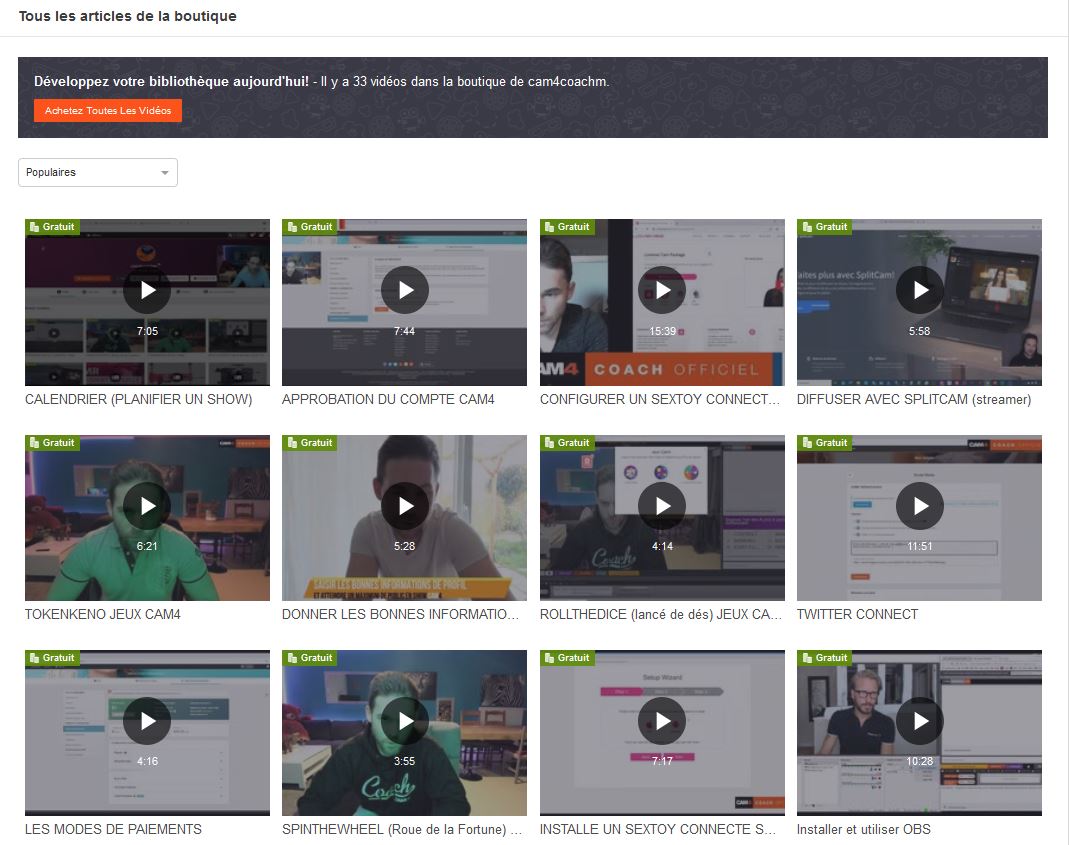
Pour compléter cette leçon une vidéo tuto pour mieux gérer votre boutique vidéo :

Conseils pour produire de superbes vidéos pour vos fans

Faire un excellent contenu (vidéos/photos) pour vos fans est amusant et facile! Suivez ces directives et vous ferez un excellent contenu.

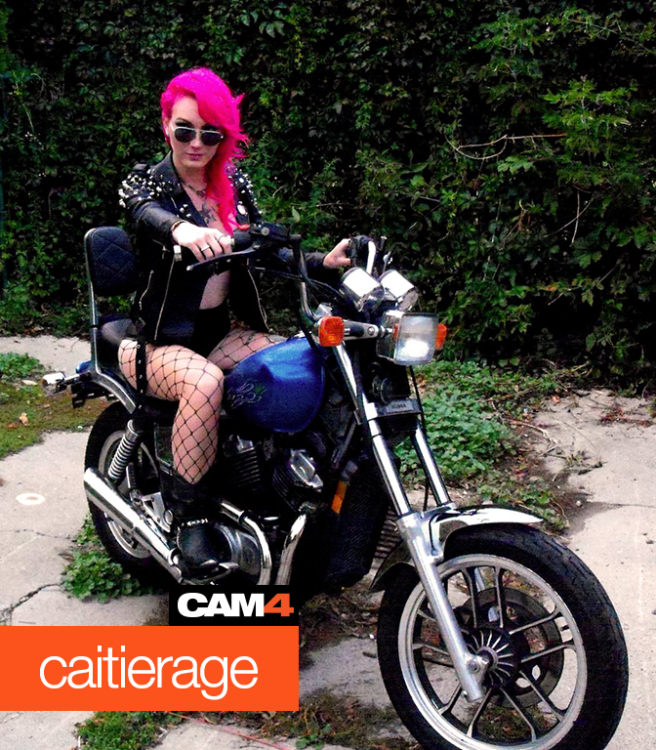
caitierage-cam4

Raconter une histoire


Quel que soit le type de vidéo que vous créez, vous devez jouer avec des émotions humaines pour que votre public soit charmé par votre contenu.

  • Comment faites-vous ceci:

Pensez à votre sujet, puis réfléchissez aux attentes de vos voyeurs. Partagez-vous quelque chose qui excite vraiment? Est-ce que cela aidera à communiquer facilement votre histoire à vos fans?


aliciatank-cam4

Pensez visuellement


Une fois que vous savez l’histoire que vous allez mettre en place, vous devez penser à une façon de l’exprimer à votre public.

  • Comment faites-vous ceci:

Quel est le feeling que vous voulez transmettre à travers votre vidéo? Si vous voulez transmettre le sentiment d’être espionné au bureau par votre vicieu de patron, créez un environnement avec un bureau et mettez votre webcam sous le bureau. Cela rendra la vidéo plus réaliste.

ES-ivanamor

Clip ou Full Video ?

Un clip dure entre 2 à 3 minutes, tandis qu’une vidéo peut aller de 5 à 30 minutes. Il est préférable de faire une vidéo excitante du début à la fin. Vous pouvez aussi finir votre vidéo par un clip!

alexvswayne

Enregistrer en mode paysage


Si vous utilisé une caméra vidéo ou un téléphone pour enregistrer, prenez l’habitude de toujours filmer en mode paysage. Cela donnera un meilleur rendu sur un écran d’ordinateur.

  • Comment faites-vous ceci:

Il suffit de tourner votre téléphone à 90 degrés pour qu’il soit positionné horizontalement.


missela20 copy

Zoom


Le Zoom peut être tentant parce que vous voulez que vos voyeurs voient quelque chose que vous jugez important, mais les obliger à voir quelque chose signifie qu’ils pourraient manquer de voir autre chose. Cela peut être donc frustrant à regarder.


bloodyfrench

Audio


Il est important que votre public vous entende parfaitement, qu’il n’y ait pas de musique de fond si vous voulez qu’ils se sentent complètement concentrés sur ce qu’ils regardent.

  • Comment faites-vous ceci:

Assurez-vous d’enregistrer votre vidéo dans un environnement complètement silencieux et d’utiliser un microphone externe si vous en avez un. Il est également important de s’abstenir de parler trop pendant votre vidéo.

Note : Il est important de savoir qu’il n’est pas autorisé de diffuser de la musique pendant le show sans autorisation de l’auteur (copyright).

AliceSleek

Lumières


Il faut qu’on vous voie parfaitement.

  • Comment faites-vous ceci:

Ajouter beaucoup de sources lumineuses! Prenez quelques plans d’essai et regardez-les pour voir si vous avez besoin de plus de lumière pour donner à votre vidéo une image claire et nette.

Retrouvez tous les conseils pour optimiser votre éclairage en cliquant ici.


edwardoo22

Caméra Fixe ou Portable?


Si vous voulez donner l’impression aux voyeurs qu’ils sont au coeur de l’action je vous conseille d’utiliser une caméra portable. Sinon utiliser un trépied pour qu’ils puissent voir tout ce qui se passe dans la pièce.

x_sofia

Angles


Utiliser différents angles de vues donnera plus de contenu à votre vidéo.

  • Comment faites-vous ceci:

Retrouvez tous les conseils pour optimiser vos angles de vues en cliquant ici.


vicalouqua

Engagez votre public


Utilisez un contact visuel pour vous connecter avec votre public, il appréciera et se sentira plus proche de vous. Cela rendra vos videos x plus sexy.

  • Comment faites-vous ceci:

Regardez votre caméra en continu, en souriant ou bien en vous mordant les lèvres. Cela permettra de capter l’attention de votre public.