Plongez et commencez à explorer les Niches ! Suivez-en quelques-unes qui éveillent votre curiosité, partagez du contenu, et voyez qui se présente.
Vous pourriez découvrir une nouvelle facette de votre style que vous adorez — et vous connecter avec des fans qui l’adorent aussi.
Votre prochain contenu préféré (et votre prochaine vague de fans) pourrait vous attendre dans une Niche que vous n’avez pas encore essayée.
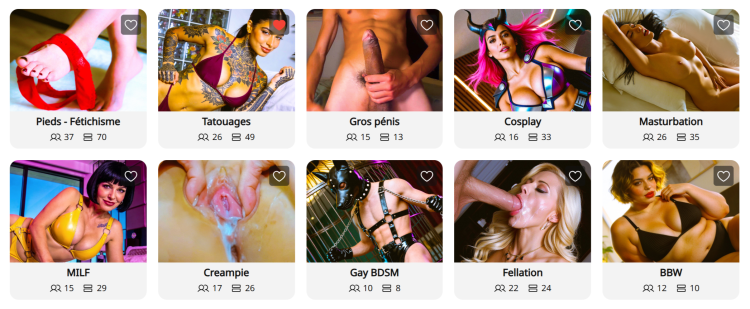
Que sont les Niches ? Les pages de Niche sont des espaces communautaires spécialisés sur CAM4, organisés autour d’intérêts spécifiques comme BDSM, Feet, BBW, Creampie, et bien plus encore. Considérez-les comme des pages où vous pouvez vous connecter directement avec des utilisateurs qui recherchent précisément le type de contenu que vous proposez.
Pourquoi les Niches changent la donne pour votre découverte :
Exposition ciblée : Au lieu de concurrencer dans la page d’accueil, vos publications et vos diffusions en direct apparaissent dans des communautés dédiées à votre style/kink .
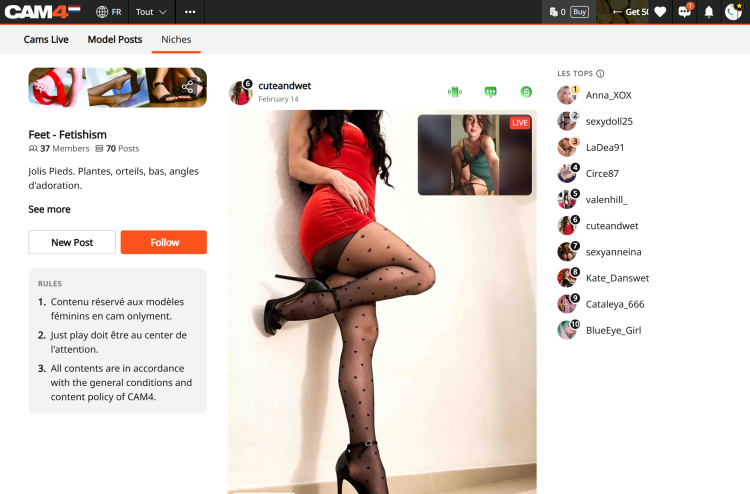
Aperçu en direct sur les publications : Lorsque vous diffusez en direct, toute publication que vous avez faite dans une Niche affichera automatiquement un aperçu vidéo de votre show en direct. Cela permet aux utilisateurs parcourant le fil de la Niche de rejoindre directement votre room.
Le Classement : Chaque Niche propose un Classement présentant les 10 meilleurs modèles en fonction du nombre total de likes. Être classé ici offre une visibilité massive et vous aide à devenir une référence reconnue dans la communauté.
Onglet « Cams » dédié : Les Niches disposent d’un onglet « Cams » spécifique qui affiche uniquement les modèles en direct membres de cette Niche. Cela permet aux spectateurs de vous trouver plus facilement lorsqu’ils recherchent un contenu spécifique.
Trouvez votre Niche : Cliquez sur l’onglet « Niche » dans la barre de navigation supérieure.
Suivre pour rejoindre : Cliquez sur « Follow » sur une page de Niche pour devenir membre.
Partager du contenu : Une fois membre, cliquez sur « Créer un post » pour partager des photos ou des vidéos depuis votre Coffre Médias. Vous pouvez également cliquer sur « Publier aussi sur mon Fil d’Actualité » pour que la photo que vous postez sur la niche apparaisse aussi sur votre Fil D’Actualité. Note : Toutes les publications de Niche sont gratuites à consulter, ce qui en fait le « trailer» parfait pour attirer les utilisateurs vers votre contenu payant ou votre show en direct
Interagir : Interagir avec les commentaires sur vos publications aide à construire une communauté fidèle au sein de la Niche.
La valeur : Débloquer de nouvelles sources de revenus Les Niches sont plus qu’un simple outil social ; elles constituent un moyen puissant d’augmenter vos gains :
Conversion plus élevée : Vous atteignez une audience ayant un intérêt spécifique pour ce type de contenu, ce qui mène à davantage de tips et de demandes de shows privés.
Marketing automatisé : Votre aperçu en direct agit comme une publicité permanente auprès des spectateurs intéressés pendant que vous êtes en direct.
Vente de contenu : Utilisez des teasers GRATUITS dans les Niches pour générer du trafic vers vos médias payants et les vidéos sur votre Activity Feed.
Statut dans le Classement : Une meilleure visibilité dans le Classement est directement corrélée à une augmentation des inscriptions au Fan Club et à la croissance des abonnés à long terme.
Besoin d’un coup de main ? Pour plus de détails sur les autres fonctionnalités de CAM4, consultez notre FAQ ou demandez à notre chatbot « Spark » que vous trouverez dans votre boîte de réception.
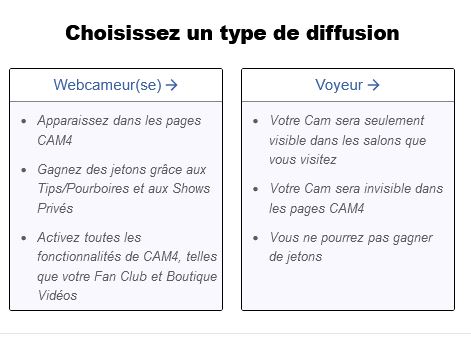
-Webcameur(se)
Pour travailler comme webcameur(se)s sur CAM4 et demander un paiement, vous devez vérifier l’identité de votre compte avant de diffuser en direct.
– Voyeur Si vous ne voulez PAS recevoir d’argent et ne pas apparaître dans le mur de cam, cliquez sur Voyeur et continuez.
Pour devenir camgirl sur CAM4 et sur n’importe quel autre site de webcam il est en fait nécessaire d’être majeur.
L’envoi de documents est une étape nécessaire pour vérifier votre âge et pour pouvoir retirer l’argent sur CAM4.
De quoi ai-je besoin? Une numérisation ou une photo recto / verso d’une pièce d’identité valide avec photo: passeport, permis de conduire ou carte d’identité
Un document est requis pour chaque personne apparaissant sur la webcam.
Comment approuver votre compte CAM4
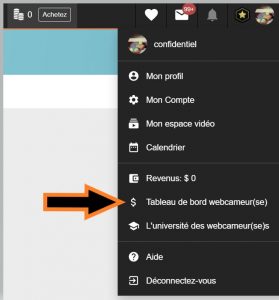
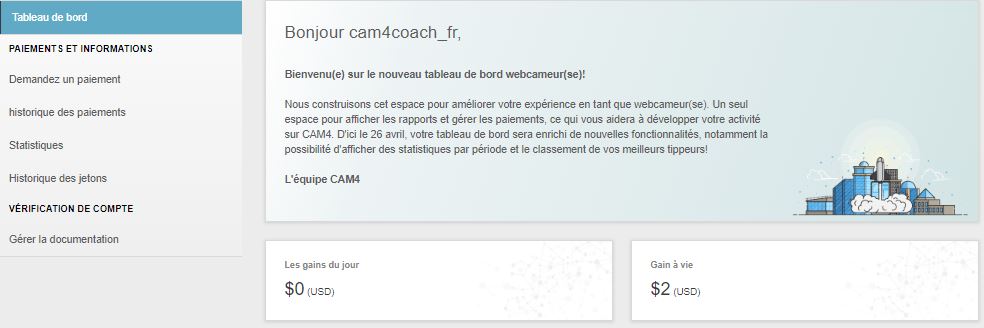
Cliquez sur « Tableau de bord webcameur(se) » en haut à droite de la page d’accueil de CAM4.
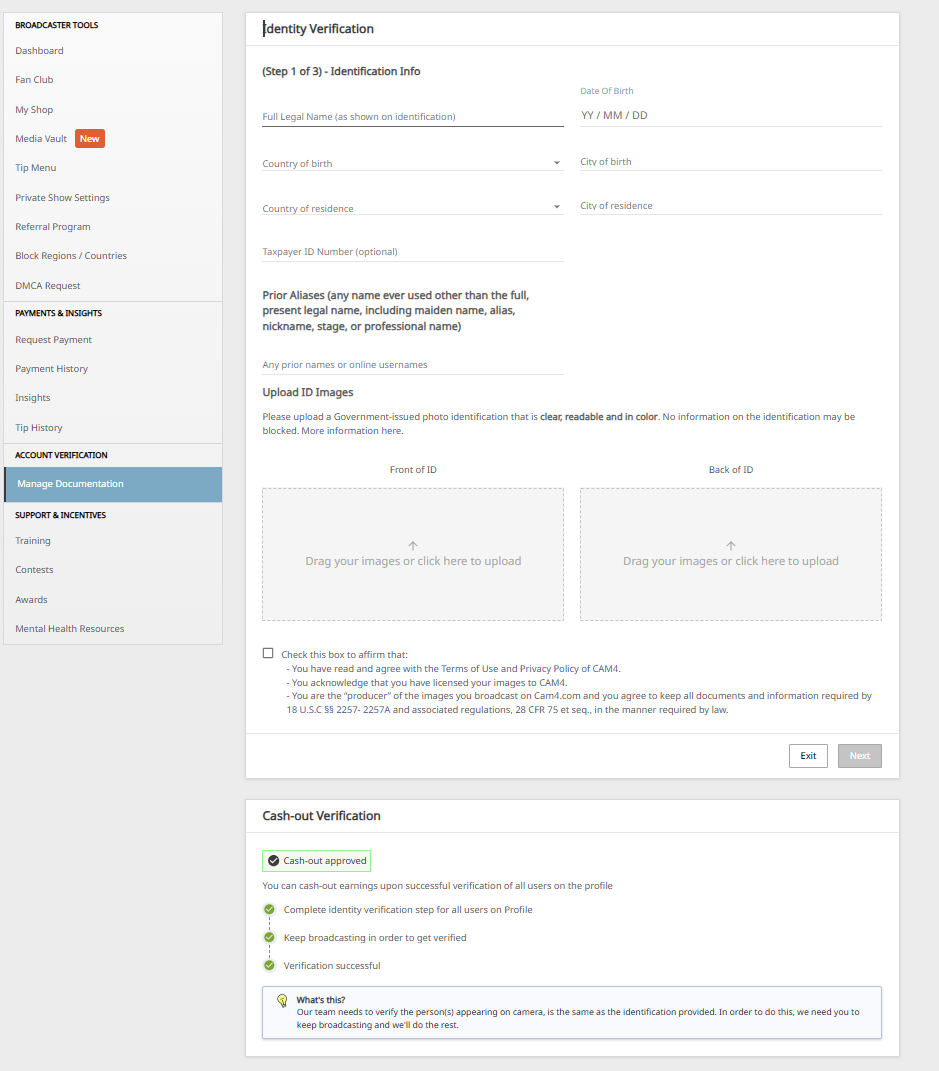
Dans le menu situé à gauche du panneau de commande, cliquez en bas sur Gérer la documentation ou, si vous le voyez, dans le message Vérification de l’identité.
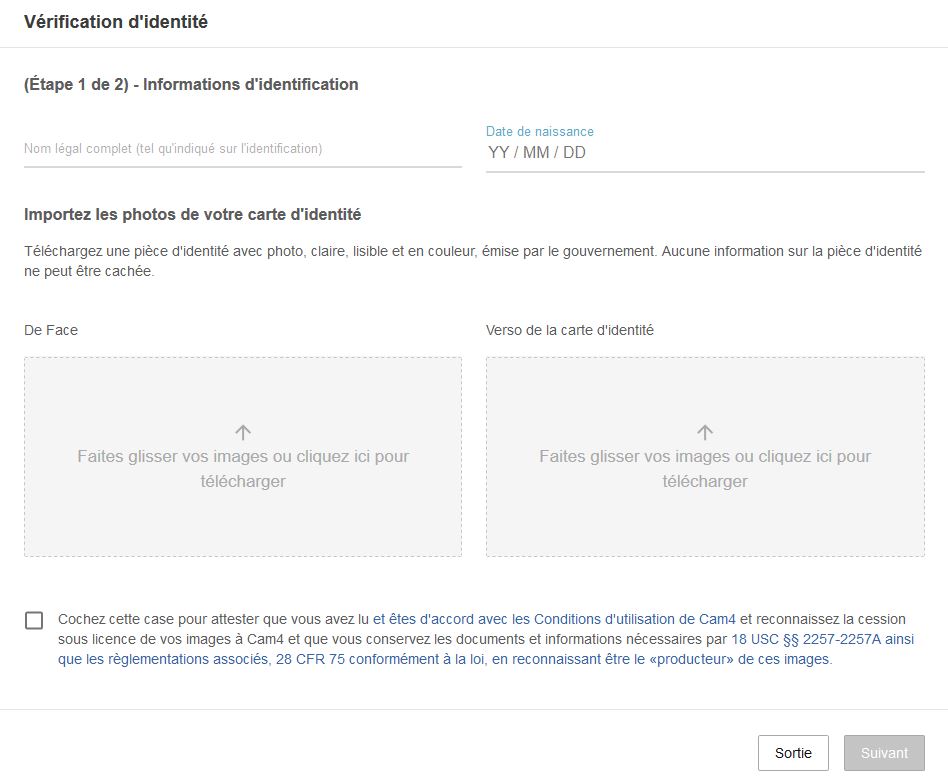
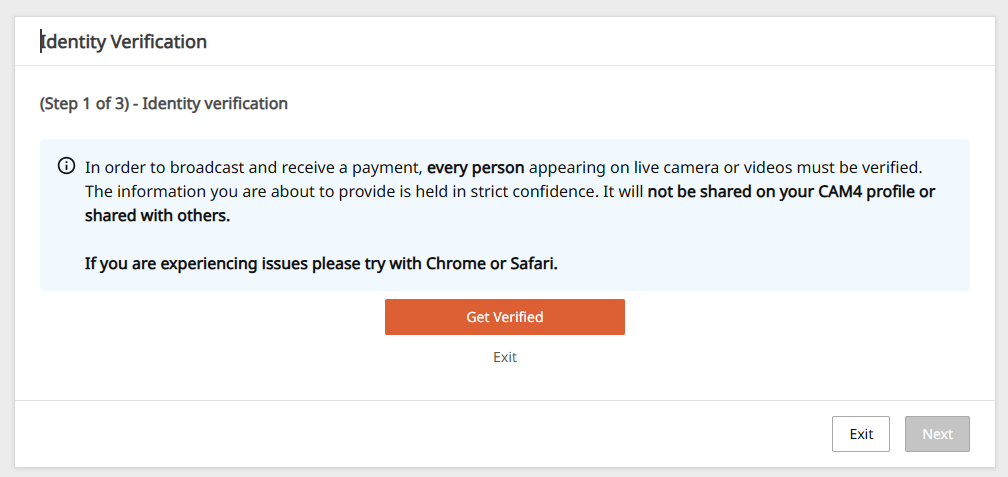
Pour la 1ère étape, cliquez sur noter vos noms et prenoms ainsi que votre date de naissance, puis téléchargez une photo claire d’un document valide (carte d’identité, passeport ou permis de conduire).
Faites glisser ou chargez dans la partie gauche une photo recto du document, et à droite une photo au verso du document.Cochez la case ci-dessous pour continuer et cliquez sur Suivant.
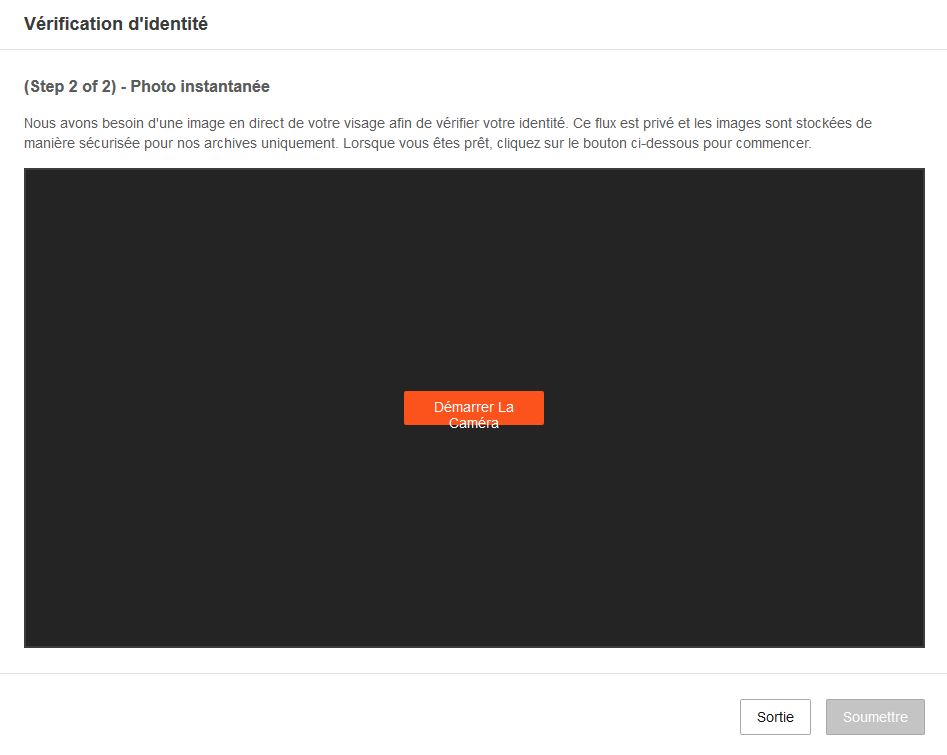
Pour terminer le processus, prenez une photo en direct pour vérifier les documents envoyés.Activez l’appareil photo et lorsque la photo est faite, cliquez sur Soumettre pour ensuite envoyer la photo.
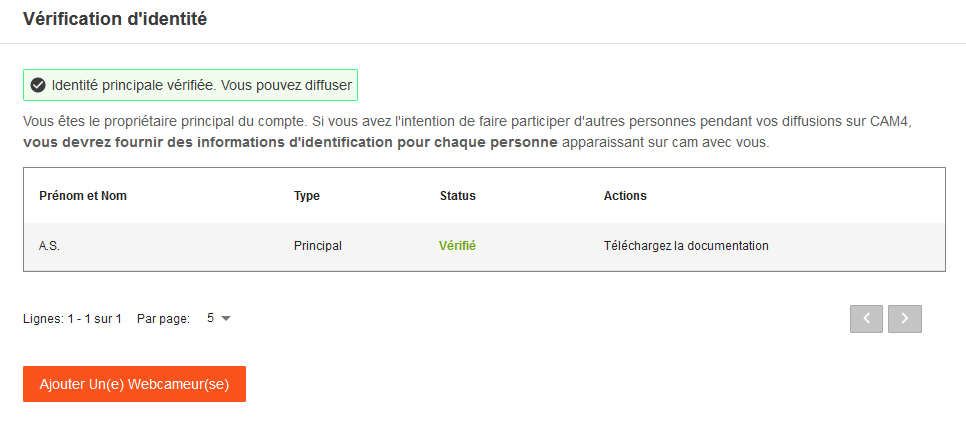
La vérification peut prendre jusqu’à 72 heures.Vous pouvez toujours vérifier l’état d’approbation et de vérification des documents envoyés dans Gérer la documentation.
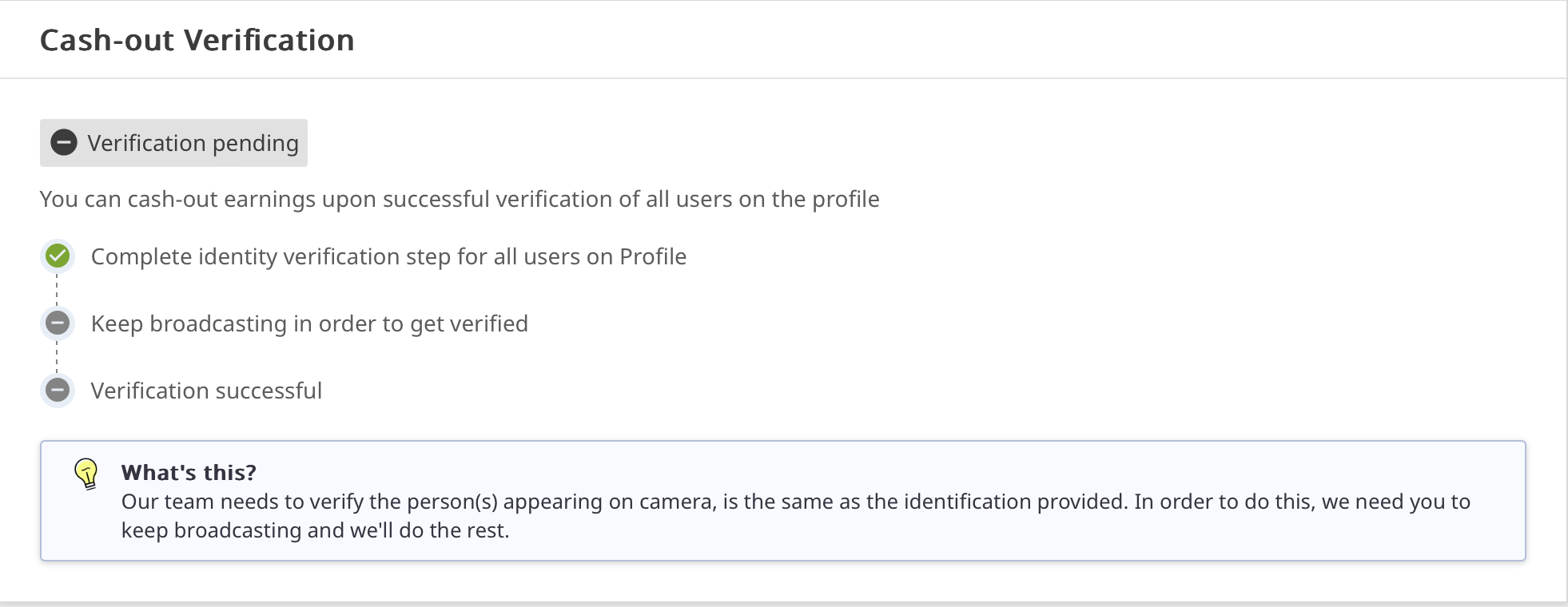
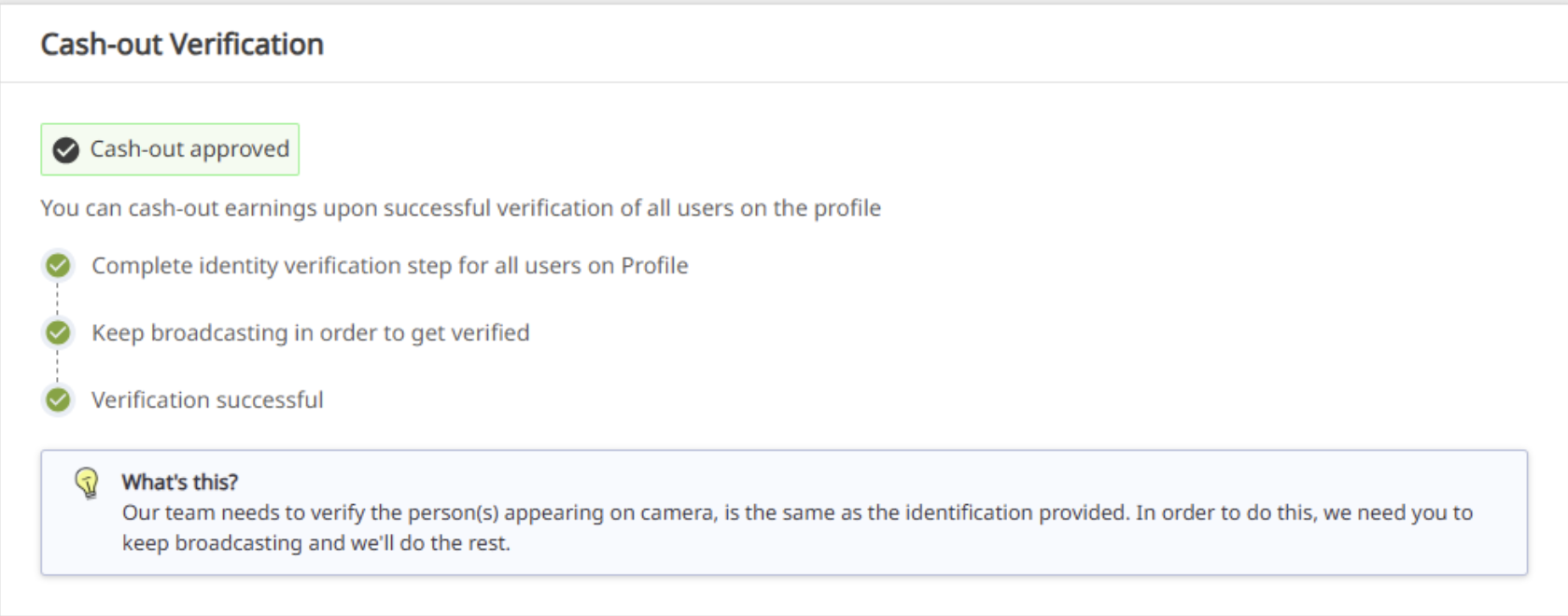
Lorsque votre identité sera approuvée cela apparaitra :
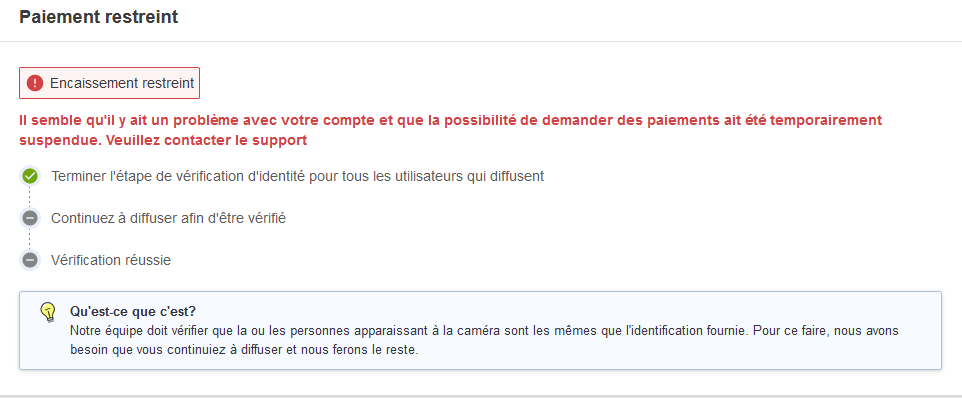
En revanche si vous n’avez pas soumis tous les documents ou pas assez diffuser en direct, les paiements seront restreints jusqu’à ce que les papiers d’identité soient fourni.
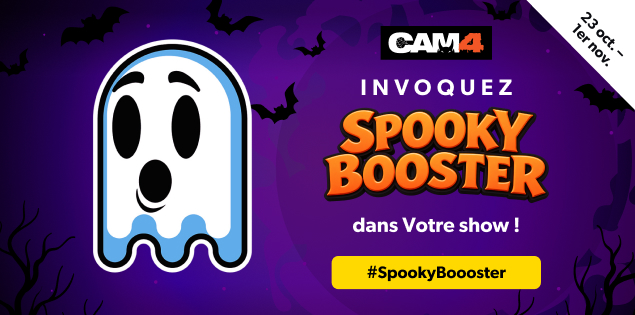
Le gentil fantôme préféré de CAM4 est de retour pour Halloween et a hâte de découvrir les surprises et les tours que nos modèles lui réservent !
Du 23 octobre à 18h (Heure de Paris) au 1er novembre, les modèles qui proposent des shows sur le thème d’Halloween pourront recevoir la visite du fantôme de CAM4, Spooky BOOOster !
Envie d’attirer Spooky dans ton salon ?
Sélectionne la niche Halloween correspondante, enfile un déguisement et/ou décore ton espace, puis lance ton live !
Spooky rendra visite UNIQUEMENT aux shows qui jouent le jeu d’Halloween. Sors ton déguisement et tes décorations les plus effrayants, et montre-lui toute ta créativité !
ASTUCE : Ajoute
le profil de Spooky
à tes favoris pour qu’il sache quand tu es en ligne !
Pour en savoir plus sur notre fonctionnalité BOOST, clique
ICI
.
CAM4 devient encore plus effrayant pour Halloween ! Du
23 octobre au 1er novembre, nous offrons des
prix terriblement géniaux aux modèles CAM4 qui proposeront les costumes les plus créatifs et effrayants ainsi que les meilleurs contenus d’Halloween.
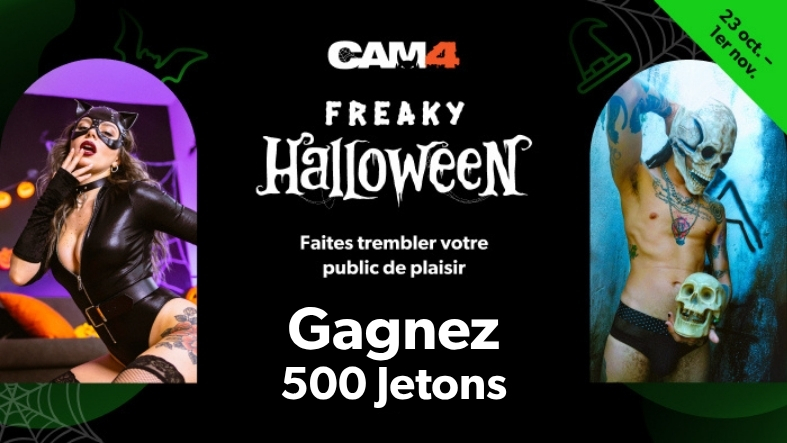
Participez à notre concours annuel Freaky Halloween de photos de costumes et de shows EN DIRECT !
24 prix à gagner dans le monde entier
Grands prix de 500 jetons
500 jetons : Gagnante de la catégorie Femmes*
500 jetons : Gagnant de la catégorie Hommes*
500 jetons : Gagnante du Prix du public – Femmes*
500 jetons : Gagnant du Prix du public – Hommes*
*Toutes les catégories incluent les modèles trans.
Prix supplémentaires
200 jetons : 10 gagnants
100 jetons : 10 gagnants
Comment participer
C’est simple ! Suivez les deux étapes ci-dessous :
1. Organisez votre show Freaky Halloween
Lancez un show EN DIRECT sur le thème d’Halloween à tout moment entre
le 23 octobre et le 1er novembre.
Choisissez votre Niche : sélectionnez la Niche Halloween CAM4 correspondant à votre catégorie au début de votre show en direct.
Restez en direct : votre show Halloween doit durer au moins 30 minutes.
Nombre de fans requis : votre show doit réunir au moins 20 fans.
Soyez créatif ! Enfilez votre meilleur costume d’Halloween et donnez vie à vos idées les plus effrayantes, drôles, sexy ou originales.
2. Publiez votre participation au concours
Publiez une photo, une vidéo ou un GIF entièrement nouveau dans la Niche Halloween correspondant à votre catégorie et ajoutez #Halloween dans la description :
Vous voulez attirer plus de regards sur votre participation ?
Partagez votre contenu Halloween sur votre fil d’activité et sur les réseaux sociaux en utilisant
#Halloween et #CAM4.
Vote photo
Deux façons de gagner un grand prix
Gagnants des catégories CAM4 : l’équipe CAM4 examinera les participations éligibles et sélectionnera les meilleures participations Femmes et Hommes. Toutes les catégories incluent les modèles trans.
Conditions d’éligibilité aux prix :
Les modèles ayant gagné au moins 50 $ / 500 jetons au cours des 30 derniers jours peuvent remporter un grand prix de 500 jetons.
Les modèles ayant gagné moins de 500 jetons au cours des 30 derniers jours peuvent également participer et tenter de remporter un prix de 100 ou 200 jetons.
Règles et conditions d’éligibilité
Seuls les modèles disposant d’un compte CAM4 vérifié peuvent participer.
Sélectionnez la catégorie Halloween correspondante au début de votre live.
Le concours se déroule du 24 octobre à 06h00 (Heure de Paris) au 2 novembre à 05h59 (Heure de Paris). Seules les participations, commentaires et mentions J’aime reçus pendant cette période seront pris en compte.
Votre live doit durer au moins 30 minutes et compter au moins 20 fans.
Aucun jeton n’est attribué simplement pour avoir participé. Seuls les gagnants sélectionnés recevront un prix.
Votre live et votre contenu doivent respecter le thème Halloween. Tout contenu hors thème sera disqualifié.
Les photos, vidéos et GIF peuvent être SFW ou NSFW.
Les photos, vidéos ou GIF soumis doivent être du contenu inédit. Les contenus déjà publiés ne sont pas éligibles.
Utilisation de l’IA : l’IA peut être utilisée pour améliorer ou retoucher les images soumises, mais les images entièrement générées par IA ou excessivement retouchées ne seront pas acceptées.
Choix du public : le niveau d’engagement le plus élevé est calculé à partir du nombre total de mentions J’aime + commentaires reçus sur une participation éligible. En cas d’égalité, la participation ayant reçu le plus de commentaires sera déclarée gagnante.
Un modèle peut recevoir au maximum un seul prix, qu’il participe seul ou en couple.
Toutes les catégories incluent les modèles trans.
Seuls les modèles ayant gagné au moins 50 $ / 500 jetons au cours des 30 derniers jours peuvent prétendre à un prix principal de 500 jetons.
Les modèles ayant gagné moins de 500 jetons au cours des 30 derniers jours peuvent remporter un prix de 100 ou 200 jetons.
Les prix seront crédités sur les comptes des gagnants au plus tard le mercredi 4 novembre 2026 et seront visibles dans le tableau de bord Broadcaster, sous « Statistiques ».
Les gagnants recevront un message de notification.
En participant, vous acceptez que CAM4 utilise la photo ou le contenu soumis sur les réseaux sociaux et à des fins promotionnelles.
Du 17 octobre au 1er novembre 2026 (heure de l’Est)
Classement Provisoire : Top 50 mondial
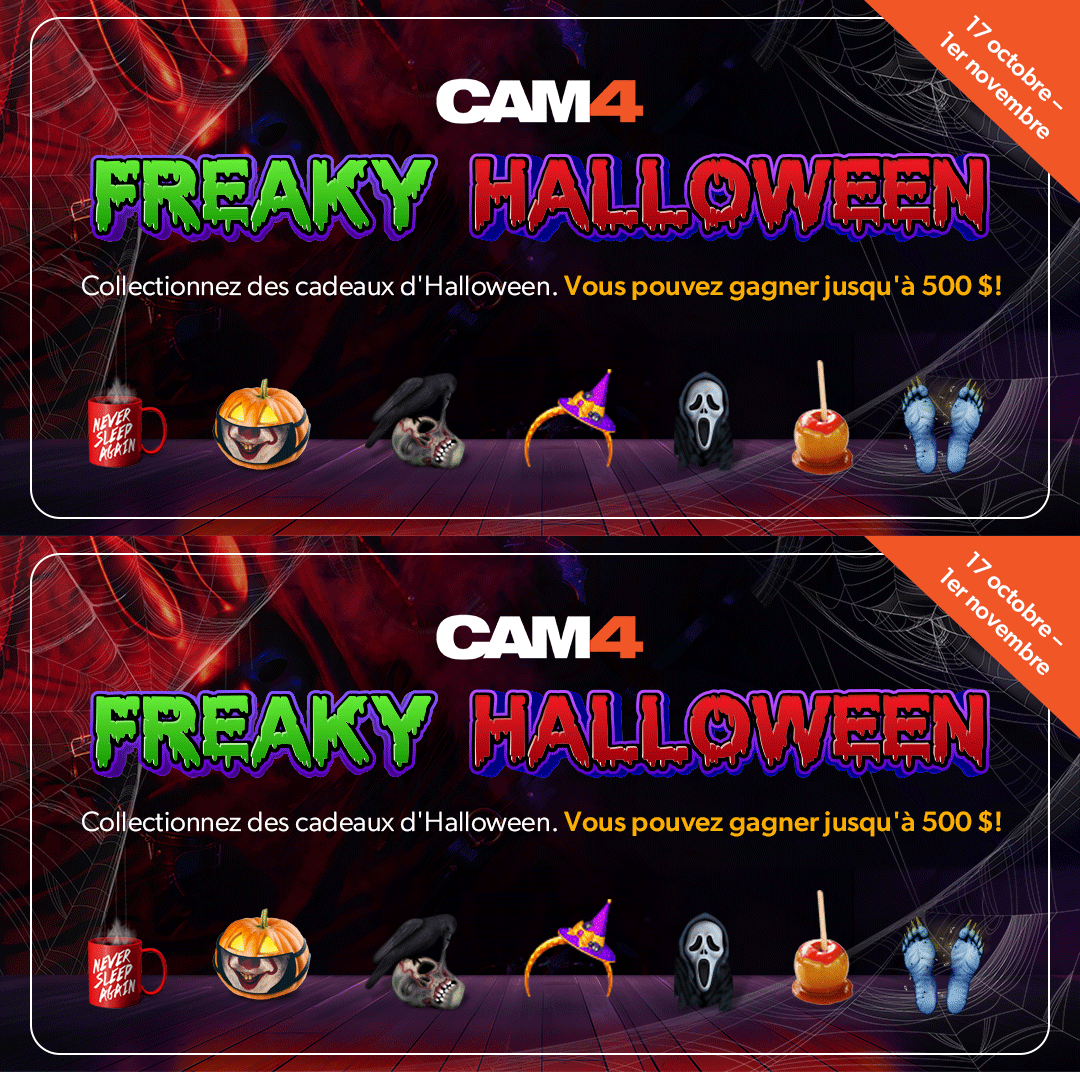
Les cadeaux d’Halloween affluent ! Voici les modèles qui figurent actuellement dans le Top 50 mondial.
Il est encore temps de monter dans le classement avant la fin du concours, le
1er novembre à 23 h 59 (heure de l’Est).
Continuez à diffuser et mobilisez vos fans pour qu’ils vous soutiennent avec des cadeaux d’Halloween !
Mis à jour le 23 octobre 2026.
Ce classement est provisoire et ne constitue pas les résultats définitifs. Toutes les conditions d’éligibilité aux prix restent applicables.
Top 50 mondial — Classement provisoire
Rang
Modèle
1
lu_isa3
2
dreamloveme
3
blueeye_girl
4
littlejenn777
5
redheaddol22
6
honeybee__x
7
nicol_hot30
8
frexanax3
9
alessandra24_
10
peitho_france
11
cataleya_666
12
lucia_milf
13
kira2_sexy
14
ginnygi
15
andrew_wallker
16
hugo4k
17
noriasexy4
18
maike1996
19
mollyambers
20
geilduiveltje
21
laurab_hot
22
casandra_lym1
23
maryfig
24
agatainfabula
25
dottoreincorsia
26
oktopussyy
27
eclissi_nix
28
angellover6
29
shadowrani
30
jenn_girly_xx
31
kylie_jen
32
kate_danswet
33
veronaughty4u
34
selvaggia
35
rosa_rossa
36
myalina2
37
saraah34
38
dolceeli00
39
ilrais
40
smeralda33_
41
x_rosie_x
42
grimildewidsley
43
elleestouu
44
stephanie_starr
45
zenoxnightxm
46
sweetmargo_
47
gattarossah
48
hot54
49
circe87
50
leeshaxx
Les inscriptions sont désormais closes.
Déjà inscrit ? Continuez à recevoir des cadeaux d’Halloween éligibles jusqu’au 1er novembre inclus !
8 prix en $$$ à gagner
Tentez de remporter une part des 1 525 $ de prix au total.
Top 5 des prix internationaux
1er : 500 $
2e : 300 $
3e : 250 $
4e : 150 $
5e : 100 $
Top 3 des prix Nouveaux modèles
1er : 100 $
2e : 75 $
3e : 50 $
Mobilisez vos fans !
Faites savoir à vos fans que vous participez au concours ! Partagez la bannière
Aidez-moi à gagner sur votre profil CAM4 et vos réseaux sociaux
afin d’encourager vos fans à vous soutenir avec des cadeaux Halloween.
Partagez. Mobilisez vos fans. Recevez des cadeaux. Grimpez dans le classement.
Déjà inscrit ? Continuez à participer !
Passez en live
Diffusez pendant au moins 5 heures au total entre
le 17 octobre à 00 h 00 ET et
le 1er novembre à 23 h 59 ET.
Recevez des cadeaux
Encouragez vos fans à vous envoyer des cadeaux issus des
catégories de cadeaux Halloween de CAM4.
Les modèles qui généreront le plus de revenus grâce aux cadeaux Halloween
éligibles grimperont en tête du classement.
Période d’éligibilité des cadeaux :
Seuls les cadeaux Halloween reçus entre
le 17 octobre à 00 h 00 ET et
le 1er novembre à 23 h 59 ET
seront comptabilisés pour le concours.
Règlement et conditions d’éligibilité
Seuls les cadeaux Halloween reçus entre le 17 octobre à 00 h 00 ET et
le 1er novembre à 23 h 59 ET seront pris en compte pour le concours.
Les inscriptions ont été closes le 22 octobre 2026 à 23 h 59 ET.
Pour participer, les modèles doivent s’être inscrits via le formulaire officiel avant cette échéance.
Les diffuseurs doivent être approuvés 2257 pour participer.
Pour être éligible à un prix Newbie, votre compte CAM4 doit avoir été créé
entre le 27 août à 00 h 00 ET et
le 22 octobre 2026 à 23 h 59 ET.
Les diffuseurs doivent diffuser pendant au moins
5 heures au total pendant la durée du concours.
Les échanges de cadeaux entre diffuseurs ne sont pas autorisés.
Les transferts de jetons entre plusieurs comptes sont strictement interdits.
Les gains provenant des cadeaux Halloween éligibles doivent être au moins
égaux à la valeur monétaire du prix auquel le diffuseur peut prétendre.
Chaque diffuseur peut recevoir un seul prix maximum.
Les diffuseurs qui remportent un prix Global ne peuvent pas également
recevoir un prix Newbie.
Tout le monde peut être éligible à un prix Global, quelle que soit
la date d’inscription sur CAM4, à condition de s’être inscrit au concours
dans les délais et de remplir toutes les conditions d’éligibilité.
Une exclusion du concours sera appliquée après
3 avertissements pour non-respect du fair-play.
Les gagnants seront annoncés et les prix versés au plus tard
le mercredi 4 novembre 2026.
Le tunnel CAM4 pour attirer, convertir, vendre et fidéliser
Tutoriel simple, direct et complet pour les créatrices et créateurs CAM4. Version août 2026
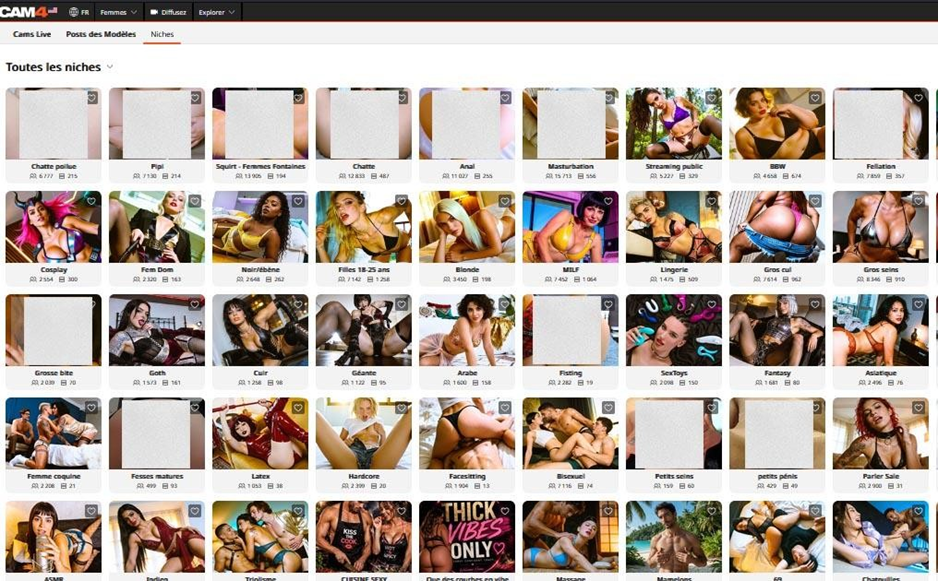
La page de découverte des Niches sur CAM4.
Comment utiliser ce guide
Ce tutoriel explique comment utiliser ensemble trois outils complémentaires de CAM4 : les Niches, le Fil d’Actualité et le Fan Club. L’objectif n’est pas seulement de publier du contenu, mais de construire un parcours logique qui transforme une découverte gratuite en relation durable, puis en plusieurs sources de revenus.
LE SYSTÈME EN UNE PHRASE : Les Niches attirent. Le Fil d’Actualité convertit et vend à la carte. Le Fan Club fidélise grâce à un abonnement et des avantages VIP.
Ce parcours n’est pas totalement linéaire : un voyeur peut te découvrir en live, dans une Niche, dans le Fil global ou sur ton profil. Mais la stratégie reste la même : lui donner une bonne raison de te découvrir, de te suivre, d’acheter, puis de revenir.
1
COMPRENDRE LE TUNNEL CAM4
Trois espaces, trois rôles, une stratégie
Le parcours idéal du voyeur
Découverte : une publication gratuite dans une Niche apparaît devant des personnes déjà intéressées par ce thème.
Visite : le voyeur clique, découvre ton profil et ton Fil d’Actualité.
Conversion : il te suit, revient en live ou achète une photo, un lot ou une vidéo à la carte.
Fidélisation : il rejoint ton Fan Club pour du contenu exclusif, des réductions et des avantages VIP.
Boucle : le membre revient en live, interagit, tippe, achète et recommande ton univers.
Les trois outils en un coup d’œil
Outil
Accès au contenu
Rôle principal
Action attendue du membre
Niches
Gratuit
Découverte ciblée, acquisition de trafic
Visiter ton profil, te suivre
Fil d’Actualité
Gratuit ou payant à la carte
Vitrine sociale, communication, vente de médias
Débloquer un post, te suivre, rejoindre le Fan Club
Fan Club
Abonnement mensuel
Fidélisation et communauté VIP
Renouveler, interagir, revenir en live
Les quatre niveaux de contenu à distinguer
Niveau
Exemple
Objectif
Gratuit / Public
Teaser dans une Niche, photo SFW, annonce de live
Créer de la portée et donner envie d’en voir plus
Payant à la carte
Photo, lot de photos, vidéo courte/moyenne/longue
Générer un achat ponctuel
Avantage Fan Club
Réduction, post gratuit pour les membres, contenu fan-only
Donner une raison claire de s’abonner
Live et relation
Tips, shows, messages, votes, défis
Créer de l’attachement et faire revenir
2
TUTORIEL NICHES
Attirer gratuitement une audience qui cherche déjà ton univers
Une Niche est un espace organisé autour d’un intérêt précis : pieds, cosplay, lingerie, domination, gaming, ASMR, fétichisme, et bien d’autres. Les personnes qui consultent une Niche recherchent déjà ce type de contenu : tu ne t’adresses pas à une audience générale, mais à des voyeurs potentiellement intéressés par ton style.
La page de découverte des Niches sur CAM4.
Pourquoi les Niches sont le haut du tunnel ?
Exposition ciblée : ton contenu est montré dans une communauté liée à un thème précis.
Contenu gratuit : les publications de Niche servent de bande-annonce pour ton profil, ton Fil d’actualité et ton live.
Preuve sociale : les likes, commentaires et classements renforcent ta visibilité.
Trafic qualifié : un voyeur intéressé par la Niche a plus de chances d’acheter un contenu du même univers.
RÈGLE CENTRALE : 1 contenu = 1 Niche pertinente = 1 titre précis = 1 description cohérente.
Comment suivre une Niche et publier
Ouvre l’onglet Niches et explore les catégories.
Choisis une Niche qui correspond réellement à ton contenu.
Suis la Niche (clique sur l’émoji « ❤ ») pour pouvoir y publier.
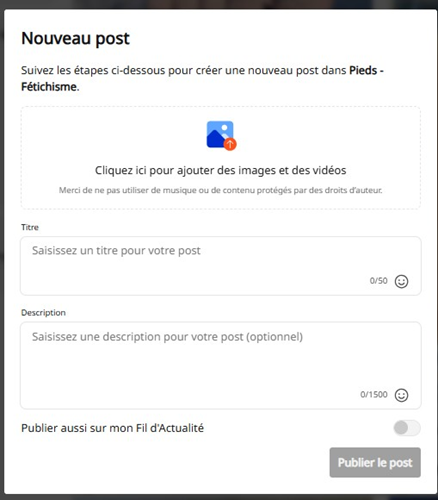
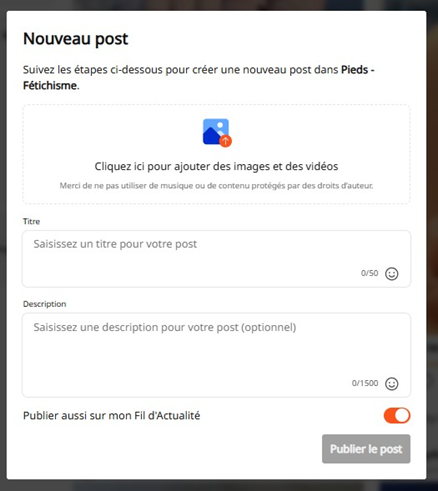
Clique sur « Nouveau Post ».
Ajoute ta photo ou vidéo depuis ton appareil ou ton Coffre Média.
Écris un titre clair, accrocheur et directement lié à ce que l’on voit.
Rédige une description : contexte, personnalité, appel à l’action.
Active « Publier aussi sur mon Fil d’Actualité » pour cumuler les deux visibilités.
Clique sur « Publier le Post » (le contenu sera live une fois approuvé par le support).
Formulaire de publication dans une Niche, avec l’option de partage vers le Fil d’Actualité.
SEO simple : aide les membres à comprendre ton contenu
Un titre vague attire moins bien l’audience ciblée qu’un titre précis.
Trop vague
Plus précis
Pourquoi c’est mieux
« Vous aimez ? »
« Mes pieds nus dans le sable après la plage »
Le thème et la scène sont immédiatement compris.
« Nouvelle photo »
« Mon nouveau cosplay de super-héroïne »
Le mot-clé correspond à la Niche Cosplay.
« Ce soir… »
« Live lingerie noire à 22h »
Le voyeur sait quoi attendre et quand revenir.
Exemples de posts de Niche
Univers
Titre
Description / CTA
Pieds
Mes pieds nus dans le sable après la plage
Tu préfères la version naturelle ou vernis rouge ? Retrouve le reste sur mon profil.
Cosplay
Mon nouveau cosplay… tu reconnais le personnage ?
Un aperçu gratuit avant le set complet sur mon Fil d’Actualité.
Fem Dom
Aujourd’hui, c’est moi qui donne les ordres
Dis-moi en commentaire quel défi je devrais préparer pour mon prochain live.
Gamer
Petite pause gaming avec moi ?
Je prépare un live gaming cette semaine. Suis mon profil pour ne pas le manquer.
ASMR
Ferme les yeux et écoute-moi…
Version complète et plus longue disponible sur mon Fil.
Les erreurs à éviter dans les Niches
Publier le même contenu dans toutes les Niches sans rapport avec le thème.
Utiliser un titre générique qui ne décrit pas la photo ou la vidéo.
Mettre tout ton contenu premium gratuitement dans le teaser.
Oublier l’appel à l’action vers ton profil, ton Fil ou ton prochain live.
Publier puis ignorer les commentaires : réponds pour créer une communauté.
3
TUTORIEL FIL D’ACTUALITÉ
Ta vitrine sociale : gratuit, payant (à la carte) et passerelle vers le Fan Club
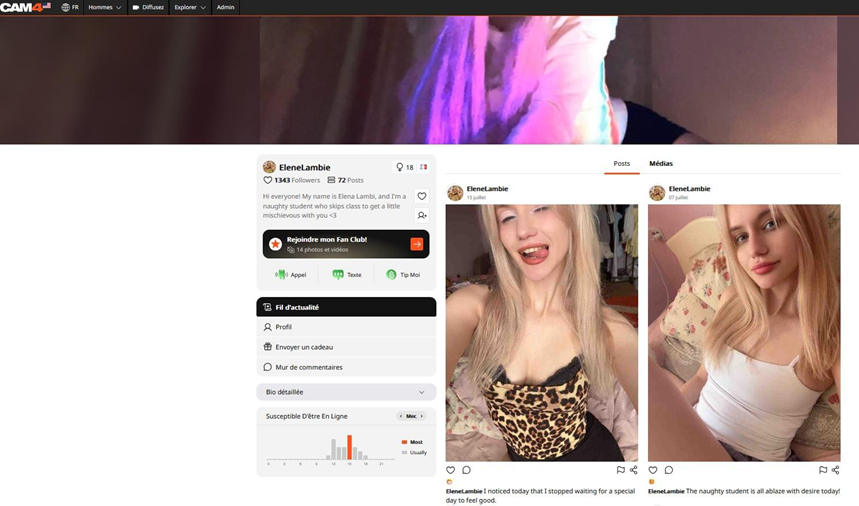
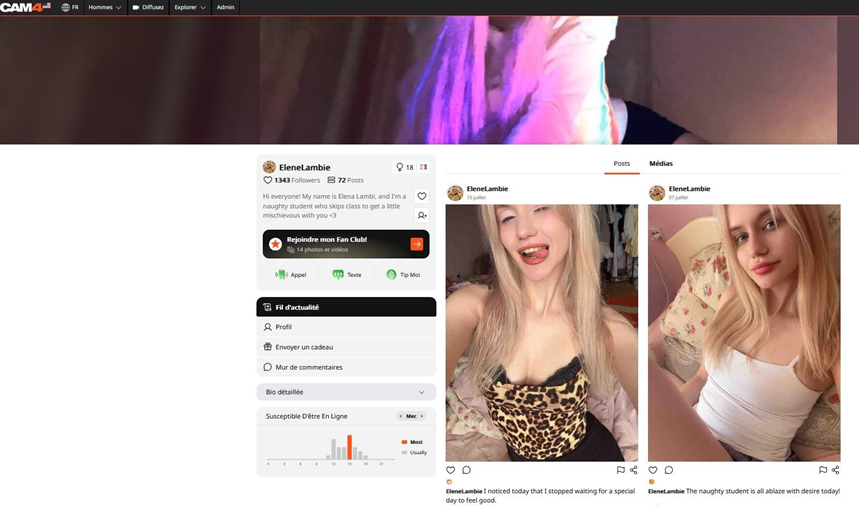
Le Fil d’Actualité est la page sociale de ton profil CAM4. Il permet de publier des messages, photos et vidéos, d’annoncer tes nouveautés, de vendre du contenu à la carte et de proposer des avantages liés au Fan Club. Il continue à travailler pour toi lorsque tu n’es pas en live.
Exemple de profil et de Fil d’Actualité CAM4.
Comment accéder au Fil et personnaliser ton profil
Clique sur ta photo de profil en haut à droite.
Choisis « Mon Fil d’Actualité ».
Ajoute une photo de profil SFW (soft, adaptée à l’affichage public).
Ajoute une image de couverture cohérente avec ton univers.
Rédige une courte bio : qui tu es, ton style, tes horaires.
PREMIÈRE IMPRESSION : Ta photo, ta couverture, ta bio et ta publication épinglée doivent expliquer ton univers en quelques secondes.
Les quatre types de publication à connaître
Type de post
Qui y accède ?
Objectif
Public / Gratuit
Tous les visiteurs
Attirer, informer, annoncer un live, teaser une vente
Payant (à la carte)
Toute personne qui paie le prix public
Vendre une photo, un lot ou une vidéo en jetons
Payant avec prix Fan
Public au prix normal ; membres à prix réduit
Valoriser l’abonnement tout en gardant une vente à la carte
Pour les fans / Fan-only
Membres du Fan Club (accès gratuit pour eux)
Offrir une exclusivité incluse dans l’abonnement
Comment créer une publication
Clique sur le bouton « + » ou « Créer une publication ».
Choisis une image ou vidéo depuis ton appareil ou ton Coffre Média.
Ajoute un titre ou une légende claire et motivante.
Choisis le niveau d’accès : gratuit, prix public, prix Fan Club ou réservé aux fans.
Vérifie l’aperçu, le prix et la description.
Clique sur « Publier le Post ».
Contrôle le rendu sur ton profil et épingle-le si c’est ta meilleure publication.
Options de prix et de partage lors de la création d’un post.
Combiner gratuit et payant sans frustrer ton audience
Contenu gratuit
Contenu payant à la carte
Contenu Fan Club
Une image SFW, un extrait, une annonce, un sondage, une coulisse.
Le set complet, la vidéo complète, plusieurs angles, un format plus long ou travaillé.
Une version exclusive, une réduction, un bonus, un accès anticipé ou une publication offerte aux membres.
Le gratuit doit donner envie, pas remplacer le produit. Montre suffisamment pour créer de l’intérêt, puis explique clairement ce que l’acheteur ou le membre obtiendra en plus.
Repères de prix indicatifs (à la carte)
Ces fourchettes sont des repères de départ, pas des obligations. Teste selon ton audience, la qualité, la durée et l’exclusivité.
Format
Repère standard
Positionnement premium
Photo seule
10 à 25 jetons
30 à 50 jetons
Lot de photos
25 à 150 jetons selon la taille
150 à 300+ jetons pour un grand set
Vidéo courte (~1-3 min)
50 à 120 jetons
150+ jetons
Vidéo moyenne (~3-10 min)
75 à 250 jetons
120 à 300+ jetons selon l’effort
Vidéo longue (~10-15 min ou +)
250 à 400 jetons
500 à 600 jetons pour un contenu très travaillé
TESTE AU LIEU DE DEVINER. Observe les déblocages. Un prix trop haut bloque les ventes ; un prix trop bas dévalorise ton travail. Modifie un seul élément à la fois : prix, vignette, titre, durée ou offre Fan Club.
Fonctions utiles du Fil d’Actualité
Coffre Média — réutilise les photos et vidéos déjà importées sans recommencer le téléchargement.
Épingler — garde en haut du profil ton offre Fan Club, ta meilleure vidéo ou ton prochain événement.
Floutage — les visiteurs voient une version floutée d’un média payant lorsque le prix est défini.
Partage — copie le lien de ton Fil pour le diffuser sur tes réseaux, en respectant les règles de chaque plateforme.
Droits d’auteur et sécurité
N’utilise pas de musique protégée sans autorisation : privilégie tes propres sons ou des ressources libres de droits.
Vérifie que toutes les personnes visibles sont majeures, identifiées et approuvées conformément aux règles CAM4.
Ne promet jamais un avantage que tu ne peux pas techniquement ou légalement fournir.
4
TUTORIEL FAN CLUB
Transformer les meilleurs fans en communauté VIP et en revenu mensuel
Le Fan Club est un abonnement mensuel. Les fans paient un prix fixe pour soutenir régulièrement leur créateur préféré et recevoir des avantages spéciaux. Pour toi, il crée une base de revenus plus prévisible et une relation plus forte avec les membres les plus engagés.
LA DIFFÉRENCE ESSENTIELLE. Le Fil d’Actualité vend surtout des contenus ponctuels à la carte. Le Fan Club vend une relation et une valeur continue : nouveaux contenus, réductions, interactions et avantages renouvelés chaque mois.
Avant l’activation
Complète la vérification d’identité requise pour ton compte et pour toute personne apparaissant dans le contenu.
Prépare plusieurs contenus et avantages afin que le Club ne paraisse pas vide au lancement.
Décide ce qui sera inclus, ce qui sera réduit et ce qui restera vendu séparément.
Choisis un rythme que tu peux maintenir sur plusieurs mois.
Comment activer ton Fan Club
Ouvre ton tableau de bord → onglet Fan Club.
Choisis ton tarif mensuel en dollars (USD).
Décris les avantages proposés et vérifie les réglages disponibles.
Active le Fan Club, puis publie immédiatement un message de bienvenue et du contenu réservé aux membres.
Le tarif minimum est de 1 $. Les paiements par carte donnent au créateur 80 % du prix d’abonnement (un abonnement à 10 $ génère 8 $ pour toi). Des taxes ou la TVA peuvent s’ajouter pour le client selon sa localisation.
ATTENTION AU CHANGEMENT DE PRIX ! Le tarif du Fan Club ne peut généralement être modifié qu’une fois tous les trois mois. Choisis un prix cohérent avec la valeur que tu peux fournir dans la durée.
Avantages automatiques ou configurables
Avantage
Fonctionnement à expliquer aux membres
Badge dans le tchat
Une étoile blanche sur fond bleu identifie le membre comme fan VIP.
Messagerie privée
Les messages des membres sont gratuits par défaut ou configurés selon tes réglages.
Mode espion
Accès gratuit à certains shows privés — uniquement si le mode espion est activé dans les paramètres du show.
Réductions de contenu
Tu peux offrir un prix Fan Club inférieur au prix public sur certains posts payants.
Contenu exclusif
Photos, vidéos, coulisses ou bonus réservés aux membres.
Réductions annexes
Sur les calls, shows groupés, shows privés et Cam2Cam, selon ce que tu configures.
Deux méthodes pour publier pour les fans
Méthode
Réglage
Utilisation stratégique
« Pour les fans »
Gratuit pour les membres ; prix public possible pour les non-membres
Montre immédiatement la valeur de l’abonnement
« Contenu payant » avec prix Fan
Prix public normal + tarif réduit pour les membres
Continue à monétiser tout en récompensant la fidélité
POINT DE CLARTÉ : Un membre Fan Club n’obtient pas automatiquement tous les médias payants. Tu décides quelles publications sont incluses, réservées, réduites ou vendues au même prix.
Pour tes vidéos : n’utilise jamais de musique protégée. Privilégie des sons libres de droits ou tes propres créations, et précise-le dans ta description.
Quel tarif mensuel choisir ?
Positionnement
Repère mensuel
À proposer
Lancement / construction de communauté
4,99 – 7,99 $
Quelques exclusivités régulières, badge, messages, réductions
Volume régulier, contenu premium, bonus et avantages très clairs
Conseil : commence autour de 5,99 $, puis ajuste selon la demande, le volume de contenu et l’engagement. La meilleure question n’est pas « combien puis-je demander ? » mais « quelle valeur puis-je livrer chaque mois sans interruption ? »
RÈGLE D’OR : Un Fan Club quasi vide ne vend pas. Vise au moins 150 posts, avec 3 à 5 nouveaux contenus par semaine (mix photos + vidéos courtes 5-10 secondes).
Comment faire vivre ton Fan Club
Un bonus exclusif chaque semaine.
Une mini-vidéo de remerciement ou une dédicace.
Un vote pour le thème du prochain live ou contenu.
Un live, salon ou événement réservé aux membres.
Un bonus de fidélité après plusieurs mois d’abonnement.
Un objectif collectif : un contenu inédit débloqué à un certain nombre de membres (ex. « à 20 membres »).
Avantages personnalisés : sois précis(e)
Indique exactement l’avantage, sa fréquence, ses conditions et sa durée — et vérifie que le réglage existe réellement dans ton compte.
Promesse trop vague
Promesse claire et mesurable
« Beaucoup d’avantages VIP »
« Une publication Fan-only par semaine + 20 % de réduction sur la vidéo du mois »
« Lives exclusifs »
« Un salon réservé aux membres le dernier dimanche du mois, annoncé 48h à l’avance »
« Réductions sur mes shows »
« Tarif promotionnel réservé aux membres pendant l’événement annoncé »
Fidéliser et obtenir des renouvellements
Régularité : publie à un rythme prévisible et annonce ce qui arrive.
Exclusivité réelle : garde une partie de ton meilleur contenu dans le Club.
Reconnaissance : réponds aux membres, remercie-les, valorise leur ancienneté.
Transparence : explique clairement ce qui est inclus et ce qui reste payant.
Promotion : parle du Fan Club dans tes posts, ton live, ta bio et ta publication épinglée.
BONUS STRATÉGIQUE (script vidéo) : Certaines ventes de contenu, y compris via le Fan Club, peuvent contribuer à ton goal en live public et donc soutenir ta visibilité. Vérifie le comportement exact dans ton interface.
Les erreurs qui font fuir les abonnés
Activer le Club puis ne rien publier pendant plusieurs semaines.
Vendre le Club comme « tout inclus » alors que la majorité du contenu reste payante.
Fixer un prix premium sans contenu ou avantages premium.
Donner gratuitement à tous exactement le même contenu que celui promis aux membres.
Ne jamais répondre aux messages ni reconnaître les abonnés fidèles.
5
STRATÉGIE COMBINÉE
Transformer une seule idée de contenu en plusieurs points de contact
La méthode « un tournage, plusieurs usages »
Tu n’as pas besoin de créer quatre contenus totalement différents. À partir d’une même séance, prépare plusieurs versions adaptées à chaque étape du tunnel.
Étape
Version du contenu
Exemple
Niche
Teaser gratuit ciblé
1 photo ou un extrait court correspondant précisément à la Niche
Fil gratuit
Publication sociale ou coulisse
Une image + question + annonce du contenu complet
Fil payant
Produit à la carte
Set complet, vidéo courte/moyenne/longue, avec titre et prix clairs
Fan Club
Valeur VIP
Bonus exclusif, accès anticipé, réduction ou angle inédit
Live
Activation de la relation
Annonce, défi, vote, appel à rejoindre le Club
NE PUBLIE PAS LE MÊME FICHIER PARTOUT. Le teaser doit attirer, le post payant doit apporter la valeur principale, et l’avantage Fan Club doit donner une raison supplémentaire de s’abonner. Chaque version a un rôle différent.
Exemple complet : une séance lingerie
Niche Lingerie : une photo gratuite, titre « Ma nouvelle lingerie noire… tu valides ? »
Fil gratuit : un teaser court + question « noir ou rouge pour le prochain live ? »
Fil payant : le set complet (12 photos) ou une vidéo de 5 minutes.
Prix Fan Club : une réduction visible sur ce même set ou cette vidéo.
Post Fan-only : une photo bonus ou un accès anticipé.
Live : rappel du nouveau contenu, vote pour le prochain thème, remerciement des membres.
Les appels à l’action à utiliser
Objectif
Exemple de CTA
Amener vers le profil
« Retrouve le set complet et mes prochains lives sur mon profil. »
Obtenir un follow
« Suis-moi pour ne pas manquer la suite demain. »
Vendre à la carte
« Débloque la vidéo complète dans mon Fil d’Actualité. »
Promouvoir le Fan Club
« Les membres du Fan Club ont le bonus exclusif et un tarif réduit. »
Faire revenir en live
« Rendez-vous ce soir à 22h pour choisir le prochain thème avec moi. »
Une fréquence saine, adaptée à chaque outil
Niveau
Rythme de départ
Quand augmenter
Niches
3 à 7 teasers ciblés / semaine
Quand tu as du contenu varié pour plusieurs Niches pertinentes
Fil public
1 post / jour, gratuit ou payant
Quand tu peux alterner annonces, teasers, ventes, interactions
Fan Club
3 à 5 apports de valeur / semaine
Quand qualité et exclusivité restent constantes
Live
Selon ton planning annoncé
Quand tu peux tenir des horaires réguliers et les promouvoir
6
PLAN D’ACTION
Une semaine simple pour mettre le tunnel en mouvement
Calendrier éditorial sur 7 jours
Jour
Niche / acquisition
Fil d’Actualité
Fan Club / Live
Lundi
Teaser gratuit dans une Niche principale
Annonce de la semaine + photo gratuite
Message de bienvenue / planning VIP
Mardi
Répondre aux commentaires de Niche
Publication payante : set photo
Réduction membre sur le set
Mercredi
Nouveau teaser dans une autre Niche
Sondage ou question gratuite
Vote des membres sur le prochain thème
Jeudi
Relancer un post qui fonctionne
Vidéo courte payante
Bonus vidéo ou accès anticipé
Vendredi
Teaser du live dans la Niche correspondante
Annonce épinglée du live
Avantage membre pendant l’événement
Samedi
Interaction et commentaires
Teaser gratuit + rappel du Fan Club
Live, défi collectif ou contenu spécial
Dimanche
Analyse des résultats
Récapitulatif + teasing semaine suivante
Remerciement et bonus fidélité
Bibliothèque de textes prêts à adapter
Usage
Exemple
Post Niche
« Petit aperçu gratuit de mon nouveau set cosplay. Le contenu complet arrive aujourd’hui sur mon profil. Tu reconnais le personnage ? »
Post gratuit Fil
« Je prépare quelque chose de nouveau pour ce soir. Tu préfères une vidéo courte ou un set photo ? »
Post payant Fil
« Nouveau set complet : 15 photos, plusieurs tenues et un bonus final. Les membres du Fan Club ont un tarif réduit. »
Post Fan-only
« Merci de faire partie de mes VIP. Voici la photo bonus qui n’est disponible nulle part ailleurs. »
Promotion Fan Club
« Rejoins mon Fan Club pour les bonus exclusifs, les réductions et les votes sur mes prochains contenus. »
Annonce live
« Je suis en live ce soir à 22h. Les membres choisiront le thème du prochain set. »
7
MESURER ET AMÉLIORER
Coacher avec des données simples, pas avec des impressions
Les indicateurs à suivre chaque semaine
Étape
Indicateurs utiles
Question à se poser
Niches
Vues, likes, commentaires, nouveaux follows
Quelles Niches attirent les visiteurs les plus engagés ?
Fil gratuit
Engagement, visites de profil, follows
Quels teasers donnent envie de voir la suite ?
Fil payant
Chiffre d’affaires, format, prix
Quel format et quel prix vendent régulièrement ?
Fan Club
Nouveaux membres, renouvellements, départs
La valeur mensuelle est-elle visible et constante ?
Live
Nouveaux spectateurs, tips, demandes de show
Les posts et le Club ramènent-ils du monde en live ?
La règle de test
Teste une variable à la fois : titre, vignette, prix, durée, Niche, heure ou CTA.
Observe pendant plusieurs publications avant de conclure.
Garde une trace simple : date, type de post, thème, prix, ventes, commentaires.
Réutilise les thèmes qui attirent et transforme-les en séries.
Arrête ou améliore les formats qui prennent du temps sans résultat.
Les points à vérifier avant de publier et avant de vendre
Check-list avant chaque publication
La Niche choisie correspond-elle réellement au contenu ?
Le titre décrit-il précisément ce que l’on voit ?
La description contient-elle un contexte et un appel à l’action ?
Ai-je choisi le bon accès : gratuit, payant, prix Fan ou Fan-only ?
Le prix est-il cohérent avec la durée, la qualité et l’exclusivité ?
Toutes les personnes apparaissant sont-elles vérifiées et autorisées ?
La musique et les autres éléments sont-ils libres de droits ?
Ai-je vérifié le rendu et cliqué sur Publier ?
Check-list hebdomadaire du Fan Club
Ai-je publié de nouveaux avantages ou contenus pour les membres ?
Ai-je répondu aux messages et remercié les membres fidèles ?
Ai-je clairement présenté les avantages du Club dans mon Fil et en live ?
Ai-je proposé au moins une exclusivité, réduction ou interaction VIP ?
Ai-je vérifié que mes promesses correspondent aux réglages disponibles ?
Questions fréquentes
Les publications dans les Niches sont-elles payantes ?
Non. Elles sont gratuites à consulter et servent principalement à la découverte et à l’acquisition de trafic.
Tous les posts du Fil d’Actualité doivent-ils être payants ?
Non. Le Fil doit mélanger contenus gratuits, annonces, teasers, posts payants et contenus liés au Fan Club.
Un abonnement Fan Club débloque-t-il toutes mes ventes à la carte ?
Non. Tu choisis pour chaque publication si elle est incluse, réservée aux fans, réduite pour eux, ou vendue séparément.
L’accès espion est-il automatique ?
Il dépend de l’activation du mode espion dans les paramètres du show privé. Vérifie ton réglage avant de le promettre.
Puis-je utiliser une chanson connue dans une vidéo ?
Pas sans les droits nécessaires. Utilise des sons originaux ou libres de droits.
Le Fan Club remplace-t-il les lives ?
Non. Il les complète : le Club fidélise entre les diffusions, le live entretient la relation qui donne envie de rester abonné.
Dois-je publier plusieurs fois par jour dès le début ?
Non. Commence par un rythme réaliste (ex. un post public par jour), puis augmente quand tu peux maintenir la qualité.
Conclusion : transforme chaque publication en étape suivante
Une publication efficace ne cherche pas seulement un like. Elle guide le voyeur vers une prochaine action : visiter ton profil, te suivre, débloquer un contenu, rejoindre ton Fan Club ou revenir en live.
À toi de jouer !
9
SOURCES ET NOTES
Documents officiels CAM4 et scripts vidéo utilisés
Ce guide consolide le tutoriel initial, les pages officielles CAM4 consultées et les deux scripts vidéo transmis. Les pages et l’interface peuvent évoluer après la date de ce document.
FAQ du Fan Club sur CAM4 — cam4support.com
CAM4 Fan Club & Facturation, FAQ pour les diffuseurs — cam4support.com
NOTE DE FIABILITÉ : Lorsque deux sources se contredisent, ce guide privilégie les pages de formation et FAQ officielles les plus récentes : abonnement Fan Club en USD par carte, publications payantes du Fil en jetons, et 80 % du prix pour les abonnements payés par carte. Les repères de prix à la carte restent indicatifs.
Niches, Fil d’Actualité & Fan Club — Le tunnel CAM4 · Version août 2026
Whales are among the largest and most remarkable animals on Earth. These marine mammals live in oceans around the world, from warm tropical waters to the cold seas surrounding the poles.
Life Beneath the Surface
Although whales spend their lives in water, they breathe air through blowholes located on top of their heads. They must regularly return to the surface to breathe before diving again in search of food or traveling through the ocean.
Whales are warm-blooded, give birth to live young, and nurse their calves with milk. A thick layer of fat called blubber helps protect them from cold water and stores energy during long migrations.
Two Main Groups
Whales are generally divided into baleen whales and toothed whales. Baleen whales filter small animals from the water using flexible plates inside their mouths. This group includes blue whales, humpback whales, and gray whales.
Toothed whales use teeth to catch fish, squid, and other prey. Many of them also use echolocation, producing sounds and listening for returning echoes to understand their surroundings. Sperm whales, belugas, and orcas belong to this group.
The Blue Whale
The blue whale is the largest known animal to have ever lived. An adult can grow longer than a city bus and weigh well over one hundred tonnes. Despite its enormous size, it feeds mainly on tiny crustaceans called krill.
Communication and Migration
Whales communicate using clicks, whistles, pulses, and complex songs. Some sounds can travel across great distances underwater. Humpback whales are especially famous for their long, patterned songs.
Many species migrate thousands of kilometres each year. They often feed in cold, nutrient-rich waters before traveling to warmer regions where they mate and give birth.
Protecting Whales
Commercial hunting once caused severe declines in many whale populations. Today, whales also face threats from fishing gear, ship collisions, underwater noise, pollution, and changes to ocean ecosystems.
Conservation programs, safer fishing practices, protected habitats, and international cooperation can help whale populations recover. Protecting whales also supports healthier oceans because these animals play an important role in marine food webs and nutrient cycles.
Streaming outdoors or indoors? Keep it safe, legal, and creative — here’s how to make exciting shows from your own property (without unnecessary risk).
Streaming Safely (Outdoors) on CAM4
You often make the best shows right at home — kitchen, balcony, garage, or garden. Keep it legal, private, and safe, and you can be fully creative.
Tip: Only stream on your own property or a private location with the owner’s permission.
Streaming Outdoors: Basic Rules
Make sure only you are in the picture/audible. Casual passers-by have not chosen to come online.
Stream on your own property or a private location with permission. Avoid public places, stores, or someone else’s property.
Car shows? Only stationary and with the engine off.
Pay attention to copyright/brands in the picture and music in the background.
Hide recognizable location information (street names, license plates, recognizable buildings).
Children (under 18) must never be visible or audible. Violation leads to immediate removal of your account.
Always check local/national laws regarding public morals and privacy. You are responsible for a legal set-up.
Sexy Ideas per Location (Home & Private)
Kitchen
Host your own “cooking show” with playful challenges.
Creative ways to use props/kitchen utensils (within platform rules).
“Vegetarian” theme show with playful, safe food props (hygiene first).
Terrace or Balcony
Use doors/windows as decor and suction cup props on glass.
Present a “weather report” as an intro to your show.
Involve your patio furniture as playful set pieces.
Garage
“Tune-up” theme: working on your car as a setting (safe, engine off).
DIY show: nod to handyman programs.
Use (clean) tools as decor/prop — no sharp edges.
Pool or Jacuzzi
Show with swimwear, pool party vibes.
BBQ + pool theme for a summer set.
Mermaid/merman or lifeguard fantasy.
Laundry Room
“Laundry day” with dryer props (pay attention to stability/safety).
Cheeky undergarment moment (within your boundaries/rules).
Minimal outfit reveal when sorting laundry.
Do’s & Don’ts (Important!)
Do’s
Keep your frame under control: only you in the picture, background clean.
Work with decor/props that are stable and clean (hygiene).
Use a private location and check neighbor/environment view.
Communicate your boundaries and keep your Tip Menu/rules visible.
Don’ts
Do not stream in public spaces, stores, or someone else’s property.
No moving cars or running engines.
No recognizable third parties (face, voice) or children in picture/sound.
Avoid logos/music with rights — or turn off audio.
In Conclusion
Stream from your own property or an approved private place: this protects yourself and respects the privacy of others. Indoors or outdoors — with smart framing, clear rules, and creativity, you have endless possibilities for exciting, original shows.
Remember: safety and compliance with legal and platform rules come before everything. In doubt? Choose an indoor set-up with a controlled background.
All you need to know about private shows on CAM4 — per minute, time blocks, or solo private with spies.
Private Shows on CAM4: How to Earn Smart with 1-on-1
Choose per minute, work with pre-paid time blocks, or start a solo private show with spies. Clear prices = more trust (and therefore more tips).
Tip: also mention your private options and rates in your bio or Activity Feed.
What is a private show?
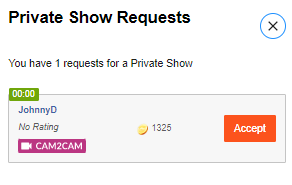
A private show is an exclusive show between you and one viewer. Depending on your settings, others can (paid) watch as « spy ». With private shows, you are guaranteed to earn tokens per minute or sell a time block in advance.
Three ways to earn with private
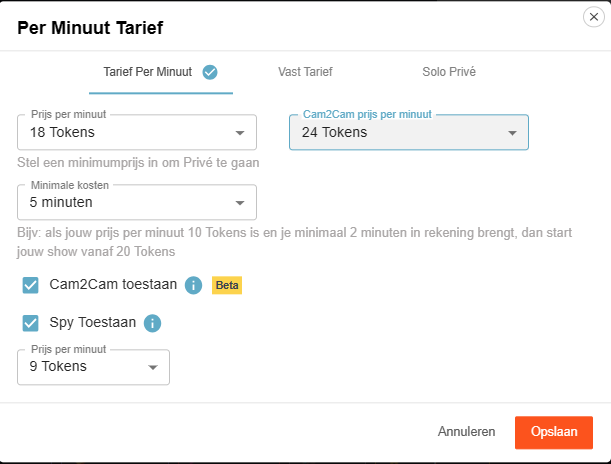
1) Pay per minute
Viewers see the cost per minute before requesting a private show; in the Netherlands, 21% VAT is applied upon purchase.
Guideline example: 12 tokens/min is $1.20 per minute for you. Your viewer in the Netherlands sees an amount of 15 tokens/min including VAT. This VAT percentage varies per country where your fan lives.
Pro tip: allow spying (Spy). These viewers only see the image, no chat, and hear no sound.
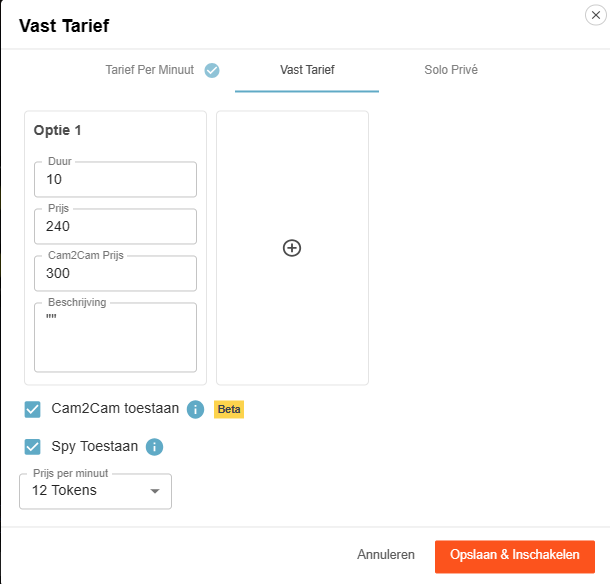
2) Time blocks (pre-paid)
Offer pre-paid blocks. You choose the duration and the price; the viewer chooses and pays.
Advantage: you are assured of the entire block. If the viewer clicks away themselves, you will still be paid the full block. If you end it yourself or your connection drops, the tokens go back to the viewer.
3) Solo private show
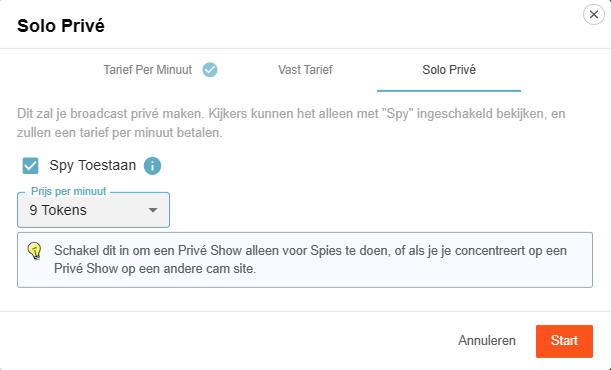
You appear to be in private, but you are alone. Spies can — if you allow it — watch for a fee and pay per minute.
Useful for calmly setting up your games or settings (turn off Spy then), or if you are running a private show elsewhere and want to generate income on CAM4 at the same time via spies.
Cam2Cam: make your private show even more intimate
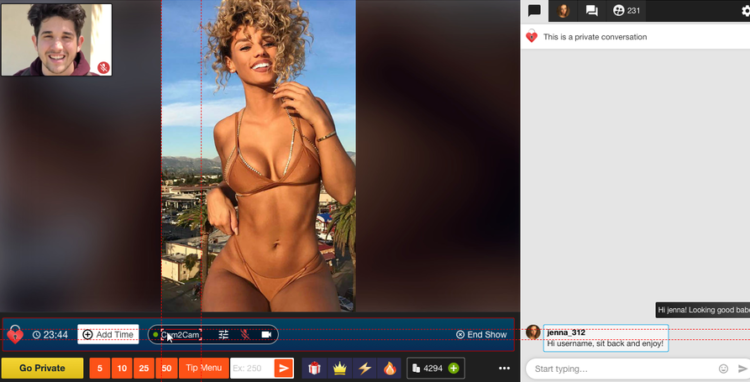
C2C offers more intimacy and often higher per-minute prices — communicate your terms and boundaries in advance. Some models find it much nicer to be able to see the viewer themselves, but some do not. Adjust your price accordingly.
Activate Cam2Cam
Go to the settings of your Private Show via the gear next to ‘Requests for private shows’. Set your C2C price and check ‘Allow Cam2Cam’. Save — done.
What does it cost?
Cam2Cam is usually ±1.25× the price of your normal private show. If you normally ask for 12–18 tokens/min, then 18–24 tokens/min for C2C is a logical range.
During the show
The video of your viewer appears in a corner of your screen (movable and scalable).
Use the Cam2Cam buttons: mute and volume control.
Auto-Pause: your time after a private show
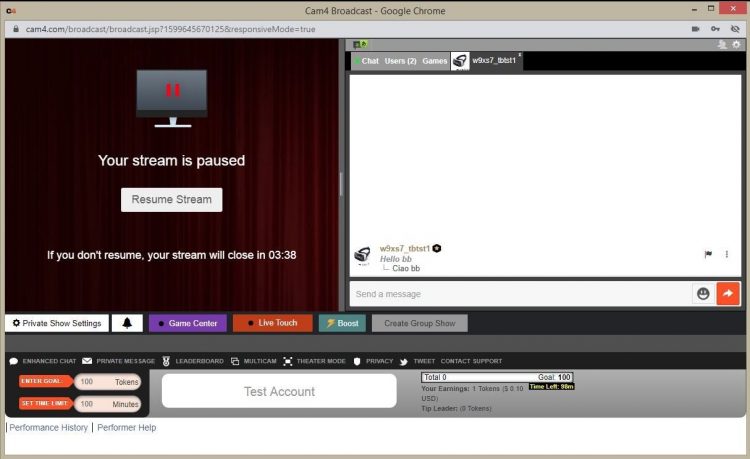
Auto-Pause gives you time to catch your breath after a Private or Group Show, before your public stream goes live again.
How does it work?
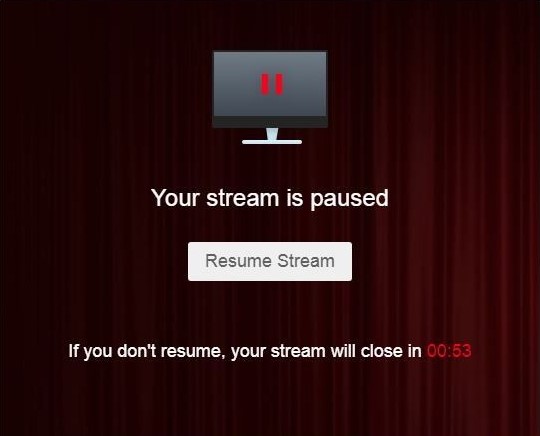
Afterwards, your stream automatically pauses for up to 5 minutes. Get something to drink, change clothes, or reset your setting — you decide.
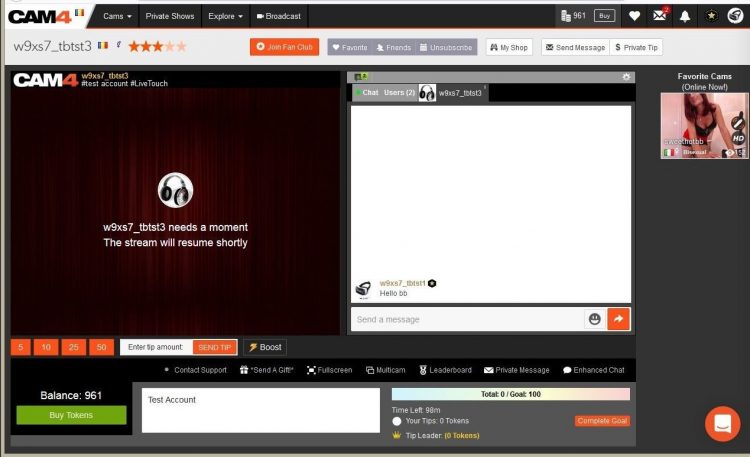
You can resume earlier at any time via “Resume Broadcast”. If you wait longer than 5 minutes, the stream ends automatically.
You will not receive private requests during the pause.
What you see
What viewers see
Price & transparency
Communicate in advance what makes private different from your public show (tempo, requests, Cam2Cam, no negotiations) and stick to your rates. Clarity increases conversion and prevents hassle.
Everything you need to know about verifications on CAM4: how you can broadcast, get paid, and comply with the law.
Verification Types on CAM4
To work safely and professionally on CAM4, there are several types of verification. These checks ensure that you are allowed to broadcast, can be paid, and that you comply with the legislation.
Please note: processing usually takes 1–3 business days.
The three types of verification
1) Broadcast Approved
Required to be allowed to broadcast. Your ID is checked to confirm that you are 18+. After approval, you can go live.
2) Verification for Payment
Required to have tokens paid out. You upload your ID and your profile is officially approved for payouts.
3) 2257 Form
Legal document: you confirm that you (and everyone in your content) are 18+, that you own the material and give CAM4 permission to broadcast.
How long does it take?
Checking your documents takes an average of 1–3 business days. Once you are broadcast approved, you can just keep broadcasting. After the second check, your payment will also be released and everything is completely in order.
Tip
Check your data
Upload clear, valid documents and fill in your forms carefully. This prevents delays in approval.
In summary: without Broadcast Approval you are not allowed to broadcast; without payment verification no payouts; and with the 2257 form you comply with the legal requirements.
Broadcasting alone doesn’t have to mean feeling alone. Discover how CAM4 Cares is bringing models together through ModelConnection.
Broadcasting can be powerful — but it can also feel isolating.
At CAM4, we believe that great models deserve more than just a platform. They deserve a real sense of connection. That’s why we launched ModelConnection under CAM4 Cares — a safe, confidential space created exclusively for our female models.
What is ModelConnection?
ModelConnection is a guided group session where models come together to talk, share, and support one another. Not as therapy, but as a powerful combination of peer connection and professional coaching.
Sessions take place via Zoom, with participants encouraged to join on camera to create a more open and connected space. Through small breakout groups and focused coaching questions, models explore their work, routines, and mindset — without judgment or pressure.
Emma — Life Coach & Cam Model
Emma is a skilled life coach and successful cam model with extensive experience guiding international groups through transformation, confidence-building, and personal growth. Specialising in mindset, communication, and empowerment, she brings a rare combination of professional coaching expertise and real-world industry experience. As an active cam model herself, Emma deeply understands the pressures, challenges, and opportunities of online broadcasting. She creates a safe, judgment-free space where models feel seen, heard, supported, and empowered to grow both personally and professionally.
Why This Matters
Working as a broadcaster often means working alone. There are no colleagues to turn to, and in your personal life, it’s not always easy to talk about what you do.
ModelConnection fills that gap — offering a space where you can connect with others who truly understand your world.
A stronger, more connected model community
A healthier work mindset and greater accountability
Sustainable long-term growth and wellbeing
Who Can Join?
ModelConnection is designed for a curated group of dedicated models. You may receive a personal invitation based on your activity and engagement on the platform.
You don’t need a specific issue or goal. You’re welcome to come as you are — whether you want to share, listen, or simply connect.
What We Have Learned
When models are given the right space, meaningful connection happens naturally. Even participants who join with some hesitation often leave feeling more energised and supported.
« The session made me realize that I’m not alone. That there is a great community of wonderful NSFW broadcasters who face similar issues and help build each other up. »
— Salacious_sage
« For me as a very shy person, it was a great place to share and see different points of view. »
— Roxannepiggy
Get Involved
The next session will be announced soon. Interested but haven’t received an invitation yet? Sign up below.
Submitting the form does not guarantee a spot, as sessions are curated to ensure the best group experience.
Apply now and take the next step.
Apply here to be considered for the next session:
Submitting the form does not guarantee a spot, as sessions are curated to ensure the best group experience.
100% confidential. We respect your privacy. Come as you are. Leave stronger.
You have full control over who has access to your room.
Moderating on CAM4
In addition to banning, there are lighter measures to keep your chat pleasant. Both you and your moderators can use these functions.
Moderate Yourself or Deploy a Moderator
You can steer visitors yourself with available tools.
You can also appoint a moderator who takes over (part of) it.
A good moderator promotes atmosphere and income — reward active mods.
Note: Be careful with mod rights, especially with other models. Someone else can remove visitors from your room; confidentiality and clear agreements are essential.
Available Options (from Mild to Strict)
Silencing
Messages from the visitor are not visible to anyone. Useful for negative behavior, spam, or begging.
Advantage: the user often doesn’t notice and is less likely to create new accounts.
Kicking
The visitor is temporarily removed but can come back immediately. Only use after a clear warning.
Room Ban
The heaviest tool within your room. The visitor can only come back once you have released (unban) him/her.
Keep CAM4 Fun!
Banning and moderating protect our community against abuse, illegal activities, and disruptive behavior. Use them wisely and to your advantage.
Do you see someone who is not following the rules? Report this to your performer manager (Alexandra) or email performers@cam4.com.
Summary: start mild (silence/ignore), scale up (kick), and ban only when necessary. You determine the climate in your room — clear rules, consistent enforcement, nice vibe.