Get direct insight into who’s in your room: with the CAM4 Token Indicator you recognize big tippers, read the chat smarter and steer your show more effectively.
More insight with the CAM4 Token Indicator
See at a glance who recently tipped, recognize big spenders and focus your energy where it pays off — directly in your chat.
Tip: link your goals and Tip Menu to what your «colored» viewers show for maximum conversion.
What is the Token Indicator?
The Token Indicator shows in your CAM4-chat how much a viewer has spent in the last 14 days.
Color-coded names and badges (such as GOLD, Fanclub or Moderator) help you quickly assess how involved someone is.
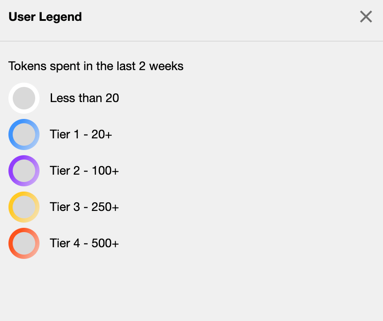
Colors based on spending
Everyone in your chat gets (if applicable) a color based on tokens spent in the last 14 days.
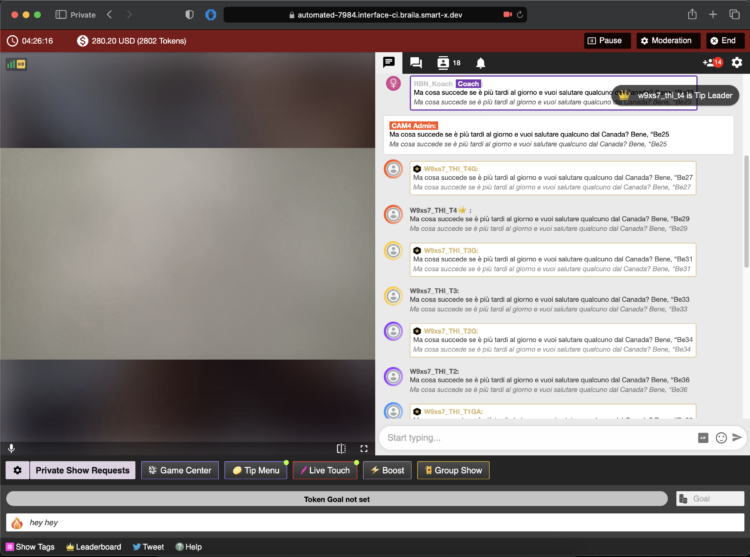
Whatever color you see — greet these viewers warmly and involve them in your goals. Often regular visitors are your next top tippers.
Badges and roles in the chat
In addition to colors, you see different icons and labels. This way you know directly who is speaking:
Token icon
Indicates that a viewer currently has tokens available.

Your messages
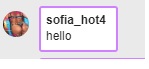
This is what your chat messages look like as a creator during the broadcast.
GOLD member
Viewers with a Gold subscription and extra features. Their status is independent of their token balance.

Moderator
Helpers you designate with tools like mute, kick and ban (only in your room).

Regular member
A registered CAM4 user without a Gold subscription.

Admin (CAM4 Crew)
Official CAM4 staff who provide support and oversee the rules. They never ask for your password.

Coach (CAM4 Crew)
Selected CAM4 coaches who support creators and provide training.

Smart use of newcomers

You immediately see when someone enters your room (like this example of a Gold member). Use that info wisely: greet new «colored» viewers, link your goals («120 more to Goal 2») and highlight 1–2 popular Tip Menu items. This increases your chance of tips — without pushing.
Pro tip: have a few short sentences ready to name thresholds (“80 more to Goal 1”), thank them for each unlock and name 1–2 menu-suggestions (e.g. 25/50/150 tokens).