Archivo de la categoría: Do not use

Lovense Toys

<section class=»cam4-article alignwide» lang=»nl»>
<p class=»preview-intro»>Make your shows more interactive: connect your toys to CAM4 and let tips feel real-time — the more tokens, the more intense the reaction.</p>

<style>
/* Basis */
.cam4-article{
–surface:#f5f6f8; –text:#1b1b1f; –muted:#6b6f7a; –brand:#ff7a00;
–radius:14px; –radius-sm:10px; –border:rgba(0,0,0,.08);
font-family:system-ui,-apple-system, Segoe UI, Roboto, Inter, Arial, sans-serif;
color:var(–text); line-height:1.6; background:transparent !important;
padding:0; margin:0; box-shadow:none !important; border:0 !important; border-radius:0 !important;
}
.cam4-article a{ color:var(–brand); text-decoration:none; }
.cam4-article a:hover{ text-decoration:underline; }
.cam4-article h1,.cam4-article h2,.cam4-article h3{ font-weight:800; color:#111; line-height:1.25; margin:0 0 12px; }
.cam4-article h1{ font-size:clamp(28px,4vw,40px); letter-spacing:-0.02em; }
.cam4-article h2{ font-size:clamp(20px,2.6vw,26px); margin-top:28px; padding-bottom:6px; border-bottom:2px solid rgba(255,122,0,.20); }
.cam4-article p{ margin:0 0 12px; }
.cam4-article ul, .cam4-article ol{ margin:6px 0 0 18px; }
.cam4-article .muted{ color:var(–muted); }
.cam4-article img{ max-width:100%; height:auto; border-radius:10px; display:block; }

/* Hero */
.cam4-article .hero{
background: radial-gradient(1200px 420px at 18% -10%, rgba(255,122,0,.10), transparent 60%),
linear-gradient(180deg, rgba(255,176,103,.06), transparent 40%);
border-left:6px solid var(–brand);
padding:clamp(16px,3.5vw,24px);
margin:0 0 18px;
}
.cam4-article .lead{ font-size:clamp(16px,2.2vw,18px); color:var(–muted); margin-bottom:8px; }
.cam4-article .stamp{ font-size:12px; color:var(–muted); display:block; margin-top:6px; }
.cam4-article .preview-intro{ margin:0 0 12px; }

/* Cards */
.cam4-article .cards{ display:grid; gap:12px; grid-template-columns:1fr; margin-top:10px; }
@media(min-width:720px){
.cam4-article .cards-2{ grid-template-columns:repeat(2,1fr); }
.cam4-article .cards-3{ grid-template-columns:repeat(3,1fr); }
}
.cam4-article .card{
background:var(–surface); border:1px solid var(–border);
border-radius:var(–radius-sm); padding:14px;
}
.cam4-article .card h3{
font-size:16px; margin-bottom:6px; position:relative; padding-left:10px;
}
.cam4-article .card h3::before{
content:»»; position:absolute; left:0; top:8px; width:4px; height:14px;
background:var(–brand); border-radius:2px;
}

/* Note */
.cam4-article .note{
font-size:12px; color:var(–muted); border-top:1px solid var(–border);
padding-top:10px; margin-top:14px;
}

/* Failsafes */
.wp-block-group .cam4-article, .cam4-article.wp-block-group{
background:transparent !important; box-shadow:none !important; border:0 !important; border-radius:0 !important;
padding:0 !important; margin:0 !important;
}
</style>

<header class=»hero»>
<h1>Connect Lovense toys to CAM4</h1>
<p class=»lead»>Make your show more engaging and increase your tips: with every tip, your toy reacts directly — you determine the intensity per threshold.</p>
<span class=»stamp»>Tip: put your thresholds (e.g. 25/50/150 tokens) visibly in your description or Tip Menu.</span>
</header>

<section>
<p>Interactive toys make your shows more dynamic and give viewers direct feedback. You control the experience — they remember it.<br>
<b>Please note:</b> Live Touch/FeelConnect is <u>not</u> suitable for Lovense. Always use the official Lovense software.</p>
</section>

<section id=»lovense»>
<h2>Lovense integration</h2>
<p><b>Lovense</b> works great with CAM4. Use the <b>Lovense Browser Extension</b> or <b>Lovense Stream Master</b> to sync tips with your toy.</p>

<div class=»cards cards-3″>
<div class=»card»>
<h3>Step-by-step</h3>
<ul>
<li>Update Lovense app and firmware.</li>
<li>Install the extension or Stream Master.</li>
<li>Connect your toy and make a test tip (small amount).</li>
</ul>
</div>
<div class=»card»>
<h3>Tips for the show</h3>
<ul>
<li>Link thresholds to intensity/duration (e.g. 25/50/150 tokens).</li>
<li>Pin your thresholds visibly and repeat them aloud.</li>
<li>Use goals + Tip Menu for rhythm and transparency.</li>
</ul>
</div>
<div class=»card»>
<h3>Multiple toys</h3>
<p>You can use multiple Lovense toys at the same time. Test combinations in advance and keep an eye on the battery status.</p>
</div>
</div>

<h3 style=»margin-top:12px;»>Supported models (selection, 2025)</h3>
<div class=»cards cards-3″>
<div class=»card»>
<h3>Vibrators & wearables</h3>
<ul>
<li>Lush 4, Lush Mini, Lush 3</li>
<li>Ferri (panty vibrator)</li>
<li>Ambi, Exomoon (bullet/lipstick)</li>
<li>Mission 2, Osci 3, Dolce, Flexer</li>
<li>Tenera 2 (clitoral suction)</li>
</ul>
</div>
<div class=»card»>
<h3>Rabbit & G-spot</h3>
<ul>
<li>Nora (all generations)</li>
<li>Lapis (strapless strap‑on)</li>
</ul>
<h3 style=»margin-top:10px;»>Masturbators</h3>
<ul>
<li>Max 2 (and older Max)</li>
<li>Calor</li>
<li>Solace / Solace Pro</li>
</ul>
</div>
<div class=»card»>
<h3>Prostate & penis</h3>
<ul>
<li>Edge 2 (and older Edge)</li>
<li>Gush 2 (and older Gush)</li>
<li>Diamo (cockring)</li>
</ul>
<h3 style=»margin-top:10px;»>Anal / Wands / Specials</h3>
<ul>
<li>Hush 2 (all sizes), Hush (older gen.)</li>
<li>Domi 2 (and older Domi), Gravity, Hyphy</li>
<li>Gemini (nipple)</li>
<li>Lovense Sex Machine (mini & full)</li>
</ul>
</div>
</div>
<p class=»muted»><b>Disclaimer:</b> This list is a selection. Compatibility may change due to new firmware or models. Always consult the official <a href=»https://www.lovense.com» target=»_blank» rel=»noopener»>Lovense website</a> for the most up-to-date information.</p>
</section>

<section>
<h2>Best practices</h2>
<div class=»cards cards-3″>
<div class=»card»>
<h3>Test in advance</h3>
<p>Test connection, intensities and thresholds before you go live. Have a short demo tip ready to let your audience experience the effect.</p>
</div>
<div class=»card»>
<h3>Communicate clearly</h3>
<p>Keep thresholds short and visible. Repeat them to newcomers and thank them for each trigger (name + what happens).</p>
</div>
<div class=»card»>
<h3>Boundaries & rules</h3>
<p>Stay within your comfort zone and CAM4 rules. Set time-outs/cooldowns if you want to control the pace.</p>
</div>
</div>
</section>

<section>
<p class=»note»>Quick recap: always use Lovense software (extension or Stream Master), test in advance, set clear thresholds and communicate them. Update apps/firmware and keep batteries ready. Consistency = more experience and more tips.</p>
</section>
</section>
Token Indicators + user badges

Get direct insight into who’s in your room: with the CAM4 Token Indicator you recognize big tippers, read the chat smarter and steer your show more effectively.

More insight with the CAM4 Token Indicator

See at a glance who recently tipped, recognize big spenders and focus your energy where it pays off — directly in your chat.


Tip: link your goals and Tip Menu to what your «colored» viewers show for maximum conversion.

What is the Token Indicator?

The Token Indicator shows in your CAM4-chat how much a viewer has spent in the last 14 days.
Color-coded names and badges (such as GOLD, Fanclub or Moderator) help you quickly assess how involved someone is.

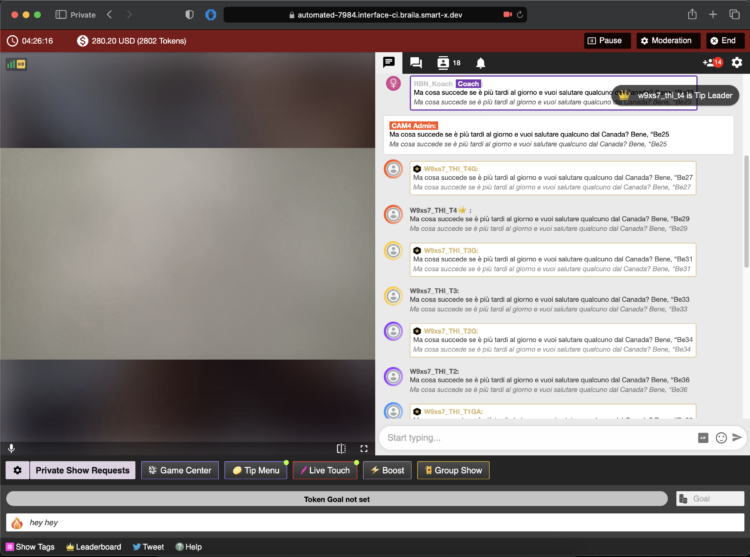
CAM4 chat with token indicator

Colors based on spending

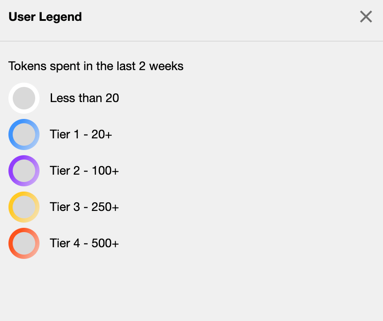
Everyone in your chat gets (if applicable) a color based on tokens spent in the last 14 days.

Color levels legend

Whatever color you see — greet these viewers warmly and involve them in your goals. Often regular visitors are your next top tippers.

Badges and roles in the chat

In addition to colors, you see different icons and labels. This way you know directly who is speaking:

Token icon

Indicates that a viewer currently has tokens available.

Token icoon

Your messages

This is what your chat messages look like as a creator during the broadcast.

Creator in chat

GOLD member

Viewers with a Gold subscription and extra features. Their status is independent of their token balance.

Gold member icoon

Moderator

Helpers you designate with tools like mute, kick and ban (only in your room).

Moderator icoon

Regular member

A registered CAM4 user without a Gold subscription.

Normaal lid icoon

Admin (CAM4 Crew)

Official CAM4 staff who provide support and oversee the rules. They never ask for your password.

Admin icoon

Coach (CAM4 Crew)

Selected CAM4 coaches who support creators and provide training.

Coach icoon

Smart use of newcomers

Binnenkomer melding

You immediately see when someone enters your room (like this example of a Gold member). Use that info wisely: greet new «colored» viewers, link your goals («120 more to Goal 2») and highlight 1–2 popular Tip Menu items. This increases your chance of tips — without pushing.

Pro tip: have a few short sentences ready to name thresholds (“80 more to Goal 1”), thank them for each unlock and name 1–2 menu-suggestions (e.g. 25/50/150 tokens).

Lovense Stream Master & Browser Extension

Quickly learn how to use your Lovense toys in your CAM4 shows — via Stream Master or with the Browser Extension.

Lovense Integration on CAM4

Choose what suits your setup: Lovense Stream Master (all‑in‑one) or the Lovense Browser Extension (Chromium). Let your toy react to tips and enhance the experience.

Tip: communicate clear thresholds (e.g. 25/50/150 tokens) and test a small “tip‑demo” before you go live.

Two ways to connect

Lovense Stream Master

All‑in‑one software/browser from Lovense, designed for live streamers. Combines streaming, cam/browser‑integration and toy‑linking in one tool — fewer separate parts needed.

Lovense Browser Extension

Extension for Chromium‑browsers (Chrome/Edge/Brave) that passes tip‑events to your Lovense‑toy, so it reacts in realtime to tips during your stream.

Key benefits

Less hassle

With Stream Master you don’t have to work separately with OBS + separate browser + extension; many functions are built in.

Direct response

The (Cam) Extension forwards tips to Lovense, so your toy vibrates or responds to agreed thresholds/amounts.

Stability

Stream Master is the recommended route and replaces the older “Lovense Browser + extension” mode for a smoother experience.

Disadvantages & points to note

  • The older “Lovense Browser with extension” will no longer receive updates since September 1, 2023 — Stream Master is recommended.
  • Always use Lovense Connect to pair your toy (the Remote‑app does not work for this).
  • The Extension works well on Chromium‑browsers; support on Firefox/Safari is limited/not available.
  • Performance may vary: high resolution + multiple apps can cause lag/crash/delay on weaker PCs. Test your setup.

Setup (short steps)

  1. Install Lovense Connect on your phone and pair your toy via Bluetooth in that app.
  2. Download/install Stream Master (or choose the Browser Extension in a Chromium‑browser).
  3. In Stream Master: add your cam‑site and set up video/overlays/toy‑integration.
  4. If you use the Extension? Install the correct extension, open the extension page before you start streaming.
  5. Do a test‑tip (small amount) to check if your toy reacts exactly as you expect.

Best practices

Test in advance

Update firmware/apps, check battery/connection and show a short demo‑tip to your chat to “learn” the thresholds.

Communicate thresholds

Keep your mapping simple (e.g. 25/50/150 tokens = light/medium/intense response) and pin them visibly in your description or Tip Menu.

Disclaimer & current info

Please note: Lovense regularly releases updates (firmware/software/compatibility). Experiences vary per hardware and internet. Always consult the official Lovense‑manuals and release notes before you go live.

Social Media

Smart social media = more visibility, more viewers, and a stronger community around your CAM4 shows.

Social Media — Use it to Reach a Larger Audience

Reach new viewers, build a loyal community, and drive traffic to your CAM4 room with a simple, consistent social strategy.

Tip: Schedule regular posts around your shows (teaser beforehand, live notification, thank you afterward) and make your CAM4 link visible everywhere.

How to Use Social Media

Post consistently! Variety and regularity keep you top-of-mind. More interaction = more reach = more chance that viewers will find your show.

Content Mix

  • Images, short videos, polls, and personal updates.
  • Behind-the-scenes and reminders for your next show.
  • Post teasers and direct followers to your full-content platform.

Planning

  • Make yourself a simple schedule: e.g., 1 post daily.
  • Announce shows well in advance + post a reminder.

Engagement

  • Respond to comments/DMs (short, friendly replies).
  • Ask questions and use polls to start conversations.

A Strong Bio

Your profile is your digital business card. Briefly tell who you are, your style, and where people can find you.

What to Include

  • 1 sentence about your vibe/style.
  • What viewers can expect.
  • Link to your CAM4 profile (Check the platforms rules)

Quick Writing Tip

Think like a fan: what would you want to read about your favorite creator? Use that as inspiration.

Ensure Clear Links

  • Put your CAM4 link in your bio and pin it where possible.
  • Repeat your link in show announcements and updates.
  • Use link stickers or “link in bio” where direct links are limited.
  • Every social platform is different as far as what they allow and don’t. Make sure that you are following their rules before adding your links and content.

Use Hashtags Wisely

Hashtags increase your discoverability. Use them consistently and appropriately for your content.

  • Examples: #cam4, #liveshow, #streaming + your own creative tags.
  • Mix broad and niche tags; don’t overdo it (quality > quantity).

Share Your Mentions

Are you being mentioned or promoted? Share it again (retweet/repost/share). Social proof increases your credibility and reach.

Key Platforms

X (x.com) / Twitter

  • Allows nudity/adult (within rules).
  • Ideal for show announcements and direct links.
  • Use hashtags, tags, and retweets for reach.

Instagram

  • Strict rules: no nudity; lifestyle/suggestive is possible.
  • Reels & Stories for engagement.
  • Link in bio to your CAM4 profile.

Facebook

  • Strict rules: no nudity.
  • Fan pages and community building.
  • Use a separate account for privacy.

TikTok

  • No nudity; large reach with short, creative videos.
  • Use trending sounds and hashtags.
  • Subtly refer to your other socials/CAM4.

Bluesky

  • Emerging platform (similar to X).
  • Relatively spacious, but rules may change.
  • Be active early and build an audience now.

Summary

Socials change, but the core remains: be visible, creative, and make it easy to follow you. Choose platforms that suit you, post consistently, and put your CAM4 link front and center — this maximizes your reach and income.

Quick recap: content mix + planning, strong bio, clear links, relevant hashtags, share social proof, and time your show moments smartly.

How many tokens should I ask?

We’ll tell you all about that here!

Setting Prices on CAM4

Knowing what to charge is just as important as what your show looks like. Clear prices help your viewers, and your wallet.

Tip: set your goals in advance and stick to them for more confidence and tips.

How do I know what to charge?

Start with your desired income and work backward. This keeps it realistic and achievable.

1) Determine your minimum

What is the minimum you want to earn per month to cover your fixed costs?

2) Determine your «comfortable» goal

What feels good to live comfortably? Not too high, but challenging.

3) Divide over your broadcast time

Divide your goal by the number of shows/hours. This gives you your goal per show.

Make your goals small — micro-goals keep the excitement going and give viewers quick «wins.»

  • Example: Do you want 1000 tokens (~100 USD) per show? Split into 4 goals of 250 tokens.
  • Goal 1: 250 tokens = nude
  • Goal 2: 250 tokens = oil show
  • Goal 3: 250 tokens = playing with yourself
  • Goal 4: 250 tokens = cumming (only if you feel good about it)

Pro tip: stick to your goals. If you keep changing them, it seems like you’re hesitating, viewers notice that immediately.

Quick triggers that always work

Make small, direct actions easily accessible. This encourages more frequent tipping.

  • Tongue = 1 token (someone tips 1 token → you stick your tongue out briefly, playful and fun)
  • «Flash breasts» for a set number of tokens

Use your Tip Menu

Avoid «what does this cost?» questions. Your Tip Menu makes it clear what you offer and at what price. You can find it in the bar under your broadcast screen (also adjustable from a private broadcast).

Butt 25 tokens popular
Breasts 25 tokens
Vagina 50 tokens
Tongue 1 token
Oil Show 150 tokens
Private DM 20 tokens
Whisper name 10 tokens
Song request 15 tokens
Dance (1 min) 40 tokens
Change clothes 60 tokens
Grab toy 80 tokens

Do’s

  • Be crystal clear about your prices and what you offer.
  • Split your show into small goals for constant progress.
  • Thank tippers and mention achieved goals out loud.
  • Test, evaluate, and adjust your menu based on what works.

Pay attention

  • Don’t change your room goal until it is hit
  • Stay within your boundaries and within the platform rules.
  • Be consistent: Always complete the actions that are tipped for.

Important: Adhere to local laws and platform rules. Only 18+ broadcasters and consent is always required.

Pay per Text

Earn from DMs: with Pay-Per-Text (PPT), you get tokens for messages and media — set it up, test it, and let your inbox work for you.

Pay‑Per‑Text on CAM4: Get Paid for Messages and Media

Set a fixed price on DMs and uploads, prioritize Fanclub members, and earn through — even when you’re not live.

Tip: communicate your PPT‑rates in your bio or Feed and pin a post with “how it works”.

Short Demo

Why Pay‑Per‑Text Works

  1. Get paid for your time — every message or media file can earn tokens, even that quick “hello”.
  2. Build your inner circle — give Fanclub members free or discounted DMs/media and charge a higher rate for the public — this builds loyalty.
  3. Full control — you determine prices and what counts (messages, media) and who you prioritize.
  4. Premium feel — paying fans get guaranteed attention and exclusive connection.
  5. Insight — see exactly what PPT yields and adjust your strategy.

Setup: Super Simple

Step 1: Basics

Make sure you are Broadcast Approved and enable Pay‑Per‑Text in your settings.

Step 2: While Streaming

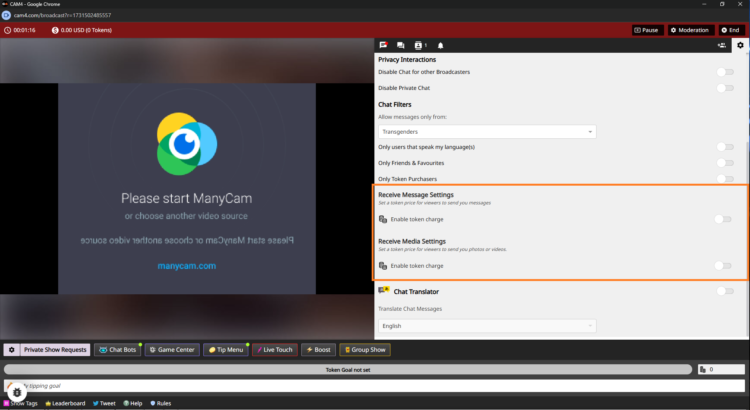
PPT instellingen tijdens stream

  1. Go live — log in and start your broadcast.
  2. Open chat‑settings — click on the gear (top right in your broadcast window) and scroll to the PPT‑section.
  3. Turn on pay per message — activate “Receive Message” and set amounts.
    Example: 5 tokens for public, 1 token for Fanclub (or free to stimulate sign-ups).
  4. Turn on pay for media — activate “Receive Media” with separate amounts.
    Example: 10 tokens for public uploads, 2 tokens for Fanclub‑uploads.
  5. No ‘Save’ needed — changes are applied immediately.

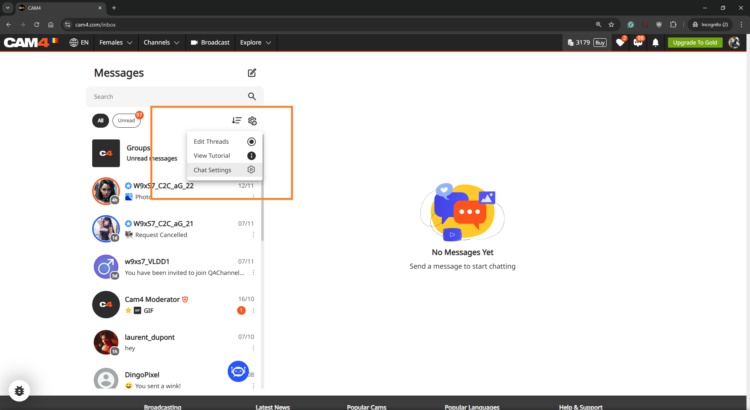
Step 3: Set Up in Messenger in Advance

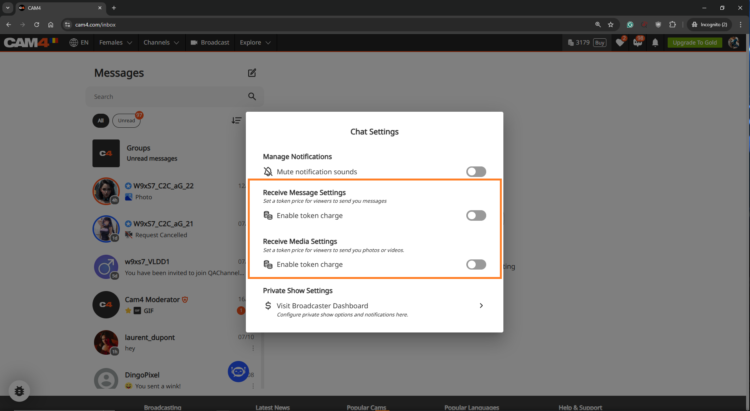
Want to get everything ready before you go live? Open the Messenger via the chat‑icon on your profile and set your PPT‑settings there. Everything is synchronized platform‑wide.

PPT in Messenger instellen
Messenger instellingen overzicht

Get the Most Out of Pay‑Per‑Text

Treat Fanclub as VIP

Give Fanclub free or discounted DMs/media and charge a higher rate for the public — this builds loyalty.

Experiment with Prices

Test different token amounts; find the sweet spot where income rises and fans remain engaged.

Test & Communicate

Check with a test account or ask a regular fan to test. Communicate your rates clearly to avoid surprises.

View Your Results

In your Broadcaster Dashboard, you can see per day what DMs and media yield. Check the Tip History tab and compare strategies: does media work better, or Fanclub‑messages?

Frequently Asked Questions

  • Can I only charge for media? — Yes. You choose whether to charge for messages, media or both.
  • What if a viewer has too few tokens? — They will receive a notification to buy tokens before the message or media is sent.
  • Are Fanclub‑messages free by default? — Yes, but you can adjust that. Set a few tokens or leave it free for conversion.

Summary: turn on PPT, distinguish between public and Fanclub, test prices, communicate clearly, and monitor your results. Consequence wins — every interaction becomes a chance to earn.

Goals & Tip Menu

Your guide to tipping options on CAM4

Tip menu and room goals — earn more by guiding your viewers

Earn more tokens by giving your viewers exactly what they want!
Your fans need to know what you’re willing to do and how to get you to do it. Keep your tip menu and your room goal separate by offering different things.

Pro tip: quick, fun actions keep energy high while tips also contribute to your larger goal.

Tip Menu — what is it?

The Tip Menu is a simple way to boost engagement. Create a list of actions with their token values so viewers know exactly how much it costs to see that action.

Broadcasters using a clear tip menu often see more interaction and higher show revenue.

Tip menu ideas

What you include is up to you — adjust based on what your audience likes.

  • Kiss-hands
  • Mention the viewer’s name or write it on your body
  • Flash breasts
  • Oil massage
  • Spanking
  • Twerk
  • Use toy for 15 seconds
  • Be creative — the sky is the limit!

Set up your Tip Menu

How to set it up

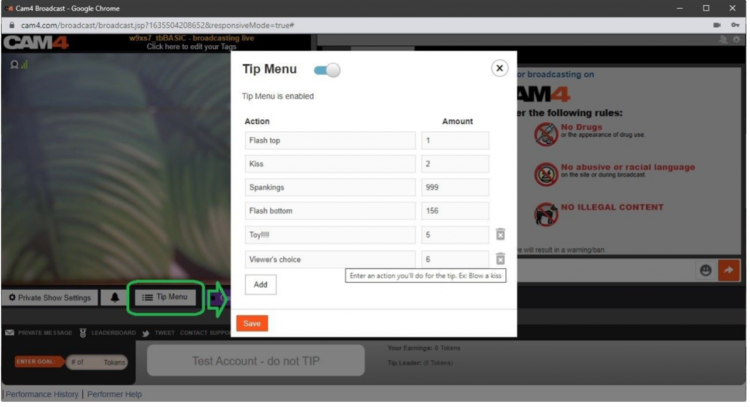
Find the Tip Menu near the Game Center and add your actions with the required tip amount.

Note: you must enter at least four (4) actions to activate your tip menu for viewers.

Setting up the tip menu

Manage & notifications

You can add up to 12 options. Use the trash icon to delete/update. Ready? Click SAVE to activate.

Once a tip menu is activated, you can’t remove it from your live show.

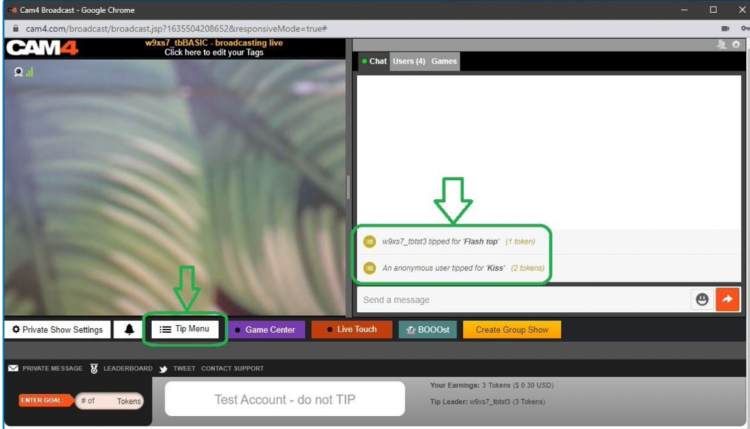
Your tip menu is automatically promoted in your chat so viewers know it’s active. When someone purchases an item, a special notification appears in chat.

Tip menu notifications in chat

Room Goal

Besides individual actions, you can also add goals. Goals are a joint challenge: viewers tip together to reach your target — once it’s hit, you perform the action.

Use goals for bigger actions, but start with micro-goals to maintain tension and give quick wins.

How to set it up

Once live, set your Goal! Click the white bar (right of the fire emoji) at the bottom of the broadcast window. Type the name of the action you will perform when the room goal is hit.

Then set the price: find the “Goal” box to the right of the grey bar that says “Token Goal not set” and add the amount in tokens.

Set your goal

Know your value

Think about what you want to do and how much you want to make before you go live. You don’t want goals that are too easy or too hard.

Example: want 1000 tokens (~$100 USD) per show? Split into four goals of 250 tokens.

  • Goal 1: 250 tokens = Naked
  • Goal 2: 250 tokens = Oil show
  • Goal 3: 250 tokens = Playing with yourself
  • Goal 4: 250 tokens = Cumming (only if you feel comfortable with that)

Pro tip: stick to your goals. If you keep changing them, it looks like you’re hesitating — viewers notice immediately.

SWAG Store – UK Only

New SWAG store: redeem your points for free goodies or convert them to CAM4 tokens — simple, fast and nicely organized.

The renewed SWAG store: points → goodies or tokens

Use your points for free products or convert them to CAM4 tokens. Everything in one simple flow — you choose.

Tip: you automatically save (up to 5% on top of your income) — check your points and redeem them.

CAM4 Pride SWAG

What is the SWAG store?

The SWAG store is the exclusive shop where you exchange points for goodies: sex toys, lubricant, CAM4 merch and more.

Save up to 5% on top of your income! With every earning, you automatically build up points for extras.

Discover the categories

Check out Cheetah Collection, SEX TOYS, Accessories, Classic Collection and European Products (scroll down a bit).

How does it work?

  1. Create account — click on the figure icon in the top right of the store to log in/register.
  2. Shopping — choose your favorites and add them to your shopping cart.
  3. Redeem points (rewards) — click on the gift icon in the bottom left to see your points balance.
    1 point = 1 USD. Click ‘redeem’ to create a voucher for the desired number of points; you will receive a unique discount code.
  4. Use discount code — add the code to your shopping cart; the amount will be deducted immediately.

Don’t forget to fill in your name in this form (so that we can easily find you):

Prefer tokens over products?

Also possible: exchange your points for CAM4 tokens. You can then simply have them paid out.

Why you don’t want to miss this

  • Choose free products with your points.
  • You decide when you order.
  • Everything clearly in one system.
  • Really feels like a reward for your work.

Go to the SWAG store

Note: availability may vary per region. Check your delivery options during checkout.

Extra promotion? UK only

Want to be in the spotlight? Upload your photos with your permission and let CAM4 promote you through our official channels.

Let CAM4 Promote You: Upload Your Photos (With Consent)

With your photos, we can promote you through our official channels — so you can reach more viewers faster and build a loyal fanbase.

Tip: upload multiple photos with different angles and poses for the best match with our channels.

How Does It Work?

Simply upload your latest photos via the form. We review them and prepare them for promotion. Do you have new content? Feel free to upload again. Want to switch faster? Send us a message.

Short Checklist

  • Recent, sharp images (good lighting, quiet background).
  • Mix of close-ups and full-body.
  • Indicate in the form where you want to be visible (opt-in/opt-out).

Where Will You Be Promoted?

Twitter / X

Optional — you choose whether you want to be visible here (adjustable in the form).

Telegram

For direct fans and followers who want to quickly see when you are online.

Push Notifications

Directly to CAM4 users for maximum visibility.

This way we ensure that your name and content reach as many people as possible.

Consent is Key

Nothing is shared without your permission. In the upload form, you indicate yourself what may and may not be used. You keep control — including a separate choice for Twitter/X.

You Decide

  • Choose per channel whether you want to be visible.
  • Adjust your preferences whenever you want by uploading again.

Respect for Boundaries

We only work with material that you have explicitly allowed and that falls within the platform rules.

Ready to Shine?

Click below to upload your photos and indicate how we may promote you:

➡ Upload Your Photos Here

We look forward to sharing your content and giving you even more visibility!

Please note: by submitting you agree to review and use according to your specified preferences. You can always change your preferences by uploading again.

Tips for Kicking Things Off Right

We’ll tell you everything here — short, clear, and applicable.

The secrets to becoming a TOP webcam model on CAM4

This article helps you get off to a flying start for more viewers, more interaction and more tokens — without unnecessary complexity. Focus on your Activity Feed and Fanclub for reach and stable income.

Tip: work with clear goals, a clear Tipmenu and a consistent posting cadence on your Feed.

1) Start here: account, verification & payout

Before you can go live: verify your age/identity and set up your payout in 10 minutes. Block countries/regions if necessary.

Account & ID‑check (2257)

All performers (18+) must be ID‑verified. This also applies to duos/groups — everyone on cam must be verified.

Get started with ID‑verification

Set up payout

Choose your payment method and check your details. Read how and when you will be paid.

Payout optionsSet it up now!

Practice online for the first time

Start without being immediately visible. This way you can safely look around and set everything up in peace

Read here how to do that.

2) Create an irresistible profile

Your profile is your landing page. Show in 5 seconds who you are, what you do and when you are live.

Bio

Short and powerful, with your vibe and boundaries. Add your broadcast schedule and a clear call‑to‑action.

Images

A clear profile picture + 2–4 recent photos that show your style. Avoid busy backgrounds.

Clarity

Put your Tipmenu and (micro)goals in your description so viewers know immediately how they can participate.

More help? How to create a strong profile page

3) Set goals and achieve them

Without a goal, your show feels “non‑committal”. Break your daily goal down into visible micro‑goals and communicate them clearly.

Example — do you want 1000 tokens (~100 USD) per show? Divide into 4 milestones of 250 tokens.

  • Goal 1: 250 tokens = naked
  • Goal 2: 250 tokens = oil‑moment
  • Goal 3: 250 tokens = solo
  • Goal 4: 250 tokens = closing moment (only if you feel good about it)

Stick to your goals. Changing constantly damages trust — and your tips.

Hint: the text in your goal bar is limited. Keep the mapping‑scheme simple (e.g. @250 → naked, @500 → oil, @750 → solo, @1000 → end).

More help? Goal & Tipmenu

4) Earn more with group shows and private shows

Group show = exclusive show with ticket for multiple viewers. Start after a maximum of ~15 minutes intro and thank each ticket holder audibly.

Private show = 1‑on‑1 per minute (spies can watch for a fee, without chat). Choose a rate that suits your offer and experience.

Starter rate

Many models start around 12–18 tokens/min.

C2C

Cam2Cam is more common around 18–32 tokens/min.

Transparency

Viewers see your price + local taxes, keep this in mind.

Pro‑tip: name in advance what makes private different/better than your public show.

Read more: Group shows •  Private Show options

Offline private shows (notifications)

Also let fans book when you are not live. Turn on OPS‑notifications and accept when it suits you.

Explanation: Enable Offline Private‑notifications

5) Activity Feed & Fanclub 

Activity Feed: post short updates, teasers and show‑announcements outside your live‑hours. Mix public (reach) with Fanclub‑only (value).

Fanclub: offer benefits that you can sustain (exclusive posts, early access, monthly shout‑out). Choose a monthly price that suits your rhythm.

Want to know more? Activity Feed & FanClub

6) Tipmenu (keep it simple and visible)

Put 6–10 fixed items in your profile description and repeat them verbally during your show. Link to your goals where possible.

Small tease 25 tokens quick boost
Pose / close‑up 50 tokens
Dance / hype‑moment 100 tokens
Wheel spin / mini‑game 150 tokens
Oil‑moment 250 tokens
Solo‑highlight 500 tokens
Group show ticket variable
Private show per minute

Need more help? How many tokens can I ask?

7) Pay-Per Text

Pay per Text: earn from DMs without negotiating

How to use it

Set a fixed price per private message and mention this in your bio or Feed. Use it for short questions, personal responses and quick requests — within your boundaries and platform rules.

Price indication

Start simple and test: many models start between 1-2 tokens/message. Increase when busy, decrease for more volume.

Useful example sentences

  • “Want a personal shoutout? Pay per Text is on.”
  • “Ask your question in DM — 1-2 tokens per message.”
  • “Fanclub gets priority with Pay per Text.”

More info: Earn more with Pay per Text •  All about messenger

8) More viewers to your shows

  • Thumbnail: fresh setting, good light, expression. Avoid the “just a bedroom”‑look.
  • Description: short, unique and with a clear invitation (what do you want to happen NOW?).
  • Hashtags: 3–5 strong tags is often enough.
  • Rhythm: stream at fixed times and announce via your Feed.

Read more: Maybe outside? •  Schedule Shows

9) Interactive toys

Increase engagement and tip‑frequency with interactive toys (e.g. Lovense). Announce thresholds (e.g. “at 200 tokens: intensity up”).

More info: Which toys can you use? •  How do you connect it?

10) Games

Use Token Keno, Spin the Wheel and Roll The Dice for extra excitement and income. Let viewers bet tokens and link creative rewards to outcomes (assignment, piece of clothing off, special interaction).

Need more help with games? All CAM4 games

11) X/Twitter Connect & Social Media

Use X/Twitter for announcements, clips/teasers and community‑building. Share your affiliate‑link smartly.

Tip: plan posts around your shows (morning‑announcement, reminder 1 hour in advance, thank you afterwards).

12) Chat‑indicators: badges, colors and token activity

Who do you see at a glance?

  • Gold/fans: special color/badge — greet quickly, involve them in goals.
  • Moderators: marked — are there to help, but be careful those rights are not for everyone.
  • Top tippers: stand out — mention them audibly with every tip.
  • CAM4 Crew: account managers/coaches etc have clear visibility.

How to read and use indicators

  • Colors/badges show role and membership; the ring around someone’s icon = recent spending (14 days).
  • Does the ring stand out? Invite specifically: achieve micro‑goal or choose 1–2 menu‑suggestions (e.g. 25/50/150 tokens).
  • Use a fixed sentence: “120 more to go until Goal 2 — thanks to [name] for the boost!”
  • Make rewards audible: thank you at every threshold (name + what unlocks).

Want to know more? Explanation about chat‑indicators

13) Protect yourself & moderate

Privacy

Be careful with personal data. Protect your privacy

DMCA – recordings

Know what to do if your show has been recorded. Broadcast recorded — what now?

Help!

If you really can’t figure it out, our support is available 24/7!

Also interesting: Banning & ModeratorsBlock countries & provinces