Category Archives: Do not use

UK DAC7 – Important Information on Data Collection for Payments

Although the UK is not subject to DAC7, we are updating our processes to align with global standards, including similar European regulations like DAC7. These changes mean we need to collect additional information from broadcasters/creators to process payments. Providing accurate information is essential to avoid issues with payouts.

Why are we collecting this information?

To comply with international transparency standards, we are required to gather specific details from our users. These regulations aim to prevent tax fraud and ensure payments are processed correctly. While DAC7 applies to the EU, aligning with these standards allows us to maintain a consistent and secure platform for all users, including those in the UK.

What information do we collect?

We may request details such as:

  • Your full name
  • Your address
  • Your National Insurance Number (NIN)

These details are necessary for compliance with tax regulations and transparency standards. Your information will only be used for these purposes and shared with tax authorities as legally required.

What is a National Insurance Number, and where can you find it?

Your National Insurance Number (NIN) is a unique identifier issued by the UK government for tax and social security purposes.

You can find it on:

  • Payslips
  • Tax return documents
  • Your personal tax account on the HMRC website
  • National Insurance card (if issued)
  • Official letters about tax, pensions, or benefits

What if you don’t have a fixed address?

If you’re traveling or don’t have a permanent residence, determining your tax residency can be more complex. Generally, your tax residency is the country where you spend more than six months (183 days) in a year. We recommend reviewing the tax laws of the countries where you’ve stayed to identify your tax residency.

Does this mean authorities will know what you do on the platform?

No. We only report payment transactions based on the information you provide. The nature of your activities on the platform will not be disclosed.

What happens if you don’t provide the required information?

Starting January 2025, providing this information will be mandatory to continue receiving payments. If the required details aren’t submitted, we won’t be able to process your payouts. Submit your information on time to avoid any interruptions.

When and how do you submit your information?

We will begin collecting this information in December. Once you log in, you’ll receive instructions on how to securely submit your details.

What happens to your information?

Your information will be used exclusively to comply with regulations like DAC7 and similar global standards. It will be shared with relevant tax authorities as required by law and handled in accordance with applicable privacy laws.

Questions?

If you have any questions or need assistance, contact our support team at payments@cam4.com or consult the UK government.

Earn more with Pay-Per-Text

Your Guide to Earning Big with Pay-Per-Text on CAM4!


Hey Creator, Ready to Boost Your Earnings?

Imagine this: every message you receive or media file you get from your fans directly puts tokens in your pocket. Sounds amazing, right? That’s exactly what Pay-Per-Text (PPT) on CAM4 does for you. It’s time to take control of your chat, maximize your earnings, and create deeper, more meaningful connections with your fans. Let’s dive in and get you set up for success!


Why Pay-Per-Text Is a Game-Changer for You

  1. Get Paid for Your Time
    Every message or media file your fans send is now a chance to earn. Yes, even that quick “hello” can add up to tokens in your account.

  2. Build Your Inner Circle
    Want to make your Fan Club the hottest spot? Reward members with free or discounted interactions while charging others a premium. It’s a win-win!

  3. Total Control, Your Way
    You decide how much to charge and for what. Want to charge only for photos or prioritize Fan Club messages? The choice is all yours.

  4. A Premium Experience for Fans
    Fans love feeling special! By charging for messages and media, you’re offering them guaranteed attention and an exclusive connection with you.

  5. Track Your Success
    CAM4 makes it easy to see exactly how much you’re earning from PPT, so you can fine-tune your strategy and watch those tokens roll in.


How to Set Up Pay-Per-Text (It’s Super Simple!)

Step 1: Let’s Get Ready!

First things first, make sure you’re Broadcast Approved and that the Pay-Per-Text feature is enabled in your settings. Easy!

Step 2: Set Up While Streaming

  1. Start Your Broadcast
    Log in and go live!

  2. Access Your Chat Settings
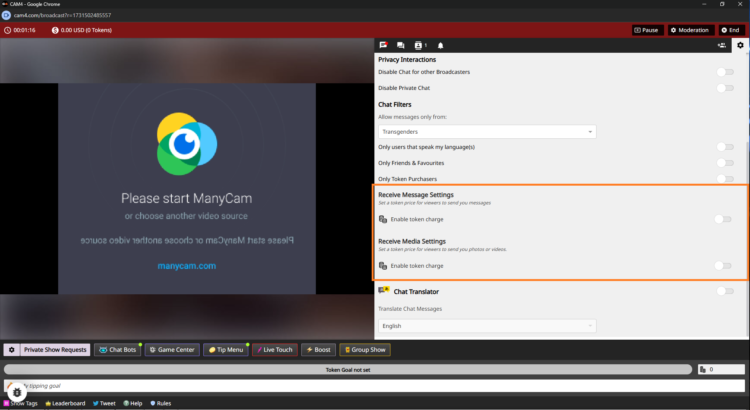
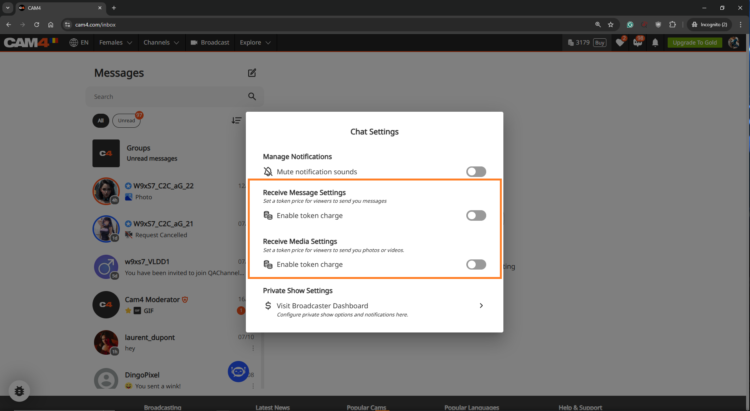
    Click the cogwheel icon (top-right corner) in the Broadcast Window. Scroll down to find the PPT options.

  3. Turn On Token Charges
    Flip the toggle for Receive Message Settings to start earning tokens for public and Fan Club messages.
    Example: Set 5 tokens for public messages and 1 token for Fan Club members (or keep it free to encourage signups).

    Do the same for Receive Media Settings to earn from photos and videos.
    Example: Charge 10 tokens for public uploads and 2 tokens for Fan Club uploads.

  4. Let CAM4 Do the Rest
    No need to hit save—your settings are updated instantly.

Step 3: Pre-Configure in the Messenger Interface

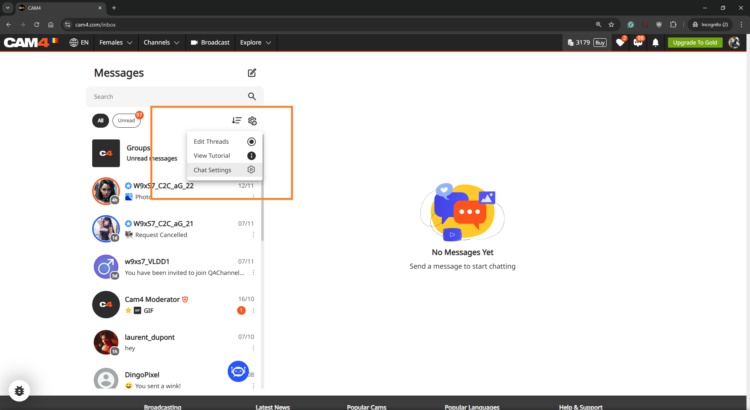
Want to set things up before you go live? No problem! Head to the Messenger Interface via the Chat Icon on your profile. Adjust your PPT settings, and they’ll sync across the platform.

Make the Most of Pay-Per-Text

  • Treat Your Fan Club Like VIPs
    Let’s be real: your Fan Club is your squad. Offer them free or reduced-rate messages to build loyalty while charging higher rates for everyone else.

  • Experiment with Token Rates
    Try different pricing to see what works best for your fans. The sweet spot is where your earnings soar, and your fans stay engaged.

  • Test It Out First
    Use a test account or ask a trusted viewer to make sure your settings work perfectly before going live.

  • Be Clear and Upfront
    Fans appreciate transparency. Display token charges clearly so there are no surprises—just good vibes.


Watch Your Earnings Grow!

Head to your Broadcaster Dashboard to track every token you earn from messages and media. It’s all broken down for you under the Tip History tab, so you know exactly where your success is coming from.

Feeling curious? Check out the Tipping Reports to see which strategies are working best. Is it media uploads? Fan Club messages? You’ve got all the insights at your fingertips.


FAQs (Because We Know You’ll Crush It!)

  • Can I charge for just one thing, like media?
    Absolutely! You’re in control, so choose what works for you.

  • What if a viewer doesn’t have enough tokens?
    No worries—they’ll get a prompt to buy more before their message or media goes through.

  • Are Fan Club messages free by default?
    Yep, but you can change that. Charge a little or keep them free—it’s totally your call.


Pay-Per-Text isn’t just a feature—it’s your gateway to more earnings, more connections, and more control over your time and energy. Ready to turn every interaction into an opportunity? Let’s do this! Your fans are waiting, and those tokens are yours to claim. 💎


~That’s all for this lesson!

Happy Camming!

Love, Your Coaching Team!

Are your Offline Private Show (OPS) Notifications on?

Never miss a private show request, even when you’re offline or away from your computer. With Offline Private Show (OPS) notifications, your viewers can make private show requests and view your schedule at any time!

This guide will help you get started with ‘Offline Private Shows’ (OPS) and setting up your notifications. By leveraging these powerful CAM4 features, you can keep your audience continuously engaged and build lasting relationships- even outside of your regular online shows.

What are the Benefits of using OPS Notifications?

Notification Preferences – Personalize your alerts and select the channels where they’ll be delivered in real-time. 

Customized Pricing – Set your desired Private Show pricing with the ability to allow Cam2Cam and Spying. 

Improved Schedule Visibility – Make your Private Show schedule and availability visible to your fans… it’s super easy to configure and is shown right on your profile- Set up to 3 different time slots.

How do I find the OPS settings?
Once logged into your CAM4 account navigate to your Broadcaster Dashboard , then click on “Private Show Settings” from theBroadcaster Tools” menu on the right.

IMPORTANT: The first thing to note is that the OPS Notifications function is defaulted to OFF, therefore as a creator you will need to activate this in your settings by sliding to ON.

Want to understanding your Offline Private Show (OPS) Notifications? 

BROWSER NOTIFICATIONS

These notifications are pop-ups that appear on your screen, regardless of which website you are on.  If your browser (ie. Safari, Firefox, Chrome) is open, a notification will be shown.   

To enable, simply toggle the “Browser Notifications” option to ON.

iOS users this feature requires additional steps to be enabled. You must add the web app to your home screen and access it from there to enable notifications.

Installing Web App

  1. Open your Web browser and go to CAM4.com
  2. Click the download icon at the bottom of your browser. 
  3. Select “Add to Home Screen from the menu

  1. Rename the icon or just press “add”
  2. The C4 icon will appear on your home screen 

C4 BROADCASTER APP NOTIFICATIONS

These notifications are sent through the C4 Broadcaster App keeping you informed about your private show requests directly to your mobile device.

To enable, simply toggle the “C4 Broadcaster” option to ON.

EMAIL NOTIFICATIONS

These notifications are sent directly to an external email address, ensuring you have a record of the request in your inbox.

Once enabled, check your email preferences to ensure the “Receive Notifications Relating To Your CAM4 Account” option is ON.


SMS NOTIFICATIONS

These notifications are sent as a text message to your mobile phone whenever a private show request has been made. 

To enable, simply “Add Your Mobile Number” in the settings.

Note: if Two-Factor Authentication (2FA) is on, the mobile number MUST MATCH  the one used for 2FA.

SET PRICING
This feature allows you to set your Private Show pricing either per minute or as a fixed rate. You can configure your “Price Per Minute”, “Minimum Timeframe”, “Spy Per Minute Rate”, and “Cam2Cam” settings here.

3 USEFUL TIPS TO REMEMBER

TIP 1: GET NOTIFIED MULTIPLE WAYS- You can activate one or more notification channels at once, enabling you to receive alerts through various methods and stay informed no matter what you’re doing or where you are.

TIP 2: CUSTOMIZE YOUR AVAILABILITY- Set the times when you are open to accepting Private Show requests.  This will help boost engagement and more private shows coming your way..  

TIP 3: SHOW YOUR SCHEDULE ON THE PROFILE & MESSENGER-  Setting your schedule will show on your profile page and also on  your messenger, ensuring viewers can easily see your availability., 

With the right settings in place, you can look forward to a more organized, responsive, and profitable PRIVATE SHOW experience.

👉 If you have any questions, feel free to ask the Coaching Bot 👈

NEED MORE HELP?

Read our FAQ’s or join one of our regular Coaching Sessions every Tuesday & Thursday at 10am EST for useful insights and to meet other creators.

Alternatively, please reach out to CAM4’s Support Team via the chat bubble in the bottom right hand corner of CAM4, or by email at support@cam4.com

One final thing… The content of Private Shows are subject to CAM4’s creator rules, and all persons on your cam must be approved by CAM4.

~That’s all for this lesson!

Happy Camming!

Love, Your Coaching Team!

Cam Crawl

Looking for new ways to be discovered on CAM4?

Every Thursday from 6pm to 7pm EST, Laura will broadcast live with split-screen magic, allowing her viewers to sit next to her in real-time.

Navigating from room to room, Laura will guide her viewers showing them exactly how to interact with the most delicious creators from North America and around the world!

You could be one of them!

Gain new fans each week and be discovered for new possibilities with CAM4.

The task is to catch Laura’s eye during the crawl… Simply login to CAM4 on Thursdays and be streaming  live between 6pm – 7pm EST. Make sure  you stream the greatest show you have to offer.

That means:
Good lightingGet out of the dark!
Engaging with your viewersShe wants to see you on cam.
HD Quality CamNo grainy streams
Nice cam roomTake pride in the space around you, it makes a big difference.

CAM4’s exclusive Cam Crawl provides opportunity for our creators to be discovered and improves the tipping habbits of our users.

By shining a spotlight on new talent and encouraging viewers to engage with them, the crawl is working to help cultivate a community of appreciation and support.  Showcasing creators and the wonderful content the create is our goal.

Hope to see you on the next Cam Crawl!


~That’s all for this lesson!

Happy Camming!

Love, Your Coaching Team!

Navigating Direct Messaging

We have heard your feedback and elevated your DM experience.

To support you as you become familiar with messenger’s great features, we have provided you with an easy to follow guide to all of the Chat and Media functionality, and so much more!

The first thing you’ll notice about this new communication tool is how much easier it is to use, as well as it providing far more than just the ability to chat!

BENEFITS OF USING CAM4 MESSENGER

  • Increased Privacy – Create connections with only the users that you choose though chat and Private shows.
  • Filtering Options – Easy access to important information and content.
  • MonetizationEarn tokens while chatting through tipping, selling content, gifting, and Private shows.
  • Mobile Friendly – Now it’s easy to use our new Messenger tool on the go!

CHAT UPGRADES

As well as the common features, such as saving, replying, deleting, adding Gifs, and Emojis,  you now have additional tools to make messages stand out and have control over who messages you. Let’s break down a few of them for you.

WINKS
Wink’s are sent from Non-gold users who would like to chat with you. The ability to type in the chat will only be enabled once you reply to their wink.

Gold users can message anyone they want – No winks needed!

SELL CONTENT

With this feature within the Media functionality of Messenger, you can add content from your ‘Media’ directly into the chat, allowing the user to purchase and enjoy.

FAN CLUBS
You can share your Fan Club Content via the chat. This will allow you to promote your ‘Fan Club’, and the user can simply click on the link to view it. They will then be prompted to join, and once they have, the content will be visible to them in the chat.

HOST A PRIVATE SHOW

Offer Private Shows at any time through Messenger!

Don’t worry about going live on your profile, your users can now request a Private Show directly with you from Messenger! 

This super function allows both creators and users to enjoy some alone time, without the possibility of others spying. Turn on Cam2Cam or keep it a 1-way private show – whichever you both want to explore.

You can start the Private Show yourself by simply clicking on the camera icon at the top right of the chat window – another great feature to make the process quick and easy.

Remember – once the show has ended, the user can rate the show, a great way to gain feedback. Also, the earnings gained from the show will appear in the chat, giving you instant insight without having to review your account.

SAFETY AND INFORMATION

REPORTING USERS
Fill out and submit a report form to our support team to investigate. Note: this will not remove the user’s ability to contact you.

BAN USERS
This facility will mean that the user will be removed from your chat and also banned from your shows. The user will still be able to see the chat, as well as any media they have purchased from you, but they won’t be able to contact you. Additionally, your username will no longer appear in any searches by the user.

CHAT BOT “SPARK”
Receive answers right away to questions you have about messenger, your shows, the site, and rules right from your chat window!


ORGANIZING WITH FILTERS

Use filtering to keep your messenger nice and organized. Grouping and saving important messages is a breeze and you can also select and delete multiple messages to manage your inbox!

EDIT THREADS
Remove unwanted chat session in bulk so your inbox isn’t cluttered with old DMs. 

MEDIA
All of the media you send or receive in the chat will appear in the Media Tab. The content can be sorted by ‘Unlocked’, ‘Photos’ and ‘Videos’, making it super easy to find! 

SAVING
You fans send you important information that you may want to easily find later. While in your chat with them, click on the “Saved” tab to see all messages you saved from that user. Messages and content that you save, will appear chronologically.


We think the new CAM4 Messenger is the perfect way to enhance the interface between creators and users, making it easier for everyone to stay in touch.

👉 If you have any questions, feel free to ask the Coaching Bot 👈

NEED MORE HELP?

Read our FAQ’s or join one of our regular Coaching Sessions every Tuesday & Thursday at 10am EST for useful insights and to meet other creators.


~That’s all for this lesson!

Happy Camming!

Love, Your Coaching Team!

Refer a Friend UK & AU

UK & AU ONLY


Invite your male and female friends to become broadcasters and both earn a bonus! Here’s how it works:

1. Assist your friend in creating a CAM4 account.
2. The new performer signs up with us and provides us with your username.
3. The new performer can also participate in our bonus program and can earn up to $600 USD in bonuses over 12 weeks!
4. Once the new performer has broadcasted for a minimum of 20 hours and earned at least $100 USD, you will receive a $50 USD bonus! (This does not mean they have to earn $100 within the first 20 hours)

Rules:

– The bonus is only awarded for new performers who have not been active on CAM4 before.
– The new performer must broadcast under a British flag and speak English.
– The new performer must provide your username to us to participate in the Friend Bonus. This can be done with Julia through the chatbox on the website or via julia@cam4.com.
– Any bonuses received do not count towards the new performer’s minimum earnings of $100 USD.
– You are welcome to give tokens to your friend, but these also do not count towards the minimum earnings of $100 USD.

Start-Up Program (USA & CAN Only)

Earn an additional $400 in the first 8 weeks on Cam4 – Signing up NOW for our Start-up Program.

We are making it easier for you to get started on CAM4.  This bonus is only available to NEW CREATORS in their first 8 weeks to help your earn more, while you build up your fan base. 

HOW DOES IT WORK? It’s super easy!
We will match your tips up to a max of $50 each week, that’s it!

Here’s how you can take part:
Step 1: Send an email to join@cam4.com, include “START-UP PROGRAM in the subject your CAM4 Username.

Step 2: CAM4 staff will confirm your start date and add you to the program will be supporting you through your 8 weeks.

Important! Requirements for participation:

  1. Your ID on file with is is North American
  2. New to CAM4 in the last 60 days. Having multiple accounts will disqualify you.
  3. You have not blocked Canada or the USA (you can block your own province/state)
  4. You acknowledge that attempted fraud can lead to immediate exclusion from the this program and possibly even from CAM4 as a whole.
  5. Moving tokens back and forth between accounts to achieve your bonus is not allowed and you will be removed from the program if you are caught doing it.
  6. Only tips earned from viewers will be counted towards the weekly total that we will match.
  7. You can only be a part of one incentive program at a time.

Bonuses will be credited to accounts no later then end-of-day Tuesday the following week. 

PRO TIP
CAM4  offers FREE live coaching in North Americia every Tuesday & Thursday at 12pm EST. Join one of our classes with Coach Vanna Faye so she can teach you how to make the most of our platform and answer any questions you may have.

Token Indicators

More insight in what your viewer might spend 
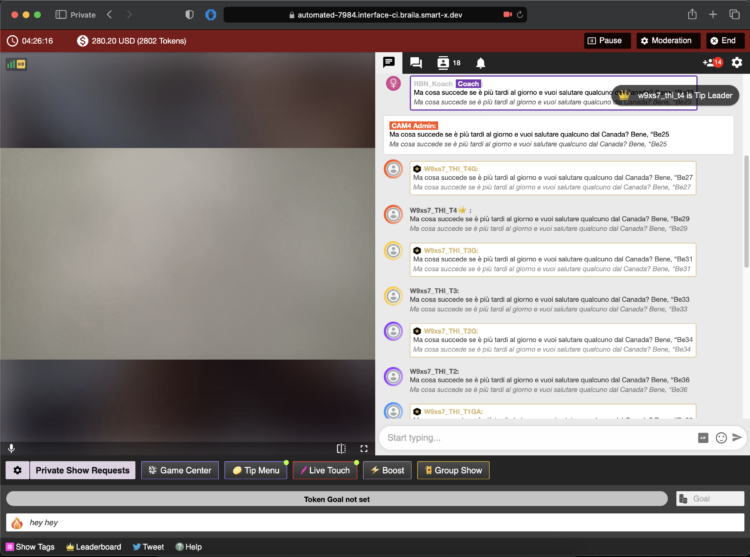
As a Broadcaster on CAM4, it’s always good to keep track of your tippers spending behavior to prioritize your attention during a live show. Get ready to see just how big of a spender your viewers may be with the brand new Token Indicator. Conveniently integrated within your CAM4 chat, this tool now allows you to identify viewers tipping habits !


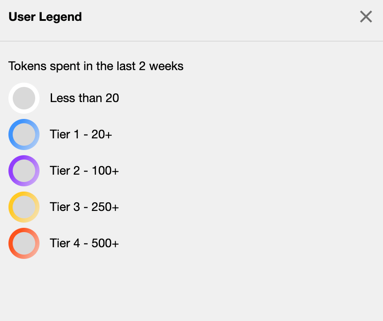
Viewers in your chat will be indicated by color coded usernames representing 5 different token tiers alongside their corresponding viewer type (Gold Member, Fanclub Subscriber, Moderator) showing you what they have spent in tokens over the last 2 weeks


TIER 1: WHITE = Has not spent any tokens in the past 2 weeks

TIER 2: BLUE = Has spent at least 1 token but not more than 19 in the past 2 weeks

TIER 3: PURPLE = Has spent at least 20 tokens but not more than 99 in the past 2 weeks

TIER 4: YELLOW = Has spent at least 100 tokens but not more than 500 in the past 2 weeks

TIER 5: ORANGE = Has spent at least 500 tokens in the past 2 weeks

THIS IS WHAT YOU WILL SEE…


Whether they are blue, purple, yellow, or orange, be sure to show them some extra love and attention while visiting your room. You never know when a regular viewer may become your next big tipper !!! 

~That’s all for this lesson!

Happy Camming!
Love, Your Coaching Team!

What is Chat Bot?

NEED A HAND ?
CAM4 is excited to introduce a brand-new function within your CAM4 broadcasts. With our NEW ChatBot tool you will be able to multitask while giving your viewers that special chat room experience unique from other broadcasters.


WHAT IS A CHAT BOT ?
A ChatBot is a conversational tool that can assist your LIVE chat with ease and free up those busy hands of yours… think of it as your very own personalized moderator. By utilizing the ChatBot function during your CAM4 broadcast it will help automate messaging so you can remain focused and give your audience your undivided attention.

A few examples and benefits of what a ChatBot can be helpful with include :

WELCOME BOT
Generate a specific “Welcome Message” visible to NEW viewers who join your room. Note, this message has a 5 second delay when someone comes in.


TIPPING BOT
Send out aThank You” message when a certain tip amount has been received or a token goal achieved. Including different chat responses for different token thresholds

TIMED / AUTO NOTIFICATION BOT  
Create a set of predefined messages that will be displayed in your Public Chat at predetermined time increments. Note, atleast 3 messages from viewers must be sent in the chat for these messages to begain.

Examples
Updates on Room Goals
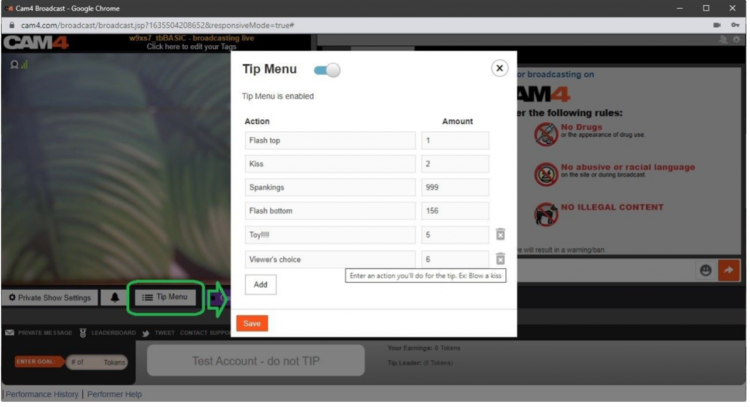
Tip Menu changes
Fan Club / My Shop offerings and discounts
Notifying your audience of Room Rules
Promoting Social Media handles
Promoting Wishlists (CAM4 Swag Store, Amazon, Stock Room, etc)
Upcoming shows and cam Schedule

With an endless list of customizable options and 3 unique bot commands, CAM4’s NEW ChatBot feature is a sure way to keep your show flowing, all while doing the work for you and keeping your viewers in the loop and their tokens tipped.

~That’s all for this lesson!

Happy Camming!
Love, Your Coaching Team!

Level UP Program

GAME ON !!!

Grab onto your joysticks and get ready to Level Up each month!

This program will have you feeling like a boss… From the 1st of each month we are challenging YOU with the opportunity to make an extra $2K+.

ACHIEVEMENT LEVELS

LEVEL 1 – $100 = $10
LEVEL 2 – $200 = $20
LEVEL 3 – $300 = $30 + Bonus CAM4 Shirt
LEVEL 4 – $400 = $40
LEVEL 5 – $500 = $50 + Bonus Creator Pack
LEVEL 6- $750 = $50
LEVEL 7 – $1000 = $100
LEVEL 8 – $1500 = $100 + Lovense Toy
LEVEL 9 – $2000 = $100
LEVEL 10 – $3000 = $200
LEVEL 11 – $4000 = $300
LEVEL 12 – $5000 = $1000

UNLOCK EACH  BONUS AS YOU GO!

The more you earn >> the more levels you unlock >> the more bonuses you collect along the way!  

Creator Pack from the Swag Store
Female Swag ($100 Value)


Male Swag ($100 Value)

Please note: The creator pack changes monthly. The swag shown in the images above does not reflect the exact products available to you. 

BUT WAIT… THERE’S MORE

As you unlock each $$$ level there are additional prizes and stretch goals that can be achieved along the way, from CAM4 Swag to LIVE TOUCH connected toys by Lovense .

BONUS ROUND
“Top Up’s”

Creators who earn $300+ can win 1 of 5 additional randomly selected  “top ups” that range between $20 – $100  each month.

Choose your destiny on your quest to beat your best score with the NEW CAM4 Level-Up Program !!!

RULES

  • Creators MUST be 2257 approved
  • Creators MUST live in North America
  • Creators MUST broadcast a min of4 hours
  • Transferring tokens between accounts is not allowed
  • Earnings are counted from 12:00am ET the first day of the month till 11:59pm ET on the last day of the month
  • Creators MUST sign up each month to take part in the program
  • Top Up’s are rewarded through random draw
  • Each Swag Store Prize can only be redeemed ONCE.
  • You can only be a part of one incentive program at a time.

Any bonuses will be credited to the creators account within the first 7 days of the following month.