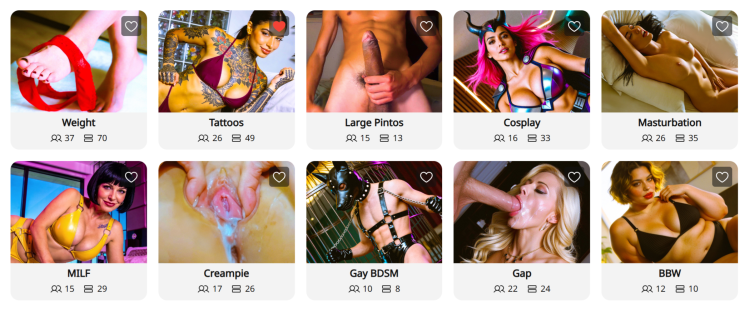
Páginas de Nichos do CAM4: tudo que os modelos precisam saber

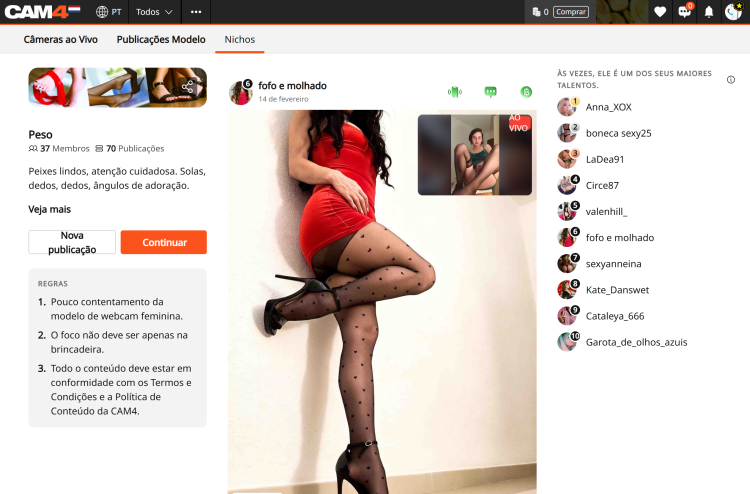
O que são Nichos? As páginas de Nichos são espaços comunitários especializados no CAM4 organizados por interesses específicos — como BDSM, Pés ou BBW. Pense nelas como hubs dedicados onde você pode se conectar diretamente com usuários que estão procurando especificamente o tipo de conteúdo único que você oferece.


Por que os Nichos mudam o jogo para a sua descoberta:

  • Exposição direcionada: Em vez de competir no diretório geral, seus posts e transmissões ao vivo aparecem em comunidades dedicadas ao seu estilo ou fetiche específico.
  • Prévia ao vivo nas publicações: Quando você está transmitindo ao vivo, qualquer post que você tenha feito em um Nicho mostrará automaticamente uma prévia do vídeo ao vivo. Isso permite que usuários navegando pelo feed do Nicho entrem diretamente na sua sala.
  • O Leaderboard: Cada Nicho possui um Leaderboard que mostra os 10 principais contribuidores com base no total de curtidas. Aparecer nele oferece grande visibilidade e ajuda você a se tornar uma autoridade reconhecida dentro dessa comunidade.
  • Aba “Cams” dedicada: Os Nichos possuem uma aba específica “Cams” que mostra apenas modelos ao vivo que são membros daquele Nicho. Isso facilita para que os espectadores encontrem você quando estão procurando conteúdo específico.

Como participar e se conectar:

  1. Encontre seu Nicho: Clique na aba Nicho na barra de navegação superior para navegar pelo diretório.
  2. Seguir para participar: Você deve clicar em “Seguir” em uma página de Nicho para se tornar membro.
  3. Compartilhe conteúdo: Depois de se tornar membro, clique em “Criar Post” para compartilhar fotos ou vídeos da sua Biblioteca de Conteúdo ou do armazenamento local.

    OBS: Todos os posts em Nichos são gratuitos para visualizar, tornando-os o teaser perfeito para atrair usuários para seu conteúdo pago ou sua transmissão ao vivo.
  4. Interaja: Interagir com comentários em seus posts ajuda a construir uma comunidade fiel dentro do Nicho.
  5. Selecione a opção “Também Postar no meu Feed de Atividades” antes de publicar sua postagem.

O valor: desbloqueando novas fontes de receita Nichos são mais do que apenas uma ferramenta social; eles são uma forma poderosa de aumentar seus ganhos:

  • Maior conversão: Você está alcançando um público “quente” já interessado no seu estilo específico, o que leva a mais gorjetas e pedidos de shows privados.
  • Marketing automatizado: Sua prévia ao vivo funciona como um anúncio constante para espectadores interessados enquanto você trabalha.
  • Vendas na Biblioteca de conteudo: Use teasers gratuitos nos Nichos para direcionar tráfego para suas mídias pagas e vídeos completos.
  • Status no Leaderboard: Maior visibilidade no Leaderboard está diretamente relacionada ao aumento de inscrições no Fã Clube e crescimento de assinantes a longo prazo.

Pronto para encontrar seu Niche?

Entre e comece a explorar Niches! Siga alguns que despertem sua curiosidade, compartilhe alguns conteúdos teaser e veja quem aparece. Você pode descobrir um novo lado do seu estilo que você ama, e se conectar com fãs que também amam isso.

Seu próximo conteúdo favorito (e sua próxima onda de fãs) pode estar esperando em um Niche que você ainda não experimentou.

Comece a explorar agora: www.cam4.com/niches


Precisa de uma mão? Para mais detalhes sobre outros recursos do CAM4, confira nosso FAQ ou pergunte ao nosso chatbot “Spark” encontrado na sua caixa de entrada.

Feliz Camming!

Sendo Aprovado

 
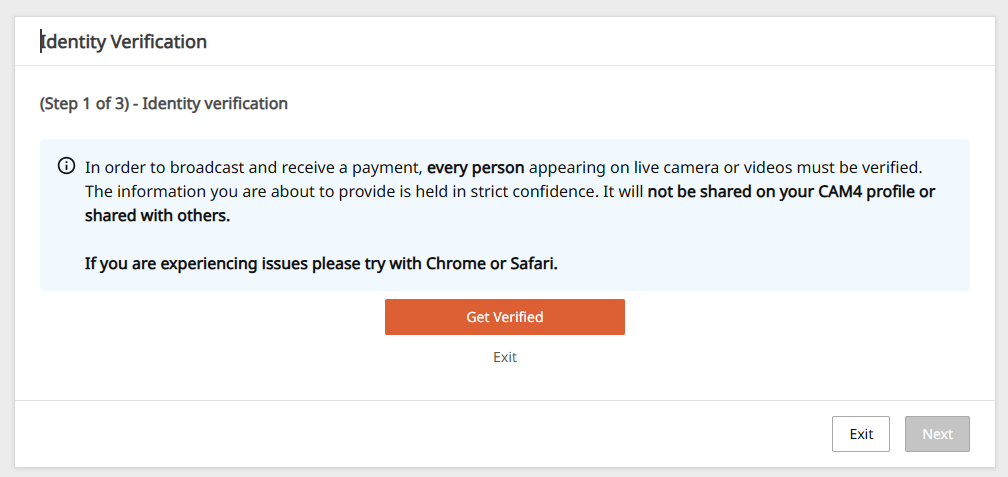
Antes de iniciar a transmissão, é imprescindível enviar seus documentos ao CAM4 para poder verificar a maioridade da pessoa que aparecerá na webcam e poder sacar seus ganhos.

Para ser um modelo no CAM4, como em todas as páginas adultas, é necessário ser maior de 18 anos.

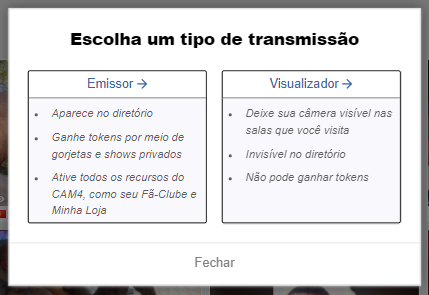
Clique em Transmitir na parte superior. Se você ainda não verificou sua conta, antes de transmitir, será perguntado se deseja transmitir como Emissor ou Visualizador. Selecione Emissor.

O que eu preciso?
Uma imagem digitalizada ou uma foto da frente e verso de um documento de identidade válido com foto e data de nascimento: Pasaporte, Identidade…

Um documento é solicitado para cada pessoa que aparece na webcam, independentemente do que você faz na webcam e da hora em que aparece.

Como aprovar sua conta no CAM4

Clique em Transmitir e selecione a opção “Torne-se uma estrela da Webcam”. 

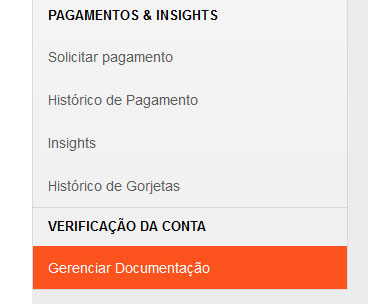
Uma vez dentro, selecione Gerenciar Documentos ou, se aparecer, clique na mensagem de notificação Verificar sua Identidade.

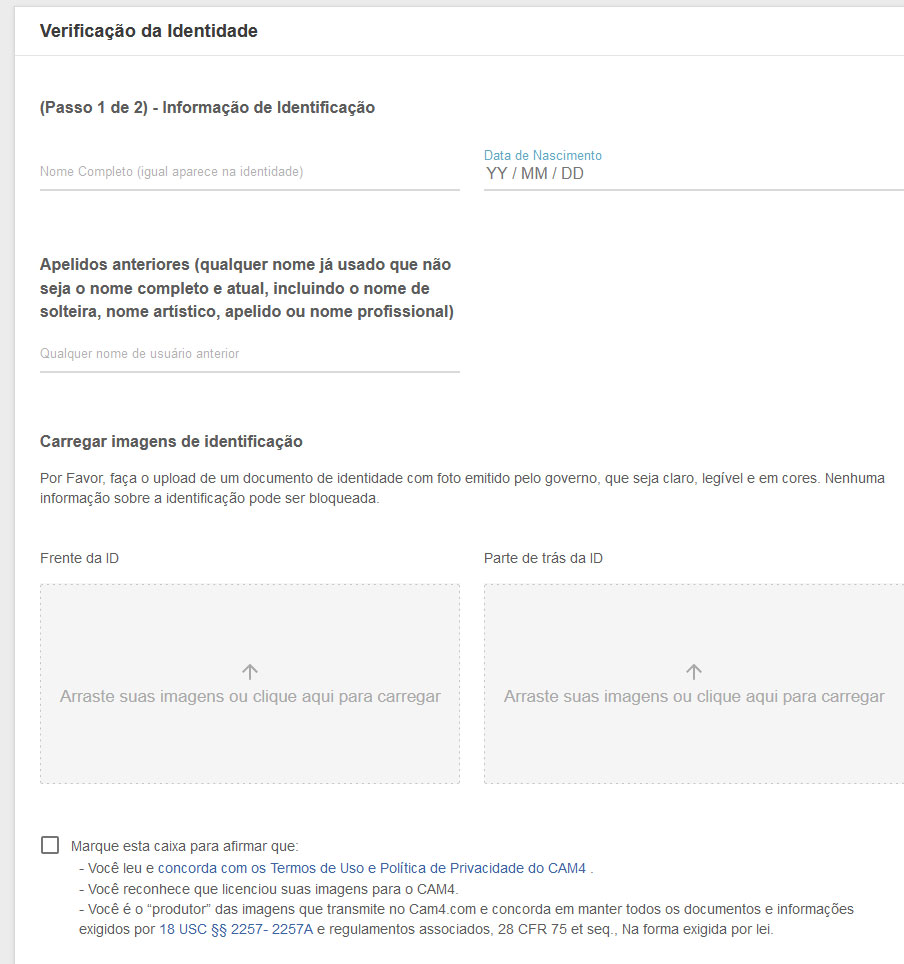
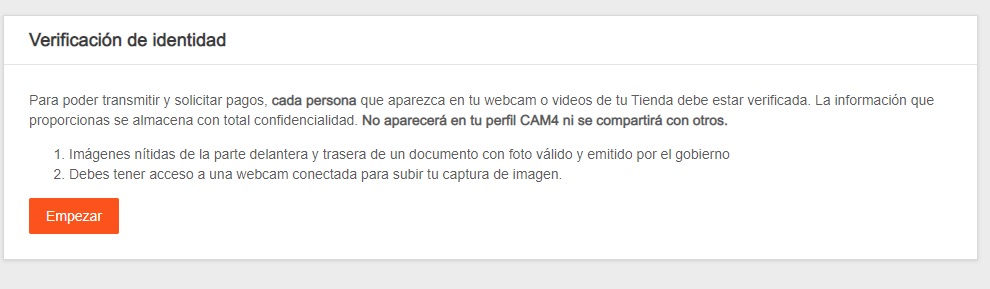
Antes de começar, certifique-se de ter: Foto da frente / verso de um documento de identidade válido, legível e colorido. E poder ativar a webcam para poder capturar sua imagem. Em seguida, clique em iniciar:

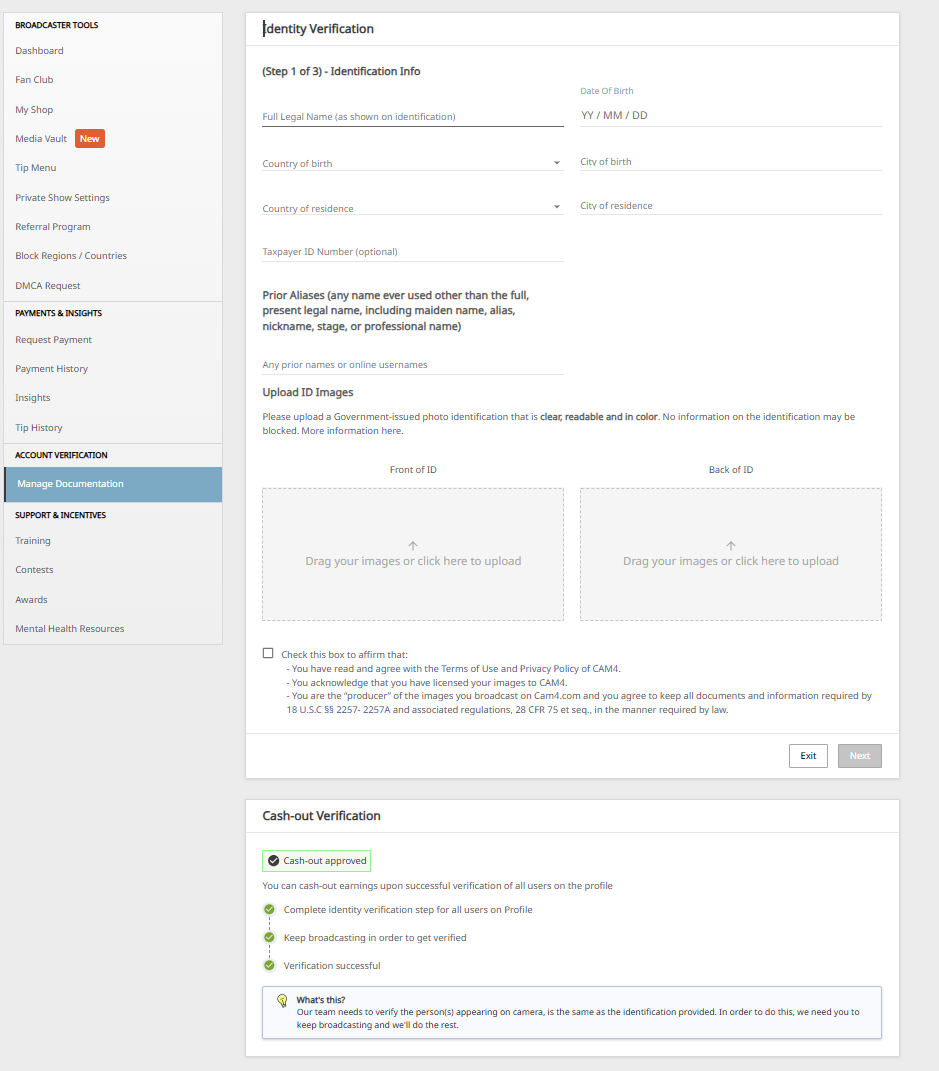
Na seção Verificação de Identidade, insira os dados pessoais solicitados e carregue as fotos do Documento válido (RG, Passaporte) nas respectivas caixas.

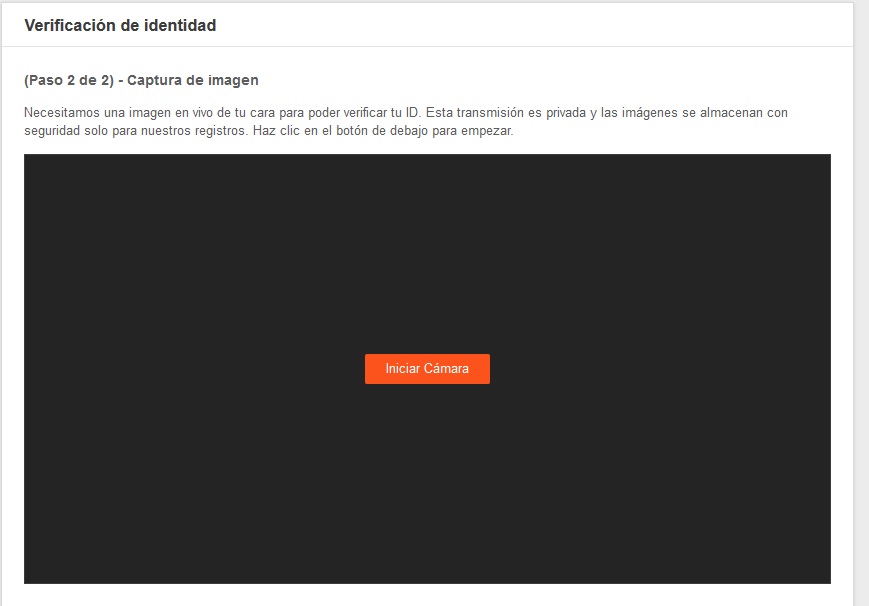
Marque a caixa abaixo para aceitar os termos e condições e continuar e clique em Avançar. Para concluir o processo, você deve tirar uma foto nítida de seu rosto. Ative a câmera e quando estiver pronto para a foto, clique em Iniciar câmera.


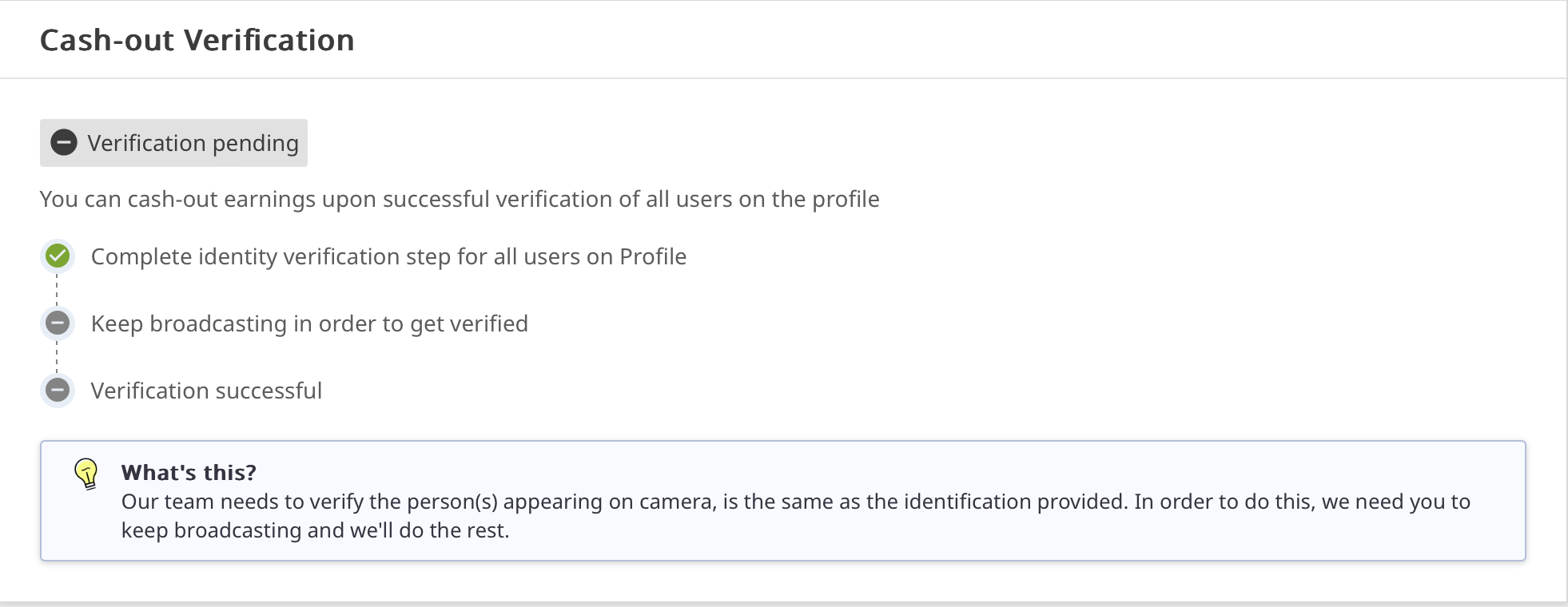
A verificação do seu perfil pode levar até 48 horas. Você sempre pode consultar o processo de aprovação na seção Gerenciar documentação.

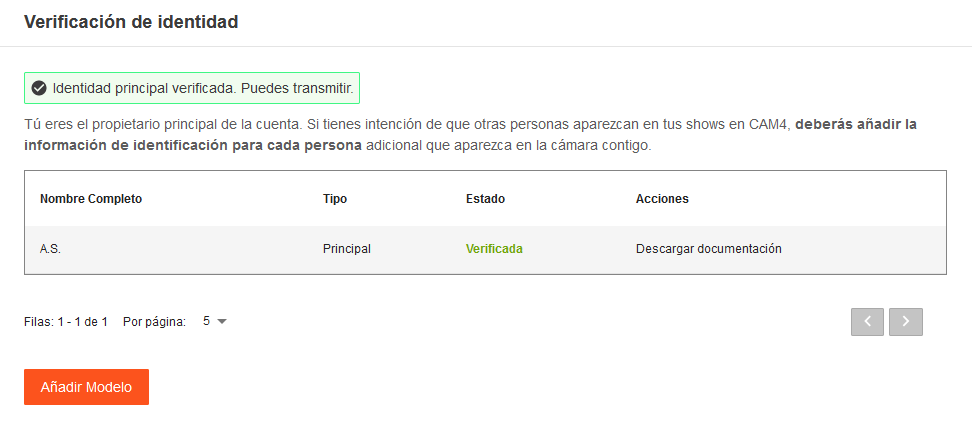
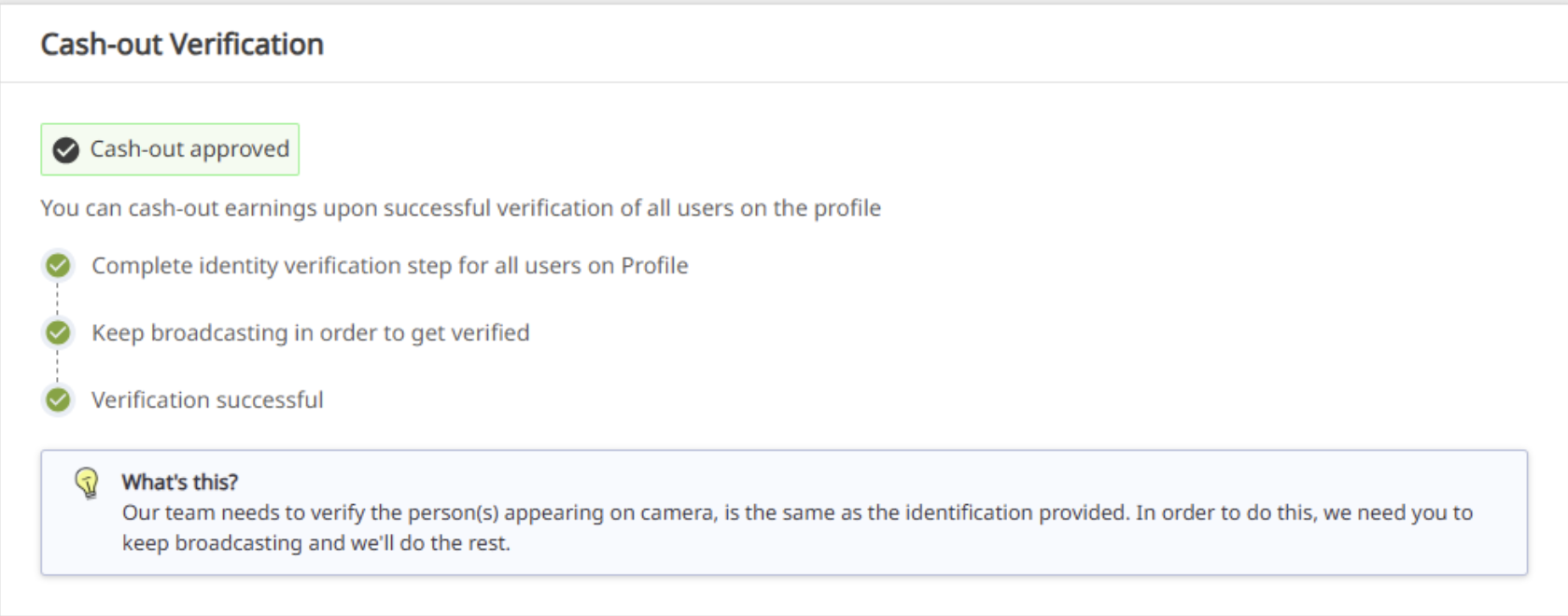
Depois de verificado, você verá seus documentos como verificados e uma mensagem de confirmação

Se mais pessoas vão transmitir a partir da sua conta, devem seguir o mesmo procedimento antes de aparecer na webcam e, uma vez verificadas, poderão aparecer na webcam.

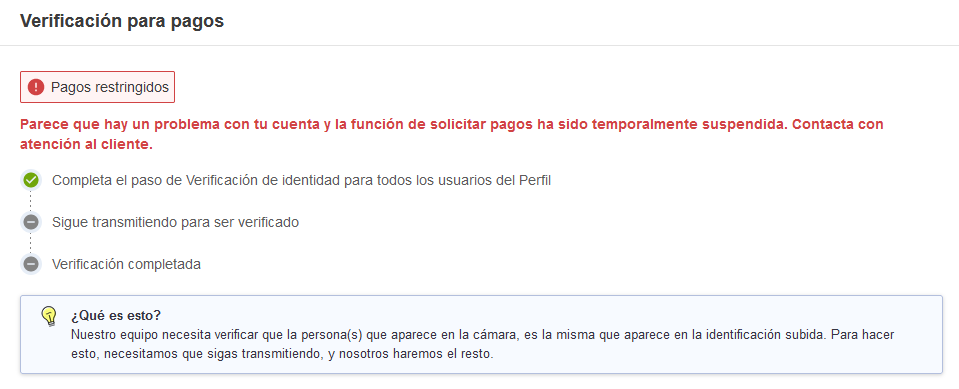
Se quiser sacar os seus ganhos, terá que continuar com a verificação dos pagamentos, para a qual será necessário ter mais transmissões na sua conta.


E isso foi tudo por essa lição!

Mantenha-se atualizado com muito mais dicas para os performers me adicionando como amiga no CAM4, e me seguindo no Twitter @cam4coach_pt

jujuhotfire PTR #2.psd final

Coaching Profile:
cam4coach_pt
Terças & Quintas
Senha: coach21

Se inscreva no meu calendário para ver seus horários locais de shows

Se Divirta na Cam!

Julia & Indio


Outdoor Streaming Guide

Streaming outdoors or indoors? Keep it safe, legal, and creative — here’s how to make exciting shows from your own property (without unnecessary risk).

Streaming Safely (Outdoors) on CAM4

You often make the best shows right at home — kitchen, balcony, garage, or garden. Keep it legal, private, and safe, and you can be fully creative.

Tip: Only stream on your own property or a private location with the owner’s permission.

Streaming Outdoors: Basic Rules

  1. Make sure only you are in the picture/audible. Casual passers-by have not chosen to come online.
  2. Stream on your own property or a private location with permission. Avoid public places, stores, or someone else’s property.
  3. Car shows? Only stationary and with the engine off.
  4. Pay attention to copyright/brands in the picture and music in the background.
  5. Hide recognizable location information (street names, license plates, recognizable buildings).
  6. Children (under 18) must never be visible or audible. Violation leads to immediate removal of your account.

Always check local/national laws regarding public morals and privacy. You are responsible for a legal set-up.

Sexy Ideas per Location (Home & Private)

Kitchen

  • Host your own “cooking show” with playful challenges.
  • Creative ways to use props/kitchen utensils (within platform rules).
  • “Vegetarian” theme show with playful, safe food props (hygiene first).

Terrace or Balcony

  • Use doors/windows as decor and suction cup props on glass.
  • Present a “weather report” as an intro to your show.
  • Involve your patio furniture as playful set pieces.

Garage

  • “Tune-up” theme: working on your car as a setting (safe, engine off).
  • DIY show: nod to handyman programs.
  • Use (clean) tools as decor/prop — no sharp edges.

Pool or Jacuzzi

  • Show with swimwear, pool party vibes.
  • BBQ + pool theme for a summer set.
  • Mermaid/merman or lifeguard fantasy.

Laundry Room

  • “Laundry day” with dryer props (pay attention to stability/safety).
  • Cheeky undergarment moment (within your boundaries/rules).
  • Minimal outfit reveal when sorting laundry.

Do’s & Don’ts (Important!)

Do’s

  • Keep your frame under control: only you in the picture, background clean.
  • Work with decor/props that are stable and clean (hygiene).
  • Use a private location and check neighbor/environment view.
  • Communicate your boundaries and keep your Tip Menu/rules visible.

Don’ts

  • Do not stream in public spaces, stores, or someone else’s property.
  • No moving cars or running engines.
  • No recognizable third parties (face, voice) or children in picture/sound.
  • Avoid logos/music with rights — or turn off audio.

In Conclusion

Stream from your own property or an approved private place: this protects yourself and respects the privacy of others. Indoors or outdoors — with smart framing, clear rules, and creativity, you have endless possibilities for exciting, original shows.

Remember: safety and compliance with legal and platform rules come before everything. In doubt? Choose an indoor set-up with a controlled background.

Private Show Possibilities

All you need to know about private shows on CAM4 — per minute, time blocks, or solo private with spies.

Private Shows on CAM4: How to Earn Smart with 1-on-1

Choose per minute, work with pre-paid time blocks, or start a solo private show with spies. Clear prices = more trust (and therefore more tips).

Tip: also mention your private options and rates in your bio or Activity Feed.

What is a private show?

A private show is an exclusive show between you and one viewer. Depending on your settings, others can (paid) watch as “spy”. With private shows, you are guaranteed to earn tokens per minute or sell a time block in advance.

Three ways to earn with private

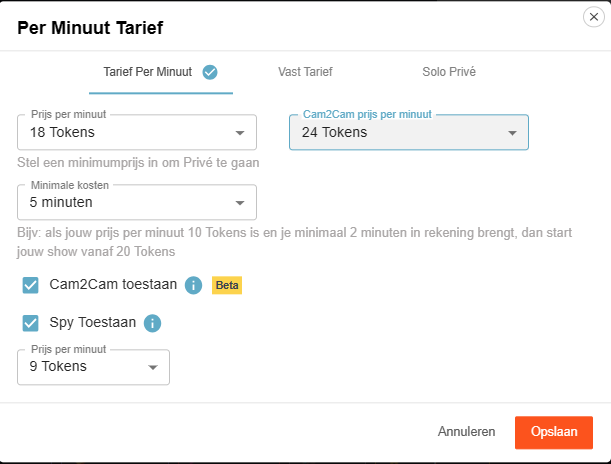
1) Pay per minute

Pay per minute (settings)

Viewers see the cost per minute before requesting a private show; in the Netherlands, 21% VAT is applied upon purchase.

Guideline example: 12 tokens/min is $1.20 per minute for you. Your viewer in the Netherlands sees an amount of 15 tokens/min including VAT. This VAT percentage varies per country where your fan lives.

Pro tip: allow spying (Spy). These viewers only see the image, no chat, and hear no sound.

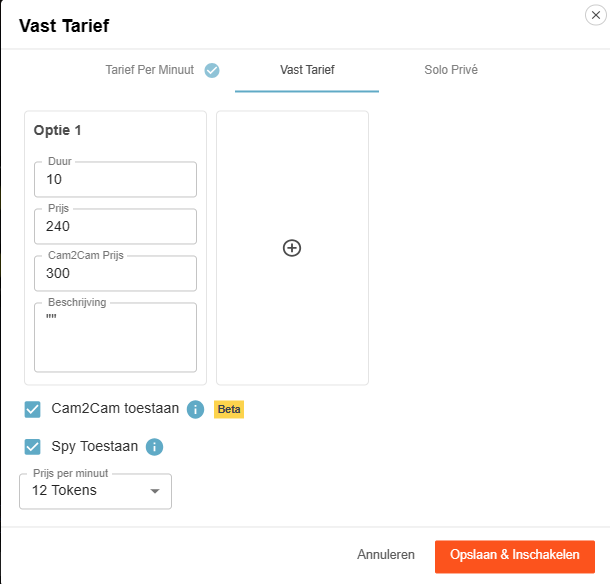
2) Time blocks (pre-paid)

Fixed rate for time blocks

Offer pre-paid blocks. You choose the duration and the price; the viewer chooses and pays.

Advantage: you are assured of the entire block. If the viewer clicks away themselves, you will still be paid the full block. If you end it yourself or your connection drops, the tokens go back to the viewer.

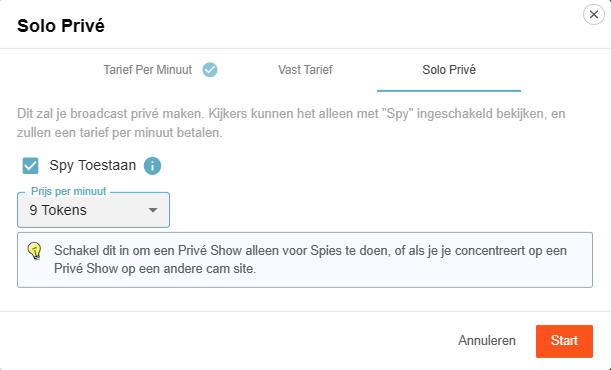
3) Solo private show

Solo private show display

You appear to be in private, but you are alone. Spies can — if you allow it — watch for a fee and pay per minute.

Useful for calmly setting up your games or settings (turn off Spy then), or if you are running a private show elsewhere and want to generate income on CAM4 at the same time via spies.

Cam2Cam: make your private show even more intimate

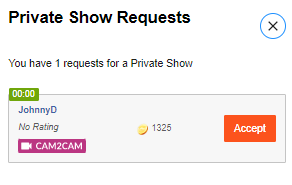
C2C offers more intimacy and often higher per-minute prices — communicate your terms and boundaries in advance. Some models find it much nicer to be able to see the viewer themselves, but some do not. Adjust your price accordingly.

Activate Cam2Cam

Activate Cam2Cam

Go to the settings of your Private Show via the gear next to ‘Requests for private shows’. Set your C2C price and check ‘Allow Cam2Cam’. Save — done.

What does it cost?

Cam2Cam is usually ±1.25× the price of your normal private show. If you normally ask for 12–18 tokens/min, then 18–24 tokens/min for C2C is a logical range.

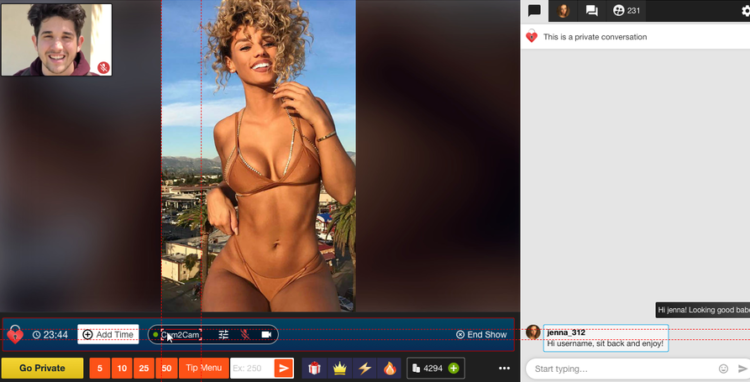
Enlarge/move C2C window

During the show


  1. The video of your viewer appears in a corner of your screen (movable and scalable).
  2.     

  3. Use the Cam2Cam buttons: mute and volume control.

Auto-Pause: your time after a private show

Auto-Pause

Auto-Pause gives you time to catch your breath after a Private or Group Show, before your public stream goes live again.

How does it work?

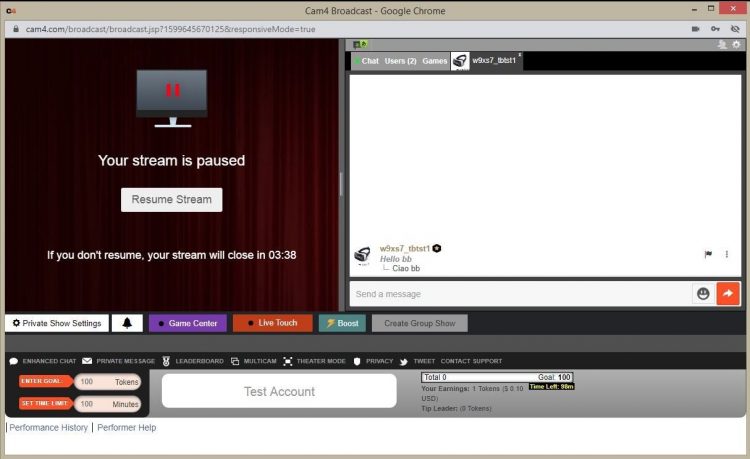
Afterwards, your stream automatically pauses for up to 5 minutes. Get something to drink, change clothes, or reset your setting — you decide.

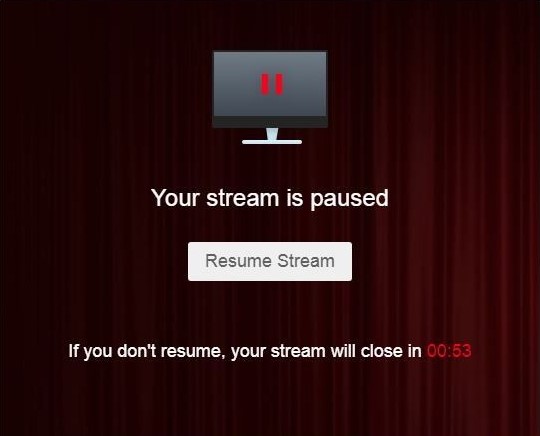
You can resume earlier at any time via “Resume Broadcast”. If you wait longer than 5 minutes, the stream ends automatically.

You will not receive private requests during the pause.

What you see

Auto-Pause performer view

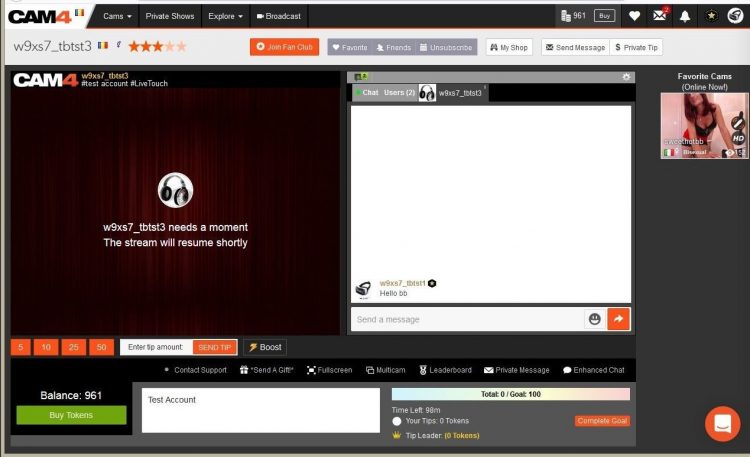
What viewers see

Auto-Pause viewer view

Resume Broadcast button

Price & transparency

Communicate in advance what makes private different from your public show (tempo, requests, Cam2Cam, no negotiations) and stick to your rates. Clarity increases conversion and prevents hassle.

Never miss a private show request again: with Offline Private Show (OPS) notifications fans can book at any time and you choose how you are alerted.

All Verifications upto 2257

Everything you need to know about verifications on CAM4: how you can broadcast, get paid, and comply with the law.

Verification Types on CAM4

To work safely and professionally on CAM4, there are several types of verification. These checks ensure that you are allowed to broadcast, can be paid, and that you comply with the legislation.

Please note: processing usually takes 1–3 business days.

The three types of verification

1) Broadcast Approved

Required to be allowed to broadcast. Your ID is checked to confirm that you are 18+. After approval, you can go live.

Identification example
Broadcast Approved example

2) Verification for Payment

Required to have tokens paid out. You upload your ID and your profile is officially approved for payouts.

Cashout Approved example

3) 2257 Form

Legal document: you confirm that you (and everyone in your content) are 18+, that you own the material and give CAM4 permission to broadcast.

2257 Form example

How long does it take?

Checking your documents takes an average of 1–3 business days. Once you are broadcast approved, you can just keep broadcasting. After the second check, your payment will also be released and everything is completely in order.

Tip

Check your data

Upload clear, valid documents and fill in your forms carefully. This prevents delays in approval.

In summary: without Broadcast Approval you are not allowed to broadcast; without payment verification no payouts; and with the 2257 form you comply with the legal requirements.

Concurso de Shows Privados ✨Ganhe até $100!

Precisa de uma grana extra nesta primavera? Então participe do concurso e faça shows privados no CAM4 para ganhar até US$ 100 ⇓

7 prêmios CAM4 Brasil e Portugal estão em jogo para os participantes inscritos que ganharem mais com Shows Privados de segunda-feira, 20 de abril, a domingo, 3 de maio de 2026.

✪ ꗃ 7 Prêmios Show Privado
CAM4 Brasil e Portugal ꗃ

1° premio: 100$

2° premio: 70$

3° premio: 50$

4° premio: 30$

5° premio: 20$

6° premio: 20$

premio: 20$

Os ganhos com shows privados, espiões e CAM2CAM serão contabilizados para determinar os vencedores deste concurso.

ꗃ INSCRIÇÕES ABERTAS
Insira seu nome de usuário do CAM4 no formulário abaixo. ⇓
(​As inscrições se encerrarão em 27 de abril)

(O endereço de e-mail que você inserir não será visível e permanecerá confidencial.)

Certifique-se de que seu nome de usuário CAM4 esteja escrito corretamente.

________________________________________________________________

Qual preço devo definir?

O preço de um show privado é certamente algo pessoal e varia de acordo com o que o performer oferece a um único espectador em comparação com uma transmissão pública, bem como com o tipo de show privado (custo por minuto ou custo por pacote de minutos).

Você é iniciante em transmissões ao vivo ou não sabe qual preço definir? O preço médio mais popular entre os performer do CAM4 é de 15 a 20 fichas por minuto.

No entanto, performers mais experientes geralmente pedem de 30 a 60 Fichas por minuto.

Escolha o preço por minuto que melhor se adapte à sua vida privada, lembrando que as fichas custam mais para o usuário!

Por exemplo, para um usuário, uma exibição de 18 fichas por minuto terá um custo equivalente a aproximadamente 2 euros por minuto.

CONSELHOS PARA SEUS SHOWS PRIVADOS

✨  Não mostre tudo em suas transmissões públicas; dê a entender que as melhores coisas acontecem no privado…
✨ Fale sobre os benefícios, oferecendo uma experiência exclusiva apenas para aqueles que entram de forma privada.
✨ Recompense quem der gorjetas generosas ou quem solicitar informações privadas com descontos ou conteúdo especial.
✨ Dê uma piscadela para quem lhe dá gorjeta ou converse com eles. Lembre-se que você também pode usar os emojis de chave e cadeado para indicar conteúdo privado ou solicitações que você só faz em particular.

Lembre-se de que você também pode ativar as notificações offline privadas para quando estiver offline.

Ao ativar as Notificações Offline, seus espectadores podem enviar solicitações privadas para sua transmissão quando você não estiver online e visualizar sua disponibilidade por hora e por dia.

Ao habilitá-las, você nunca perderá um pedido de show privado, mesmo quando estiver offline ou longe do seu computador!
>> Clique aqui para saber mais! <<

1. Somente modelos de webcam verificados que transmitam do Brasil ou Portugal podem participar deste concurso.

2. Para se cadastrar, você precisa inserir seu nome de usuário CAM4 no formulário acima..

3. As inscrições encerram na segunda-feira, 27 de abril de 2026.

4. Os vencedores dos 7 prêmios privados serão aqueles que acumularem mais tokens por meio de shows privados (tanto com preço fixo quanto por minuto) e por meio de ganhos com ESPIÕES. Shows em grupo, no entanto, não contam para este concurso.

5. Para serem considerados vencedores, os performers devem ter transmitido na CAM4 por pelo menos 10 horas no total, entre 20 de abril e 3 de maio de 2026.

6. Um máximo de 6.000 fichas serão contabilizados por usuário (por exemplo, se você ganhar 7.000 fichas em shows privados do mesmo tipper, um máximo de 6.000 fichas serão contabilizadas para esse tipper).


7. Para se qualificar para um prêmio, você precisará ter realizado shows privados com pelo menos 2 usuários diferentes.

Os resultados serão verificados durante as atualizações provisórias. Os ganhos de apresentações privadas realizadas entre contas vinculadas, outros artistas ou moderadores com a intenção de manipular os resultados do concurso não serão contabilizados.

* Horário UTC: O Concurso seguirá o padrão de horário UTC

CAM4 Cares: ModelConnection

Broadcasting can be powerful — but it can also feel isolating.

At CAM4, we believe that great models deserve more than just a platform. They deserve a real sense of connection. That’s why we launched ModelConnection under CAM4 Cares — a safe, confidential space created exclusively for our female models.

What is ModelConnection?

ModelConnection is a guided group session where models come together to talk, share, and support one another. Not as therapy, but as a powerful combination of peer connection and professional coaching.

Sessions take place via Zoom, with participants encouraged to join on camera to create a more open and connected space. Through small breakout groups and focused coaching questions, models explore their work, routines, and mindset — without judgment or pressure.

Emma - Life Coach & Cam Model

Emma — Life Coach & Cam Model

Emma is a skilled life coach and successful cam model with extensive experience guiding international groups through transformation, confidence-building, and personal growth. Specialising in mindset, communication, and empowerment, she brings a rare combination of professional coaching expertise and real-world industry experience. As an active cam model herself, Emma deeply understands the pressures, challenges, and opportunities of online broadcasting. She creates a safe, judgment-free space where models feel seen, heard, supported, and empowered to grow both personally and professionally.

Why This Matters

Working as a broadcaster often means working alone. There are no colleagues to turn to, and in your personal life, it’s not always easy to talk about what you do.

ModelConnection fills that gap — offering a space where you can connect with others who truly understand your world.

  • A stronger, more connected model community
  • A healthier work mindset and greater accountability
  • Sustainable long-term growth and wellbeing

Who Can Join?

ModelConnection is designed for a curated group of dedicated models. You may receive a personal invitation based on your activity and engagement on the platform.

You don’t need a specific issue or goal. You’re welcome to come as you are — whether you want to share, listen, or simply connect.

What We Have Learned

When models are given the right space, meaningful connection happens naturally. Even participants who join with some hesitation often leave feeling more energised and supported.

“The session made me realize that I’m not alone. That there is a great community of wonderful NSFW broadcasters who face similar issues and help build each other up.”

— Salacious_sage

“For me as a very shy person, it was a great place to share and see different points of view.”

— Roxannepiggy

Get Involved

The next session will be announced soon. Interested but haven’t received an invitation yet? Sign up below.

Submitting the form does not guarantee a spot, as sessions are curated to ensure the best group experience.

Apply now and take the next step.

Apply here to be considered for the next session:

Submitting the form does not guarantee a spot, as sessions are curated to ensure the best group experience.

“`

100% confidential. We respect your privacy.
Come as you are. Leave stronger.

Banning and Moderating

Banning and moderating on CAM4 — here’s how to keep your room safe, cozy, and under control.

Safety on CAM4: Banning and Moderating

Keep CAM4 fun and safe with the right measure at the right time. Difference between banning (denying access) and moderating (steering chat behavior).

You decide what happens in your room — choose the mildest effective option and scale up if necessary.

Banning on CAM4

Sometimes it is necessary to deny someone access completely or partially. There are two types of bans:

1) Administrator Site Ban

With a site ban, a user loses access to the entire website — usually after violating the Terms & Conditions or illegal activities.

  • Illegal/prohibited activities (including minors)
  • Spamming or scamming
  • Unlawfully recording/distributing broadcasts
  • Persistent ignoring of warnings (e.g., playing video instead of live)

Payment problems can also lead to a site ban. Do they think they were banned unfairly? Refer to support@cam4.com.

Full terms: cam4.com/legal/termsofuse

2) Broadcaster Room Ban

  • Only applies to your room.
  • The viewer can still use the rest of CAM4.
  • Only use if milder options didn’t work.

You have full control over who has access to your room.

Moderating on CAM4

In addition to banning, there are lighter measures to keep your chat pleasant. Both you and your moderators can use these functions.

Moderate Yourself or Deploy a Moderator

  • You can steer visitors yourself with available tools.
  • You can also appoint a moderator who takes over (part of) it.
  • A good moderator promotes atmosphere and income — reward active mods.
Note: Be careful with mod rights, especially with other models. Someone else can remove visitors from your room; confidentiality and clear agreements are essential.

Available Options (from Mild to Strict)

Silencing

Messages from the visitor are not visible to anyone. Useful for negative behavior, spam, or begging.

Advantage: the user often doesn’t notice and is less likely to create new accounts.

Kicking

The visitor is temporarily removed but can come back immediately. Only use after a clear warning.

Room Ban

The heaviest tool within your room. The visitor can only come back once you have released (unban) him/her.

Keep CAM4 Fun!

Banning and moderating protect our community against abuse, illegal activities, and disruptive behavior. Use them wisely and to your advantage.

Do you see someone who is not following the rules? Report this to your performer manager (Alexandra) or email performers@cam4.com.

Summary: start mild (silence/ignore), scale up (kick), and ban only when necessary. You determine the climate in your room — clear rules, consistent enforcement, nice vibe.

X/Twitter Basics

Become a self-promotion master: get more viewers via X (Twitter) with smart, simple steps.

X (Twitter) Basics — Become a Self-Promotion Master

Increase your audience and attract more viewers to your CAM4 shows with a smartly designed X profile and consistent posts.

Tip: Add your CAM4 link to your bio and pin your show announcement to the top of your profile.

Start: Creating Your X (x.com) Account

A well-designed profile is the first step to success:

  1. Go to x.com or download the X app.
  2. Click Sign Up and fill in your name, email, and password.
  3. Complete your profile: photo, bio, and a link to your CAM4 profile.
  4. Activate your account via the verification email.

Quick Profile Check

  • Profile photo that shows your style.
  • Short bio with your vibe + boundaries.
  • Link to your CAM4 profile (easy to find!).

Link X to Your CAM4 Profile

By linking, CAM4 automatically posts a live notification when you broadcast — free reach outside CAM4.

Here’s how: Model Dashboard → Profile → Social Media → connect your X account.

Works great in combination with your Activity Feed: teaser beforehand, auto-post at start, thank you afterward.

Posting (Tweeting): The Basics

  • Click the Post/Tweet icon, write your message (max. 280 characters), and post.
  • Add images, GIFs, or links for more impact.
  • Use hashtags like #cam4, #liveshow, #cammodel for findability.
  • Tag relevant accounts to stimulate interaction.
  • Repost/retweet and respond to fans/creators to grow your network.

Timing

Post just before your show, at start (auto-post), and a short thank you afterward.

Content Mix

Announcements, behind-the-scenes, polls, short clips/teasers.

Consistency

Small but frequent works better than an occasional long thread.

Why Use X?

Reach & Promotion

  • Broader guidelines than many platforms.
  • Quickly promote your live shows.
  • Free extra visibility.

Direct Interaction

  • Talk to fans and followers in real-time.
  • Build relationships that bring back tips and viewers.

Need Extra Help?

Want to learn more about promotion and socials? Check out our other training articles or contact the CAM4 team. We are happy to help you use social media smartly and get more success from your shows.

Quick recap: complete profile + link to CAM4, fixed post routine around your shows, use hashtags and tags smartly, and respond actively. Consistency wins.

DAC7 & Taxes

Although the UK is not subject to DAC7, we are updating our processes to align with global standards, including similar European regulations like DAC7. These changes mean we need to collect additional information from broadcasters/creators to process payments. Providing accurate information is essential to avoid issues with payouts.

DAC7 in short: European rules require platforms to report income from creators to the Tax Authorities. Here’s how to comply easily — without hassle.

DAC7 & the Tax Authorities

DAC7 requires platforms like CAM4 to report user income to EU tax authorities. Our process is streamlined so you can pay out quickly and compliantly.

Tip: Keep your details up-to-date (social security number, address, name). Is everything correct? Payouts run smoother.

What is DAC7?

DAC7 is European legislation that requires platforms to share certain information about user income with tax authorities. Goal: to combat tax evasion and promote fair taxation.

Why is this important to you?

Transparency

With correct data, you contribute to a fairer system and avoid administrative issues.

No Surprises

Because your information is complete upon registration, you will not face additional obligations later.

Fast Payouts

Correct data = fast processing of your payouts.

What Happens to Your Data?

Privacy & Security

  • Data is only used to comply with DAC7.
  • We store your data securely and only share what is legally required.

What We Do/Don’t Report

  • We report necessary information (such as the amount you have earned).
  • We do not report the nature of your activities on the platform.

What Do You Need to Do?

  • When registering, fill in your details completely and correctly (social security number, official name, address, country).
  • Keep your profile information up-to-date (moved or changed name? adjust immediately).
  • Check your payment and profile settings occasionally to avoid delays.

Important: this article is informative and not tax advice. Consult the Tax Authorities website for official information.

Questions or Need Help?

Do you have questions about DAC7 or payments? Email us via payments@cam4.com. More information can also be found on the Tax Authorities website.

Make sure your details are always up to date. Does something change? Adjust it directly in your profile to prevent interruptions.

Activity Feed & Fanclub

The Do’s & Don’ts: share content, earn continuously, and build a loyal community — all within CAM4.

The CAM4 Activity Feed & Fanclub: Your All-in-One Platform

Share updates, photos, and videos, sell premium content, and build steady income through your Fanclub — all within CAM4.

Tip: mix public posts (reach) with Fanclub-only content (value) and post at fixed times.

Intro Video

What is the Activity Feed?

Think of it as your own social platform within CAM4: you share updates, post photos, sell videos, and grow your audience — even when you’re not live.

How does it work?

  1. Personalize your profile: choose an SFW profile picture and header that reflect your brand.
  2. Fanclub-exclusive: offer premium posts through your Fanclub for loyal members.
  3. Earn from your content: sell individual photos and videos to your fans.
  4. Media library: all your media in one place, ready to post.
  5. Fresh and active: post short, attractive updates regularly.

Why the Activity Feed?

More Visibility

Fans quickly find your latest content — even when you’re offline.

Efficient

Manage all your updates in one place, without separate tools or detours.

Easy

Intuitive and quick posting with everything within easy reach.

Fanclub: Build a Loyal Community

Fanclub hero

A Fanclub is a monthly subscription with exclusive access to you and your content — an ideal basis for predictable, recurring income.

Benefits for Fans

  • Exclusive content (photos, videos, behind-the-scenes).
  • Special benefits such as chat badges and free spy access.
  • Discount on premium content.

Recommended Fanclub Prices

  • 50–75 tokens/month (USD 4.99–7.99): ideal to start.
  • 75–125 tokens/month (USD 7.99–9.99): for casual fans.
  • 125–150+ tokens/month (USD 14.99+): for creators with consistent premium content.

Quick Price Guide

Content Type Entry / Promo Standard Range Premium / High Effort
Fanclub 50–75 tks (USD 4.99–7.99) 75–125 tks (USD 7.99–9.99) 125–150+ tks (USD 14.99+)
Photos (Single) Free – 5 tks 10–25 tks 30–50 tks
Photo Sets 10–25 tks (5–10 photos) 25–150 tks (10–15 photos) 50–300+ tks (15–20 photos)
Videos (Short < 3m) Free – 25 tks (teasers) 50–120 tks 150 tks+
Videos (Medium 3–10m) 1–25 tks 25–100 tks 120–300+ tks
Videos (Long 15m+) 25–100 tks 250–400 tks 500–600 tks

Do’s and Don’ts for a Successful Fanclub

Do’s

  • Post new content regularly.
  • Give members a special feeling with extras.
  • Offer discounts or seasonal promotions.
  • Respond to messages and DMs.
  • Renew your content often.

Don’ts

  • Not posting = cancellations.
  • No too high price without extra value.
  • Don’t forget to promote (Feed + socials).
  • Don’t give everything away for free outside the Club.

Pro tip: plan a monthly content cadence (e.g., 2 photo sets + 1 video + 3 short updates) and pin your “welcome/benefits” post at the top.

Refer a Friend & Referral Promotion Program

Want to get more out of your broadcasts? Earn extra in two ways: Refer a Friend (Friends Bonus) and the Referral Program for viewers.

Earn More: Refer a Friend & Referral Program

Two simple ways to boost your income: invite a friend to become a broadcaster or earn from verified sign-ups via your link.

Tip: combine both — promote your referral link on socials and within your shows.

Overview — Two Ways to Earn Extra

1) Refer a Friend (Friends Bonus)

Invite a friend to become a broadcaster themselves. You get USD 50 as soon as your referral meets the conditions. Your friend can earn up to USD 600 bonus in 6 weeks.

2) Referral Program (Viewers)

Share your unique link. Get paid for each verified free sign-up (email confirmed) — up to USD 2.00 per registration (country dependent).

1) Refer a Friend — Friends Bonus

Invite your friends to become broadcasters and earn bonuses together — simple, transparent, and quickly arranged.

What Does It Yield?

  • USD 50 bonus for you.
  • Your friend can earn up to USD 600 bonus in 6 weeks.

    Vrienden Bonus

How It Works

  1. Create Account — help your friend with a CAM4 account.
  2. Pass on Your Username — via the chat box or mail to julia@cam4.com.
  3. Bonus Program — your friend can earn up to 600 USD in 6 weeks.
  4. Your Bonus — you get 50 USD as soon as your referral streamed ≥ 20 hours and earned ≥ 100 USD.

⚠️ That first USD 100 does not have to be earned within the first 20 hours.

Rules

  • Only for new performers who have not been active on CAM4 before.
  • The new performer broadcasts under the Dutch flag and speaks Dutch.
  • Your username must be correctly passed on to us upon registration.
  • Bonuses do not count towards the required minimum of 100 USD.
  • Tokens that you give to your friend do not count towards that 100 USD.

In short: you get 50 USD as soon as your referral has broadcasted for 20 hours and has earned 100 USD. They can grab up to 600 USD bonus in 6 weeks.

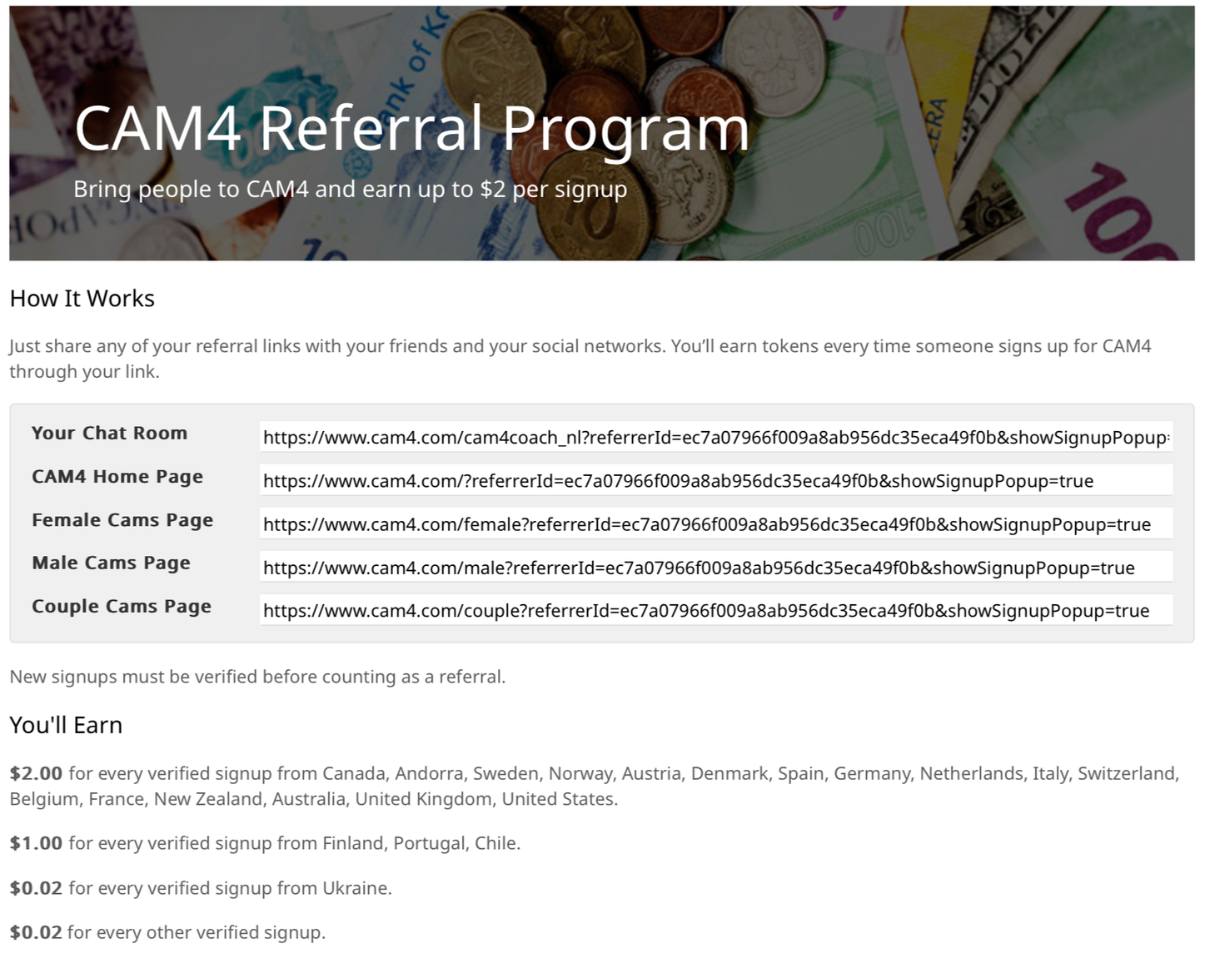
2) Referral Program — Earn from Viewers

Referral links voorbeeld

Earn by bringing viewers and followers to CAM4. Share your personal link; you get paid for each verified free sign-up (email confirmed).

Payout — Top Countries

USD 2.00 per verified sign-up from: USA, UK, New Zealand, Australia, Belgium, Germany, Netherlands, Italy, Switzerland.

Payout — North & South Europe

USD 0.20 per sign-up from: Spain, Sweden, Denmark, Finland, Portugal, Norway.

Payout — Other

USD 0.02 per sign-up from all other countries.

How It Works

  1. Go to your Model DashboardPromotion Program.
  2. Copy your personal referral links.
  3. Share them via social media, blog, email, or in your live chat.
  4. Earn even when you are not live (place links/banners on your site).

What is a verified sign-up?
A new user who creates a free CAM4 account and confirms their email address.

Rules

  • You have earned a minimum of 100 tokens to participate.
  • Your account is verified in the Dashboard.
  • Fraud will result in exclusion and possible termination of your account.

💡 You can see your earnings directly in your Model Dashboard under Promotion Program.