Let fans know when you go live: schedule your shows in your CAM4 calendar, gather followers, and increase the chance they’ll return.
Plan your shows with the CAM4 calendar
Fans can subscribe to your calendar via your profile and get a notification as soon as you go live. Easy to stay in touch, more returning viewers.
Tip: put themes, guests, and hashtags (#footfetish, #dominatrix) in your description for extra visibility.
Why planning works
Predictability
Fans know exactly when you’re live and can set a reminder.
More reach
Notifications to profile followers increase the chance they’ll return.
Flexible schedule
Plan up to 90 days in advance, a maximum of 5 shows per week.
How to schedule a show
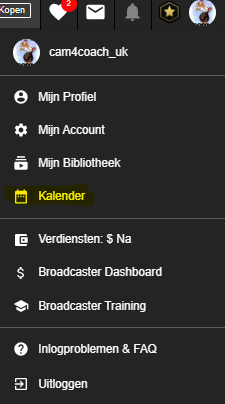
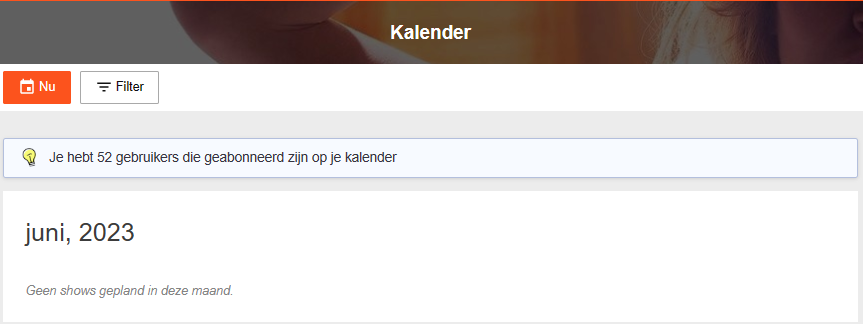
Log in to CAM4 and open your Avatar in the top left → Calendar. You’ll see your calendar, how many fans receive updates, and the „NOW” option.
Then the screen opens where you can schedule your show. Fill in:
- Date — first month, then day, then year.
- Start time — when does your show start?
- Duration — how long will you broadcast?
- Description — pitch your show: what can fans expect (theme, guest, goal)?
Click „Schedule New Broadcast” to confirm your scheduled show.
Make your announcement stronger
What do you mention?
- Show type (tease, games, group show, private focus).
- Goals or Tip Menu highlights (e.g. 25/50/150 tokens).
- Hashtags for discoverability (#cam4, #liveshow + niche).
Timing
- Schedule shows at fixed times (rhythm = recognition).
- Post a reminder in your Activity Feed the same day.
- Afterwards: thank you post with highlight (build loyalty).
Pro tip: announce special shows (guest/theme) a few days in advance and pin the post to the top of your Feed.