Category Archives: Do not use

Bannen en Moderators

Bannen en modereren op CAM4 — zo houd je je room veilig, gezellig en onder controle.

Veiligheid op CAM4: Bannen en Modereren

Hou CAM4 leuk en veilig met de juiste maatregel op het juiste moment. Verschil tussen bannen (toegang ontzeggen) en modereren (chatgedrag sturen).

Jij bepaalt wat er in je room gebeurt — kies de mildste effectieve optie en schaal op indien nodig.

Bannen op CAM4

Soms is het nodig om iemand volledig of gedeeltelijk de toegang te ontzeggen. Er bestaan twee soorten bans:

1) Administrator Site Ban

Bij een site ban verliest een gebruiker de toegang tot de hele website — doorgaans na schending van de Terms & Conditions of bij illegale activiteiten.

  • Illegale/verboden activiteiten (o.a. minderjarigen)
  • Spammen of scammen
  • Onrechtmatig opnemen/verspreiden van uitzendingen
  • Hardnekkig negeren van waarschuwingen (bijv. video afspelen i.p.v. live)

Betalingsproblemen kunnen ook leiden tot een site ban. Menen ze onterecht geband te zijn? Verwijs naar support@cam4.com.

Volledige voorwaarden: cam4.com/legal/termsofuse

2) Broadcaster Room Ban

  • Geldt alleen voor jouw room.
  • De kijker kan de rest van CAM4 nog gebruiken.
  • Pas inzetten als mildere opties niet werkten.

Jij hebt volledige controle over wie toegang heeft tot jouw room.

Modereren op CAM4

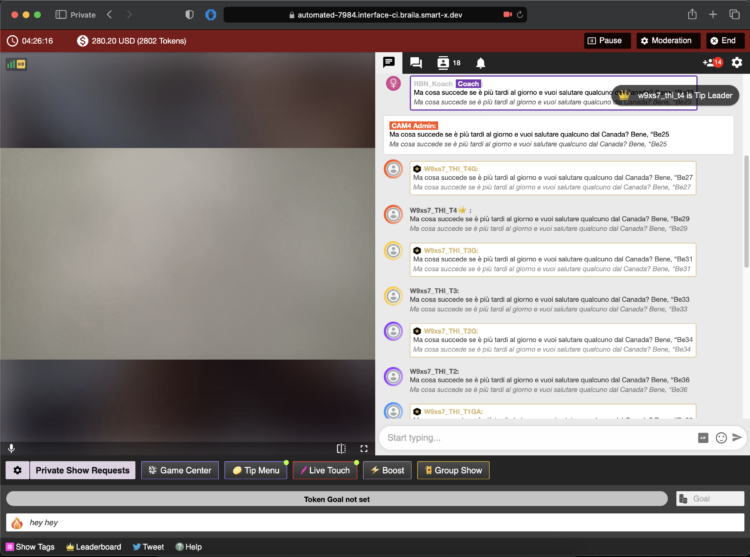
Naast bannen zijn er lichtere maatregelen om je chat prettig te houden. Zowel jij als je moderators kunnen deze functies gebruiken.

Zelf modereren of moderator inzetten

  • Je kunt zelf bezoekers bijsturen met beschikbare tools.
  • Je kunt ook een moderator aanstellen die (een deel) overneemt.
  • Een goede moderator bevordert sfeer én inkomsten — beloon actieve mods.
Let op: Wees voorzichtig met mod‑rechten, zeker bij andere modellen. Iemand anders kan bezoekers uit jouw room verwijderen; vertrouwelijkheid en duidelijke afspraken zijn essentieel.

Beschikbare opties (van mild naar streng)

Silencing (stilte opleggen)

Berichten van de bezoeker zijn voor niemand zichtbaar. Handig bij negatief gedrag, spam of bedelen.

Voordeel: de gebruiker merkt het vaak niet en maakt minder snel nieuwe accounts.

Kicking (wegsturen)

De bezoeker wordt tijdelijk verwijderd, maar kan direct terugkomen. Gebruik pas na een duidelijke waarschuwing.

Room Ban (uit jouw room)

Het zwaarste middel binnen jouw room. De bezoeker kan pas terugkomen zodra jij hem/haar hebt vrijgegeven (unban).

Houd CAM4 leuk!

Bannen en modereren beschermen onze community tegen misbruik, illegale activiteiten en storend gedrag. Gebruik ze verstandig en in jouw voordeel.

Zie je iemand die zich niet aan de regels houdt? Meld dit bij je performer manager (Alexandra) of mail naar performers@cam4.com.

Samenvatting: begin mild (silence/ignore), schaal op (kick) en ban pas als het moet. Jij bepaalt het klimaat in je room — heldere regels, consequente handhaving, fijne vibe.

Prive Show Mogelijkheden

Alles wat je moet weten over privéshows op CAM4 — per minuut, tijdsblokken of solo privé met spies.

Privéshows op CAM4: zo verdien je slim met 1‑op‑1

Kies per minuut, werk met pre‑paid tijdsblokken of start een solo privéshow met spies. Duidelijke prijzen = meer vertrouwen (en dus meer tips).

Tip: vermeld je privé‑opties en tarieven ook in je bio of Activity Feed.

Wat is een privéshow?

Een privéshow is een exclusieve show tussen jou en één kijker. Afhankelijk van jouw instellingen kunnen anderen (betaald) meekijken als “spy”. Met privéshows verdien je gegarandeerd tokens per minuut of verkoop je vooraf een tijdsblok.

Drie manieren om te verdienen met privé

1) Per minuut betalen

Per minuut betalen (instellingen)

Kijkers zien vóór aanvraag van een priveshow de kosten per minuut; in Nederland wordt 21% btw toegepast bij aankoop.

Richtprijs‑voorbeeld: 12 tokens/min is voor jou 1.20 dollar per minuut. Jouw kijker in Nederland ziet een bedrag 15 tokens/min inclusief BTW. Dit percentage BTW verschilt per land waar jouw fan woont.

Pro tip: sta meegluren (Spy) toe. Deze kijkers zien alleen beeld, geen chat en horen geen geluid.

2) Tijdsblokken (pre‑paid)

Vast tarief voor tijdsblokken

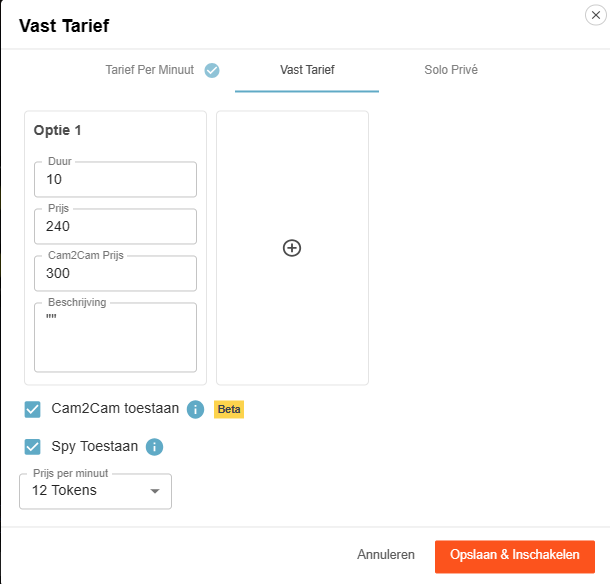
Bied vooraf betaalde blokken aan. Jij kiest de duur en de prijs; de kijker kiest en rekent af.

Voordeel: je bent verzekerd van het hele blok. Als de kijker zelf weg klikt, krijg jij toch het volledige blok uitbetaald. Beëindig je zelf of valt jouw verbinding weg, dan gaan tokens terug naar de kijker.

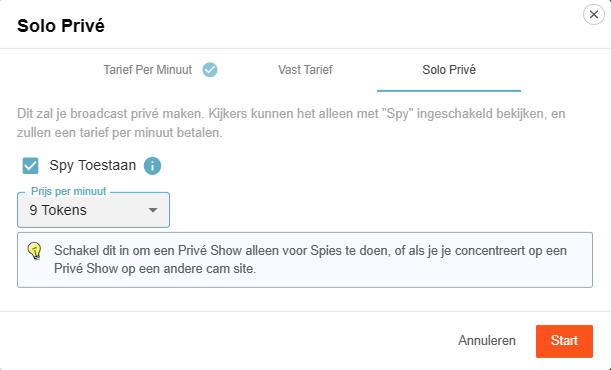
3) Solo privéshow

Solo privéshow weergave

Je lijkt in privé te zijn, maar je bent alleen. Spies kunnen — als jij dat toestaat — tegen betaling meekijken en betalen per minuut.

Handig om je spelletjes of settings rustig klaar te zetten (zet Spy dan uit), of als je elders een privéshow draait en tegelijk op CAM4 inkomsten wilt genereren via spies.

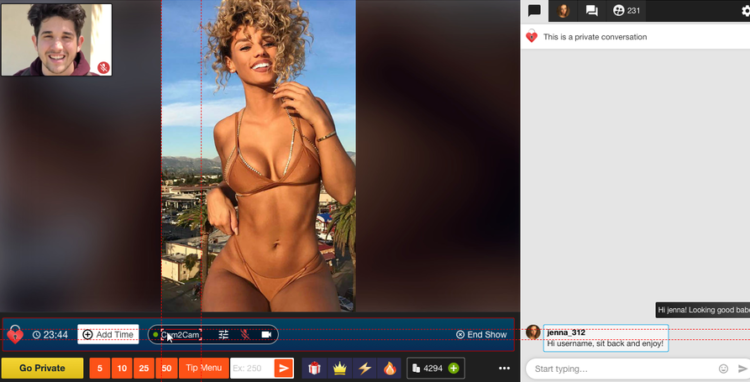
Cam2Cam: maak je privéshow nog intiemer

C2C biedt meer intimiteit en vaak hogere minutenprijzen — communiceer vooraf je voorwaarden en grenzen. Sommige modellen vinden het een stuk fijner om de kijker zelf te kunnen zien, maar sommige ook niet. Pas hier je prijs op aan.

Cam2Cam activeren

Cam2Cam activeren

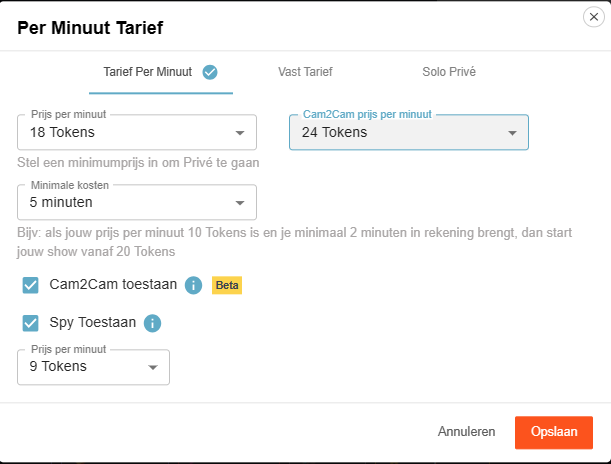
Ga naar de instellingen van je Privéshow via het tandwiel naast ‘Verzoeken voor privéshows’. Stel je C2C‑prijs in en vink ‘Cam2Cam toestaan’ aan. Sla op — klaar.

Wat kost het?

Cam2Cam is doorgaans ±1,25× de prijs van je normale privéshow. Vraag je normaal 12–18 tokens/min, dan is 18–24 tokens/min voor C2C een logische range.

C2C venster vergroten/verplaatsen

Tijdens de show

  1. De video van je kijker verschijnt in een hoek van je scherm (verplaatsbaar en schaalbaar).
  2. Gebruik de Cam2Cam‑knoppen: dempen en volumeregeling.

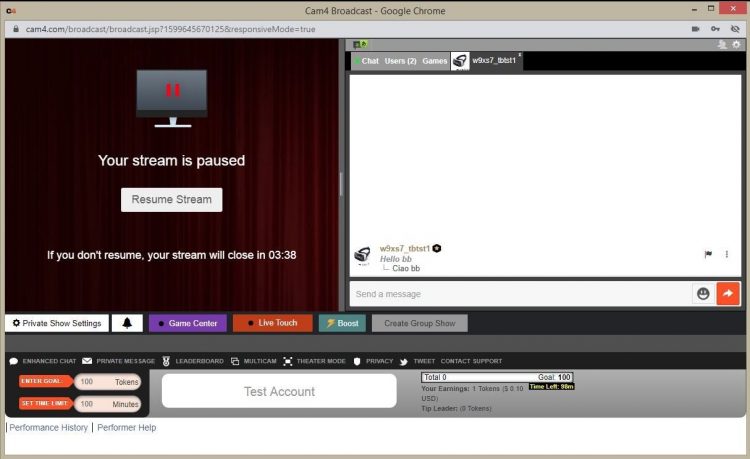
Auto‑Pauze: jouw tijd na een privéshow

Auto-Pauze

Auto‑Pauze geeft je tijd om op adem te komen na een Privé‑ of Groepshow, voordat je openbare stream weer live gaat.

Hoe werkt het?

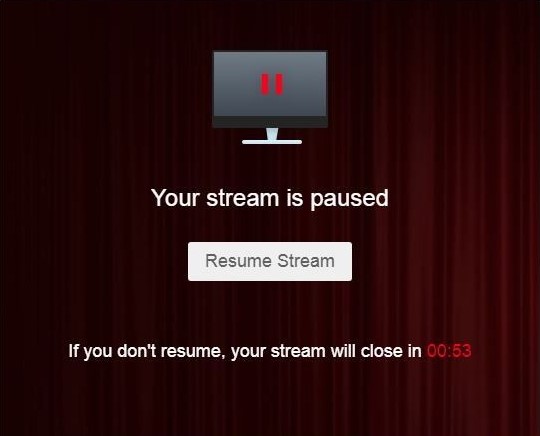
Na afloop pauzeert je stream automatisch tot maximaal 5 minuten. Haal wat te drinken, kleed je om of reset je setting — jij beslist.

Je kunt op elk moment eerder hervatten via “Hervat Uitzending”. Wacht je langer dan 5 minuten, dan beëindigt de stream automatisch.

Tijdens pauze ontvang je geen privéverzoeken.

Wat jij ziet

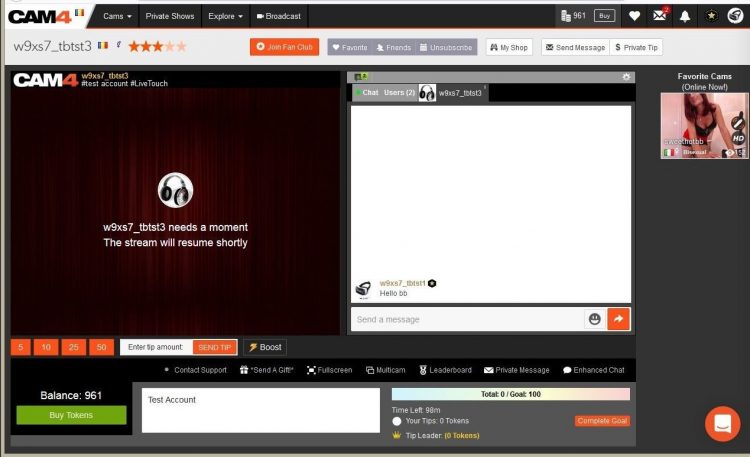
Auto-Pauze performer view

Wat kijkers zien

Auto-Pauze viewer view

Hervat Uitzending button

Prijs & transparantie

Communiceer vooraf wat privé anders maakt dan je openbare show (tempo, requests, Cam2Cam, geen onderhandelingen) en houd je aan je tarieven. Duidelijkheid verhoogt conversie en voorkomt gedoe.

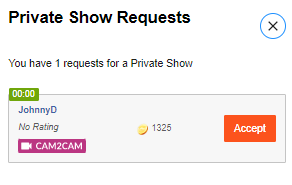
Mis nooit meer een privéshowverzoek: met Offline Private Show (OPS) meldingen kunnen fans op elk moment boeken en jij kiest hoe je wordt gewaarschuwd.

Erotic Stories Submissions


CAM4 is now publishing Erotic Stories and we want yours!

If your story is chosen, it will be published, narrated, shared with our audience, and you’ll get paid. You can even choose to stay anonymous if you prefer.

Word limit: 500–1500 words. That’s all it takes to turn your imagination into income.
Payment details: Will be provided by email if your story is selected.
Publishing: Selected stories will be filmed, creating narrated videos that are published weekly on our Erotic_stories profile on CAM4.
Editing: Light editing may be applied for a smoother read for video narration and to comply with CAM4’s terms and conditions.


Why Submit?

  • Get seen. Your story reaches thousands of readers & listeners.

  • Get paid. Selected stories earn real money.

  • Get creative. Share your fantasies in your own unique voice.

  • Get Content. Use your story yourself by selling it to your fans.

Quick Writing Tips

  • Find your voice — be authentic and let your style shine.

  • Build tension — anticipation is everything.

  • Make it sensory — show, don’t just tell.

  • Keep it polished — clean writing stands out.

  • Don’t get too wordy – Stay within 500–1500 words.

For a full beginner’s guide with more tips, click here.

Ready to Submit?

It’s simple:

  1. Write your story (500–1500 words).

  2. 👉 Submit Your Story Here

  3. If your story has been selected, a CAM4 staff member will email you with more details


Your fantasies deserve more than to stay in your head. Put them on the page, share them with the world, and let them earn for you.

Start writing today — your audience is waiting.


Need a Hand?

For more information on topics relating to CAM4, check out our FAQ , or join our live Coaching Sessions every Tuesday & Thursday at 11 AM & 8 PM EST.

Our chatbot “Spark” is also always ready to help and can be found in your Inbox!


Now get writing, have fun, and let the love (and tokens) roll in!

Happy Camming!

Offline oefenen voor je eerste LIVE uitzending

Een veilige start om alles vooraf te checken!

Offline oefenen voor je eerste LIVE uitzending

Voordat je de eerste keer live gaat voor publiek, kun je eerst oefenen met een Password Show. Zo ontdek je in alle rust hoe het uitzenden werkt — zonder directe kijkers in je room.

Tip: gebruik dit als jouw “generale repetitie” om stress te verminderen en zelfverzekerd live te gaan.

Wat is een Password Show?

Een Password Show is een besloten uitzending die alleen toegankelijk is voor mensen met het door jou ingestelde wachtwoord. Je kunt dit wachtwoord gewoon voor jezelf houden, zodat je volledig privé oefent.

Oefenen: wat ga je testen?

1) Verken de knoppen

Zie hoe je camera in beeld komt, waar je je doelen instelt en hoe je het Fooien Menu zichtbaar maakt.

2) Test je setup

Check je licht, geluid, achtergrond en camerapositie zonder druk van kijkers.

3) Oefen je flow

Doorloop alvast hoe je een show wilt opbouwen: van begroeting tot het werken met doelen en menu’s.

Maak er een oefenshow van — gebruik microdoelen alsof je live bent. Zo leer je hoe doelen eruitzien in beeld.

  • Goal 1: 10 tokens = check hoe de goal eruitziet
  • Goal 2: 20 tokens = geluid en muziek testen
  • Goal 3: 30 tokens = camerapositie wisselen

Pro tip: schrijf tijdens je Password Show notities op — wat werkt goed, wat wil je aanpassen?

Waarom dit slim is

Een Password Show geeft je:

  • Rust om het platform technisch te leren kennen
  • Zelfvertrouwen voordat je voor een groot publiek live gaat
  • Minder kans op stress of technische foutjes tijdens je eerste echte show

Instellen van een Password Show

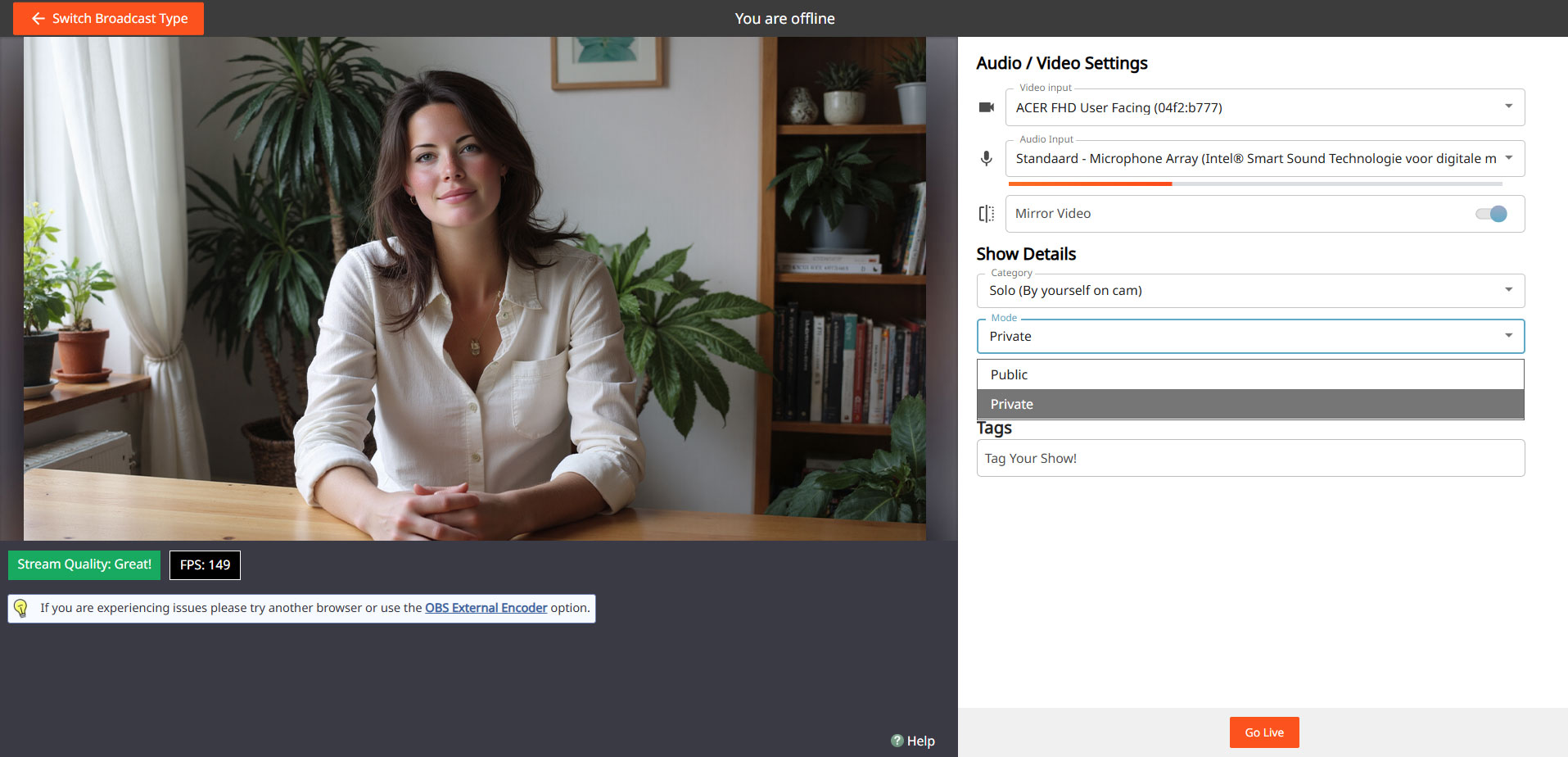
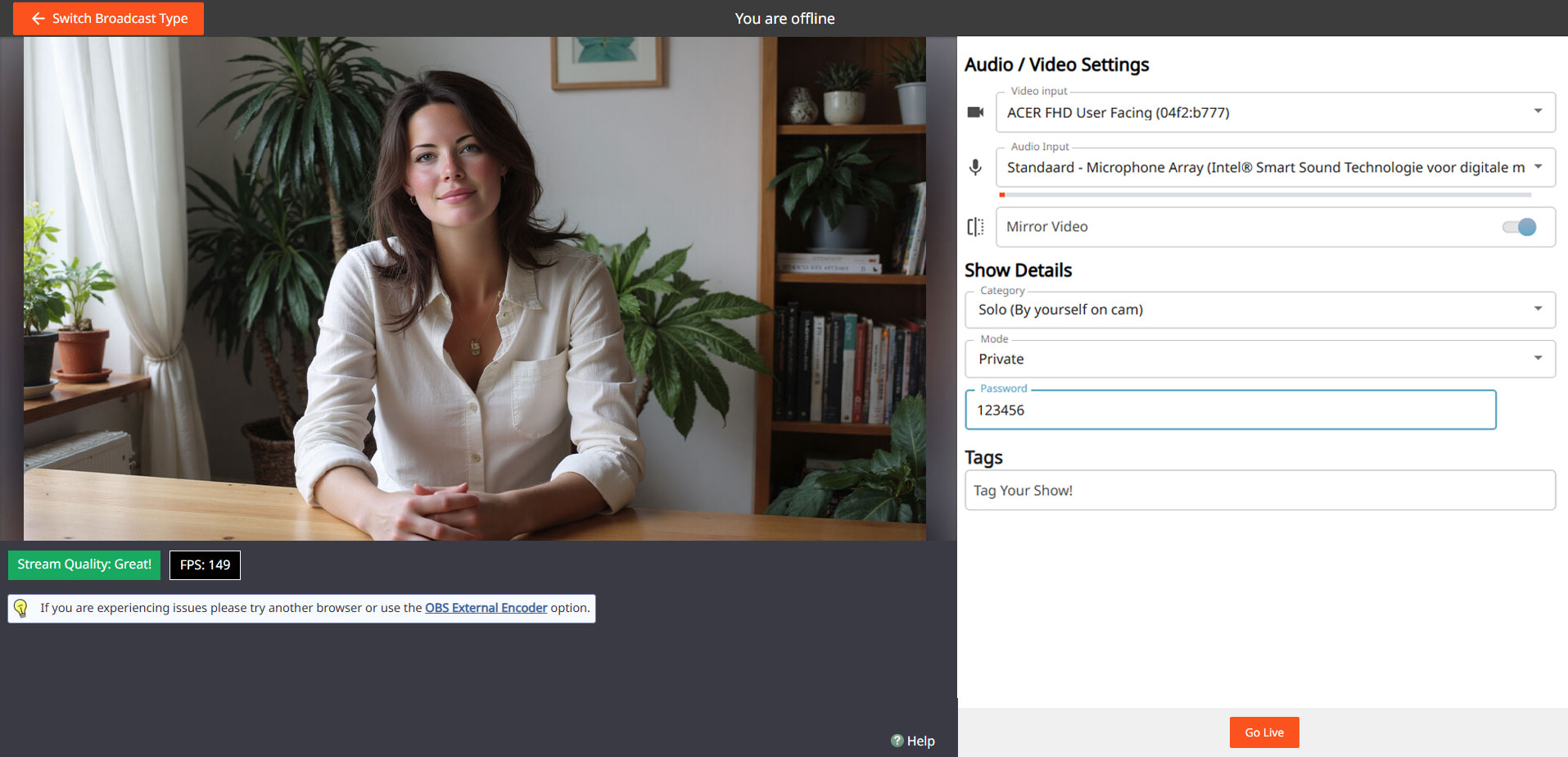
Ga naar je uitzendscherm, kies “Show Type” en selecteer Password Show. Stel een wachtwoord in en bewaar dit alleen voor jezelf als je puur wilt oefenen.

Stappen:

Open uitzendscherm
Kies ‘Password Show’
cam4 password show

Stel wachtwoord in
cam4 password settings

Ga live & test
cam4 private

Je kunt later hetzelfde proces gebruiken om een besloten show te doen met een selecte groep fans.

Do’s

  • Gebruik de Password Show als jouw oefenruimte
  • Test zowel camera als geluid uitgebreid
  • Bekijk hoe doelen en fooien in beeld verschijnen
  • Voel je vrij om meerdere keren te oefenen voordat je “echt” live gaat

Let op

  • Vergeet niet na je Password Show je instellingen terug te zetten naar een gewone uitzending
  • Geef je wachtwoord niet zomaar door als je echt privé wilt oefenen
  • Blijf altijd binnen je eigen grenzen en platformregels — ook in een Password Show

Belangrijk: houd je aan lokale wetgeving en platformregels. Alleen 18+ performers en consent is altijd vereist.

Fan Club Pricing: What Successful Creators Charge

What is a CAM4 Fan Club?

A Fan Club is a monthly subscription where your biggest supporters pay a set fee to get exclusive access to you and your content. Unlike one-time token tips or purchases, Fan Clubs bring guaranteed monthly income directly into your account.

By joining, fans get:

  • Exclusive content (photos, videos, behind-the-scenes material). This is where your NSFW content should be hiding!
  • Special perks like chat badges, free spy access to shows, and private messaging.
  • Discounted rates on your premium videos and content.

Fan Clubs are not only about exclusive perks, they’re a way to strengthen your connection with fans while earning 80% from every subscription, more than you receive from token purchases!

Suggested Fan Club Pricing

Here are five options inspired by top creators and platforms:

50–75 tokens/month ($4.99–$7.99) – Perfect for beginners and building your base.

75–125 tokens/month ($7.99–$9.99) – The sweet spot for casual fans and one of the most popular ranges across platforms.

125–150+ tokens/month ($14.99+) – Best for creators with consistent content, loyal fans, and premium material.

Tip: Start in the mid-range (~$5.99) and adjust based on demand, the volume of your content, and fan engagement.

Quick Pricing Guide (Cheat Sheet)

Content Type

Entry / Promo

Standard Range

Premium / High Effort

Fan Club

50–75 tks ($4.99–$7.99)

75–125 tks ($7.99–$9.99)

125–150+ tks ($14.99+)

Photos (single)

Free – 5 tks

10–25 tks

30–50 tks

Photosets

10–25 tks (5–10 pics)

25–150 tks (10–15 pics)

50-300+ tks (15-20 pics)

Videos (short <3m)

Free – 25 tks (teasers)

50–120 tks

150 tks+

Videos (medium 3–10m)

1-25  tks

25–100 tks

120-300+ tks

Videos (long 15m+)

25-100 tks

250–400 tks

500–600 tks (high effort)

Tip: Use freebies (1–2 pics or <1 min clips) as teasers. Offer seasonal discounts (10–20%) to boost sales without devaluing your work.

Photosets & Unlockables

  • SFW content: Free or unlocked automatically to tease your style.
  • Single photos: 5–25 tokens depending on explicitness.
  • Bundles (5–10 pics): 15–25 tokens.
  • Larger sets (10–20 pics): 150–300 tokens.

Mix in occasional freebies on your Activity Feed. This gives fans a taste of what’s inside and helps hook new subscribers.

Videos

  • Short (1–3 mins): 50–120 tokens. Teasers and quick clips sell best here.
  • Medium (3–10 mins): 75–250 tokens depending on effort and explicitness.
  • Long (10–15+ mins): 250–600 tokens, especially for high-effort or special releases.

Pro tip: Cut longer videos into shorter clips for easier sales and more views. Keep a few <1 min teasers free for promotion.


Do’s and Don’ts for a Successful Fan Club

Do’s

  • Post consistently to give fans ongoing value.
  • Make members feel special with perks and exclusive drops.
  • Offer discounts or seasonal promos (10–20%).
  • Reply to messages — engagement keeps fans loyal.
  • Refresh your content often (new covers, contests, seasonal sets).

Don’ts

  • Don’t set it and forget it — inactivity = unsubscribes.
  • Don’t overprice if you’re not offering strong exclusive value.
  • Don’t forget to promote — mention your Fan Club in every post/show.
  • Don’t give everything away outside the Club — keep your best material inside.

Need a Hand?

For more details check out our FAQ on this topic and others, or join our live Coaching Sessions every Tuesday & Thursday at 11 AM & 8 PM EST.

Our chatbot “Spark” is also always ready to help and can be found in your Inbox!


Now go live, have fun, and let the love (and tokens) roll in!

Happy Camming!

EROTIC STORIES : A Beginners Guide To Writing

If you are a new or an experienced writer who is looking to have you stories published we are here for you. You can submit your story or idea to us for review and if we publish it we’ll pay you $$$!

SUBMIT YOUR STORY HERE

We are here for you!  So lets cut to the chase. Below, I will break down some actionable items to help you get started.

(Noun) literature or art intended to arouse sexual desire.

Erotica, unlike pornography, is designed to arouse and provide stimulation to the reader based around plot and character development. It is not just one long sex scene with all action. Not to say that your sex scenes can’t be explicit; the more detailed the better. However, it must be grounded in plot and character growth.

If your story contains more plot and characters, with minimal sex or less explicit scenes. You may be venturing into erotic romance.

If you are serious about getting started in erotica, we need to address privacy. One of the most important questions you’ll have to ask yourself is if you’ll write under your Industry name or a new pen name.

For those who don’t know. A pen name is essentially a pseudonym that you can use professionally in your writing, books, blogs, public profiles, and social media.

There are many pros to using a pen name. For example:

Using a pen name will allow you some creative freedom to write that is separate from your career in the adult industry.  You can keep that part of your life separate from your professional one and take on a whole new persona.

A con would be…

If you use a pen name instead of your industry one, you now need to grow that name instead of getting visibility right away due to your current success and following. 

Whichever route you take, it’s an important first step.

The erotica community is alive in all corners of the internet. At a minimum, I would recommend you join Twitter. If you are unsure on how Twitter works or the most effective ways to get noticed on that platform there are some great guides out there with a quick google search or even here on Medium.

After you complete your profile information and upload your picture (or icon, stock image if you are using a pen name) seek out some authors of interest. Do a quick #erotica search and you will be inundated with accounts to follow. Check out some profiles to see if they are writing the things you are into.

An important step that a lot of people miss, and the key to getting more involved in the community is simple: When you grab a copy of someone’s book, tell them. If you like it, let them know. Extra points if you leave a review. Not only will a review make you stand out from the crowd, they are rare and greatly appreciated in the world of erotica.

Let your growing audience know that you are new to the genre. You will find a very supportive group of people who can help you on your way.

Some great tags to keep tabs on are #erotica #writingcommunity #eroticacommunity

Time to loosen up. Open up a new document or start a new notebook and pour yourself a drink of your choice. We are going to get dirty. I want you to practice writing scenes made to titillate your audience. Your goal, after all, is to help someone reach their goal.

For example, don’t do this:

She reached for his love muscle and put it in her warm cavern.

Do this:

She grabbed his dick, smiling at the weight in her hand. Guiding the head to her slick entrance. She teased herself as she sat. Moaning as the thickness filled her cunt.

The second uses a lot more graphic language and some people will struggle with getting into the ‘dirty’ words. Practice them until you are comfortable. Take your last sexual encounter, write about it. Describe it as if you were writing it into a book. Watch some pornography, a quick 20–30 seconds sample and try to write it into words. Use all five senses.

Another exercise is to write short acts like the one above. Mix it up. Try it in the first person perspective, then switch and try it from the male POV. How did he see and feel things compared to her? Write that down, then keep going. Just keep filling your page or your document.

When you are starting out you may find it easier to write a story containing things you yourself are interested in or have a fetish about. If you have fantasies about lesbian or gay sex. Write a story about it. Hotwife, shared wife or cuckolding? Write it. Vampire alien breeding with a hucow who is into bondage. Yup write it. You will not be the only one into it.

A word of warning on this point. These kinds of stories will likely get your book removed as well as running the risk getting your account banned on Amazon: Underage, Non-Consent, Incest, Bestiality (unless its a werewolf or other mythical creatures) If you have any doubts refer to Amazon or the forums.

This rule is no different from that of other genres. If you want to be a good erotica writer you need to read a lot of erotic fiction. 

Download some books from the authors you are interacting with on Twitter. Pick up some from varying POV. Try some written by female and male authors. Maybe try different sub-genres that you have an interest in, but never experimented with.

Most of all, take notes. Write what you liked and what didn’t work for you. Review once you have a few stories under your belt. If you find yourself constantly liking to read third person stories, you will likely have more success concentrating on that POV. First person more your style? Write that way.

If you pick up some badly written erotica, just return it and move on to the next one. 
Make sure you enjoy what you write, burn out and lost motivation is as real in erotica as it is in other genres.

I cannot emphasize joining the community enough. I’ve met some great people since I started and would be at a loss without the other authors/readers on Twitter.

~That’s all for this lesson!

Happy Writting!
Love, Your Coaching Team!

Unlocking the Power of the new Activity Feed

The Activity Feed is CAM4’s latest and most exciting tool yet! Designed to help you, the creator, to effortlessly showcase and monetize your offline content into one simple feed, serving as an all-in-one platform to share updates, post photos, monetize your videos, and grow your audience—similar to the layout of most social media platforms. 

With complete control over your feed, you can curate the content you want fans to see, reflecting your unique style and giving your content the visibility it deserves.

Let’s dive into how to use it effectively!


What is the Activity Feed?

The Activity Feed lets you transfer content from your Galleries and My Shop areas into a dynamic, interactive feed displayed prominently on your profile.  By leveraging this feature, you can:

  • Keep fans engaged with daily updates, curate content, and add exclusive posts.
  • Promote and monetize your recorded video content
  • Promote Fanclub signups and special promotions

How It Works

1. Customize Your Profile

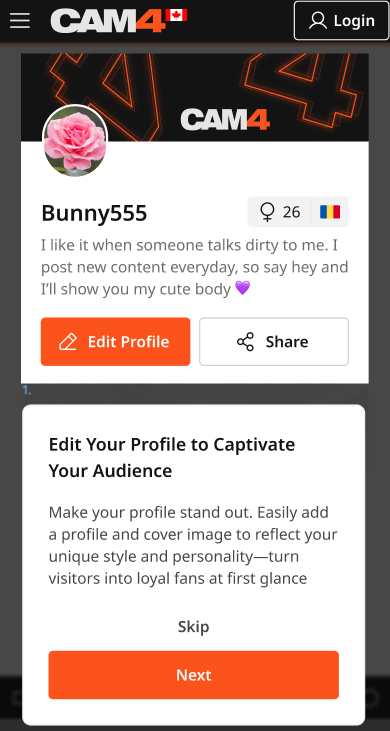
Your profile is a visitor’s first impression—make it count! Add a captivating SFW profile picture and cover image to reflect your personal brand. A visually polished profile helps turn casual visitors into loyal fans.

2. Transition Your Content to the Feed

  • Your existing Galleries and My Shop content will automatically be converted into posts, updated every 24 hours.
  • Initially, these posts will be visible only to you, giving you the opportunity to curate and refine your feed before launching it to your audience.

Once the feed is live, Galleries and My Shop will be retired and no longer displayed in seperate locations.   *Rest assured: purchased videos will remain accessible to buyers.

3. Launch Exclusive Content with Your Fan Club

Boost your income by offering exclusive perks through your Fan Club subscription:

  • Create a Fanclub or simply update your existing  Fan Club via the Broadcaster Dashboard.
  • Provide premium content that club members will continuously engage with, building a dedicated audience within your Fan Club. 

4. Monetize Your Video and Image Content

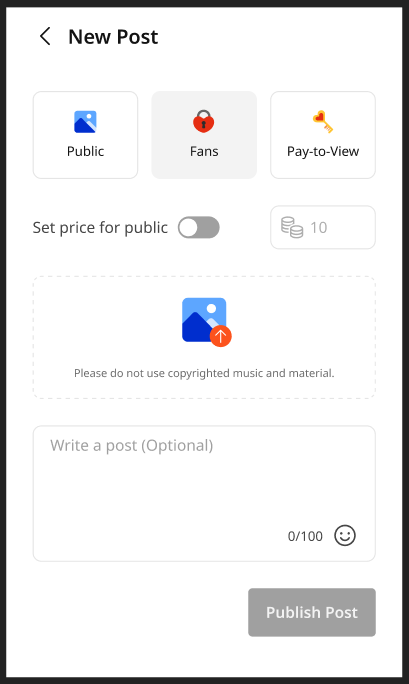
Create and share video and image posts that your audience can purchase, offering exclusive content to paying fans or subscribers while boosting your revenue. Provide VIP content to encourage memberships and maximize your earnings.

5. Your Media Library

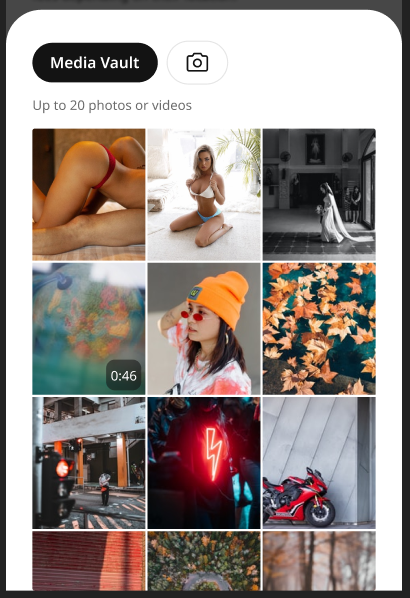
The new Media Vault consolidates your photos and videos into one convenient location. Previously uploaded media is already there, ready to be posted directly to your feed.

6. Keep Your Content Fresh

  • Consistently share creative, diverse, and enticing posts to attract and retain fans.
  • Use the feed to highlight different aspects of your talent and build a robust collection of content that keeps fans coming back for more.

Why Did CAM4 Launch The Activity Feed To  Creators First?

Before the Activity Feed is rolled out to all users, creators are getting exclusive early access, giving you the opportunity to:

  • Explore and familiarize yourself with the platform’s new design.
  • Curate your feed to match your personal style and organize your content seamlessly.
  • Fine-tune and add exclusive content to effectively monetize your feed.

By preparing in advance, you’ll maximize the impact of your Activity Feed when it’s unveiled to your fans.


Tips for Success

  • Set Preferences Early: Take a few minutes to customize your notifications and get comfortable with the new settings.
  • Check Regularly: Make it a habit to monitor your feed daily to stay updated and respond to fan activity.
  • Engage Promptly: Interact with comments and messages quickly to build stronger connections with your fans.
  • Post Consistently: Frequent updates keep your audience engaged and help attract new fans. 

Why You’ll Love the Activity Feed

  • Increased Visibility: Fans can easily discover your latest and historical posts.
  • Enhanced Productivity: Manage all your updates in one place.
  • User-Friendly Design: The platform is intuitive and familiar, making it easy to navigate.

Ready to take your content to the next level? Start curating your Activity Feed today and prepare for a seamless launch to your fans. Let your creativity shine and watch your audience grow!

UK DAC7 – Important Information on Data Collection for Payments

Although the UK is not subject to DAC7, we are updating our processes to align with global standards, including similar European regulations like DAC7. These changes mean we need to collect additional information from broadcasters/creators to process payments. Providing accurate information is essential to avoid issues with payouts.

Why are we collecting this information?

To comply with international transparency standards, we are required to gather specific details from our users. These regulations aim to prevent tax fraud and ensure payments are processed correctly. While DAC7 applies to the EU, aligning with these standards allows us to maintain a consistent and secure platform for all users, including those in the UK.

What information do we collect?

We may request details such as:

  • Your full name
  • Your address
  • Your National Insurance Number (NIN)

These details are necessary for compliance with tax regulations and transparency standards. Your information will only be used for these purposes and shared with tax authorities as legally required.

What is a National Insurance Number, and where can you find it?

Your National Insurance Number (NIN) is a unique identifier issued by the UK government for tax and social security purposes.

You can find it on:

  • Payslips
  • Tax return documents
  • Your personal tax account on the HMRC website
  • National Insurance card (if issued)
  • Official letters about tax, pensions, or benefits

What if you don’t have a fixed address?

If you’re traveling or don’t have a permanent residence, determining your tax residency can be more complex. Generally, your tax residency is the country where you spend more than six months (183 days) in a year. We recommend reviewing the tax laws of the countries where you’ve stayed to identify your tax residency.

Does this mean authorities will know what you do on the platform?

No. We only report payment transactions based on the information you provide. The nature of your activities on the platform will not be disclosed.

What happens if you don’t provide the required information?

Starting January 2025, providing this information will be mandatory to continue receiving payments. If the required details aren’t submitted, we won’t be able to process your payouts. Submit your information on time to avoid any interruptions.

When and how do you submit your information?

We will begin collecting this information in December. Once you log in, you’ll receive instructions on how to securely submit your details.

What happens to your information?

Your information will be used exclusively to comply with regulations like DAC7 and similar global standards. It will be shared with relevant tax authorities as required by law and handled in accordance with applicable privacy laws.

Questions?

If you have any questions or need assistance, contact our support team at payments@cam4.com or consult the UK government.

Earn more with Pay-Per-Text

Your Guide to Earning Big with Pay-Per-Text on CAM4!


Hey Creator, Ready to Boost Your Earnings?

Imagine this: every message you receive or media file you get from your fans directly puts tokens in your pocket. Sounds amazing, right? That’s exactly what Pay-Per-Text (PPT) on CAM4 does for you. It’s time to take control of your chat, maximize your earnings, and create deeper, more meaningful connections with your fans. Let’s dive in and get you set up for success!


Why Pay-Per-Text Is a Game-Changer for You

  1. Get Paid for Your Time
    Every message or media file your fans send is now a chance to earn. Yes, even that quick “hello” can add up to tokens in your account.

  2. Build Your Inner Circle
    Want to make your Fan Club the hottest spot? Reward members with free or discounted interactions while charging others a premium. It’s a win-win!

  3. Total Control, Your Way
    You decide how much to charge and for what. Want to charge only for photos or prioritize Fan Club messages? The choice is all yours.

  4. A Premium Experience for Fans
    Fans love feeling special! By charging for messages and media, you’re offering them guaranteed attention and an exclusive connection with you.

  5. Track Your Success
    CAM4 makes it easy to see exactly how much you’re earning from PPT, so you can fine-tune your strategy and watch those tokens roll in.


How to Set Up Pay-Per-Text (It’s Super Simple!)

Step 1: Let’s Get Ready!

First things first, make sure you’re Broadcast Approved and that the Pay-Per-Text feature is enabled in your settings. Easy!

Step 2: Set Up While Streaming

  1. Start Your Broadcast
    Log in and go live!

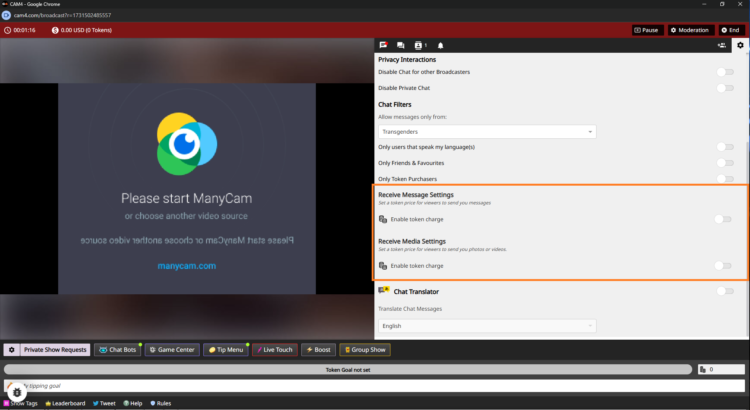
  2. Access Your Chat Settings
    Click the cogwheel icon (top-right corner) in the Broadcast Window. Scroll down to find the PPT options.

  3. Turn On Token Charges
    Flip the toggle for Receive Message Settings to start earning tokens for public and Fan Club messages.
    Example: Set 5 tokens for public messages and 1 token for Fan Club members (or keep it free to encourage signups).

    Do the same for Receive Media Settings to earn from photos and videos.
    Example: Charge 10 tokens for public uploads and 2 tokens for Fan Club uploads.

  4. Let CAM4 Do the Rest
    No need to hit save—your settings are updated instantly.

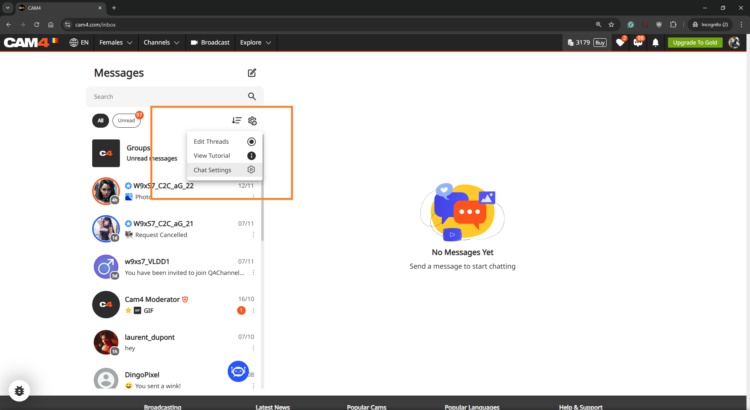
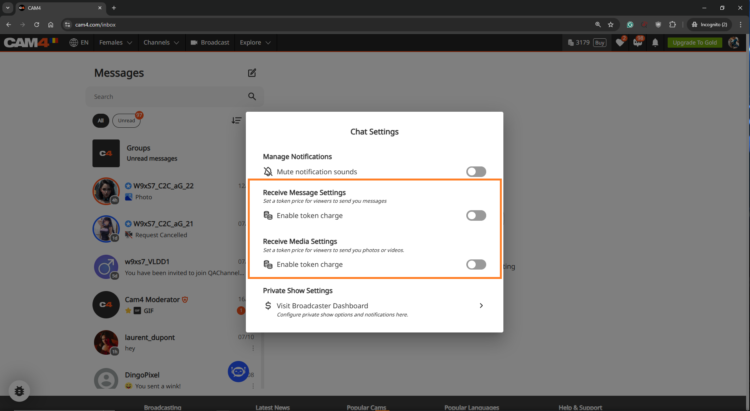
Step 3: Pre-Configure in the Messenger Interface

Want to set things up before you go live? No problem! Head to the Messenger Interface via the Chat Icon on your profile. Adjust your PPT settings, and they’ll sync across the platform.

Make the Most of Pay-Per-Text

  • Treat Your Fan Club Like VIPs
    Let’s be real: your Fan Club is your squad. Offer them free or reduced-rate messages to build loyalty while charging higher rates for everyone else.

  • Experiment with Token Rates
    Try different pricing to see what works best for your fans. The sweet spot is where your earnings soar, and your fans stay engaged.

  • Test It Out First
    Use a test account or ask a trusted viewer to make sure your settings work perfectly before going live.

  • Be Clear and Upfront
    Fans appreciate transparency. Display token charges clearly so there are no surprises—just good vibes.


Watch Your Earnings Grow!

Head to your Broadcaster Dashboard to track every token you earn from messages and media. It’s all broken down for you under the Tip History tab, so you know exactly where your success is coming from.

Feeling curious? Check out the Tipping Reports to see which strategies are working best. Is it media uploads? Fan Club messages? You’ve got all the insights at your fingertips.


FAQs (Because We Know You’ll Crush It!)

  • Can I charge for just one thing, like media?
    Absolutely! You’re in control, so choose what works for you.

  • What if a viewer doesn’t have enough tokens?
    No worries—they’ll get a prompt to buy more before their message or media goes through.

  • Are Fan Club messages free by default?
    Yep, but you can change that. Charge a little or keep them free—it’s totally your call.


Pay-Per-Text isn’t just a feature—it’s your gateway to more earnings, more connections, and more control over your time and energy. Ready to turn every interaction into an opportunity? Let’s do this! Your fans are waiting, and those tokens are yours to claim. 💎


~That’s all for this lesson!

Happy Camming!

Love, Your Coaching Team!

Are your Offline Private Show (OPS) Notifications on?

Never miss a private show request, even when you’re offline or away from your computer. With Offline Private Show (OPS) notifications, your viewers can make private show requests and view your schedule at any time!

This guide will help you get started with ‘Offline Private Shows’ (OPS) and setting up your notifications. By leveraging these powerful CAM4 features, you can keep your audience continuously engaged and build lasting relationships- even outside of your regular online shows.

What are the Benefits of using OPS Notifications?

Notification Preferences – Personalize your alerts and select the channels where they’ll be delivered in real-time. 

Customized Pricing – Set your desired Private Show pricing with the ability to allow Cam2Cam and Spying. 

Improved Schedule Visibility – Make your Private Show schedule and availability visible to your fans… it’s super easy to configure and is shown right on your profile- Set up to 3 different time slots.

How do I find the OPS settings?
Once logged into your CAM4 account navigate to your Broadcaster Dashboard , then click on “Private Show Settings” from theBroadcaster Tools” menu on the right.

IMPORTANT: The first thing to note is that the OPS Notifications function is defaulted to OFF, therefore as a creator you will need to activate this in your settings by sliding to ON.

Want to understanding your Offline Private Show (OPS) Notifications? 

BROWSER NOTIFICATIONS

These notifications are pop-ups that appear on your screen, regardless of which website you are on.  If your browser (ie. Safari, Firefox, Chrome) is open, a notification will be shown.   

To enable, simply toggle the “Browser Notifications” option to ON.

iOS users this feature requires additional steps to be enabled. You must add the web app to your home screen and access it from there to enable notifications.

Installing Web App

  1. Open your Web browser and go to CAM4.com
  2. Click the download icon at the bottom of your browser. 
  3. Select “Add to Home Screen from the menu

  1. Rename the icon or just press “add”
  2. The C4 icon will appear on your home screen 

C4 BROADCASTER APP NOTIFICATIONS

These notifications are sent through the C4 Broadcaster App keeping you informed about your private show requests directly to your mobile device.

To enable, simply toggle the “C4 Broadcaster” option to ON.

EMAIL NOTIFICATIONS

These notifications are sent directly to an external email address, ensuring you have a record of the request in your inbox.

Once enabled, check your email preferences to ensure the “Receive Notifications Relating To Your CAM4 Account” option is ON.


SMS NOTIFICATIONS

These notifications are sent as a text message to your mobile phone whenever a private show request has been made. 

To enable, simply “Add Your Mobile Number” in the settings.

Note: if Two-Factor Authentication (2FA) is on, the mobile number MUST MATCH  the one used for 2FA.

SET PRICING
This feature allows you to set your Private Show pricing either per minute or as a fixed rate. You can configure your “Price Per Minute”, “Minimum Timeframe”, “Spy Per Minute Rate”, and “Cam2Cam” settings here.

3 USEFUL TIPS TO REMEMBER

TIP 1: GET NOTIFIED MULTIPLE WAYS- You can activate one or more notification channels at once, enabling you to receive alerts through various methods and stay informed no matter what you’re doing or where you are.

TIP 2: CUSTOMIZE YOUR AVAILABILITY- Set the times when you are open to accepting Private Show requests.  This will help boost engagement and more private shows coming your way..  

TIP 3: SHOW YOUR SCHEDULE ON THE PROFILE & MESSENGER-  Setting your schedule will show on your profile page and also on  your messenger, ensuring viewers can easily see your availability., 

With the right settings in place, you can look forward to a more organized, responsive, and profitable PRIVATE SHOW experience.

👉 If you have any questions, feel free to ask the Coaching Bot 👈

NEED MORE HELP?

Read our FAQ’s or join one of our regular Coaching Sessions every Tuesday & Thursday at 10am EST for useful insights and to meet other creators.

Alternatively, please reach out to CAM4’s Support Team via the chat bubble in the bottom right hand corner of CAM4, or by email at support@cam4.com

One final thing… The content of Private Shows are subject to CAM4’s creator rules, and all persons on your cam must be approved by CAM4.

~That’s all for this lesson!

Happy Camming!

Love, Your Coaching Team!