Category Archives: Tools für Broadcasters

Hier findest du hilfreiche Tipps, Informationen zu Zahlungsmethoden, wie du bezahlt wirst, Token-Berichte und vieles mehr.

Starthilfe

Wir erzählen dir hier alles – kurz, deutlich und anwendbar.

Die Geheimnisse, um ein TOP‑Webcam-Model auf CAM4 zu werden

Dieser Artikel verhilft dir zu einem erfolgreichen Start für mehr Zuschauer, mehr Interaktion und mehr Tokens – ohne unnötige Komplexität. Konzentriere dich auf deine Aktivitätsanzeige und Fanclub für Reichweite und ein stabiles Einkommen.

Tipp: Arbeite mit klaren Zielen, einem übersichtlichen Tipmenu und einer konsistenten Posting-Frequenz auf deinem Feed.

1) Starte hier: Konto, Verifizierung & Auszahlung

Bevor du live gehen kannst: Verifiziere dein Alter/deine Identität und richte deine Auszahlung in 10 Minuten ein. Blockiere notfalls Länder/Regionen.

Konto & ID‑Check (2257)

Alle Performer (18+) müssen ID‑verifiziert sein. Dies gilt auch für Duos/Gruppen – jeder auf Cam muss verifiziert sein.

Los geht’s mit der ID‑Verifizierung

Auszahlung einrichten

Wähle deine Zahlungsmethode und überprüfe deine Daten. Lies, wie und wann du ausgezahlt wirst.

AuszahlungsmöglichkeitenJetzt einrichten!

Zum ersten Mal online üben

Starte, ohne sofort sichtbar zu sein. So kannst du dich sicher umsehen und alles in Ruhe einstellen.

Lies hier, wie du das machst.

2) Erstelle ein unwiderstehliches Profil

Dein Profil ist deine Landingpage. Zeige in 5 Sekunden, wer du bist, was du tust und wann du live bist.

Bio

Kurz und knackig, mit deinem Vibe und Grenzen. Füge deinen Show Plankalender und einen klaren Call‑to‑Action (Aufforderung) hinzu.

Bilder

Ein deutliches Profilfoto + 2–4 aktuelle Fotos, zu deinem Stil zeigen. Vermeide unruhige Hintergründe.

Klarheit

Setze dein Trinkgeld-Menü und (Mikro)Ziele in deine Beschreibung, damit Zuschauer direkt wissen, wie sie mitmachen können.

Mehr Hilfe? So erstellst du eine starke Profilseite

3) Setze Ziele und erreiche sie

Ohne Ziel fühlt sich deine Show “unverbindlich” an. Teile dein Tagesziel in sichtbare Mikroziele auf und kommuniziere sie klar.

Beispiel – willst du 1000 Tokens (~100 USD) pro Show? Teile sie in 4 Meilensteine von 250 Tokens auf.

  • Ziel 1: 250 Tokens = nackt
  • Ziel 2: 250 Tokens = Öl (Körperteile)
  • Ziel 3: 250 Tokens = Solo (Masturbation)
  • Ziel 4: 250 Tokens = Orgasmus (nur wenn du dich dabei wohlfühlst)

Bleibe bei deinen Zielen. Ständiges Ändern schadet dem Vertrauen – und dem Trinkgeld.

Hinweis: Der Text in deiner Zielbalken ist begrenzt. Halte das Mapping‑Schema simpel (z.B. @250 → nackt, @500 → Öl, @750 → Solo, @1000 → Ende).

Mehr Hilfe? Ziele & Trinkgeld-Menü

4) Mehr verdienen mit Gruppenshows und Privateshows

Gruppenshow = exklusive Show mit Ticket für mehrere Zuschauer. Starte nach maximal ~15 Minuten Vorspiel und bedanke dich bei jedem Ticketkäufer hörbar.

Private Show = 1‑on‑1 pro Minute (Spione können gegen Bezahlung mitgucken, ohne Chat bzw. Nachrichtenzustellung). Wähle einen Tarif, der zu deinem Angebot und deiner Erfahrung passt.

Startertarif

Viele Models starten bei etwa 12–18 Tokens/Minute.

C2C

Cam2Cam kommt häufiger bei 18–32 Tokens/Minute vor.

Transparenz

Zuschauer sehen deinen Preis + lokale Steuern, berücksichtige dies.

Pro‑Tipp: Benenne vorher, was Private anders/besser macht als deine öffentliche Show.

Lies mehr: Gruppenshows • Private Show Möglichkeiten

Offline Privateshows (Benachrichtigungen)

Lass Fans auch buchen, wenn du nicht live bist. Aktiviere OPS‑Benachrichtigungen und akzeptiere, wann es dir passt.

Erklärung: Offline Private‑Benachrichtigungen einschalten

5) Aktivitätsanazeige & Fanclub 

Aktivitätsanzeige: Poste kurze Updates, Teaser und Show‑Ankündigungen außerhalb deiner Live‑Shows. Mixe öffentlich Beiträge (Reichweite) mit Fanclub‑only (Wert).

Fanclub: Biete Vorteile, die du einhalten kannst (exklusive Posts, früher Zugang, monatlicher Gruß an den loyalsten Trinkgeldgelber). Wähle einen Monatspreis aus, der zu deinem Rhythmus passt.

Mehr wissen? Aktivitätsanzeige & Fanclub

6) Trinkgeld-Menü (halte es einfach und sichtbar)

Setze 6–10 feste Aktionen in deine Profilbeschreibung und wiederhole sie mündlich während deiner Show. Kopple sie, wo möglich, an deine Ziele.

Kleiner Tease 25 Tokens schneller Boost
Pose / Close‑up 50 Tokens
Tanz / Hype‑Moment 100 Tokens
Wheel Spin / Mini‑Game 150 Tokens
Öl‑Moment 250 Tokens
Solo‑Highlight 500 Tokens
Gruppenshowticket variabel
Privateshow pro Minute

Mehr Hilfe nötig? Wie viele Tokens kann ich verlangen?

7) Pay-Per Text

Pay per Text: Verdiene an DMs, ohne zu verhandeln

Wie du es einsetzt

Lege einen festen Preis pro Privatnachricht fest und erwähne dies in deiner Bio oder deiner Aktivitätsanzeige. Nutze es für kurze Fragen, persönliche Reaktionen und schnelle Anfragen – innerhalb deiner Grenzen und Plattformregeln.

Preisindikation

Starte einfach und teste: Viele Models beginnen zwischen 1-2 Tokens/Nachricht. Erhöhe bei Andrang, senke für mehr Volumen.

Handliche Beispielsätze

  • “Willst du einen persönlichen Shoutout? Pay per Text ist aktiviert.”
  • “Stelle deine Frage per  DM – 1-2 Tokens pro Nachricht.”
  • “Fanclub Mitglieder erhalten Vorrang bei Pay per Text.”

Mehr Info: Verdiene mehr mit Pay per Text • Alles über Messenger

8) Mehr Zuschauer für deine Shows

  • Thumbnail: frisches Setting, gutes Licht, Ausdruck. Vermeide den “einfach nur ein Schlafzimmer”‑Look.
  • Beschreibung: kurz, einzigartig und mit einer klaren Einladung (was willst du, dass jetzt passiert?).
  • Hashtags: 3–5 starke Tags sind oft genug.
  • Rhythmus: streame zu festen Zeiten und kündige es über deinen Aktivitätsanzeige an.

Lies mehr: Vielleicht draußen? • Shows Planen

9) Interaktive Toys

Erhöhe die Beteiligung und Tringeld‑Frequenz mit interaktiven Toys (z.B. Lovense). Kündige Hemmschwellen an (z.B. “bei 200 Tokens: Intensität hoch”).

Mehr Info: Welche Toys kannst du verwenden? • Wie schließt du es an?

10) Spiele

Nutze Token Keno, Spin the Wheel und Roll The Dice für zusätzliche Spannung und Einnahmen. Lass Zuschauer Tokens einsetzen und kopple kreative Belohnungen an Ergebnisse (Aufgabe, Kleidungsstück aus, spezielle Interaktion).

Mehr Hilfe benötigt mit Spielen? Alle CAM4 Spiele

11) X/Twitter Connect & Social Media

Nutze X/Twitter für Ankündigungen, Clips/Teaser und Community‑Bildung. Teile deinen Affiliate‑Link clever.

Tipp: Plane Posts rund um deine Shows (Morgen‑Ankündigung, Erinnerung 1 Stunde vorher, Dankeschön hinterher).

12) Chat‑Indikatoren: Badges, Farben und Tokenaktivität

Wer ist auf einen Blick zu sehen?

  • Gold/Fans: spezielle Farbe/Badge – schnell begrüßen, in Ziele einbeziehen.
  • Moderatoren: markiert – sind da, um zu helfen, aber pass auf, diese Rechte sind nicht für jeden.
  • Top Trinkgeldgeber: fallen auf – nenne sie hörbar bei jedem Trinkgeld.
  • CAM4 Crew: Account Manager/Coaches usw. haben eine deutliche Sichtbarkeit.

So liest und nutzt du Indikatoren

  • Farben/Badges zeigen Rolle und Mitgliedschaft; der Ring um jemandes Icon = aktuelle Ausgaben (14 Tage).
  • Fällt der Ring auf? Lade diesen dazu gezielt ein: Mikroziel erreichen oder wähle 1–2 Trinkgeld‑Vorschläge (z.B. 25/50/150 Tokens).
  • Verwende einen festen Satz: “Noch 120 bis Ziel 2 – danke an [Name] für den Boost!”
  • Mache Belohnungen hörbar: bedanke dich bei jeder (Hemm-)Schwelle (Name + was freigeschaltet wird).

Mehr wissen? Erklärung zu Chat‑Indikatoren

13) Schütze dich & moderiere

Privatsphäre

Sei sparsam mit persönlichen Daten. Schütze deine Privatsphäre

DMCA – Aufnahmen

Wisse, was zu tun ist, wenn deine Show aufgenommen wurde. Sendung aufgenommen – was nun?

Hilfe!

Solltest du wirklich nicht weiterkommen, steht dir unser Support 24/7 zur Verfügung!

Auch interessant: Sperren & ModeratorenLänder & Regionen blockieren
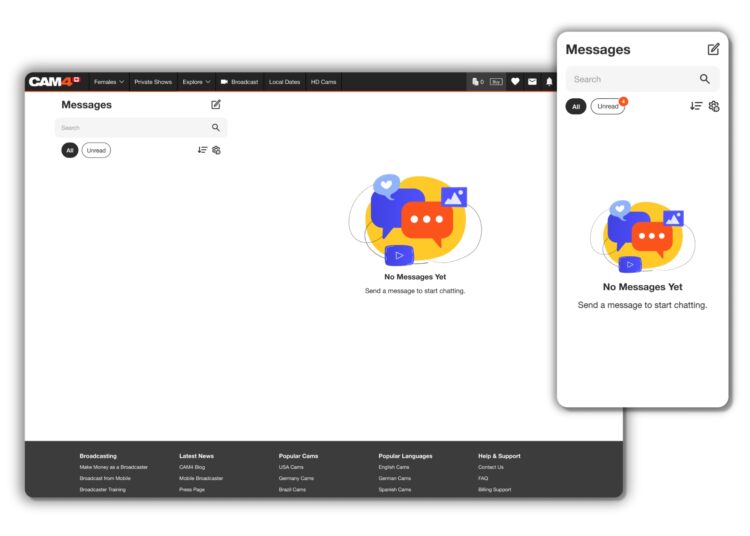
CAM4 Messenger-Funktion

Entdecke alle Messenger-Funktionen in einer Übersicht.

CAM4 Messenger: verbesserte DM-Erfahrung

Einfacher zu bedienen und viel leistungsfähiger als nur Chatten. Dieser Leitfaden zeigt dir alle Chat- und Medienfunktionen – und wie du damit verdienen kannst.

Tipp: Kombiniere Messenger mit Pay-Per-Text, um für Nachrichten und Medien bezahlt zu werden.

Schnelle Einführung

Übersicht Messenger-Funktionen

Übersicht Messenger-Funktionen

Der neue Messenger ist einfacher und funktionsreicher. Lerne die Tools kennen und nutze sie direkt in deinem täglichen Workflow.

Vorteile von CAM4 Messenger

Messenger mobiles Beispiel

Erhöhte Privatsphäre

Knüpfe Verbindungen zu Zuschauern, die du auswählst – über Chat und private Shows.

Filteroptionen

Schneller Zugriff auf wichtige Infos und Inhalte ohne Rauschen.

Geld verdienen

Verdiene Token mit Trinkgeldern, Content-Verkäufen, Geschenken und privaten Shows.

Mobilfreundlich

Der Messenger funktioniert unterwegs reibungslos und übersichtlich.

Chat-Upgrades

Chatfunktionen

Speichern, antworten, löschen, GIFs und Emojis – plus zusätzliche Kontrolle darüber, wer dir Nachrichten senden kann.

  • Antworten und Speichern pro Nachricht
  • Nachrichtenverwaltung (löschen, melden)
  • GIFs, Emojis und Medienvorschauen
  • Wer dich ansprechen darf: strengere Kontrolle

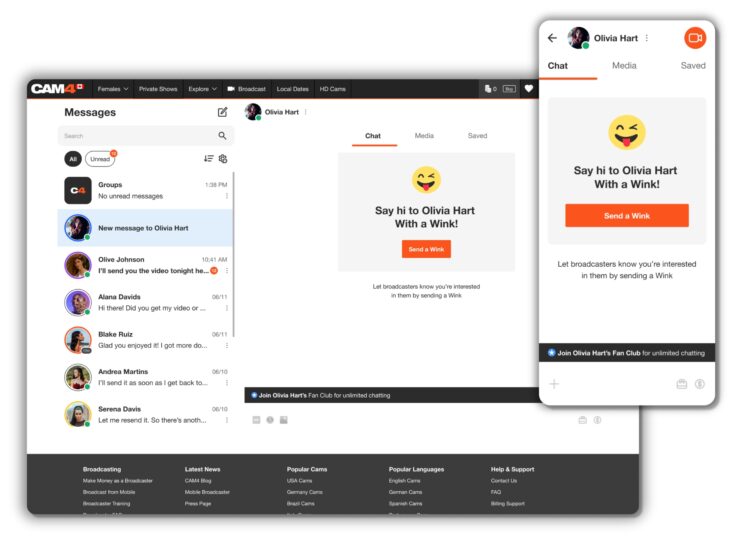
Zwinkern

Nicht-Gold-Mitglieder senden zuerst ein Zwinkern; erst nach deiner Antwort können sie Trinkgeld senden. Gold-Zuschauer können direkt Nachrichten senden.

Zwinkern und Chatflow


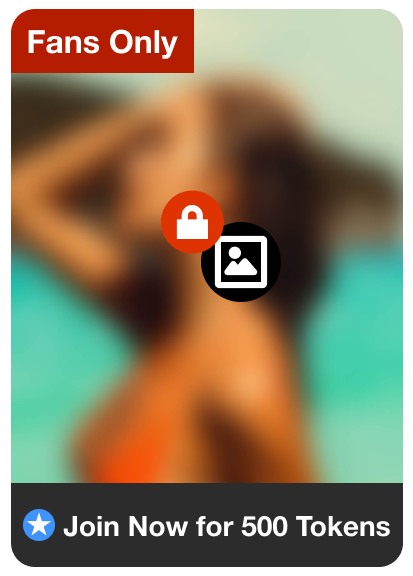
Fanclubs teilen

Bewirb deinen Fanclub per DM. Der Zuschauer klickt sich durch, wird Mitglied und sieht dann den Inhalt im Chat.

Fanclub-Link Beispiel

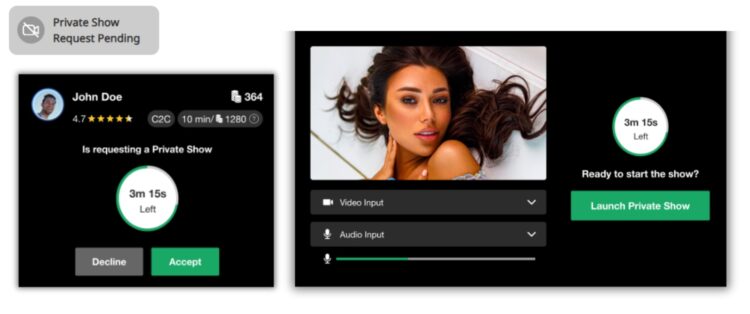
Organisiere eine private Show über Messenger

Start aus dem Chat

Biete jederzeit private Shows an – ohne mit Publikum auf deinem Profil live gehen zu müssen.

  • Wähle: Cam2Cam oder Standard-Privatshow
  • Starte über das Kamerasymbol rechts oben im Chatfenster
  • Einnahmen erscheinen nach

Kamera-Symbol Private Show

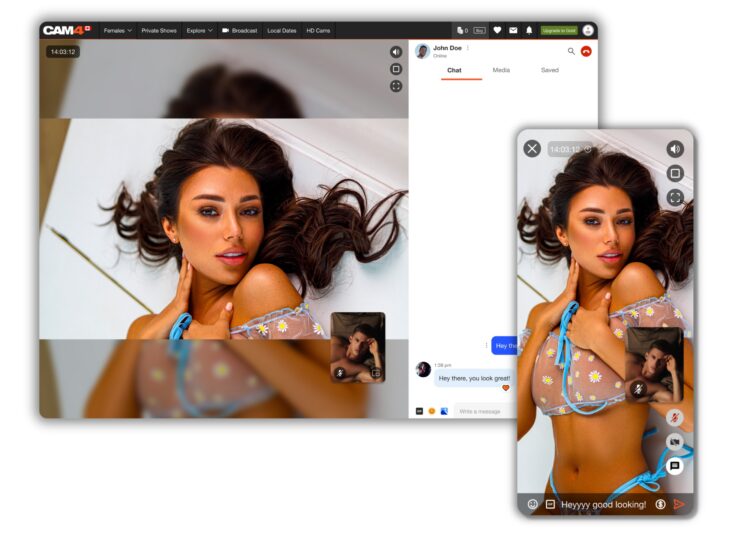
Beispielansichten

Private Show aus dem Chat starten Bewertung und Einnahmen im Chat

Danach kann der Zuschauer die Show bewerten; du siehst deine Einnahmen sofort.

Sicherheit und Informationen

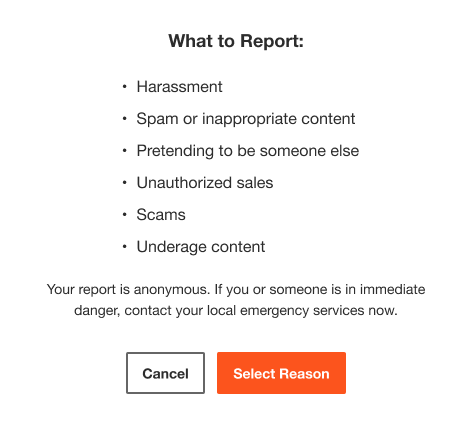
Nutzer melden

Sende ein Meldeformular an den Support zur Überprüfung. Hinweis: Das Melden blockiert den Kontakt nicht automatisch.

Nutzer melden

Nutzer sperren + Coach Bot

Sperren entfernt den Nutzer aus deinem Chat und deinen Shows; dein Name verschwindet aus seinen/ihren Suchergebnissen. Coach Bot gibt direkte Antworten auf Fragen zu Messenger, Shows und Regeln.

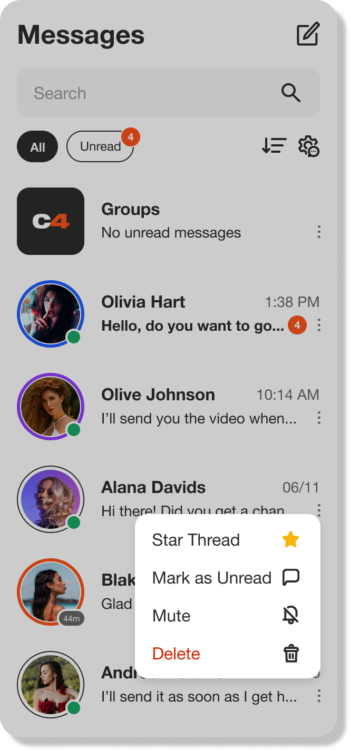
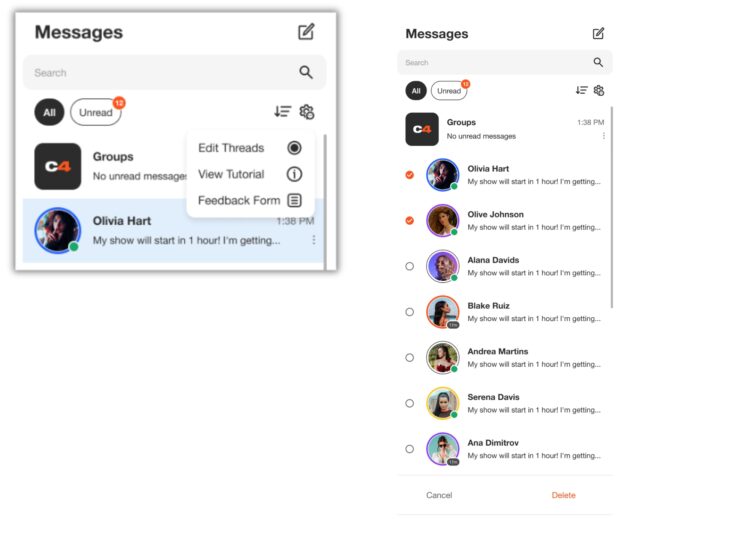
Mit Filtern organisieren
Posteingang verwalten

Konversationen filtern, wichtige Nachrichten gruppieren und speichern. Verwalte deinen Posteingang schnell mit Massenlöschung.

Filter und Posteingangsverwaltung

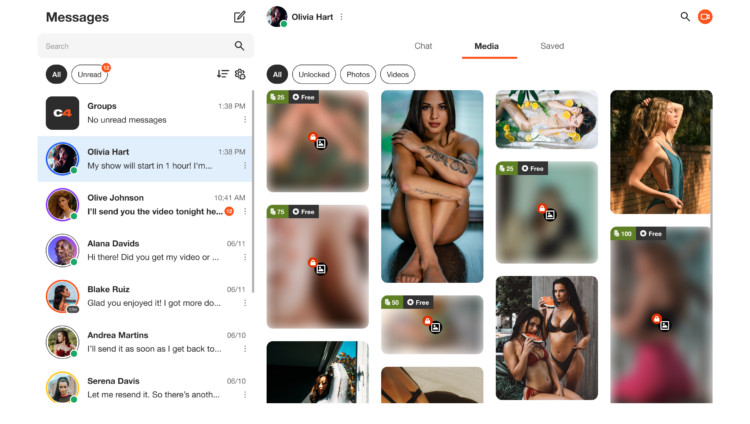
Media-Tab

Alle Medien in deinen DMs findest du unter Media — sortiere nach Freigeschaltet, Fotos oder Videos.

Übersicht Media-Tab

Speichern

Wichtige Infos später wiederfinden? Nutze den Tab „Gespeichert“ pro Konversation. Alles wird chronologisch angezeigt.

Lovense Spielzeug-Integration auf CAM4

Erfahre schnell, wie du deine Lovense-Spielzeuge in deinen CAM4-Shows verwendest – über Stream Master oder mit der Browser-Erweiterung.

Lovense-Integration auf CAM4

Wähle, was zu deinem Setup passt: Lovense Stream Master (All-in-One) oder die Lovense Browser-Erweiterung (Chromium). Lass dein Spielzeug auf Tipps reagieren und steigere das Erlebnis.

Tipp: Kommuniziere klare Schwellenwerte (z. B. 25/50/150 Token) und teste eine kleine “Tip-Demo”, bevor du live gehst.

Zwei Möglichkeiten zur Verbindung

Lovense Stream Master

All-in-One-Software/Browser von Lovense, entwickelt für Live-Streamer. Kombiniert Streaming, Cam/Browser-Integration und Spielzeugverbindung in einem Tool – weniger separate Teile erforderlich.

Lovense Browser-Erweiterung

Erweiterung für Chromium-Browser (Chrome/Edge/Brave), die Trinkgeld-Ereignisse an dein Lovense-Spielzeug weiterleitet, sodass es in Echtzeit auf Trinkgeld während deines Streams reagiert.

Hier findest unser Anleitungsvideo

Wichtigste Vorteile

Weniger Aufwand

Mit Stream Master musst du nicht separat mit OBS + separatem Browser + Erweiterung arbeiten; viele Funktionen sind eingebaut.

Direkte Reaktion

Die (Cam-)Erweiterung leitet Trinkgelder an Lovense weiter, sodass dein Spielzeug vibriert oder auf vereinbarte Schwellenwerte/Beträge reagiert.

Stabilität

Stream Master ist die empfohlene Route und ersetzt den älteren Modus “Lovense Browser + Erweiterung” für ein reibungsloseres Erlebnis.

Nachteile & Hinweise

  • Der ältere “Lovense Browser mit Erweiterung” erhält seit dem 1. September 2023 keine Updates mehr – Stream Master wird empfohlen.
  • Verwende immer Lovense Connect, um dein Spielzeug zu koppeln (die Remote-App funktioniert hierfür nicht).
  • Die Erweiterung funktioniert gut auf Chromium-Browsern; Unterstützung auf Firefox/Safari ist begrenzt/nicht verfügbar.
  • Die Leistung kann variieren: hohe Auflösung + mehrere Apps können auf schwächeren PCs zu Verzögerungen/Abstürzen/Verzögerungen führen. Teste deine Einstellung.

Einrichtung (kurze Schritte)

  1. Installiere Lovense Connect auf deinem Telefon und kopple dein Spielzeug über Bluetooth in dieser App.
  2. Lade Stream Master herunter/installiere es (oder wähle die Browser-Erweiterung in einem Chromium-Browser).
  3. In Stream Master: Füge deine Cam-Seite hinzu und richte Video/Overlays/Spielzeugintegration ein.
  4. Verwendest du die Erweiterung? Installiere die richtige Erweiterung, öffne die Erweiterungsseite, bevor du mit dem Streamen beginnst.
  5. Mache einen Test-Tipp (kleiner Betrag), um zu überprüfen, ob dein Spielzeug genau so reagiert, wie du es erwartest.

Bewährte Methoden

Vorab testen

Aktualisiere Firmware/Apps, überprüfe Akku/Verbindung und zeige deinem Chat einen kurzen Demo-Tipp, um die Schwellenwerte zu “lernen”.

Schwellenwerte kommunizieren

Halte dein Mapping einfach (z. B. 25/50/150 Token = leichte/mittlere/intensive Reaktion) und pinne sie sichtbar in deiner Beschreibung oder im Trinkgeld-Menü.

Haftungsausschluss & aktuelle Informationen

Bitte beachte: Lovense veröffentlicht regelmäßig Updates (Firmware/Software/Kompatibilität). Die Erfahrungen variieren je nach Hardware und Internet. Konsultiere immer die offiziellen Lovense-Handbücher und Versionshinweise, bevor du live gehst.

Unlocking the Power of the new Activity Feed

The Activity Feed is CAM4’s latest and most exciting tool yet! Designed to help you, the creator, to effortlessly showcase and monetize your offline content into one simple feed, serving as an all-in-one platform to share updates, post photos, monetize your videos, and grow your audience—similar to the layout of most social media platforms. 

With complete control over your feed, you can curate the content you want fans to see, reflecting your unique style and giving your content the visibility it deserves.

Let’s dive into how to use it effectively!


What is the Activity Feed?

The Activity Feed lets you transfer content from your Galleries and My Shop areas into a dynamic, interactive feed displayed prominently on your profile.  By leveraging this feature, you can:

  • Keep fans engaged with daily updates, curate content, and add exclusive posts.
  • Promote and monetize your recorded video content
  • Promote Fanclub signups and special promotions

How It Works

1. Customize Your Profile

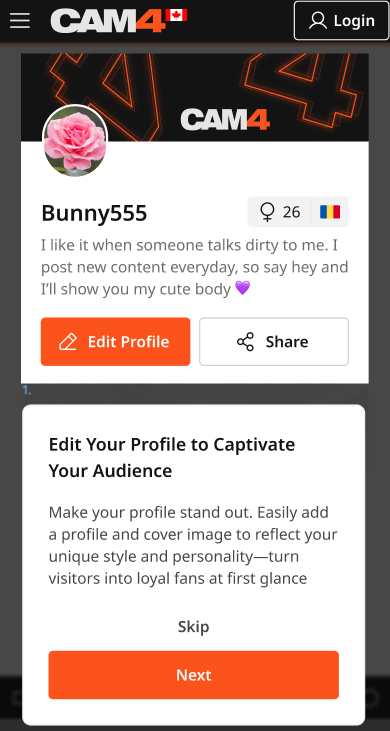
Your profile is a visitor’s first impression—make it count! Add a captivating SFW profile picture and cover image to reflect your personal brand. A visually polished profile helps turn casual visitors into loyal fans.

2. Transition Your Content to the Feed

  • Your existing Galleries and My Shop content will automatically be converted into posts, updated every 24 hours.
  • Initially, these posts will be visible only to you, giving you the opportunity to curate and refine your feed before launching it to your audience.

Once the feed is live, Galleries and My Shop will be retired and no longer displayed in seperate locations.   *Rest assured: purchased videos will remain accessible to buyers.

3. Launch Exclusive Content with Your Fan Club

Boost your income by offering exclusive perks through your Fan Club subscription:

  • Create a Fanclub or simply update your existing  Fan Club via the Broadcaster Dashboard.
  • Provide premium content that club members will continuously engage with, building a dedicated audience within your Fan Club. 

4. Monetize Your Video and Image Content

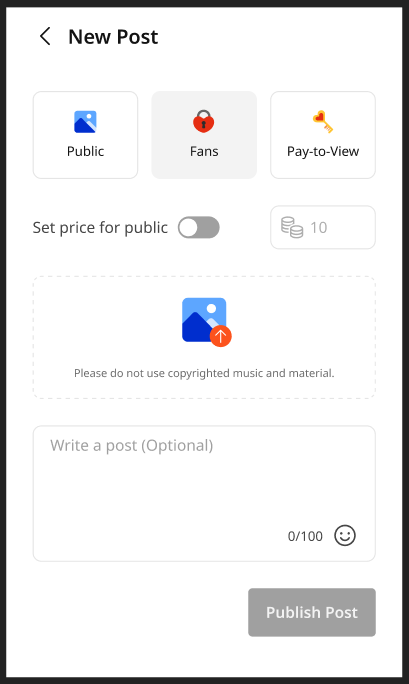
Create and share video and image posts that your audience can purchase, offering exclusive content to paying fans or subscribers while boosting your revenue. Provide VIP content to encourage memberships and maximize your earnings.

5. Your Media Library

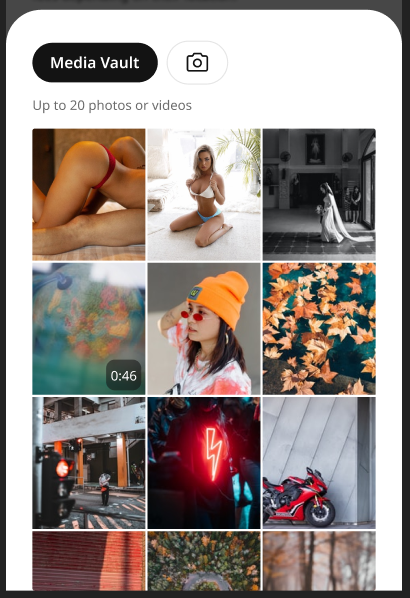
The new Media Vault consolidates your photos and videos into one convenient location. Previously uploaded media is already there, ready to be posted directly to your feed.

6. Keep Your Content Fresh

  • Consistently share creative, diverse, and enticing posts to attract and retain fans.
  • Use the feed to highlight different aspects of your talent and build a robust collection of content that keeps fans coming back for more.

Why Did CAM4 Launch The Activity Feed To  Creators First?

Before the Activity Feed is rolled out to all users, creators are getting exclusive early access, giving you the opportunity to:

  • Explore and familiarize yourself with the platform’s new design.
  • Curate your feed to match your personal style and organize your content seamlessly.
  • Fine-tune and add exclusive content to effectively monetize your feed.

By preparing in advance, you’ll maximize the impact of your Activity Feed when it’s unveiled to your fans.


Tips for Success

  • Set Preferences Early: Take a few minutes to customize your notifications and get comfortable with the new settings.
  • Check Regularly: Make it a habit to monitor your feed daily to stay updated and respond to fan activity.
  • Engage Promptly: Interact with comments and messages quickly to build stronger connections with your fans.
  • Post Consistently: Frequent updates keep your audience engaged and help attract new fans. 

Why You’ll Love the Activity Feed

  • Increased Visibility: Fans can easily discover your latest and historical posts.
  • Enhanced Productivity: Manage all your updates in one place.
  • User-Friendly Design: The platform is intuitive and familiar, making it easy to navigate.

Ready to take your content to the next level? Start curating your Activity Feed today and prepare for a seamless launch to your fans. Let your creativity shine and watch your audience grow!

Your Tip Menu

Launch Your Very Own Custom Tip Menu to Improve Engagement and Increase Earnings!

Tell your fans what to tip for and earn more tokens, set up yours now!

What Is It?
The CAM4 Tip Menu is a fun tool that allows you to create a customized list of actions with the corresponding token amount a viewer needs to tip for you to perform the action during your performance. We’ve recently upgraded our tipping menu functionality to allow for simple set up and easy viewer access. Performers who’ve launched their own tip menus have reported heightened activity and ultimately an increase in show earnings! 

Benefits of Creating a Tip Menu:

  • The tip menu is an easily customizable list that you control and can change / update at any time
  • Your viewers know exactly what they can tip for each performance action without having to ask
  • You won’t need to set up an HTML bio
  • The tip menu is easily accessible via your profile during every show
  • Less chatty viewers are more likely to engage

Quick & Easy Tip Menu Set Up
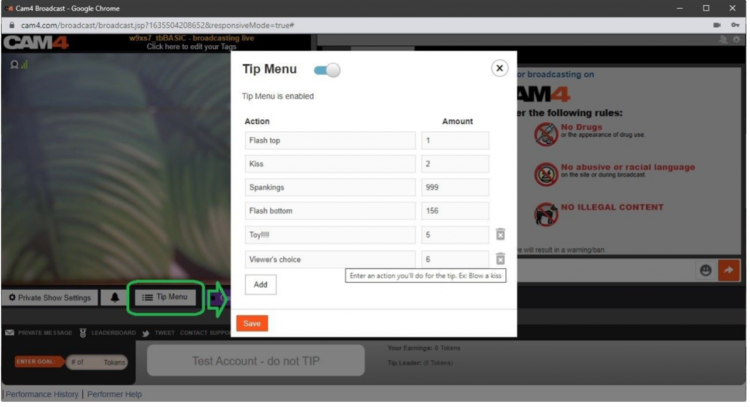
Locate the Tip Menu feature near the Game Center and enter each action and the required tipping amount. *Please note you must enter at least four (4) actions to activate your tipping menu for viewers

You can add up to 12 tip menu options; click the trash can icon to the right of each option to delete and update. Once you’ve completed your list, click SAVE to activate.

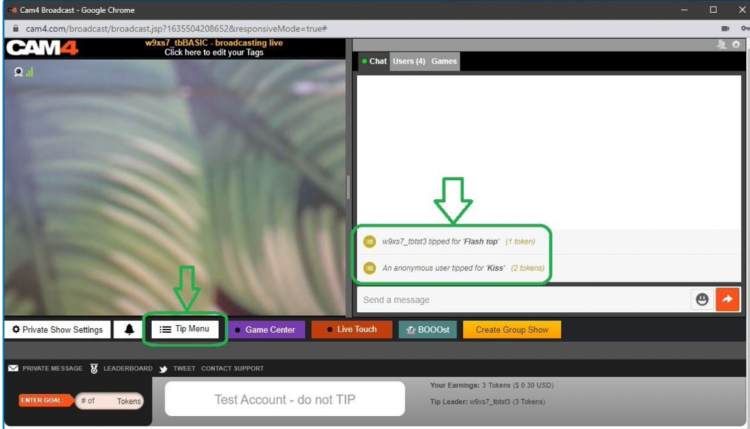
You will receive a special notification in your chat window every time a viewer selects an item in your tip menu


Tip Menu Ideas
What you include on your tip menu is completely up to you, and the great thing is you can add and update the menu as you learn what your viewers want and need in your shows!  Here are some sample tip menu options to get you started:

  • Blow kisses
  • Custom shout out message
  • Flash boobs
  • Oil rubdown
  • Spanking
  • Twerk
  • Insert toy for 15 seconds

Get creative here – the sky really is the limit!

The Key to Tip Menu Success
Our best advice for making the tip menu work for you is to keep your list of options fresh and creative while continuously directing viewers to it during your show.

We’re Here to Help You Win!
If you need help setting up your tip menu or are looking for ways to maximize this fun tool, please reach out to support@CAM4.com at any time and one of our experts will guide you.


~That’s all for this lesson!

Happy Camming!
Love, Your Coaching Team!

Auto Pause after a Private or Group Show

Auto-Pause is designed to give you time to prepare to be in front of your regular viewers again after your Private or Group show ends.

Go grab some food or something to drink, clean up, use the washroom, or change your outfit. You have 5 minutes to do whatever you need to do before going live on cam for your viewers again.

HOW DOES IT WORK?

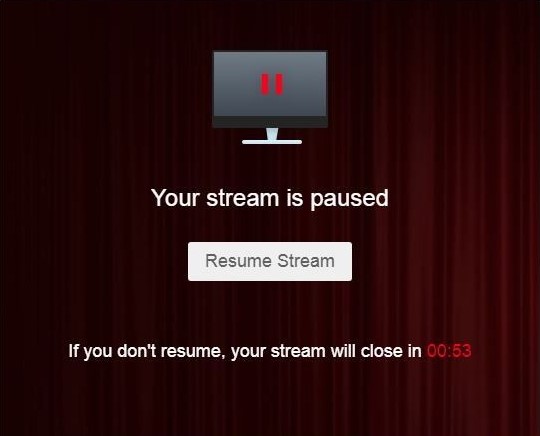
Start your Private or Group show as you normally would.  At the end of the show, your stream will pause for a maximum of 5 minutes .

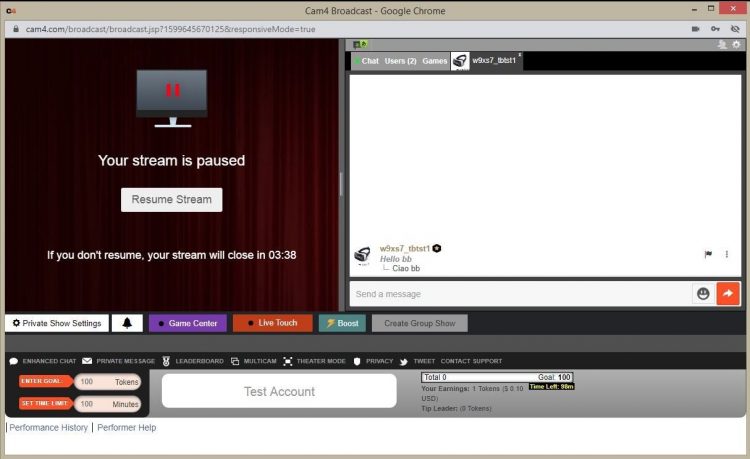
What YOU will see:


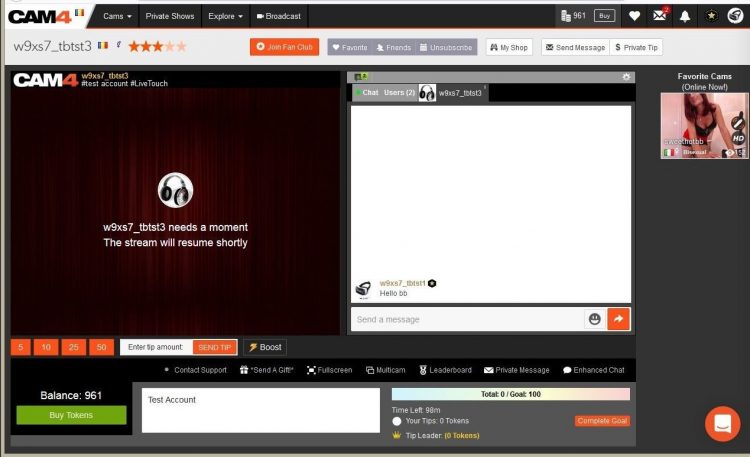
What your VIEWERS will see:

The stream is resumable at any time by clicking on the “Resume Stream” button. 

If you do not resume the stream during the first 5 minutes, the stream ends automatically. 

Private Show requests are not available while your show is paused. 

~That’s all for this lesson!

Happy Camming!
Love, Your Coaching Team!

BOOST: The Ultimate Way to Grow your Audience


Struggling to build an audience? Just logged on and want to kickstart your show?

Now you can BOOST your room higher in the directory for just 25 tokens!

CAM4 has put YOU in the drives seat, giving YOU the ability to increasing your rank on the page so you  will get more viewers in your show!

How it Works:  

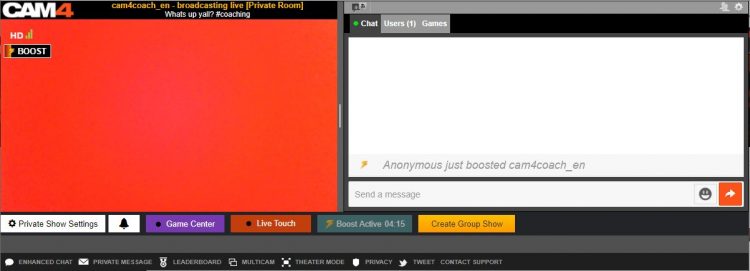
BOOST will display on your screen once you start a LIVE broadcast and is visible to you and your viewers.

This feature (once purchased) will  position you within the top percent of cams currently on the site for the duration of the BOOST.

Click on the “BOOST” button to start the feature.

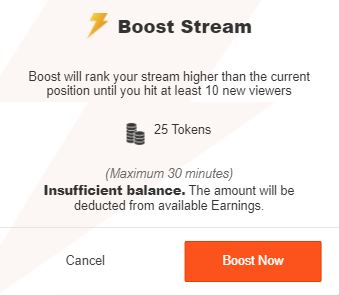
It costs 25 tokens to BOOST your cam for 5 minutes, or until you have gained 10 new viewers in your room (to a max of 30 mins).

When you click on “Proceed” the cost of the BOOST will be deducted from your CAM4 account and your cam will be re-positioned on the directory page. 

What Happens when BOOST starts?

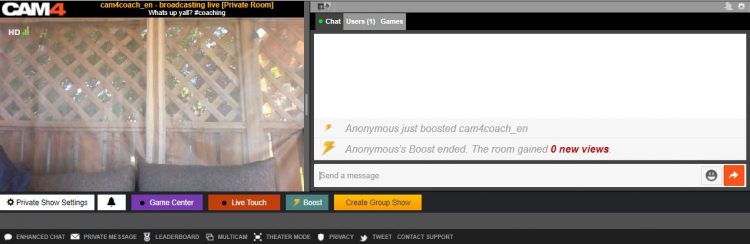
  1. You will see a message in your chat letting you know who purchased the boost.
  2. There is a bar on your broadcast window that will slowly fill up as the time runs out. 
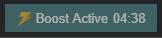
  3. The BOOST button is now inactive, this mean you cannot click on it. The text has also changed to read” Boost Active” and includes a count down. 

PRO TIP
When your boost is active, more people will be seeing your thumbnail. This is your moment to try to attract more viewers to your show! Switch it up with an alluring pose, a sexy strip tease, wet t-shirt show, or closeups. Anything you can do to attract the attention of the new audience you now have access to.

What Happens When the BOOST ends?

  1. The button will say “Boost” again become active enabling you to click on it again.
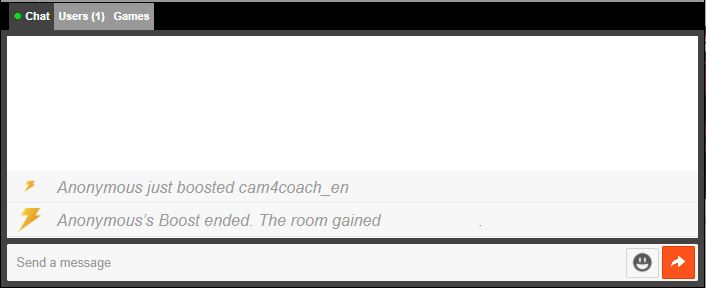
  2. You will see a message in the chat window that will tell you that the BOOST has ended and display how many viewers you gained during that BOOST.
  3. Your directory position will change, but not necessarily back to your original position – because your new position will reflect increases in your viewers due to the boost.

Viewers can BOOST you too!!

Viewers are always looking for ways to  support their favorite broadcasters. Why not encourage them to use the Boost feature on you?  With their help, boosting can really make a difference in your performance and exposure on CAM4. 

~That’s all for this lesson!

Happy Camming!
Love, Your Coaching Team!

How To Buy A Gold Membership With Tokens

One of the benefits of being a verified performer on CAM4 is the ability to purchase your gold membership with tokens at a discounted price! Take a look at how you can convert your tokens into over 20 awesome Gold features.

Using Tokens For Your Gold Membership

First, tokens must come from your dashboard to be used for a Gold Membership.

Go into your Performer Dashboard  and request a CAM4 TOKENS payment for $12.50. 

You will see these tokens in your account on the CAM4 homepage.

new-account-gold-membership


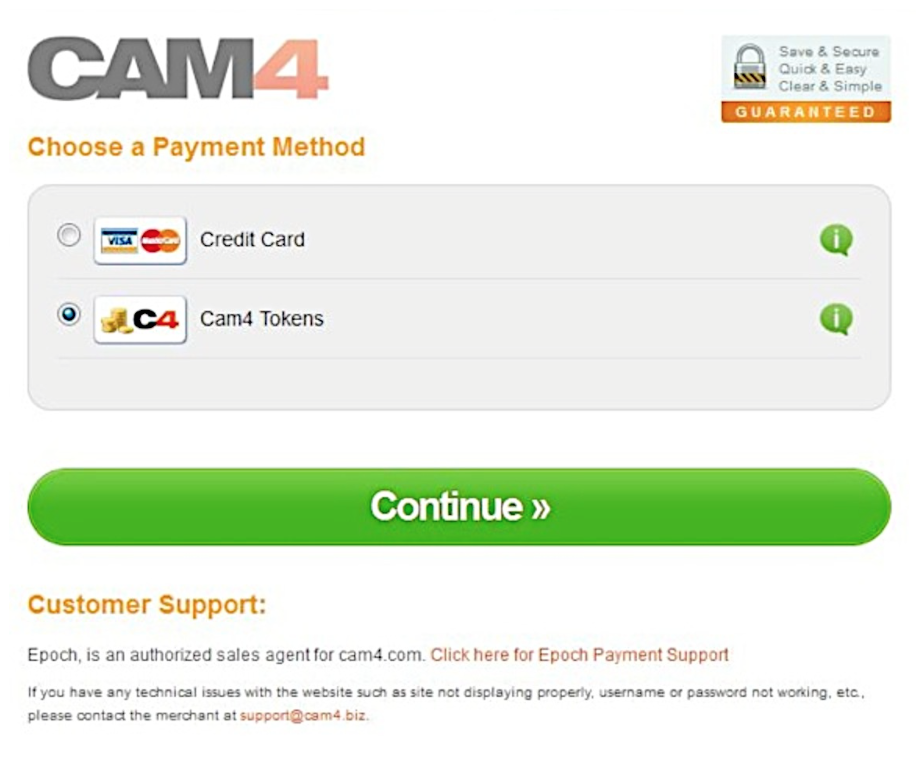
Once you press the “Upgrade to Gold” button you will be  taken to a  checkout window where CAM4 Tokens is a payment option.


Screen Shot 2015-06-25 at 2.48.50 PM

After clicking continue, you will receive a receipt and see your status go to Gold in a few minutes.  (You may have to refresh your page)


~That’s all for this lesson!

Happy Camming!
Love, Your Coaching Team!

Your Broadcaster Dashboard

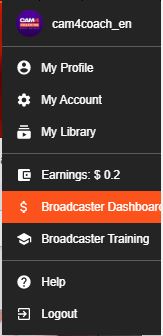
From your Broadcaster Dashboard you can cash out, view your payment & earnings history, upload ID or add additional performers to your account.

 
*You can also access your dashboard in ‘My Account’. It’s listed under ‘Performer tools’ on the lower left side of your screen.

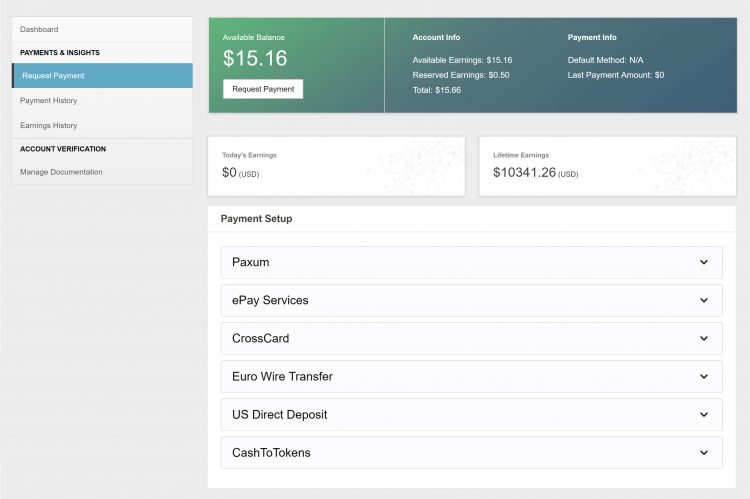
Request Payment

Here you can select and setup your method of payment and cash out your earnings right from the same page!

Look here for more info on your Payment Options

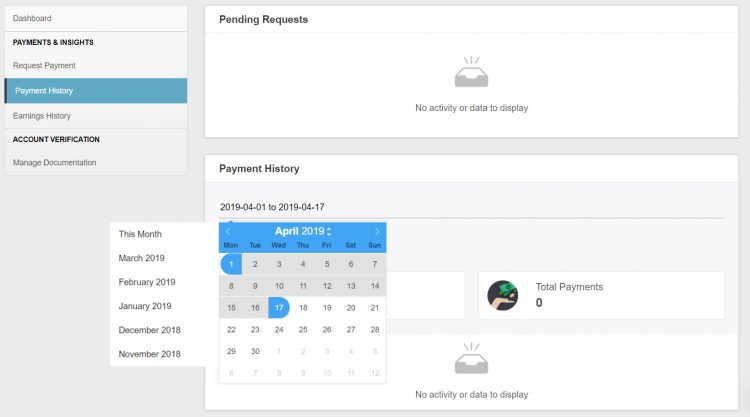
Payment History

♥Up to date status of your most recent payment request
♥Custom payment history look-ups & stats. 
♥Have access to all your performer payout information in a simple easy to read data.
♥Super helpful when tax season cums bb 😉

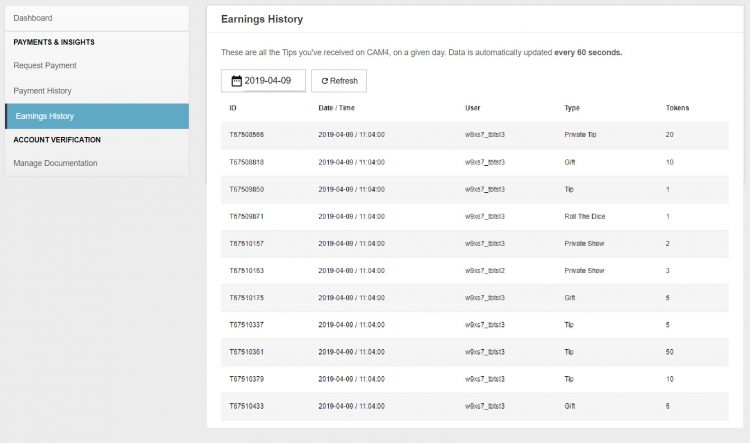
Earnings History

♥Detailed view of where every single token you earned came from. 
♥Up to the minute view of your earnings. 
♥Custom earnings history look-ups & stats. 

Manage Documentation

For new  broadcasters this is where you will upload your ID and go through the approval process!

More info on adding additional broadcaster to your account.


~That’s all for this lesson!

Happy Camming!
Love, Your Coaching Team!


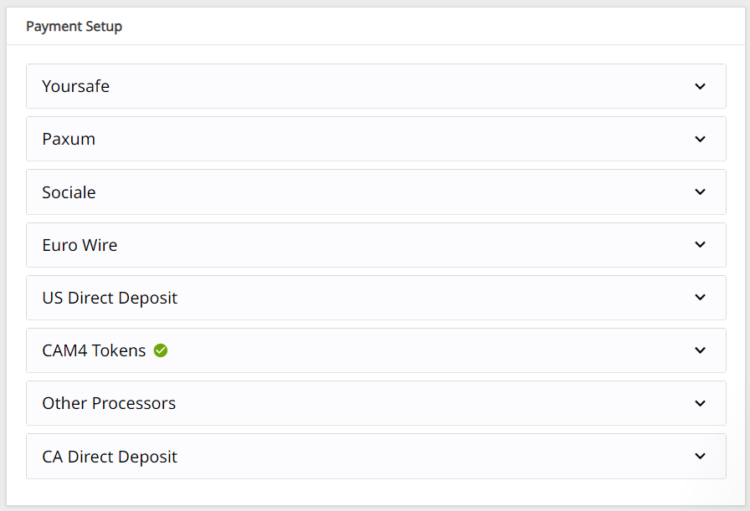
Payment Options

We offer TEN payment options but not all options are available to every broadcaster due to your location.

Click here to find out which one works in your country!

Yoursafe 

  • Minimum payment: $50 USD
  • Processed: Daily (Mon – Fri)
  • Information required: Yoursafe Full Beneficiary Name

Link To FAQ for more details.

Paxum

  • Minimum payment: $50 USD
  • Delivery: Daily (Mon – Fri)
  • Information required: Paxum Account ID
  • Pre-paid Paxum Mastercard – CURRENTLY NOT AVAILABLE

Link To FAQ for more details.

Register for an Paxum account: https://www.paxum.com/

Sociale

  • Minimum payment: $50 USD
  • Delivery: Daily (Mon – Fri)
  • Information required: Setup on Sociale App
What payment methods does Sociale offer?
  • Local Bank Transfer (South America, Africa, Asia)
  • Crypto (USDT Tether)
 Need Help?
Click here to contact Sociale’s Customer Service team
Euro Wires (EUR Only – Including UK) –> click here for Australia
  • Minimum payment: $100 USD
  • Processed: Daily (Mon – Fri)
  • Delivery: 5-7 business days
  • Bank account has to be in the same name as the main account holder of the verified CAM4 account.

Link To FAQ for more details.

NOTE:  When filling out your banking/account information, please do not use special characters (comma, periods, dashes, etc.). Make sure to use your FULL NAME  (including all first names – no initials are allowed). Your name MUST match the name listed on your bank account.

Direct Deposits (US Only)

  • Minimum payment: $100 USD
  • Payments must be requested by TUESDAY 11:59pm EST to be included for payment on FRIDAY.
  • Once payment request is sent to the bank on Friday, please expect an additional 3 – 5 business days for the funds to settle in your account.
  • Payment will show on your bank statement as: TLE OPPORTUNITIES DIR DEP

CAN Direct Deposits (CAN Only)

  • Minimum payment: $100 USD
  • Processed: Daily (Mon – Fri)
  • Funds will be sent to your bank account in CAD
  • Expect an additional 3 – 5 business days for the funds to settle in your account.
  • Payment will show up on your bank statement as GRANITY MEDIA INC.

Link To FAQ for more details. 

Convert to Tokens: (100 tokens = $10 USD)

  • Cost: FREE
  • Minimum payment: None
  • Payment: Immediate

NOTE: Registration and approval are still required for this method of payment, as tokens have a cash value.

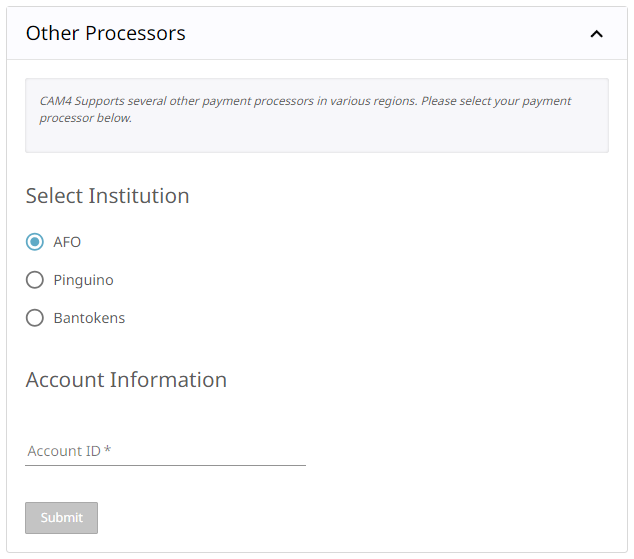
Daily Pay (UK Only)

 We offer a few other methods of payment that maybe local to your region as well. Simply add your Account ID to get setup!

Click here to find out which one works in your country!

If you have any issues setting up one of these payment options please email payments@cam4.com. Our friendly CS team are happy to help walk you through setup or work through any issues that may come up.


~That’s all for this lesson!

Happy Camming!
Love, Your Coaching Team!